
Our readers keep the lights on and my morning glass full of iced black tea. As an Amazon Associate, I earn from qualifying purchases.
Specs are compiled from manufacturer listings and verified buyer reviews and can change over time — please confirm the key details on the product page before buying.
Your first dive computer should feel like a trusted dive buddy, not a complicated piece of gear you have to fight with underwater. A poor choice can mean confusing screens, a dead battery mid-trip, or unreliable decompression data. This guide cuts through marketing hype to help you pick a computer that fits your diving style without overpaying for unused features.
I’m Min — the founder and writer behind Gadgets Feed. This guide is built by comparing the manufacturers’ published specifications and the patterns across verified customer reviews, so you get each pick’s real strengths and trade-offs instead of marketing spin.
Whether you are fresh out of Open Water certification or a vacation diver looking to retire your rental console, this roundup of the best beginner dive computer options highlights the models that deliver accurate data, simple controls, and reliable performance without the advanced technical features you simply do not need yet.
Quick Picks
- Mares Puck Pro Ultra Dive Computer — Best Overall
- Cressi Donatello Wrist Dive Computer — Best Display
- MARES Quad Air Smart — Pro-Grade Entry
- Cressi Leonardo 2.0 Scuba Dive Computer — Value Pick
- CRESSI Giotto Scuba Diving Wrist Computer — Compact Progression
- Aqua Lung i200C Dive Computer — Smart App Setup
- Suunto Zoop Novo Wrist Scuba Diving Computer — Budget Trailblazer
- Seac Screen Scuba Wrist Dive Computer — Entry-Level
How To Choose The Best Beginner Dive Computer
Choosing your first dive computer is more critical than buying a mask or fins because it actively manages your safety underwater. Key specs separate a great learning tool from a frustrating one.
Algorithm and Decompression Model
The algorithm (the math the computer uses to calculate how much nitrogen your body absorbs) determines how conservative your dive times are. Most beginner computers run a version of the Bühlmann ZHL-16C algorithm (an industry-standard model that tracks 16 theoretical tissue compartments). Picks that use this algorithm with gradient factors give you safer, more personalized no-decompression limits than older simpler models.
Interface Complexity Underwater
Gloves, cold hands, and limited visibility make buttons hard to operate. A single-button interface (one button does everything with short and long presses) is actually a feature for beginners, not a limitation—there is only one thing to find and push. A two-button setup is also manageable. Avoid computers with tiny recessed buttons or complex menu trees if you are just starting out.
Battery Type and Replacement
A user-replaceable battery (a standard coin cell like CR2430 or CR2450 that you swap yourself) saves you a trip to a dive shop and keeps your computer running on every trip. Some computers require sending the unit to an authorized dealer for battery changes, which also resets the water-tight seal—a hidden cost and hassle that beginners should avoid.
Quick Comparison
| Model | Best For | Algorithm | Max Depth | Battery Type | Amazon |
|---|---|---|---|---|---|
| Mares Puck Pro Ultra | Overall simplicity with Bluetooth logging | Bühlmann ZH-L16C | — | CR2450 user-replaceable | $224.95Amazon |
| Cressi Leonardo 2.0 | Clean single-button interface | Cressi RGBM | — | CR2430 user-replaceable | $224.95Amazon |
| Suunto Zoop Novo | Conservative safety-first profiles | Suunto RGBM | 330 ft (100 m) | User-replaceable | from $279.00Amazon |
| Cressi Donatello | Compact wrist fit with HD display | Cressi RGBM | — | CR2430 user-replaceable | $299.95Amazon |
| CRESSI Giotto | Two-button control with log book | Cressi RGBM | — | 2-year life; user-replaceable | $299.95Amazon |
| Aqua Lung i200C | Bluetooth phone control for settings | — | — | Standard user-replaceable | $370.00Amazon |
| Seac Screen | Budget entry with three modes | Bühlmann ZHL-16C | — | — | $179.95$268.50Amazon |
| MARES Quad Air Smart | Future-ready hoseless tank integration | — | — | User-replaceable | $641.94Amazon |
In-Depth Reviews
1. Mares Puck Pro Ultra Dive Computer
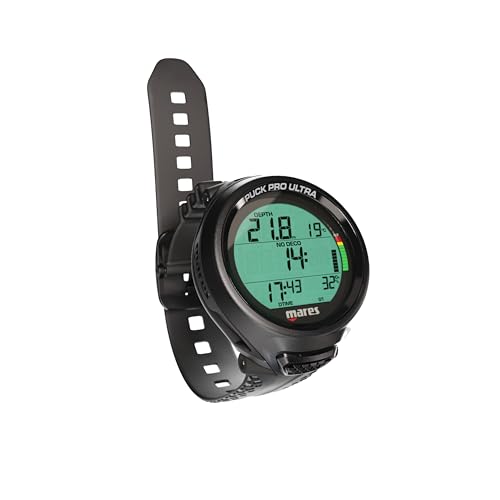
The one-button wrist computer that quietly does everything a new diver needs, plus Bluetooth for logbook nerds.
This pick gives you the widely trusted Bühlmann ZH-L16C algorithm with dual gradient factors (an advanced decompression model that adjusts your safety margins based on recent dive profiles) paired with a crisp screen that stays readable even in low-visibility saltwater. Buyers report that they “dove with this for a week in saltwater and it performed very well,” which backs up the claim that this computer handles real vacation diving without hiccups. The Puck Pro Ultra measures 6.7 x 5.5 x 5.4 inches, and the Suunto Zoop Novo measures 6 x 6 x 6 inches., making it more comfortable on smaller wrists.
The single-button interface means there is exactly one control to master: short presses cycle through screens, long presses change settings. It supports single gas Nitrox between 21% and 50%, so you can take the Enriched Air course later without buying a new computer. The user-replaceable CR2450 battery lasts up to 100 dives, and the integrated Bluetooth lets you wirelessly transfer dive logs to the Mares app for tracking your progress. For a first computer that grows with you without overwhelming you, this is the one.
One honest limitation: the one-button interface requires reading the manual before your first dive—it is not intuitive the way a smartphone is. And while the app is useful for logbook storage, it is not essential for the dive itself.
What makes it beginner-friendly
- Bluetooth connectivity for easy dive log transfer
- User-replaceable battery lasts up to 100 dives before swapping
- Famous Bühlmann ZHL-16C algorithm with gradient factors for safety
- Clear high-contrast display for murky conditions
The learning curve
- Single-button setup demands manual reading beforehand
- No integrated tank transmitter or air integration
- Plastic construction feels light but less premium than metal
Reach for this if: you want a modern, no-fuss dive computer with Bluetooth logging and a proven algorithm that will not force you to upgrade after your first 20 dives.
Look elsewhere if: you prefer a two-button interface or need air integration—this is strictly a bottom-time and depth computer.
2. Cressi Donatello Wrist Dive Computer

A compact wrist-friendly build with an HD screen that older divers and low-light divers will appreciate immediately.
The Donatello stands out for its high-definition backlit display—a meaningful upgrade over the Cressi Leonardo 2.0’s weaker backlight. This matters when you are doing a night dive or squinting at your wrist in low-visibility water. One buyer used it for 11 dives in Mexico and reported it was “very easy to use with clear display,” noting that while it lacks advanced features it works perfectly for a diver doing about 20 dives per year.
It runs on a user-replaceable CR2430 button battery with a battery life indicator, and you can transfer dive data to your phone via an optional IR interface (sold separately). The single-button interface keeps things simple—short and long presses navigate menus—and it supports Air, Nitrox, and Free Diving modes with user-selectable deep stops. At 5 x 4 x 3.1 inches, The Donatello measures 5 x 4 x 3.1 inches, while the Mares Puck Pro Ultra measures 6.7 x 5.5 x 5.4 inches., so it wears smaller on the wrist for divers with slimmer arms.
The trade-off you should know: the optional IR interface for data transfer is an extra purchase, and it lacks Bluetooth, so you will need the cable or dongle to digitize your logs. The screen is the star here; the connectivity is a step behind.
Pick this for: a display that you can actually read in any light, coupled with a compact wrist profile that fits smaller frames.
skip it if: Bluetooth syncing is important to you—this computer uses IR and requires a separate accessory for data transfer.
3. MARES Quad Air Smart

A hoseless air-integrated computer that tracks your tank pressure without the hose clutter—but budget for the transmitters.
The Quad Air Smart is the only pick here that offers hoseless tank data integration with up to three separate transmitters (sold separately), meaning you can see your remaining gas on your wrist and even monitor a buddy’s tank pressure. The large data viewer splits the screen into three segments, and the four-button interface (mirrored buttons on both sides so it works on either arm) is easier to navigate with gloves than a single-button computer. Owners mention that it supports up to 3 tank transmitters and can monitor your buddy’s tank, a feature unique among beginner-oriented computers.
The “Runaway Deco Alarm” warns you if you are descending toward mandatory decompression stops, and the Predictive Multigas feature lets you switch gases during a dive to accelerate deco. It also offers up to 150 dives on a single user-replaceable battery. The catch is that the transmitter is not included—multiple buyers returned the unit thinking it was a complete package, so factor that into your budget. The manual is also only available online (a multilingual warning booklet is included in the box). This is a future-proof pick for a new diver who plans to stick with the sport and wants one computer to grow into.
Advanced for a beginner
- Hoseless monitoring of up to 3 tank transmitters
- Four-button mirrored interface works well with gloves on either arm
- User-replaceable battery lasts up to 150 dives
- Can monitor buddy’s tank pressure simultaneously
The hidden costs
- Transmitters sold separately—no printed manual in the box
- Overkill if you only dive a few times per year on vacation
- Premium price compared to simpler entry-level models
Best for: the new diver who is already planning their next cert and wants air integration without a console hose.
Not for: the occasional vacation diver—the extra cost of transmitters outweighs the benefits at 10 dives per year.
4. Cressi Leonardo 2.0 Scuba Dive Computer

The legendary entry-level dive computer—one button, three modes, and a clear screen that just works.
The Leonardo 2.0 has been a staple in dive training for years because its single-button interface (short press cycles, long press confirms) is the simplest way to interact with a computer underwater. Buyers confirm it “performed well at 40m depth,” and one reviewer with astigmatism noted the display is readable and the ascent alarm beeps are clear. It supports Air, Nitrox (with FO2 adjustable from 21% to 50%), and Gauge modes, with three user-adjustable conservatism levels so you can dial in how cautious you want your no-deco limits to be.
The CR2430 battery is user-replaceable, and the computer communicates via infrared and USB for logbook downloads. The main downsides are a weak backlight (hard to read in pitch-black water) and a safety stop display that only shows minutes, not seconds. Some divers also mention that the watchband is long and tends to loosen during dives, and the plastic case is large enough to spin around on smaller wrists. Despite these quirks, the Leonardo remains the go-to budget-friendly choice for dive shops and new divers alike.
What stands out: the sheer simplicity—no menus to memorize, no Bluetooth pairing, no app. It just tracks your dive. Buyers consistently call it “reliable” and “easy to use.” The weak backlight is the one thing you should know before buying; it is not great for night diving.
Get this if: you want the least expensive, most proven entry-level computer that dive instructors trust for certification courses.
Pass if: you need Bluetooth for wireless logging or plan to do night dives where a bright backlight matters.
5. CRESSI Giotto Scuba Diving Wrist Computer

A two-button step up that keeps the interface simple while adding a 70-hour logbook and Bluetooth data transfer.
The Giotto offers a natural progression from single-button computers by giving you two physical buttons, which makes navigating menus slightly faster without becoming confusing. It supports Air and Nitrox with FO2 adjustable from 21% to 99% and PO2 from 1.2 to 1.6 bar, giving you more oxygen flexibility than the Leonardo. The logbook stores up to 70 hours of dive data or 60 dives complete with profiles, and you can download everything to your phone via Bluetooth or IR (interface sold separately). Buyers describe it as “easy to use entry-level” and note the beep is loud enough to hear underwater.
The backlit display is clear, and the deep stop function can be turned on or off depending on your dive style. The battery lasts up to 2 years and is user-replaceable. One quirk mentioned by reviewers: the raised cover around the screen traps water droplets that are hard to clear, though this does not affect the computer’s function. It also runs slightly large on smaller wrists, so you may need to trim the rubber strap.
Why it works for learners
- Two-button interface is easy to use with gloves
- 70-hour logbook with full dive profiles for tracking progress
- Supports up to 99% FO2 for advanced Nitrox courses later
- Bluetooth and IR connectivity for data transfer
A couple of nuisances
- Raised faceplate traps water droplets that are hard to clear
- Large for smaller wrists; strap may need trimming
- Bluetooth accessory (interface) sold separately
Choose this for: a slightly more advanced interface than the Leonardo plus Bluetooth logging—great if you want to future-proof your Nitrox range.
Skip if: you have a slim wrist or want the smallest possible footprint; the Giotto has a chunky profile.
6. Aqua Lung i200C Dive Computer

A Bluetooth-equipped computer that lets you set up everything on your phone instead of squinting at tiny wrist menus.
The i200C is unique in this lineup because you can remotely control all your settings—even set your Nitrox mix—through the free DiverLog+ app on your smartphone, which talks to the computer via Bluetooth Smart technology. This completely eliminates button-fumbling topside. It offers four operating modes: Air, Nitrox, Gauge with a run timer, and Free Dive mode that tracks calculations so you can switch between scuba and freediving during the same day without confusing the algorithm. Customers note that the “setup is not obvious” from the wrist alone, but the app makes it simple.
The battery is a standard user-replaceable type available at any supermarket or drugstore—a nice touch when you are traveling and need a quick swap. It also maintains all settings and calculations between battery changes. However, there are reliability concerns: one reviewer noted false “100 O2” warnings after no-deco dives and display blanking after 12 dives, though others had a flawless experience over multiple trips. It is a great pick if you are comfortable relying on an app for setup, but the mixed reliability reviews give us pause.
Its best feature: the app-based setup is genuinely easier than button-pressing, especially for divers who are not mechanically inclined. The battery is available anywhere. The real concern: a minority of reviewers point out glitches and early failure, so buy from a seller with a good return policy.
Ideal for: divers who want a smartphone-like setup experience and appreciate the convenience of Bluetooth control.
Not ideal if: you want a computer that works perfectly every time with zero app dependence—the reliability reports are too mixed for that.
7. Suunto Zoop Novo Wrist Scuba Diving Computer

A famously conservative dive computer that prioritizes safety margins, ideal for cautious new divers.
The Suunto Zoop Novo is known for its Suunto RGBM algorithm (a reduced gradient bubble model that is deliberately conservative with your no-deco limits), which means it pulls you out of the water earlier than most other computers. For a beginner who is still learning their gas consumption and buoyancy, this extra margin is a feature, not a bug. It operates in Air, Nitrox, Gauge, and Freedom modes, supports 21% to 50% oxygen mixtures, and has a maximum depth display of 330 feet (100 meters). Shoppers say it “does everything needed: auto-activates at 2′, alerts for ascent speed and no-deco limits, adds stops.”
The display is easy to read underwater and the buttons are usable even with thick gloves. It runs on a user-replaceable battery. One downside: the Zoop Novo requires a D-series cable (sold separately) for PC data transfer, which is different from the cable used by older Suunto models—so if you buy the wrong cable, it will not work. The Zoop Novo weighs 120 grams, while the Mares Puck Pro Ultra weighs 1.16 pounds (about 525 grams). but the wrist feel is well-balanced. It is a solid, no-surprises choice for the diver who values safety above all else.
Safety-first design
- Conservative algorithm gives beginners a wider safety margin
- Auto-activates at 2 feet of depth—no tapping required
- Clear audible alarms for ascent speed and no-deco limits
- User-replaceable battery
The inconvenience
- PC cable is a specific D-series model (easy to buy the wrong one)
- More conservative than most computers—shorter dive times
- Heavier at 120 grams than some all-plastic competitors
Best for: cautious divers and those who prioritize safety limits over maximum bottom time—this computer will keep you on the shallow side.
Not for: divers who want aggressive profiles or Bluetooth connectivity for logging; this is purely a wrist computer.
8. Seac Screen Scuba Wrist Dive Computer – Black/White

A budget-priced Bühlmann computer with three modes—if you can get past the battery issue on arrival.
The Seac Screen is the most wallet-friendly entry here, running the respectable Bühlmann ZHL-16C algorithm with support for 1 or 2 gas mixes (Air and Nitrox with O2 up to 99%). It offers Scuba, Gauge, and Free Diving modes, plus a logbook that records up to 18 hours of activity with samples every 2 seconds. At 5 x 4 x 3.1 inches, it measures 5 x 4 x 3.1 inches, while the Mares Puck Pro Ultra measures 6.7 x 5.5 x 5.4 inches., making it one of the smallest and lightest computers on this list.
The problem, and it is a real one: multiple buyers report the battery arriving dead. As one reviewer put it, “As stated in other reviews, the battery was dead when I received the computer. The warranty will be voided if it is not taken to an authorized dealer.” Another noted the same issue—”the main issue is when it arrived, the battery was dead.” Taking it to a dive shop for a warranty-safe battery swap adds time and a small fee before your first dive. If you are willing to deal with that pre-flight hassle, the computer itself is easy to use and works well. The free Dive Manager software (for Windows 10) lets you log dives, but the USB cable is sold separately.
The honest assessment: this is a solid computer in theory with a frustrating reality—the dead-battery-on-arrival issue is so consistent across reviews that you should assume it will happen and plan accordingly. The actual diving experience is good once you clear that hurdle.
Only buy this if: you are comfortable taking a new computer to a dive shop for a warranty-approved battery swap before your first dive. The savings are real, but so is the inconvenience.
Avoid if: you want a turnkey experience from the start—there is a high likelihood of staring at a dead screen on arrival.
Understanding the Specs
Decompression Algorithm (Bühlmann vs RGBM)
The algorithm is the mathematical engine inside your dive computer that calculates how much nitrogen your tissues absorb and how fast you can safely ascend. Bühlmann ZHL-16C (pronounced “bool-mahn”) is the industry standard used by brands like Mares and Seac—it tracks 16 theoretical tissue compartments and is widely trusted for its predictable profiles. RGBM (Reduced Gradient Bubble Model) is used by Suunto and Cressi—it is generally more conservative, meaning it gives you shorter no-deco limits because it accounts for microbubble formation in your blood. Neither is “better,” but beginners on rental gear often prefer the extra safety margin of RGBM.
Nitrox Capability and FO2 Range
Nitrox is enriched air that contains more oxygen than standard compressed air (usually 32% or 36% compared to 21%). A computer that supports Nitrox can have its FO2 (fraction of oxygen) adjusted—typically from 21% up to 50% or even 99% on advanced models. For a beginner, a computer that handles at least 50% FO2 is enough for the PADI Enriched Air Diver course. The computer also needs a PO2 (partial pressure of oxygen) setting, usually between 1.2 bar and 1.6 bar, which tells the computer when to warn you that the oxygen concentration in your body is getting too high.
FAQ
Can I use a beginner dive computer for Nitrox diving?
How long does the battery last on a beginner dive computer?
Is a single-button dive computer harder to use than a two-button one?
Do I need Bluetooth on my first dive computer?
Can I replace the battery myself or do I need a dive shop?
What is the maximum depth I can take a beginner dive computer to?
Does a more conservative algorithm mean shorter dive times?
Can I use a freediving computer for scuba diving?
Will a dive computer work with my existing dive console or pressure gauge?
What happens if my dive computer fails underwater?
Final Thoughts: The Verdict
For most new divers, the beginner dive computer winner is the Mares Puck Pro Ultra because it combines the trusted Bühlmann algorithm with Bluetooth logging and a user-replaceable battery for under the premium mark. If you want the proven single-button simplicity that dive schools trust, grab the Cressi Leonardo 2.0. And for the diver who plans to go all-in with air integration and multiple tanks, the MARES Quad Air Smart is the best future-proof foundation.
How We Picked
We do not accept paid placement. Every pick is matched to a real buyer and a real use-case; we do not hands-on test units.
Sources & Methodology
Specifications: manufacturer listings and product documentation. Review insights: verified customer reviews, as of July 2026. Pricing: not shown on this page (it changes often); check the current price via the retailer link.
As an Amazon Associate, Gadgets Feed earns from qualifying purchases. This does not affect which products we feature.
Related Guides
Product prices and availability are accurate as of the date/time indicated and are subject to change. Any price and availability information displayed on Amazon at the time of purchase will apply to the purchase of this product. As an Amazon Associate I earn from qualifying purchases.
CERTAIN CONTENT THAT APPEARS ON THIS SITE COMES FROM AMAZON. THIS CONTENT IS PROVIDED "AS IS" AND IS SUBJECT TO CHANGE OR REMOVAL AT ANY TIME.
Amazon and the Amazon logo are trademarks of Amazon.com, Inc. or its affiliates.