
Jumping into PC gaming for the first time is exciting until you realize the wrong rig turns that excitement into frustration with stuttering frames, long load times, and hardware that can’t run the games you actually want to play. The market is flooded with prebuilts that look flashy but hide old server CPUs, weak power supplies, and obsolete graphics cards—traps that leave beginners stuck with a machine that underperforms on day one or fails entirely after a few months. Cutting through the noise to find a system that delivers reliable 1080p performance, respects a tight budget, and leaves room to grow requires knowing exactly which specs actually matter for a first-time buyer.
I’m Min — the co-founder and writer behind Gadgets Feed. I’ve spent countless hours analyzing component benchmarks, reading through thousands of verified buyer reports, and cross-referencing CPU/GPU pairings to separate the genuinely beginner-friendly gaming PCs from the overpriced e-waste dressed up with RGB lighting.
This guide breaks down the best prebuilt and mini PC options available on Amazon right now, covering performance tiers from entry-level integrated graphics to dedicated GPUs capable of smooth 60+ FPS in modern titles. If you’re searching for the best beginner pc for gaming, these recommendations will help you avoid common pitfalls and get straight to playing.
How To Choose The Best Beginner PC For Gaming
Finding the right first gaming PC is about balancing immediate performance with future flexibility. Beginners should prioritize a dedicated graphics card over a high-core-count CPU, ensure the power supply has headroom for upgrades, and verify the platform supports standard components rather than proprietary ones. Avoid machines built around ancient Xeon server chips or cheap power supplies that can’t handle a GPU swap down the road.
Dedicated GPU vs Integrated Graphics
The single biggest performance factor for gaming is the graphics card. A dedicated GPU like the AMD Radeon RX 580 or RX 560 can handle modern esports titles at 1080p with smooth frame rates, while integrated graphics (even AMD’s capable Vega 8 or Radeon 760M) will struggle with anything beyond low-settings or older games. For a true beginner gaming experience, a dedicated GPU is non-negotiable unless your library is limited to 2D indies and classic titles.
CPU Generation and Platform Age
Many budget prebuilts feature decade-old processors like the Intel Core i7-4790 (Haswell, 2014) or Xeon E3-12xx v6 (Kaby Lake, 2017), advertised with inflated clock speeds. These chips lack modern instruction sets, have poor single-threaded gaming performance, and often run on platforms with no upgrade path. A modern entry-level CPU like an AMD Ryzen 5 3500X or Ryzen 7 5700G offers better gaming performance per dollar and a clear path to upgrade to a newer Ryzen processor later.
Power Supply and Upgrade Room
Beginners often overlook the power supply, but a weak PSU limits any future GPU upgrade. Look for at least a 500W 80 Plus Bronze unit with dedicated PCIe power connectors. Proprietary power supplies in cheap prebuilts can force you to replace the entire machine when you want a better graphics card. A standard ATX PSU and motherboard make swapping in a new GPU, adding RAM, or installing a second SSD trivially easy.
Quick Comparison
On smaller screens, swipe sideways to see the full table.
| Model | Category | Best For | Key Spec | Amazon |
|---|---|---|---|---|
| GMKtec M6 Ultra | Mini PC | Best Overall | Ryzen 5 7640HS / Radeon 760M iGPU | Amazon |
| NOVATECH Phantom 2.0 | Prebuilt Tower | Best Value Dedicated GPU | AMD RX 580 8GB / Xeon E3-1230v6 | Amazon |
| ViprTech Stryker 1.0 | Prebuilt Tower | Best Build Quality | AMD RX 580 8GB / Ryzen 7 2700 | Amazon |
| Blackout Computers RX 580 | Prebuilt Tower | Premium Pick | AMD RX 580 8GB / i7-4790 | Amazon |
| YAWYORE R5 5600GT | Prebuilt Tower | Best Upgrade Platform | AMD Vega 7 iGPU / Ryzen 5 5600GT | Amazon |
| ALCPOK Ryzen 7 5700G | Prebuilt Tower | Best Integrated Graphics | AMD Radeon Vega 8 (Ryzen 7) | Amazon |
| KAMRUI Hyper H1 | Mini PC | Most Portable | Ryzen 7 7735HS / Radeon 680M iGPU | Amazon |
| STGAubron RX 550 | Prebuilt Tower | Best Entry-Level Bundle | AMD RX 550 4GB / Core i5 | Amazon |
| abytespark RX 550 | Prebuilt Tower | Best Budget RGB | AMD RX 550 4GB / Core i5 | Amazon |
| WIWB Ryzen 5 RX 560 | Prebuilt Tower | Best for Esports | AMD RX 560 4GB / Ryzen 5 3500X | Amazon |
| suevery Ryzen 5 RX 560 | Prebuilt Tower | Budget Champion | AMD RX 560 4GB / Ryzen 5 | Amazon |
In‑Depth Reviews
1. GMKtec M6 Ultra Gaming Mini PC
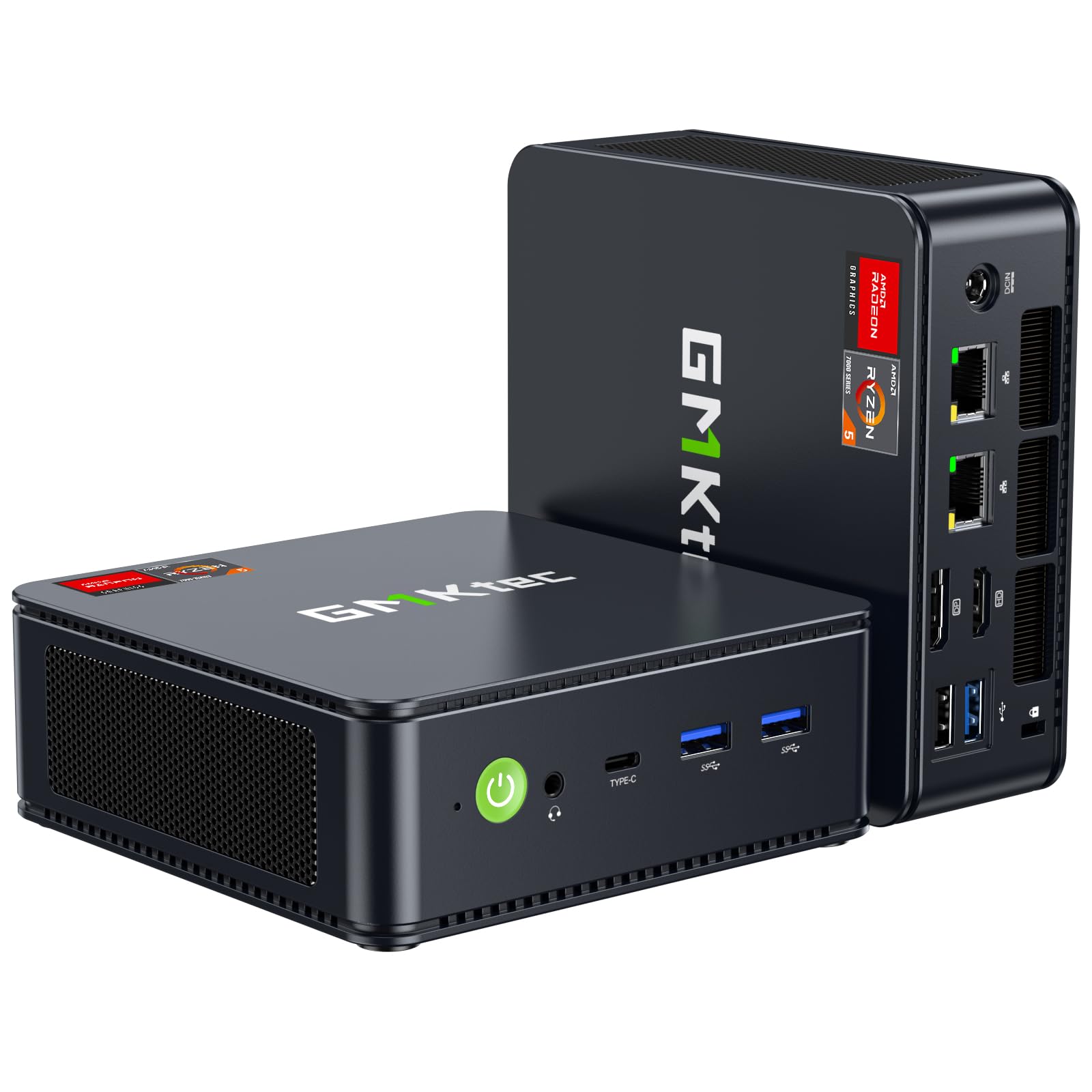
The GMKtec M6 Ultra redefines what a beginner gaming PC can be by packing a serious mid-range APU into a chassis smaller than a paperback. Its AMD Ryzen 5 7640HS with the Radeon 760M iGPU (8 compute units running at up to 2,600 MHz) delivers playable frame rates in titles like Fortnite and CS2 at 1080p low-medium, while 32GB of dual-channel DDR5 memory eliminates the single-stick bottleneck that cripples many budget prebuilts. The integrated graphics also support AV1 hardware encoding, making this a surprisingly capable machine for streaming and recording your gameplay.
The connectivity is where the M6 Ultra truly punches above its weight. Dual 2.5Gbps NICs, WiFi 6, Bluetooth 5.2, a USB4 port capable of 8K@60Hz output, and both HDMI 2.0 and DisplayPort allow you to run three 4K displays simultaneously. The OCuLink port (an eGPU connector hidden behind the rear panel) offers a future-proof upgrade path: when the integrated 760M isn’t enough, you can attach an external graphics dock without losing performance to Thunderbolt overhead — a rare feature at this price tier.
The trade-offs are minor but worth noting. The dual-fan cooling system is quiet under light loads but becomes audible during sustained gaming sessions, and the unit runs warm at the top trim. Some users report app crashes in performance mode with heavy 3D workloads, though the unit remains stable for standard gaming scenarios. For a beginner who wants a tiny, silent desktop that plays modern games today and can be upgraded later with an eGPU, this is the most forward-thinking option available.
Why it’s great
- Incredibly compact form factor with desktop-class specs
- 32GB DDR5 dual-channel memory out of the box
- OCuLink port allows external GPU upgrades
- Triple 4K display output and WiFi 6
Good to know
- Integrated graphics limit AAA gaming to low-medium settings
- Fans become audible under sustained gaming load
- Some instability reported in high-performance mode
2. NOVATECH Phantom 2.0

The NOVATECH Phantom 2.0 delivers the most critical component for any beginner gaming PC — a genuine 8GB dedicated graphics card — without stretching the budget. The AMD Radeon RX 580 remains a legendary entry-level GPU that can push over 60 FPS in Call of Duty Warzone, Fortnite, and Apex Legends at 1080p medium settings, and its 8GB of VRAM gives it staying power that 4GB cards simply lack. Paired with a Xeon E3-1230v6 processor (basically a Core i7-7700 without integrated graphics), this system handles multitasking and streaming with no stutter.
The build quality stands out in this price bracket. The case features clean cable management, a tempered glass side panel, and vibrant RGB fans that create an attractive display without being overbearing. Storage is handled by a 512GB M.2 NVMe SSD, which boots Windows 11 Pro in seconds and loads game maps noticeably faster than SATA-based competition. Buyers also report responsive customer support, with several reviews noting the company shipped replacements overnight when units arrived with defects.
The obvious concern is the Xeon processor’s age and upgrade path. The E3-1230v6 uses the LGA 1151 socket but is limited to its own chipset generation, meaning you can’t drop in a modern Core i5 or Ryzen later without replacing the motherboard and RAM. The 500GB SSD fills up fast with modern game installs, and the rear I/O lacks USB 3.2 Gen 2 ports. For a beginner who wants to play today without touching a screwdriver, this is an excellent value — just plan to replace the whole platform if you want more CPU power later.
Why it’s great
- RX 580 8GB delivers genuine 1080p 60+ FPS gaming
- Well-built case with good cable management and RGB
- Responsive customer service with overnight replacements
- M.2 NVMe SSD provides fast boot and load times
Good to know
- Xeon E3-1230v6 has no integrated GPU and limited upgrade path
- 500GB storage fills quickly with modern games
- No USB 3.2 Gen 2 ports on rear panel
3. ViprTech Stryker 1.0
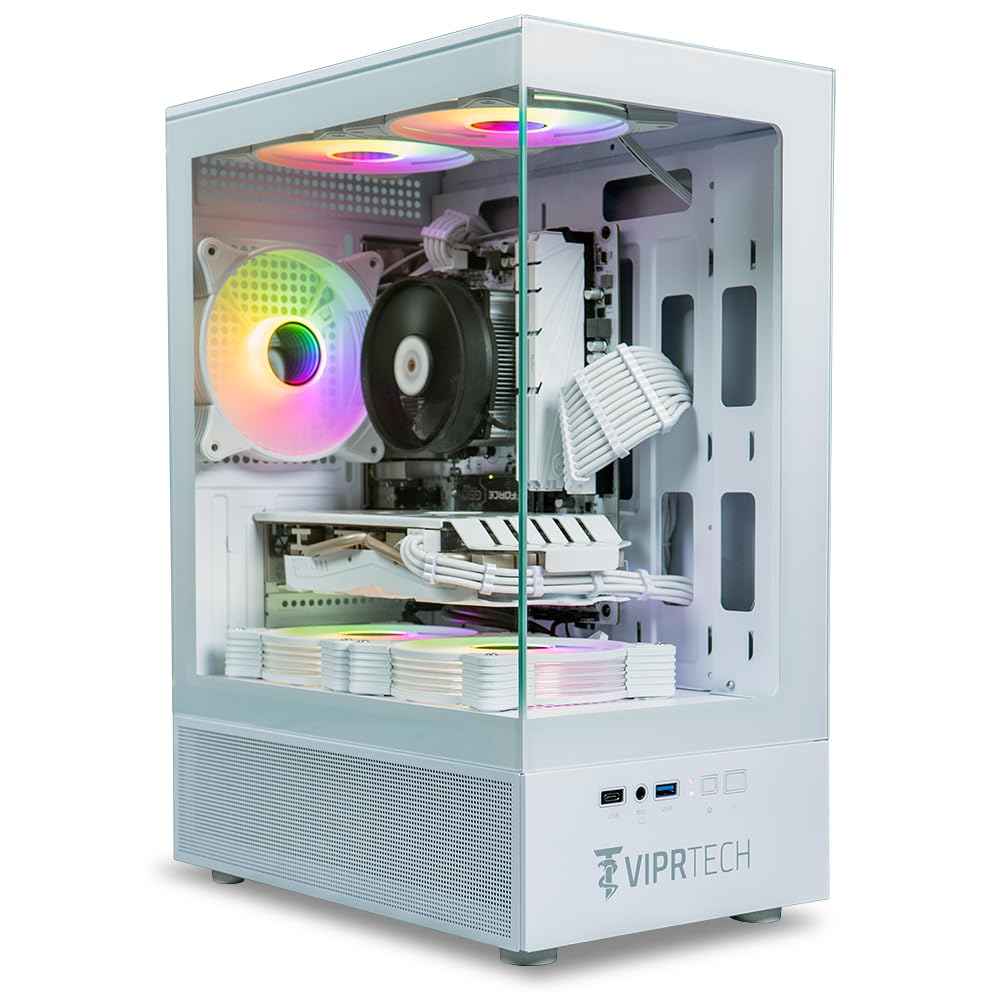
The ViprTech Stryker 1.0 is built by hand in the USA and it shows. The white case with braided cable extensions and a dedicated RGB controller creates a clean, premium aesthetic that most budget prebuilts can’t match. Under the hood, an AMD Ryzen 7 2700 (8 cores, 16 threads at up to 4.1 GHz) pairs with an AMD Radeon RX 580 8GB, a combination that handles everything from Valorant to Elden Ring at 1080p without breaking a sweat. The 700W power supply leaves substantial headroom for a future GPU upgrade — a feature beginners should prioritize.
Every unit is stress-tested before shipping, and the warranty support is among the best in this category. Multiple reviews highlight that ViprTech’s customer service team (reachable by phone and chat) resolved issues quickly, including overnight shipping of replacement units when components failed. The Ryzen 7 2700’s AM4 socket means you have a clear upgrade path to a Ryzen 5 5600X or Ryzen 7 5700X later without changing motherboards — a massive advantage over locked-down prebuilts.
The downsides are typical for the price tier. The 500GB SSD is adequate for a few games but requires expanding if you install modern titles that exceed 100GB each. Some units arrive with loose screws or minor cosmetic blemishes, and the documentation is sparse — expect to Google motherboard headers if you want to tweak fan curves or RGB settings. For a beginner who values build quality, support, and upgradeability over raw specs, the Stryker 1.0 is a confident pick.
Why it’s great
- Hand-built in the USA with premium white braided cables
- Ryzen 7 2700 offers 8 cores with AM4 upgrade path
- 700W PSU provides real headroom for future GPU swaps
- Excellent phone/chat customer support
Good to know
- 500GB SSD fills quickly with modern games
- Minimal documentation for BIOS/motherboard settings
- Some units arrive with minor cosmetic blemishes
4. Blackout Computers RX 580 Desktop
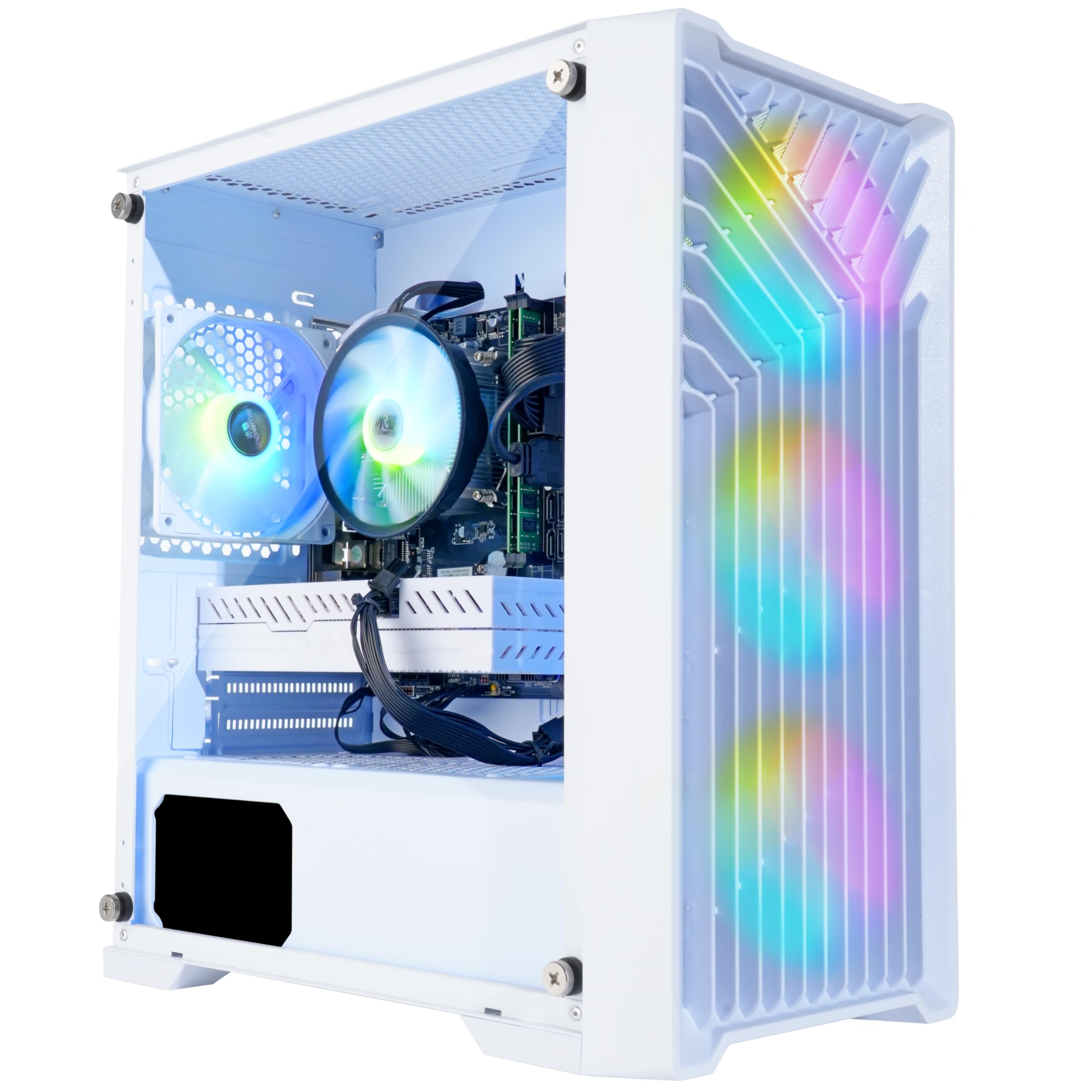
Blackout Computers offers one of the most polished beginner experiences with this RX 580 build, delivered in a white “Eclipse” case with front mesh and tempered glass. The AMD Radeon RX 580 8GB is the star here, capable of running almost any modern game at 1080p medium-high settings with 60+ FPS. The included 1TB NVMe SSD is double the storage of most competitors at this price, giving beginners room for Call of Duty, Fortnite, and a library of indie games without immediate expansion.
The Intel Core i7-4790 is the weak link. This Haswell-era chip from 2014 runs at a respectable 4.0 GHz max boost and handles gaming fine, but it lacks modern features like DDR4 support beyond 1600 MHz, PCIe 4.0, and M.2 NVMe boot (some units reportedly use SATA M.2 despite the NVMe marketing). The platform forces you to replace the entire motherboard and RAM to upgrade the CPU — a dead end for future growth. Blackout does include a 1-year warranty and responsive support, with several reviews praising how quickly they replaced failed graphics cards.
Gaming performance is solid for the price, but the aging platform raises concerns about longevity. The 4GB RAM ceiling on DDR3 effectively means 16GB is your max without replacing the whole system, and the lack of modern connectivity (no USB-C, no Wi-Fi 6) feels dated. For a beginner who wants a turnkey machine that runs today’s games well and doesn’t plan to upgrade for 3-4 years, this delivers. For anyone wanting long-term flexibility, the ViprTech or NOVATECH options offer better platforms.
Why it’s great
- 1TB NVMe SSD provides generous storage out of the box
- RX 580 8GB delivers strong 1080p performance
- Attractive white case with mesh front panel and RGB
- Customer support responsive for warranty replacements
Good to know
- i7-4790 is over a decade old with no upgrade path
- DDR3 memory limits future expansion
- Some units have SATA M.2 instead of NVMe
5. YAWYORE R5 5600GT Desktop

The YAWYORE desktop is built around the Ryzen 5 5600GT, an APU with powerful integrated Radeon Vega 7 graphics that can handle Fortnite, League of Legends, and CS2 at 1080p with respectable frame rates — enough to get a beginner playing immediately without a dedicated GPU. The real story here is the upgrade path: the MSI A520M-A PRO motherboard and 550W 80 Plus Bronze power supply include PCIe connectors for a dedicated graphics card, and buyer reports confirm that adding an RX 580 or GTX 1070 Ti boosts performance to 80+ FPS in demanding titles.
The memory and storage package is generous for the price. 16GB of DDR4 3200MHz RAM in dual-channel configuration maximizes the Vega 7 iGPU’s performance (single-channel cripples APU graphics), and the 1TB M.2 NVMe PCIe SSD offers fast boot times and plenty of space for a game library. Five 120mm ARGB fans with a remote-controlled cooling system keep temperatures in check while adding visual flair, and the system runs quiet enough for a shared bedroom or dorm room.
The trade-off is that out of the box, you’re relying on integrated graphics. While the Vega 7 is the best current-gen iGPU outside of AMD’s 700M series, it won’t run modern AAA titles at acceptable settings — Elden Ring and Call of Duty will require a dedicated GPU purchase. The MSI motherboard is a budget board with limited BIOS features and no Wi-Fi built in (though the package includes a USB dongle). For the beginner who wants a stable, upgrade-friendly foundation, this is the smartest long-term investment.
Why it’s great
- Modern AM4 platform with clear GPU upgrade path
- 1TB NVMe SSD and 16GB dual-channel DDR4 included
- Remote-controlled ARGB cooling system
- Quiet operation and easy initial setup
Good to know
- No dedicated GPU included; relies on integrated Vega 7
- A520 motherboard lacks Wi-Fi and advanced BIOS options
- Will need a GPU purchase for AAA gaming
6. ALCPOK Ryzen 7 5700G Desktop

The ALCPOK desktop centers on the AMD Ryzen 7 5700G — the most powerful APU commonly available in prebuilt systems. Its Radeon Vega 8 integrated graphics (8 compute units at 2,000 MHz) can run League of Legends, Dota 2, CS2, and Fortnite at 1080p with playable frame rates without any dedicated GPU, making it the best “plug and play” option for a beginner who wants to buy exactly one box and start gaming immediately. The 8-core, 16-thread CPU also crushes productivity tasks like video editing and programming.
The 550W 80 Plus Bronze power supply includes dedicated PCIe power connectors, so adding a graphics card later is as simple as plugging one in — no PSU swap required. The 1TB NVMe SSD offers ample storage, and the ARGB fans with customizable lighting look far more premium than the price suggests. Dual monitor support via HDMI and DisplayPort works out of the box, and the built-in WiFi handles online gaming without noticeable latency. Buyer reviews consistently praise the value: many compared the cost to building it themselves and found the prebuilt cheaper.
The 16GB of RAM is a single stick (single-channel), which significantly reduces Vega 8 graphics performance — dual-channel memory can boost iGPU frame rates by 30-50%. Adding a second 16GB stick is the first upgrade every owner should make. The PSU, while adequate for a GPU addition, lacks the headroom for high-end cards (RTX 3070 or above) without replacement. For a beginner focused on esports who wants a polished out-of-box experience with a clear GPU upgrade path, this is the strongest APU-based option.
Why it’s great
- Ryzen 7 5700G delivers best-in-class integrated gaming performance
- 550W PSU with PCIe connectors ready for GPU upgrade
- 1TB NVMe SSD and stylish ARGB cooling included
- Great value — often cheaper than DIY build
Good to know
- Single stick of RAM cripples iGPU performance
- PSU can’t handle high-end GPUs without replacement
- Integrated graphics insufficient for demanding AAA titles
7. KAMRUI Hyper H1 Mini Gaming PC
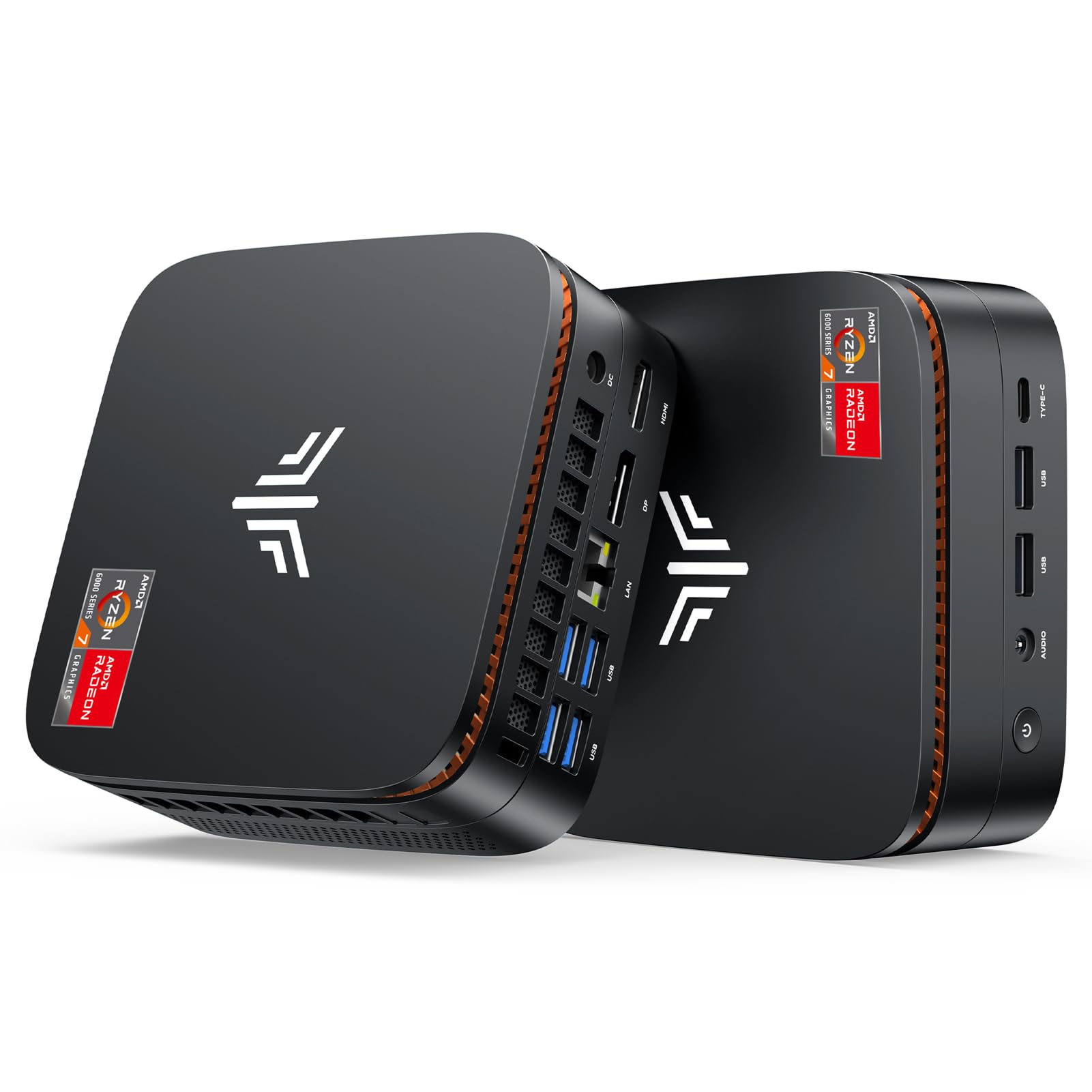
The KAMRUI Hyper H1 packs an AMD Ryzen 7 7735HS (8 cores, 16 threads up to 4.75 GHz) with Radeon 680M integrated graphics — the same iGPU found in handheld gaming PCs like the ASUS ROG Ally. In a tiny chassis that fits in a backpack, this mini PC can run Fortnite, GTA V, and Overwatch at 1080p low-medium with playable frame rates, and it handles 4K video playback and office work with zero effort. The 24GB of LPDDR5 5500 MHz memory in dual-channel mode is optimized for the 680M’s performance.
The I/O is impressive for the size: triple 4K display support via HDMI and USB-C, 2.5Gbps Ethernet, WiFi 6, and Bluetooth 5.2. It comes with a VESA mount so you can attach it behind a monitor, creating an invisible gaming setup. The passive air cooling keeps noise levels extremely low during productivity, though the fan does spin up under sustained gaming — but it remains quieter than most full-size towers. Multiple buyer reviews highlight how well this unit handles video editing, photoshop, and light gaming simultaneously without stutter.
The integrated Radeon 680M is a significant step up from older iGPUs but still falls short of dedicated GPUs like the RX 580. AAA titles from 2023 onward will require low settings and resolution scaling. The 512GB SSD is tight for a game library and while upgradeable, the LPDDR5 RAM is soldered — no upgrading memory later. A small number of users report sudden crashes or black screen issues after the return window, which is a concern for reliability-focused beginners. For the portable form factor and 680M performance, this is a niche pick for those who need a living room or travel gaming machine.
Why it’s great
- Ultra-compact design with VESA mount for clean setups
- Radeon 680M iGPU outperforms most other integrated graphics
- 24GB LPDDR5 dual-channel memory
- Triple 4K display support and 2.5Gbps LAN
Good to know
- Integrated graphics can’t match dedicated RX 580
- Soldered RAM — no memory upgrades possible
- Reports of crashes/black screens in some units
8. STGAubron Prebuilt Gaming PC Desktop

The STGAubron bundles a full gaming setup with the tower itself — RGB gaming keyboard, RGB gaming mouse, mouse pad, and WiFi 6/Bluetooth 5.0 connectivity are all included, making this the easiest starter package for a complete beginner who has nothing but a monitor. The AMD Radeon RX 550 4GB dedicated graphics card, while entry-level, provides a tangible advantage over integrated graphics, pushing games like Fortnite, Valorant, and CS2 at 1080p with playable settings. The Intel Core i5 processor (up to 3.6 GHz) and 16GB DDR4 RAM handle multitasking well.
The 512GB SSD boots Windows 11 Home quickly and offers decent space for a handful of games. Two RGB fans with included lighting control give the case a gamer aesthetic that appeals to younger buyers. Customer service reviews are mixed but notably positive for resolution: multiple reviewers who faced hardware failures reported that STGAubron’s support team sent replacement units or components even after the return window, upgrading their ratings from 1-star to 4 or 5 stars after the issue was resolved.
The RX 550 4GB is genuinely weak by modern standards — it won’t run Call of Duty Warzone or Hogwarts Legacy at acceptable frame rates, and its 4GB VRAM is a bottleneck even for some esports titles at higher settings. The non-descript “Core i5” (likely a 3rd or 4th gen model) and no-name power supply are common corner-cutting tactics in this price tier. Buyer reviews confirm that some units suffer from component failures (LED lights, sound, graphics) within months. This is a true entry-level machine best suited for young children or very casual gamers playing undemanding titles.
Why it’s great
- Includes gaming keyboard, mouse, and mouse pad
- Dedicated RX 550 GPU beats integrated graphics
- WiFi 6 and Bluetooth 5.0 built-in
- Responsive customer support for warranty claims
Good to know
- RX 550 4GB is too weak for modern AAA gaming
- Generic “Core i5” likely from older generation
- Component failure reports common after a few months
9. abytespark Prebuilt Gaming PC Desktop

The abytespark desktop leans heavily into visual appeal — a white “sea view” tower with five RGB fans, RGB case lighting, and a full suite of peripherals (keyboard, mouse, mouse pad) creates a cohesive, flashy setup that younger gamers love. The AMD Radeon RX 550 4GB dedicated graphics card, while identical in performance to the STGAubron’s, at least provides a genuine discrete GPU experience over integrated solutions. The Intel Core i5 processor and 16GB of RAM keep Windows 11 Home running smoothly for everyday tasks.
The cooling system is actually effective. Some buyers report that the five-fan configuration keeps temperatures in check even during extended sessions, and the fans themselves are not overly loud. The case has reasonably good airflow for a budget tower, which helps with component longevity. The included peripherals are basic but functional — the keyboard and mouse work fine for getting started, and the mouse pad is a nice extra touch for the price.
The biggest red flag is the component quality. Buyer reports and technical teardowns reveal that some units ship with a decade-old Intel Core i7-4770 (Haswell, 2013) instead of the advertised Core i5, and the motherboard may lack TPM 2.0, pushing the system outside Windows 11’s hardware requirements. The RX 550 4GB is the same entry-level bottleneck as the STGAubron. Bluetooth is notably absent, requiring a separate USB adapter. For a teen or younger child who wants the flashiest possible first gaming PC for Roblox and Minecraft, this fits — but be aware of the platform dead end.
Why it’s great
- Striking white case with five RGB fans and lighting
- Includes keyboard, mouse, and mouse pad
- Dedicated RX 550 GPU for light gaming
- Effective cooling keeps temperatures reasonable
Good to know
- Some units ship with 2013-era i7-4770 CPU
- No Bluetooth or TPM 2.0 support in some batches
- RX 550 4GB cannot handle demanding games
10. WIWB Ryzen 5 RX 560 Desktop
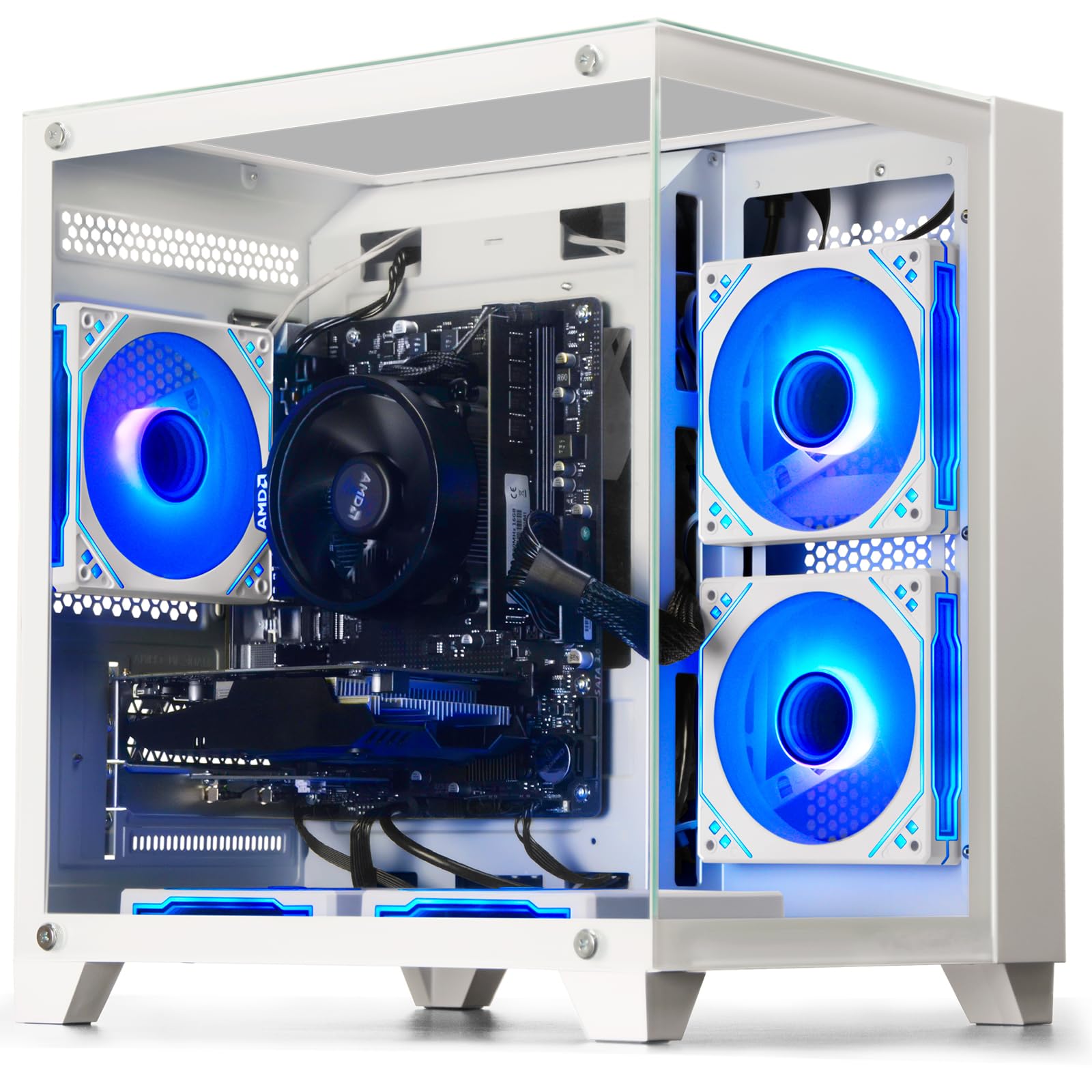
The WIWB desktop pairs an AMD Ryzen 5 3500X (6 cores, 6 threads at up to 4.1 GHz) with a Radeon RX 560 4GB dedicated GPU, creating a balanced entry-level machine specifically tuned for esports. League of Legends, CS2, Overwatch, and Valorant all run smoothly at 1080p with high settings — exactly what a competitive-focused beginner needs. The RX 560 is a modest step above the RX 550, offering higher clock speeds and slightly better memory bandwidth, which translates to tangible gains in frame rate consistency.
The white case is clean and understated compared to the flashy RGB competitors, and the custom air-cooling system with optimized airflow keeps the system running stable during long sessions. The motherboard includes M.2 and DDR4 slots for future expansion, and the straightforward internal layout makes upgrading components (adding RAM, swapping the GPU) accessible even for first-time PC owners. Several buyer reviews note that the system arrived well-packaged and configured correctly, with no driver or boot issues.
The RX 560’s 4GB VRAM is a hard limit for modern AAA gaming — titles like Call of Duty Warzone and The Last of Us Part I will struggle even at low settings. The Ryzen 5 3500X, while modern and efficient, lacks simultaneous multithreading (SMT), meaning its 6 cores can’t handle heavy multitasking as well as a 5600X or i5-12400F would. Some reviewers report that the unit’s graphics card was not detected upon arrival, requiring a replacement. For the beginner focused exclusively on competitive multiplayer and willing to stay in esports titles, this is a solid, focused choice.
Why it’s great
- Ryzen 5 3500X + RX 560 is optimized for esports titles
- Clean white case with effective air cooling
- Easy to upgrade with standard motherboard and slots
- Smooth 1080p performance in competitive games
Good to know
- RX 560 4GB can’t handle modern AAA games
- Ryzen 5 3500X lacks SMT for heavy multitasking
- Some units arrive with undetected GPU
11. suevery Ryzen 5 RX 560 Desktop

The suevery desktop offers the same AMD Radeon RX 560 4GB dedicated graphics found in the WIWB, but bundles it with a Ryzen 5 processor that includes simultaneous multithreading for better multitasking performance. The 16GB of DDR4 3200MHz RAM (dual-channel, based on buyer reports) and 512GB M.2 NVMe SSD provide a responsive Windows 11 experience, with games loading quickly. The RX 560’s 4GB VRAM is sufficient for 1080p gaming at medium settings in most titles from the last few years.
Build quality is acceptable for the price point. The black case is sleek and unobtrusive, with customizable RGB lighting that can be adjusted to match any desk setup. The cooling system with multiple RGB fans keeps temperatures manageable, and reviewers consistently praise the quiet operation — even during gaming sessions, the fans don’t become a distraction. The system is easy to set up out of the box, with Windows 11 Home pre-installed and drivers pre-loaded. Beginner-focused buyer reviews highlight that it runs solo indie games, Steam, and Discord without any lag or stutter.
The recurring issue from buyer reports: the RX 560 GPU is sometimes not detected in Windows, requiring either a driver reinstall or, in worst cases, a GPU replacement. One reviewer explicitly had to buy a new graphics card because the included one was undetected. The Ryzen 5 processor is not fully specified (model number varies), and the single stick of RAM reported in some units would cripple performance. For a budget-conscious beginner willing to troubleshoot a potential GPU detection issue, this offers the best value-for-money RX 560 experience available.
Why it’s great
- RX 560 4GB dedicated GPU for 1080p gaming
- Dual-channel DDR4 3200MHz RAM in most units
- Quiet operation and customizable RGB lighting
- Strong performance in indie and esports titles
Good to know
- GPU not detected in some units (requires driver or replacement)
- Ryzen 5 model number not fully specified
- Some units ship with single-channel RAM
FAQ
Can a beginner gaming PC with integrated graphics run Fortnite at 60 FPS?
How much storage does a beginner gaming PC need?
What power supply wattage do I need for future GPU upgrades?
Is a mini PC good for a beginner gamer?
Final Thoughts: The Verdict
For most users, the best beginner pc for gaming winner is the NOVATECH Phantom 2.0 because it pairs a genuinely capable RX 580 8GB dedicated GPU with a solid foundation at a price that leaves room for peripherals. If you want the smallest possible footprint without sacrificing modern features, grab the GMKtec M6 Ultra for its future-proof OCuLink port and 32GB DDR5. And for the beginner who wants the best upgrade path and a modern platform, nothing beats the YAWYORE R5 5600GT — buy it, drop in a used RX 580, and you have a machine that punches far above its price tier.