
Our readers keep the lights on and my morning glass full of iced black tea. As an Amazon Associate, I earn from qualifying purchases.
Specs are compiled from manufacturer listings and verified buyer reviews and can change over time — please confirm the key details on the product page before buying.
Starting out in embroidery feels like learning a new language, especially when you need a machine that also sews. The right combo machine pairs sewing and embroidery so you can finish projects like monogrammed towels and simple garments without switching devices. This guide cuts through the spec-sheet noise to help you find the beginner sewing and embroidery machine that actually matches your skill level and creative goals.
I’m Min — the founder and writer behind Gadgets Feed. This guide is built by comparing the manufacturers’ published specifications and the patterns across verified customer reviews, so you get each pick’s real strengths and trade-offs instead of marketing spin.
Your first combo machine should feel like a helpful partner, not a puzzle, so this best beginner sewing and embroidery machine guide ranks ease of use above raw power. We break down who each pick serves best and where the real learning curves hide.
Our Picks at a Glance


How To Choose Your First Combo Machine
A combo machine is a long-term investment, so prioritize models with expandable features like larger hoops and more built-in designs. Look for a machine with intuitive controls and a feature set that supports skill growth over time.
Hoop Size Sets Your Canvas
The embroidery hoop is the frame that holds your fabric tight while the machine stitches your design. A standard 4″ x 4″ hoop is perfect for monograms and small patches, but it limits you on bigger items like towel ends or shirt backs. A larger hoop, such as 5″ x 7″ or 6″ x 10″, lets you stitch bigger designs in one pass, reducing re-hooping for beginners.
Touchscreen vs. Button Navigation
Modern machines use either a touchscreen or physical buttons to select designs and adjust settings. A color touchscreen shows you the actual design preview and often guides you through the steps, which is far easier for a first-time user. Button-based machines can feel more dated and harder to navigate when you want to scroll through hundreds of built-in designs.
Consider the Full Support Ecosystem
Beginners will inevitably need guidance. Choose a machine backed by clear manuals, video tutorials, and responsive customer support to ease the learning curve. Machines that rely on app or WiFi connectivity can be great, but only if the connection is stable and the setup is clear, so check the reviews for how real owners handle the tech side.
Quick Comparison
| Model | Best For | Embroidery Area | Built-in Designs | Machine Weight | Amazon |
|---|---|---|---|---|---|
| Janome Horizon MC 9850★ Best Overall | Value-packed features | — | — | 23 lbs | Amazon |
| EverSewn Sparrow X2Tech Upgrade | Tech-savvy upgraders | — | 100+ | 20 lbs | Amazon |
| PooLin EOC03Beginner Champion | Pure embroidery beginners | 4″ x 9.25″ | 130 | 15 lbs | Amazon |
| POOLIN EOC05 | Household versatility | 4″ x 9.25″ | 130 | 26 lbs | Amazon |
| SINGER Legacy SE300 | Traditional sewists | 4″ x 4″ / 6″ x 10.25″ | 200 | 20.5 lbs | Amazon |
| Brother SE2000 | Quiet all-rounders | 5″ x 7″ | 135 | 20 lbs | Amazon |
| Bernette B79 | Heavy-duty enthusiasts | — | — | 47 lbs | Amazon |
| Brother NQ3550W | Large project mavens | 6″ x 10″ | 258 | 28 lbs | Amazon |
In-Depth Reviews
1. Janome Horizon Memory Craft 9850
Our pick — over 4★ from 100+ verified ratings; the strongest balance of quality and price.
The crowd favorite for value that guards your growing skill set.
The Janome Horizon MC 9850 is the pick for sewists who want a serious feature set without paying flagship prices. It combines professional-grade embroidery with precise sewing, and the sophisticated computerized memory lets you save your custom embroidery patterns and stitch combinations for easy recall later. Owners consistently rave about the machine quality and how simple it is to switch between straight stitching and embroidery.
This machine is noticeably user friendly, with a touchscreen display that simplifies design selection for those advancing their skills. The trade-off is physical: at 23 pounds, this is one of the heavier units here (a full 53% heavier than the PooLin EOC03 at 15 pounds), so you will want a dedicated table. It is also a machine that experienced sewers recommend for those doing light embroidery, not absolute novices looking for their very first stitch.
You get a large workspace and a built-in stitch library that most owners praise, even though a rare unit “would eat my material” per owner reports. If you already sew and want to add embroidery without replacing your machine in a year, this is the value balance.
Why Owners Stay Loyal
- Owners praise the quality and find assembly and use easy.
- The 9mm stitch width creates beautiful, smooth stitches.
- Features are considered well worth the money.
Honest Trade-offs
- At 23 pounds, it is heavy to move around.
- Accessories are Janome-only and pricier.
- Experienced users say it is not for true beginners.
Reach for this if: you are a sewer ready to step into embroidery with a machine that offers depth and a large working area.
Look elsewhere if: you have never sewn before and need the most hand-holding possible from the start.
2. EverSewn Sparrow X2
A smart-device-driven machine for the sewist who loves modern tech.
The EverSewn Sparrow X2 breaks the mold by moving embroidery control to your smartphone or tablet. You get over 120 stitch patterns for sewing and over 100 built-in embroidery designs, but the real hook is the app that lets you customize designs in a few easy steps without needing WiFi. This is a next-generation approach that excites crafters who enjoy using their mobile devices.
Expect a learning curve. You need a 64-bit phone or tablet (a device that runs 64-bit apps) to control the machine via its app, which works smoothly within 15 feet for some but gets mixed feedback on connectivity. Owner reports mention “more issues in 1 month than any other machine” when the connection fails, yet the sewing itself consistently earns praise.
You can load most common embroidery file formats like exp, pes, and dst (industry-standard design files), so you are not locked into a proprietary system. If you are a beginning sewist or quilter who loves tech and enjoys troubleshooting, the app-based design freedom is a thrill, but those who want a purely mechanical experience may find the setup finicky. At 20 pounds, it is a lightweight footprint, and the 1-year electrical and labor warranty offers some confidence.
The Tech Appeal
- Design via app on Apple or Android devices.
- Large and small hoops included.
- Over 100 built-in embroidery designs.
What To Expect
- Connectivity is the most-mentioned mixed aspect.
- Owners flag a significant learning curve for app setup.
- Needle threader is reported as difficult to use.
Who it suits: tech-savvy sewists upgrading from an older mechanical machine.
Who it does not suit: anyone who wants a self-contained machine without depending on a phone or tablet.
3. PooLin EOC03
Starter kit included so your first project starts the second you unpack.
The PooLin EOC03 is built for the first-time embroidery user, and it leans into that promise with the Institch operating system designed for clear navigation. It comes with 130 built-in designs and 8 fonts, giving you plenty to play with immediately, plus a full starter kit including 6 threads, 20 stabilizers, and 25 prewound bobbins. The PooLin EOC03 includes a full starter kit with threads, stabilizers, and bobbins, so you can begin immediately.
What wins people over is the support ecosystem. Owners say the customer service is proactive, with real-time direct messaging for help and step-by-step tutorials on YouTube. One happy beginner said it is “a fantastic machine” that is “easy to set up and use right from the start,” with the first test stitch happening in under an hour. The machine is quiet, and the large 4×9.25 hoop is a favorite feature.
The honest catch is in the mixed ease-of-use feedback. While some find the manual easy to follow, others report the machine jamming and stopping randomly mid-project compared to a 6-year-old Brother. The 15-pound weight makes it the lightest full-size option here, and its footprint is smaller than the more powerful POOLIN EOC05, which matters for a tight craft corner. It is unapologetically embroidery-first, so consider it if sewing is secondary.
Reach for this if: embroidery is your main goal and you want the most comprehensive starter experience with real human backup.
Think twice if: you plan to sew garments regularly, as sewing is not this machine’s focus.
4. POOLIN EOC05 2-in-1
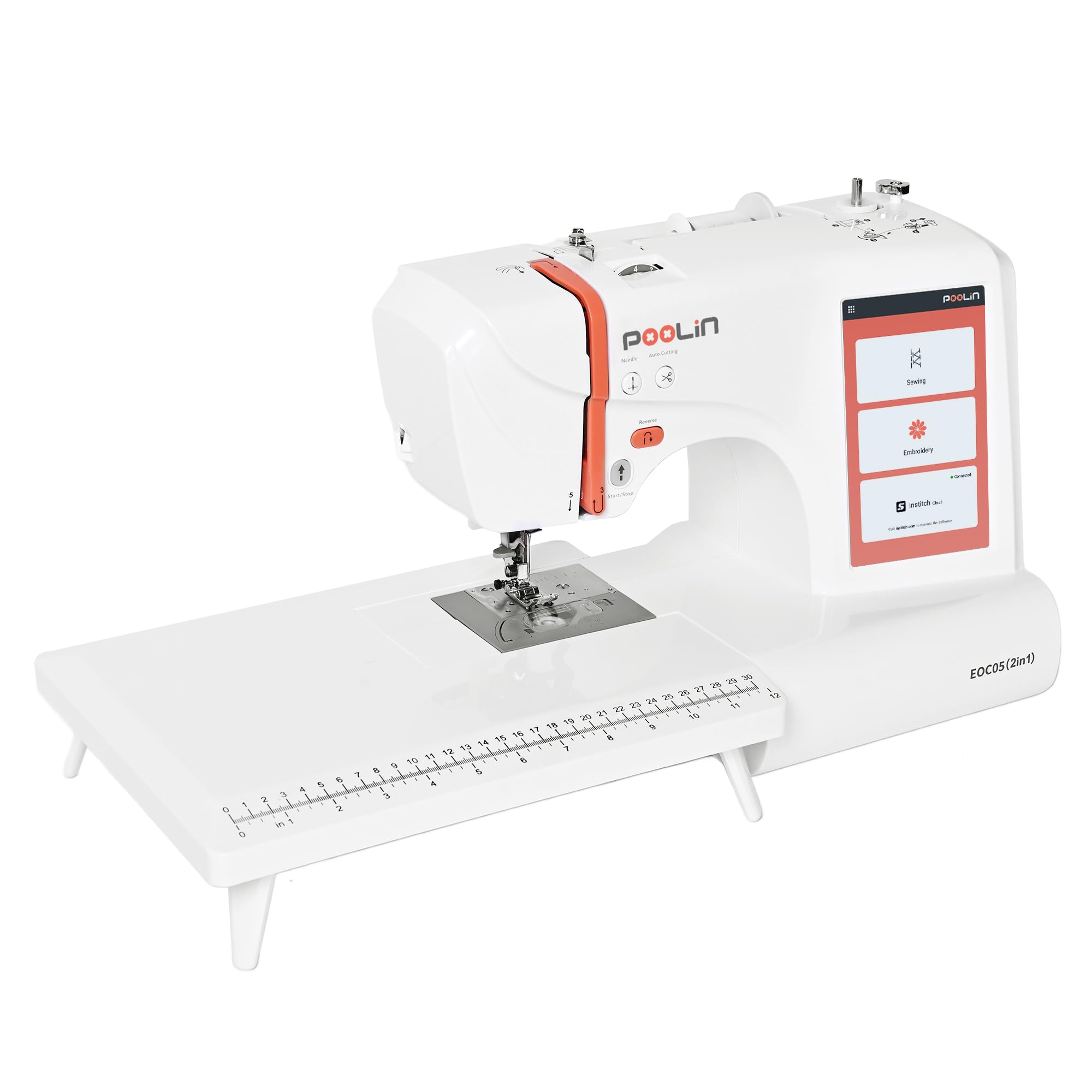
A true hybrid that switches from embroidery to serious sewing by changing the table.
The POOLIN EOC05 gives you the best of both worlds by making it easy to switch between embroidery and 207 built-in sewing stitches. A large 7-inch touchscreen makes design selection clear for first-time users, and it includes the same 130 built-in embroidery designs and 8 lettering fonts as its sibling. It simplifies common tasks with a one-step buttonhole and an on-screen presser foot guide.
What stands out in owner reports is effectiveness in both modes and the quality of support. Initial hiccups like thread bird-nesting (where thread tangles underneath the fabric) were resolved with help from responsive technicians via video and direct messaging. The included components are generous, too, with 24 pre-wound bobbins and a full supply and tool kit to get you started.
You can adjust stitch width from 0-7 mm and length from 0.2-5 mm to handle different fabrics, which gives it real sewing range beyond just embroidery. If you want a machine that grows from monograms to full sewing projects, this is the balanced choice.
Why It Shines
- Users report it works well for both embroidery and sewing.
- 7-inch touchscreen is easy to follow for first-timers.
- One-on-one support with instructional videos is praised.
The Catch
- WiFi connection can be problematic for some units.
- At 12 kg, set up a permanent home for it.
- Initial thread nesting issues may require support help.
Best for: households wanting one machine that does meaningful sewing and embroidery without a second purchase.
Not ideal if: you cannot rely on customer support to help you through initial setup bumps.
5. SINGER Legacy SE300

A vast built-in library and two hoops for sewists who love options.
The SINGER Legacy SE300 is a versatility powerhouse with 250 built-in sewing stitches and 200 embroidery designs, including 6 font options. It arrives with an impressive array of accessories: two embroidery hoops (a large 10¼” x 6″ and a standard 4″ x 4″), ten presser feet, a USB stick, and complimentary software. The LCD touch screen allows for easy stitch selection and control.
Singer fans who love the brand will appreciate the familiar feel and the sheer creative range. Owners who love it say it is “very easy to understand and very comfortable to sew with,” and they would not trade it for higher-priced machines. The self-adjusting tension system is designed to save setup time by automatically setting the ideal stitch length, width, and pressure based on your selection.
The reality check is that embroidery performance gets mixed opinions, with some units stopping work and thread durability drawing negative feedback for breaking and clogging the thread path. One owner noted that when switching between sewing and embroidery, you have to set the bobbin tension separately, suggesting you keep a dedicated bobbin for each mode. The SINGER Legacy SE300 offers extensive features, but buyers report thread durability issues that may require patience.
What You Get
- Two hoops included for varied project sizes.
- 13 one-step buttonhole styles.
- USB stick and software for extra designs.
What To Watch
- Thread durability is a commonly reported negative.
- Embroidery performance is inconsistent across owners.
- No on-machine editing for custom designs.
Choose it for: the sewist who wants an enormous stitch library and the Singer brand legacy at a mid-range price.
skip it if: consistent thread behavior and a flawless embroidery experience from the start are your top priorities.
6. Brother SE2000
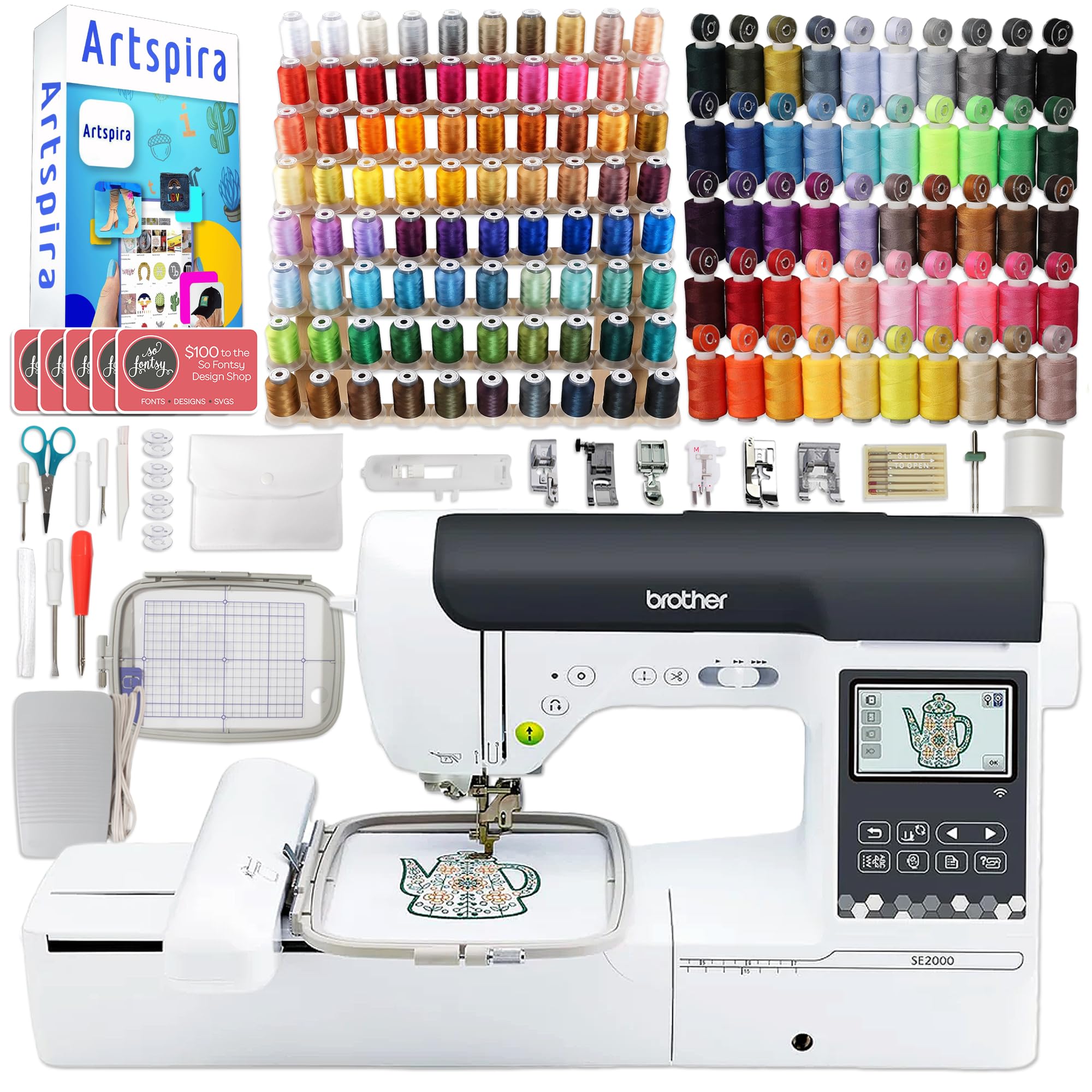
A famously quiet workhorse with a hefty accessory bundle that feels premium.
The Brother SE2000 is a 2-in-1 machine that owners repeatedly describe as “very quiet,” making it a joy for extended sewing and quilting sessions. It comes with a deluxe bundle that includes 80 embroidery thread spools and 50 sewing threads with matching pre-wound bobbins, so your color palette is vast from day one. The 5″ x 7″ embroidery hoop is a great middle-ground size for everything from shirt backs to tote bags.
The quality is what wins people over here, with owners noting its “excellent embroidery capabilities” and finding it beginner-friendly despite the large manual. The 3.2″ x 1.8″ LCD color display touch screen is easy to navigate, and Brother’s Artspira app adds free fonts and designs via wireless LAN. It is also a compact unit at 20 pounds, which makes it easier to store than the heavier pro models.
The trade-off is that the embroidery tension is finicky, so owners recommend testing on scrap fabric first. Some of the included cheaper thread and bobbins are lint-prone, so you will want to upgrade those as you go. The design discount cards are hidden inside the outer plastic envelope with the packing slip, so check there before you throw away the packaging. It is a premium experience at a mid-high price, perfect for the sewist who values a peaceful workflow.
Owner Favorites
- Much quieter than comparable models, great for quilting.
- 135 built-in designs and 103 sewing stitches.
- Generous bundle with 130 thread spools included.
Owner Notes
- Embroidery tension needs testing before each project.
- Bundled regular thread is lint-prone, upgrade it.
- Threading path differs from older models, read the manual.
Reach for this if: you want a quiet, quality machine and you love having a huge accessory bundle to grow into.
Look elsewhere if: you want a machine that delivers perfect embroidery tension with zero setup fuss.
7. Bernette B79

A sturdy cast-aluminum beast for the ambitious crafter with workspace to spare.
The Bernette B79 is a serious piece of equipment aimed at embroidery, quilting, and even cosplay. It is built on a sturdy cast aluminum frame that weighs a substantial 47 pounds — nearly double the weight of most other picks here — which means it will not budge during heavy projects. The 5-inch color touchscreen and 4 LEDs make for a bright, clear workspace, and the machine offers a vast 230mm of sewing space to the right of the needle.
Owners praise the machine’s quality and find it transformative for quilting, with a 9-inch throat space compared to the 5 inches on their old machine. The machine supports multiple embroidery file formats and offers a pause-to-cut function that owners find handy. It is designed for fast, even fabric feed with a dual feed system and a programmable foot control with a back-kick function.
The honest truth is that this is not a beginner-friendly machine from the start. Owners note a steep learning curve, a startup time over 40 seconds, and menus they describe as unintuitive with a vague manual. The functionality gets mixed feedback — it works great for some, while others find it unreliable for heavy fabrics. For the price, value for money draws negative feedback from some owners, so this is a considered purchase for the experienced sewist who wants a powerful second machine, not a first one.
The Pro Side
- Sturdy metal frame and bright LED lighting for heavy use.
- 9-inch throat space suits large quilting projects.
- Fast sewing with a programmable foot control.
Consider This
- Long startup time and a steep learning curve.
- Owners mention it struggles with heavy fabrics reliably.
- Snap-in feet and bobbin threading are user frustrations.
Best for: experienced sewists upgrading to a large, capable machine for quilting and cosplay.
Not for: beginners who need intuitive menus and a gentle learning curve right from the start.
8. Brother NQ3550W

A pro-grade field for jacket backs plus the software to design your own.
The Brother NQ3550W is the ultimate creative suite for the serious enthusiast who wants room to grow. The extra-large 6″ x 10″ embroidery field is perfect for large projects like jacket backs, and it includes an incredible 258 built-in embroidery designs and 291 built-in stitches. It comes bundled with the full BES Blue Embroidery Software and a 5″ x 7″ magnetic sash frame hoop, which is lightweight and easy to use with six strong magnets for materials up to 2mm thick.
Owners absolutely love this machine for its value, noting it is a “great bundle deal” and praising the auto presser foot height for thick fabrics. The machine automatically trims jump stitches, cutting both the upper and lower threads at the end of each thread color, which saves you tedious manual trimming. A 3.67-inch full-color LCD touch screen lets you position, rotate, reflect, and trace your designs with full on-screen editing.
This is the best pick for beginners who hate being boxed in and know they will want to design custom patterns. The only significant con is that the BES software is Windows-only and incompatible with Mac. At 28 pounds, it is heavy to move around, but customers note it is quiet and beginner-friendly in speed control. If you want to jump from “learning” to “custom designing” without buying another machine, this is your destination.
Why It’s Special
- Huge 6″ x 10″ embroidery area for large projects.
- Includes full BES Blue software for custom design.
- Automatic jump stitch cutting saves real time.
Before You Buy
- BES software is Windows-only, not Mac compatible.
- At 28 pounds, it is heavy to move around.
- Premium investment that requires a dedicated space.
Reach for this if: you want a machine that will handle large, complex projects and grow with you into custom design.
Look elsewhere if: you use a Mac for your creative work or want a lighter machine for easy storage.
Understanding the Specs
Embroidery Area and Hoops
The embroidery area is the maximum size of a single design you can stitch without moving the fabric. Smaller units offer a 4″ x 4″ space, which suits monograms, while mid-range machines offer 5″ x 7″ or 4″ x 9.25″. The largest ones, like the 6″ x 10″ on the Brother NQ3550W, let you tackle big designs like jacket backs in one pass. The hoop size directly determines what projects you can easily complete, so match it to your ambitions.
Built-in Designs and Stitches
Built-in designs are ready-to-stitch patterns already loaded on the machine, letting you start immediately without a computer. Built-in stitches are the different sewing patterns (straight, zigzag, decorative) available for regular sewing. More designs and stitches mean more creative options, but they also make navigation harder, so a clear touchscreen becomes essential on machines with 200+ options.
FAQ
What is the ideal embroidery hoop size for a complete beginner?
What does a 4×4 vs 4×9.25 embroidery area actually mean for my projects?
Can a beginner machine embroider and sew well, or is it a compromise?
Do I need WiFi or an app to use a beginner embroidery machine?
How many built-in designs do I need as a beginner?
What is the difference between an embroidery machine and a sewing machine?
Why do some machines require a separate bobbin for sewing versus embroidery?
What is the difference between the Brother SE2000 and the Brother NQ3550W?
How heavy is too heavy for a home embroidery sewing machine?
Is a 7-inch touchscreen worth paying extra for?
Final Thoughts: The Verdict
For most buyers, the top pick for a beginner sewing and embroidery machine is the Janome Horizon MC 9850 because it offers the strongest value for features, quality, and ease — the crowd favorite in reviews. If you want vibrant tech and app-based design freedom, grab the EverSewn Sparrow X2. And for the purest first-time embroidery experience with a full starter kit and real human support, the PooLin EOC03 is the one to reach for.
How We Picked
We do not accept paid placement. Every pick is matched to a real buyer and a real use-case; we do not hands-on test units.
Sources & Methodology
Specifications: manufacturer listings and product documentation. Review insights: verified customer reviews, as of September 2026. Pricing: not shown on this page (it changes often); check the current price via the retailer link.
As an Amazon Associate, Gadgets Feed earns from qualifying purchases. This does not affect which products we feature.