
Our readers keep the lights on and my morning glass full of iced black tea. As an Amazon Associate, I earn from qualifying purchases.
Specs are compiled from manufacturer listings and verified buyer reviews and can change over time — please confirm the key details on the product page before buying.
A beginner 3D printer should just work on day one — you plug it in, load filament, and watch a model build itself instead of spending your weekend turning tiny knobs. The nine machines below all skip that misery in different ways: some come fully assembled and print within minutes, others self-level the bed on their own, and one even watches itself for failed prints. The right pick depends on how much you want to tinker versus how much you just want toys, cookie cutters, and cosplay parts showing up on your desk.
I’m Min — the founder and writer behind Gadgets Feed. This guide is built by comparing the manufacturers’ published specifications and the patterns across verified customer reviews, so you get each pick’s real strengths and trade-offs instead of marketing spin.
Some printers here run on open-source slicers you already know, while others lock you into a polished app ecosystem. Every pick below was sorted by whether a total first-timer can actually get a successful print without a mentor standing next to them. Here is how I rank each of these machines for anyone hunting the best beginners 3d printer.
Our Picks at a Glance



How To Choose The Best Beginners 3D Printer
Most first printers get abandoned because of one thing: the machine fights you before it ever prints something worth keeping. A beginner machine earns its place by removing steps — assembly, leveling, slicing, and calibration — so your first hour is spent watching plastic turn into a shape instead of reading forum threads. Here is what actually matters before you buy.
Auto leveling versus manual bed leveling
The bed is the flat surface your print sticks to, and if it sits too far from the nozzle nothing sticks, while too close smears the first layer. Manual leveling means turning small wheels under the bed and slipping a piece of paper in the gap by feel. Auto leveling measures that gap for you with a sensor or probe — most machines on this list do it automatically, which removes the single most common reason beginners give up.
Assembly time and what “fully assembled” really means
Some printers arrive as a box of rails, screws, and a tiny wrench. Others show up ready to power on. A machine that needs 20 to 30 minutes of assembly is still reasonable, but if you want your kid printing before dinner, look for one that ships pre-built. Fully assembled units trade a bit of tinkering knowledge for immediate payoff.
Print volume: how big is big enough
Print volume is the maximum size object your machine can build, measured as length, width, and height. Small volumes are perfect for mini figures, keychains, and toys, while larger beds let you print helmets, brackets, or single-piece functional parts. Match the volume to what you actually plan to make, not the biggest number on the spec sheet.
Filament compatibility and the heated bed question
Filament is the plastic spool your printer melts. PLA is the easiest to print and the standard beginner material. A heated bed — a warmed build plate — helps plastic grip the surface and lets you use tougher materials like PETG and ABS. If a machine lists no heated bed, plan on PLA only.
Quick Comparison
| Model | Best For | Print Speed | Build Volume | Weight | Amazon |
|---|---|---|---|---|---|
| Bambu Lab A1★ Best Overall | Best Overall | 10,000 mm/s² accel | — | 22 lb | Amazon |
| TINA2S MiniBest for Kids | Kids & Dorms | — | Mini figures | 6.4 lb | Amazon |
| Entina Tina2CBest Starter Kit | App-Led Starters | — | 3.9 × 3.9 × 3.9 in | 5.28 lb | Amazon |
| Creality Ender 3 V3 SE | Tinkerers | 250 mm/s | — | 19.8 lb | Amazon |
| FlashForge Adventurer 5M | Fast All-Rounder | 600 mm/s | 220 × 220 × 220 mm | 23.8 lb | Amazon |
| FlashForge AD5M | Multi-Nozzle Upgrades | 600 mm/s | 220 × 220 × 220 mm | 22 lb | Amazon |
| Anycubic Kobra X | Quiet Home Printing | — | 260 × 260 × 260 mm | 20.9 lb | Amazon |
| Elegoo Centauri 2 Combo | Multicolor on a Budget | 500 mm/s | 256 × 256 × 256 mm | 33 lb | Amazon |
| Bambu Lab P1S | Enclosed & Advanced Filament | 500 mm/s | 260 × 260 × 260 mm | 38.9 lb | Amazon |
In‑Depth Reviews
1. Bambu Lab A1 3D Printer
Our pick — over 4.5★ from 650+ verified ratings; the strongest balance of quality and price.
The crowd favorite for a reason — this is the machine that turns beginners into regular printers.
If you want one printer that does not need you to learn bed leveling, Z-offset tuning, or firmware wrangling before your first model, this is the one. Its full-auto calibration handles Z-offset and bed-leveling on its own, and active flow rate compensation adjusts the plastic going out to keep layers smooth. Acceleration of 10,000 mm/s² means it moves the toolhead fast without the wobble that usually ruins speed. The 4.7-star rating across 600+ owners backs that up — reliability shows up again and again in buyer feedback.
Assembly is not the story here; working is. One owner with six years of resin printing logged 30 minutes of assembly, 30 minutes of self-calibration, and 15 minutes of firmware updates before printing 1.5 hours after unboxing. One customer reports a 10-year-old running the A1 independently, with no adult supervision needed. One buyer ran the A1 16 hours a day making kids’ toys with no failures.
The catch is that the A1 is not the most compact machine. At 22 pounds and 21.76 × 20.83 × 12.87 inches, it needs real desk or table space and stays put once you set it down. Compare that to the TINA2S mini at 6.4 pounds and 8.3 × 8.3 × 11.4 inches — this one is a bench machine, not a shelf gadget. Multi-color printing also requires the AMS lite unit, sold separately or bundled in the combo.
What works on day one
- Full-auto calibration handles Z-offset and bed-leveling without tools
- 10,000 mm/s² acceleration keeps prints fast without sacrificing detail
- Active flow rate compensation smooths extrusion for consistent layers
- 1-Clip quick swap nozzle for tool-free maintenance
Where you compromise
- Multi-color needs the AMS lite, bought separately or in the combo
- 22 pounds and over 21 inches wide — a real piece of furniture
- Closed-source firmware limits deep tinkering
Pick this if: you want the closest thing to an appliance in the beginner market and value reliability over a one-evening build project.
Pass if: your space is small and every inch counts, or you specifically want to learn open-source tinkering.
2. TINA2S Fully Assembled Mini 3D Printer
Six and a half pounds of printer that lives happily on a nightstand.
This is the machine for households where the printer has to share space with homework and a bedroom. It weighs just 6.4 pounds and measures 8.3 × 8.3 × 11.4 inches, so it fits small desks, dorm shelves, and classroom corners. Compare it to the Bambu Lab A1’s 22 pounds and 21.76 × 20.83 × 12.87 inches, and you are looking at a machine that moves with one hand. Auto-leveling and a dual z-axis rail mean you still get precise first layers without a leveling ritual.
For parents, the payoff is what comes in the box. It ships fully assembled with 10M of PLA filament, a pre-loaded microSD card carrying model designs and splicing software, plus the accessories you would otherwise chase down separately. One buyer summed it up: “Fully assembled; prints first model in <20 min; quiet, lightweight, compact.” Its one-touch filament loading and active pause-and-resume put daily operation in your kid’s hands rather than yours.
Print quality is the standout — 123 owners singled it out, more than any other characteristic. The recurring caveat is size and material: it prints PLA, PLA pro, and TPU in the 1.75mm size, and one reviewer recommends small spools (250g, roughly 12–13.5cm diameter) rather than standard 1kg rolls. There is also no heated bed, so plan for PLA and avoid anything exotic. One note to keep in mind: it works best with the included magnetic metal platform, so do not swap in a non-magnetic plate.
Ideal setup: a kid’s room, a dorm, or a classroom where the printer needs to be small, quiet, and self-contained.
Look elsewhere if: you want to print large functional parts, use ABS or other high-temp filaments, or need a heated bed.
3. Entina Tina2C 3D Printer
Eight minutes from unbox to first print, with the phone doing the heavy lifting.
Entina built this one around the app, not the printer. The Poloprint Cloud app handles guided setup, AI-powered search, and even photo-to-print conversion, while the 2.4G WiFi and TF-card offline mode give you two ways to send files. It also runs STEM courses through the app, which is the actual differentiator for parents who want the printer to teach something — not just produce plastic dragons. Auto-leveling and a power-loss recovery feature round out the beginner-friendly basics.
The build volume tells the real story: 3.9 × 3.9 × 3.9 inches. That is genuinely small — good for mini figures, small educational builds, and STEM projects, but not a machine for large single-piece prints. Weighing 5.28 pounds with a compact footprint, it slides into a classroom or a corner without dominating either. A quick-swap printhead and self-cleaning nozzle keep maintenance accessible for a first-timer.
One thing owners consistently mention is that kids just enjoy using it — enjoyment was the second most-mentioned positive trait. A 10-year-old printed several items within 24 hours of unboxing, and one grandparent credited the built-in video tutorials for getting their grandson started. It ships ready to go with no assembly, which matters when your buyer is a nine-year-old with a birthday deadline. Compatibility runs across Windows, macOS, Linux, and Chromebook, and it slices with Cura or Simplify3D.
What you get for the tier: app-first setup, a 3.9 × 3.9 × 3.9 inch print area, WiFi and offline modes, and 3000+ models plus 20+ modules in the cloud library.
What to factor in: the small print volume is the ceiling here — plan for toys, miniatures, and STEM pieces, not large structural parts.
Right call for: families who want a guided app experience and a living STEM curriculum more than a big build volume.
Not the one if: you need to print anything larger than a few inches across.
4. Creality Ender 3 V3 SE
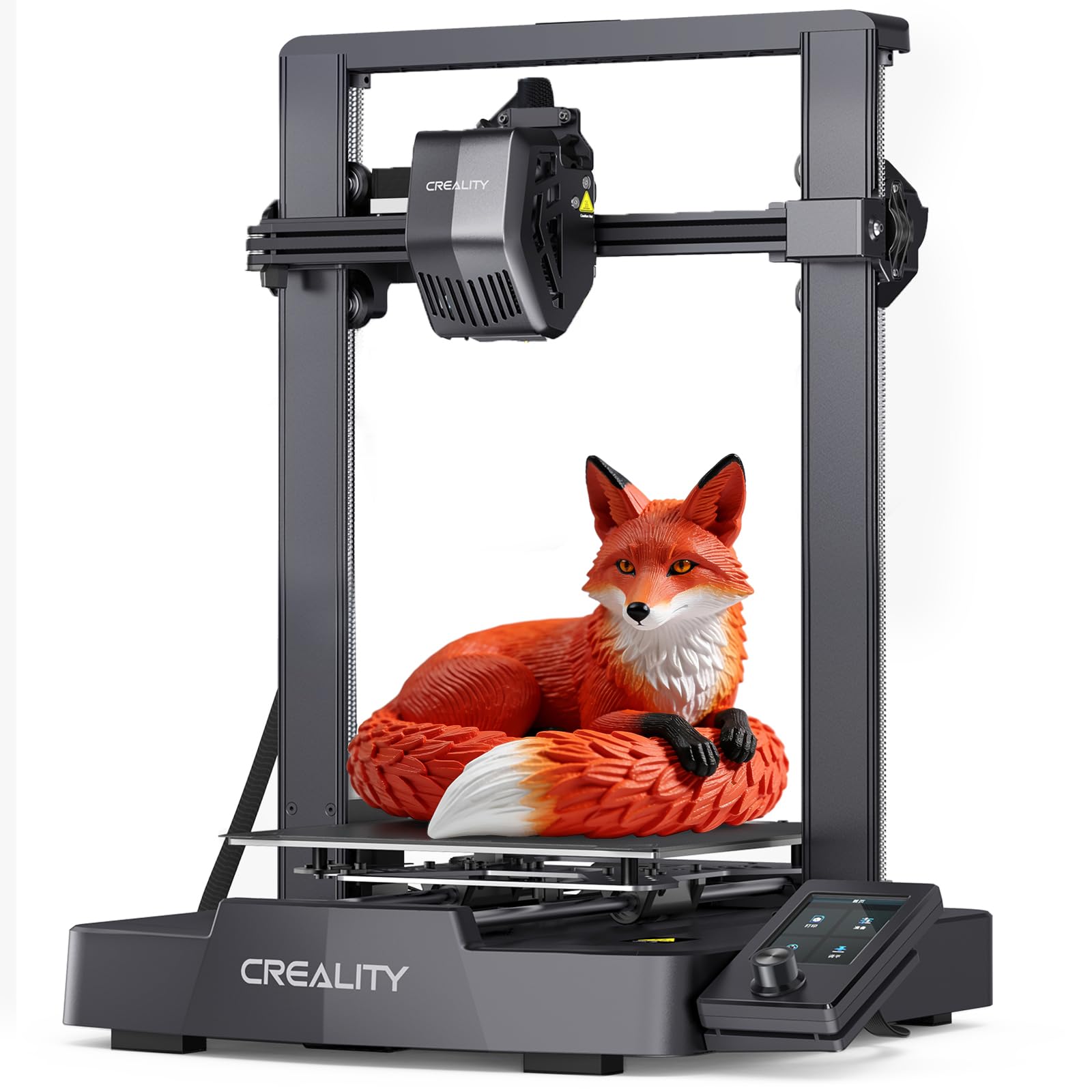
The classic beginner’s printer, now with the bed-leveling headache mostly solved.
Creality has been the gateway brand for first-time printers for years, and the V3 SE is the modernized version. Print speeds reach 250mm/s with 2,500mm/s² acceleration, which is plenty for a learning curve. The CR Touch auto leveling and automatic Z-offset calibration take care of the first layer, so you skip the paper-and-feel routine that drove early Ender owners up the wall. The Sprite direct drive extruder handles PLA, PETG, and TPU without fuss.
Where buyers consistently give thumbs up is print quality — it is the leading positive characteristic by a wide margin — followed by how easy it is to learn and its value relative to cost. One owner who cross-shopped against competitors noted their USB drive breaks occasionally and they wish the build area were taller, but still recommended it to any beginner who wants to get into 3D printing. Others praise the online community and consistent functional parts.
The honest caveat with this model is quality consistency: some buyers report loose bolts on arrival or adhesion headaches that require a bit of troubleshooting. Reliability and noise level show mixed feedback, and one reviewer had a boot failure after a single roll of filament. The build quality itself is a recurring point of debate. It is not a dealbreaker — plenty of owners run this for years — but expect a first-weekend shakedown rather than a perfectly polished first hour.
Where it wins: strong print quality for its tier, direct-drive extrusion for PLA/PETG/TPU, and a dual-Z motion system that reduces wobble during long jobs.
The recurring gripe: loose bolts and adhesion issues show up often enough that a first-time buyer should budget a Saturday for setup and a test print.
Matches best with: a beginner who actually wants to learn the machine — this one rewards a little curiosity with a very capable printer.
Skip if you want: fully plug-and-play, zero-tolerance behavior on day one.
5. FlashForge Adventurer 5M

Zero to full speed in 0.025 seconds, and to your first print in about 10 minutes.
If speed is your personality, this is the pick. The Adv5M reaches 600mm/s with 20,000 mm/s² acceleration, and FlashForge claims the jump from zero to 600mm/s takes just 0.025 seconds. A 50w heating element brings the nozzle to 200℃ in 35 seconds, so you are not standing around watching a heat-up bar every time you swap a spool. From unboxing to first print, the manufacturer says 10 minutes. Vibration compensation kills the ghosting artifacts that usually show up at those speeds.
Owners describe it as a genuine workhorse. The 68-performance mentions lead the way, and print speed is next by count. One verified customer praised the easy setup, slicer presets that yield good prints, solid PLA and PETG plate adhesion, WiFi file transfers, and tech support that ships parts in days. Another noted it is ready with minimal assembly and works well for niche jobs like cutting clay cutters.
The build volume is 220 × 220 × 220mm and the machine weighs 23.8 pounds. That is a bench footprint, not a shelf. The recurring complaints are firmware freezes, a sensitive touchscreen, and no work light at the print area — all things FlashForge users tend to work around. Noise level gets mixed reports; it seems louder on startup than mid-print. Power-loss recovery and filament run-out sensing both work, so long jobs are not a gamble if the lights flicker.
Where it delivers
- 600mm/s max speed with 20,000 mm/s² acceleration
- Nozzle heats to 200℃ in 35 seconds
- One-click full-auto leveling for a clean first layer
- Power-loss recovery and filament run-out sensor on board
Worth knowing
- Nozzle does not auto-shutoff — different from the Pro version
- WiFi is 2.4GHz only, so 5G networks will not connect
- 220 × 220 × 220mm volume is average for this tier
Best fit: a beginner who wants speed and a well-supported machine more than tinkering flexibility.
Look past it if: you need a large print volume or demand a work light and polished firmware from the start.
6. FlashForge AD5M 3D Printer

The one that grows with you — swap nozzles tool-free and change materials without ever buying a new machine.
The AD5M is the more customizable sibling of the Adventurer 5M: same 600mm/s speed and all-metal CoreXY motion structure, but with a patent quick-release nozzle that swaps in as little as 3 seconds across 0.25, 0.4, 0.6, and 0.8mm diameters. That means you can go from fine detail work to larger functional parts without pulling a tool out of the drawer. The one-click auto leveling measures the nozzle-to-plate distance automatically, so the first layer stays predictable.
Print quality shows up as the top positive trait here — 87 mentions — and ease of use comes second. Branded filaments work best according to one owner, who noted that third-party filament sometimes has trouble sticking or dispensing. One customer’s 10-year-old printed 25–30 items, mostly one-piece articulating dragons and snakes, and called the AD5M a great value gateway printer. Filament run-out sensor and power-loss recovery both work; the double-sided PEI steel plate flips over for PETG.
Where it stumbles is connectivity — the WiFi feedback is the one aspect that trends negative, with some users reporting trouble connecting. Reliability is more mixed than you might expect from a FlashForge machine, though most of what owners describe sounds like operator error rather than hardware failure. There is also a learning curve on the slicer side: one buyer notes the app can manage prints but not slice, so you will want a Windows or Mac machine nearby.
What separates it: the 3-second tool-free nozzle swap across four sizes is the feature most beginner-oriented competitors do not offer, and the Orca-Flashforge slicer handles one-click batch sends and remote monitoring.
Where buyers push back: WiFi connectivity is the one element that trends mixed, and the branded-filament preference is worth knowing before you stock up on a different spool brand.
Ideal buyer: someone who wants to experiment with different nozzle sizes and material types without buying a second printer.
Think twice if: you only plan to print PLA and want zero thought required from the software side.
7. ANYCUBIC Kobra X
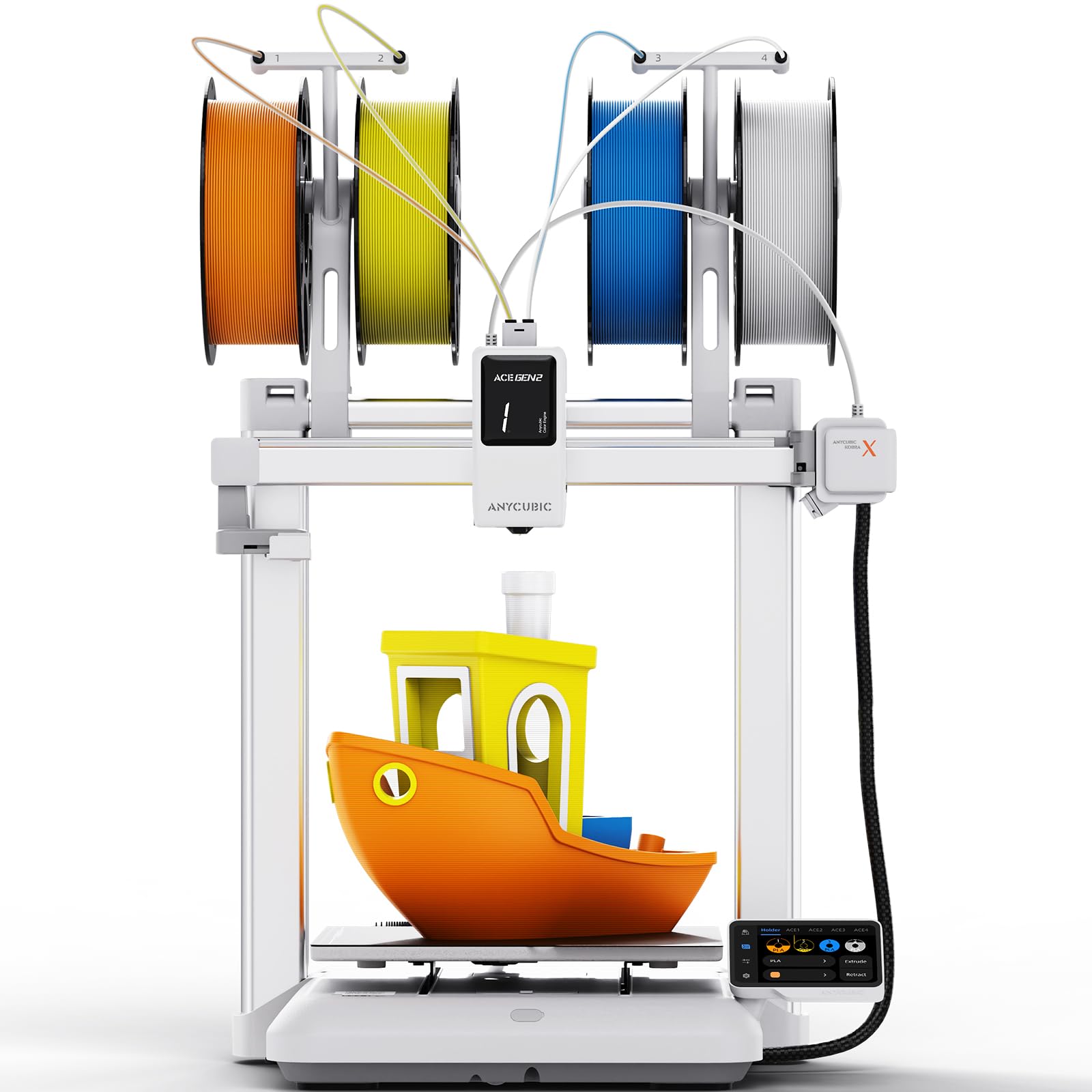
Whisper-quiet and color-happy — this one belongs in the living room, not the garage.
At 45dB, the Kobra X runs quieter than a normal conversation, which makes it one of the few printers that does not need its own dedicated corner. Native 4-color printing handles color swaps automatically through the ACE GEN 2 system, so kids can design in color without you manually stopping to change spools. The 260 × 260 × 260mm build volume gives real room to work, and LeviQ 3.0 auto leveling uses a 49-point measurement at 0.02mm accuracy for a solid first layer.
Another thing owners rank highly is the AI Guard feature: the printer detects foreign objects on the bed or printing errors like a “spaghetti” tangle, pauses immediately, and pings your phone. That is a safety net real beginners use, especially when they leave the machine unattended. The 720P camera streams real-time monitoring and automatic error alerts. Print quality comes out ahead in customer feedback, and reliability is the second most-mentioned trait.
Two things to know going in: this machine is brand new on the market so the owner base is still small, and the print bed really is 260 × 260 × 260mm, which is generous but not enormous. Assembly takes about 15 minutes from the start, pre-assembled with a modular design. A few owners mention minor quirks like non-level rear feet or a screen positioned close to the heated bed — the kind of first-weekend adjustments that come with any machine at this tier. Customer support has been responsive so far.
The standouts: 45dB quiet operation, 4-color printing from the start, and AI-powered spaghetti detection that pauses the print and pings your phone.
The honest trade-off: this is a new model with a smaller owner base, so long-term reliability is still being proven.
Built for: a household that wants the printer within earshot and a kid who wants color, not just single-tone prints.
Consider other options if: you want a decade-proven track record before you commit.
8. ELEGOO Centauri 2 Combo
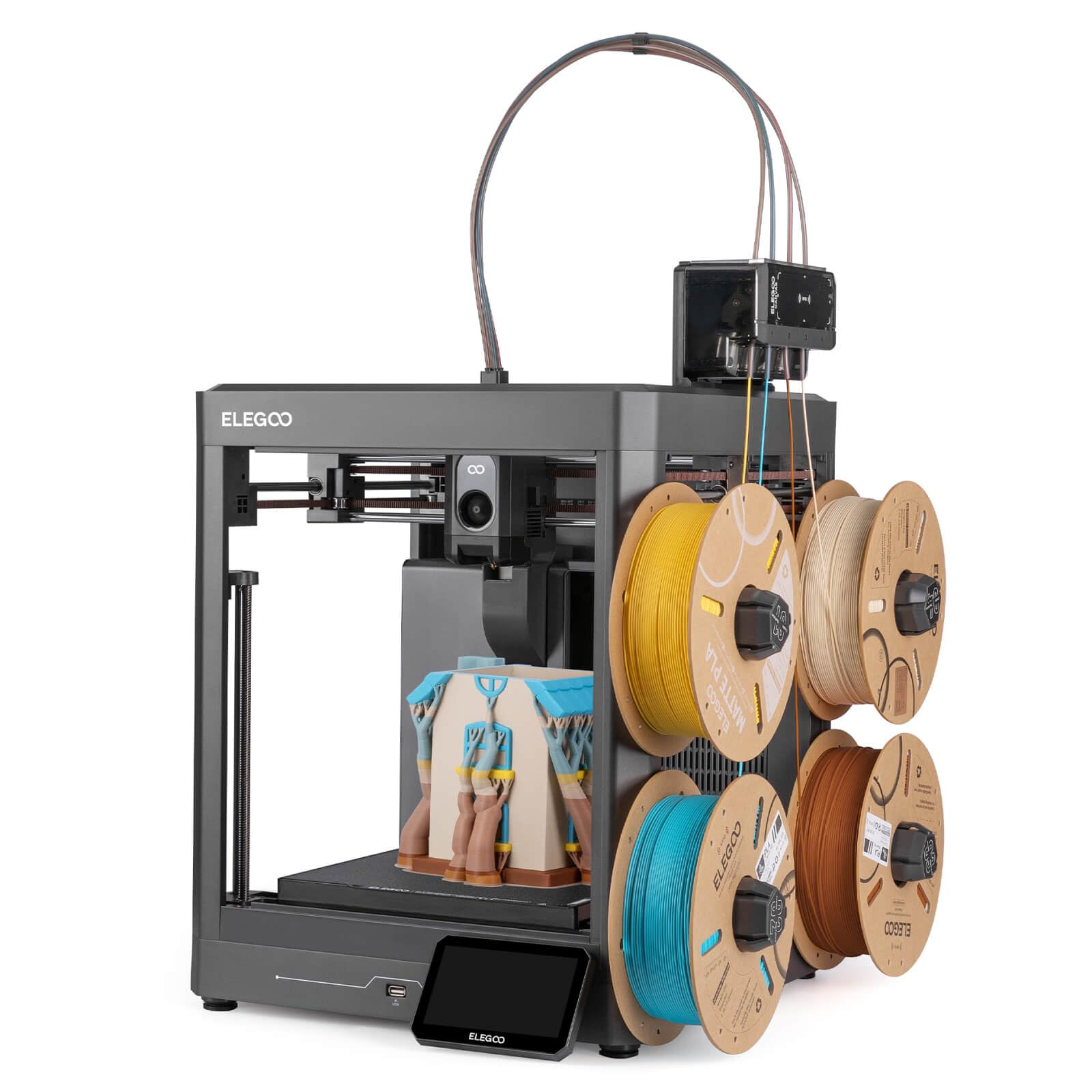
Multicolor printing without the premium price tag — and the biggest owner base on this list.
Four-color CANVAS printing with independent motors and instant color switching is the headline here. RFID filament recognition and auto refill mean you load the spools and the printer handles the threading. CoreXY motion reaches 500mm/s with 20,000 mm/s² acceleration, and 22 intelligent sensors monitor every print in real time to catch problems before they ruin a model. Full auto calibration and pre-print checks keep the setup work minimal — most customers note printing within 30 to 45 minutes of opening the box.
Print quality is what buyers notice most: 298 owners flag it and another 699 mention quality in general, the largest positive count on this list. The build volume is 256 × 256 × 256mm, which is enough for helmets, big toys, or multi-part projects without a split. Owners with 300–400 printing hours report continued reliability, and power-loss resume works when the lights go out.
The honest downside is longevity variance. Some units ship with quality-control hiccups that require troubleshooting with ELEGOO support, and durability is the one trait that trends negative in customer feedback. Nozzle temperature reaches 320℃ which opens up ABS and other advanced filaments, but you may need glue for some of them. At 33 pounds it sits heavy on the bench, and the enclosed toolhead does partially block your view of the print.
What wins people over
- 4-color CANVAS printing with auto refill and RFID filament detection
- 500mm/s CoreXY speed with 20,000 mm/s² acceleration
- 22 sensors monitor print quality in real time
- 256 × 256 × 256mm build volume with vibration compensation
Real-world friction
- Durability trends negative across buyer feedback — QC varies
- Heavy 33-pound machine that will not move once placed
- Some filaments require glue for adhesion on the plate
Strongest match for: a maker who wants 4-color printing and a whole ecosystem of software from day one — and does not mind a little troubleshooting.
Not for you if: you want out-of-the-box reliability with zero back-and-forth with support.
9. Bambu Lab P1S 3D Printer

The enclosed powerhouse — a beginner machine that quickly stops feeling like a beginner machine.
The P1S is the upgrade pick on this list, and the reason is the enclosure. A fully enclosed body helps advanced filaments like ABS and ASA hold their shape and protects the print from drafts. Speed reaches 500mm/s with 20,000 mm/s² acceleration and auto bed leveling works with a single button press — no calibration ritual. Setup is promised at 15 minutes, and an AMS unit (sold separately) opens up to 16 colors and multi-material printing. Supported filaments include PLA, PETG, TPU, PVA, PET, ABS, and ASA as ideal, with PA and PC as capable.
For owners doing actual work with the printer, the workflow is the selling point. One buyer used the P1S for in-house rapid prototyping, replacing outsourced work and recouping the cost in 6–8 prints. Another long-time Ender 3 user wished they had upgraded sooner: plug in, add filament, print. Multiple owners highlight that it prints near-perfect right from the start, with failures usually traceable to something small like a dirty build plate. Ease of use leads the feedback, with value for money right behind it.
Two caveats are worth flagging. First, it is the heaviest machine on this list at 38.9 pounds, so plan a permanent bench spot. Second, Bambu’s ecosystem is a walled garden — you get a polished experience but limited open-source flexibility. One owner received a unit that needed repair from the start, which is a rare but real risk with the brand. For most buyers though, this is a printer you grow into rather than outgrow.
Why it earns the premium slot: enclosed chamber, 500mm/s speed, auto bed leveling, and a supported filament list that spans PLA, PETG, TPU, PVA, PET, ABS, and ASA as ideal.
The honest caveats: 38.9 pounds means a permanent home, and the ecosystem is proprietary — buy in knowing you are playing on Bambu’s court.
Right for: a beginner with a dedicated workspace who wants a machine that handles advanced filaments and pays back with real prototyping work.
Pass if: you want open-source flexibility or a lightweight printer you can move.
Understanding the Specs
Print Speed & Acceleration
Speed is how fast the print head moves — 250mm/s, 500mm/s, 600mm/s — and acceleration is how quickly it gets up to that speed, measured in mm/s². Higher numbers mean shorter print jobs, but only if the printer’s frame can handle the motion without wobbling. For beginners, anything at 250mm/s or above is genuinely fast. What actually matters is whether the machine compensates for vibration, because that is what keeps fast prints looking clean.
Build Volume
Build volume is the maximum size object the printer can produce, written as length × width × height. Mini printers like the TINA2S and Tina2C print small figures and gifts in tight volumes. Full-size machines like the Anycubic Kobra X and Bambu Lab P1S offer 260 × 260 × 260mm, enough for helmets and one-piece functional parts. Pick a volume that matches what you actually plan to print — bigger machines are heavier and take up more space.
Auto leveling & first-layer quality
Auto leveling uses a sensor or probe to measure the nozzle-to-bed distance and adjust automatically. That single feature removes the most common reason beginners give up. CR Touch, LeviQ 3.0, and the FlashForge one-click system all do the same job in different ways. A properly leveled bed means the first layer sticks and the rest of the print has a fighting chance.
Filament & heated bed
Filament is the plastic spool your printer melts. PLA is the standard beginner material; PETG and TPU are tougher but still printable on most machines here. A heated bed is required for materials like ABS, and it improves adhesion for everything else. If a machine lists no heated bed, treat it as a PLA-only printer.
FAQ
Do I need to assemble a beginner 3D printer from the start?
What does auto bed leveling actually do and is it worth it?
How big of a build volume do I actually need on a first printer?
Do I need a heated bed for PLA?
Is a mini 3D printer actually usable for real projects or just toys?
How long does setup take before my first print?
What is the difference between PLA, PETG, and TPU filament?
Do I need WiFi or can I just use an SD card?
Is a multicolor printer hard to set up for a beginner?
How loud is a beginner 3D printer and where should I put it?
Final Thoughts: The Verdict
For most first-time buyers, the strongest pick is the Bambu Lab A1 3D Printer — its full-auto calibration and 10,000 mm/s² acceleration deliver the closest thing to a plug-and-print experience, and the pattern across buyer feedback keeps landing on reliability rather than troubleshooting. If a kid or a small desk is the priority, grab the TINA2S Mini at 6.4 pounds and 8.3 × 8.3 × 11.4 inches — its 123-owner print-quality track record is the standout in compact starter machines. And for advanced filaments plus a permanent enclosed setup, the Bambu Lab P1S is the one to reach for. If you are the type who wants to learn how the machine actually works, the Creality Ender 3 V3 SE trades a small weekend of setup for genuine DIY education at a friendly tier.
How We Picked
We do not accept paid placement. Every pick is matched to a real buyer and a real use-case; we do not hands-on test units.
Sources & Methodology
Specifications: manufacturer listings and product documentation. Review insights: verified customer reviews, as of September 2026. Pricing: not shown on this page (it changes often); check the current price via the retailer link.
As an Amazon Associate, Gadgets Feed earns from qualifying purchases. This does not affect which products we feature.