
Our readers keep the lights on and my morning glass full of iced black tea. As an Amazon Associate, I earn from qualifying purchases.
Specs are compiled from manufacturer listings and verified buyer reviews and can change over time — please confirm the key details on the product page before buying.
You want a monitor that pulls you into the game, not one that feels like staring through a mailbox slot. The real choice isn’t just inches — it’s matching resolution and refresh rate to what your PC can actually push, and picking between OLED’s deep blacks and VA panels’ brighter, cheaper picture. This list spans a budget-friendly 34-inch ultrawide to a massive 57-inch dual-4K behemoth, so you can see what each performance tier delivers before you anchor it to your desk.
I’m Min — the founder and writer behind Gadgets Feed. This guide is built by comparing the manufacturers’ published specifications and the patterns across verified customer reviews, so you get each pick’s real strengths and trade-offs instead of marketing spin.
If you’re ready to find the right screen for your setup, this breakdown of the best big gaming monitor options weighs refresh rate, resolution, and panel type against real-world buyer feedback.
Our Picks at a Glance


How To Choose The Best Big Gaming Monitor
Buying a large gaming monitor is a big purchase, so it pays to understand the three specs that define the experience: resolution, refresh rate, and panel type. Getting these right for your hardware and your favorite games is the difference between a screen that feels amazing and one that feels like a waste of desk space.
Resolution and Your Graphics Card
The resolution determines how sharp the image looks, but it also determines how hard your graphics card has to work. A 1440p ultrawide (3440 x 1440) is a great middle ground — it offers a huge view without demanding as much power as 4K. True 4K (3840 x 2160) looks stunning but needs a high-end GPU to hit high frame rates. If you have a mid-range card, a 1440p panel is the smarter pick.
Refresh Rate and Response Time
Refresh rate, measured in Hz, tells you how many times the screen updates per second. A 120Hz screen feels smooth; a 240Hz screen is a serious advantage in competitive games. Response time, measured in ms, is how fast a pixel changes color — a lower number means less blur in fast motion. For most players, 1ms and above is a solid target, while the fastest OLEDs hit an ultra-low 0.03ms.
Panel Type: VA, IPS, or OLED
The panel type controls the picture. VA panels (like on the Dell and Samsung Odyssey G9) offer deep contrast and rich blacks for a lower price, but can have slightly slower response times. IPS panels give accurate colors and wide viewing angles. OLED panels (like on the MSI and ASUS ROG picks) deliver perfect blacks and instant response, but need care to avoid burn-in and cost more.
Quick Comparison
| Model | Best For | Resolution | Refresh Rate | Panel Type | Amazon |
|---|---|---|---|---|---|
| Alienware AW3425DWM★ Best Overall | Ultrawide Value | 3440 x 1440 | 180Hz | VA | Amazon |
| Samsung Odyssey G50DTop Performer | Flat QHD Speed | 2560 x 1440 | 180Hz | IPS | Amazon |
| Dell S3425DWBest Value | Productivity & Work | 3440 x 1440 | 120Hz | VA | Amazon |
| MSI MAG 341CQP | Entry OLED | 3440 x 1440 | 175Hz | QD-OLED | Amazon |
| LG 34GX90SA-W | Smart OLED Features | 3440 x 1440 | 240Hz | OLED | Amazon |
| LG 34GS95QE | Competitive OLED Speed | 3440 x 1440 | 240Hz | OLED | Amazon |
| Alienware AW3423DWF | Creator Color Accuracy | 3440 x 1440 | 165Hz | QD-OLED | Amazon |
| MSI MPG 321CURX | 4K Ultrawide Power | 3840 x 2160 | 240Hz | QD-OLED | Amazon |
| ASUS ROG PG32UCDP | Dual-Mode Gaming | 3840 x 2160 | 240Hz | WOLED | Amazon |
| ASUS ROG PG32UCDM | Glossy 4K HDR | 3840 x 2160 | 240Hz | QD-OLED | Amazon |
| Samsung Odyssey Neo G9 | Maximum Immersion | 7680 x 2160 | 240Hz | VA Mini-LED | Amazon |
In‑Depth Reviews
1. Alienware 34 Curved Gaming Monitor – AW3425DWM
Our pick — over 4.5★ from 650+ verified ratings; the strongest balance of quality and price.
The massive ultrawide view that delivers top-tier speed without the top-tier price.
This Alienware is the pick that gives you the full 34-inch ultrawide experience — a 3440 x 1440 resolution stretched across a 1500R curve — without forcing you into the premium OLED price bracket. The 180Hz refresh rate and 1ms gray-to-gray response time keep fast scenes ghost-free. Buyers report that it “Replaced 7-year-old Acer 100Hz ultrawide,” and found the jump in smoothness immediately noticeable.
The VA panel’s 3000:1 contrast ratio delivers deeper blacks than typical IPS screens, and 400-nit brightness (VESA DisplayHDR 400 certified) gives HDR content real punch. 95% DCI-P3 coverage keeps games vibrant rather than washed out. The stand is a highlight too — it offers both height and tilt adjustment with a tool-less design that makes setup a minute-long job.
The thing everyone raves about is the sheer quality for the money — well over a hundred owners single it out as exceeding expectations for the price. Hardware-based low blue light reduces eye strain during marathon sessions without washing out colors. The one trade-off is the lack of speakers, so you’ll need to plan your audio separately.
Why the Crowd Loves It
- 180Hz refresh rate and 1ms response time make gameplay buttery smooth
- 3000:1 contrast ratio delivers deep, rich blacks for a VA panel
- Tool-less, height-adjustable stand is sturdy and easy to set up
- Exceptional value for a name-brand ultrawide
Things to Note
- No built-in speakers, so you’ll need external audio
- VA panel isn’t as responsive as IPS or OLED for the most competitive play
- Some find the 21:9 width too wide for everyday desktop use
Who it’s for: Gamers who want the rich ultrawide experience and high refresh rates while staying affordable.
Consider this: If you’re a die-hard esports player needing the absolute fastest panel, an IPS or OLED screen will edge it out on response time.
2. SAMSUNG 32-Inch Odyssey G50D Series QHD Fast IPS
A flat, fast, and color-accurate 32-inch screen that keeps up with the quickest reflexes.
If you prefer a flat screen over a curve, this Samsung is a powerhouse that doesn’t compromise on speed. It’s built for reaction time, with a blistering 180Hz refresh rate and a 1ms gray-to-gray response time — that’s a full 50% faster refresh than the Dell 34 S3425DW’s 120Hz, making it a better choice for fast-paced shooters. QHD (2560 x 1440) packs 1.7x the pixel density of Full HD for pin-sharp text and game details.
The Fast IPS panel’s 178° viewing angles keep colors accurate even off-center. It’s also G-Sync compatible, which keeps your GPU and monitor in sync to eliminate screen tearing. The adjustable stand swivels, tilts, and adjusts height, so you can dial in your perfect viewing position.
The thin bezel looks sleek on any desk, and buyers praise the build quality. But quality control is a recurring gripe — one buyer reports “QC issues: first unit had 4 dead pixel zones, second has 1; inspect on arrival.” Check your unit carefully on arrival, and watch for setup quirks like a mounting ring that won’t attach.
The Fast-Action Edge
- 180Hz refresh rate and 1ms response time are elite for competitive gaming
- G-Sync and FreeSync support prevent screen tearing
- Fully adjustable stand for height, tilt, and swivel
- Eye Saver Mode reduces blue light for long sessions
What to Watch For
- Quality control can be inconsistent, so inspect for dead pixels on arrival
- No USB hub or second HDMI port for extra connectivity
- Flat screen lacks the immersion of a curved panel
Reach for this if: You’re a competitive gamer who values raw speed and a flat, color-accurate screen over the ultrawide curve.
Look elsewhere if: You want a built-in USB hub or the rich wrap-around feel of a curved ultrawide.
3. Dell 34 Monitor S3425DW
The productivity powerhouse that turns a single USB-C cable into a full desktop setup.
While it handles games well, this Dell earns its place as the ultimate work-and-play hybrid thanks to one killer feature: single-cable USB-C connectivity. Plug one cable in (up to 65W power delivery) and it charges your laptop while carrying video and data, keeping your desk completely clutter-free. That’s a blessing if you dock a MacBook or work laptop daily.
The 34-inch WQHD (3440 x 1440) VA panel’s 3000:1 contrast ratio is 3x the Samsung Odyssey G50D’s 1000:1, delivering noticeably deeper blacks for movies and atmospheric games. It also has a claimed ultra-low 0.03ms response time, which makes motion look crisp despite the 120Hz refresh rate cap. The built-in speakers are a bonus, with better audio output than the previous generation.
99% sRGB and 95% DCI-P3 coverage make it a solid photo-editing choice, with one owner praising it for photography and Lightroom. The ComfortView Plus feature is a standout, reducing harmful blue light emissions to ≤35% for all-day comfort without washing out colors, which is rare. The main quibble from owners is the limited ports (HDMI, USB-C, USB-A only — no DisplayPort), and some note the VESA mount is recessed, requiring careful bracket assembly.
The Desk-Clearing Setup
- Single USB-C cable delivers video, data, and up to 65W laptop charging
- 3000:1 contrast ratio gives deep blacks for rich viewing
- Built-in speakers are better than most monitor audio
- ComfortView Plus reduces blue light to ≤35% without color shift
The Limits
- No DisplayPort input, limiting some connection options
- 120Hz refresh rate is lower than gaming-focused rivals
- VESA mount is recessed, making arm installation fiddly
Best suited for: Professionals and students who want a large, eye-friendly screen that doubles as a laptop docking station.
Think twice if: Pure competitive gaming is your priority — the 120Hz cap and VA panel lag behind faster IPS options.
4. MSI MAG 341CQP QD-OLED

The gateway to OLED’s perfect blacks and instant response, wrapped in a curved 34-inch screen.
Stepping up to OLED changes how games look, and this MSI is among the most accessible ways in. The QD-OLED panel (a quantum-dot OLED that boosts color and brightness) delivers a 1,500,000:1 contrast ratio — 1500x the contrast of a standard IPS screen — so blacks are perfect because pixels literally turn off. Pair that with a 0.03ms response time and 175Hz refresh rate, and motion stays clean even in fast shooters.
The Quantum Dot color layer ensures the color meets the market standard with a Delta E≤2 rating, so what you see is what the creator intended. Console gamers get a treat too: HDMI 2.1 with a full 48 Gbps bandwidth. The KVM feature lets you control multiple devices with one keyboard and mouse, which is a handy productivity boost.
The image quality and color accuracy are what everyone raves about — dark scenes look incredible, and the sharp details are superb. MSI OLED Care 2.0 helps reduce the risk of burn-in, which is the main fear with OLED. However, the OLED care routine can be intrusive, with a 5-minute refresh cycle running every 4-16 hours, and some users note text color fringing on light backgrounds.
The OLED Advantage
- Perfect blacks and 1,500,000:1 contrast ratio for stunning HDR
- 0.03ms response time eliminates ghosting entirely
- HDMI 2.1 with full 48 Gbps bandwidth for consoles
- KVM switch for controlling multiple devices
Know Before You Buy
- OLED care pixel refresh runs regularly, which can be distracting
- Text can show color fringing on light backgrounds
- Brightness is lower (250 nits) than some VA panels
Choose this if: You want the transformative OLED picture quality and are willing to follow its care routine.
skip it if: You do a lot of static office work — a VA or IPS panel is more forgiving for productivity.
5. LG 34GX90SA-W 34-inch Ultragear OLED

An OLED that’s also a smart TV, with a steep 800R curve that wraps around your vision.
This LG is for the gamer who wants everything in one screen. It’s not just a monitor; it runs LG’s webOS, giving you built-in access to Netflix, Prime Video, Disney+, and over 300 free LG Channels — no PC or console needed for streaming. You can even cloud game directly from the home screen with services like NVIDIA GeForce NOW. It’s a complete entertainment hub.
Performance is flagship-tier, with a 240Hz refresh rate and 0.03ms response time that keeps gameplay insanely fast and smooth. The steep 800R curve is the most aggressive on this list, extending your periphery to pull you deeper into the action. The OLED panel delivers up to 98.5% DCI-P3 color coverage and a 1.5M:1 contrast ratio, with DisplayHDR True Black 400 for deep blacks and brilliant highlights.
The picture quality is crisp, with owners praising the vivid colors and amazing contrast with true blacks. At 1300-nit peak brightness, HDR content genuinely pops. However, there’s a serious caveat: a reviewer flagged that LG installs adware/spyware via updates on Windows without consent, tracking inputs and selling data. This privacy concern is a real reason to think twice if you’re privacy-conscious.
The All-in-One Screen
- webOS gives built-in access to major streaming apps and cloud gaming
- 240Hz refresh rate and 0.03ms response for elite gaming
- 1300-nit peak brightness makes HDR content pop
- Steep 800R curve is incredibly rich
The Catch
- Reported LG software on Windows may track data — a privacy risk
- Dual-mode scaling has been criticized as poor
- Built-in speakers are loud but slightly muffled
Perfect for: Gamers who want a single screen for console, PC, and streaming without juggling inputs.
Watch out: If you’re strictly privacy-focused, the reported data collection makes this a hard pass.
6. LG 34GS95QE 34-inch Ultragear OLED

The pure gaming OLED with true blacks so deep, your desktop looks switched off.
This LG is the twin sibling of the 34GX90SA-W but stripped of the smart TV features and focused purely on gaming performance. It uses the same 34-inch 21:9 OLED panel with a dramatic 800R curve, but adds AMD FreeSync Premium Pro certification on top of G-Sync compatibility, ensuring a fluid, virtually tear-free experience across both NVIDIA and AMD graphics cards.
At 240Hz refresh rate and 0.03ms response time, motion stays razor-sharp. Owners describe the blacks as true black, not gray — “The first time my desktop loaded, I thought the monitor was off.” The 1.5M:1 contrast ratio and DisplayHDR True Black 400 (a VESA HDR certification for deep blacks) keep dark scenes detailed, so horror games and night-time racing feel new.
The thing everyone raves about is the monitor quality and the phenomenal refresh rate — it’s considered a masterpiece for gaming. The virtually borderless, ultra-thin design with height, tilt, and swivel adjustments makes it a sleek addition to any battlestation. However, the aggressive 800R curve isn’t for everyone — some find it too much for everyday desktop use, and the rear menu button is cramped for your hand.
The Competitive Edge
- 240Hz refresh rate and 0.03ms response for elite esports performance
- Officially validated NVIDIA G-Sync Compatible and FreeSync Premium Pro
- True blacks with DisplayHDR True Black 400 certification
- Virtually borderless, ultra-thin design
What to Consider
- The steep 800R curve may feel aggressive for productivity
- Reported LG software on Windows may track data — a privacy risk
- Rear menu button is awkward to use
This is for: Serious gamers who want certified-smooth, tear-free OLED performance without the smart TV extras.
Not for: Those who mainly do office work — the aggressive curve and OLED burn-in care make it a dedicated gaming weapon.
7. Alienware AW3423DWF Curved QD-OLED

The QD-OLED that balances jaw-dropping HDR gaming with professional-grade color accuracy.
This Alienware is a legend in the QD-OLED space because it serves both rich gaming and color-critical creation. Quantum Dot technology (which converts blue light into red and green) achieves a 99.3% DCI-P3 color gamut, so colors look rich and accurate. Creator Mode lets you switch between native DCI-P3 and sRGB color spaces with gamma adjustments, making it a real tool for content creators.
With a 0.1ms response time and 165Hz refresh rate, gameplay is stutter-free and incredibly smooth. The 1800R curve is more subtle than the LG’s 800R, making it more comfortable for mixed use. It’s also certified for AMD FreeSync Premium Pro and VESA AdaptiveSync, ensuring tear-free play. The iconic Legend 2.0 design features customizable RGB AlienFX lighting.
HDR implementation is among the best, with almost zero pixelation and class-leading clarity. Owners mention it’s “Incredible colors, great HDR implementation, perfectly functional VRR, just the right size for ultrawide desktop gaming.” The 3-year premium warranty includes OLED burn-in coverage, which eases long-term worries. The main weakness is the anti-glare coating — one owner notes it’s easily spotted or marked by gentle cleaning.
The Creator’s Tool
- 99.3% DCI-P3 color gamut with Creator Mode for color-critical work
- 3-year premium warranty with OLED burn-in coverage
- Subtle 1800R curve works well for both gaming and productivity
- Customizable RGB AlienFX lighting
The Trade-Off
- Anti-glare coating is delicate and easily marked by cleaning
- Text can be slightly less sharp on light backgrounds
- Stand legs take significant desk space
Built for: Gamers who also do color-sensitive work and want the reassurance of a solid burn-in warranty.
Bear in mind: The delicate anti-glare coating requires careful handling, especially during cleaning.
8. MSI MPG 321CURX QD-OLED

Step up to true 4K sharpness with a 240Hz QD-OLED panel and a hefty 98W laptop charge.
If you’ve got the GPU horsepower to drive 4K, this MSI is a revelation. The 32-inch 4K UHD (3840 x 2160) resolution on a QD-OLED panel delivers a level of detail and clarity that 1440p simply can’t match — text is razor-sharp and game worlds feel denser. It’s paired with a 240Hz refresh rate and 0.03ms response time for buttery-smooth, ghost-free motion.
The 1700R curve (a 1700mm radius bend) immerses you in games without distorting work windows. It’s G-Sync Compatible, so NVIDIA cards play tear-free. The USB-C port delivers 98W of power, enough to charge a demanding laptop with one cable. A built-in KVM switch lets you control multiple devices with one keyboard and mouse.
Owners call it “absolute visual perfection,” praising the vibrant colors and deep blacks. The HDR is excellent, especially after a firmware update — without it, one owner notes HDR looks washed out. The 3-year burn-in warranty covers the OLED panel, which helps ease the biggest OLED fear. However, it lacks built-in speakers, and the glossy screen attracts fingerprints.
The 4K Advantage
- True 4K UHD resolution for razor-sharp detail
- 98W USB-C power delivery for demanding laptops
- 240Hz refresh rate with 0.03ms response
- KVM switch for multi-device control
Things to Know
- No speakers built in
- HDR looks washed out until you update the firmware
- Glossy screen shows fingerprints easily
This is the one for: High-end PC owners with a powerful GPU who want 4K sharpness and elite gaming speed in one screen.
Keep in mind: You’ll need to update the firmware on arrival and plan for external speakers.
9. ASUS ROG PG32UCDP 32 Inch 4K 240Hz OLED
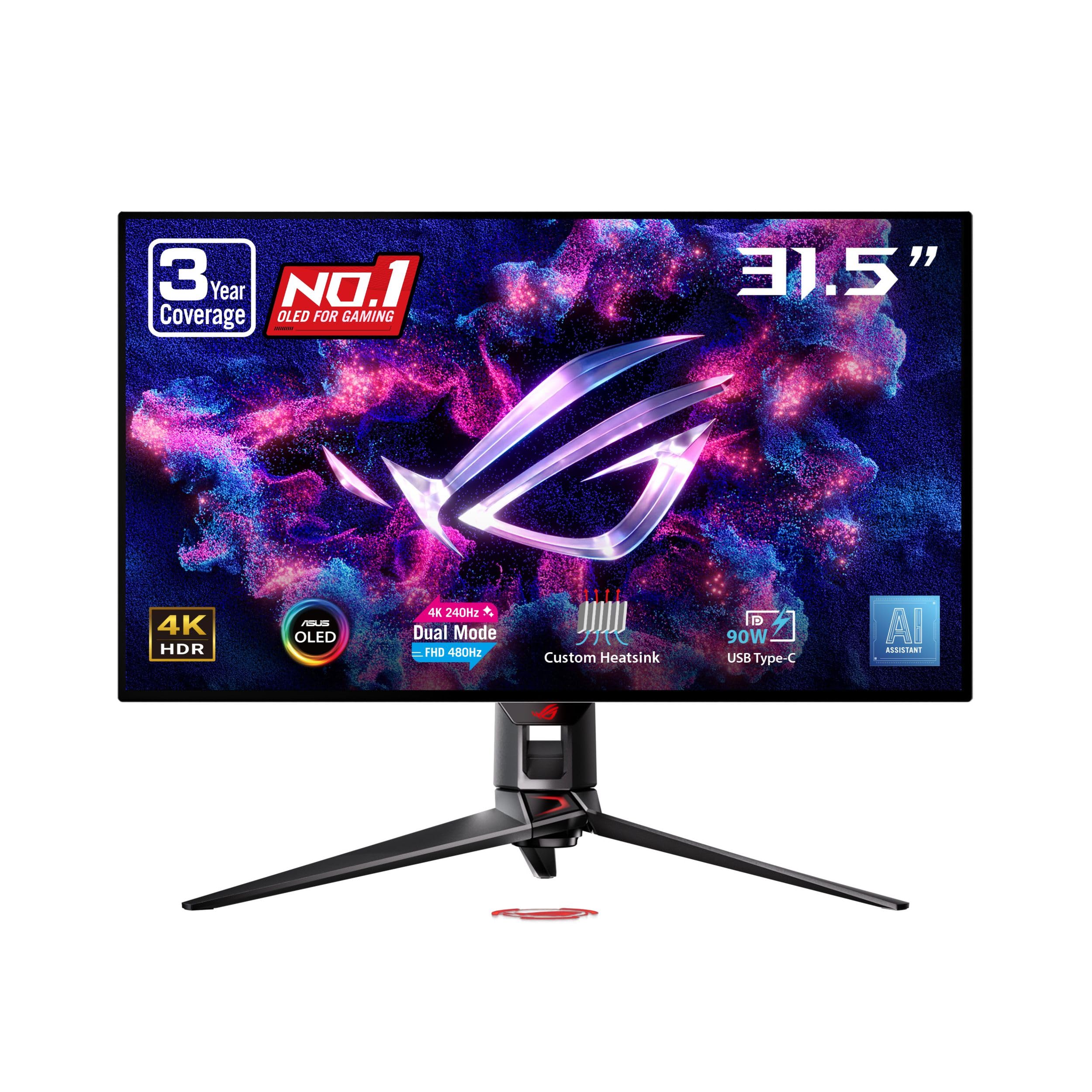
The shape-shifter monitor that runs 4K at 240Hz for beauty, or FHD at 480Hz for speed.
This is the monitor that refuses to make you choose between stunning visuals and competitive speed. The Dual Mode display lets you switch between 4K (3840 x 2160) at a smooth 240Hz for gorgeous single-player games, or drop down to FHD (1080p) at an insane 480Hz for ultra-competitive esports where every millisecond counts. It’s like having two monitors in one.
The WOLED panel delivers fantastic colors and deep blacks with a generous 99% DCI-P3 color space and true 10-bit color depth. ASUS’s exclusive OLED Anti-Flicker Technology helps reduce eye strain during refresh-rate fluctuations. The custom heatsink provides exceptional passive cooling, which helps prevent burn-in and keeps the panel running reliably for longer.
The display quality is outstanding, with one owner calling it a “truly visually transformative experience” for 4K 240Hz gaming. AI Assistant features like dynamic Crosshair and Sniper are nice gaming touches. However, the crowd is split on value — owners praise the picture but note the aggressive auto-dimming on static images and report some units failing after about a month of use, so reliability is worth watching.
The Best of Both Worlds
- Dual Mode: 4K at 240Hz for visuals, FHD at 480Hz for speed
- 99% DCI-P3 color with true 10-bit depth
- Custom heatsink improves cooling and reduces burn-in risk
- AI Assistant features for gaming
Worth Considering
- Aggressive auto-dimming on static images
- Some customers note units failing after a month of use
- Value for money is a point of debate among owners
Ideal for: Gamers who play a mix of cinematic epics and fast-paced shooters and want top speed for both.
Be aware: Some units have had reliability issues early on, so inspect and test thoroughly during the return window.
10. ASUS ROG PG32UCDM 32 Inch 4K 240Hz QD-OLED

The glossy 4K QD-OLED flagship that brings Dolby Vision and 1000-nit brightness to your desk.
For the absolute best HDR, this ASUS is a top contender. It packs a 32-inch 4K QD-OLED panel with 240Hz refresh rate and 0.03ms response time, but the real trick is 1000 candela per square meter peak brightness and Dolby Vision support — a rare combo in monitors. That delivers HDR rivaling a high-end TV, so games like Cyberpunk look stunning.
The glossy screen finish is a deliberate choice, and it’s one owners praise for clarity and vibrancy — one reviewer noted it prevents the eye fatigue they felt with matte screens. It covers a full 99% DCI-P3 gamut with Delta E < 2 color difference, so colors are exceptionally accurate. The advanced heat management system (custom heatsink and graphene film) is designed to reduce burn-in risk, and it’s backed by a 3-year warranty with burn-in coverage.
Reviewers agree this is an exceptional high-end gaming display with crisp picture quality, deep colors, and true black performance. The 140 PPI density (pixels per inch) is a balance — one owner notes it allows 1440p gaming at comparable quality to 4K, saving GPU costs. But the KVM switch is awkward, there’s only one DisplayPort, and the power brick is huge at 600W.
Why It’s a Flagship
- Dolby Vision support with 1000-nit peak brightness
- Glossy screen offers superior clarity and vibrancy
- 3-year warranty with burn-in coverage
- VESA DisplayHDR 400 True Black compliance
Flaws You’ll Notice
- Clunky built-in KVM switch
- Only one DisplayPort connection
- Massive 600W power brick takes up desk space
Reach for this if: HDR quality is your top priority and you have a GPU powerful enough to feed a 4K 240Hz panel.
Accept it: The big power brick and single DisplayPort are minor inconveniences for this level of picture quality.
11. Samsung 57″ Odyssey Neo G9 (G95NC)

The world’s first dual UHD behemoth that replaces an entire triple-monitor setup with one curved screen.
This is the monitor that ends the need for multiple screens entirely. The 57-inch display with Dual UHD resolution (7680 x 2160) is as wide as two 4K UHD monitors side-by-side, wrapped in an extreme 1000R curve. It’s a stunning 32:9 super-ultrawide that completely fills your peripheral vision. One owner reported it “replaces 3-monitor setup, eliminates neck pain.”
The Quantum Matrix Technology uses 2,392 local dimming zones with Quantum Mini LEDs to create 1,000,000:1 contrast ratio and 1000-nit peak brightness (VESA DisplayHDR 1000). This means deep blacks and bright, controlled highlights. The 240Hz refresh rate with a 1ms gray-to-gray response time keeps motion smooth, and the new DisplayPort 2.1 input delivers the full bandwidth needed for this massive resolution.
Owners are blown away by the picture quality, praising its suitability for both work and gaming — day traders love it for running multiple charts. CoreSync lighting projects colors into your room for extra immersion. It’s genuinely heavy though — one owner notes it needs a 40-50 lbs lift to mount. There are also mentions of firmware needing improvement, with standby issues and a short 3-foot DisplayPort cable included.
The Super-Ultrawide Dream
- 57-inch Dual UHD (7680 x 2160) replaces a triple-monitor setup
- 2,392 local dimming zones for deep blacks and 1000-nit peak brightness
- 240Hz refresh rate with a 1ms response time
- DisplayPort 2.1 input for full bandwidth
The Heavy Realities
<
- Extremely heavy — needs a 40-50 lbs lift for mounting
- Firmware needs improvement, with standby issues reported
- Included DisplayPort cable is only 3 feet long
Built for: Enthusiasts and professionals who want the ultimate rich field of view and have the desk space (and GPU) to feed it.
Plan for: A sturdy monitor arm or a second pair of hands — this is a heavy piece of hardware that demands careful setup.
Understanding the Specs
Refresh Rate (Hz)
This is how many times your screen redraws the image every second. A 60Hz screen updates 60 times a second, which feels standard. A 120Hz screen doubles that, making motion look smoother and less blurry. At 240Hz, fast-moving objects stay pin-sharp, which gives you a real edge in competitive shooters. To actually use a high refresh rate, your graphics card needs to be powerful enough to generate those frames in the first place.
Response Time (ms)
This measures how quickly a pixel can change from one color to another. A slower response time (like 5ms) can cause ghosting — a faint trail behind fast-moving objects. A 1ms response time is good for gaming, while OLED panels like the MSI and ASUS ROG picks hit an ultra-fast 0.03ms, which means virtually zero ghosting. For competitive play, this makes a real difference in how clearly you see enemy movement.
FAQ
Will a 34-inch ultrawide monitor fit on my desk?
What graphics card do I need for a 4K 240Hz monitor?
Is OLED worth the extra cost for a gaming monitor?
What is the difference between FreeSync and G-Sync?
Will a 57-inch super-ultrawide work for everyday office tasks?
How do I prevent burn-in on an OLED gaming monitor?
Is a curved monitor better than a flat one for gaming?
What does VESA DisplayHDR 400 mean?
Final Thoughts: The Verdict
If you want one dependable pick, the big gaming monitor winner is the Alienware AW3425DWM because it delivers the sought-after ultrawide experience with a high 180Hz refresh rate and deep VA contrast at a price that doesn’t demand a flagship GPU. If you want a flat screen built for pure competitive speed, grab the Samsung Odyssey G50D. And for the ultimate immersion that replaces an entire multi-monitor desk, the Samsung Odyssey Neo G9 is the one to reach for.
How We Picked
We do not accept paid placement. Every pick is matched to a real buyer and a real use-case; we do not hands-on test units.
Sources & Methodology
Specifications: manufacturer listings and product documentation. Review insights: verified customer reviews, as of August 2026. Pricing: not shown on this page (it changes often); check the current price via the retailer link.
As an Amazon Associate, Gadgets Feed earns from qualifying purchases. This does not affect which products we feature.