
Our readers keep the lights on and my morning glass full of iced black tea. As an Amazon Associate, I earn from qualifying purchases.
Specs are compiled from manufacturer listings and verified buyer reviews and can change over time — please confirm the key details on the product page before buying.
The best biometric door lock is the one that opens on your fingerprint in under half a second — and still lets you in when the battery dies. That is the whole decision. A fingerprint lock reads the ridges on your finger, matches them to the prints you saved, and retracts the deadbolt for you. No key hunt on a rainy porch, no hiding a spare under the mat. This guide covers nine real fingerprint and palm locks, from a value knob lock to a premium palm-vein deadbolt, and sorts out which one actually fits your door and your daily routine.
I’m Min — the founder and writer behind Gadgets Feed. This guide is built by comparing the manufacturers’ published specifications and the patterns across verified customer reviews, so you get each pick’s real strengths and trade-offs instead of marketing spin.
Fingerprint readers, battery life, and door-fit all vary wildly between these locks, so the wrong pick means a daily annoyance. Read on for the breakdown that makes choosing a biometric door lock simple.
Our Picks at a Glance

How To Choose The Best Biometric Door Lock
The biggest mistake buyers make is treating every fingerprint lock as the same device with a different logo. They are not. The reader technology, the power source, and the way the lock talks to your phone decide whether you love it in month one and still like it in month twelve. Here is what actually matters.
Fingerprint Reader Versus Palm Vein Reader
A fingerprint reader matches the ridges on your fingertip. A palm vein reader scans the vein pattern under your skin, so it never touches you at all. Finger readers are the norm and work well for most people. The catch is that dry, wet, or worn fingertips can cause a miss, which is why readers that advertise a specific recognition speed are worth a look. Palm readers sidestep that entirely — you hover your hand and the door opens, no contact, no smudged sensor.
Rechargeable Battery Versus AA Batteries
This one shapes your monthly routine. A lock with a built-in rechargeable pack means you plug in a USB-C cable when the level drops — no batteries to buy, but the lock is out of service while it charges. A lock that runs on AA batteries lets you swap in fresh cells in seconds and keep going. If you hate buying batteries, go rechargeable. If you hate waiting on a charge, go AA.
Does It Need A Gateway For Remote Access
Some locks connect straight to your home Wi-Fi, so you can open up from anywhere and get alerts without buying anything else. Others talk Bluetooth only, which means you need to be within range — and if you want true remote control, you must add a gateway sold separately. Check this before you buy. It is the most common surprise in owner reviews.
Door Fit And Installation
Most of these locks are designed for standard US doors and install with a screwdriver, no drilling. But door thickness and bore hole size still need to line up. Measure your door before ordering and check the lock’s stated compatibility. A lock that fits your door drops in during a coffee break; the wrong one turns into a weekend project.
Quick Comparison
| Model | Best For | Entry Methods | Fingerprint Capacity | Remote Access | Amazon |
|---|---|---|---|---|---|
| Tapo DL110★ Best Overall | Overall balance of price and features | 6 ways | 100 fingerprints | Built-in Wi-Fi | Amazon |
| Veise VE018Budget Champion | Budget keypad entry | 8 ways | 20 fingerprints | Gateway required | Amazon |
| Philips DDL210XSimplest Setup | Simplest no-app setup | Fingerprint, PIN, key | Not stated | None | Amazon |
| Yamiry Smart Deadbolt | Front door weather resistance | 5 ways | 5 fingerprints | Gateway required | Amazon |
| Veise VE017-L | Full handle-set replacement | 8 ways | Not stated | Gateway required | Amazon |
| Tapo DL105 | Slim doors with windows | 6 ways | 100 fingerprints | Built-in Wi-Fi | Amazon |
| Wyze Palm Lock | Touch-free palm entry | Palm, code, key | Not applicable | Built-in Wi-Fi | Amazon |
| Philips DDL240X | Wi-Fi with handle set | Fingerprint, PIN, key, app | 50 fingerprints | Built-in Wi-Fi | Amazon |
| Lockly Secure Plus | Anti-pick keypad security | Fingerprint, PIN, key | 99 fingerprints | Hub required | Amazon |
In‑Depth Reviews
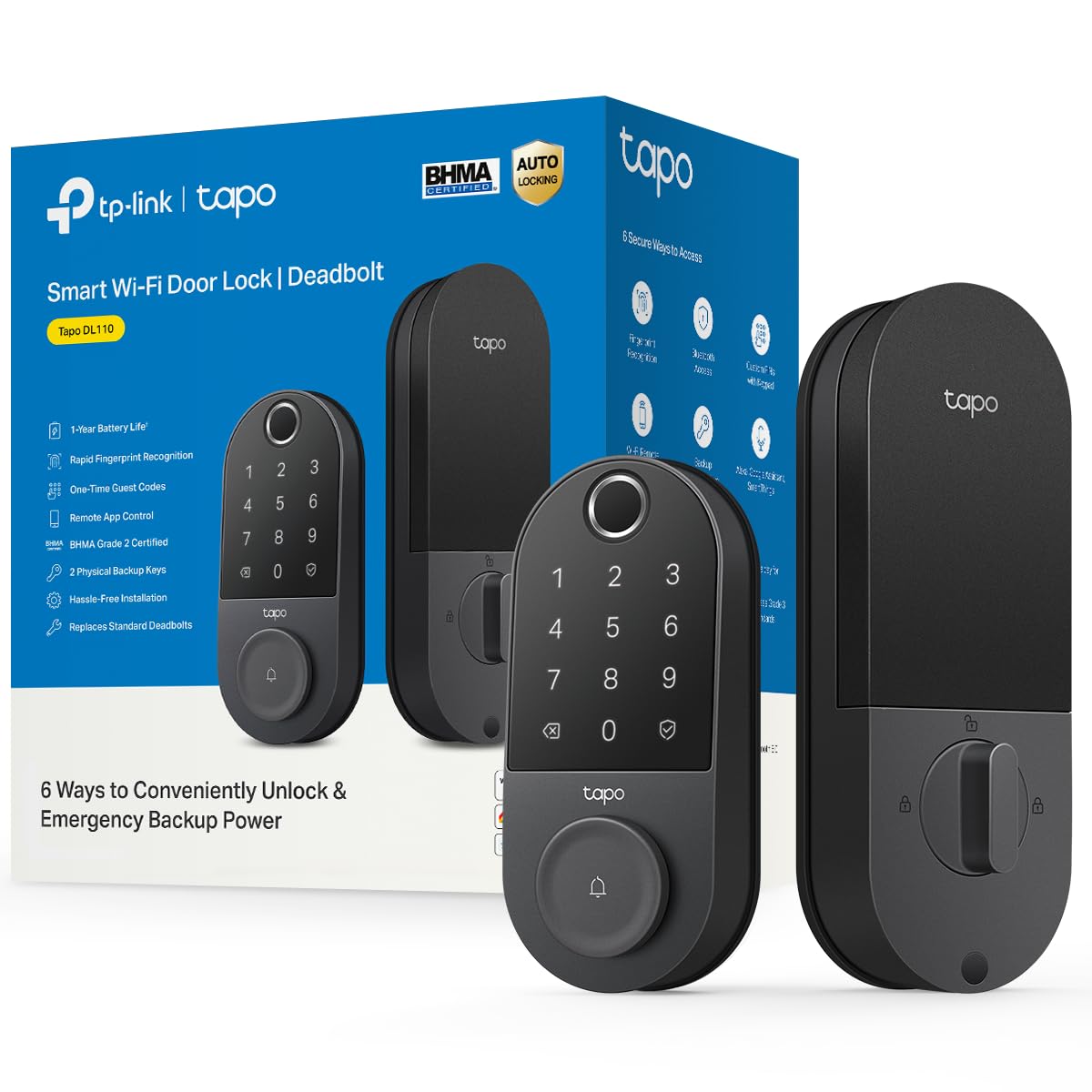
1. Tapo Smart Wi-Fi Door Lock, Deadbolt, Fingerprint Recognition, DL110
Our pick — over 4.5★ from 800+ verified ratings; the strongest balance of quality and price.
The do-everything deadbolt that recharges by cable instead of eating batteries.
If you want one lock that covers the whole household without asking anyone to change their habits, this is it. The Tapo DL110 deadbolt opens six ways — fingerprint, keypad passcode, the Tapo app, close-range Bluetooth, your smart home assistant, or the two included backup keys. You can save up to 100 different fingerprints, so every family member and the regular dog walker can get their own print instead of sharing a code. That is a huge margin over the Veise VE018 knob lock, which holds 20.
The fingerprint reader is the part you will notice daily. Tapo rates it at 0.42 seconds, and owners back that up — as several put it, the reader is “ultra-fast” and never misreads. The rechargeable battery pack is the real differentiator: no AA purchases, and the app shows you the level so you are never guessing. One long-term owner reported the battery sitting at 78% after eight months of roughly ten uses a day. Charging runs through USB-C, and if the pack ever dies flat you can power the lock from a USB-C bank to get back in.
The recurring gripe is the doorbell button on the keypad, which can fire a false alert if something brushes it. Owners also note the keypad stays invisible until you touch it, which takes a week to get used to. Neither is a dealbreaker — this lock’s owner base is large and happy, and the Tapo app ties into the same-brand mesh and camera gear if you already run that ecosystem.
Where It Wins
- Six ways in, including 100 saved fingerprints and two Schlage-compatible backup keys
- Rechargeable pack with USB-C — no AA batteries to buy, and a USB-C bank can rescue it if the pack drains
- Built-in Wi-Fi means remote open up and activity logs with no extra gateway purchase
- Install is genuinely short — owners consistently report ten to fifteen minutes
Where It Costs You
- The doorbell button is trigger-happy, and false alerts are the most common owner complaint
- No Matter or open API, so automations stay inside the Tapo ecosystem
- The keypad is hidden until touched, and the battery must be pre-charged before first use
Settle here if: you want fingerprint entry, app control, and remote access without buying a gateway or a battery subscription.
Think again if: you run Matter-based home automation or you want a keypad you can read at a glance.
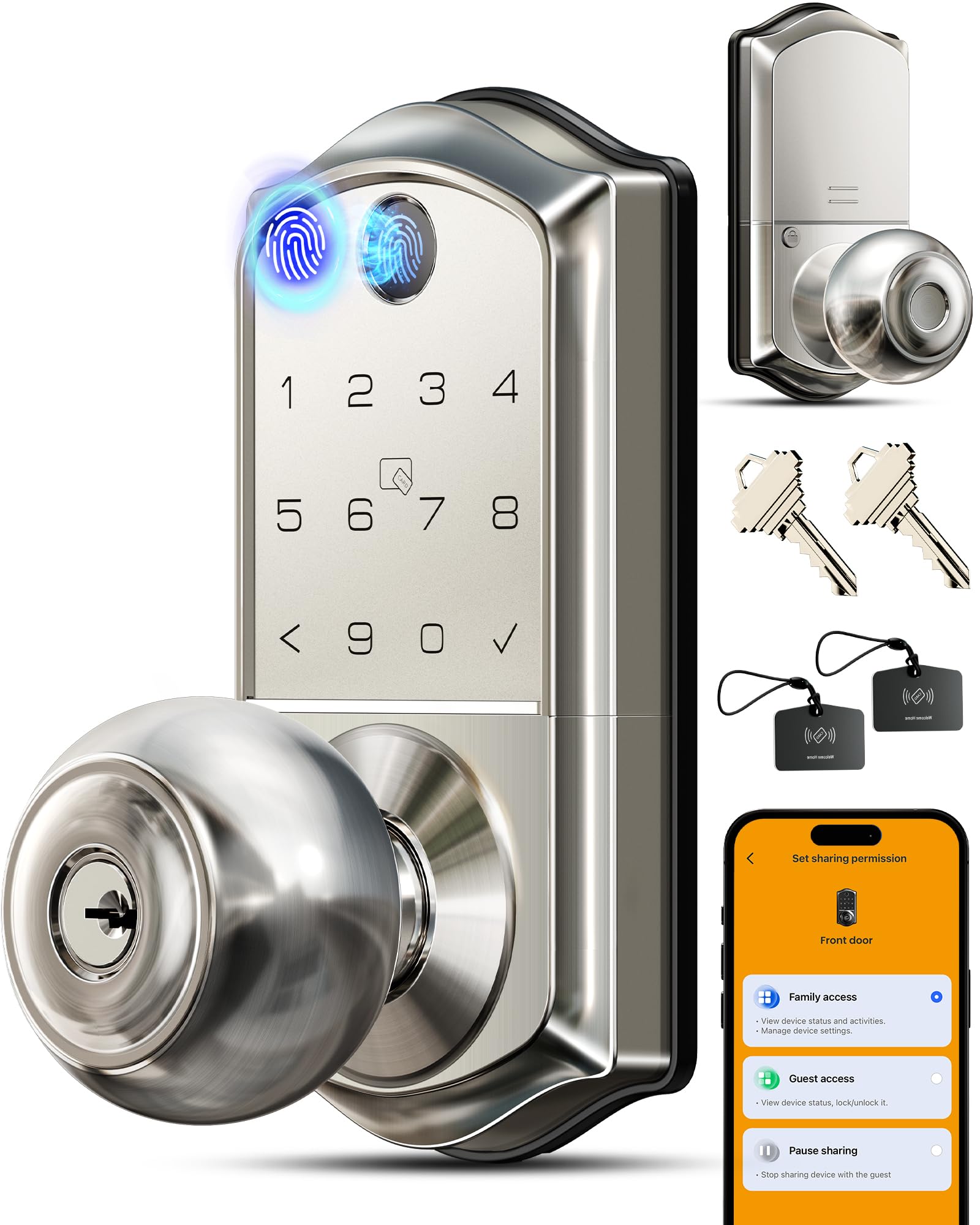
2. Veise VE018 Fingerprint Keypad Smart Door Knob Handle Lock, Satin Nickel
The knob-handle lock that quietly wins on reliability, not on gadget count.
Veise built this one around doing the basics well, and the owner base notices. The thing that wins people over is reliability — it is the aspect mentioned most by a wide margin in this lock’s reviews. You get eight ways in: a 0.2-second fingerprint, app control over Bluetooth, a keypad, an IC card, mechanical keys, remote authorization, code sharing, and auto-lock. The app stores up to 100 distinct codes and 100 fobs, so a rental property or a busy family can hand out access without ever duplicating a key.
The physical fit is where it separates from the deadbolts above. This is a knob handle assembly, so it is roughly 8.07 x 6.22 x 3.54 inches overall — noticeably bulkier than the slim Tapo DL110 at 5.91 x 2.69 x 1.29 inches. If your door already has a knob handle and you want the whole assembly swapped rather than adding a separate deadbolt, that extra size is the point, not a flaw. Batteries are four AA cells, and Veise rates them at up to 16 months of use, with alerts in the app when they run low.
Two honest notes. The recurring gripe is the mechanical feel — the knob sometimes needs a deliberate turn and can feel rough from the start, and a few owners have had the pressed knob separate from the housing. The fingerprint reader lands in mixed territory in reviews: fast and accurate for most, occasionally fussy if your fingertip is dry. Register a couple of fingers per person and this rarely comes up. Veise’s support team also gets named repeatedly as the reason people stayed with the brand — replacements and follow-ups arrive quickly.
Straight read: an affordable knob-handle lock where reliability and customer service carry the day, with a mechanical action that occasionally feels less refined than the electronics.
The caveat worth knowing: remote access needs the Veise G1 gateway sold separately — Bluetooth alone only reaches across the hall.
Reach for this if: you want one unit that replaces the whole handle and deadbolt, plus fingerprint and fob entry for a busy household.
Look elsewhere if: you want remote open up from the start, or you prefer an all-metal mechanical feel.
3. Philips Fingerprint Keyless Entry Door Lock with Touchscreen, Matte Black
The off-grid deadbolt that talks you through setup and never touches your Wi-Fi.
Not everyone wants their front door on the network. This Philips keypad deadbolt has no Wi-Fi, no app, no hub, and no Bluetooth — it is a fingerprint reader, a touchscreen keypad, and two mechanical keys, full stop. Programming happens by voice guidance in English, French, or Spanish, so you press numbers and the lock tells you what to do next. Owners who dislike smart-home tinkering tend to like this one a lot.
The reader is rated at 0.3 seconds and up to 99.99% accuracy, and the fingerprints live on the lock itself rather than in a cloud account. That matters if you care about keeping your entry data local. Philips also gives you unlimited one-time PIN codes for guests, cleaners, or deliveries — each code dies after a single use, which is a cleaner hand-off than a texted permanent code.
Here is the catch. This is the lock in the lineup with the most mixed feedback on reliability and auto-lock, and its auto-lock needs a helper habit: the lock has no door sensor, so the deadbolt extends on its timer whether the door is shut or standing wide open. Auto-lock is also off until you switch it on. Buyers report the keypad can be dim in bright sunlight, and the fingerprint reader is less dependable for children under six or adults over 65 — Philips states that limitation up front. If your household is adults with clean, dry fingers, none of this bites.
What the design buys you: a self-contained lock with no account, no cloud, and no network exposure — plus voice-guided programming that replaces the manual.
What you trade away: no remote open up, no app logs, and an auto-lock that fires on a timer regardless of whether the door is actually closed.
Best for: a front door you never want networked, in a household of adults who want fingerprints plus a keypad and nothing else.
Skip if: you need remote open up, timestamps on who came in, or you have young children or older adults relying on the reader.
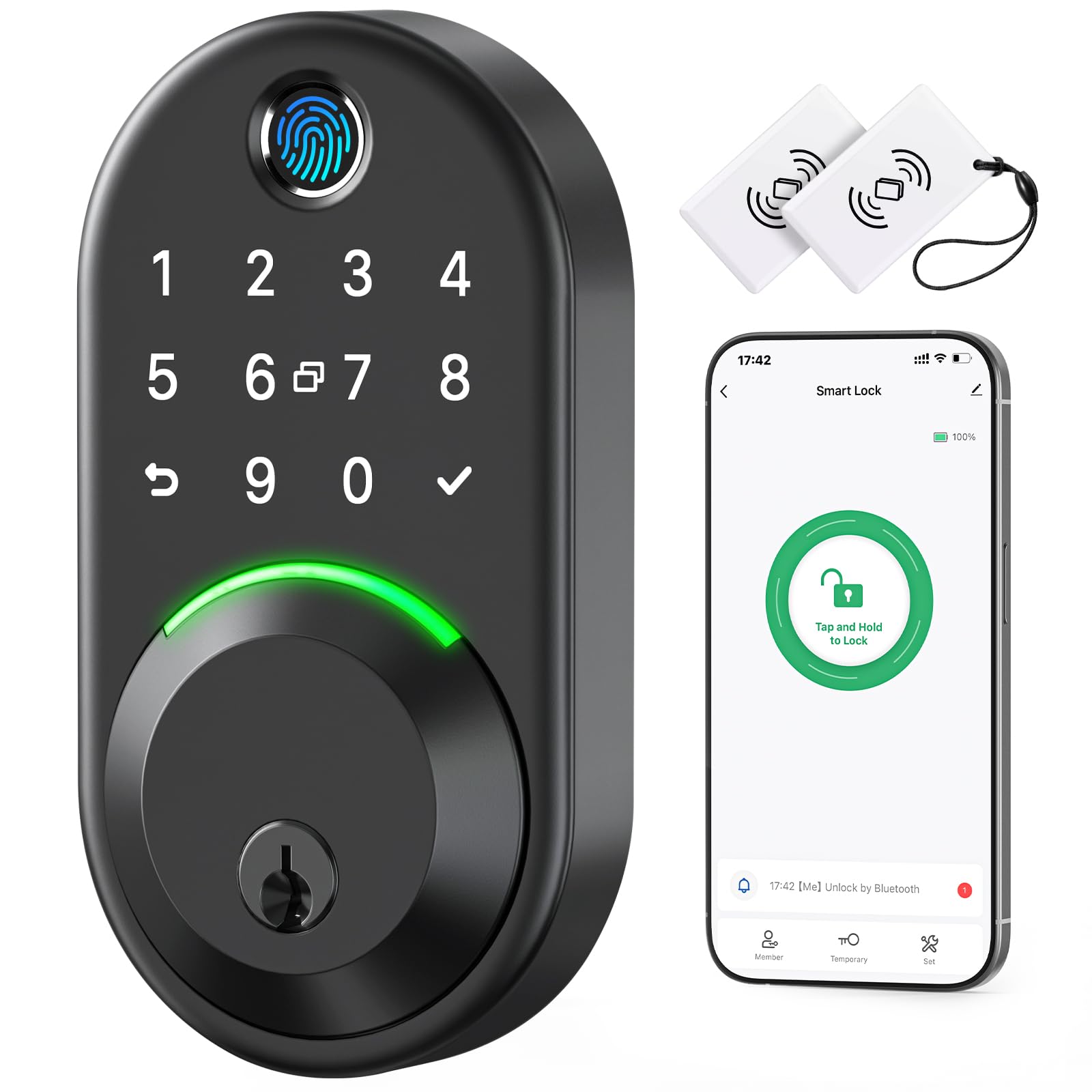
4. Yamiry Smart Deadbolt Lock with Keypad, Fingerprint Keyless Entry
Built for the door that gets rained on, snowed on, and baked all summer.
The Yamiry deadbolt is the lock to pick when your front door faces the weather directly. It carries an IP66 waterproof rating, which means it shrugs off rain and hose spray, and it is rated to operate from -22°F to 158°F. A covered porch lock never has to think about that. An exposed door absolutely does, and that single rating is why this one earns its spot.
The reader uses an AI algorithm with a self-learning chip: it keeps two fixed fingerprints and three that adapt over time, so your print gets easier to read the more you use it. Entry comes five ways — app, passcode, key fob, fingerprint, or physical key — and you get four ways to lock, including auto-lock and a long press on the checkmark button. Two key fobs are in the box, and the physical keys can be duplicated at any hardware store.
Install is the part owners call out most, and it is the second-heaviest theme in the reviews after build quality. No drilling, just a screwdriver, and the same-brand NICE DIGI app walks you through pairing. The honest trade-off is remote access: the lock ships Bluetooth-only at roughly a 6-foot range, so controlling it from work means adding the Wi-Fi gateway, sold separately. Owners also flag that a small share of units need a re-pair after the first battery change — a quick reset, not a return.
Why It Earns The Slot
- IP66 waterproof and rated from -22°F to 158°F — the widest weather window here
- Ships with two key fobs and two duplicable keys, so guests get a fob instead of a code
- Auto-lock, one-touch locking, passage mode, and anti-peep code entry all standard
- Owner reviews lean heavily on build quality and how simple the install is
The Honest Trade-Offs
- Remote control needs the Wi-Fi gateway, sold separately
- Only five fingerprints stored — fine for four people, tight for a large family
- Key fob pairing occasionally needs a second attempt on first setup
The right door for it: an exterior entry with no overhang, where rain and temperature swings are the daily reality.
Wrong door for it: a large household that needs many separate fingerprints, or anyone unwilling to add a gateway for remote access.
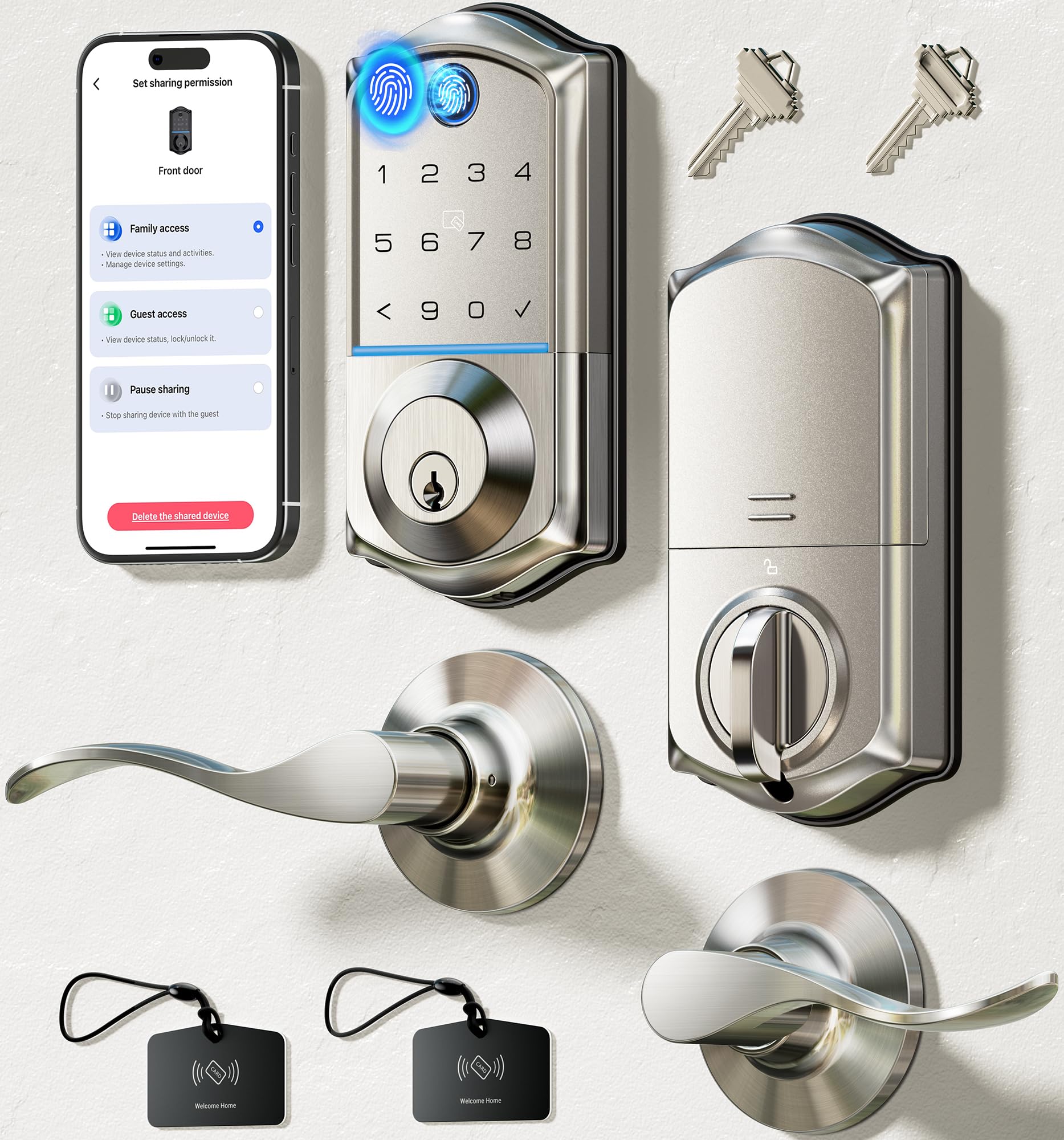
5. Veise VE017-L Fingerprint Smart Lock with 2 Lever Handle Set, Satin Nickel
A fingerprint deadbolt with two matching handles, so the whole door matches.
If your door currently has a mismatched collection of hardware, this kit fixes the look at the same time as the security. You get the Veise VE017-L fingerprint deadbolt plus two zinc-alloy lever handles in a satin nickel finish — one for each side of the door. The handles are built to last and match the lock’s finish exactly, which is a small detail that most deadbolt-only locks leave you to solve separately.
The reader is quick: Veise rates it at 0.2 seconds with 99.99% accuracy, using an FPC sensor with 500DPI resolution that reads from any angle. You can store 100 long-term codes and generate unlimited temporary or one-time codes in the app for guests, all managed through the KK Home app. Four AA batteries run it for up to a year, and there is a Type-C emergency port plus two physical keys for the day the cells finally give out.
The catch here is connectivity, and owners are blunt about it. The lock runs Bluetooth only unless you add the Veise G1 gateway, sold separately — meaning you cannot change codes from the office or let someone in from out of town without it. Bluetooth itself draws mixed reviews: some find it instant, others report drops that need a reconnect. Weigh that against the day-to-day, which is genuinely strong: owners praise how easy it is to use, and the finish looks sharp once installed.
What makes it stand out: an IP55-rated fingerprint deadbolt with two zinc handles included — the only pick here that solves the whole door in one box.
The known friction point: Bluetooth-only from the start, so remote code changes require the separately sold gateway.
Worth buying when: you want the deadbolt and both handles replaced together, in a finish that ties the door together.
Better to pass when: remote open up is a must-have and you would rather not add a gateway to make it work.
6. Tapo Smart Wi-Fi Deadbolt Door Lock, Fingerprint Recognition, DL105
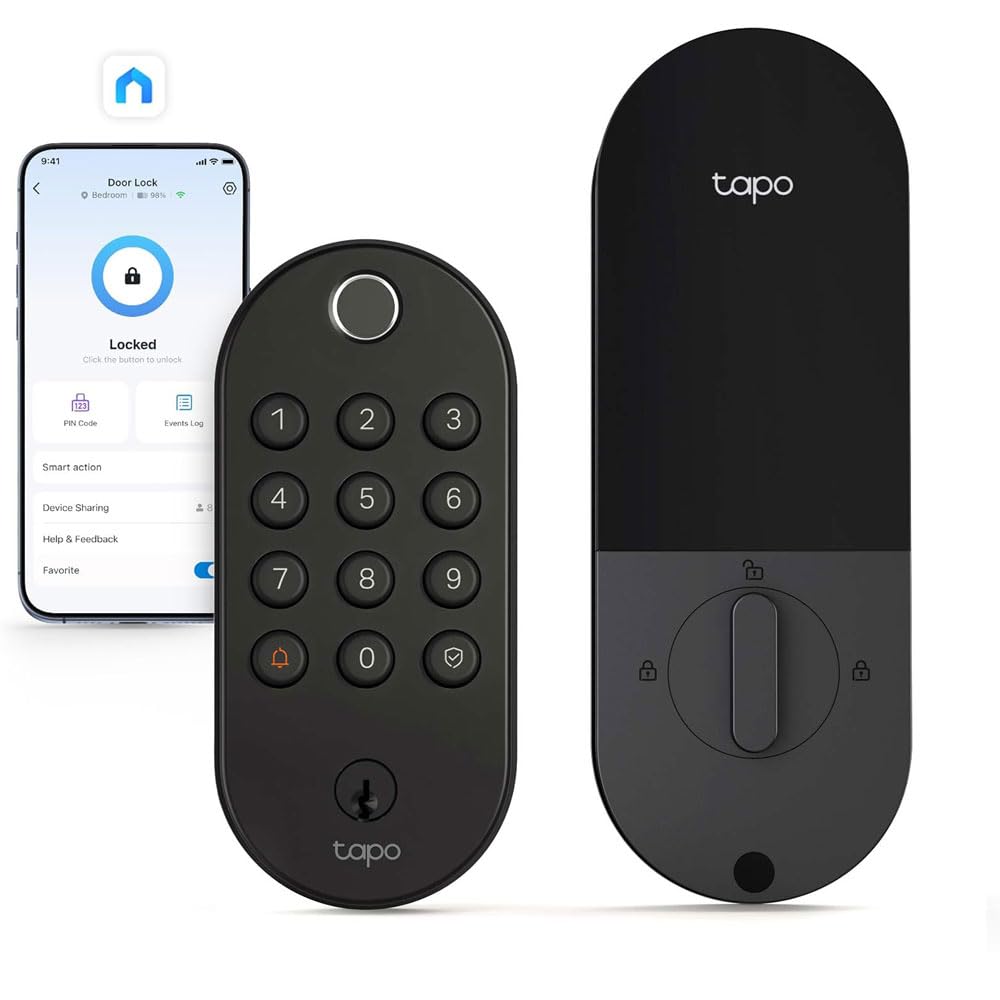
The slim deadbolt that fits the awkward door nothing else would.
Some doors are a problem. A door with a window panel, a narrow stile, a non-standard cutout — a lot of smart locks simply will not sit right on it. This Tapo DL105 is built slim for exactly that situation, and owners mention it fitting doors where previous locks would not. If you have stared at your entry and wondered whether anything will actually mount, start here.
It still covers the essentials. Fingerprint entry is rated at 0.5 seconds with room for 100 fingerprints, and the fingerprint reader works alongside six total ways in: the reader, keypad passcodes, the Tapo app, Bluetooth, your smart home assistant, or the two included backup keys. Wi-Fi is built in, so from-work open up and activity logs work without a hub. The lock is BHMA certified, IP54 rated, and rated from -22°F to 158°F. The battery recharges over USB-C and is rated for a year per charge.
Two things to plan for. The battery pack ships partly drained and charges slowly, so plug it in the night before you install. And the fingerprint reader draws mixed feedback — mostly fast and accurate, occasionally needing a second tap if your finger is dry. At this price it is not the value champion in the lineup, but for a difficult door it can be the only one that fits at all.
Strong Points
- Slim profile that fits narrow and window doors other locks cannot mount
- BHMA certified build with IP54 weather resistance and a wide -22°F to 158°F range
- Built-in Wi-Fi — remote access and detailed activity logs with no gateway
- Schlage SC1 key included and rekeyable to your existing key
Plan Around This
- Battery arrives partly charged and takes a full overnight to top up
- Fingerprint reader is occasionally fussy with very dry skin
- No brushed nickel option, which some buyers wanted
Made for: awkward doors — window panels, narrow stiles, and cutouts that leave standard deadbolts hanging.
Not the pick when: you have a standard door and want the best value in the lineup — the DL110 below it does more for less.
7. Wyze Palm Lock with Palm Vein Recognition

You never touch it — you hover your hand and the door opens.
This is the lock for anyone the fingerprint world has failed. Dry skin, worn ridges, arthritis, a hand that never lands the same way twice — all of it stops mattering here. The Wyze Palm Lock reads the vein pattern beneath your palm from a short distance, so entry is a hover, not a press. A five-year-old’s palm reads fine, and so does a hand that has been in gloves all morning. For a household with rheumatoid arthritis or older hands that fumble small keys, this is the change that actually helps.
The supporting hardware is generous. There is a rechargeable main battery rated for six months, backed by a second battery that carries two more weeks — so a low charge never means a locked-out night. If both flatline, a USB-C port takes any power bank for an emergency jump. The lock uses a gyroscope to sense when the door is actually closed before locking, which stops the deadbolt from firing into the trim. A millimeter-wave radar wakes the lock only when a person shows up, saving battery. It is IP53 weather-rated, BHMA3 certified, and works with Alexa and Google.
The honest caveat: palm recognition is superb for most people but not universal. A few customers note it is hit or miss for them while working flawlessly for their partner — the same person-to-person variance you get with fingerprints, just relocated. You also need the app to program it, and that step is buried in the manual. Neither keeps this from being the standout choice for a specific buyer.
The core advantage: a contactless palm-vein reader plus a main battery rated for six months and a backup that buys two more weeks — a genuinely locked-out-proof setup.
The one wobble: palm reading is superb for most, but a small share of users find it inconsistent for their particular hand.
Pick it when: fingerprints have failed you, or you want a truly touch-free entry on a door your whole family uses.
Hold off when: you are happy with a fingerprint reader and do not want to learn an app-based programming flow.
8. Philips Fingerprint Door Lock, WiFi Front Door Lock Set with Touchscreen
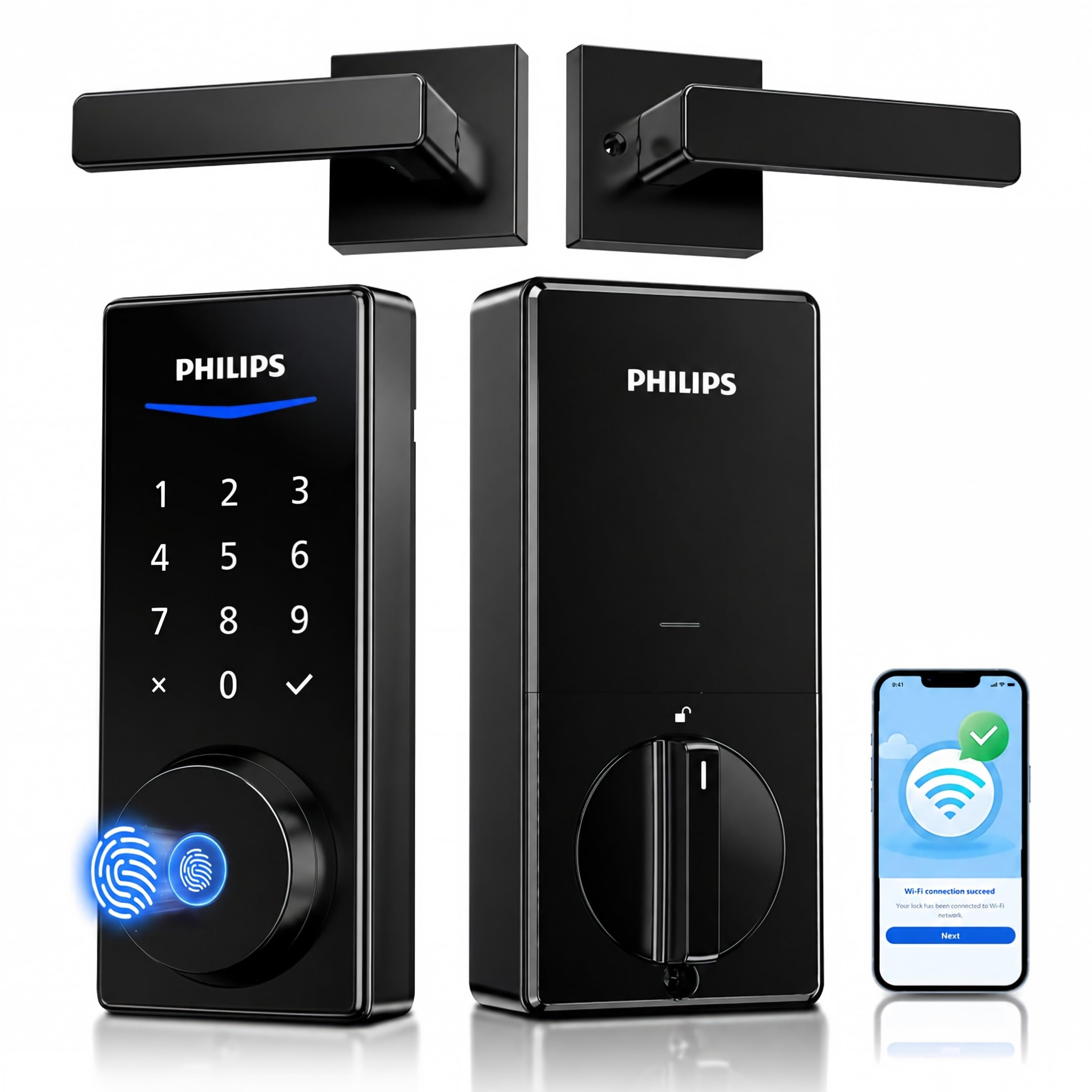
Wi-Fi control and a fresh handle set arrive in one box — no gateway to buy.
The Philips DDL240X is the pick for anyone who wants remote open up without adding a bridge to their router. Wi-Fi is built into the lock itself, paired over 2.4GHz, so locking, open up, alerts, and access history all work from your phone anywhere. The kit includes the lock plus two lever handles, so replacing the door hardware is a single order. Up to 50 fingerprints can be saved, along with 100 user PINs and unlimited one-time codes.
Owners like the reader — one reported it reading correctly on the first try every time, and others note it is fast enough to feel instant even when the finger lands at an angle. The touchscreen keypad is responsive, Alexa and Google voice control are supported, and multiple locks can live in the same app, which helps if you run more than one door. Install runs about twenty minutes for most, and the sculpted matte black housing looks heavier in person than the price suggests.
Two real caveats. The lock has no door-close sensor, so auto-lock fires on its timer whether or not the door is shut — you still have to close the door behind you. And battery life is the aspect with the most critical feedback: one heavy user reported the eight AA cells lasting around two months, while others go considerably longer. Rechargeable AAs are explicitly not recommended by Philips, so keep a pack of alkalines on the shelf.
Why it is here: genuine built-in Wi-Fi, a Wi-Fi-free-of-gateways promise, and a two-handle kit that upgrades the whole door in one job.
The catch to weigh: no door-close detection, and the AA appetite runs higher for heavy users than the marketing suggests.
An easy yes if: you want true remote access with zero extra hardware and a matching handle set delivered together.
A harder sell if: you open your door twenty times a day, or you specifically want a lock that knows when the door is closed.
9. Lockly Secure Plus Smart Deadbolt Lock with 3D Biometric Fingerprint

The keypad that shuffles its own numbers so nobody can peek or guess your code.
If someone has ever watched you type your door code from across the street, this is the lock you want. Lockly’s patented PIN Genie keypad shows four virtual buttons with three digits on each, and the digits move to new positions after every use. Anyone trying to learn your code from finger smudges or a shoulder glance comes up empty. It also grants offline access codes that work on a schedule without any Wi-Fi or internet, which is perfect for a cleaner or a dog sitter.
The biometric side is a second-generation 3D fingerprint sensor that recognizes in 0.3 seconds, open up in 0.5 seconds, and stores up to 99 prints. Lockly reports 100 million-plus fingerprint accesses granted on this sensor design. Around that: app control, physical keys, eKeys sent to phones, and a rekeying ability that lets you swap the key cylinder without replacing the whole lock. You also get five years of mechanical and finish warranty plus two years on electronics, which is the longest coverage on this list.
The honest trade-off is remote monitoring. This lock needs an additional Wi-Fi hub to send real-time alerts and status updates to your phone — without it, you are Bluetooth-only. On reliability, the score is mixed: many owners say it works like a charm, while a smaller group report it stopping altogether, so support and warranty matter more here than elsewhere. For a rental or office where code security is the priority, those trade-offs still land on the right side.
Why It Stands Out
- PIN Genie keypad scrambles its digits after every use — code-guessing and smudge-reading do not work
- 3D fingerprint sensor recognizes in 0.3 seconds and stores up to 99 prints
- Offline access codes work on a schedule with no Wi-Fi or internet at all
- Five years of mechanical and finish warranty plus two years of electronics
What To Budget For
- Remote monitoring and alerts need an additional Wi-Fi hub, sold separately
- Reliability feedback is mixed — a smaller group of reviewers point out units that stopped working
- Instructions are clear but the install can run two hours on some doors
A strong match for: rentals, offices, and any door where keypad secrecy and offline guest codes matter more than app polish.
Only worth it if: you value the anti-peep keypad and long warranty, and accept adding a hub for remote alerts.
Understanding the Specs
Fingerprint Recognition Speed (in seconds)
This number is how long the lock takes to read your finger and open up the deadbolt. Lower is faster. A lock rated at 0.2 seconds feels instant — you touch and the bolt retracts before your hand leaves the plate. A lock rated at 0.5 seconds is still quick, roughly a heartbeat, but you notice the tiny pause if you are carrying groceries. For daily use, anything under half a second feels invisible. Above that, you start to wonder if the reader missed you, which is where people tap twice.
Fingerprint Storage Capacity
This is how many different fingerprints you can save. A lock that stores 100 prints means every family member can save several fingers — thumb for the left hand, index for the right, so a bandaged finger is never a problem. A lock that stores only 5 prints means tight math. Count your household, add a couple of extra fingers per person as backup, and add a print or two for regular visitors you trust with keys. Get the capacity wrong and someone ends up on the keypad permanently.
Battery Source (Rechargeable vs AA)
Rechargeable packs plug into USB-C and the app tracks the level for you. The upside is no batteries to buy and precise level readings. The downside is the lock is offline while it charges, so you plan around it. AA cells swap in seconds at any hour, and you keep a spare pack on the shelf. Pick based on which annoyance bothers you less: buying batteries, or not having your lock for a few hours.
Remote Access and Gateways
Remote open up means you can let someone in from across town. Two paths exist: a lock with built-in Wi-Fi controls itself over your network, or a Bluetooth-only lock paired with a separate Wi-Fi gateway. The built-in path is simpler but sometimes locks you into the maker’s app. The gateway path is cheaper on lock cost but adds a purchase and a setup step. Check which one a lock uses before buying, because this is the most common surprise in owner feedback.
FAQ
Will a biometric door lock fit my existing deadbolt hole?
What happens if the batteries die and you are locked out?
Do I need Wi-Fi for a biometric door lock to work?
Why does my fingerprint sometimes not register on these locks?
Is a palm vein lock more secure than a fingerprint lock?
How long does the battery last on a biometric door lock?
Can I share temporary access with guests and a cleaner?
Does auto-lock fire if the door is standing open?On most of these locks, yes — and that is worth understanding before you buy. The Philips DDL210X has no door sensor, so the bolt extends on its timer whether the door is shut or left open, and auto-lock is off by default until you enable it. The Wyze Palm Lock is the exception: a built-in gyroscope detects the angle and movement of the door and only locks once it senses the door has actually closed, which stops the deadbolt from firing into the trim. Several other picks here lack door-close detection too, so always pull the door shut behind you.?
Which biometric lock is best for a rental property or Airbnb?
Do these locks work with Alexa and Google Assistant?
Final Thoughts: The Verdict
For most buyers, the biometric door lock winner is the Tapo DL110 because it pulls together 100 fingerprint slots, six ways in, built-in Wi-Fi for remote access with no gateway, and a rechargeable USB-C battery rated for a year — all in one deadbolt that installs in about fifteen minutes. If contactless entry is what you want, grab the Wyze Palm Lock for its palm-vein reader and the main-plus-backup battery setup that keeps you locked out only in theory. And for a front door with no overhang, the Yamiry Smart Deadbolt is the one to reach for, with IP66 waterproofing and a -22°F to 158°F operating range. For a slim or window door nothing else fits, take the DL105; for a rental or office, the Lockly Secure Plus and its scrambling keypad. Match the battery type and connectivity to how you actually live, and the daily walk-in stops being a chore.
How We Picked
We do not accept paid placement. Every pick is matched to a real buyer and a real use-case; we do not hands-on test units.
Sources & Methodology
Specifications: manufacturer listings and product documentation. Review insights: verified customer reviews, as of September 2026. Pricing: not shown on this page (it changes often); check the current price via the retailer link.
As an Amazon Associate, Gadgets Feed earns from qualifying purchases. This does not affect which products we feature.