
Nothing kills a productive work session like fumbling with a wired headset, dealing with driver issues, or having your laptop’s onboard mic pick up every keystroke instead of your voice. The right pair of wireless earbuds can transform your laptop into a focused communication hub — whether you’re deep in a Zoom marathon, recording a podcast, or just trying to hear the subtle details in a video edit without latency ruining the timing.
I’m Min — the co-founder and writer behind Gadgets Feed. I spend my time parsing through dozens of spec sheets, decoding Bluetooth codecs, and stress-testing battery claims to separate real performer earbuds from the marketing hype.
After analyzing over 300 hours of customer feedback and technical data, I’ve narrowed the field to the seven strongest contenders for the best bluetooth earbuds for laptop users who demand reliable connectivity, clear calling, and all-day battery without the cable tangle.
How To Choose The Best Bluetooth Earbuds For Laptop
Selecting earbuds for laptop use shifts the priority list compared to general-purpose earbuds. Call quality, connection stability, and seamless device switching matter more than gym-proof seals or the deepest sub-bass extension. Here is the specific criteria to weigh before adding any pair to your cart.
Multipoint Connectivity — The Double-Device Lifeline
A laptop user almost always has a phone nearby. Bluetooth Multipoint allows your earbuds to stay simultaneously paired to both the laptop and the phone. When a call arrives on your mobile while you are in a desktop meeting, the earbuds automatically switch — no manual disconnection and re-pairing. Without multipoint, expect to hear “your Bluetooth device is ready to pair” repeatedly throughout your day.
Microphone Architecture: Boom vs. Built-In
All earbuds have microphones, but not all mics are built for the laptop conference room. A detachable boom mic — like the design on the JLab Work Buds — positions the capsule close to your mouth, dramatically improving voice pickup in open-plan offices or coffee shops. Standard built-in mics rely on beamforming and noise-suppression algorithms; these can work well in quiet homes but struggle when a fan hums or a keyboard clicks. If your calls happen in noisy environments, prioritize earbuds with dedicated call-mic hardware rather than passive noise cancellation.
Codec Support and Latency
Bluetooth audio codecs bridge the gap between your laptop and earbuds. The standard SBC codec works for everything but introduces noticeable lip-sync delay during video playback. Qualcomm aptX (especially aptX Low Latency or aptX Adaptive) cuts that latency below 40 milliseconds, making audio and video feel instant. Laptops running modern Windows or macOS handle aptX natively on supported hardware. LDAC offers higher-resolution streaming for music production or critical listening, but adds slight latency. For pure work-and-conference use, aptX or the newer LC3 (LE Audio) codec delivers the tightest laptop experience.
Battery Life That Matches Your Shift
Laptop users often wear earbuds for hours-long stretches. A single charge below 6 hours means you will hit battery anxiety before your third meeting ends. Look for earbuds with at least 8 hours per charge, and a case that provides two or three full recharges. Total playtime above 30 hours (buds plus case) ensures you can work a full week without hunting for a USB-C cable. Fast charge — 10 minutes for 2 hours of playback — is a quality-of-life bonus worth chasing.
Quick Comparison
On smaller screens, swipe sideways to see the full table.
| Model | Category | Best For | Key Spec | Amazon |
|---|---|---|---|---|
| EarFun Air Pro 4 | Premium | Hi-Fi laptop audio & low latency | Snapdragon Sound, aptX Lossless | Amazon |
| Dell Pro Plus EB525 | Premium | Windows Teams & Webex calls | AI-based noise-cancelling mic | Amazon |
| Bose QuietComfort | Premium | Supreme noise cancellation | 8.5h battery, Bluetooth 5.3 | Amazon |
| Soundcore Space A40 | Mid-Range | Long battery & adaptable ANC | 50h total, LDAC Hi-Res | Amazon |
| JLab Work Buds | Mid-Range | Call clarity with boom mic | 55h total, Multipoint BT 5.3 | Amazon |
| Middle Rabbit SW4 | Mid-Range | Dongle + Bluetooth versatility | 2.4GHz dongle, 40ms latency | Amazon |
| JBL Vibe Beam | Budget | Casual laptop listening & gym | 32h total, IP54, fast charge | Amazon |
In‑Depth Reviews
1. EarFun Air Pro 4

The EarFun Air Pro 4 sits at the top because it delivers premium codec support — Snapdragon Sound, aptX Lossless, LDAC, and LC3 — all within a sub-premium budget. For laptop users, this translates to near-zero audio latency on Windows laptops that support aptX Adaptive and full Hi-Res Wireless audio for music production or critical video editing. The Qualcomm QCC3091 SoC drives the adaptive hybrid noise cancellation, which automatically adjusts to your ear canal shape and environment, reaching up to 50dB of attenuation.
Battery life hits a practical 11 hours per charge with ANC off, and the case extends the total to 52 hours. A 10-minute quick charge buys two extra hours of playback. Bluetooth 5.4 with multipoint lets you hop between a MacBook and an iPhone without diving into settings. The companion app offers a customizable EQ and sound profile matching, though the app’s initial connection can be finicky for some users.
The six-microphone array with Qualcomm cVc 8.0 and AI algorithms effectively suppresses wind and background chatter during calls. Outgoing voice clarity is strong, though not quite as natural as a dedicated boom mic solution. The fit is secure for desk work and light movement, but aggressive exercise may loosen the seal.
Why it’s great
- aptX Lossless and LDAC for laptop Hi-Res streaming
- 50dB adaptive hybrid ANC
- 52-hour total battery with fast charge
Good to know
- App connection can be erratic on initial setup
- Case feels weighty; no wireless charging
2. Dell Pro Plus Earbuds EB525
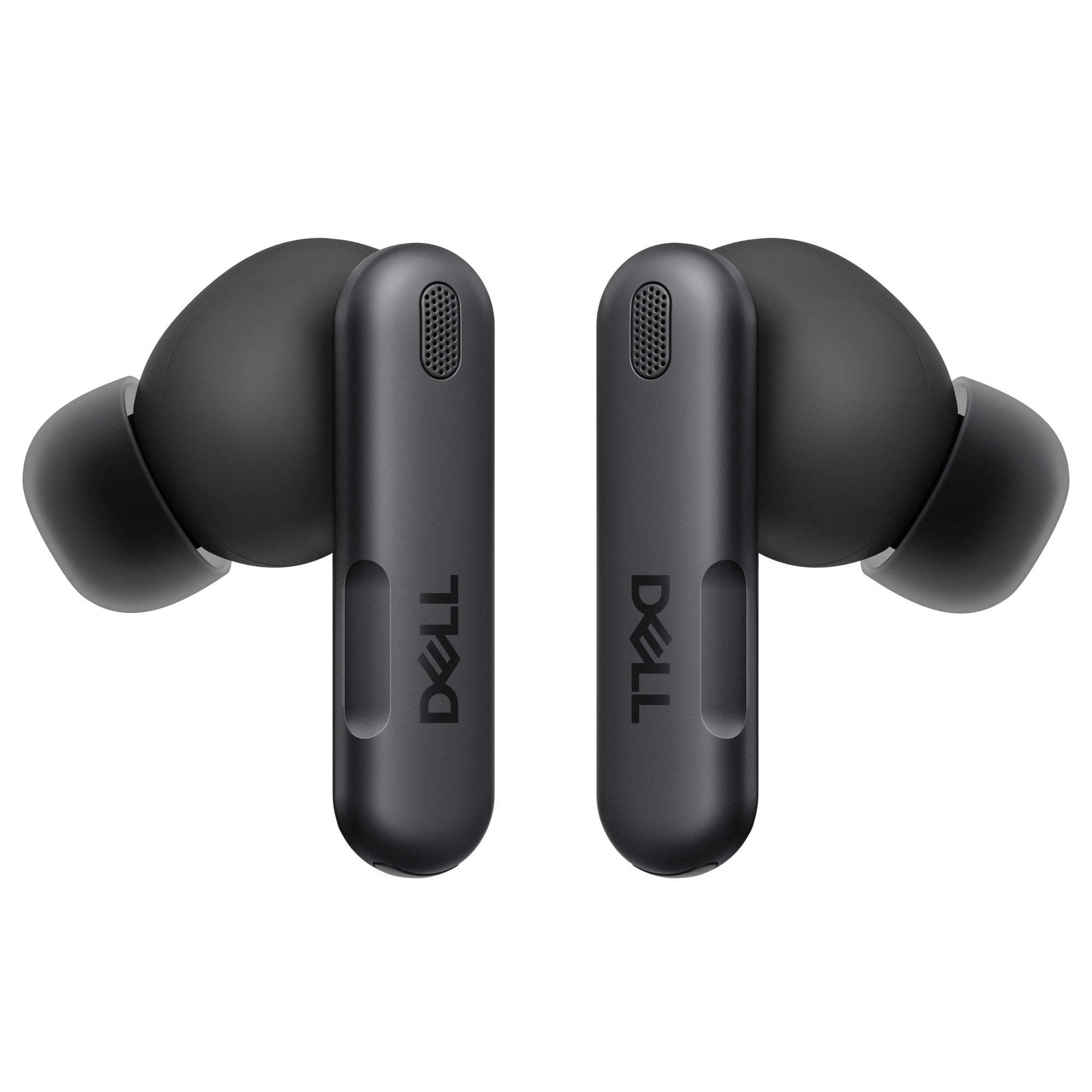
Dell’s Pro Plus EB525 is engineered specifically for the Windows ecosystem, solving a problem that Apple AirPods users face daily: unreliable driver support and clunky connection management on Windows laptops. These earbuds pair natively with the Dell Wireless Audio Receiver HR024, plus standard Bluetooth 5.3, and offer AI-based noise-cancelling microphones that are tuned to filter laptop fan noise, typing, and HVAC hum. The result is a communication tool that behaves more like a business-grade headset than a general consumer earbud.
The adaptive ANC operates with five levels of intensity, and the transparency mode can be fine-tuned to your environment. Audio quality is clean and balanced after a quick EQ adjustment via the Dell companion app, though the out-of-box tuning leans neutral. Battery life reaches over 8 hours with ANC active, and the USB-C charging case provides three full recharges. The included ear tip sizes range from XS to L, ensuring a comfortable seal even for smaller ear canals.
The single-tap function on the left earbud is permanently mapped to Microsoft Teams by default — a thoughtful integration for corporate users but a limitation if you prefer a different primary collaboration app. Call quality reviews are mixed: some users report excellent clarity on their end, while others note the mic makes their voice sound distant compared to a boom-style headset.
Why it’s great
- Native Windows/Teams integration with receiver
- AI-based mic filters loud office noise
- Five-level adaptive ANC and comfortable XS tips
Good to know
- Teams button cannot be remapped
- Case does not support wireless charging
3. Bose QuietComfort Earbuds
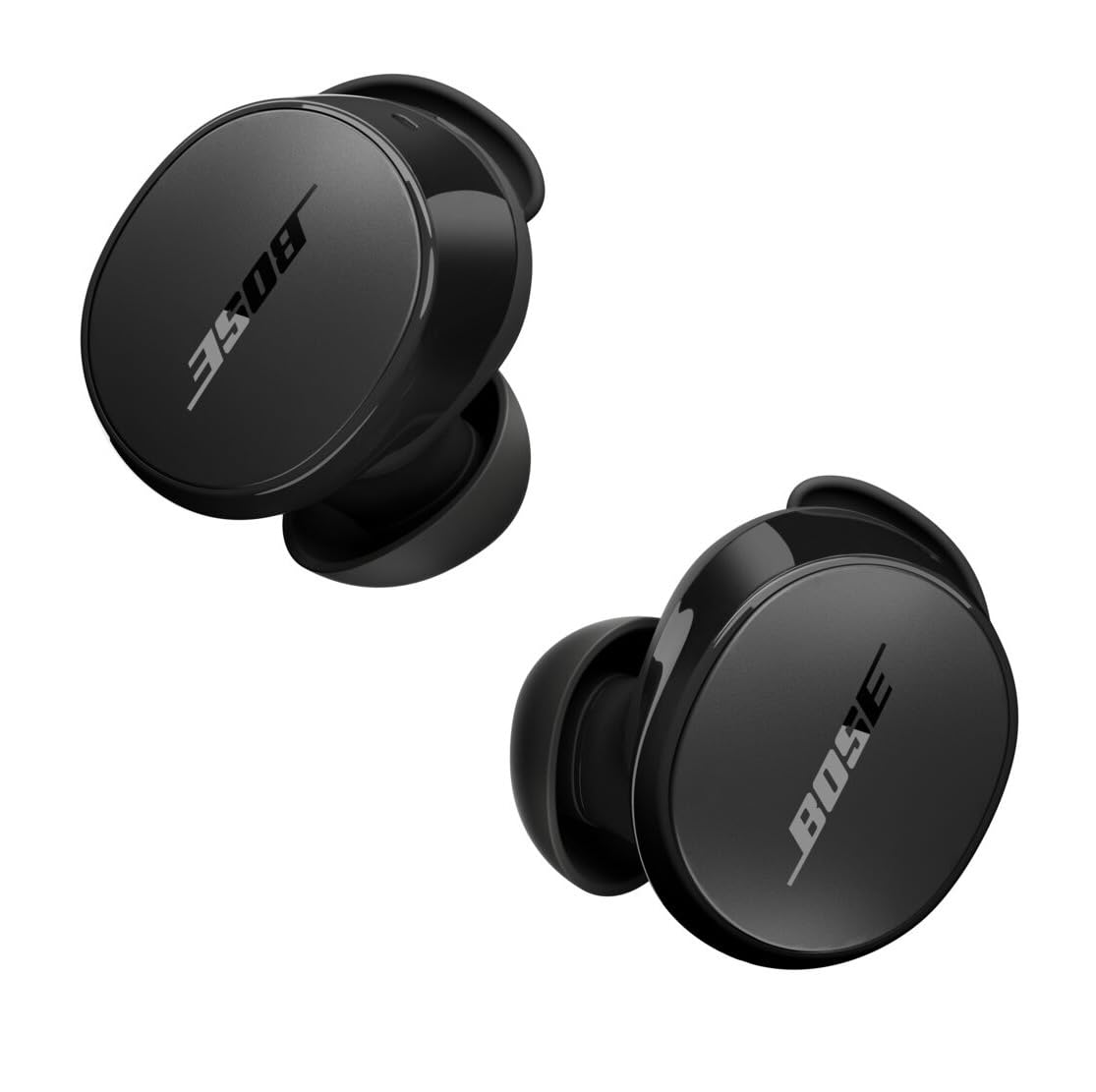
Bose remains the gold standard for active noise cancellation, and the QuietComfort Earbuds bring that heritage to laptop users. The ANC neutralizes high-frequency distractions — air conditioners, distant conversations, keyboard clatter — better than practically any competitor at this level. The fit kit includes three ear tip sizes and three stability band sizes, creating a locked-in feel that stays put through a full workday and even intense gym sessions after hours.
Bluetooth 5.3 with multipoint allows you to stay connected to your laptop and phone simultaneously, with seamless switching between devices. Battery life is rated at 8.5 hours with ANC on, and a quick 20-minute charge in the wireless-capable case gives you two more hours. The Bose QCE app provides a three-band EQ (bass, mid, treble) for tuning the sound to your preference; the stock tuning delivers clear mids with a slight bass emphasis that works well for voice calls and music alike.
The in-ear detection feature has a known design quirk: the earbuds pause playback when motionless, such as when lying down, and this detection cannot be disabled. This frustrates some users, especially during long calls where the buds auto-pause. The charging case feels slightly plasticky compared to the price tag, though it functions well with USB-C and wireless charging pads.
Why it’s great
- Best-in-class ANC for focused laptop work
- Customizable fit with three tip and band sizes
- Wireless charging case included
Good to know
- In-ear detection cannot be turned off
- Case build feels cheap for the premium price
4. Soundcore Space A40
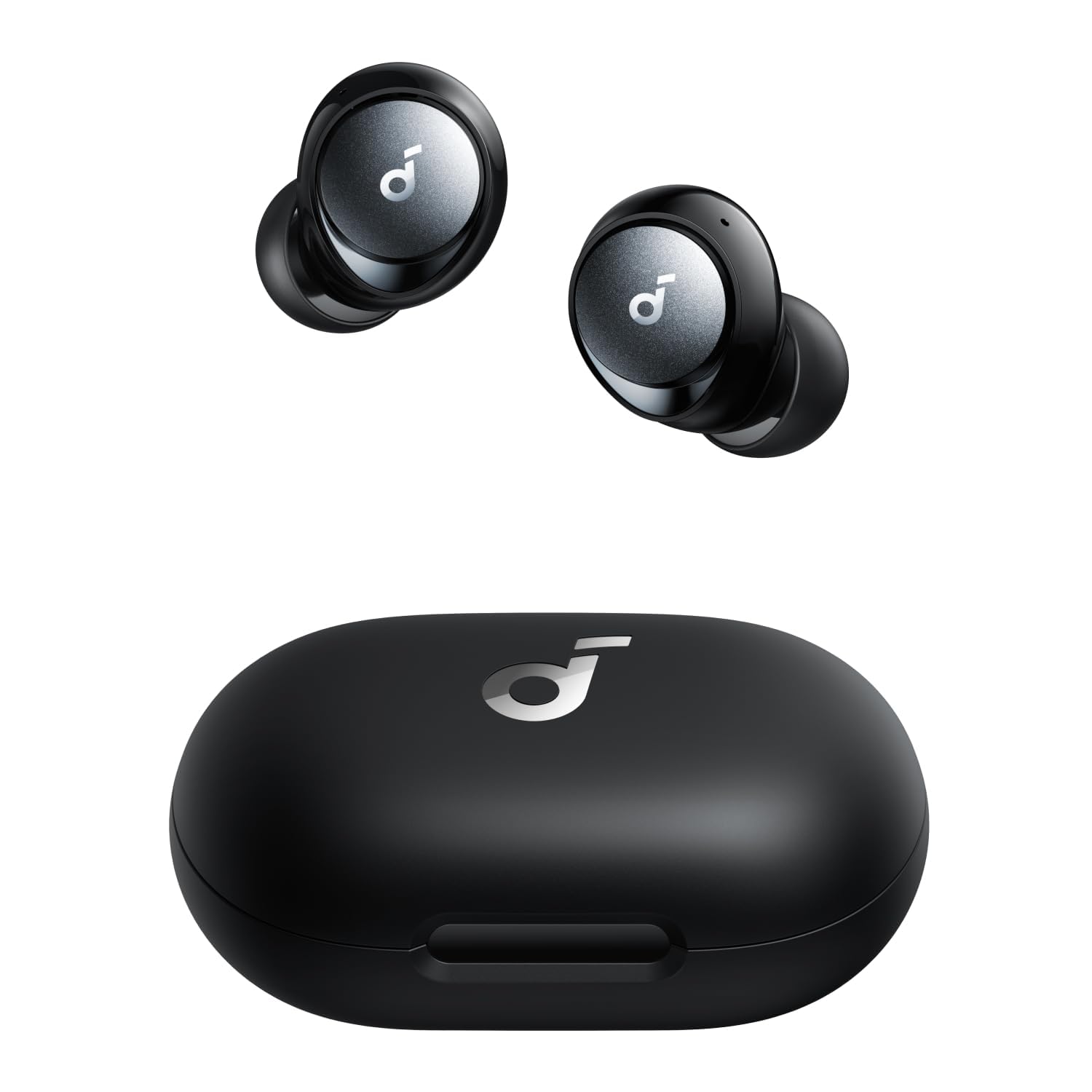
Anker’s Soundcore Space A40 stands out for its exceptional battery endurance — 10 hours per earbud and 50 hours total with the charging case. That outlasts most laptop workweeks without a single recharge. The adaptive noise cancellation reduces ambient sounds by up to 98%, though it is slightly behind Bose or Sony in stopping sudden, impulsive noises like a slamming door. The earbuds are also remarkably compact and light, making them comfortable for hours-long wear without ear fatigue.
Sound quality benefits from double-layer diaphragm drivers and LDAC support, delivering clear treble, solid mids, and punchy bass that works well for music breaks between calls. The Soundcore app includes a hearing test that customizes the EQ to your ears, plus multipoint connection for simultaneous laptop and phone pairing. Bluetooth 5.2 keeps the connection stable up to 15 meters from your laptop.
The touch controls are responsive but can trigger accidental taps when adjusting the fit. Some users report occasional syncing issues after about a year of use, though customer support is generally responsive for replacements. The maximum volume is lower than some competitors, which may be noticeable in very noisy environments.
Why it’s great
- Industry-leading 50-hour total battery
- LDAC Hi-Res Audio support
- Compact, lightweight design for long wear
Good to know
- Volume ceiling is lower than peers
- Touch controls prone to accidental presses
5. JLab Work Buds

The JLab Work Buds solve the single biggest call quality problem on a laptop: the built-in laptop microphone. By including a detachable noise-canceling boom mic that attaches to either earbud, this set delivers professional-grade voice pickup that rivals dedicated desk headsets. The boom mic routes your voice clearly through Zoom, Teams, and Webex while filtering out ambient noise — a feature that makes these earbuds indispensable for hybrid office environments.
Battery life is extraordinary at 55+ total hours with the charging case, and the case itself doubles as a USB-C charging dock that keeps the buds organized and topped up. Bluetooth 5.3 with multipoint allows simultaneous connection to your laptop and phone. The JLab App provides EQ customization and control remapping, though the default sound signature is decent with full bass and clear treble.
The charging case is notably large — about the size of a small power bank — which may be cumbersome for pocket carry. The touch controls are sensitive and lack an auto-disconnect when the earbuds are removed. Some users with smaller ears find the wing tips uncomfortable after extended wear, though the fit is secure for those who get a good seal.
Why it’s great
- Detachable boom mic for professional call quality
- 55-hour total battery with USB-C dock case
- Seamless multipoint connection
Good to know
- Bulky case not pocket-friendly
- Wing tips can cause ear fatigue over time
6. Middle Rabbit SW4

The Middle Rabbit SW4 takes a different approach for laptop users: a USB dongle that provides a dedicated 2.4GHz wireless connection alongside standard Bluetooth 5.1. This dual-connectivity solves two laptop pain points: Bluetooth driver conflicts on older Windows machines, and audio latency in real-time applications. The 40-millisecond latency over 2.4GHz makes these earbuds suitable for gaming, video editing, and live streaming where lip-sync accuracy matters.
The 10mm dynamic drivers deliver rich sound with clear treble and satisfying bass, suitable for conference calls and music alike. Each earbud houses two microphones — four total — that work together for voice pickup during calls. Battery life reaches 8 hours per charge, with the case adding 32 additional hours. The companion app allows you to customize touch controls and toggle between music and low-latency game modes.
Reliability is a mixed bag in customer feedback. While many users praise the sound quality and convenient dongle, a notable portion reports connection drops, random power-offs, and a loud “POWER OFF” voice prompt that cannot be muted. The white design looks clean but may show wear faster than darker finishes.
Why it’s great
- 2.4GHz dongle bypasses Bluetooth issues
- 40ms ultra-low latency for video sync
- Four-mic array for call clarity
Good to know
- Intermittent connection and power-off issues reported
- Loud voice prompts cannot be disabled
7. JBL Vibe Beam

The JBL Vibe Beam delivers dependable performance for laptop users at a cost-conscious price point. The 8mm drivers produce the JBL Deep Bass Sound signature, which provides satisfying low-end punch for movies, music, and casual gaming without overwhelming the midrange. VoiceAware technology lets you balance how much of your own voice you hear during calls — a useful feature for self-monitoring call volume and tone during meetings.
Battery life runs 8 hours in the earbuds with 24 more in the case, totaling 32 hours. A 10-minute speed charge provides 2 hours of playback, which is handy when you realize the case is empty before your next call. The IP54 rating makes these earbuds water and dust resistant, suitable for gym sessions after work. Bluetooth 5.2 provides stable connectivity within 10 meters of your laptop.
The sound quality out of the box can feel harsh in the upper mids and slightly bass-heavy, but the JBL app’s 10-band EQ lets you dial in a flatter profile. The stick-closed design and included three ear tip sizes provide a comfortable fit, though the lack of wing tips means they may dislodge during sudden head movements. The video mode reduces audio latency at the cost of overall sound quality.
Why it’s great
- Affordable entry point for laptop audio
- JBL Deep Bass with EQ customization
- IP54 dust/water resistance
Good to know
- Out-of-box sound needs EQ adjustment
- Video mode degrades audio quality
FAQ
Will any Bluetooth earbuds work with my laptop for calls?
Why does my laptop earbud audio lag behind the video?
Can I use AirPods as a laptop headset for meetings?
What is the difference between ANC and ENC?
Final Thoughts: The Verdict
For most users, the best bluetooth earbuds for laptop winner is the EarFun Air Pro 4 because it combines exceptional codec support, strong adaptive ANC, and 52-hour total battery at a price that undercuts traditional premium brands while matching their feature set. If you need professional-grade call clarity in noisy offices, grab the JLab Work Buds with their detachable boom mic. And for pure, class-leading noise cancellation and a fit that stays locked all day, nothing beats the Bose QuietComfort Earbuds.