
Our readers keep the lights on and my morning glass full of iced black tea. As an Amazon Associate, I earn from qualifying purchases.
Specs are compiled from manufacturer listings and verified buyer reviews and can change over time — please confirm the key details on the product page before buying.
A wireless mechanical keyboard should give you that deep, satisfying key sound you actually want to type on — with no cable tying you to one desk. That means a hot-swappable board you can switch between a laptop, a tablet and a phone without re-pairing anything. The picks below cover that whole range, from budget-friendly boards with a 4000mAh battery to premium builds with an 8000mAh cell and an OLED screen. Our top pick, the DAREU EK75PRO, is the highest-rated board here at 4.7 stars across 300+ ratings.
I’m Min — the founder and writer behind Gadgets Feed. This guide is built by comparing the manufacturers’ published specifications and the patterns across verified customer reviews, so you get each pick’s real strengths and trade-offs instead of marketing spin.
Below you will find the practical specs that decide whether a board earns its place on your desk, from switch type to battery size. Every pick here is a buying guide to the strongest bluetooth mechanical keyboard choices for building a cleaner, quieter setup.
Our Picks at a Glance

How To Choose The Best Bluetooth Mechanical Keyboard
The most common mistake is buying on looks alone and ending up with a board whose laptop connection drops mid-sentence. Start with the one spec that decides everything else: which wireless modes the keyboard actually supports. After that, the layout and the keys you can swap are what you will live with every day.
Bluetooth, 2.4GHz, or wired — you want all three
Bluetooth is the mode that lets you bounce between a laptop, a tablet and a phone with a button press. A 2.4GHz wireless connection uses a small USB dongle and transmits faster, so it suits fast-paced typing or gaming. USB-C wired mode is your fallback when the battery is empty. Boards here like the DAREU EK75PRO and AULA S98 Pro give you all three in one, so you are never stuck on the wrong connection.
Layout: how many keys you actually need
A 75% layout trims the board to the function row and arrow keys but drops the number pad, keeping the mouse close. A full-size or 96%-style board keeps the number pad for spreadsheets and data entry. If you are a spreadsheet user, take the number pad seriously — it is the one layout detail people regret skipping.
Switches and keycaps you can change
A hot-swappable board lets you pull switches out by hand and push new ones in, no soldering. That means one keyboard can go from clicky to quiet linear whenever your taste changes. PBT keycaps — a denser plastic than the common ABS — resist both the shine and the fading that show up on cheaper caps.
Quick Comparison
| Model | Best For | Layout & Keys | Connectivity | Battery | Amazon |
|---|---|---|---|---|---|
| DAREU EK75PRO★ Best Overall | Everyday typing & gaming | 75% — 81 keys | BT 5.1 / 2.4GHz / USB-C | — | Amazon |
| Keychron K2 V2Budget Champion | Mac users & travel | 75% — 84 keys | BT 5.1 / USB-C | 4000 mAh | Amazon |
| AULA S98 ProBest Display | Compact board with a screen | 96-key | BT 5.0 / 2.4GHz / USB-C | 5000 mAh | Amazon |
| RK ROYAL KLUDGE R98 Pro | Full-size on a tight desk | 98% — 101 keys | BT / 2.4GHz / USB-C | 7500 mAh | Amazon |
| Keychron K10 | Spreadsheets & Mac | 104 keys | Bluetooth / USB-C | 4000 mAh | Amazon |
| AULA F108 PRO | Full-size with screen | 104 keys | BT 5.0 / 2.4GHz / USB-C | 8000 mAh | Amazon |
| Logitech G515 Lightspeed TKL | Slim gaming | TKL — 104 keys | LIGHTSPEED / Bluetooth / wired | 36 hours | Amazon |
| Logitech MX Mechanical | Office & multi-OS | Full-size — 110 keys | Bluetooth / Logi Bolt | Up to 15 days | Amazon |
| ASUS ROG Azoth | Serious builders & customizers | 75% — 81 keys | Bluetooth / 2.4GHz / USB | 2000+ hours | Amazon |
In‑Depth Reviews
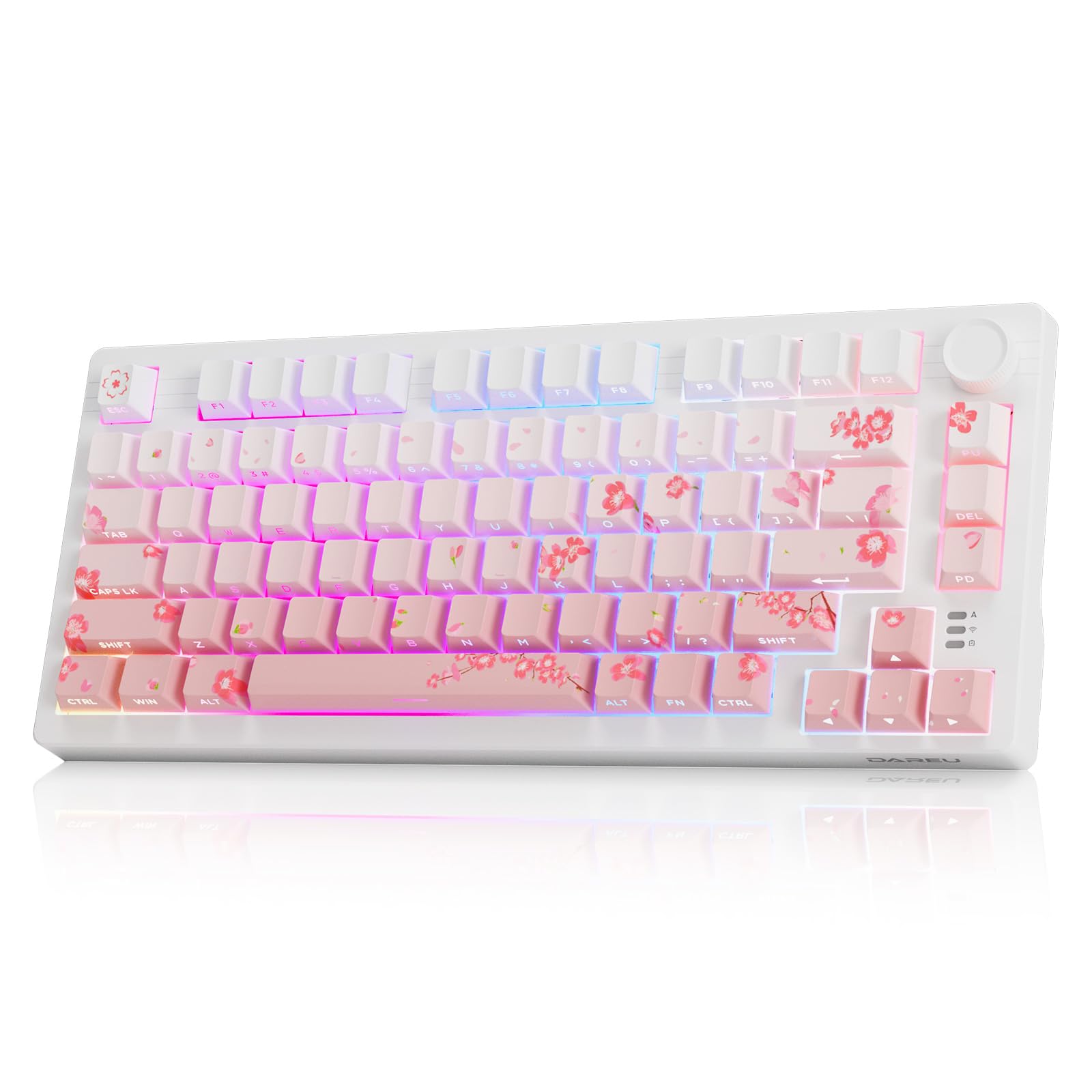
1. DAREU EK75PRO Sakura Pink 75% Wireless Mechanical Gaming Keyboard with Knob
Our pick — over 4.5★ from 350+ verified ratings; the strongest balance of quality and price.
The creamy-sounding 75% board that jumps between five devices without missing a keystroke.
If you want a keyboard that sounds like something, this is the place to start. The DAREU EK75PRO is a gasket-mount board — meaning the plate holding the switches floats on soft layers instead of sitting rigid — and that build is exactly why it lands at the top. You get three ways to connect: USB-C wired, 2.4GHz wireless, and Bluetooth 5.1, with as many as five devices ready to pair at once. So your desktop PC, your work laptop, and your iPad can all live on one board. What wins people over is the build itself — quality is the thing the review pages keep returning to.
The typing feel is the whole point here. It ships with pre-lubed DAREU cloud linear switches, which are smooth like a red switch but respond a little faster and sound crisp rather than hollow. Side-printed PBT keycaps put the lettering on the front edge, so the RGB shines through the font instead of around your fingers. There are 12 backlight modes, 5 side-light modes, and 16.8 million colors to play with. The multi-function knob handles volume, playback and brightness once you set it up in the driver.
Now the catch, and it is a layout one rather than a quality one. This is a 75% board, so there is no number pad — fine for most people, a real problem if you type numbers all day. The layout also sits smaller than the Keychron K2 at 13.11″L x 5.51″W versus the K2’s 12.32″L x 4.84″W. One buyer who needed a number pad for accounting kept it for novel writing instead and called it a great buy. Weigh that before you commit.
Where It Wins
- Gasket mount plus multi-layer silencing keeps the keystroke quiet and the sound creamy
- Hot-swappable — pull the switches and drop in almost any 3-pin or 5-pin set, no soldering
- 81 keys with a knob for volume, playback, brightness and shortcuts
- Side-printed PBT caps resist fading and sweat
What To Weigh
- No number pad — if you run spreadsheets daily, budget for a separate pad
- The knob takes a little learning before it feels natural
The Pick For You: someone who wants a great-sounding board that switches between PC, laptop and iPad all day.
The One Trade-Off: number-crunchers should look at the Keychron K10 instead.
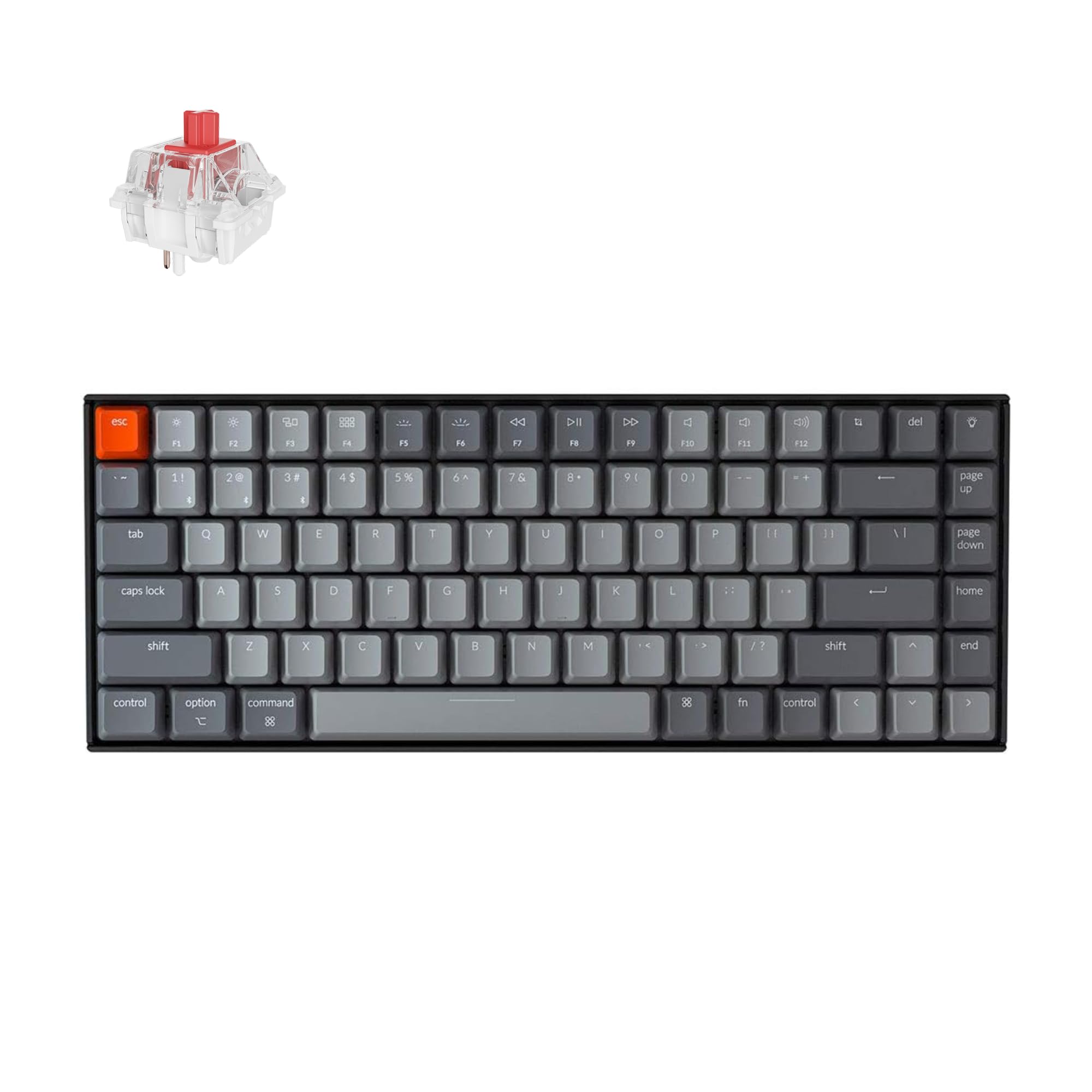
2. Keychron K2 75% Layout Bluetooth Mechanical Keyboard Super Red Switch / White LED Backlit / Anti Ghosting / N-Key Rollover / 84 Key USB C Wired Computer Keyboard for Mac Windows — Version 2
The compact Mac-first board that pairs with three devices and runs for weeks on one charge.
The K2 is the one to reach for if your whole setup is Apple-shaped. It carries the latest Bluetooth 5.1 chipset — the part that handles the wireless link — and holds up to three paired devices, switchable with a keypress. Type into a Mac Mini at the desk, tap over to an iPad, then to your phone. There is also a wired USB Type-C mode when you want a firmer connection. A 75% layout with 84 keys keeps the arrow keys and the shortcut column but drops the number pad. That gives it 84 buttons against the DAREU’s 81, the two closest boards in this lineup on key count.
The battery is the standout number: 4000 mAh, which Keychron rates at up to 72 hours of typing or up to 7 days of normal use at 8 hours a day. Owners describe it running nearly a month without a charge in mixed use. The smooth linear red switches give an easy, quiet keystroke, and there is a 50-million-keystroke lifespan on the switch rating. If you study or share a dorm room, the red switch keeps you from being the loud one.
Here is the honest part. The Bluetooth side is the most likely to frustrate you — the connection is generally reliable but the board draws frequent complaints about occasional disconnects, and re-pairing after it powers off is normal. The plastic frame also feels like the least premium part of the build. If you need proof of the sound before picking a switch, the blues are the loud clicky ones and the reds are the smooth quiet ones — know your preference before you buy.
Where the money goes: a genuinely built keyboard with a Mac keyset, three Bluetooth channels and USB-C, for less than most of the boards above.
Before you click: plan on keeping the USB cable handy for trouble-free days, and expect to learn a slightly different Fn row than a full Mac keyboard.
Buy it when: you want a Mac-native keyboard with three Bluetooth channels on a modest budget.
Pass if: you want a rock-solid always-on wireless link — the wired mode earns more trust here.
3. AULA S98 Pro Wireless Mechanical Gaming Keyboard with Screen, Knob, 96 Keys
A 96-key board with a tiny LCD that shows battery, time, and even your own GIFs.
The front of this keyboard might be the most interesting part of the whole list. AULA built in a small color screen that cycles through your battery percentage, connection mode and system status, and lets you load a GIF if you want your own picture sitting on the desk. A knob next to it scrolls through volume, RGB modes, language and system on the fly. This is the only pick here with both a screen and a full number pad in a compact body.
It runs the same tri-mode setup you are getting used to — Bluetooth 5.0, 2.4GHz wireless and USB-C — and stores up to five devices you can flip between with the knob. Switch, keycap and stabilizer are pre-lubed, so the keystroke is smooth from the start, and the sound deadening uses five layers of material to kill the hollow cavity resonance. The 5000 mAh battery is a step up from the Keychron K2’s cell. The board is heavier than it looks too, at 2 pounds against the K2’s 500 g.
The recurring gripe is the reliability — a portion of owners run into it stopping working, and the screen customization needs the driver and a wired connection to configure. The knob also only controls volume by default, and a few people find it has a slight wobble. Get your screen set up while wired and you will have a smoother time with it.
what separates it
- Built-in LCD screen for battery, time and GIF uploads
- Five layers of dampening and pre-lubed switches for a creamy sound
- 5000 mAh battery plus a full number pad in one compact body
Where It Asks Patience
- Screen setup needs the AULA driver and a wired connection
- The knob controls volume by default — other functions take a little digging
- Some owners run into reliability issues over time
Reach for this if: you want a screen on your keyboard and still need the number pad.
Look elsewhere if: you want zero setup — this board rewards someone willing to install the driver.
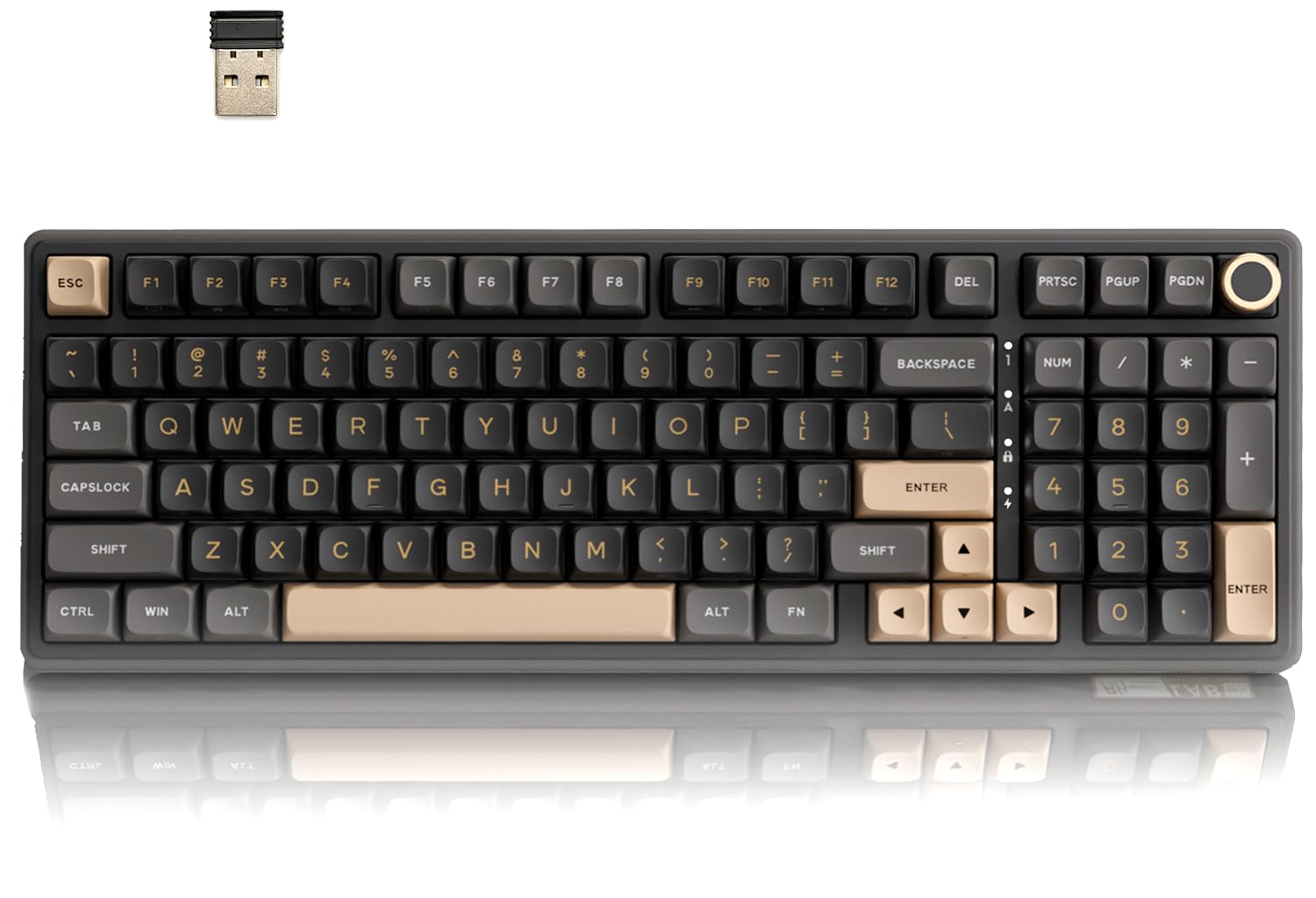
4. RK ROYAL KLUDGE R98 Pro Wireless Mechanical Keyboard, Creamy Bluetooth / 2.4GHz / Wired RGB Gaming Keyboard with Number Pad and Knob
A full-featured board that stretches a single charge out to about 365 hours.
You get up to 365 hours of use without the backlighting on, thanks to a 7500 mAh battery inside the R98 Pro — a large pack for a keyboard. That means you can type for weeks without hunting for a charging cable. The board also feels soft and quiet because it is gasket-mounted with five soft layers, and it comes with pre-lubed linear cream switches (smooth, quiet key presses) and an MDA-profile PBT keycap set — a sculpted cap shape with a taller, more dished profile than the flat caps on most boards, so your fingers rest more naturally.
The layout is the clever part. It is a 98% arrangement with 101 keys, meaning it keeps the number pad and arrow keys but trims the space around them so your mouse has more room. The volume knob can even be swapped out for a standard keycap if you dislike knobs. Bluetooth mode holds three devices, switchable with FN plus a key, so your PC, Mac, laptop or Android tablet can all share the board. It does that with a lower profile footprint than the Keychron K10’s full 104-key body. The whole board also uses an online driver instead of installed software if you would rather not install anything, and it works on both Windows and Mac.
The main thing to expect is lighter ambient lighting. The keycaps are opaque, so the LED only shows around the edges of each key rather than glowing the legends from behind. If you type in a dark room and need the letters lit, that profile will feel dimmer than a side-printed board. Almost everyone else finds it easy to live with.
The battery story: 7500 mAh and up to 365 hours without backlighting completely removes the charging habit from your week.
Know this going in: the edge-lit RGB style suits low-light ambient glow, not a bright under-letter show.
The pick for you: anyone who wants full-size function with the desk room of a smaller board and almost never wants to plug in.
Skip if you need: a lit legend that stays readable with the room lights off.
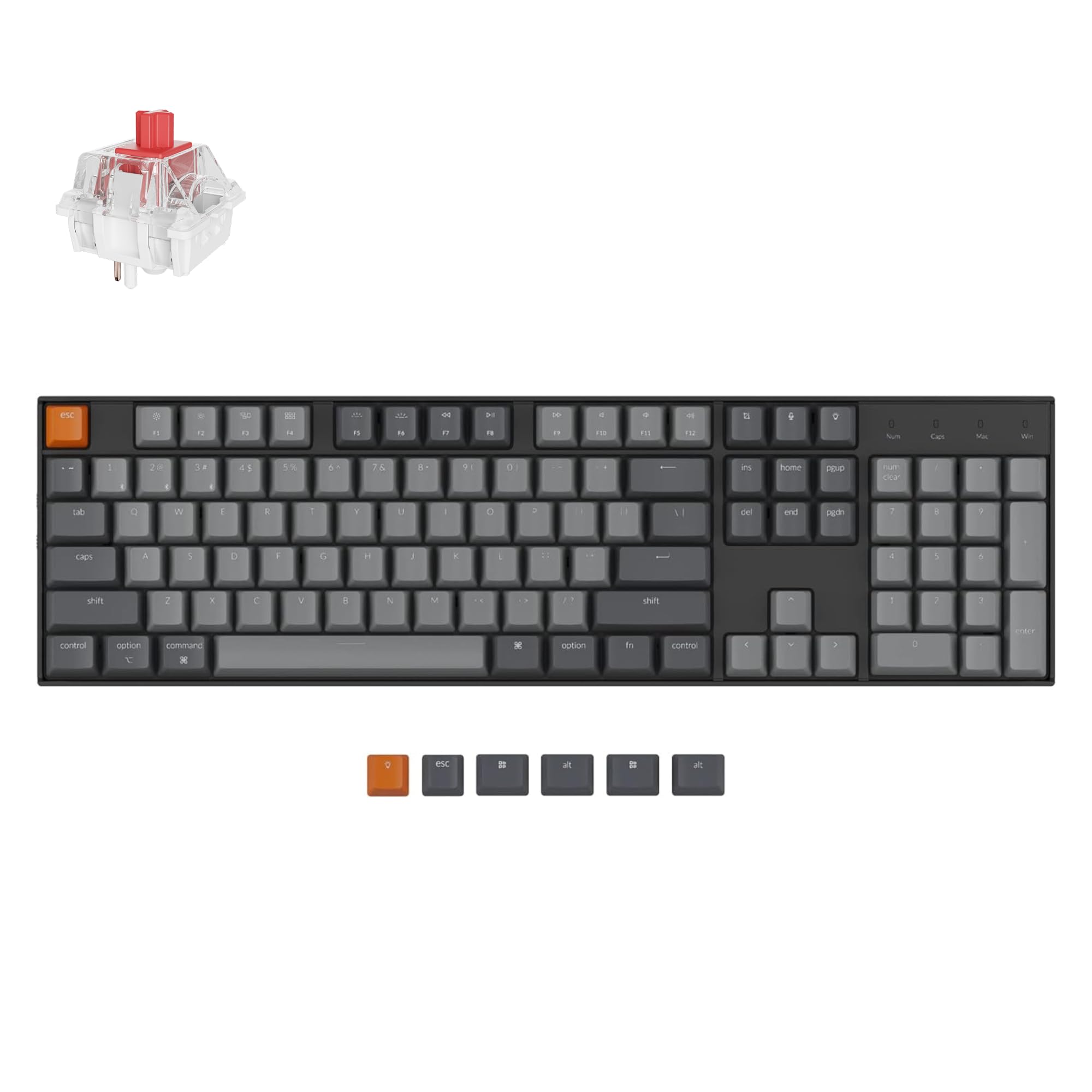
5. Keychron K10 Full Size 104 Keys Bluetooth Wireless Mechanical Gaming Keyboard for Mac Windows with Keychron Super Red Switch
A 104-key desk board that keeps the number pad and switches between three Bluetooth devices.
Spreadsheet people, this is your row. The K10 gives you the full 104-key layout with a proper number pad, which is the one thing the smaller boards above simply cannot offer. It runs the Keychron Super Red linear switch — smooth, quick and light to press — with a 4000 mAh rechargeable battery and an adjustable white LED backlight for dim offices. Bluetooth holds three devices, and there is a USB-C wired mode for a desktop setup you never want to move.
What owners keep coming back to is the typing feel: they describe the keystroke as solid and the sound as thocky without being loud enough to annoy an office. The white backlight and low-lit working environment go together, and the board ships with both Mac and Windows keycap sets so it matches your machine from the start. It is also reassuringly planted on a desk at 500 g — heavier than the K2, same carry weight as its smaller sibling sits lighter on the desk feel.
The trade-off here is a long-term one, and it is worth stating plainly. This model is not hot-swappable, so the switches are fixed, and the backlight is white only with no RGB. One owner who ran it for years found the wireless battery draining quickly over time and the board discontinued. At 4.5 stars across 200+ ratings, most buyers get along with it fine, but if you want to swap switches or want RGB, look at the AULA F108 PRO or the ASUS ROG Azoth instead.
Why It earns a Spot
- 104-key full-size with number pad for data entry
- Keychron Super Red linear switches are smooth and quiet for shared offices
- Ships with both Mac and Windows keycaps included
What It Lacks
- Not hot-swappable — switches are fixed
- White backlight only, no RGB color options
The fit: an office typist who wants a full number pad and Mac-friendly keys on a stable Bluetooth board.
The mismatch: tinkerers who want to swap switches or add color backlighting later.
6. AULA F108 PRO Wireless Mechanical Keyboard with Screen & Knob, Full Size with 8000 mAh Battery

A full 104-key board carrying the biggest battery in the lineup — 8000 mAh.
The F108 PRO solves the two most common complaints about the smaller keyboards here in one go. First, the number pad: this is a 104-key full-size layout with arrow keys, a function row and the numeric zone. Second, the battery: 8000 mAh is the largest cell on this list, and it sits behind a board that is rated to suit long work sessions. That is a big gap over the Keychron K10’s 4000 mAh, and it means fewer charging stops over a work week.
You can connect to three kinds of devices — Bluetooth 5.0, 2.4GHz wireless and USB-C — and save up to five of them, so switching between your laptop and desktop is quick. The 1000Hz polling rate on the 2.4GHz and wired modes means the board talks to your computer 1000 times a second, which helps gaming response feel instant. A built-in TFT screen (a small full-color panel rather than a simple monochrome readout) shows GIFs, volume, date and time, battery status and connection mode. The knob controls system, connection, volume and lighting. PBT two-color caps, south-facing RGB and over 16.8 million colors fill out the rest. It is a sturdy 2.7 pounds on the desk.
Some rough edges are real. Setup asks you to switch the default language to English and the shipped manual is in Chinese, so the first hour is bumpier than it should be. The knob is also not set to volume by default, and the smaller side light bars cannot be customized on their own. The screen configuration needs a wired connection and Windows software to get the most out of it. What you get in return for that effort is a full-size board that stays charged and looks nothing like the plain keyboards most people are used to.
Where It Comes Out Ahead
- 8000 mAh — the biggest battery in this lineup
- Full 104-key layout with number pad and a TFT screen
- Tri-mode with 1000Hz polling on 2.4GHz and wired for low latency
Where It Tries Too Hard
- Chinese-language default manual and screen settings need switching
- Knob defaults to functions other than volume
- The side light bars are not independently customizable
Best for: anyone who wants a full-size board that rarely needs a cable and has a screen to match.
Not the one if: you want everything working perfectly the minute you unbox it with zero setup.
7. Logitech G515 Lightspeed TKL Wireless Gaming Keyboard (Tactile) — Black

The slim, tenkeyless board built for gamers who want a 1 ms report rate without the wires.
When response time is the priority, you want a board that keeps pace with your brain. The G515 runs on LIGHTSPEED, Logitech’s own low-latency wireless, and it hits a 1 ms report rate — how quickly each keypress reaches the computer — at a level wired keyboards aim for. There is also Bluetooth for your other devices and a wired mode for when you want it. The tenkeyless layout trims the number pad but keeps everything else, and it is one of the slimmest low-profile boards here.
The typing feel comes from GL Brown tactile switches — factory-lubed, so they are smooth, and just enough of a bump to tell you a key has fired. PBT double-shot keycaps resist the oils on your fingers, so they do not wear out and go shiny. There is 36 hours of battery on a charge, and the three hotkeys give you quick access to LIGHTSPEED, Bluetooth and Game Mode. The KEYCONTROL software lets you stack up to 15 functions on a single key for game macros and shortcuts.
The trade-off is the same one low-profile boards always have: it is about as thin as it gets, which means it will not feel substantial to someone who loves a heavy, deep-keyed board. A few owners have also seen key chatter (a key registering twice) show up after months of use. If you want something that feels like a wall of sound and weight, this is not it. If you want fast, thin and clean, it is.
The gaming case: 1 ms report rate on LIGHTSPEED wireless and low-profile GL Brown switches give you speed without the cable.
The honest caveat: its thin low-profile shape is polarizing — excellent for speed, less satisfying if you love deep, heavy keystrokes.
Pick it if: you game seriously and want wired-like latency without a wire on the desk.
Think twice if: you want a chunky, thock-heavy feel — this one is slim on purpose.
8. Logitech MX Mechanical Wireless Illuminated Performance Keyboard Linear

A low-profile office board with smart backlighting that wakes the moment your hands approach.
This one is built for desks where noise and clutter both matter. The MX Mechanical pairs with up to three devices over Bluetooth Low Energy or the included Logi Bolt receiver, and it handles nearly any operating system — Windows, macOS, ChromeOS or Linux. The full-size low-profile layout keeps typing angles shallower, which is easier on the wrists over a long day. Battery rounds out at up to 15 days on a charge, or up to 10 months with the backlighting off. The smart illumination is the neat touch: the backlight lights up as your hands get close, then adjusts itself to the room’s brightness.
The build is where the praise lands. Solid, sturdy, with a soft-touch key feel and a quiet, pleasant sound — the kind of board that does not draw attention in a shared space. Linear mechanical switches give uninterrupted travel with minimal spring force, so the keystroke is smooth rather than snappy. Customization lives in Logi Options+ software, where you can remap Fn keys, set backlighting effects, and enable Flow to control more than one computer from the same keyboard.
You need to weigh the price against the typing feel. It lands at 4.2 stars across 500+ ratings, and value for money is the most contentious point with some buyers — the people who love it treat it as a premium tool, and the people who do not find it a lot to spend for a linear switch they could get elsewhere. A few also note keys wobbling slightly and light bleeding between keys when lit. It is a work keyboard first, so treat it that way.
Why Offices Like It
- Pairs with three devices over Bluetooth or the Logi Bolt receiver
- Smart backlight wakes as your hands approach
- Up to 10 months of battery with the backlight off
- Logi Options+ handles key remapping and multi-computer control
Questions Worth Asking
- Value is the contested point — the price is premium for a linear switch
- A few note keys wobbling slightly and light bleed between keys
The fit: a multi-device office worker who wants a quiet, low-profile board that covers Windows, Mac and ChromeOS.
The mismatch: someone chasing deep tactile feedback or a big-value switch for the money.
9. ASUS ROG Azoth Wireless Mechanical Gaming Keyboard — 75% TKL, Tri-Mode, Hot Swappable, OLED Display

A 75% board that arrives with a full modding kit and a 2-inch OLED screen in the corner.
You can build and tune your own keyboard with the ROG Azoth, which ships as a ready-to-mod kit: a hot-swap PCB that takes 3-pin switches (you can pull and replace switches without soldering), plus a Krytox lubricant, a switch opener, pullers, a lube station and a brush — everything you need to lube and swap your own switches. That level of included tooling is not something the other boards here bother with, and it reflects the top-tier price tag.
You get a smooth, quiet typing feel from ROG NX Snow linear switches, pre-lubed and described as buttery smooth and thocky from the start, seated on a silicone gasket mount with three layers of damping foam that absorb vibration and kill the pinging sound. On top sits a 2-inch OLED screen showing CPU and GPU stats, media playback and keyboard settings, plus a control knob for volume and lighting. For battery, ASUS rates it at 2000+ hours in 2.4GHz mode with OLED and RGB off — the longest wireless runtime quoted anywhere on this list. Tri-mode covers three Bluetooth devices, 2.4GHz RF and wired USB, and it is a substantial 1186 g on the desk.
A couple of things are worth knowing before you commit. This board is heavy and expensive, and it is not the kind of thing you pack in a bag for a coffee shop. Functionality scores mixed among owners, especially around the Armoury Crate software and the wired-to-wireless switch, which some find fiddly. And a small share of owners have run into key chatter after a couple of weeks. The build and the sound are the reasons to buy it, not the app.
For the builders: the included lube kit and hot-swap PCB make this the most customization-friendly board in the group.
The catch to plan for: heavy at 1186 g and the Armoury Crate software has a learning curve — a desk-bound board, not a travel one.
Choose it when: you want to mod, lube and hot-swap switches and have a 2-inch OLED on your desk.
Choose something else if: you want a lighter, cheaper board without software.
Understanding the Specs
Switches: linear, tactile and clicky
The switch is the physical mechanism under each keycap, and it decides feel and sound. A linear switch presses straight down with no bump — smooth and quiet, good for shared spaces. A tactile switch has a small bump you can feel as it fires, so you know the key registered. A clicky switch adds an audible click. The DAREU EK75PRO and Keychron K10 use linear switches, while the Logitech G515 uses tactile GL Brown switches. Hot-swappable boards let you change the switch type entirely without soldering.
Battery life in mAh
Milliamp-hours (mAh) is the size of the battery inside the board. A bigger number generally means longer between charges, though how you use the backlight matters just as much. The Keychron K2 and K10 pack a 4000 mAh cell, the AULA S98 Pro steps up to 5000 mAh, the RK R98 Pro reaches 7500 mAh, and the AULA F108 PRO tops out at 8000 mAh. Turning off RGB is the single fastest way to stretch any of them.
Connectivity: Bluetooth, 2.4GHz and wired
Most boards here are tri-mode, which means you get Bluetooth for device switching, a 2.4GHz dongle for lower latency, and USB-C wired as a fallback. Bluetooth is easiest for juggling a laptop, tablet and phone, while 2.4GHz suits fast typing and gaming. Wired mode is your safety net for long typing days or when the battery is empty.
Layout: 75%, 96% and full-size
A 75% layout keeps the arrow and function keys but drops the number pad, which frees up desk space for your mouse. A 96% or 98% layout squeezes in the number pad in a tighter frame. A full-size board keeps everything in the traditional arrangement. If you spend your day in spreadsheets, the number pad is worth choosing the larger board for.
FAQ
Will a Bluetooth mechanical keyboard work with my Mac and my Windows PC at the same time?
How long does the battery actually last on a wireless mechanical keyboard?
What does hot-swappable mean on a mechanical keyboard?
Is a 75% layout hard to get used to coming from a full-size keyboard?
Do I need to install software to use these keyboards?
Are the keys loud enough to bother someone in the same room?
Can I use these keyboards for gaming or are they typing only?
Do I lose much by choosing a keyboard with a screen?
Will PBT keycaps really last longer than the stock caps on a cheap keyboard?
Final Thoughts: The Verdict
The safest single purchase in this group is the DAREU EK75PRO — it is the highest-rated board here at 4.7 stars, and its gasket mount, hot-swap switches and tri-mode wireless cover nearly every use. If your day runs on numbers and you want a bigger battery and a screen, the AULA F108 PRO and its 8000 mAh cell is the full-size answer. And if gaming latency is what keeps you up at night, the Logitech G515 Lightspeed TKL delivers a 1 ms report rate on wireless. Pick by layout first and battery second, and you will land on the right one.
How We Picked
We do not accept paid placement. Every pick is matched to a real buyer and a real use-case; we do not hands-on test units.
Sources & Methodology
Specifications: manufacturer listings and product documentation. Review insights: verified customer reviews, as of September 2026. Pricing: not shown on this page (it changes often); check the current price via the retailer link.
As an Amazon Associate, Gadgets Feed earns from qualifying purchases. This does not affect which products we feature.