
Our readers keep the lights on and my morning glass full of iced black tea. As an Amazon Associate, I earn from qualifying purchases.
Specs are compiled from manufacturer listings and verified buyer reviews and can change over time — please confirm the key details on the product page before buying.
After hour five of a workday, a bad mouse makes your hand ache, your scroll wheel stick, or your battery die mid-call. The right one should feel invisible in your hand. This guide lines up the strongest contenders by the specs that actually matter: battery life, DPI (dots per inch — how fast the cursor moves), and how the mouse pairs with your laptop.
I’m Min — the founder and writer behind Gadgets Feed. This guide is built by comparing the manufacturers’ published specifications and the patterns across verified customer reviews, so you get each pick’s real strengths and trade-offs instead of marketing spin.
A good bluetooth mouse for laptop depends on battery longevity, DPI range, and how well it pairs with your operating system. Silent clicks help in a shared office. Multi-device switching helps in a hybrid workflow. A compact shape lets it tuck into a jeans pocket.
Quick Picks
- Logitech MX Anywhere 3S for Mac — Premium Pick
- PHILIPS Ergonomic Wireless Mouse (SPK7858) — Best Overall
- Logitech MX Anywhere 2S Bluetooth Edition — Top Performer
- XBG B15pro Wireless Bluetooth Mouse — Best Value
- NYIEFADA Bluetooth Wireless Arc Travel Mouse — Compact Pick
- Bluetooth Arc Travel Mouse (Dual Mode) — Budget Champion
- Dell MS700 Bluetooth Travel Mouse — Corporate Choice
How To Choose The Best Bluetooth Mouse For Laptop
Picking a wireless mouse means balancing three things: how it connects to your laptop, how long it lasts between charges, and how comfortable it feels over an eight-hour day. The sections below walk you through the key specs so you know exactly what to look for without getting lost in marketing talk.
Connectivity: Bluetooth vs. 2.4GHz vs. Tri-Mode
Bluetooth is the easiest option because it does not require a USB dongle (a small plug-in receiver) — you just pair it with your laptop and go. That said, a 2.4GHz connection (using a tiny USB receiver) is often more stable and has lower latency, which matters if you are dragging files across a crowded desk. Tri-mode mice give you both options plus a second Bluetooth channel, so you can switch between your laptop, tablet, and phone without re-pairing each time.
Battery Life and Charging
Look for a mouse that lasts at least a few weeks on a full charge if you use it daily for work. Built-in rechargeable batteries (usually 500 mAh, or milliampere-hours — a measure of energy capacity) are common now, and a good model will run for 25-70 days on a charge. Some premium options include an emergency top-up feature: a quick 3- or 5-minute charge gives you enough power for a full workday. If you travel a lot, a mouse with a standard AAA battery compartment means you can pop in fresh cells anywhere.
DPI, Scroll Wheels, and Button Count
DPI, or dots per inch, measures how fast the cursor moves across the screen when you move the mouse. An adjustable DPI between 800 and 4000 covers most setups, including high-resolution external monitors. The number of buttons (usually 2-6) and a quality scroll wheel make a big difference for productivity — a side scroll wheel is a lifesaver for wide spreadsheets. Pay attention to button noise: silent switches are a must for shared offices or late-night work sessions.
Quick Comparison
| Model | Best For | Connectivity | Battery Life | DPI Range | Amazon |
|---|---|---|---|---|---|
| Logitech MX Anywhere 3S Mac | Premium Mac Workflow | Bluetooth LE | Weeks (Rechargeable) | Up to 8,000 DPI | $89.99Amazon |
| PHILIPS SPK7858 | Ergonomic Office Use | Bluetooth, 2.4G (USB-A/C) | Up to 25 Days (500mAh) | 800 – 4,000 DPI | $39.99$49.99Amazon |
| Logitech MX Anywhere 2S | Multi-Computer Control | Bluetooth | Up to 70 Days (Full Charge) | Up to 4,000 DPI | $49.99$59.99Amazon |
| XBG B15pro | Feature-Packed Value | Bluetooth 5.0/4.0, 2.4G | ~1 Month (500mAh) | 800 – 2,400 DPI | $25.99Amazon |
| NYIEFADA Arc Travel | Ultra-Portable Travel | Bluetooth 5.0/4.0, 2.4G | ~30 Days (Rechargeable) | Not specified | $32.99Amazon |
| Bluetooth Arc Travel Dual | Budget Travel Companion | Bluetooth 5.0/3.0, 2.4G | ~12 Days (Rechargeable) | 1,000 – 2,400 DPI | $33.98Amazon |
| Dell MS700 | Compact Corporate Travel | Bluetooth 5.0 | 24 Months (AAA Batteries) | Up to 4,000 DPI | $39.99Amazon |
In‑Depth Reviews
1. Logitech MX Anywhere 3S for Mac

The compact powerhouse that sails through 1,000 lines of a spreadsheet per second without a hiccup.
If you live in the Apple ecosystem, this mouse was built with you in mind. It connects via Bluetooth Low Energy to up to three devices — MacBook Pro, MacBook Air, iMac, or iPad — and surfaces like glass are no problem thanks to an 8,000 DPI sensor (a precision sensor that tracks even tiny hand movements with extreme accuracy). Buyers report the MagSpeed scroll wheel is the standout feature: it lets you blaze through a thousand lines per second and then stop exactly on a single pixel when you need to.
The quiet clicks are a practical upgrade over earlier generations — you get the same tactile feedback without the sharp noise that distracts others on a quiet train or open-plan office. It uses USB-C for charging, and the 78% post-consumer recycled plastic body (Space Gray finish) makes it a solid ecological fit for your desk. Unlike the MX Anywhere 2S, this model is tune for macOS with Logi Options+ customization, so every button can be remapped to your workflow.
The trade-off is that the slightly small design may not fill a large hand, and the lack of a USB receiver means you rely entirely on Bluetooth — which works perfectly, but you cannot fall back on a dongle if your system has Bluetooth interference.
Standout Specs
- 8K DPI sensor tracks on any surface, including glass
- MagSpeed wheel scrolls 1,000 lines per second for instant navigation
- 78% recycled plastic body in the Space Grey variant
Real Trade-Offs
- Hand orientation is right-handed only — lefties may find it less natural
- No USB receiver included, so Bluetooth is your only connection path
Reach for this if: you use a Mac as your daily driver and want a compact, precise mouse that scrolls faster than anything else at this size.
Look elsewhere if: you need a full-sized palm-filling shape or prefer a dual-mode mouse with a USB receiver as backup.
2. PHILIPS Ergonomic Wireless Mouse (SPK7858)

The productivity-first mouse that saves your wrist and lets you cut through spreadsheets sideways.
PHILIPS brings a true ergonomic right-handed shape with a contoured thumb rest and anti-slip grip, so your forearm stays neutral during long 9-to-5 sessions. The secret weapon here is the dual scroll wheels: the main tactile wheel plus a thumb-side horizontal scroll wheel that lets you fly across miles of Excel columns or wide timelines without ever dragging the cursor across the screen. You also get a 5-level DPI adjustment ranging from 800 to 4000, which covers everything from pixel-precise photo edits to fast multi-monitor work.
Connectivity is unusually flexible — the included 2.4G receiver comes in both USB-A and USB-C forms, so you can plug it directly into a modern laptop without a bulky hub. It also pairs via Bluetooth with iPad, Windows PC, and Mac, switching between three devices instantly. The 500mAh battery gives a solid 25-day heavy workload (8 hours a day), and a five-minute emergency top-up provides one hour of tracking. At 97 grams, it is light enough for a bag but substantial enough to feel solid under your palm.
One reviewer noted the dotted texture on the scroll wheel can cause a minor blister after extended use, and the RGB lighting cycles without direct control. Still, this is the most complete ergonomic office mouse at its level.
Productivity Edge
- Thumb-side horizontal scroll wheel for easy spreadsheet navigation
- Dual USB-A/C receiver means no dongle or hub needed on modern laptops
- 5-minute charge gives one hour of use — perfect for emergency top-ups
Minor Caveats
- Right-handed only — left-handed users cannot get the full ergonomic fit
- RGB lighting is decorative only and cannot be customized to specific colors
Ideal for office pros: anyone who spends hours in spreadsheets, documents, or photo editing and wants genuine wrist support and dual-scroll efficiency.
skip it if: you are left-handed or you prefer a symmetrical, ambidextrous shape without side buttons.
3. Logitech MX Anywhere 2S Bluetooth Edition

The veteran road warrior that charges for a full day in just three minutes.
This is the Bluetooth-only version of Logitech’s classic travel companion, meaning it relies solely on wireless pairing without a USB dongle. The headline feature is Darkfield tracking (a proprietary sensor technology that allows the mouse to track accurately on glass and other clear surfaces), so you can work from a coffee shop table or a glass desk without needing a mouse pad. The sensor goes up to 4,000 DPI, which covers everything from standard laptop screens to high-res external monitors.
Battery life is a standout here: a full charge lasts up to 70 days, and a three-minute micro-USB top-up gives you enough power for an entire day. The Hyper-Fast scrolling wheel lets you flick through long documents — switch to click-to-click mode when you need precise line-by-line control. With Logitech Flow, you can control up to three computers with the same mouse, dragging text and files between them as if they were one machine. Buyers mention the compact fit is great for small to medium hands and that Bluetooth pairing is smooth with both Mac and Windows.
The catch is that the micro-USB charging port is dated compared to the 3S’s USB-C, and Logitech does not include a USB receiver — so if your computer’s Bluetooth module is weak, you may experience slight lag.
Long-Haul Ready
- 70-day battery life — charge once and forget about it for two months
- Darkfield sensor tracks on glass surfaces without a mousepad
- 3-minute charge gives a full day of power
Older Tech
- Uses micro-USB instead of USB-C — an extra cable to carry
- No USB receiver means Bluetooth is your only connection path
Who it serves: frequent travelers who need a long-lasting, glass-friendly mouse that charges in a pinch and switches between multiple computers easily.
Skip it for: users who prefer a dual-mode mouse with a backup dongle or anyone who has already switched their devices to USB-C cables.
4. XBG B15pro Wireless Bluetooth Mouse

The budget mouse with a built-in LED screen that spares you the battery guessing game.
XBG packs an unusual amount of visual feedback into a sub-mid-range price. The B15pro has a small LED display on top that shows your exact battery percentage, current DPI level (800/1000/1200/1600/2400), and active connection mode — so you never wonder why the cursor is sluggish or guess when it needs a charge. This makes it a smart pick for anyone who has been caught with a dead mouse mid-presentation. The tri-mode connectivity (Bluetooth 5.0/4.0 and 2.4GHz) means you can switch between a laptop, tablet, and PC in under a second.
The build is a plastic shell with a contoured thumb rest and arched palm support that prevents wrist strain during full workdays. The 500 mAh battery lasts roughly a month on a single charge, and the silent buttons keep things quiet in a library or shared office. One buyer described it as “great value, fast delivery” and noted that the 1600 DPI setting was “smooth across 3 screens.” It also includes a USB dongle for older computers that lack Bluetooth.
While it offers six buttons, reviewers mention you cannot remap those buttons or adjust the sleep timer — it auto-sleeps after 5 minutes. The instruction manual is minimal, so you may need to experiment to learn every function.
Screen Smarts
- Real-time LED display shows battery, DPI, and connection mode at a glance
- 500 mAh battery lasts about a month and charges via USB-C
- 6 buttons with tri-mode pairing for 3 devices
Limitations
- Buttons cannot be customized via software
- Automatic sleep mode engages after 5 minutes with no way to change it
Best for budget-conscious buyers: anyone who wants a feature-rich mouse with a battery readout, DPI switching, and multi-device support without spending on premium brands.
Not for: power users who rely on programmable macros or need a longer, adjustable sleep timer.
5. NYIEFADA Bluetooth Wireless Arc Travel Mouse

The arc-shaped travel companion that rotates flat and slides into a pocket in seconds.
If portability is your top priority, this NYIEFADA arc mouse is about as small as it gets. It rotates 360 degrees and snaps flat, reducing its profile to a thin slab you can carry in a jeans pocket or the smallest laptop sleeve. The glossy finish and slim build make it ideal for minimalist travelers who hate bulky gear. Despite its size, it supports tri-mode connectivity — Bluetooth 5.0, Bluetooth 4.0, and a 2.4GHz USB dongle — so you can connect three devices (laptop, tablet, phone) and switch between them quickly.
Battery life is good for the form factor: one buyer mentioned the first charge “lasted a month with heavy daily use,” and the mouse turns off automatically when the receiver is disconnected or the PC shuts down. The silent clicks keep it discreet, and the included storage bag means the dongle stays safe when you are on the move. It works with Windows 7 through 11 and Linux, and the compact shape fits perfectly in a work bag.
The trade-off is the unusual arc shape — it does not feel like a traditional mouse, and some users find the flat profile less comfortable for extended use. It also only has 3 buttons, so there is no side scrolling or forward/back navigation.
Travel-Ready
- Rotates fully flat for pocket-sized portability
- Rechargeable battery lasts up to 30 days with daily use
- Connects to 3 devices with Bluetooth and 2.4GHz modes
Shape Trade-Off
- Flat arc design is less ergonomic for full-day desktop use
- Only 3 buttons — no side buttons or horizontal scrolling
Made for minimalists: anyone who needs an ultra-portable backup mouse that disappears into a pocket and connects to multiple devices without hassle.
Pass on this if: you need a full-hand ergonomic shape for eight-hour workdays or want more than basic left/right/scroll controls.
6. Bluetooth Arc Travel Mouse (Dual Mode)

An entry-level arc mouse with three DPI levels but a frustrating scroll on iPad.
This dual-mode arc mouse from an unbranded manufacturer offers Bluetooth 5.0/3.0 plus a 2.4GHz USB receiver, giving you two ways to connect without paying a premium. The stand-out spec is the adjustable DPI: you can toggle between 1000, 1600, and 2400 DPI using a switch on the bottom, which makes it adaptable to different screen sizes. The mouse rotates 360 degrees and folds flat for storage, matching the NYIEFADA in portability at a lower entry cost. Owners mention the USB receiver slot on the mouse is a nice touch — you will not lose the tiny dongle.
The rechargeable battery lasted about “12 full working days” straight from the factory charge, according to one reviewer, but there is no battery level indicator, so the mouse can die without warning. It pairs easily with Windows laptops and Chromebooks, and the silent clicks work well in quiet settings like a dorm room or office cubicle. The 3 DPI options give you flexibility whether you are editing photos or browsing the web.
The catch is iPad compatibility: one reviewer found the scroll wheel reversed direction on an iPad Air 13 with M4, and the roller would sometimes return to the top of a document unexpectedly. The glossy finish also shows fingerprints quickly.
Entry-Level Perks
- Three DPI levels (1000/1600/2400) for different screen setups
- Rotates flat for pocket or sleeve storage
- USB receiver stores inside the mouse body
iPad Issues
- Scroll wheel may reverse direction or be erratic on iPads with M4
- No battery level indicator means sudden unexpected shutdowns
Good for Windows users: if you need a cheap, foldable travel mouse for a Windows laptop or Chromebook and can live without battery level alerts.
Avoid if: you are using an iPad as your primary machine or require confident, predictable scrolling for document work.
7. Dell MS700 Bluetooth Travel Mouse
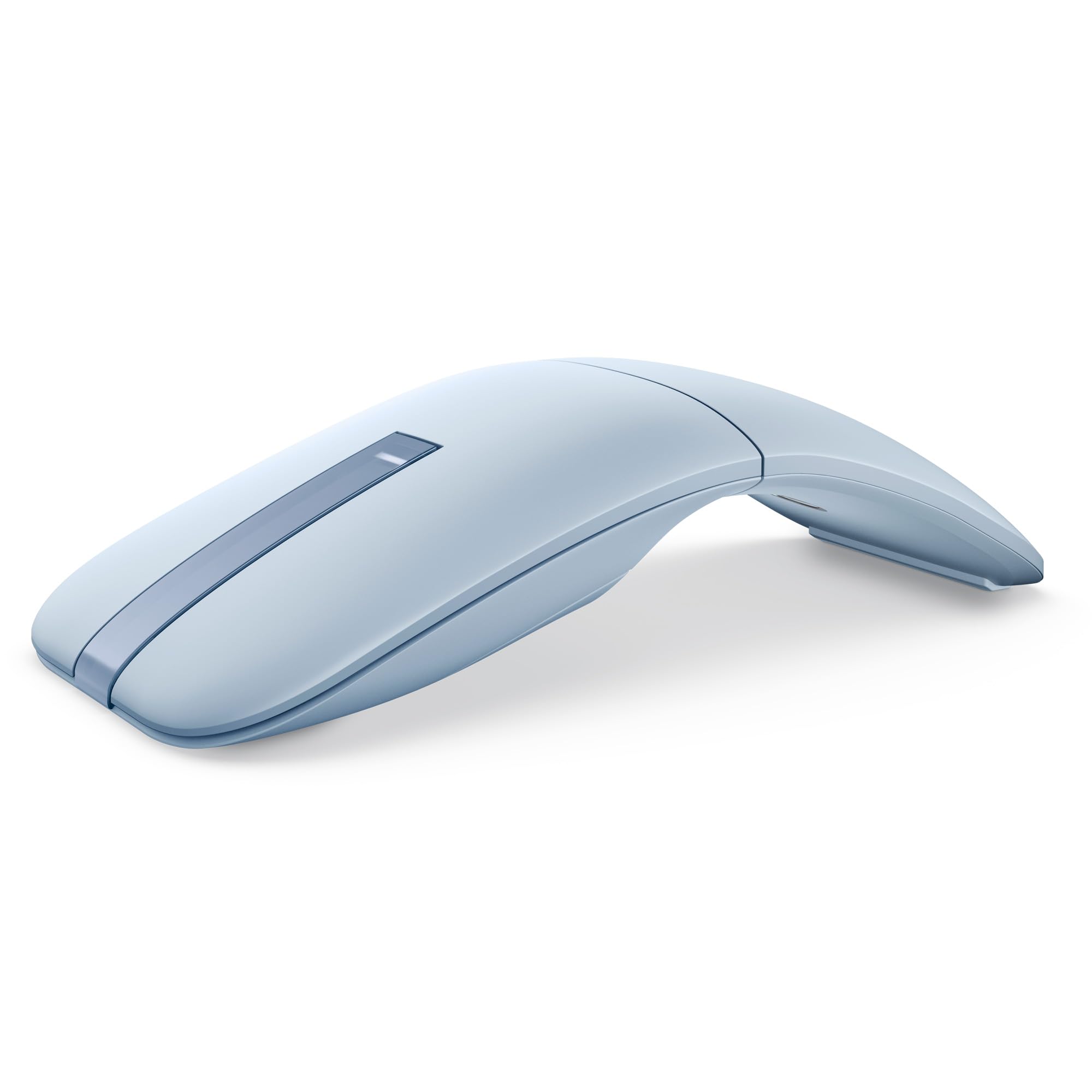
A lightweight Dell travel mouse with AAA batteries that last two years and a touch-scroll surface.
Dell’s MS700 is designed for corporate users who value long battery life above all else. It runs on two standard AAA batteries, and the manufacturer rates the battery life at 24 months — one of the longest claims in this category. The mouse weighs just 56.9 grams, making it one of the lightest picks here, and it features a twist-to-on/off mechanism that physically disconnects the laser when you stow it, preventing accidental battery drain. The optical LED sensor goes up to 4000 DPI, so you can match cursor speed to high-resolution monitors.
Instead of a physical scroll wheel, the MS700 uses a touch-scroll surface on top — swipe your finger to navigate vertically. It connects via Bluetooth 5.0 to up to three devices and works with Windows, macOS, Linux, Android, Chrome OS, and iOS. The ambidextrous design and smooth plastic finish make it equally comfortable for left- and right-handed users. One buyer called it “compact, lightweight, solid feel” and praised the “fast/reliable” Bluetooth 5.0 connection. Dell backs it with a 3-year Advanced Exchange warranty, so a replacement ships to you before you return the original.
The main drawback is the non-rechargeable battery system — you will need to keep spare AAA cells handy, though the 24-month life means that is rarely an issue. Some reviewers found the touch scrolling “very erratic” and inconsistent compared to a traditional wheel.
Set-and-Forget
- 24-month battery life on two AAA batteries — nearly two years of use without swapping
- Weighs only 56.9 grams for true pocket portability
- Twist-to-on/off mechanism prevents accidental operation during travel
Touch-Scroll Quirks
- Touch surface can feel erratic and unpredictable for precision scrolling
- AAA batteries are not rechargeable — you buy replacements rather than plugging in
Best for corporate IT buyers: employees who need a reliable, lightweight travel mouse with a long warranty and nearly two-year battery life that cuts down on support tickets.
Skip it for: anyone who prefers a traditional scroll wheel for precise document work or wants a rechargeable mouse to avoid buying batteries.
Understanding the Specs
DPI (Dots Per Inch)
DPI measures how far the cursor moves on screen relative to the physical distance you move the mouse. A higher DPI means the cursor zips across the screen with a small hand movement — useful for high-resolution monitors where the cursor would otherwise crawl. Most mice let you adjust DPI on the fly, typically between 800 and 4000, so you can slow down for precise photo editing and speed up for multi-screen navigation. An 8K DPI sensor, like the one on the Logitech MX Anywhere 3S, is overkill for most laptops but excellent for large, high-res external displays.
Battery Life and Chemistry
Battery life varies dramatically by mouse type. A rechargeable 500 mAh battery typically lasts 25-70 days under normal office use, depending on the efficiency of the sensor and auto-sleep settings. Standard AAA battery mice like the Dell MS700 can last up to 24 months because they lack a rechargeable circuit and draw power only when in use. The trade-off is convenience: rechargeable mice save you from buying batteries but have a finite lifespan (2-3 years before the internal battery degrades), while battery-powered mice work indefinitely as long as you feed them fresh cells.
Connectivity Modes
Bluetooth is the most universal connection — it works with any laptop or tablet without a receiver, but it can introduce slight latency in crowded wireless environments (airports, conference halls). A 2.4GHz USB receiver offers lower latency and a more stable connection, making it better for tasks that require fast cursor response, but it ties up a USB port and can be lost. Tri-mode mice (Bluetooth 5.0, Bluetooth 4.0, and 2.4GHz) give you the best of both worlds: Bluetooth for everyday convenience and a quick switch to 2.4GHz when you need a lag-free connection or are using a device without Bluetooth.
Button Count and Scroll Wheels
Standard productivity mice have 2-3 buttons (left, right, scroll wheel), but more advanced models include up to 6 buttons plus a secondary scroll wheel on the thumb side. Additional buttons can be mapped to common actions like copy/paste, screen switching, or back/forward navigation. A MagSpeed or Hyper-Fast scroll wheel can spin freely through thousands of lines per second, then switch to a click-to-click mode for line-by-line precision. For spreadsheet work, a dedicated horizontal scroll wheel on the thumb side saves you from dragging scrollbars across wide columns.
FAQ
Will a Bluetooth mouse work with my laptop if it does not have Bluetooth built-in?
How long does a rechargeable mouse battery last before it starts losing capacity?
Can I use a Bluetooth mouse with an iPad or Android tablet?
What does 1600 DPI mean in everyday use?
Is a 2.4GHz mouse better than a Bluetooth mouse for office work?
How do I switch between three devices on a tri-mode mouse?
Why does my mouse disconnect or lag during use?
What is the difference between an optical sensor and a laser sensor in a mouse?
How do I clean a wireless mouse to keep the sensor accurate?
Can I use a Bluetooth mouse while it is charging?
Final Thoughts: The Verdict
For the majority of shoppers, the bluetooth mouse for laptop winner is the PHILIPS Ergonomic Wireless Mouse because it combines genuine ergonomic wrist support with a USB-A/C receiver and an emergency 5-minute top-up that keeps you working through a forgotten charge. If you want premium ultra-precision and smooth Apple ecosystem integration, grab the Logitech MX Anywhere 3S for Mac. And for a no-nonsense travel mouse with nearly two-year battery life and a strong warranty, the Dell MS700 is the safest long-term bet for any laptop bag.
How We Picked
We do not accept paid placement. Every pick is matched to a real buyer and a real use-case; we do not hands-on test units.
Sources & Methodology
Specifications: manufacturer listings and product documentation. Review insights: verified customer reviews, as of July 2026. Pricing: not shown on this page (it changes often); check the current price via the retailer link.
As an Amazon Associate, Gadgets Feed earns from qualifying purchases. This does not affect which products we feature.
Product prices and availability are accurate as of the date/time indicated and are subject to change. Any price and availability information displayed on Amazon at the time of purchase will apply to the purchase of this product. As an Amazon Associate I earn from qualifying purchases.
CERTAIN CONTENT THAT APPEARS ON THIS SITE COMES FROM AMAZON. THIS CONTENT IS PROVIDED "AS IS" AND IS SUBJECT TO CHANGE OR REMOVAL AT ANY TIME.
Amazon and the Amazon logo are trademarks of Amazon.com, Inc. or its affiliates.