
A sluggish, imprecise, or cramp-inducing mouse doesn’t just slow you down—it actively sabotages your workflow. Whether you’re juggling multiple devices, editing spreadsheets for hours, or simply want to cut the cord from your laptop, the right Bluetooth mouse delivers a tactile precision that transforms your daily computing experience.
I’m Min — the co-founder and writer behind Gadgets Feed. Over hundreds of hours spent combing through technical data sheets and mining thousands of buyer testimonials, I’ve pinpointed exactly which connectivity standards, sensor resolutions, and ergonomic designs separate a genuinely great Bluetooth mouse from a wrist-straining regret.
This guide distills that research into a sharp, actionable lineup. My goal is to help you find the absolute best bluetooth mouse for your specific hand, workspace, and daily demands—without getting lost in marketing fluff.
How To Choose The Best Bluetooth Mouse
Picking your next wireless pointer means looking past the glossy marketing and focusing on the three pillars that define daily comfort and performance: ergonomics, connectivity, and sensor precision. Ignore any one of these and you risk ending up with a desk ornament that makes your wrist ache.
Ergonomic Shape and Hand Fit
Not all hands are the same, and neither are mouse shapes. A vertical mouse forces your palm into a handshake position, relieving pressure on the carpal tunnel. A trackball keeps your forearm stationary while your thumb does the steering, ideal for tight desks. A standard contoured mouse works best for hybrid palm-and-claw grips. Always check the hand orientation—many vertical models are right-hand only.
Connectivity: Bluetooth vs. 2.4GHz Tri-Mode
Bluetooth 5.0 offers a clean, dongle-free connection ideal for laptops and tablets, but can introduce slight latency in congested environments. Tri-mode mice add a 2.4GHz receiver for lag-free performance plus a second Bluetooth channel, letting you flip between three devices with one button. If you switch between a desktop, laptop, and tablet daily, tri-mode is a workflow game-changer.
Sensor Quality and DPI Range
Optical sensors track on most non-glass surfaces, and a broad DPI range (800 to 4800) ensures pixel-perfect targeting on both a 1080p office monitor and a 4K ultrawide. Lower DPI settings give precise fine-detail control for design work; higher DPI speeds up cursor travel for multi-monitor setups. A mouse with at least 1600 DPI ceiling handles nearly every scenario.
Quick Comparison
On smaller screens, swipe sideways to see the full table.
| Model | Category | Best For | Key Spec | Amazon |
|---|---|---|---|---|
| TECKNET Vertical | Vertical | Budget Wrist Relief | 4800 DPI, 6 Levels | Amazon |
| Uineer Vertical | Vertical | RGB + Rechargeable | 2400 DPI, 7-Color LED | Amazon |
| Logitech MK270 Combo | Combo | Full Keyboard & Mouse | 2.4 GHz, 36-Month Keyboard Battery | Amazon |
| XBG B15pro | Tri-Mode | LED Status Display | 500 mAh, LED Screen | Amazon |
| NYIEFADA Arc Travel | Foldable | Ultra-Portable Travel | Foldable, 30-Day Battery | Amazon |
| Dell MS700 | Travel | Business Traveler | 4000 DPI, 56.9 Grams | Amazon |
| Logitech Ergo M575S | Trackball | Zero-Wrist Movement | Thumb Control, 18-Month Battery | Amazon |
In‑Depth Reviews
1. Logitech Ergo M575S Wireless Trackball Mouse

Logitech’s M575S fundamentally rethinks pointer control by replacing arm-dragging motion with a highly precise thumb-operated trackball. The sculpted right-handed cradle keeps your hand stationary while your thumb flicks the blue ball across any surface—no mouse pad required. The sensor delivers pixel-accurate tracking, and the three customizable buttons let you assign shortcuts like copy/paste or mission control without lifting a finger.
The Ergo Lab-tested design reduces forearm muscle strain by 25%, a figure backed by real ergonomic certification. Connectivity is dual: Logi Bolt USB receiver (encrypted, lag-free) or Bluetooth, with seamless switching via the Easy-Switch button. An included AA battery powers it for up to 18 months on a single charge, and the Logi Options+ app allows per-app cursor speed and button mapping.
One nuance: this trackball uses the newer Logi Bolt protocol, so it won’t pair with older Logitech Unifying receivers. The ball cage can be popped out for occasional cleaning—dust buildup will eventually cause the ball to stick. For anyone already suffering wrist discomfort or working from a cramped desk, this is the most liberating Bluetooth mouse in its class.
Why it’s great
- Stationary wrist operation slashes fatigue on 8-hour days
- Dual Bluetooth + Logi Bolt connectivity with encrypted dongle
- Three programmable buttons with per-app customization
- 18-month battery life on a single AA battery
Good to know
- Right-hand only; lefties need to look elsewhere
- Incompatible with older Logitech Unifying receivers
- Trackball requires periodic cleaning to maintain smoothness
2. XBG B15pro Wireless Bluetooth Mouse

The XBG B15pro earns the top spot by packing an incredible feature density into a mid-range price bracket. Its built-in LED screen displays battery percentage, current DPI level, and connection mode in real time—no more guessing or diving into system menus. The tri-mode engine handles Bluetooth 5.0, Bluetooth 4.0, and 2.4GHz wireless, allowing you to swap between a PC, tablet, and phone in under one second.
Silent clicks preserve the tactile bump without the clicky noise, making it ideal for library-adjacent work environments. The 500 mAh rechargeable battery charges via USB-C and lasts roughly a full month of normal use. An automatic sleep mode kicks in after five minutes of idle time, and a quick left-right button press wakes it instantly. DPI spans 800 to 2400 across five steps, covering everything from pixel-precise photo edits to fast cursor sweeps across an ultrawide monitor.
The ergonomic shape incorporates a contoured thumb rest and arched palm support, preventing wrist fatigue during extended sessions. The matte finish resists fingerprint smudges, and the textured side grip adds control during rapid movements. If you want a genuinely smart Bluetooth mouse that never leaves you guessing your settings, this is the one.
Why it’s great
- On-board LED screen shows battery, DPI, and connection mode
- Tri-mode connectivity for seamless 3-device switching
- USB-C rechargeable 500 mAh battery with auto-sleep
- Silent clicks with a satisfying tactile feel
Good to know
- Side buttons not functional on macOS
- No software for button remapping
- Sleep mode timer is fixed (5 minutes)
3. TECKNET Ergonomic Vertical Mouse

The TECKNET Vertical delivers serious ergonomic relief at a price that undercuts most competitors. Its handshake-grip design rotates your palm to a near-vertical angle, taking pressure off the carpal tunnel. The high-performance chip drives a wide DPI range from 800 all the way up to 4800 across six adjustable levels—more than enough for both precision design work and high-speed multi-monitor navigation.
Connectivity is dual: Bluetooth 5.0/3.0 pairs with two devices simultaneously, while the 2.4GHz USB receiver stored in the base offers a latency-free backup. The left and right buttons are deliberately quiet, though the other function buttons click audibly. Battery life is advertised at a full year using two AAA batteries, with a useful LED low-battery warning that prevents sudden disconnects.
One catch worth noting: this is a right-hand-only design, and some users report scroll wheel degradation after several months of heavy use. The mouse also requires branded batteries for optimal longevity—cheap alkalines may drain faster. For the buyer who needs proven vertical ergonomics without spending premium dollars, the TECKNET is the smartest budget-friendly choice.
Why it’s great
- Six DPI levels up to 4800 for versatile precision
- Dual Bluetooth + 2.4GHz with on-body receiver storage
- Quiet left/right clicks for shared workspaces
- Up to 12 months of battery life per set of AAA batteries
Good to know
- Right-hand only; not suitable for left-handed users
- Scroll wheel durability concerns reported after 4–6 months
- Batteries not included in the box
4. Uineer Wireless Ergonomic Vertical Mouse
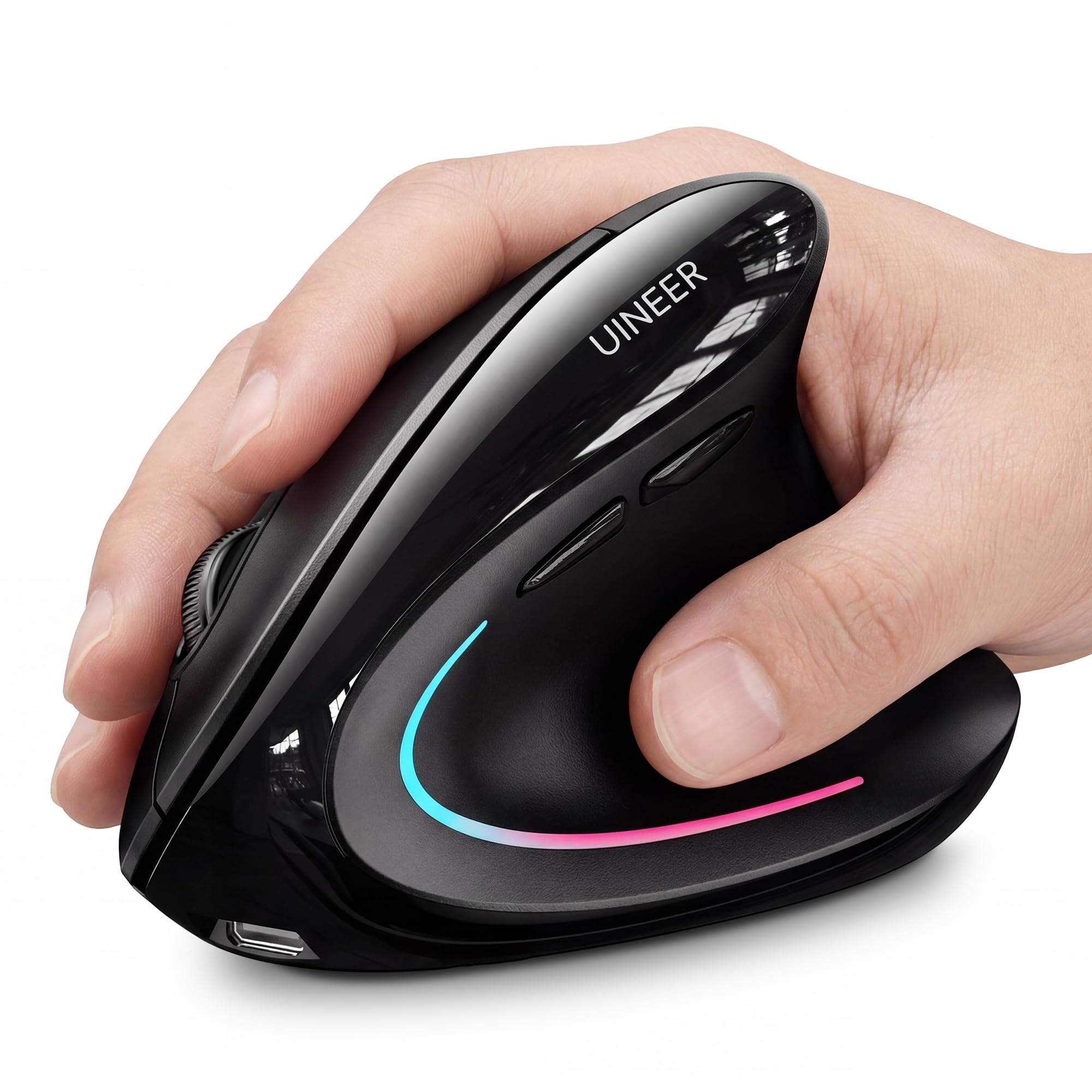
Uineer’s take on the vertical mouse adds a splash of personality with a customizable 7-color ambient LED that cycles through hues to match your mood—or simply marks your DPI setting. The handshake grip is optimized for small-to-medium hands, positioning your wrist straight and forearm relaxed. A high-performance chip enables four DPI steps (800/1200/1600/2400), enough for daily productivity and light design work.
This mouse supports dual Bluetooth 5.0/4.0 plus 2.4GHz wireless, allowing simultaneous pairing with up to three devices. Switching between your laptop, tablet, and PC takes a single button press without re-pairing. The internal rechargeable battery lasts over a week on a single charge, with a smart sleep mode that activates after 10–30 minutes of inactivity. A low-battery warning LED appears before the mouse dies entirely.
A minor but real issue: some units develop a squeaky scroll wheel after a few weeks, though a tiny dab of grease usually silences it. The side buttons are non-functional on macOS, so Mac users lose two of the six buttons. Overall, this is a solid, flashy vertical mouse that trades absolute build refinement for exceptional feature value and RGB flair.
Why it’s great
- 7-color ambient LED adds visual feedback and style
- Tri-mode connectivity (Dual BT + 2.4G) for 3 devices
- Rechargeable battery with smart power-saving sleep
- Lightweight at 71 grams for fatigue-free portability
Good to know
- Best suited for small-to-medium hands
- Scroll wheel may develop noise after a few weeks
- Side buttons incompatible with macOS
5. NYIEFADA Bluetooth Wireless Arc Travel Mouse
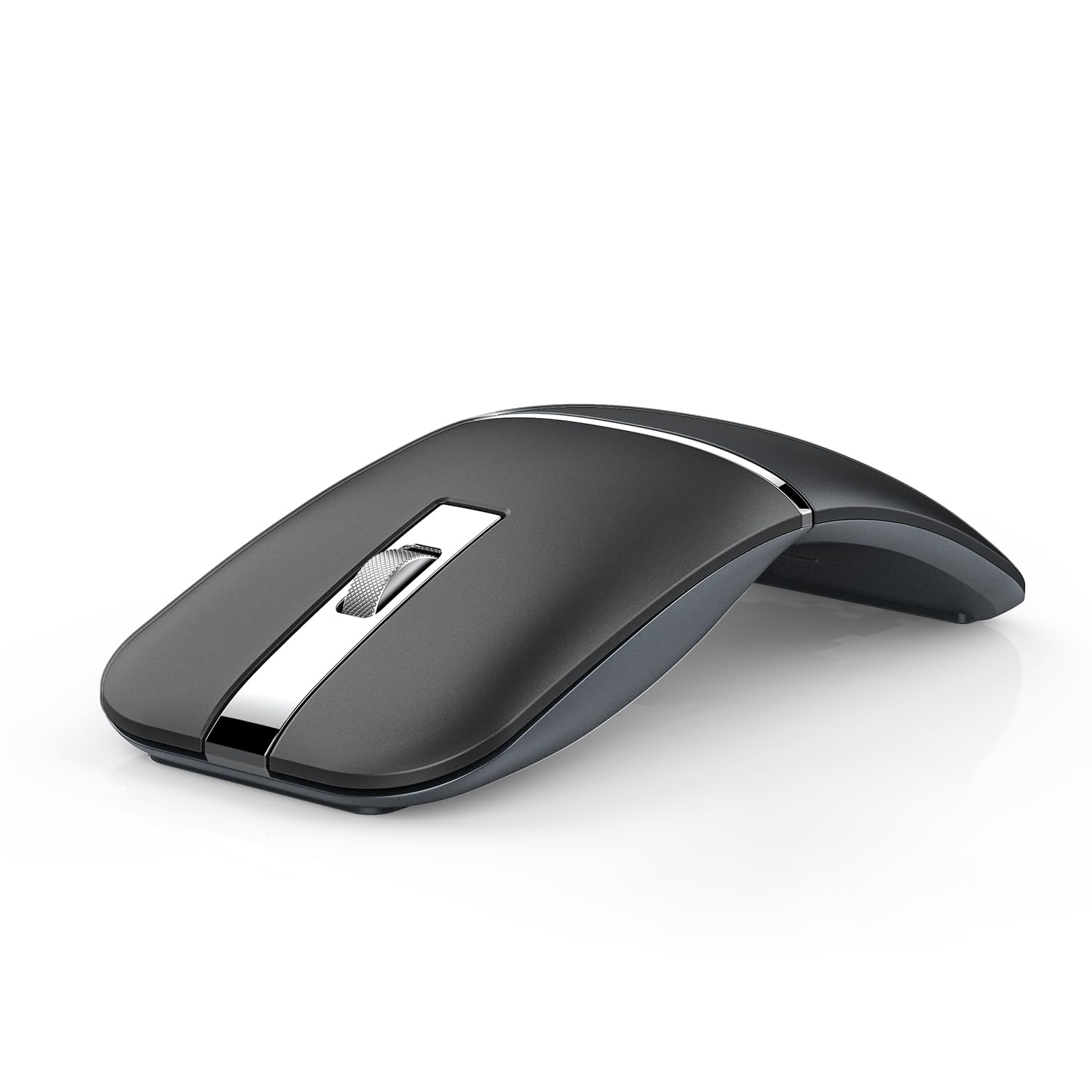
The NYIEFADA Arc redefines travel-friendliness with a rotating, foldable body that snaps completely flat, slipping into a pocket or the slim sleeve of a laptop bag. When unfolded, it provides a surprisingly comfortable palm arch for extended use. The 360-degree rotation mechanism feels solid and clicks into place with confidence. Silent, soft-click buttons keep the noise floor low in coffee shops and co-working spaces.
Tri-mode connectivity is on board: two Bluetooth channels (5.0/4.0) plus a 2.4GHz dongle stored inside the mouse body. Switching among three devices (laptop, tablet, phone) is immediate—no re-pairing required. The built-in rechargeable battery delivers up to 30 days of moderate use, and automatic power-off kicks in when the USB receiver is disconnected or the paired computer shuts down. A glossy black finish and included carry bag round out the package.
The biggest trade-off is the reduced button count—only three buttons (left, right, scroll click) with no side navigation buttons, so power users will lose forward/backward shortcuts. The glossy surface also picks up fingerprints quickly. For the road warrior who prioritizes pocketability and quick multi-device pairing over button abundance, this Arc mouse is the definitive travel companion.
Why it’s great
- Rotating body folds flat for ultra-slim pocket storage
- Tri-mode Bluetooth + 2.4GHz with internal dongle holder
- Silent buttons and soft click feedback
- Rechargeable battery lasts up to 30 days per charge
Good to know
- Only three buttons; no forward/back navigation
- Glossy finish collects visible fingerprints
- Different feel from standard mice may require adjustment period
6. Dell MS700 Bluetooth Travel Mouse

Dell’s MS700 is engineered for the business traveler who demands a no-compromise blend of portability and precision. The twistable design is its signature trick: a simple quarter-turn collapses the mouse flat for stowing, and an identical twist powers it off to conserve battery. At just 56.9 grams, it’s barely noticeable in a bag—ideal for the carry-on mindset.
Bluetooth 5.0 connectivity supports up to three paired devices with instant switching via the Easy-Switch button. The optical LED sensor offers adjustable DPI up to 4000, delivering smooth, responsive cursor control on a wide range of surfaces (excluding glass). Touch scrolling replaces a physical wheel with a capacitive strip, enabling rapid page navigation with a single finger swipe. Quiet click buttons keep noise to a minimum in shared cabins.
The MS700 runs on two AAA batteries rather than a rechargeable cell—some prefer the simplicity of swapping, but forgetting spares can be a travel headache. The touch scrolling can feel erratic to users accustomed to a physical wheel, and it only pairs via Bluetooth (no 2.4GHz dongle). For the minimalist who values an ultra-light, twist-to-stow design, this Dell is a refined tool.
Why it’s great
- Twist-to-stow and twist-to-power-off mechanism
- Ultra-light 56.9 gram weight for effortless portability
- 4000 DPI sensor with smooth touch scrolling
- Bluetooth 5.0 with 3-device pairing
Good to know
- Uses AAA batteries; not rechargeable
- Touch scrolling can feel imprecise under fast use
- No 2.4GHz dongle option for lag-free gaming
7. Logitech MK270 Wireless Keyboard and Mouse Combo

The Logitech MK270 is not a standalone Bluetooth mouse—it’s a full keyboard-and-mouse combo connected through a single 2.4GHz USB receiver. That distinction matters: you trade the convenience of Bluetooth pairing for rock-solid, low-latency wireless that never drops or interferes. The compact mouse is ambidextrous and comfortable for both hands, with smooth cursor tracking on most surfaces.
The keyboard is the real star here, featuring low-profile, quiet keys with a full-size layout including a number pad, arrow keys, and eight multimedia shortcut keys (internet, email, play/pause, volume). A spill-resistant design protects against accidental coffee splashes. Battery life is exceptional—the keyboard runs up to 36 months on two AAAs, while the mouse lasts up to 12 months on a single AA. On/off switches on both devices extend that longevity.
Compatibility is strictly Windows-only, so Mac users should look elsewhere. The mouse lacks a Bluetooth option entirely—it’s 2.4GHz only, meaning you’ll need a free USB-A port. Older Logitech Unifying Hub software changes have caused minor pairing hiccups for some. For building a fresh desk setup on a tight budget, this combo delivers unmatched long-term value and reliable daily performance.
Why it’s great
- Keyboard battery lasts up to 36 months on two AAA batteries
- Spill-resistant keyboard design protects against accidents
- Full-size layout with dedicated media and shortcut keys
- Rock-solid 2.4GHz connection with no Bluetooth pairing steps
Good to know
- Windows-only; no macOS compatibility
- Mouse is 2.4GHz only—no Bluetooth option
- Compact mouse lacks side navigation buttons
FAQ
Can I use a Bluetooth mouse with an iPad or Android tablet?
What DPI setting should I use for a 4K monitor?
Is a vertical mouse really better for wrist pain?
Final Thoughts: The Verdict
For most users, the best bluetooth mouse winner is the XBG B15pro because it combines a brilliant on-board LED display, tri-mode connectivity, USB-C rechargeability, and silent clicks at a mid-range price that outclasses everything else in this roundup. If you want a zero-wrist-movement desktop companion that’s been verified by ergonomists, grab the Logitech Ergo M575S. And for a compact, foldable traveler that disappears into your pocket, nothing beats the NYIEFADA Arc Travel Mouse.