
The loud, clacking world of clicky switches has a quieter, more refined sibling: the tactile bump. A brown switch keyboard delivers that satisfying, physical confirmation of a keystroke without the audible ruckus that empties offices and annoys roommates. It’s the sanctuary where typing precision meets peaceful coexistence, balancing the crisp feedback you crave with the silence others demand.
I’m Min — the co-founder and writer behind Gadgets Feed. I’ve spent hundreds of hours dissecting mechanical keyboard specs, comparing actuation curves, and analyzing switch materials to separate genuine performance from marketing fluff in this crowded market.
This guide breaks down the top contenders to help you zero in on the right brown switch keyboard for your specific workflow, from coding marathons to competitive gaming sessions.
How To Choose The Best Brown Switch Keyboard
The magic of a brown switch lies in its tactile bump, but not all implementations are equal. The feel, travel distance, and quietness vary dramatically from one board to the next, making your choice deeply personal. The key is to match the keyboard’s overall package—from its layout to its build materials—to your primary use case.
Layout and Form Factor
Your desk space and need for a numpad dictate your size. Full-size (104-key) boards keep every key within reach, ideal for spreadsheet warriors and data entry. Compact 96% or 98% layouts trim the bezel but retain the numpad, saving significant desk real estate. For pure minimalists, tenkeyless (TKL) options exist, but be prepared to lose the number pad entirely.
Build Quality and Acoustics
A keyboard’s chassis material—plastic, ABS, or aluminum—directly influences its heft and resonance. A plastic case can produce a hollow, pingy sound, while an aluminum frame offers a dense, premium thock. Look for internal dampening layers like foam or silicone pads, which absorb echo and give each keystroke a clean, refined tone. The difference between a rattly board and a silent, creamy one is often just a few millimeters of foam.
Connectivity and Power
Wired connections offer zero latency and never need charging, making them the standard for competitive gaming. Wireless options (Bluetooth or 2.4GHz) provide desk cleanliness and device switching, but introduce battery anxiety. A 4000mAh battery can last weeks without backlighting, while smaller cells may require weekly charging. For wireless flexibility without compromise, look for a reliable 2.4GHz dongle and a respectable battery capacity.
Quick Comparison
On smaller screens, swipe sideways to see the full table.
| Model | Category | Best For | Key Spec | Amazon |
|---|---|---|---|---|
| Keychron K4 | Premium Wireless | Multi-device productivity | 4000mAh battery, 240-hour life | Amazon |
| Cherry KC 200 MX | Premium Office | Professional office typing | CHERRY MX2A Brown, 100M clicks | Amazon |
| Cherry MX 3.0S | Premium Gaming | Competitive gaming with RGB | Aluminum housing, NKRO | Amazon |
| RK R98 Pro | Mid-Range Enthusiast | Thocky typing enthusiast | Gasket mount, pre-lubed linear | Amazon |
| Keychron C2 | Mid-Range Value | Budget full-size productivity | 104 keys, 50M keystroke lifespan | Amazon |
| RK Royal Kludge RK98 | Mid-Range Wireless | Wireless gaming on a budget | Tri-mode, 3750mAh battery | Amazon |
| Redragon K745 PRO | Budget Enthusiast | Gasket mount on a budget | 5-layer dampening, tri-mode | Amazon |
In‑Depth Reviews
1. Keychron K4 96% Layout 100 Keys Wireless Bluetooth 5.1/Wired USB Mechanical Gaming Keyboard

This board nails the trifecta of wireless freedom, long battery life, and tactile typing. The 96% layout crams a full numpad into a frame barely larger than a TKL, saving significant desk space without sacrificing your number-crunching muscle. The 4000mAh battery is a titan among mechanical keyboards, delivering up to 240 hours of use with the backlight off, so you can leave the charging cable behind for weeks.
The Keychron Super Brown Switch provides a gentle, affirming bump that is ideal for office environments where clicky switches would invite glares. It connects with up to three devices via Bluetooth 5.1 and switches between them seamlessly, making it perfect for workflows that jump between a PC, laptop, and tablet. The white LED backlight adds a professional, subtle glow without the circus of RGB.
Long-term owners report lasting satisfaction, with one reviewer noting zero wear after three years of daily use. The inclusion of extra keycaps for both Mac and Windows means it adapts to your OS out of the box. For the user who wants one keyboard to rule all devices without ever hunting for a charger, the K4 is a masterclass in design.
Why it’s great
- Massive 4000mAh battery offers weeks of wireless use
- Compact 96% layout retains full numpad functionality
- Seamless multi-device Bluetooth switching
Good to know
- Tall profile may require a wrist rest for comfortable use
- Condensed numpad zero key takes adjustment for data entry
- No 2.4GHz receiver dongle included
2. Cherry KC 200 MX, Wired Mechanical Office Keyboard

Cherry defines the brown switch standard, and the KC 200 MX is a pure, unapologetic office tool. The new MX2A Brown switches are a generational leap, offering a smoother, quieter actuation with the same reliable tactile bump that has built Cherry’s legend. The anodized aluminum top plate gives the board a cool, premium heft that stops it sliding during frantic typing sessions.
This is a wired board with a USB-A connection, so latency is non-existent, and the build is laser-focused on durability. Laser-etched, abrasion-resistant keycaps ensure the legends remain perfectly legible even after years of heavy use. The addition of dedicated calculator and volume keys, along with tasteful white status LEDs for Caps/Scroll/Num Lock, proves Cherry thought about the small things.
Customer feedback consistently praises the MX2A Brown switches for being “buttery smooth” and quieter than older MX Blue switches, with a “thock” that feels satisfying without being disruptive. A minor caveat is the non-replaceable USB cable and clunky tilt feet, but the core typing experience is among the best at this level. If your priority is a no-compromise wired office keyboard, this is the benchmark.
Why it’s great
- Premium CHERRY MX2A Brown switches are exceptionally smooth
- Durable aluminum surface and abrasion-resistant keycaps
- Dedicated calculator and volume hotkeys
Good to know
- Non-removable USB cable limits cable management
- Tilt feet feel somewhat clunky to adjust
- No backlighting for the keys themselves
3. Cherry MX 3.0S, Wired Mechanical Gaming Keyboard
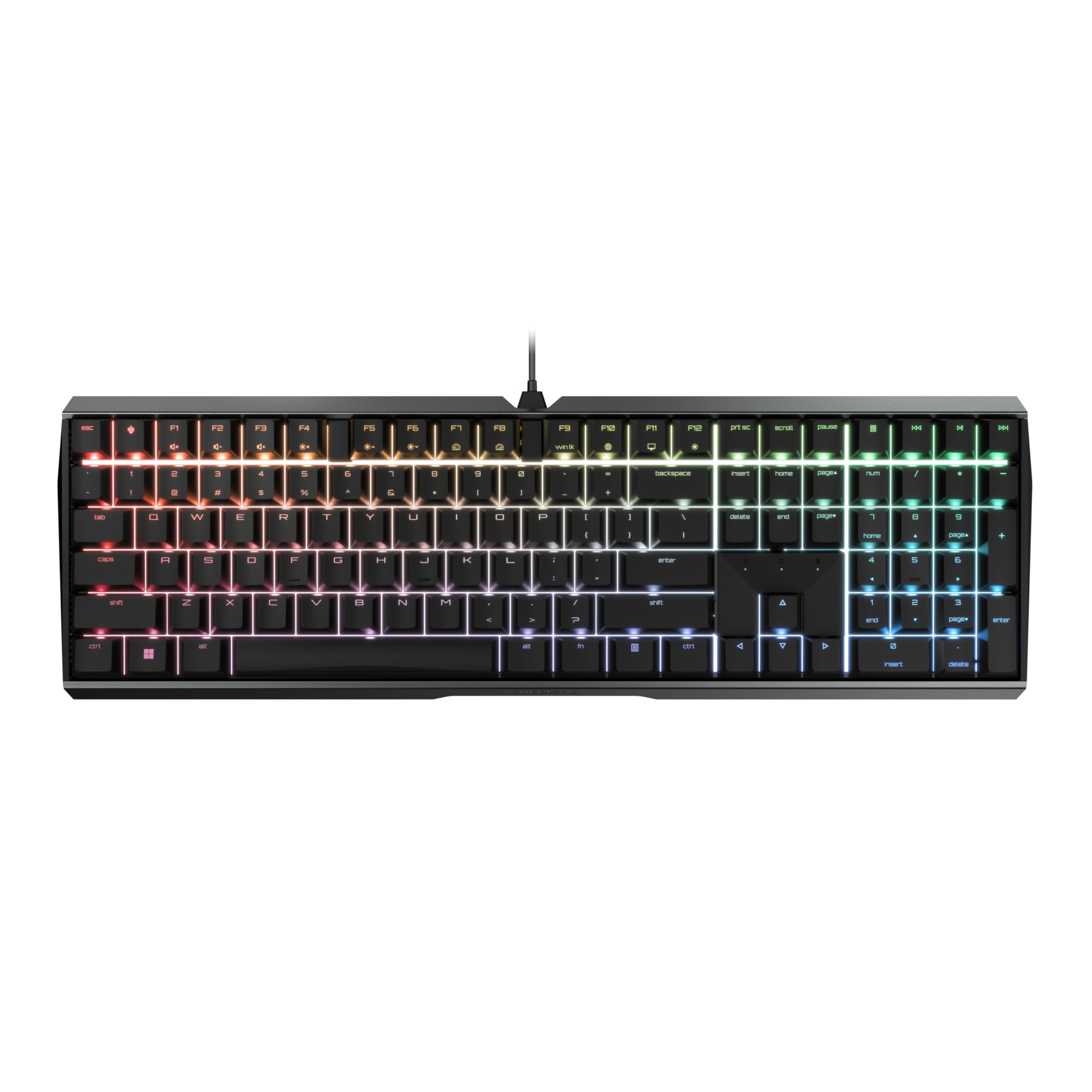
The MX 3.0S takes Cherry’s legendary switches and wraps them in a screw-free extruded aluminum chassis built for the rigors of esports. The unibody construction eliminates the flex and creak of plastic boards, giving you a rock-solid platform for rapid inputs. The CHERRY MX Brown switches here are the classic tactile variant, rated for over 100 million keystrokes, providing distinct feedback without the click that could tip off opponents on voice comms.
RGB lighting covers 16 million colors, with effects programmable via the CHERRY UTILITY software. Full N-key rollover and anti-ghosting ensure every frantic key press registers, even during complex macros. The WIN key lock and game mode are easily accessible, keeping accidental Windows key interrupts at bay. The detachable USB-A to micro-USB cable adds a measure of portability for LAN parties.
Users confirm the aluminum base gives the board a “substantial” feel, and the tactile feedback is “not obnoxiously loud.” The stock keycaps are illuminated from below with good color fidelity, though the font may not appeal to everyone. The RGB software is basic compared to gamer-centric competitors, but the hardware itself is tough and responsive. For a straightforward, durable gaming keyboard with authentic Cherry brown switches, this is a top-tier contender.
Why it’s great
- Rock-solid, screw-free aluminum housing for zero flex
- Authentic CHERRY MX Brown switches with 100M actuations
- Full NKRO and anti-ghosting for competitive gaming
Good to know
- Height adjustment requires screwing legs, not flipping them
- RGB software is less feature-rich than competitors
- Keycap font style may not suit everyone’s taste
4. RK ROYAL KLUDGE R98 Pro Wired Mechanical Keyboard

The R98 Pro is an enthusiast-grade board that punches far above its weight class. The gasket mount structure allows the plate to float on silicone, producing a bouncy, cushioned typing feel that dampens harsh bottom-outs. This, combined with five layers of sound-absorbing foam, produces the coveted “creamy, thocky” sound that mechanical keyboard purists chase, right out of the box.
The pre-lubed cream switches are linear, meaning they offer a smooth, uninterrupted travel without a tactile bump. However, this board is included because its hot-swap socket supports 3/5-pin switches, so you can easily swap in your own brown switches for a truly custom tactile experience. The MDA profile PBT keycaps offer a large, finger-hugging surface that makes long typing sessions noticeably more comfortable.
A detachable aluminum volume knob and a compact 98-key layout keep the desk clean. The RK online driver allows deep customization of key binds, macros, and RGB lighting. Users rave about the “buttery” and “ASMR” quality of the stock typing sound, and note that it handily beats modified keyboards out of the box. If you want to enter the custom keyboard hobby, the R98 Pro is an ideal starting platform.
Why it’s great
- Gasket mount and 5-layer foam deliver creamy, thocky sound
- Hot-swappable PCB accepts almost any 3/5-pin switch
- MDA profile PBT keycaps are comfortable and durable
Good to know
- Stock switches are linear, not tactile browns
- Key legends are not shine-through for dim environments
- Wired only, no wireless connectivity
5. Keychron C2 Full Size Wired Mechanical Keyboard

Keychron brings its quality to the entry-level with the C2, a no-frills full-size wired keyboard that focuses on the fundamentals. The 104-key layout is a classic full-size experience, essential for anyone who relies on a dedicated numpad for data entry, finance, or CAD work. The included Mac and Windows keycaps make it a true OS-agnostic tool right from the unboxing.
The pre-installed Keychron tactile brown switches deliver a noticeable bump with a 50-million-keystroke lifespan. The typing feel is consistent and solid, with a dampened sound that won’t disturb a shared workspace. The two-level adjustable feet (6° and 9°) allow for angle customization, and the braided USB-C cable is a welcome touch for durability.
Owners consistently call it a “quality full-size keyboard” with a “modern 90s vibe” thanks to its retro color scheme. It feels heavy enough to stay planted on the desk during vigorous typing. While it lacks backlighting and wireless features, its price point makes it the most accessible entry into the Keychron ecosystem for those who simply need a reliable, tactile typing experience.
Why it’s great
- Affordable entry point into the Keychron brand
- True 104-key layout with full numpad
- Comes with extra keycaps for both Mac and Windows
Good to know
- No backlighting of any kind
- Plastic case may feel less premium than metal options
- No hot-swap capability
6. RK ROYAL KLUDGE RK98 Wireless Mechanical Keyboard

The RK98 is a wireless workhorse that refuses to compromise on features. Tri-mode connectivity (BT 5.1, 2.4GHz, USB-C) lets you jump between your PC for gaming and your tablet for notes without unplugging a single cable. The 2.4GHz dongle stores neatly inside the keyboard, preventing loss. The 3750mAh battery offers up to 168 hours of use with RGB off, meaning you can game and type for weeks without a charge.
The stock tactile brown switches feature a 55gf actuation force and 2.0mm pre-travel, striking the classic balance between gaming responsiveness and typing precision. Noise-cancelling cotton inside the case keeps the sound profile clean and office-friendly. The inclusion of a hot-swappable PCB means you can swap in any Cherry MX-compatible switch later without soldering.
The 98% layout is a clever space-saving design that retains the numpad and arrow keys with a slightly offset arrow cluster to prevent misclicks. Users highlight the fantastic typing feel out of the box, calling it a “great value at its price.” Some note the RGB lighting is bright but doesn’t shine through the stock keycaps. If you want wireless flexibility with a solid tactile experience, the RK98 is a strong pick.
Why it’s great
- Tri-mode wireless with Bluetooth 5.1, 2.4GHz, and wired
- Long-lasting 3750mAh battery for extended wireless use
- Hot-swappable PCB for easy switch customization
Good to know
- RGB lighting does not shine through keycap legends
- No QMK/VIA software support
- Plastic case may not feel as premium as aluminum boards
7. Redragon K745 PRO Wireless Gasket RGB Gaming Keyboard

Redragon’s K745 PRO is a revelation for the budget market, packaging a gasket mount and five-layer noise dampening at a price point where such features are rarely seen. The gasket structure decouples the plate from the case, resulting in a cushioned, flexible typing feel that eliminates the harsh bottom-out of rigid designs. This, combined with the foam layering, creates a “creamy, thocky” sound that rivals boards costing twice as much.
The custom Mint Mambo switches are pre-lubed linear switches with a light 40g actuation, making them fast and smooth for gaming. Like the R98 Pro, this board is hot-swap ready for 3/5-pin switches, allowing you to install tactile brown switches for a personalized bump. It also supports tri-mode connectivity (BT 3.0/5.0, 2.4GHz, USB-C), giving you wireless freedom without sacrificing performance.
The full-size 108-key layout includes four extra shortcut keys for convenience. Users report the typing experience is “creamy and satisfying,” with a sound quality that is “quiet, thocky.” The concave PBT keycaps prevent finger slipping during long sessions. For the budget-conscious enthusiast who refuses to give up the gasket-mount experience, the K745 PRO is a clear winner.
Why it’s great
- Premium gasket mount at an entry-level price
- Five layers of sound dampening for a clean, creamy sound
- Tri-mode wireless with hot-swap PCB
Good to know
- Stock Mint Mambo switches are linear, not tactile
- Keycaps are not shine-through
- Battery life is shorter than premium options (~20-40 hours)
FAQ
Are brown switches good for gaming or just typing?
What is the difference between Cherry MX Brown and Keychron Super Brown switches?
Final Thoughts: The Verdict
For most users, the brown switch keyboard winner is the Keychron K4 because it perfectly balances wireless freedom, exceptional battery life, and the tactile Keychron Super Brown switch in a space-saving 96% layout. If you want the purest, highest-quality wired office experience, grab the Cherry KC 200 MX with its premium MX2A switches. And for entry-level enthusiasts who want a gasket mount and hot-swap potential without breaking the bank, nothing beats the Redragon K745 PRO.