
If your current mouse sounds like a typewriter every time you click, or you’re juggling three cables just to switch between your laptop, tablet, and phone, it’s time for an upgrade. A silent, multi-device wireless mouse isn’t a luxury anymore — it’s a desk sanity essential.
I’m Min — the co-founder and writer behind Gadgets Feed. I’ve spent hundreds of hours parsing the spec sheets, real-user feedback, and connectivity protocols in the wireless pointer market to separate the genuinely smooth operators from the laggy, battery-hungry duds.
After filtering through dozens of models by battery capacity, DPI range, connection stability, and ergonomic design, I’ve narrowed the field down to the seven best options on Amazon right now. This guide will help you find the perfect bt mouse for your workflow and workspace.
How To Choose The Best BT Mouse
Not every wireless mouse delivers the same experience. The key differentiators boil down to how you connect, how long the battery lasts, and how the thing actually feels under your hand for eight hours straight.
Connectivity and Multi-Device Switching
A true BT Mouse should support at least Bluetooth 5.0 for a stable, low-latency connection. Premium models offer tri-mode connectivity (Bluetooth 5.0, Bluetooth 4.0, and 2.4GHz via a dongle), letting you pair with a laptop, tablet, and desktop simultaneously and switch with a single button press. If you work across multiple screens, this feature alone justifies an upgrade.
Battery Life and Charging Convenience
Rechargeable lithium-ion batteries (500 mAh to 800 mAh) are the standard for modern cord-free mice, promising weeks of use between charges. Some premium options still use standard AAAs for extreme longevity (up to 18 months), but require battery swaps. Look for USB-C charging to keep your cable clutter to a minimum. A sleep mode that kicks in after five minutes of inactivity is a must for conserving power.
Sensor Resolution and Tracking Surface
DPI (dots per inch) determines how far the cursor moves per inch of physical mouse movement. For general office work, 1600 DPI is the sweet spot. Creative professionals and multi-monitor users benefit from 4000 DPI or higher. The best sensors track accurately across nearly every surface, including glass, without a mouse pad, which is a game-changer for travel and cramped desks.
Quick Comparison
On smaller screens, swipe sideways to see the full table.
| Model | Category | Best For | Key Spec | Amazon |
|---|---|---|---|---|
| Logitech MX Anywhere 3S for Mac | Premium | Mac users & power professionals | 8K DPI, MagSpeed scroll wheel | Amazon |
| Logitech Ergo M575S | Premium | Ergonomic & trackball fans | Thumb control, 18-month battery | Amazon |
| Dell MS700 Travel Mouse | Mid-Range | Ultra-portable travel use | 4000 DPI, twist-to-stow design | Amazon |
| NYIEFADA Arc Travel Mouse | Mid-Range | Foldable & compact travel | 360-degree rotating design, 30-day battery | Amazon |
| XBG B15pro | Mid-Range | Productivity with LED display | LED status screen, 500 mAh battery | Amazon |
| CHHI Wireless Bluetooth Mouse | Budget | Budget-friendly multi-device use | 3200 DPI, 100-hour battery | Amazon |
| Normdecos Bluetooth Wireless Mouse | Budget | Jiggler mode & dual-port receivers | 800 mAh battery, jiggler mode | Amazon |
In‑Depth Reviews
1. Logitech MX Anywhere 3S for Mac

The Logitech MX Anywhere 3S for Mac is the undisputed king of compact Bluetooth mice for Apple users. Its 8K DPI sensor tracks on any surface, including glass, so you never need a mouse pad again. The MagSpeed scroll wheel is a mechanical marvel — it can fly through 1,000 lines per second in free-spin mode or click into a precise ratchet for pixel-perfect stops.
Quiet clicks are a standout feature; the main buttons produce a soft, muffled thud rather than a sharp snap, making this an ideal companion for shared workspaces or late-night sessions. USB-C charging and a battery that lasts weeks on a single charge mean you’ll rarely think about power. It pairs with up to three devices via Bluetooth Low Energy, switching instantly.
The only real compromise is its compact footprint — users with larger hands may find it a bit small for full-palm grip. But for travel, desk decluttering, and Mac-centric workflows, this mouse sets a standard few can match.
Why it’s great
- 8K DPI sensor tracks on glass without a pad
- MagSpeed scroll is the fastest and most precise wheel available
- Extremely quiet clicks for distraction-free work
Good to know
- Compact size may be small for large hands
- Priced at the premium end of the category
2. Logitech Ergo M575S

The Ergo M575S is a trackball mouse that completely redefines what a BT Mouse can do for your wrist health. By keeping your hand stationary and moving the cursor with your thumb, this Logitech design reduces forearm muscle strain by 25% compared to a standard mouse. It’s a godsend for users battling repetitive strain injuries or working in tight spaces where traditional mousing is impossible.
Connectivity is dual — Bluetooth or the included Logi Bolt USB receiver — and battery life is an absurd 18 months from a single AA battery. The sculpted right-handed shape cradles your palm naturally, and the thumb-operated ball offers precise, smooth tracking once you acclimate. The buttons produce quiet clicks that won’t annoy nearby colleagues.
This is not a mouse you grab for a quick round of gaming. The trackball learning curve is real, and left-handed users are out of luck. For office productivity, data entry, and anyone who prioritizes ergonomic longevity, it’s an incredible value.
Why it’s great
- Reduces forearm strain by 25% for all-day comfort
- 18-month battery life from a single AA battery
- Saves desk space — cursor moves without moving the mouse
Good to know
- Right-hand only design
- Trackball has a learning curve for new users
3. Dell MS700 Travel Mouse

The Dell MS700 is the most intelligently designed travel mouse on this list. Its twist mechanism stows the mouse completely flat for pocket storage, and a single reverse twist pops it back into an ergonomic arched shape ready for work. At just 56.9 grams, it disappears into a bag.
The 4000 DPI optical sensor provides smooth, responsive tracking across most surfaces. Dell Pair and Microsoft Swift Pair make Bluetooth 5.0 connection near-instant on Windows 10 and 11, though Mac users will need to pair manually. The touch-scroll strip is a unique alternative to a traditional scroll wheel, offering a frictionless swipe motion.
Battery life is excellent on the included pair of AAA batteries, but the MS700 is not rechargeable — you’ll need to keep spares handy. The twist-to-stow build feels solid and well-engineered, and the matte finish resists fingerprints better than glossy alternatives.
Why it’s great
- Twist-to-stow design folds flat for ultra-portable travel
- 4000 DPI sensor offers excellent precision for office work
- Touch-scroll strip provides a unique, smooth navigation experience
Good to know
- Runs on AAA batteries rather than a rechargeable cell
- Swift Pair is Windows-only; Mac pairing is manual
4. NYIEFADA Arc Travel Mouse
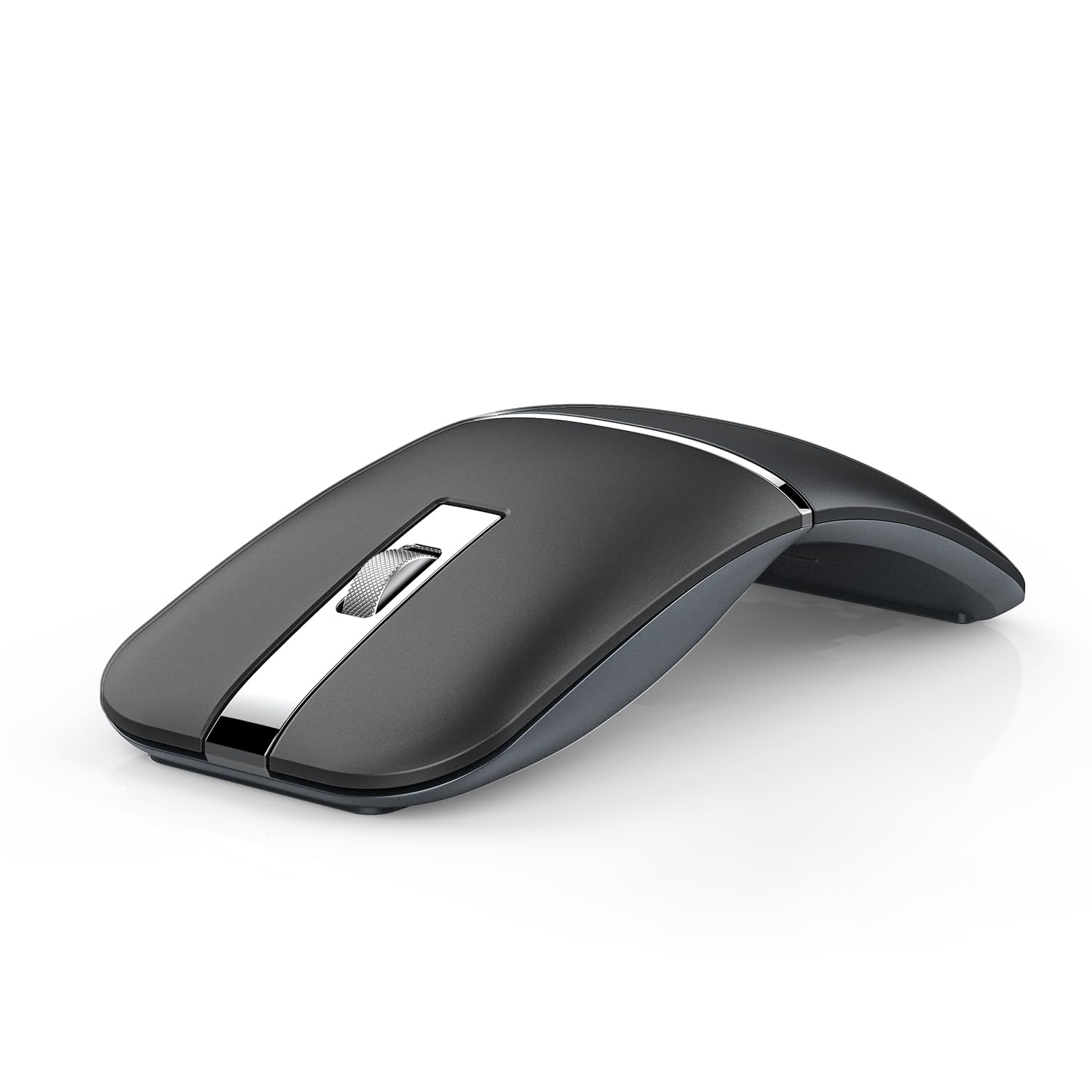
The NYIEFADA Arc Mouse brings a clever 360-degree rotating design that folds completely flat for pocket carry, making it a fantastic alternative to the far more expensive Microsoft Arc. It supports tri-mode connectivity — Bluetooth 5.0, Bluetooth 4.0, and a 2.4GHz USB dongle — letting you connect to three devices simultaneously.
Silent clicks and a built-in rechargeable battery rated for about 30 days of typical use make this a genuine daily driver for mobile professionals. The glossy plastic finish and slim profile mean it slides easily into a laptop sleeve. The small nano receiver stows inside the mouse body, so there’s no risk of losing it during transit.
The arc shape takes some adjustment if you’re used to a full-sized ergonomic mouse. The glossy surface also attracts fingerprints quickly. For the price, however, the combination of foldable design, multi-device pairing, and rechargeable battery is hard to beat.
Why it’s great
- 360-degree rotating design folds completely flat for travel
- Tri-mode connectivity supports three devices simultaneously
- Rechargeable battery lasts up to 30 days on a single charge
Good to know
- Glossy finish shows fingerprints and smudges easily
- Arc shape has a learning curve compared to standard mice
5. XBG B15pro

The XBG B15pro stands out in the mid-range with its built-in LED status display, which shows real-time battery percentage, DPI level, and active connection mode. No more guessing or fumbling with companion apps — the information you need is displayed directly on the mouse. It supports tri-mode connectivity (Bluetooth 5.0, Bluetooth 4.0, and 2.4GHz) and switches between paired devices in under a second.
The 500 mAh rechargeable battery charges via USB-C and lasts roughly a month of typical office use. The quiet clicks are genuinely silent, and the ergonomic contour includes a thumb rest and arched palm support that reduce fatigue during long workdays. The five adjustable DPI steps (800 to 2400) give you precise control over cursor speed.
The plastic build feels solid but not premium, and the LED screen, while useful, adds a slight thickness to the profile. For users who want all the connectivity options of a premium mouse at a mid-range price point, the B15pro delivers excellent value.
Why it’s great
- LED display shows battery, DPI, and connection mode at a glance
- Tri-mode connection with sub-second device switching
- USB-C rechargeable with 500 mAh battery for month-long runtime
Good to know
- Plastic build doesn’t feel as premium as higher-end options
- LED screen adds slight thickness to the profile
6. CHHI Wireless Bluetooth Mouse
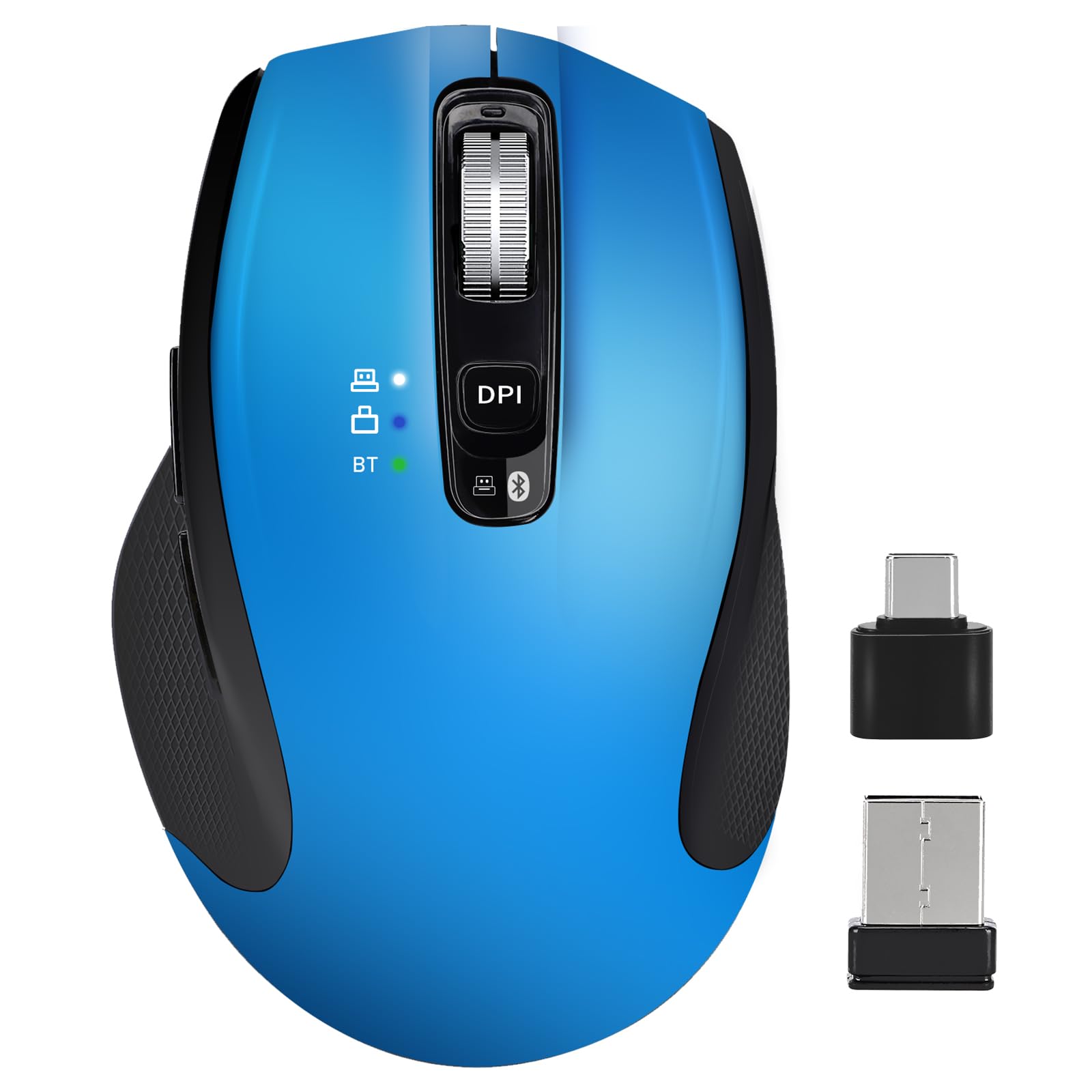
The CHHI Wireless Bluetooth Mouse delivers remarkable versatility at a budget-friendly price point. It ships with both a USB-A and a USB-C receiver, plus Bluetooth, allowing you to connect three different devices simultaneously and switch with a single button. The 3200 DPI sensor offers four adjustable levels (1000, 1600, 2400, 3200), providing solid accuracy for general office tasks and web browsing.
The built-in rechargeable lithium battery is rated for 100 hours of active use — roughly two months based on typical daily use — and charges via USB-C. The ergonomic shape includes a pronounced thumb rest, and the silent clicks are genuinely quiet, making it suitable for libraries and open-plan offices. It’s compatible with Windows, macOS, Linux, Chrome OS, iOS, and Android.
The build quality uses a mix of metal and plastic that feels slightly more substantial than its price suggests. The USB-C receiver is very tight in its storage slot, and there are no setup instructions included. For the price, this is a fantastic all-rounder that covers nearly every connection scenario.
Why it’s great
- Includes both USB-A and USB-C receivers plus Bluetooth for three devices
- 100-hour battery life from a rechargeable lithium cell
- Silent clicks and ergonomic thumb rest for comfortable all-day use
Good to know
- USB-C receiver is extremely tight to remove from storage
- No printed setup instructions included in the box
7. Normdecos Bluetooth Wireless Mouse
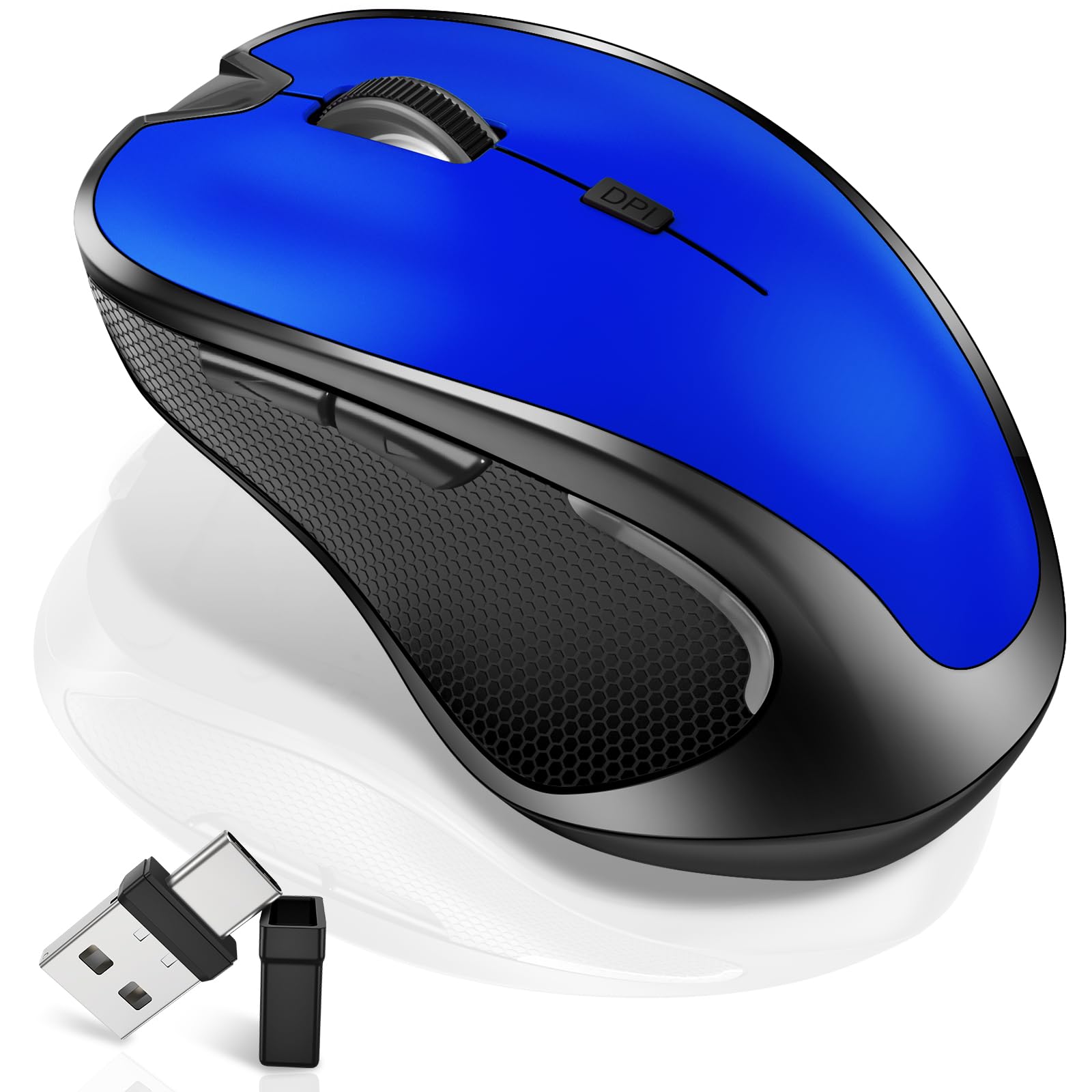
The Normdecos Bluetooth Wireless Mouse packs a massive 800 mAh rechargeable battery — one of the largest capacities in this roundup — delivering up to 90 days of standby time and weeks of active use. It supports four connection modes: Bluetooth 5.2, Bluetooth 3.0, 2.4GHz USB-A, and 2.4GHz USB-C, thanks to a clever dual-port receiver that stores inside the mouse.
A unique selling point is the built-in jiggler mode, which randomly moves the cursor at irregular intervals to keep your computer from going to sleep during long downloads, video meetings, or remote sessions. The three adjustable DPI levels (800, 1200, 1600) cover basic productivity needs, and the quiet clicks are soft enough for shared spaces.
The plastic build is lightweight and functional, but doesn’t feel as refined as mid-range competitors. The matte blue finish is fingerprint-resistant, and the ergonomic contour is comfortable for right-handed users. For students, remote workers, or anyone on a tight budget who needs multi-device flexibility, this is a strong choice.
Why it’s great
- 800 mAh battery is the largest capacity in this guide
- Jiggler mode keeps your computer awake during long tasks
- Dual-port 2-in-1 receiver (USB-A and USB-C) for maximum compatibility
Good to know
- Plastic build doesn’t feel as premium as mid-range options
- Limited to 1600 DPI maximum for cursor speed
FAQ
Can I use a BT Mouse on a glass desk without a mouse pad?
What is the practical difference between Bluetooth 5.0 and Bluetooth 5.2 in a mouse?
Why do some wireless mice still use AA batteries instead of rechargeable cells?
What does “silent click” actually mean, and is it worth sacrificing feedback?
Final Thoughts: The Verdict
For most users, the bt mouse winner is the Logitech MX Anywhere 3S for Mac because it combines a class-leading 8K DPI sensor, the fastest scroll wheel on the market, and whisper-quiet clicks in a travel-friendly package. If you want ultimate ergonomic relief and unmatched battery longevity, grab the Logitech Ergo M575S. And for a budget-friendly multi-device powerhouse that covers every connection scenario, nothing beats the CHHI Wireless Bluetooth Mouse.