
Our readers keep the lights on and my morning glass full of iced black tea. As an Amazon Associate, I earn from qualifying purchases.
Specs are compiled from manufacturer listings and verified buyer reviews and can change over time — please confirm the key details on the product page before buying.
If you play modern games at 1440p, 16GB of video memory (VRAM, the memory your graphics card uses to store textures) is now the balance—8GB cards are already struggling with new releases. The current generation of Radeon cards makes 16GB standard at mid-range prices, so you don’t have to overspend to get it. Your real decision is which card fits your case, your power supply, and the games you play most.
I’m Min — the founder and writer behind Gadgets Feed. This guide is built by comparing the manufacturers’ published specifications and the patterns across verified customer reviews, so you get each pick’s real strengths and trade-offs instead of marketing spin.
From the XFX Swift’s crowd-pleasing performance to the compact PowerColor Reaper, here is the honest breakdown of the budget 16gb graphics card landscape and exactly who each one serves best.
Our Picks at a Glance



How To Choose The Best Budget 16GB Graphics Card
Before you click buy, a few things separate a great purchase from a frustrating one. The VRAM capacity is only half the story—clock speeds, cooler design, and card length play huge roles in daily satisfaction.
Match the Card to Your Resolution
If your monitor is 1080p, you will find plenty of power here. For 1440p gaming, look for a card that reviewers consistently say holds high frame rates with high settings—this is where 16GB of video memory really pays off with larger texture packs.
Measure Your Case Before You Order
These cards come in very different lengths. A triple-fan model can be over 11 inches long, while a compact dual-fan card might slip into smaller builds. Always cross-check the card’s stated length against your case’s GPU clearance, especially if you have a small form factor rig.
Check Your Power Supply
Most of these cards need a single 8-pin power connector, but your power supply’s wattage rating matters too—recommendations range from 500W to 700W depending on the model. A solid 80 Plus rated PSU with a bit of headroom is always a wise companion.
Quick Comparison
| Model | Best For | Boost Clock | Card Length | Memory Type | Amazon |
|---|---|---|---|---|---|
| XFX Swift RX 9060 XT OC★ Best Overall | Overall value and quiet performance | 3320 MHz | 10.63 inches | 16GB GDDR6 | Amazon |
| ASUS Dual RX 9060 XTCompact Pick | Compact size and dual BIOS control | 3250 MHz | 8 inches | 16GB GDDR6 | Amazon |
| PowerColor Reaper RX 9060 XTSFF Favorite | Small form factor and Linux builds | 2620 MHz | 8.66 inches | 16GB GDDR6 | Amazon |
| ASRock Challenger RX 9060 XT | 0dB silent mode and compact fit | 3290 MHz | 9.8 inches | 16GB GDDR6 | Amazon |
| XFX Swift Triple Fan RX 9060 XT | Heavy cooling for long sessions | 3320 MHz | — | 16GB GDDR6 | Amazon |
| GIGABYTE Gaming OC RX 9060 XT | Server-grade thermal gel and RGB | 2700 MHz | 11.06 inches | 16GB GDDR6 | Amazon |
| Gigabyte RX 7600 XT Gaming OC | AV1 encoding and Ray Tracing | 2810 MHz | 11.06 inches | 16GB GDDR6 | Amazon |
| ZOTAC RTX 5060 Ti Twin Edge OC | NVIDIA DLSS 4 and GDDR7 speed | 2602 MHz | 8.7 inches | 16GB GDDR7 | Amazon |
| Sapphire Nitro+ RX 9070 XT | Top-tier 4K performance | 3060 MHz | — | 16GB GDDR6 | Amazon |
In‑Depth Reviews
1. XFX Swift AMD Radeon RX 9060 XT OC Gaming Edition
Our pick — over 4.5★ from 350+ verified ratings; the strongest balance of quality and price.
The budget crowd-pleaser that runs cool, quiet, and punches far above its weight class.
The thing everyone raves about here is sheer performance—buyers report it crushes demanding titles they couldn’t play smoothly before. You get a boost clock up to 3320 MHz on the RDNA 4 chip, which means high settings and smooth frame rates without the card breaking a sweat. The 16GB GDDR6 memory gives you room for modern texture packs, and the dual-fan XFX SWFT cooling keeps things quiet even under load.
What wins people over is the value, plain and simple. One owner swapping from an RX 6500 XT called it “the best video card I could afford,” noting it delivered two to three times the performance at the same noise level. Another moving up from a 6GB RTX 3050 found it flawless after a week of stress tests and gaming. The card runs at about 90°F under load, stays stable, and feels sturdier than its compact size suggests.
Crucially, at 10.63 inches long, it fits most standard cases without fuss. The 1900 MHz base GPU clock is modest, but the boost capability is what you’ll actually feel in games. It’s the rare card where the reviews, the specs, and the real-world experience all line up perfectly.
What Owners Love
- Excellent frame rates on modern titles with 16GB of GDDR6 headroom.
- Runs quiet and cool, hovering around 90°F even when pushed.
- Strong value—plenty of buyers call it a fantastic upgrade for the money.
Who Should Look Elsewhere
- At 10.63 inches, it may be tight in very small form factor cases.
- Lighting is minimal, so it is not the pick for RGB-heavy builds.
The crowd favorite: If you want the safest, most proven 16GB upgrade for 1080p and 1440p gaming, this is the one to beat.
One honest caveat: If you specifically need the absolute shortest card for a cramped case, the ASUS Dual and PowerColor Reaper below are shorter.
2. ASUS Dual Radeon RX 9060 XT 16GB GDDR6
The compact 1440p warrior that stays silent and slips into tight spaces.
The defining spec here is the 3250 MHz GPU clock speed—the highest base figure in this lineup—packed into a card just 8 inches long. That short length makes it a perfect fit for smaller cases, and buyers consistently praise its compact size alongside a clean appearance. You get 16GB of GDDR6 memory, which owners mention future-proofs you for high-resolution textures and heavier games.
ASUS added a Dual BIOS switch so you can toggle between Quiet and Performance profiles, and the 0dB technology lets the fans stop entirely during light gaming. The Axial-tech fan design uses a smaller hub for longer blades, and the dual ball bearings are built to last up to twice as long as sleeve-bearing designs. In practice, customers note stable temperatures, quiet fans, and an easy install with no driver conflicts.
There is a real argument for this card if you play a mix of 1080p and 1440p. One owner detailed smooth 1440p gameplay with a mid-range CPU, hitting up to 180fps in one title before capping it at 120.. Another noted it handled video editing and 3D work with faster rendering than expected. It is a smaller, cooler, quieter take on the same RDNA 4 silicon—just with a bit less raw boost headroom than the XFX Swift.
Why it stands out: The 8-inch length is the shortest of the RX 9060 XT cards here, making it the easiest to fit into a compact build without sacrificing 16GB of VRAM or cooling quality.
Reach for this if: You value a small footprint, whisper-quiet idle, and the flexibility of a dual BIOS switch for tuning noise versus performance.
Look elsewhere if: You want the absolute highest boost clock for overclocking headroom—the XFX Swift beats it there.
3. PowerColor Reaper AMD Radeon RX 9060 XT 16GB GDDR6
The tiny 200mm card that runs new games “like a dream” and sips power.
At just 200mm long internally, this is the card you measure twice and fall in love with—it is built for small form factor (SFF) cases and even works well in eGPU setups, according to owners. The 2620 MHz GPU clock is the most modest here, but reviewers point out that newer games run great and the card is completely silent even at full load. It needs only a single 8-pin PCI Express power connector, which is a huge relief if your power supply is older or smaller.
What surprised reviewers most is how much performance fits in this shell. One owner downsized from a much larger 7900 XTX and found the Reaper “tiny but mighty.” running great at 1440p while keeping 16GB of VRAM available for AI models and high-res textures. The card also works flawlessly on Linux—one buyer using CachyOS called it excellent—and the compact size got consistent praise as ideal for SFF builds.
The one catch is power delivery and thermals. With a 500W minimum system power recommendation, it is the easiest on your power supply, but the compact cooler means temperatures can run warm—one owner logged GPU temps of 72-76°C with a hotspot around 88-91°C under load. That is within safe operating range, but you should not expect the same thermal headroom as a triple-fan card.
The real-world read: This is the card for builders who care more about fitting into the case than about chasing the highest overclock. The Linux compatibility and single 8-pin requirement are rare dual wins.
Best suited for: SFF builders, Linux users, and anyone with a power supply on the older side.
Not ideal for: Hot, poorly ventilated cases—the compact cooler needs a bit of airflow to stay happy.
4. ASRock Radeon RX 9060 XT Challenger 16GB OC

A 0dB silent mode and a 3290 MHz boost make this the quiet 1440p specialist.
The standout spec is the 3290 MHz boost clock—the highest listed boost among the RX 9060 XT cards here—so you get serious raw frame-rate potential from the start. Owners confirm this with real numbers: one buyer upgraded from an RTX 3060 and saw 105-120 fps at 1440p Ultra with ray tracing, while another reported 165 fps on high settings.. The 16GB of GDDR6 memory runs at 20 Gbps on a 128-bit bus, giving you ample bandwidth for modern textures and creative work.
The 0dB silent mode is a genuine selling point: the dual fans can stop spinning entirely at idle, which is why owners describe it as “ultra quiet” and perfect for a hot office setup where noise matters. The card measures 249mm long, which the manufacturer notes requires a single 8-pin connector and a recommended 550W power supply. It also features an LED indicator and a hardware switch to disable the light entirely—a nice touch for folks who dislike RGB.
Reviewers consistently highlight the heat-to-performance ratio at this price point, calling it a fantastic value for small spaces. One user runs it in an eGPU enclosure with a mini PC and says it runs cool and quiet while outperforming pricier alternatives. Just measure your chassis clearance first—249mm is compact but not tiny.
Why it earns its place: The combination of the highest boost clock, a true 0dB idle, and a hardware light switch makes this the most thoughtful silent pick of the group.
Grab this if: You game at 1440p with ray tracing enabled and want fans that vanish at idle.
Think twice if: You need the absolute shortest card—at 9.8 inches it is longer than the ASUS Dual and PowerColor Reaper.
5. XFX Swift AMD Radeon RX 9060 XT OC Triple Fan Gaming Edition

Triple-fan cooling that one owner says never even hits 50°C under full load.
If thermals are your top worry, this is the card that answers it. The XFX SWFT Triple Fan cooling solution keeps temperatures impressively low—one buyer measured 55°C at 100% load and an idle of just 38-41°C.. The boost clock runs up to 3320 MHz, and the 16GB GDDR6 memory runs at a fast 20 GHz, which gives you headroom for high-refresh 1440p and even some 4K gaming. Shoppers say 60fps or higher at 4K and ultra settings at 1080p or 1440p.
The trade-off is physical size. This is a large card—one owner specifically noted it “needs a support bracket” and described it as heavy, while another said it handled dual 1440p/4K monitors with ease. The power draw is higher too, at 180W compared to the 100W of the older RX 6600 it replaced. If you have a spacious case with good airflow, none of this matters; if you are building small, this is not your card.
There is one small quibble in the reviews: the XFX logo light cannot be turned off, which annoyed a couple of owners who wanted a clean, dark aesthetic. Apart from that, the value feedback is strong—buyers call it a great 16GB card for the money, with one noting it handles all games on max settings. The sharper visuals and swift gameplay earn consistent praise.
The honest trade-off: You buy this for the cooling and accept a big footprint. Owners love the thermal headroom and the light-free aesthetic is the only minor friction point.
Best for: Gamers with large mid-towers who run long sessions and want temps in the 40-55°C range.
skip it if: Your case is cramped, or you want no visible lighting on the card.
6. GIGABYTE Radeon RX 9060 XT Gaming OC 16G

The 2700 MHz Gaming OC with server-grade thermal gel and RGB that owners call “ready for the long haul.”
GIGABYTE packed its WINDFORCE cooling system with a Hawk Fan and server-grade thermal conductive gel, and the reviews show it works—buyers report a max of around 68°C even in heavy workloads. and quiet operation thanks to zero-RPM idle. The 16GB of GDDR6 VRAM handles the latest games at max settings on high resolutions, and the PCIe 5.0 interface means it is future-proof for your next motherboard. At 11.06 inches long, it is one of the bigger cards here, so measure your case first.
Buyers consistently report this card is reliable and power-efficient, with one owner calling it “ready for the long haul.” A GIGABYTE listing also includes a detailed comparison of high-end cards, showing how much performance 16GB open up when you push toward 4K (3840×2160 resolution). The design earns praise, but one buyer upgrading from a GTX 1660 warns the heavy triple-fan setup and metal backplate make it a tight fit even in a mid-tower case.
The one real knock is ray tracing—it is decent, but not the strongest at this tier, and some buyers noted the large size as a minor drawback. That said, the value story is strong for budget-to-mid-range builds, and the overclocking headroom is there: one owner ran it comfortably without overheating. This is a GIGABYTE card, so the RGB Fusion lighting is a bonus if you are already in that ecosystem.
The build-quality read: Server-grade thermal gel and a sturdy backplate make this the most “premium feel” option among the RX 9060 XT cards, at the cost of extra length.
Choose this for: A rock-solid, future-proof 16GB card with RGB and a cooler that rarely breaks a sweat.
Reconsider if: Your case clearance is under 11 inches, or if ray tracing performance is your absolute priority.
7. Gigabyte Radeon RX 7600 XT Gaming OC 16GB

The RDNA 3 workhorse with AV1 encoding that handles 1440p/165Hz and creative apps alike.
Sitting on the previous RDNA 3 architecture, this card brings a boost clock of 2810 MHz and 16GB of GDDR6 memory running at a fast 18000 MHz on a 128-bit bus. It stands out for its feature set: AMD Radiance Display Engine, advanced ray tracing, AI accelerators, and notably AV1 encoding, which is a boon for streamers and video editors. Owners using it with a Ryzen 7 report flawless max settings across 20+ games, including titles like Horizon, Tekken, and Forza.
The WINDFORCE cooling here uses three 80mm blade fans, five composite copper heat pipes, and a copper plate that directly touches the GPU. That hardware keeps the card cool and quiet in practice, with owners praising the low noise level and easy installation. It is also a solid choice for flight sim fans—one buyer has used it for eight months with Microsoft Flight Simulator 2024 at middle resolution without issue.
The honest caveat is value. Owners are split on whether the price matches the performance, with some calling it a “super great deal” and others giving four stars largely because of the cost. This is also the most power-hungry pick here at a 700W recommended power supply. For a GPU that slots between the 1080 Ti and 3060 Ti experience with 16GB of VRAM, it is a capable all-rounder, but you are paying a premium for the RDNA 3 feature set.
The balanced take: If AV1 encoding and a mature, stable architecture matter more than raw new-gen clocks, this card delivers, but check that your PSU has the headroom.
Ideal for: Streamers, editors, and gamers who want 16GB VRAM with proven driver stability.
Not for: Budget builders with a 500W power supply, or anyone who wants the latest RDNA 4 architecture.
8. ZOTAC Gaming GeForce RTX 5060 Ti 16GB Twin Edge OC
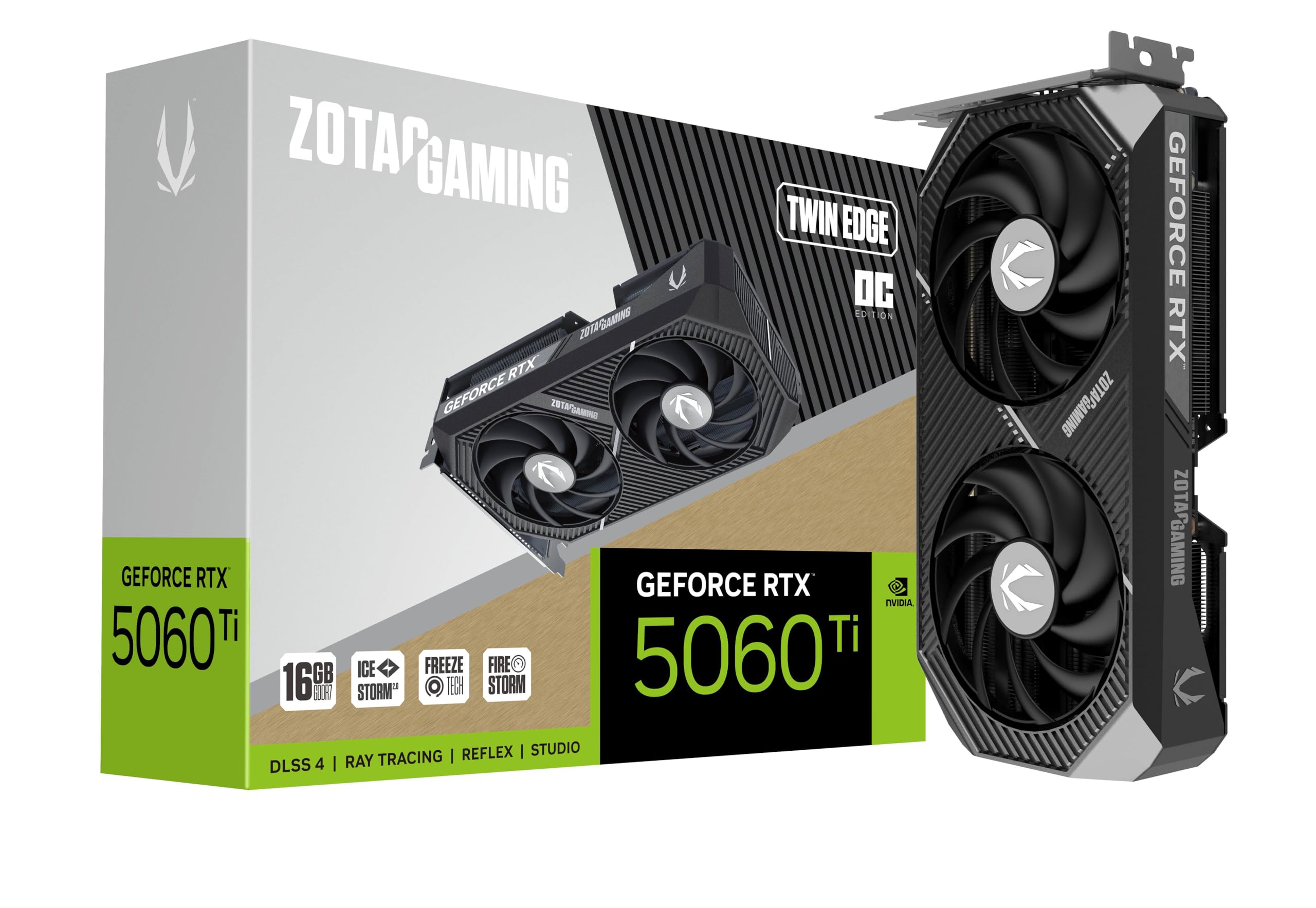
The NVIDIA answer with DLSS 4, GDDR7 memory, and a 26 Gbps data rate.
If you are locked into the NVIDIA ecosystem, this is the 16GB card to watch—the first in this list to use GDDR7 memory, which runs at a blistering 28 Gbps on a 128-bit bus. Powered by the Blackwell architecture with DLSS 4, it delivers that signature upscaling magic that you cannot get on Radeon cards. The boost clock is 2602 MHz, which is modest on paper, but DLSS 4 makes up the gap in supported games. Owners describe it as fast, powerful, and smooth in all games, with one noting it works great for video editing and Framepack AI.
The 8.7-inch length makes it comfortably SFF-ready, and the IceStorm 2.0 cooling with two 90mm BladeLink fans and pass-through airflow keeps it quiet in practice—buyers call it “fairly quiet” with a FREEZE fan stop at idle. The card is also SFF-ready, uses a single 8-pin PCIe connector, and supports 8K output with 4 displays via 3x DisplayPort 2.1b and 1x HDMI 2.1b. It is a genuinely small, efficient 16GB option with a metal backplate.
Value is the sticking point. Owners have mixed feelings about the price—some call it unreasonable even while praising performance. One reviewer bluntly said the card is overpriced but still “better than the 5070 due to VRAM.” You are paying a premium for NVIDIA’s DLSS 4 (a technology that boosts frame rates using AI), ray tracing (realistic lighting effects), and CUDA support (software that speeds up video editing and 3D rendering). If you need those NVIDIA features, this is a strong 16GB pick; if you are purely price-driven, the Radeon cards above stretch your dollar further.
Who this serves: DLSS 4 believers and creative users who rely on NVIDIA’s feature set and want 16GB of fast GDDR7 memory in a compact, SFF-friendly shell.
Reach for this if: DLSS 4, ray tracing, and NVIDIA’s ecosystem are non-negotiable, and you want the fastest memory type here.
Look elsewhere if: Pure price-to-performance is your only metric—AMD gives you 16GB for considerably less.
9. Sapphire Nitro+ AMD Radeon RX 9070 XT Gaming OC

The 4K-class monster with a 256-bit memory interface and whisper-quiet Nitro+ cooling.
This is the big brother of the lineup, and the specs tell the story: a 3060 MHz GPU clock on the RDNA 4 chip, a wider 256-bit memory interface, and 16GB of GDDR6. That wider bus makes a real difference at high resolutions. Owners coming from a 6750 XT measured a 60-90% performance jump., with excellent 1440p and 4K results and improved 1% low frame rates. The display quality earns consistent praise for high-end 1440p gaming.
The Nitro+ cooler is the star of the show. Reviewers call it “whisper quiet” even in the overclocked profile, and one buyer says it runs “cool and silent” with a well-engineered stock cooler and zero coil whine. The build quality is premium, described as “probably the best version of the 9070 XT you can buy,” with a clean look thanks to a rear-connected power cable. Owners also note it boosts aggressively—around 3.0 GHz—straight from the start.
The honest reality is that this is the most demanding card here. It is physically large at over 300mm and uses more than 3 slots, requiring a spacious case and a serious 850W power supply, per owners. Reliability feedback is mixed—while most buyers have a flawless experience, a rare unit arrived with instability issues. Value opinions are also split, with some calling it worth the price and others finding it overpriced. This is the card to buy when you want 4K-class 16GB performance and are willing to pay for the premium Nitro+ treatment.
The premium read: You are paying for the 256-bit memory interface (a wider data path that moves more data per clock cycle) and a top-tier cooler. If 1440p is your ceiling, the RX 9060 XT cards give you most of the experience for less money.
Buy this for: 4K gaming, a whisper-quiet premium build, and the widest memory interface in this roundup.
Pass if: You have a mid-range power supply, a smaller case, or 1440p is your target resolution.
Understanding the Specs
VRAM: 16GB GDDR6 vs GDDR7
Your graphics card’s video memory (VRAM) determines how many high-resolution textures it can load at once—more VRAM means less stutter in demanding games. 16GB is the current balance for 1440p gaming. Most cards here use GDDR6 memory, while the ZOTAC RTX 5060 Ti uses faster GDDR7, which moves data quicker but is also newer and pricier. The memory bus width—128-bit on most, 256-bit on the Sapphire—also affects how fast the card can access that memory.
Boost Clock and Game Clock
Every GPU has a base clock, a game clock, and a boost clock. The boost clock is the maximum speed the card can hit under load, and it is the number you will see in the spec sheets here (ranging from 2602 MHz to 3320 MHz). The game clock is the speed it holds during typical gaming. A higher boost clock generally means higher frame rates, but the cooler and power delivery determine whether the card can actually sustain that speed.
FAQ
Is 16GB of VRAM necessary for 1440p gaming?
Will a 500W power supply run these RX 9060 XT cards?
What is the difference between GDDR6 and GDDR7 memory?
How long should a 16GB graphics card last?
Can I run these cards on a PCIe 4.0 motherboard?
Are these cards suitable for video editing or AI work?
What does a dual BIOS switch do on the ASUS card?
Why is the Sapphire Nitro+ 9070 XT so much larger?
What is DLSS 4 on the ZOTAC RTX 5060 Ti?
Final Thoughts: The Verdict
For most people, the budget 16gb graphics card winner is the XFX Swift RX 9060 XT OC because it pairs the strongest blend of performance, quiet cooling, and value across the highest volume of owner feedback. If you want a compact card that sips power and vanishes into a small case, grab the PowerColor Reaper. And if you are invested in NVIDIA’s DLSS 4 ecosystem, the ZOTAC RTX 5060 Ti is the 16GB card to reach for.
How We Picked
We do not accept paid placement. Every pick is matched to a real buyer and a real use-case; we do not hands-on test units.
Sources & Methodology
Specifications: manufacturer listings and product documentation. Review insights: verified customer reviews, as of August 2026. Pricing: not shown on this page (it changes often); check the current price via the retailer link.
As an Amazon Associate, Gadgets Feed earns from qualifying purchases. This does not affect which products we feature.