
Our readers keep the lights on and my morning glass full of iced black tea. As an Amazon Associate, I earn from qualifying purchases.
Specs are compiled from manufacturer listings and verified buyer reviews and can change over time — please confirm the key details on the product page before buying.
Finding a truly budget 27-inch monitor usually means wading through a swamp of washed-out colors, flimsy stands, and motion blur that ruins your favorite games. The good news is that the sub- market has improved dramatically, and you can now get a sharp, fast, and comfortable 27-inch screen without sacrificing quality. This guide cuts through the noise, comparing the specs and owner experiences to find the best values for work, study, and play.
I’m Min — the founder and writer behind Gadgets Feed. This guide is built by comparing the manufacturers’ published specifications and the patterns across verified customer reviews, so you get each pick’s real strengths and trade-offs instead of marketing spin.
Here we compare the features that actually matter—refresh rates, panel types, and connectivity—to help you pick a budget 27 inch monitor that genuinely fits your desk, your eyes, and your workload.
Our Picks at a Glance



How To Choose The Best Budget 27 Inch Monitor
The secret to a great budget monitor is knowing exactly which features to prioritize and which to ignore. A 27-inch screen is large enough for comfortable daily work and rich gaming, but if you spend your money on the wrong specs, you will feel the mistake every day.
Match the resolution to your daily tasks
At 27 inches, the jump from Full HD (1080p) to Quad HD (1440p) is significant. A 1080p display at this size will have larger, softer pixels, which is fine for gaming on a tight budget or general web browsing. But for detailed spreadsheet work, photo editing, or reading lots of small text, the extra sharpness of a 1440p (2560×1440) panel makes a visible difference to your eyes.
Refresh rate is about smoothness, not just games
Most budget monitors used to be stuck at 60Hz (the refresh rate, meaning the number of times the screen redraws its image each second). A 120Hz or 144Hz panel feels noticeably smoother—not just when racing in a game, but also when you scroll through a long webpage or drag a window across the screen. A higher refresh rate reduces eye strain and makes the whole computer feel more responsive..
Don’t ignore the stand and the ports
Check whether the monitor comes with the cables you need (most include at least an HDMI cable) and how much you can adjust the screen. A tilt-only stand is common at this price, so if you know you will need height or swivel adjustment for your posture, look for a model with a more ergonomic stand or VESA mounting holes (the screw pattern for attaching a separate monitor arm).
Quick Comparison
| Model | Best For | Resolution | Refresh Rate | Panel Type | Amazon |
|---|---|---|---|---|---|
| LG 27U411A-B★ Best Overall | Everyday value & smooth desktop | 1920 x 1080 | 120Hz | IPS | Amazon |
| ViewSonic VS2747-HOffice Favorite | Simple, clear office work | 1920 x 1080 | 100Hz | IPS | Amazon |
| LG 27GS50F-BGaming Starter | Entry-level competitive gaming | 1920 x 1080 | 180Hz | VA | Amazon |
| AOC C27G4ZH | rich curved & fast gaming | 1920 x 1080 | 280Hz | VA | Amazon |
| AOC Q27G41ZE | Sharp 1440p & high-speed play | 2560 x 1440 | 240Hz | IPS | Amazon |
| Samsung Odyssey G5 | Vivid QHD gaming & work blend | 2560 x 1440 | 200Hz | IPS | Amazon |
| Acer Nitro XV272U | Highly adjustable QHD gaming | 2560 x 1440 | 240Hz | IPS | Amazon |
| Alienware AW2725DM | Premium QHD gaming color | 2560 x 1440 | 180Hz | Fast IPS | Amazon |
| Dell S2725DC | Productivity with USB-C simplicity | 2560 x 1440 | 144Hz | IPS | Amazon |
In‑Depth Reviews
1. LG 27U411A-B
Our pick — over 4.5★ from 850+ verified ratings; the strongest balance of quality and price.
The crowd-pleasing all-rounder that proves a 120Hz screen doesn’t have to cost a fortune.
You get a fluid 120Hz refresh rate (the speed at which the screen updates) here, which makes scrolling and everyday computing feel far smoother than a standard 60Hz display. Sharpness comes from the 1080p (1920 x 1080) resolution on an IPS panel (a screen type known for accurate colors and wide viewing angles), and the monitor covers up to 99% of the sRGB color spectrum. That color coverage means web content and your own photos appear rich and accurate, not washed out.
What wins people over is the overall build and picture quality—Reviewers praised the screen’s clarity and color accuracy.. Buyers pairing it with a Mac mini called the setup truly “plug n play,” and specifically praised the anti-glare screen as “a blessing” for bright rooms. It isn’t the brightest panel around, and one Mac owner noted it’s “not quite as bright as the Mac 27” they were comparing it to, but it still earns high marks as a good-looking monitor.
The practical adjustments are a real asset for a budget screen. You can tilt it from -5° to 20° to find a comfortable angle, and the “3-side virtually borderless design” keeps the frame thin. Beyond that, small extras like Reader Mode (which lowers blue light for comfortable nighttime reading) and the Switch app (which splits the screen into up to 6 sections for multitasking) add genuine value. The recurring gripe is the stand—it doesn’t offer height adjustment, so if you need a specific screen height for posture, you’ll want to use the 100x100mm VESA mount (the standard screw holes for attaching a monitor arm).
Why it wins
- Silky-smooth 120Hz refresh rate on any budget
- Accurate IPS color with 99% sRGB coverage
- Ultra-thin bezels that look far more expensive
- Reader Mode is genuinely kind to your eyes at night
Keep in mind
- No height adjustment on the stock stand
- Brightness maxes out at 250 nits (a measure of screen brightness)
Grab it for: the smoothest all-around desktop experience for the lowest cost—this is our Best Overall winner.
Consider an arm if: your desk setup demands exact height placement, since the included stand only tilts.
2. ViewSonic VS2747-H
A crisp, no-nonsense IPS panel built for long study sessions and tidy home offices.
Picture quality is the headline here, and owners describe it as “very sharp, clear and bright.” The panel refreshes at 100Hz, which is 40Hz slower than the LG above but still a meaningful upgrade over an older 60Hz monitor for smoother cursor movement and browsing. It also uses the same SuperClear IPS technology (a technique for maintaining accurate colors and brightness across wide viewing angles), so the picture stays consistent whether you’re sitting dead-center or off to the side.
The value story is strong—the review pages sum it up as an “affordable monitor with good quality” that’s “more than enough for regular work or studying.” One practical note from buyers with aging eyes: the 27-inch size is specifically appreciated for being easier to read. You get flexible connection options with HDMI and VGA ports (the older standard connection), so it will happily work with a modern laptop or an older desktop PC.
Setting it up takes minutes, and it “fits well on my desk and looks neat.” The included presets—”Game,” “Movie,” “Web,” “Text,” and “Mono”—let you switch modes for what you’re doing, while Flicker-Free technology and a Blue Light Filter reduce screen flicker and blue light to lessen eye fatigue.. The main limitation, echoing the LG, is the stand’s lack of height adjustment, which some owners flag as a minor drawback for a screen this tall.
A trusted workhorse: It’s not the absolute fastest or brightest panel, but for pure clarity, color, and dependable daily comfort, this is an exceptionally well-reviewed pick.
The one catch: the stand only tilts; if your eye level demands the screen be raised, budget for a cheap monitor arm.
3. LG 27GS50F-B UltraGear
A dedicated gaming monitor that brings a blistering 180Hz refresh rate to first-time players.
This is the proper entry point for competitive play, running at a 180Hz refresh rate—that’s a full 80% more frames per second than the ViewSonic’s 100Hz, so motion is dramatically smoother in fast shooters. It’s paired with a VA panel (a screen type known for high contrast and deep blacks), and the contrast ratio of 3000:1 here is a solid 3.0x higher than the ViewSonic’s 1000:1, meaning dark scenes look genuinely deep rather than gray—a fact gamers were quick to notice. Owners coming from older 60Hz screens describe seeing “a very big difference in the smoothness and colors” with “blacks that are black and not gray.”
It’s packed with gamer-focused tools that actually work. The built-in Black Stabilizer brightens dark shadows so you can spot enemies hiding in them, an FPS Counter displays your frames-per-second in real-time, and a Crosshair overlay puts a targeting reticle at the center of the screen for accuracy. For smooth, tear-free visuals (where the screen shows parts of two different frames at once), it supports AMD FreeSync, which keeps the monitor’s refresh rate in sync with your graphics card.
Connectivity covers modern needs with two HDMI ports and a DisplayPort (the standard PC gaming connection), and the “3-side virtually borderless” design keeps the bezels thin. Setup is famously easy, and the on-screen menu is praised as very user-friendly. The honest trade-off is the stand—it only tilts, and a few owners note it “doesn’t tilt up and down” much. The color quality is generally praised as “crisp and clear,” though a minority find the VA panel’s default look slightly too dark, so you may want to tweak the settings.
The speed pick: If your priority is smooth, competitive gaming on a strict budget, the combination of 180Hz and deep 3000:1 contrast is unbeatable here.
Not for creative pros: its 72% color gamut coverage is lower than the LG’s 99%, so color-critical photo work is better served by the office-focused picks above.
4. AOC C27G4ZH

A 1500R curve and a 280Hz refresh rate deliver an rich, ultra-fast gaming experience.
If pure speed is your obsession, this is the fastest screen in the lineup. The 280Hz refresh rate (meaning the image redraws 280 times per second) is the highest in this guide, and it’s matched with a 0.3ms response time (the speed at which a pixel changes color), which minimizes the ghosting trails you see behind fast-moving objects. Owners are impressed, saying the quality is “amazing” and the refresh rate “so fast” that it makes for an “attractive set of monitors” in a dual-screen setup.
The rich 1500R curvature (meaning the screen bends at a radius of 1500mm) wraps the display around your field of view, which gamers and movie watchers tend to love. It’s built on a VA panel with a 3000:1 contrast ratio, matching the LG UltraGear for deep blacks, and it adds a brightness of 300 nits (a measure of screen brightness) to help fight glare in well-lit rooms. The 1080p resolution stays crisp on the curved panel, and it supports HDR (High Dynamic Range, which improves the contrast and color range of compatible content) for more vibrant visuals.
Setup is a breeze, and the design includes extensive ergonomic adjustments with tilt, swivel, and height options—a rarity at this price. It comes ready for consoles too, with DP 1.4 and HDMI 2.0 ports (the current standard for high refresh rate connections). Buyers found it can hit “240Hz on HDMI or 280Hz on display port,” so you’ll want the included DisplayPort cable for maximum speed. The main owner complaint is that “calibrating colors is a pain,” so expect to spend a few minutes in the menu if you’re picky about color accuracy.
Built for immersion
- Fastest refresh rate here at 280Hz for maximum smoothness
- Curved 1500R screen wraps around your vision
- Ergonomic stand with tilt, swivel, and height adjustment
- Included DisplayPort cable for full speed
The trade-off
- Color calibration from the factory takes some work
- 1080p resolution is softer than the QHD options above
Choose this when: you want maximum motion clarity and an rich curved screen for the lowest price.
Look elsewhere if: you do color-sensitive work—the manual calibration might frustrate you.
5. AOC Q27G41ZE

The sharpest 1440p IPS panel here, giving you 240Hz of speed without the usual premium price.
This AOC is the pick where budget meets big-league specs, kicking things off with a Quad HD (2560×1440) resolution. That’s significantly sharper than the 1080p models above, and owners say the upgrade makes “a really good difference in a better way” for image detail. It’s a huge step up from 1080p, offering a massive picture-quality upgrade for those new to QHD.. The 27-inch size is the perfect match for this resolution, keeping text and images crisply defined..
Performance is equally strong, starting with a 240Hz native refresh rate (via DisplayPort) that overclocks to 260Hz for a touch more speed. The 0.3ms MPRT response time (a measure of how quickly moving images can change to avoid blur) keeps motion exceptionally clean. For screen tearing (that visual glitch where the screen shows two different frames at once), it supports both AMD FreeSync and NVIDIA G-Sync, so it plays nicely with whatever graphics card you own. The “sniper/crosshair/timer” features are praised as genuinely useful for precision games.
Color work benefits from the 1000:1 contrast ratio and 300-nit brightness, and the adjustable tilt covers -3° to +21° for a comfortable viewing angle. The three-sided frameless design with a “textured black and red finish” looks the part on any desk. The honest weaknesses: the stand is non-adjustable for height, and some owners note the screen runs “slightly dimmer at max brightness” than they’d prefer. It’s a great value for the resolution and speed you get..
The 1440p bargain: It delivers the sharpest, fastest image for the money, beating the 1080p picks on resolution while matching them on value.
Plan for the stand: with no height adjustment, a VESA arm is the smart add-on if you value ergonomics.
6. Samsung Odyssey G5 (G53F)

A lively QHD IPS panel with a 200Hz refresh rate and a sleek, modern silhouette you’ll be proud to display.
The Odyssey G5 stands out for its picture quality. It upgrades to a Quad HD (2560×1440) resolution, which delivers “incredibly detailed, pin-sharp images,” and an IPS panel (a screen type known for wide viewing angles and accurate color) that maintains consistent hues across a wide 178° viewing angle. Owners rave that “the colors are so clean and so clear” and call it “beautiful and vibrant,” making it a joy for both high-end gaming and everyday viewing.
With a 200Hz refresh rate and 1ms response time (MPRT—a measure of fast pixel response to reduce blur), it offers a smooth, responsive experience without the top-tier cost. The AMD FreeSync Premium support minimizes screen tearing and choppiness, so fast action stays fluid. For dark scenes, the Black Equalizer boosts visibility in deep shadows, while the Virtual Aim Point adds an on-screen crosshair for precision shooters. It also has something few others at this price offer: Auto Source Switch+ which instantly switches to the device you just turned on.
It’s a flexible choice, equally at home with a desktop PC, a laptop, or a modern console, with ports including both HDMI and DisplayPort. Owners describe it as “very easy to set up and easy to adjust,” and the tilt adjustment handles basic ergonomics. It’s among the most eye-catching screens here, but it does come with a couple of considerations: some units have had reliability concerns, with a few owners reporting failures after four months of use, so it’s worth weighing that against the strong picture quality.
A visual treat: For the vibrant colors, sharp QHD resolution, and fast 200Hz, this is a compelling mid-premium pick that looks as good as it performs.
A gamble to note: a minority of owners hit screen failures within months, so buy with a good return policy in mind.
7. Acer Nitro XV272U

A feature-dense 1440p gaming panel with the most ergonomic stand you can get at this price.
Gamers love this Acer for its combination of speed and adjustability. The WQHD (2560 x 1440) IPS display offers a solid 400-nit peak brightness and a 240Hz refresh rate via DisplayPort (144Hz via HDMI) for buttery-smooth frames. Owners call it “amazing” and an “amazing upgrade from 1080 monitor,” with one noting it’s “highly recommended over other monitors up to ” for its combination of features and price. It supports NVIDIA G-Sync and AMD FreeSync Premium, so it adapts to your GPU without tearing.
The real standout feature is the ErgoStand, which is the most flexible in this guide. It adjusts ergonomically for tilt (-5° to 15°), height (up to 4.7 inches), swivel (full 360° rotation), and pivot (rotating into portrait mode for reading code or long documents). Owners praise “the amazing amount of ways to position it.” For pure color-critical work, it covers 99% of the sRGB gamut (a standard color space used for web and digital work) and packs two built-in 2-watt speakers.
Ports are generous too: one DisplayPort 1.4, two HDMI 2.0 ports, and an audio-out, with the cables included. But it’s note a few honest limitations: the HDMI 2.0 port limits console performance, and some buyers report quality-control issues with backlight bleed (where light leaks around the edges of the panel in dark scenes). While the overall picture is described as “stunning” with “minimal IPS bleed” by many, the consensus is to check your unit carefully on arrival and use the DisplayPort for the best experience.
The adjustability king
- ErgoStand with tilt, height, 360° swivel, and pivot
- Fast 240Hz QHD with G-Sync and FreeSync support
- Bright 400-nit panel with 99% sRGB color
- Built-in speakers save desk space
Worth checking
- Some QC issues with backlight bleed on arrival
- HDMI 2.0 limits top performance on consoles
Reach for it when: you need a fully adjustable screen for long hours and want crisp 1440p gaming speed.
Proceed with care if: you’re sensitive to backlight bleed—inspect your unit and don’t hesitate to use the return policy.
8. Alienware AW2725DM

A premium 1440p gaming display with DCI-P3 95% color that makes games look genuinely stunning.
The Alienware name carries weight for a reason. This 27-inch monitor uses a Fast IPS panel (a screen type that refreshes pixels quickly to reduce motion blur) with a 180Hz refresh rate and 1ms gray-to-gray response time, delivering “smooth motion” and “high refresh rate for responsive gaming.” It’s “super responsive and the picture quality is awesome,” making it “perfect for anyone wanting to game at 1440p.”
What really separates it is the color. With DCI-P3 95% coverage (a wider color space used in digital cinema and HDR content) and VESA DisplayHDR 400 certification (a standard for HDR quality), it produces “vibrant colors” and “exceptional HDR” that owners call “outstanding.” For long sessions, Its hardware-based low blue light solution reduces eye strain while preserving color.. The build quality is the “sleek premium design” you expect, with a sturdy adjustable stand.
The features are well-rounded: it supports both G-Sync and FreeSync, offers a full suite of adjustment (height, pivot, swivel, and tilt), and includes a “dedicated console mode” for gaming on a TV-style setup. It arrives with all the cables you need: a DisplayPort 1.4, an HDMI, and even a USB Type-A to Type-B. The minor complaints are isolated—some owners mention “the screen flashing black” occasionally, and the 180Hz refresh rate is lower than the AOC Q27G41ZE’s 240Hz. It’s also notably priced higher, so it’s a premium pick rather than a budget champion.
For the color connoisseur: If your gaming world demands richer, cinematic colors and you value the Alienware name, the DCI-P3 95% coverage and 400-nit brightness justify the premium over the AOC.
Speed purists note: at 180Hz, it’s not the absolute fastest here—the AOC above pushes 240Hz for less.
9. Dell 27 Plus S2725DC
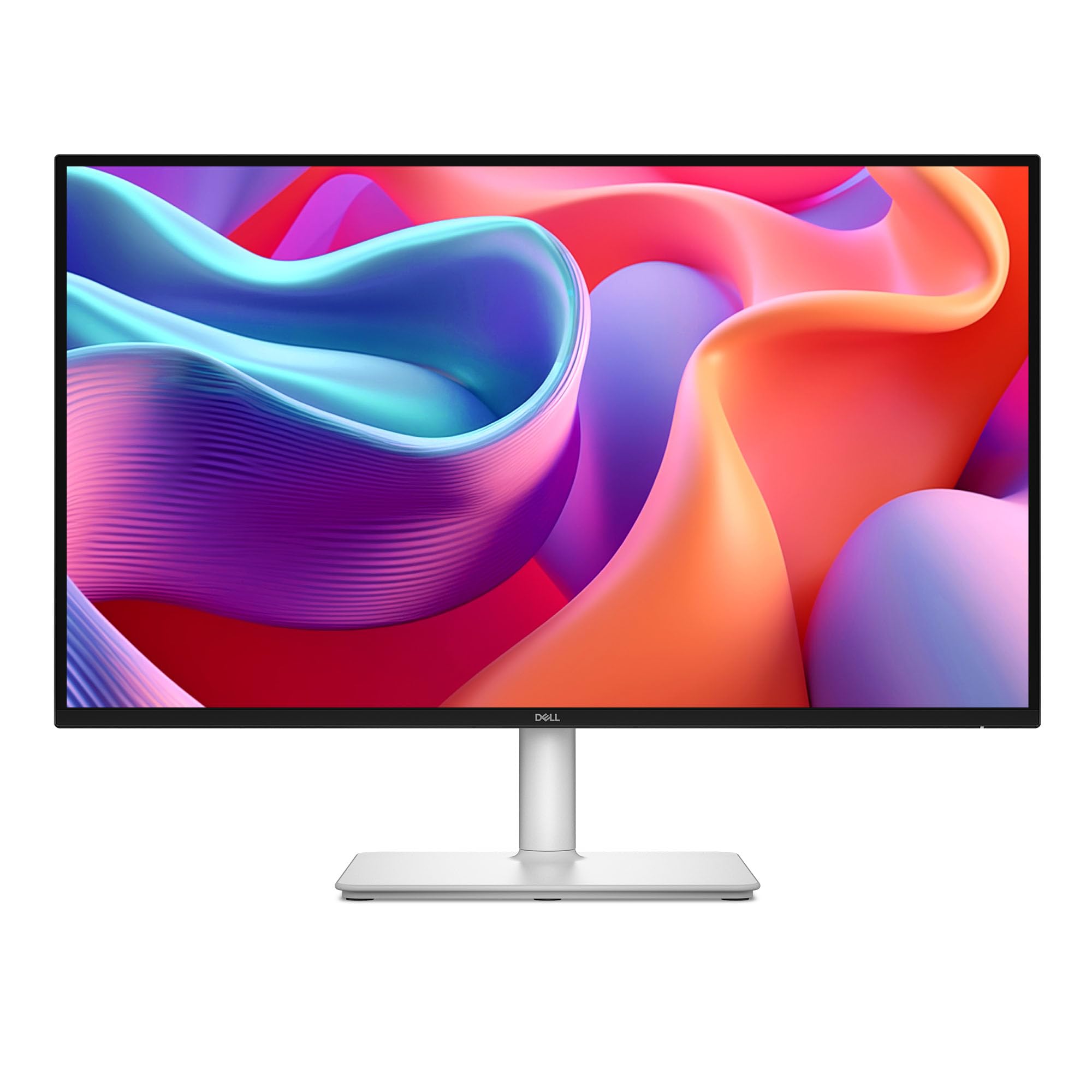
The one-cable Wonder for laptop users, combining sharp QHD with USB-C power delivery.
If you live and work on a laptop, this is the screen you want. The headline feature is the single USB-C connection that “saves clutter with a single usb-c display supply cable”—it carries video, and it charges your laptop with up to 65W of power delivery. That means one slim cable on your desk does everything, eliminating the power block and multiple cords. Owners love how it “eliminates power block/cords” and makes the desk feel clean.
Of course, it’s a Dell, so the display quality is excellent. It features a QHD (2560×1440) IPS panel with a 1500:1 contrast ratio (matching the best in this guide) and a fast 144Hz refresh rate for desktop smoothness. Owners call the picture “amazing” and say it’s “perfect as a second monitor.” The display is certified as 4-star TÜV for eye comfort, reducing harmful blue light without washing out colors., and it was “comfortable for 10-hour use” for one owner.
The stand lives up to its premium positioning with full height, tilt, pivot, and swivel adjustment, erasing the ergonomic complaints of the budget picks. It also has integrated dual 3W speakers that offer “a wider range of frequencies” than typical monitor audio. The pop-out quick-access port on the front gives you easy access to a USB-C port with 15W power delivery and a USB-A port. The only drawbacks are minor: it’s “limited inputs” compared to the Acer, it’s “not wall-mountable” from the start, and the joystick control is described as “fragile.” It’s the most expensive pick here but earns a 4.8-star rating as the top-tier productivity choice.
The ultimate one-cable setup: For laptops with USB-C, this offers unrivaled desk simplicity with 65W charging, superb QHD clarity, and a fully ergonomic stand.
The premium cost: you pay the most here, and you sacrifice the many ports and VESA mounting of other picks.
Understanding the Specs
Resolution & Panel Type
Resolution determines sharpness. On a 27-inch screen, 1920×1080 (Full HD) is fine for gaming and general use, but 2560×1440 (Quad HD) makes text and images noticeably crisper. The panel type matters for colors and viewing angles: IPS (In-Plane Switching) offers the best, most accurate color from all angles, while VA (Vertical Alignment) gives higher contrast and deeper blacks but can shift colors at extreme angles. For non-gamers, IPS is the safest choice.
Refresh Rate & Adaptive Sync
Refresh rate, measured in Hertz (Hz), is how often the screen redraws per second. Standard is 60Hz, but 100Hz-144Hz feels smoother in everyday scrolling and gaming. For fast shooters, you’ll want 180Hz or higher. Adaptive Sync (like AMD FreeSync or NVIDIA G-Sync) synchronizes the monitor with your graphics card to eliminate screen tearing (the horizontal split that happens when they’re out of sync).
FAQ
Is 1080p sharp enough on a 27-inch monitor?
Can I use a 1440p or 100Hz monitor with an older laptop?
What is the difference between a 100Hz and a 180Hz monitor?
What does a 1500R curved monitor actually do?
Is USB-C worth the extra cost on a monitor?
Why is the contrast ratio important for a budget monitor?
How much does the size of a 27-inch monitor matter for a desk?
Can I use a QHD gaming monitor with a PlayStation or Xbox?
Final Thoughts: The Verdict
For most people, the budget 27 inch monitor winner is the LG 27U411A-B because it delivers a smooth 120Hz IPS display with accurate 99% sRGB color at an unbeatable value. If you want maximum gaming speed, grab the LG 27GS50F-B for its 180Hz refresh rate. And for a smooth, clutter-free laptop setup with USB-C charging, the Dell S2725DC is the one to reach for.
How We Picked
We do not accept paid placement. Every pick is matched to a real buyer and a real use-case; we do not hands-on test units.
Sources & Methodology
Specifications: manufacturer listings and product documentation. Review insights: verified customer reviews, as of August 2026. Pricing: not shown on this page (it changes often); check the current price via the retailer link.
As an Amazon Associate, Gadgets Feed earns from qualifying purchases. This does not affect which products we feature.