
Our readers keep the lights on and my morning glass full of iced black tea. As an Amazon Associate, I earn from qualifying purchases.
Specs are compiled from manufacturer listings and verified buyer reviews and can change over time — please confirm the key details on the product page before buying.
Walking into 3D scanning used to mean spending a full paycheck on the gear. Now a few entry-level models prove you do not have to pay rent-level money for a decent scan. This guide breaks down the specific trade-offs you face under budget limits — where accuracy fights ease of use, and where spending a bit more buys a huge jump in results.
I’m Min — the founder and writer behind Gadgets Feed. This guide is built by comparing the manufacturers’ published specifications and the patterns across verified customer reviews, so you get each pick’s real strengths and trade-offs instead of marketing spin.
Picking the right budget 3D scanner depends on matching its light source and intended format to your actual objects. That choice determines whether your first day is a triumph or a frustrating return.
Our Picks at a Glance


How To Choose The Best Budget 3D Scanner
Picking a budget 3D scanner is less about raw specs and more about matching the scanner’s strengths to what you actually scan. A scanner that nails tiny detail on a ceramic mug might completely fail on a dark plastic car part. Here are the three factors that separate a smart buy from a shelf-sitter.
Light Source: The Key to What You Can Scan
The light source determines whether your scanner can see dark, shiny, or transparent objects without needing a can of spray powder. A blue LED light (400–500nm wavelength) projects very fine structured light, giving you high accuracy on light-colored objects. An NIR (near-infrared) source handles medium-format objects but can still struggle on dark surfaces. Infrared laser lines (found on the Revopoint units) cut through reflective and dark materials directly, often eliminating the need for scanning spray entirely. Ask yourself what color and finish your objects have — that decides the light source you need.
Scanning Format: Size Matters
Every scanner has a balance for object size. A small-format scanner (like the 3DMakerpro Seal Lite) works on objects from 10mm up to 300mm, which is perfect for jewelry, coins, and small mechanical parts. A medium-format scanner (like the Moose Lite) stretches from 15mm to 1500mm, so it can handle a chair, a small statue, or a car fender. If you scan mostly small items, buying a medium-format scanner sacrifices fine detail. If you need to scan a bicycle frame, a small-format scanner will frustrate you.
Accuracy vs. Ease of Use
A spec like “0.02mm accuracy” sounds incredible, but that number only holds under ideal conditions — stable lighting, proper distance, and a perfectly non-reflective object. Budget scanners demand practice. Several buyers report spending hours learning the ideal scanning distance and speed before getting usable results. The trade-off is clear: a more accurate scanner (0.02-0.05mm) has a steeper learning curve, while a simpler, slightly less accurate unit (0.1mm) may give you a better first experience. Check reviews that mention “learning curve” and “setup time” — they reveal the real daily experience better than any spec sheet.
Quick Comparison
| Model | Best For | Accuracy | Light Source | Scanning Format | Amazon |
|---|---|---|---|---|---|
| Creality CR-Ferret SE★ Best Overall | Entry-level PC-based scanning | ≥1000 dpi resolution | — | Desktop | Amazon |
| Revopoint INSPIRE 2Top Performer | Versatile spray-free scanning | Up to 0.03 mm precision | Infrared Laser / Structured Light | Small to Medium | Amazon |
| Revopoint POP3 Plus | High-speed medium objects | 0.04 mm precision | Infrared Structured Light | Medium (20mm to 2m) | Amazon |
| 3DMakerpro Seal Lite | High-accuracy small objects | Up to 0.02 mm | Blue LED | Small (10 to 300mm) | Amazon |
| Shining 3D Einstar | Hair and full-body scanning | 0.1 mm point distance | Infrared VCSEL | Small to Large | Amazon |
| 3DMakerpro Moose Lite | Medium-format cost-effective | Up to 0.05 mm | NIR | Medium (15mm to 1.5m) | Amazon |
In‑Depth Reviews
1. Creality CR-Ferret SE 3D Scanner
The featherweight 105g desktop scanner that punches above its weight on accuracy.
At just 105g, the Ferret SE is the lightest scanner here — you can hold it all day without arm fatigue. It scans dark and metallic objects without needing spray, a trick that many pricier units still struggle with. The 24-bit full-color scanning uses a built-in 2MP color camera to capture original colors, so a scan of a painted car part comes out with real-looking paint. The anti-shake tech counters small hand tremors, which helps if you do not have the steadiest hands. It supports PC scanning only (no battery handle, no phone support), and requires at least an i5-8th Gen CPU with 8GB RAM on Windows 10/11 64-bit. Reviewers point out a mixed experience. One noted: “The phone app is simply broken, but I was shocked at how accurate the scanning was, the software is super easy to clean up the mesh because it can catch quite a bit of noise.” That sums it up — when it works, the accuracy impresses. But some users report the software getting stuck on the configure screen with an endless spinning circle, or the scanner losing tracking every few seconds. A 12 fps bug after firmware updates disappointed a few.
Strengths
- Scans dark and metallic objects without spray
- Ultra-light 105g design reduces hand fatigue
- 24-bit full-color capture with 2MP camera
- Anti-shake tech for steadier results
Weak Points
- PC-only — no battery handle or mobile support
- Software installation can be problematic (spinning circle bug)
- Real-world frame rate can drop to 12 fps after updates
Best for the desktop tinkerer: if you always scan near a PC and want a budget-friendly, spray-free scanner that captures color — the Ferret SE is a bargain.
The real limit: its software reliability frustrates some buyers, and the phone app does not work, so PC scanning is your only path.
2. Revopoint INSPIRE 2 3D Scanner
The wireless workhorse that tackles dark surfaces without a drop of spray.
The INSPIRE 2 fires 11 infrared laser lines so you do not need scanning spray for dark or reflective objects. You get dual scanning modules: infrared structured light for quick captures and multi-line laser for fine detail, all in one unit. It delivers up to 0.03 mm precision and 0.05 mm accuracy, . It weighs just 190g, and the aerospace-grade aluminum alloy front panel makes it feel tougher than its light weight suggests. Owners mention high-quality color scans on the first try, with easy setup on Android, Windows, and iOS. Some note the tripod feels a bit unstable and the calibration stickers do not always stay stuck. A few beginners found the software confusing, but most agree the 0.5mm tolerance after practice is great for the money. Unlike many budget options, the INSPIRE 2 scans outdoors in up to 20,000 lux lighting, so you are not stuck at a desk. The 1.5x and 2x optical zoom bring out detail on mixed-geometry surfaces that simpler scanners miss.
What Shines
- 11 infrared laser lines scan dark/reflective objects spray-free
- Wireless Wi-Fi 6 scanning for true mobility
- Dual structured-light and laser modes handle varied objects
- Full-color texture capture with built-in RGB camera
Where It Stumbles
- Included tripod can feel unstable
- Sticky calibration dots have adhesion issues per some buyers
- Learning curve for complete beginners
Reach for this if: you scan a variety of materials and want wireless freedom without sacrificing accuracy — the INSPIRE 2 is the most versatile budget scanner here.
Look elsewhere if: you only scan tiny, high-detail objects and want the absolute lowest entry price.
3. Revopoint POP3 Plus 3D Scanner

A 18-fps speedster for scanning medium objects without the wait.
The POP3 Plus scans at up to 18 fps, so you capture medium objects like a motorcycle helmet or a small statue much faster. Its 9-axis IMU (a motion sensor that steadies the scan) reduces shaky-frame issues that plague slower scanners. It hits 0.04 mm precision, and the new photolithographic calibration board keeps it within 20 microns of accuracy. It handles objects from 20mm up to 2 meters. Buyers praise the complete kit — it comes with two turntables, a phone connector, multiple handles, and tracking stickers. A few report lousy results out of the gate, requiring hours of videos and practice to get decent scans. Others say the customer service is outstanding and that, once learned, it delivers amazing results for the money. Unlike the INSPIRE 2, the POP3 Plus uses Class 1 infrared light for eye-safe scanning of body parts, making it a strong choice for human scans. It exports in PLY, OBJ, STL, ASC, 3MF, GLTF, and FBX.
Speed Highlights
- 18 fps scanning with 9-axis IMU stabilization
- Comprehensive kit includes two turntables and handles
- 20-micron accuracy with photolithographic calibration board
- Class 1 infrared light safe for body scanning
The Trade-Offs
- Steep learning curve for new users
- Some units delivered poor results requiring extensive practice
- More expensive than entry-level desktop scanners
Best for the workflow builder: if you have the patience to learn and want a scanner kit that leaves nothing out — the POP3 Plus gives you the fastest capture speed in this budget range.
The catch: that speed comes with a real learning curve; buyers warn it is not plug-and-play by any means.
4. 3DMakerpro 3D Scanner Seal Lite

The highest accuracy per dollar — if your objects are small and light-colored.
The Seal Lite delivers up to 0.02mm accuracy, the tightest spec in this entire list. It achieves that with a blue LED light source (400–500nm) that projects a finer structured light than NIR or standard LED. This makes it ideal for small objects from 10mm to 300mm — think jewelry, coins, dental models, or small mechanical parts. It weighs 1.54 pounds and measures 2.36 x 1.38 x 4.33 inches, making it more compact than the medium-format Moose Lite (which is 2.76 x 1.38 x 4.33 inches and weighs 1.72 pounds). It captures mono texture only, so you get shape, not color. Customers note that once you learn the technique, it delivers great quality scans for the price. One reviewer noted: “Returned. Scanned face easily but failed on hair, black objects, and tiny items (e.g., 0.5-inch flag).” That is the core trade-off — the blue LED struggles on dark or highly reflective surfaces without spray. Others mention the setup documentation is poor, requiring trial-and-error to figure out the ideal scanning distance (180–280mm) and speed. The JMStudio software is free with lifetime updates, and it exports in OBJ, STL, PLY, and ASC.
Accuracy Pros
- 0.02mm accuracy — best in class for this budget
- Blue LED captures fine detail on light-colored objects
- Scan-back and anti-shake features for stable handheld use
Accuracy’s Price
- Fails on black, dark, or tiny objects per multiple buyers
- Poor documentation leads to a frustrating setup
- Requires powerful PC; no battery handle included
Reach for this if: your world is small, light-colored objects and you want the most detail the budget tier can deliver.
skip it if: you scan dark plastic parts, hair, or anything under 10mm — the Seal Lite’s blue LED simply cannot see them.
5. Shining 3D Einstar Handheld 3D Scanner

The only scanner in this budget range with a dedicated “Hair Mode” for human scans.
The Einstar has a “Hair Mode” that captures sufficient hair data for human scans, improving the whole data completeness. It uses 3 Infrared VCSEL projectors and 2 stereo depth cameras, with no projector light during scanning, so it is comfortable and safe for eyes. The scanning speed hits up to 14 FPS, and it collects point cloud data with a point distance up to 0.1mm. The built-in RGB color camera gives you high color fidelity 3D data. It weighs 3.08 pounds, noticeably heavier than the 190g Revopoint units, but the trade-off is the ability to scan larger objects and even full bodies. Buyers call it the best consumer-grade scanner currently on the market for under. One compared it to an Artec Leo, saying the Einstar tracked dark, shiny objects easily where a Revopoint struggled. The EXstar software includes a data quality indicator that guides you to better scans. However, some shoppers say the software lacks tutorials and that the ergonomics are awkward with a tangled wire and no tripod mount. The Einstar needs tracking dots for large flat surfaces, and some users found artifacts and deformed edges that required hours of cleanup.
Standout Features
- Hair Mode captures realistic human hair in scans
- Tracks dark and shiny objects without spray or dots
- 14 FPS scanning with intelligent algorithm software
- Outdoor scanning stable with 3 infrared projectors
Limitations
- Heavier (3.08 lbs) than most budget handhelds
- Software lacks built-in tutorial — steep learning curve
- No tripod mount and awkward cable management
Reach for this if: you scan people, hair, or dark auto parts and want reliable tracking — the Einstar’s infrared array handles these objects better than almost any budget alternative.
Look elsewhere if: you want a lightweight, simple setup for small objects — the Einstar’s heft and learning curve make it a commitment.
6. 3DMakerpro 3D Scanner Moose Lite
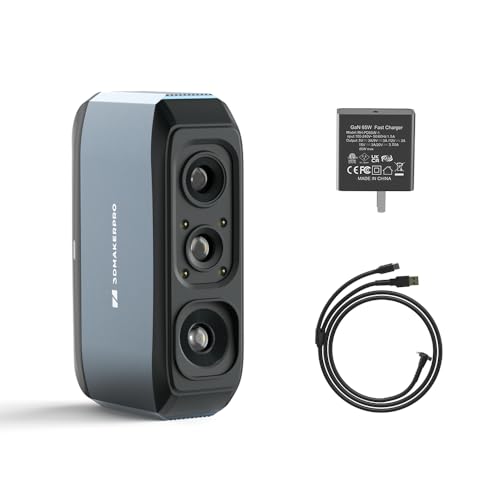
The cost-effective medium-format scanner — if you can live with its limits.
The Moose Lite uses an NIR (near-infrared) light source, achieving 0.05mm accuracy and 0.1mm resolution. It handles objects from 15mm up to 1500mm (1.5 meters), making it the widest range in the affordable tier. The ideal working distance is 150–400mm. It weighs 1.72 pounds, while the Seal Lite weighs 1.54 pounds, and measures 2.76 x 1.38 x 4.33 inches — noticeably longer. It captures mono texture only and runs at 10fps. Buyer feedback is brutally honest. One said: “It took me a whole day to scan a regular glass, and it still came out all wrong.” Another noted that it “cannot see dark objects” at all and returned it. On the positive side, a few users found the 0.05mm accuracy sufficient for a base mesh and the software intuitive for those with CAD experience. A clear pattern emerges: the Moose Lite works for patient users scanning matte, light-colored medium objects — but fails on glass, dark plastic, and reflective surfaces.
Value Points
- Wide scanning range (15mm to 1500mm) for varied projects
- 0.05mm accuracy sufficient for base meshes
- NIR light and anti-glare coating reduce reflections
- Scan-back and anti-shake features aid stability
Hard Limits
- Fails on dark, transparent, and reflective objects
- Multiple buyers report terrible first-day experiences
- Software needs overhaul per user complaints
Best for the CAD-experienced hobbyist: if you understand scanning technique and work with medium, light-colored objects, the Moose Lite is a cost-effective entry into larger-format scanning.
The honest catch: if your objects are dark, shiny, or transparent, or you want a friendly first experience — skip this one and look at the Revopoint options.
Understanding the Specs
Accuracy vs. Precision
These two terms get mixed up a lot. Accuracy tells you how close the scanned measurement is to the real-world object — a 0.02mm accuracy means a 100mm part will come out within 0.02mm of that measurement. Precision tells you how consistently the scanner captures that detail across multiple scans. A scanner can be precise (consistent) but not accurate (consistently wrong by 0.1mm). The budget scanners here range from 0.02mm to 0.1mm accuracy — the lower the number, the finer the detail you can capture. But remember: that accuracy spec is a best-case number, achieved under perfect lighting and distance. Real-world accuracy is often 2-3 times worse for beginners.
Light Source Types and What They Mean
The light source is the engine of a structured-light 3D scanner. Blue LED (400–500nm) projects the finest pattern, giving you the highest accuracy on light-colored objects — but it struggles on dark or reflective surfaces. NIR (near-infrared) light penetrates a bit better and handles a wider range of object sizes, but its accuracy tops out around 0.05mm. Infrared laser lines (used in Revopoint units) are the most versatile — they can see dark and shiny surfaces without spray, making them the best choice if you scan a variety of materials. If you only scan matte light-colored objects, a blue LED scanner saves money and gives better detail. If you scan mixed materials, pay extra for infrared laser.
FAQ
Do I need a powerful computer to run a budget 3D scanner?
Can a budget 3D scanner scan black or dark objects?
What is scanning spray and do I really need it?
How long does it take to learn a budget 3D scanner?
Is a budget 3D scanner good enough for 3D printing?
Can I use a budget 3D scanner with my phone?
What file formats do budget 3D scanners export?
How does the Moose Lite compare to the Seal Lite?
What accessories do I need for a smooth scan?
Can I scan people with a budget 3D scanner?
Final Thoughts: The Verdict
For most buyers, the best budget 3D scanner is the Revopoint INSPIRE 2 because it combines infrared laser versatility with 0.03mm precision and wireless freedom — it handles dark objects without spray better than any other pick here. If you scan only small, light-colored items and want the tightest detail, grab the 3DMakerpro Seal Lite with its 0.02mm accuracy. And for human scans, hair detail, or reliable outdoor scanning, the standout is the Shining 3D Einstar in this price bracket.
How We Picked
We do not accept paid placement. Every pick is matched to a real buyer and a real use-case; we do not hands-on test units.
Sources & Methodology
Specifications: manufacturer listings and product documentation. Review insights: verified customer reviews, as of July 2026. Pricing: not shown on this page (it changes often); check the current price via the retailer link.
As an Amazon Associate, Gadgets Feed earns from qualifying purchases. This does not affect which products we feature.
Related Guides
Product prices and availability are accurate as of the date/time indicated and are subject to change. Any price and availability information displayed on Amazon at the time of purchase will apply to the purchase of this product. As an Amazon Associate I earn from qualifying purchases.
CERTAIN CONTENT THAT APPEARS ON THIS SITE COMES FROM AMAZON. THIS CONTENT IS PROVIDED "AS IS" AND IS SUBJECT TO CHANGE OR REMOVAL AT ANY TIME.
Amazon and the Amazon logo are trademarks of Amazon.com, Inc. or its affiliates.