
For years, mainstream PC gaming advice held that 4K resolution was the exclusive domain of + flagship GPUs. That wall is cracking. The latest generation of graphics cards has finally delivered genuine 1440p and entry-level 4K performance at price points that don’t require selling a kidney. But navigating the alley of budget-friendly GPUs that can actually drive a 4K display without choking on modern textures means looking beyond just the sticker price — you need the right mix of VRAM, memory bandwidth, and modern architecture.
I’m Min — the co-founder and writer behind Gadgets Feed. I pore over silicon specifications, benchmark data, and real-world thermal results to separate the cards that genuinely deliver at 4K from the ones that just advertise “4K support.”
These are the graphics cards that let you game, create, or stream in 2160p resolution without draining your entire build budget — the definitive best budget 4k gpu options you should consider right now.
How To Choose The Best Budget 4K GPU
Choosing a low-cost 4K-capable graphics card is a balancing act between core count, memory subsystem, and upscaling magic. You can’t get everything at this price bracket, so knowing which compromises hurt 4K performance and which are tolerable is critical.
VRAM Capacity and Memory Bus Width
At 4K resolution, texture assets are enormous. An 8GB frame buffer fills up fast in titles like Cyberpunk 2077 or Hogwarts Legacy, forcing the card to swap data over the PCIe bus — which tanks frame rates. 12GB is the safer floor for a true 4K experience. Equally important is the memory bus width: a 128-bit bus (common on entry-level cards) severely limits memory bandwidth at higher resolutions, while a 192-bit or wider bus allows the VRAM to feed the GPU cores at the rate 4K demands. Cards like the ASRock Intel Arc B580 with its 192-bit interface handle texture-rich scenes better than many 8GB alternatives, even if the raw GPU clock speed looks lower.
Upscaling and Frame Generation
No budget card can natively run every AAA title at 4K native at 60+ FPS. That’s where deep learning and temporal upscaling step in. NVIDIA’s DLSS 4 (available on RTX 50-series cards) reconstructs a 4K image from a lower internal resolution without the blur of older techniques. Intel’s XeSS 2 and AMD’s FSR 4 offer similar benefits. For a budget 4K setup, a card with high-quality upscaling support is more important than raw raster compute — because you will use upscaling in demanding games, and the quality of that upscaling defines your actual visual experience.
PCIe Generation and System Compatibility
Budget 4K cards often use PCIe 4.0 x8 or PCIe 5.0 x8 interfaces. While this is fine on modern platforms, pairing a PCIe 4.0 x8 card with an older PCIe 3.0 motherboard can introduce a bandwidth bottleneck that reduces 4K performance by 10-20%. Check your motherboard’s PCIe generation before buying. Features like Resizable BAR (ReBAR) are also mandatory for Intel Arc cards to achieve their rated performance — without it, those cards fall behind significantly. Always verify that your CPU and motherboard chipset support ReBAR before buying an Intel Arc GPU for a budget 4K build.
Quick Comparison
On smaller screens, swipe sideways to see the full table.
| Model | Category | Best For | Key Spec | Amazon |
|---|---|---|---|---|
| ASRock Intel Arc B580 Challenger | Mid-Range | 1440p high-refresh / Entry 4K | 12GB GDDR6 / 192-bit bus | Amazon |
| GIGABYTE GeForce RTX 5060 WINDFORCE | Mid-Range | DLSS 4 / 1080p-1440p max | 8GB GDDR7 / 128-bit bus | Amazon |
| ASUS Dual RTX 5060 OC | Mid-Range | SFF build / Quiet 0dB mode | 8GB GDDR7 / 623 AI TOPS | Amazon |
| PNY RTX 5060 Ti OC Dual Fan | Mid-Range | Best value new 1440p | 8GB GDDR7 / 2692 MHz boost | Amazon |
| GIGABYTE Radeon RX 9060 XT Gaming OC | Premium | 16GB VRAM for heavy textures | 16GB GDDR6 / 2700 MHz | Amazon |
| PNY RTX 5070 Epic-X ARGB | Premium | High-FPS 1440p / Solid 4K | 12GB GDDR7 / 192-bit bus | Amazon |
| ASUS Prime RX 9070 XT OC | Premium | 1440p ultra / Ray Tracing 4K | 16GB GDDR6 / 4000 MHz | Amazon |
In‑Depth Reviews
1. ASRock Intel Arc B580 Challenger 12GB OC

The ASRock Intel Arc B580 Challenger is the dark horse of the budget 4K GPU segment. Its 12GB of GDDR6 memory on a 192-bit bus gives it a meaningful VRAM advantage over every 8GB card in this list — a margin that directly translates to smoother texture streaming at 4K in titles like Hogwarts Legacy or Horizon Forbidden West. The Xe2-HPG architecture delivers 20 Xe cores and 160 XMX engines, and while ray tracing performance still trails NVIDIA at this tier, the raw raster output is genuinely competitive with cards priced significantly higher.
Where this card shines is value per gigabyte of VRAM. You get 12GB of frame buffer, Intel XeSS 2 upscaling, and DisplayPort 2.1 support (including UHBR13.5) — all in a compact 249mm dual-fan design that fits easily into most mATX builds. The 0dB Silent fan mode means the card runs completely passive during desktop use or light productivity, which is rare at this price point. Power draw hovers around 100-150W under load, making it one of the most efficient options for a 4K-capable build.
There is a catch: Intel Arc cards require Resizable BAR (ReBAR) enabled in BIOS to reach their full potential. Without it, performance suffers considerably. Driver installation can also be finicky — one user reported outdated software initially. But once configured correctly with a modern system, the B580 delivers “THE BEST graphics card you can get for this amount of money.” For budget 4K, the VRAM and bus width make it the most future-proof entry point.
Why it’s great
- 12GB VRAM on a 192-bit bus — best memory subsystem at this price
- Very power efficient, runs cool and silent in idle
- DP 2.1 UHBR13.5 support for high-bandwidth 4K displays
Good to know
- Requires ReBAR on modern motherboard for full performance
- Driver setup can be finicky on first install
- Ray tracing performance still behind NVIDIA equivalents
2. GIGABYTE GeForce RTX 5060 WINDFORCE OC 8G

The GIGABYTE GeForce RTX 5060 WINDFORCE OC marks the entry point of NVIDIA’s Blackwell architecture at a price that doesn’t sting. With 8GB of next-generation GDDR7 memory and a 128-bit bus, it’s the most modest memory spec on this list — and that 8GB cap will be the first bottleneck at native 4K. But GDDR7’s higher bandwidth per pin partially compensates for the narrow bus, and DLSS 4 with Multi Frame Generation is the real game-changer here. In titles that support it, DLSS 4 can reconstruct a 4K image from a 1440p render with minimal visual penalty, effectively turning this into a 4K-capable card in supported titles.
What you lose in VRAM capacity, you gain in software maturity and ecosystem polish. NVIDIA’s drivers are rock solid, the GeForce Experience (now NVIDIA App) makes one-click optimization easy, and DLSS 4 adoption among AAA developers is already strong. The WINDFORCE dual-fan cooling system keeps the card quiet even under sustained load, and the compact 7.83-inch length means it fits comfortably in most mid-tower cases. One reviewer noted they were “getting over 250 FPS in games like Cyberpunk and DOOM” when paired with a Ryzen 5700 — though that’s with upscaling and at lower resolutions.
For a true budget 4K build, the 8GB VRAM is a hard ceiling. You’ll have to dial down texture quality in some modern titles to avoid stuttering, and ray tracing at 4K is essentially off the table. But as a 1440p powerhouse that can occasionally touch 4K with DLSS 4, it’s a compelling option. As one seasoned buyer put it, “this GPU works great for me… mainly do photo/video editing and music production.” Versatility is its real strength.
Why it’s great
- DLSS 4 with Multi Frame Generation for effective 4K upscaling
- GDDR7 memory delivers higher bandwidth per watt than GDDR6
- Mature NVIDIA driver ecosystem and broad game support
Good to know
- 8GB VRAM cap limits texture quality at native 4K
- 128-bit memory bus reduces effective bandwidth at high resolutions
- Ray tracing at 4K not viable without aggressive upscaling
3. ASUS Dual GeForce RTX 5060 8GB OC Edition

The ASUS Dual RTX 5060 OC is essentially the same Blackwell GPU as the GIGABYTE offering, but with a specific focus on small form factor (SFF) compatibility. Certified as SFF-Ready, this 2.5-slot card measures just 9 inches long, making it one of the few Blackwell GPUs that fits into compact ITX cases without sacrificing 0dB fan-stop technology. The Axial-tech fan design with a barrier ring increases downward air pressure, keeping the card cool even in the constrained airflow environment of a small chassis.
Performance mirrors the RTX 5060 core: 8GB GDDR7 over a 128-bit bus, 623 AI TOPS of compute for neural processing, and the full DLSS 4 feature set. The factory overclock pushes the boost clock to 2565 MHz in OC mode, which offers a modest 30 MHz bump over the default 2535 MHz — not transformative, but every little bit helps at 4K. One reviewer who upgraded from a GTX 1660 reported “roughly double the capability… a great performance boost for most games at medium to high settings.”
The 0dB technology is a genuine quality-of-life improvement. For a budget 4K build used as a daily driver for productivity and light gaming, the fanless idle mode eliminates noise entirely. This ASUS model lacks RGB lighting, which keeps cost down but might disappoint builders wanting visual flair. If you’re building a quiet, compact 4K-capable system and can work within the 8GB VRAM envelope, this is the most space-efficient option on the list.
Why it’s great
- SFF-Ready certified — fits in compact ITX cases easily
- 0dB fan-stop for silent operation during light use
- High AI TOPS count (623) for neural rendering workloads
Good to know
- 8GB VRAM is limiting for native 4K gaming
- No RGB lighting for aesthetic-focused builds
- Factory OC is modest — 30 MHz boost over reference
4. PNY NVIDIA GeForce RTX 5060 Ti OC Dual Fan
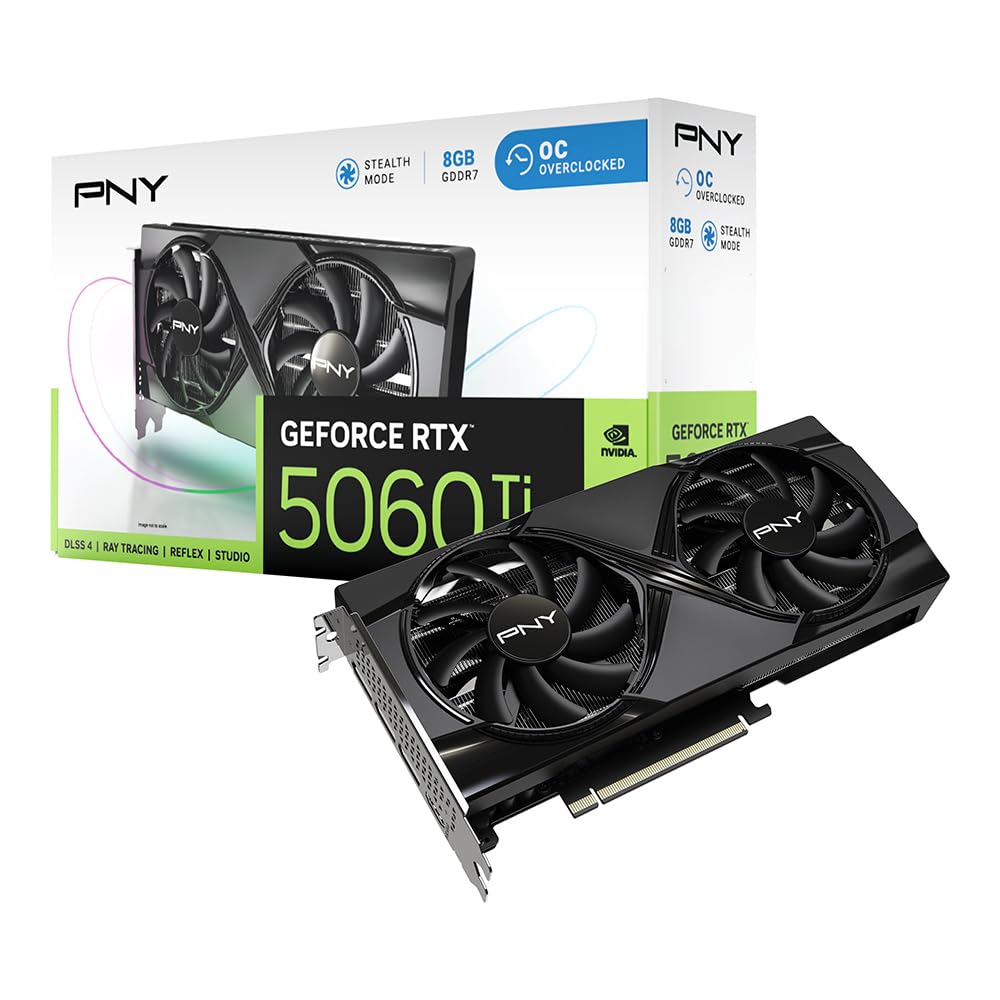
The PNY RTX 5060 Ti OC Dual Fan sits in a curious position: it’s technically the “Ti” step up from the vanilla 5060, with a higher boost clock of 2692 MHz, but it retains the same 8GB GDDR7 configuration and 128-bit memory bus. The increased clock speed and the full DLSS 4 suite (including Reflex for latency reduction) give it a genuine edge in 1440p gaming, where it can push frame rates past 100 FPS in most titles. For a budget 4K setup, those extra frames translate to smoother DLSS upscaling from a 1440p base render.
PNY’s build quality is solid here. The dual-fan cooler runs cool even under sustained loads, and the card is compact enough to fit in most cases without clearance issues. It’s also PCIe 5.0 x8 compliant, which means it works fine in both Gen 4 and Gen 5 slots — though the x8 lane width on a PCIe 3.0 board could create a slight bottleneck. One reviewer who paired it with a NUC setup confirmed it “runs cool even at full load” and deemed it the “best price-to-performance new card” on the market.
The 5060 Ti’s real competition comes from the 16GB VRAM model, which costs about 30% more. If you’re strict about budget, the 8GB version is the pragmatic choice — especially if you primarily game at 1440p and treat 4K as a bonus capability. As one satisfied user wrote, “good enough for my daily activities, watch 4K videos, the price was also competitive.” The PNY RTX 5060 Ti is the card to pick if you want the highest clock speeds in the budget tier without stretching your budget.
Why it’s great
- Highest boost clock (2692 MHz) in the budget Blackwell lineup
- DLSS 4 and Reflex for smooth, low-latency upscaled 4K
- Runs cool under load with reliable PNY build quality
Good to know
- 8GB VRAM still limits 4K texture quality
- 16GB version is only ~30% more for future-proofing
- PCIe 5.0 x8 interface may bottleneck on PCIe 3.0 boards
5. GIGABYTE Radeon RX 9060 XT Gaming OC 16G

The GIGABYTE Radeon RX 9060 XT Gaming OC flips the script on the budget 4K narrative. Instead of chasing the highest clock speed or the latest memory technology, it offers double the VRAM of its competition: 16GB of GDDR6 on a generous memory bus that easily handles 4K texture packs without breaking a sweat. For gamers who mod titles with 8K texture packs or work with 3D rendering and video editing, this 16GB buffer is a genuine productivity and gaming asset that no 8GB card can match.
The WINDFORCE cooling system with its Hawk fan design and server-grade thermal conductive gel keeps temperatures well in check — one reviewer noted the card runs “quiet and low temp” even during extended 1440p ultra sessions in Cyberpunk and Hogwarts Legacy. The RGB lighting adds a touch of flair, and the dual-slot design is reasonably sized at roughly 11 inches. FSR 4 upscaling, AMD’s answer to DLSS, provides a solid 4K upscaling path, and while it’s not quite as sharp as NVIDIA’s latest, it’s close enough that most users won’t notice in motion.
The RX 9060 XT’s ray tracing capability is decent at this tier — better than expected, as one reviewer described — but still behind NVIDIA’s Blackwell cards. If ray tracing is a priority for your 4K experience, you may want to look at the RTX 5070 or RX 9070 XT instead. But for raw raster performance and sheer VRAM capacity at a mid-range price, this GIGABYTE card is the “best value for budget” and an absolute beast for texture-heavy 4K gaming.
Why it’s great
- 16GB GDDR6 VRAM — best in class for budget 4K texture loading
- Quiet, effective WINDFORCE cooling and RGB lighting
- FSR 4 upscaling and wide memory bus for smooth 1440p/4K
Good to know
- Ray tracing capability is decent but behind Blackwell competition
- Larger physical size may not fit compact cases
- Requires three PCIe power connectors (check PSU cabling)
6. PNY NVIDIA GeForce RTX 5070 Epic-X ARGB OC Triple Fan

The PNY RTX 5070 Epic-X ARGB OC is the first card on this list that can legitimately claim true 4K gaming without compromise — at a price that still qualifies as “budget” relative to the + flagship tier. With 12GB of GDDR7 memory on a 192-bit bus, the memory subsystem is robust enough to handle 4K texture streaming without the stuttering that plagues 8GB cards. The Blackwell architecture brings 6,144 CUDA cores, fourth-gen ray tracing cores, and DLSS 4 with Multi Frame Generation, making this the most feature-complete GPU in our budget 4K comparison.
Crucially, the 5070 is confirmed to have the full 80 ROPs — one reviewer explicitly verified this — and “does perform better than a 4070 Super.” The triple-fan Epic-X cooler is exceptionally quiet even under sustained load, with one user noting “phenomenal cooling that lowered case temps significantly.” The 8% factory overclock out of the box provides a meaningful performance uplift, and the card includes the dual 8-pin to 12-pin adapter for compatibility with most power supplies.
This is the sweet spot for a budget 4K build that doesn’t want to compromise on ray tracing or modern features. The 12GB VRAM buffer, combined with GDDR7’s bandwidth and DLSS 4, enables playable 4K in virtually all current titles at high settings. As one reviewer summarized: “Best bang for your buck if you’re looking for a GPU that can handle any game you throw at it.” If your budget can stretch to this tier, the 5070 is the clear performance champion among cards that don’t exceed .
Why it’s great
- 12GB GDDR7 on a 192-bit bus — genuine 4K capable memory subsystem
- Triple-fan cooler is quiet and effective, lowers case temps
- Full 80 ROPs confirmed, outperforms RTX 4070 Super
Good to know
- Higher price point — stretches the “budget” definition
- ARGB may require additional RGB software and headers
- Large 2.4-slot design requires case space check
7. ASUS Prime AMD Radeon RX 9070 XT 16GB OC Edition

The ASUS Prime AMD Radeon RX 9070 XT OC Edition is the most premium card in this list and the only one that can genuinely target 4K with ray tracing enabled without breaking frame budgets. Its 16GB GDDR6 frame buffer is the largest on the list, and the 4000 MHz boost clock is the highest of any card here. The 2.5-slot Axial-tech fan design with dual-ball bearings and a phase-change GPU thermal pad keeps temperatures impressively low — one reviewer reported “idle 28-32C, stressed 55-59C” — which is remarkable for a card capable of pushing 4K at max settings.
Ray tracing performance is where the 9070 XT truly separates itself from budget cards. Where the 5060 and 5060 Ti struggle to maintain 30 FPS in ray-traced 4K titles, the 9070 XT can deliver playable frame rates at medium to high ray tracing settings. This makes it a viable option for players who want the full visual experience of modern AAA games without dropping to 1080p. The card also works out of the box on Linux (both Xubuntu and Fedora were confirmed) — a rare but appreciated asset for Linux gamers looking for a budget 4K solution.
The truth is, the 9070 XT is the “best affordable GPU currently” for 4K, but it’s also the most expensive card here. It requires three PCIe power connectors, so you’ll need a power supply with adequate cabling (750W recommended). Build quality is solid, with no coil whine reported, but the plastic shroud feels slightly less premium than the price suggests. If you can accommodate the 311mm length and the three power connectors, this is the ultimate budget 4K card that doesn’t ask you to compromise on ray tracing or texture quality.
Why it’s great
- 16GB VRAM and 4000 MHz boost for genuine 4K ray tracing
- Incredibly cool and quiet operation (55-59°C under load)
- Excellent Linux compatibility out of the box
Good to know
- Largest physical footprint — 311mm, check chassis clearance
- Requires three PCIe power connectors (may need new PSU)
- Plastic shroud feels less premium than metal alternatives
FAQ
Can any budget 4K GPU actually run modern games at native 4K without upscaling?
Is 8GB of VRAM enough for 4K gaming in 2025-2026?
Should I prioritize VRAM capacity or GPU clock speed for a budget 4K build?
Do I need a PCIe 5.0 motherboard for these budget 4K GPUs?
Final Thoughts: The Verdict
For most users, the best budget 4k gpu winner is the ASRock Intel Arc B580 Challenger 12GB because it offers a 192-bit memory bus and 12GB VRAM at a price that undercuts every competitor with similar specs — a combination that directly translates to smoother 4K texture streaming. If you want the most mature upscaling technology and don’t mind the 8GB VRAM ceiling, grab the GIGABYTE GeForce RTX 5060 WINDFORCE for DLSS 4 excellence. And for genuine 4K with ray tracing, nothing beats the ASUS Prime AMD Radeon RX 9070 XT 16GB in the premium tier of this budget-focused lineup.