
Our readers keep the lights on and my morning glass full of iced black tea. As an Amazon Associate, I earn from qualifying purchases.
Specs are compiled from manufacturer listings and verified buyer reviews and can change over time — please confirm the key details on the product page before buying.
You want a compact keyboard that frees up mouse room without losing the keys you actually use — and you don’t want to blow your budget doing it. A 75% board keeps the function row and arrow keys while dropping the number pad, which is why it’s the balance for gamers and desk-bound workers alike. We’ve sorted through the best budget-friendly options to find the ones that deliver creamy sound, solid builds, and reliable wireless without the premium price tag.
I’m Min — the founder and writer behind Gadgets Feed. This guide is built by comparing the manufacturers’ published specifications and the patterns across verified customer reviews, so you get each pick’s real strengths and trade-offs instead of marketing spin.
Whether you’re upgrading from a mushy office membrane or a full-size gaming rig, finding the right budget 75% keyboard means balancing switch feel, battery life, and connectivity for your specific setup.
Our Picks at a Glance

How To Choose The Best Budget 75% Keyboard
Picking a compact mechanical keyboard used to mean giving up wireless or living with a hollow, clacky sound. That’s no longer true — budget boards now borrow the gasket mounts and pre-lubed switches once reserved for customs. Here’s what actually separates a keeper from a return.
Switch Feel and Sound Profile
The switch determines both how the keypress feels and how loud it is. Linear switches (like Red or Cream) are smooth with no bump, making them fast for gaming and quiet enough for an office. The “creamy” or “thocky” sound you see everywhere comes from a mix of pre-lubed switches, foam layers, and a gasket mount that absorbs the harsh ping. If you’re unsure, a pre-lubed linear is the safest, most versatile choice.
Connectivity and Battery
Decide if you need Bluetooth, a 2.4GHz dongle, or plain wired. Tri-mode boards (all three) offer the most flexibility: use the dongle for zero-latency gaming, Bluetooth for hopping between a laptop and tablet, and USB-C for charging or a rock-solid connection. For wireless boards, battery capacity matters — look for a higher mAh figure if you hate reaching for the cable.
Quick Comparison
| Model | Best For | Connectivity | Battery | Switch Type | Amazon |
|---|---|---|---|---|---|
| YUNZII C75★ Best Overall | Best Overall / Creamy feel | BT 5.0 / 2.4GHz / USB-C | 5500mAh | Pre-lubed Linear | Amazon |
| BlueSamurai 75%Best Value Wired | Best Budget Wired | Wired USB-A | — | Red Linear | Amazon |
| Ajazz AK820Best Gasket Feel | Best Gasket Feel | Wired USB-C | — | Pre-lubed Linear | Amazon |
| surmen M75 | Best Battery Wireless | BT 5.0 / 2.4GHz / USB-C | 5000mAh | Pre-lubed Linear | Amazon |
| RK R75 | Most Portable | BT 5.1 / 2.4GHz / USB-C | 4000mAh | Cream Linear | Amazon |
| Womier M87 Pro | Best Retro Aesthetic | BT 5.1 / 2.4GHz / USB-C | — | Linear | Amazon |
| AULA S75 Pro | Best Screen & Knob | BT 5.0 / 2.4GHz / USB-C | — | Pre-lubed Linear | Amazon |
| AULA F87 | Best for Typists | BT 5.0 / 2.4GHz / USB-C | 4000mAh | Greywood Linear | Amazon |
| YUNZII AL80 | Premium Aluminum Pick | BT / 2.4GHz / USB-C | 6000mAh | Pre-lubed Linear | Amazon |
In-Depth Reviews
1. YUNZII C75 Cute 75% Wireless Mechanical Keyboard
Our pick — over 4.5★ from 600+ verified ratings; the strongest balance of quality and price.
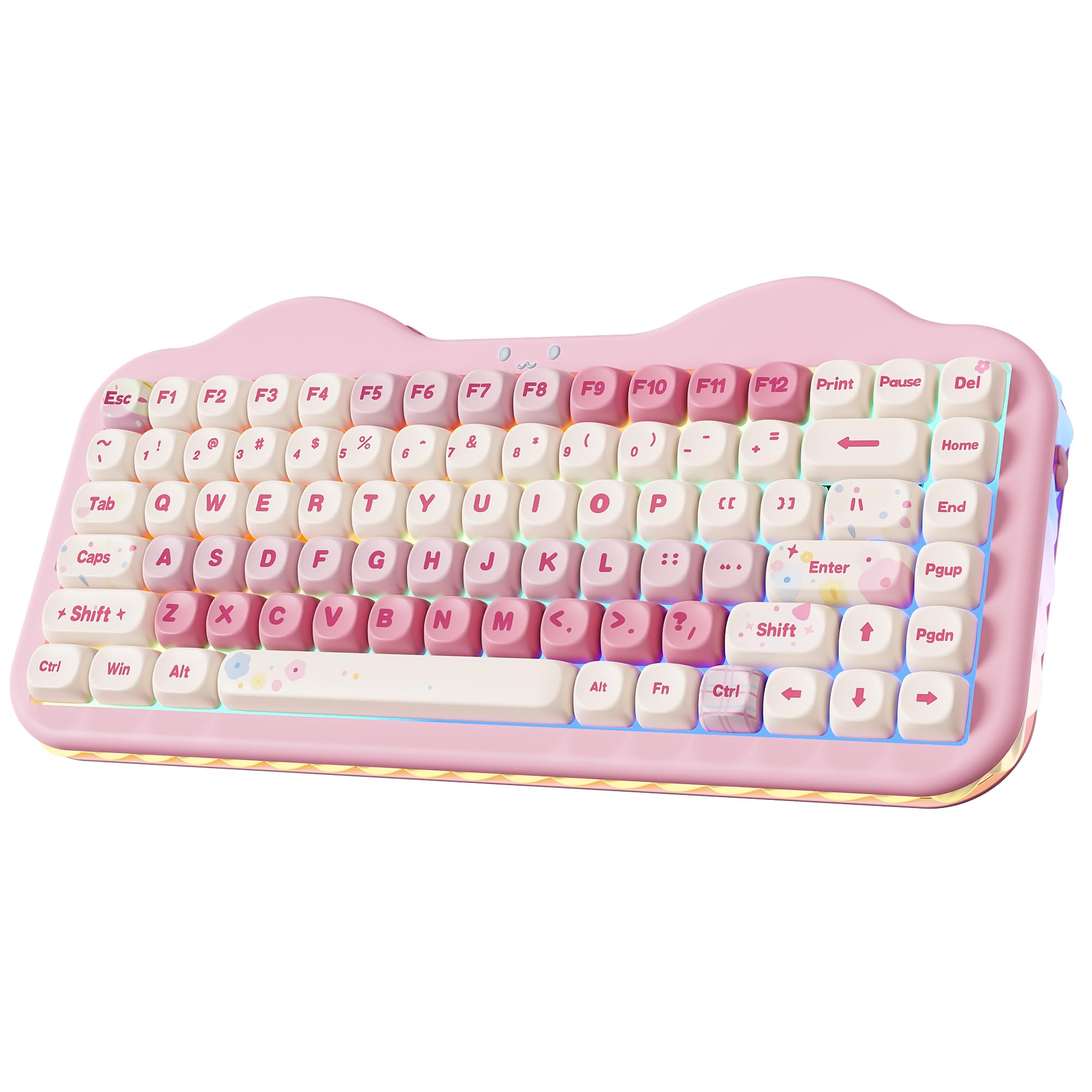
The YUNZII C75 delivers a creamy, thocky feel across 84 keys, making it the best overall pick for its sound and build.
The YUNZII C75 is the one that earns its “Best Overall” badge by nailing the two things buyers obsess over: sound and build. Its gasket structure, layered with sound-absorbing fillings and pre-lubed switches, produces that deep “creamy” thock instead of a hollow clack — the thing everyone raves about is this quality at a budget price. It’s a heavier board at 1.01 kg, which translates to durability and no sliding during frantic gaming sessions.
Connectivity is genuinely flexible with tri-mode (BT 5.0, 2.4GHz, and USB-C) letting you switch between up to 5 devices across Windows, Mac, Android, and iOS. A 5500mAh battery keeps it running through extended work and play. The 3-zone RGB lets you customize the keys, the cute cat face emblem, and the side underglow separately — though one reviewer noted the letters on the keys don’t light up, so dark-room typing takes a moment to adjust.
It’s hot-swappable with 3-pin and 5-pin support, meaning you can personalize the feel without soldering. The main recurring gripe is a minor one: a “W” key that occasionally doesn’t register, which buyers chalk up to user error rather than a defect. For a first-timer or an enthusiast wanting a premium feel without the premium price, this is the safest bet.
Creamy King: The 84-key layout and 5500mAh battery make it a marathon-friendly daily driver, not just a pretty desk piece.
Reach for this if…: you want the full modern package — wireless, RGB, hot-swap, and that signature thocky sound — without learning to solder.
Look elsewhere if…: you need shine-through keycaps to see letters in the dark; this board’s RGB is more about ambiance than illumination.
2. BlueSamurai 75% Wired Mechanical Gaming Keyboard
The BlueSamurai is a wired workhorse with smooth Red switches, proving you don’t need wireless for a great feel.
The BlueSamurai is the budget purist’s choice: a straightforward 82-key wired board that skips the battery and complexity to focus on the essentials. Its Red linear switches are smooth and fast with minimal resistance, and the bottom silent sponge creates a quieter typing experience — ideal for an office where every clack gets noticed. As buyers report, “Feels durable and light. Love the lighting in the keyboard and easy to connect. Feels ergonomically good too.”
On the customization front, it’s a modder’s dream. Hot-swappable sockets accept both 3-pin and 5-pin switches, and the case is easy to open, making it a popular first project for new enthusiasts. The 18 RGB backlight modes and 8 monochrome options give you plenty of visual variety without needing software.
The honest trade-off: lighting gets mixed feedback, with some owners noting the shine-through isn’t strong enough to find keys in a dim room. There’s also a known quirk where Mac users see mis-mapped symbols, so this is really a Windows-first keyboard. If you’re looking for an easy entry point to mechanical keyboards and plan to tinker, this is the ideal starting block.
Modder’s Entry Ticket: Easy disassembly and pre-lubed stabilizers make it a friendly first build, though the stock keycaps are mediocre.
Grab this for…: a cheap, reliable Windows board you can upgrade with new switches later.
Think twice if…: you’re on a Mac or you want a board that looks premium right from the start.
3. Ajazz AK820 TKL 75% Hot Swappable Mechanical Keyboard
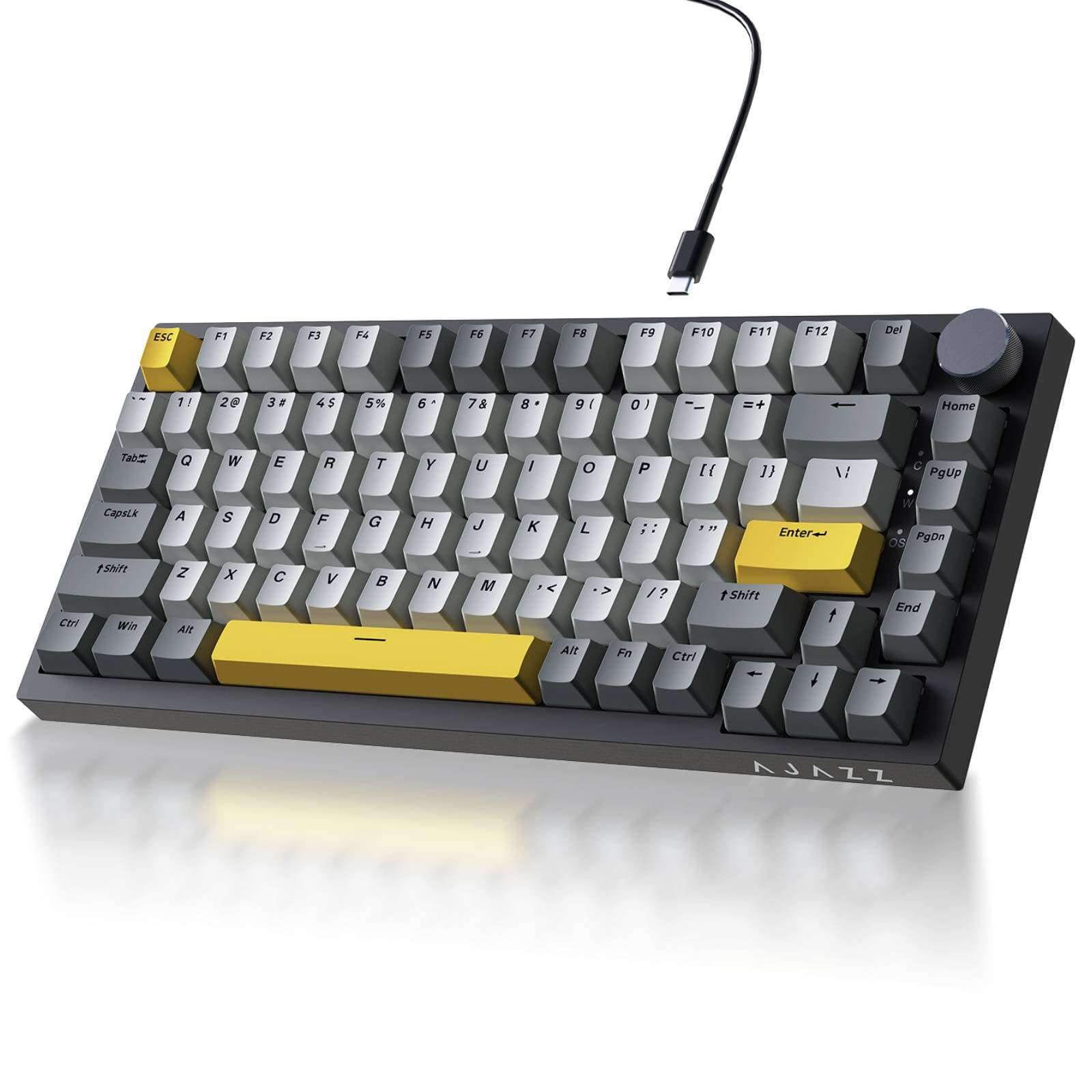
The Ajazz AK820’s gasket mount delivers a creamy thock while its 82-key layout frees up 30% more desk space.
The Ajazz AK820 is wired-only, which might sound restrictive — but for pure performance at this price, it’s a winner. The precision gasket mount, combined with Poron sandwich cotton and high-density foam, delivers the sought-after solid, creamy sound with zero hollow ping. At just 400 g, it’s remarkably light, making it an easy board to move between home and office.
The 82-key layout keeps your function row and arrows while freeing up space for mouse sweeps. A metal volume knob sits on the top-right for instant mute adjustments, and the south-facing RGB design means the backlight is bright and clear from your typing angle. The PBT keycaps are double-shot, offering superior oil resistance — great for long gaming sessions or coffee-fueled workdays.
One buyer swapped out their Razer Ornata for this because of the “key feel,” calling it a great daily driver. The only knocks are minor: the manual lacks clear RGB switching instructions (it’s Fn+\|), and while the stock caps sound great, thicker aftermarket PBT caps can deaden the sound. If you want that gasket-mounted thock without a wireless price tag, this is it.
Stock Sound Star: from the start, the pre-lubed sea salt switches offer a smooth, crisp, and quiet response that rivals costlier boards.
Ideal for…: gamers and typists who want zero-latency wired performance and don’t need Bluetooth.
Consider another if…: you must have wireless; this board’s cable is the price you pay for its budget-friendly gasket feel.
4. surmen M75 75% Wireless Creamy Keyboard

The surmen M75 runs up to 178 hours on a single charge, making it the best battery-life pick for wireless users.
The surmen M75 punches above its weight with a feature set that usually costs more. A 5000mAh battery delivers up to 178 hours of use in Bluetooth mode with the lights off, or 42 hours with RGB blazing, so you’re not tethered to a charger every few days. It’s tri-mode (BT 5.0, 2.4GHz, USB-C) and can connect to up to 3 devices via Bluetooth simultaneously.
The typing experience is a highlight: a custom white linear switch paired with a fitted silicone pad and sound-absorbing sponge significantly reduces cavity noise, leaving a clear, pure switch sound. The layout is fully hot-swappable (3-pin and 5-pin) and features south-facing LEDs designed to illuminate the backlight directly at your typing angle.
The “creamy” sound quality is the top praise, with owners calling it “Unreal Value” for the money. The catch is more about polish than performance: the basic software, a small knob, and smudgy plastic detract from an otherwise excellent package. Also, the keys aren’t see-through, so dark-room typing is guesswork. For a budget wireless board with phenomenal acoustics, it’s a strong contender.
Music-to-Ears RGB: Unique music rhythm effects change with your playlist, offering a level of customization rare at this price.
Best for…: anyone who prioritizes battery life and a clean acoustic profile over software polish.
Skip if…: you want a premium-feeling case; the plastic body is functional, not fancy.
5. RK ROYAL KLUDGE R75 Wireless Mechanical Keyboard

Travel-friendly with five layers of sound-dampening and a hot-swappable CNC knob — RK’s compact crowd-pleaser.
The RK R75 is the compact traveler’s choice, known for its 68-key footprint that slides easily into a backpack for work on the go. Despite its size, it packs a gasket mount with five layers of Poron sound-absorbing material, reducing key noise and vibration for a creamier, quieter sound. Owners note it’s a durable, reliable board — one reported using it for a year before buying a second for their partner.
It’s a tri-mode board (BT 5.1, 2.4GHz, USB-C) supporting up to 3 devices, with a 4000mAh battery that ensures at least 7 days of use — extendable with RGB off. The CNC metal volume knob is a standout: it’s hot-swappable and programmable, so you can even replace it with a Cream switch if you prefer a key there. The south-facing RGB offers over 20 built-in backlight modes.
What wins people over is the “creamy clacky” sound and solid construction. The trade-off is the key legends aren’t backlit, so the RGB lights up the board but not the letters — a minor annoyance for dark rooms. If you want a portable, feature-packed board with a satisfying sound and don’t mind opaque caps, this is a top-tier budget pick.
Feature-Dense: QMK/VIA support means deep customization for enthusiasts, a rare find at this price point.
Reach for this if…: you need a compact, reliable wireless board that’s easy to pack and even easier to customize.
Pass if…: backlit letters are a must for you; this board’s beauty is in its glow, not its legends.
6. Womier Retro 75% Gaming Keyboard with OLED Display

The Womier M87 Pro’s retro design, OLED display, and multi-function knob make it a standout desk centerpiece.
The Womier M87 Pro is for the person who wants their keyboard to be a conversation piece. The smart OLED color display shows a custom GIF, caps lock status, connection mode, and battery level, while the built-in knob adjusts connection, system, backlight, and volume — it’s a fully self-contained control center. The retro-modern design and triple absorption layers (EVA foam, IXPE pad, sponge case) give it a dampened, low-pitched sound that owners call satisfying.
Connectivity is covered with tri-mode (USB-C, BT 5.1, 2.4GHz) and it’s hot-swappable with almost all 3-pin/5-pin switches. The tactile feel is described as old-school, with a “thunky” spacebar that owners love. The 19 RGB backlight modes and 9 color selections round out the package.
The honest caveat: this is not the board for Mac users who want deep customization. The software is Windows-only, making GIF uploads impossible on macOS, and the stock switches actuate very easily (resting fingers can trigger keys). It’s also a heavier board, so it’s not for ultra-minimalist setups. But for the retro aesthetic and screen feature at this price, it’s class-leading.
Display Dazzler: Uploading a custom GIF and watching it on your keyboard is a novelty that never gets old — when the software cooperates.
Choose this…: for a unique desk centerpiece with a tactile, dampened feel that stands out from every other black slab.
Consider another…: if you’re on a Mac or want software that feels finished; this one has quirks.
7. AULA S75 PRO Wireless Mechanical Keyboard with Screen & Knob

The AULA S75 Pro’s vibrant LCD screen and side-printed PBT keycaps deliver premium features on a budget.
The AULA S75 Pro takes the “budget” label and pushes it to the limit with a full LCD screen serving as your command center. See battery status, date, time, operating system, and even custom GIFs at a glance, while the multi-function knob controls most functions on the fly. It’s a tri-mode board (BT 5.0, 2.4GHz, USB-C) that stores up to five devices for smooth switching across Windows, Mac, iOS, and Android.
The typing experience is where it shines: five layers of filling silencer combined with an extended silicone pad nearly eliminates cavity noise, delivering that “creamy” sound owners describe as “surprisingly good.” The side-printed PBT keycaps use double-shot injection molding and heat sublimation, making them durable and sweat-proof. The south-facing LEDs clearly illuminate each key through the font — a huge plus for dark-room typing.
The main limitation is software: the driver only works on Windows and requires wired mode to set the screen image or calibrate the date. Also, battery life comes in around 20 hours with full RGB, though it stretches to a week with sleep mode on. If screen and knob control are your must-haves, this delivers the most for the money.
Configuration King: The knob lets you switch RGB effects, colors, and volume intuitively — no digging through menus.
Go for this…: if the screen-and-knob feature set matters more to you than a metal case.
Better elsewhere…: if you live in macOS; the full feature set is Windows-centric.
8. AULA F87 Wireless Mechanical Keyboard

The AULA F87’s LEOBOG Greywood switches deliver a marbly, creamy feel and survive 60 million keystrokes.
The AULA F87 is the typist’s dream, boasting pre-lubricated LEOBOG Graywood V3 switches that deliver a smooth, “marbly, creamy, thocky” sound — one owner used it for 18 months with zero issues. With 87 keys, it retains the full function row and arrows, saving 25% of your desktop space. The five layers of sound-deadening material, plus one-piece silicone pads, give it a soft, elastic feel that’s quiet enough for a recording studio.
It’s fully tri-mode (BT 5.0, 2.4GHz, USB-C) with a 4000mAh battery for days of use. The RGB is customizable through 15 lighting effects and a music-sync mode that pulses to your playlist. Hot-swappable 3-pin/5-pin sockets let you DIY your layout, and the PBT keycaps are super sweat and slip-resistant.
The recurring trade-off is the keycaps: they’re opaque, which blocks RGB shine-through, leaving only the side/under-glow visible. The software is also known to be mediocre and hard to find. But the core typing feel — smooth, quiet, and satisfying — earns high praise for outperforming boards that cost significantly more.
Silent Sniper: Barely louder than Cherry Reds, this board is excellent for typing in quiet environments or near a sensitive microphone.
Pick this…: for a seriously satisfying typing feel that takes you from work to gaming without missing a beat.
Look elsewhere if…: you want eye-catching shine-through RGB; this board shows its light around the edges, not through the keys.
9. YUNZII AL80 75% Wireless Aluminum Mechanical Keyboard

The YUNZII AL80’s aluminum chassis and QMK/VIA support offer premium customization at a budget price.
The YUNZII AL80 is what happens when a budget board decides to feel expensive. The anodized aluminum chassis, at 1.4 kg, gives it a solid, desk-anchored presence that plastic boards can’t match. A 6000mAh battery leads the pack — one of the largest in this guide — ensuring long, uninterrupted sessions. It’s tri-mode (BT, 2.4GHz, USB-C) with a 1000Hz polling rate for lag-free gaming.
The gasket-mounted structure, layered with sound-absorbing material, produces that creamy, thocky sound owners describe as “buttery smooth.” The LCD screen displays time, GIFs, photos, and battery status, while the knob is fully programmable. It offers over 20 backlight modes and 1.68 million RGB colors with south-facing LEDs.
Where this board really flexes is QMK/VIA support — you can remap every key and macro without touching a flashy, buggy driver. The honest downsides: the stock Cocoa Cream switches are loud and higher-pitched than premium options, and the software translation is poor. One owner called it “the best keyboard under I’ve ever tried,” though they swapped the switches for a quieter feel. If you want a premium aluminum feel and deep customization, this is the one.
Enthusiast Ready: Full QMK/VIA support means the customization potential is only limited by your imagination, not the firmware.
Splurge on this…: if you want a premium aluminum chassis and are willing to swap switches to get your perfect sound.
Think twice if…: you want a perfectly quiet board from the start; the stock switches lean loud.
Understanding the Specs
Keycap Material: PBT vs ABS
Keycaps are the plastic tops you touch every day. PBT (polybutylene terephthalate) is the premium choice — it resists the shiny “oily” wear that ABS develops over months of heavy use and has a slightly textured, softer feel. “Double-shot” PBT means the legend (the letter) is molded as a separate piece of plastic, so it never fades or wears off. ABS is cheaper and smoother but tends to shine and wear down faster.
Hot-Swappable Switches
This is the feature that turns a budget board into a lifelong project. “Hot-swappable” means you can pull out a switch with a small tool and push in a new one, no soldering iron required. It supports 3-pin and 5-pin switches, covering almost every switch on the market. If you buy a board with a pre-lubed linear switch and later decide you want a tactile bump or a clicky clack, you just swap them — it’s like getting a brand-new keyboard for the price of a few switches.
FAQ
What exactly is a 75% keyboard layout?
How do I know if a keyboard will work with my Mac?
What is a “creamy” or “thocky” sounding keyboard?
Is a gasket mount worth it on a budget keyboard?
What does hot-swappable mean and is it important?
What is the difference between Bluetooth and a 2.4GHz wireless dongle?
How long does a wireless keyboard battery last?
What are the differences between linear, tactile, and clicky switches?
Final Thoughts: The Verdict
For most people, the clear budget 75% keyboard winner is the YUNZII C75 because it pairs that coveted creamy thocky sound with a 5500mAh battery and tri-mode connectivity at a price that feels like a steal. If you want a wired board with a serious gasket mount and zero-compromise typing feel, grab the Ajazz AK820. And for a premium aluminum feel that can grow with you through QMK/VIA customization, the YUNZII AL80 is the one to reach for — the crowd favorite with over 600 reviews at 4.8 stars is proof of its quality.
How We Picked
We do not accept paid placement. Every pick is matched to a real buyer and a real use-case; we do not hands-on test units.
Sources & Methodology
Specifications: manufacturer listings and product documentation. Review insights: verified customer reviews, as of August 2026. Pricing: not shown on this page (it changes often); check the current price via the retailer link.
As an Amazon Associate, Gadgets Feed earns from qualifying purchases. This does not affect which products we feature.