
Our readers keep the lights on and my morning glass full of iced black tea. As an Amazon Associate, I earn from qualifying purchases.
Specs are compiled from manufacturer listings and verified buyer reviews and can change over time — please confirm the key details on the product page before buying.
AIO liquid coolers have dropped in price, making them accessible even for budget builds. But today, even on a tight build, you can get proper liquid cooling that tames a hot CPU without sounding like a vacuum cleaner, all for the price of a mid-range air tower. The catch is that not every cheap AIO actually delivers on its promises — some pump noise, some leak, some just plainly don’t cool well.
I’m Min — the founder and writer behind Gadgets Feed. This guide is built by comparing the manufacturers’ published specifications and the patterns across verified customer reviews, so you get each pick’s real strengths and trade-offs instead of marketing spin.
We picked the eight best budget aio cooler options that actually earn their spot, focusing on what matters most: real-world performance, trustworthy build quality, and quiet daily operation.
Our Picks at a Glance


How To Choose The Best Budget AIO Cooler
Choosing a budget AIO cooler requires matching it to your CPU’s heat output, case size, and noise tolerance. You need to match the cooler to your CPU’s heat output, your case size, and how much noise you can tolerate. Here are the three pillars to get it right the first time.
Radiator Size: 240mm vs 360mm
The radiator dissipates heat from the coolant into the air. A 240mm cooler (two 120mm fans) fits almost any mid-tower case and handles most mid-range chips just fine. A 360mm cooler (three 120mm fans) moves more heat away and stays quieter because the fans can spin slower for the same cooling — but it needs a case with room for a long radiator up top or in front. Measure your case clearance first.
Pump and Build Quality
The pump circulates coolant to transfer heat away from the CPU. Cheaper pumps can whine or fail within a year. Look for a three-phase or dual-chamber pump design — these run smoother and produce less vibration. Also check for ceramic bearings in the pump, which are quieter and last longer than standard metal bearings. Evaporation-proof tubing is a nice bonus, as it keeps the coolant inside the loop for years.
Noise Level and Fan Quality
A quiet cooler enhances the computing experience. Check the fan noise rating (listed in decibels, or dB) — anything under 30 dB is considered quiet in a normal room. The fan’s maximum rotational speed (RPM) and airflow (CFM) tell you how much air it moves and at what noise cost. PWM fans (the ones with four pins) let your motherboard adjust fan speed automatically based on CPU temperature, so they only spin fast when they need to.
Quick Comparison
| Model | Best For | Radiator | Noise Level | Max RPM | Amazon |
|---|---|---|---|---|---|
| MSI MAG Coreliquid A13 360★ Best Overall | Best Overall | 360mm | 14.4 dB | 3800 RPM | Amazon |
| Thermalright Frozen Notte 360 V2Best Value 360mm | Best Value 360mm | 360mm | 27.7 dB | 5300 RPM | Amazon |
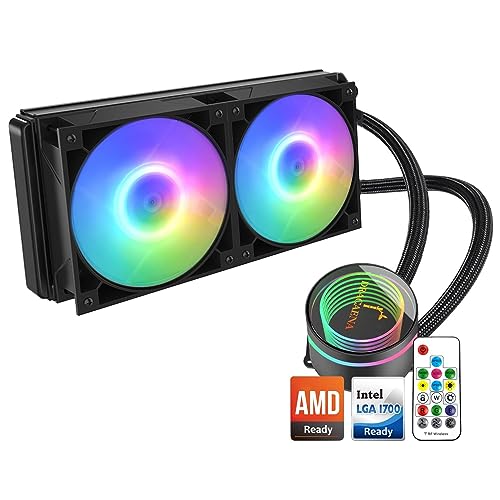
| Dracaena 240mm AIOBudget 240mm Pick | Budget 240mm Pick | 240mm | 26.9 dB | 1800 RPM | Amazon |
| ID-COOLING FX240 PRO | High-Airflow 240mm | 240mm | 35.2 dB | 2900 RPM | Amazon |
| Cooler Master 240 Core II | Premium 240mm | 240mm | 30 dB | 1750 RPM | Amazon |
| ID-COOLING FX360 PRO | High-Airflow 360mm | 360mm | 35.2 dB | 2900 RPM | Amazon |
| Cooler Master 360L Core | Best Premium 360mm | 360mm | 27.2 dB | 1800 RPM | Amazon |
| MSI MAG Coreliquid A13 240 | Sleek 240mm Pick | 240mm | — | 3800 RPM | Amazon |
In‑Depth Reviews
1. MSI MAG Coreliquid A13 360
Our pick — over 4.5★ from 300+ verified ratings; the strongest balance of quality and price.
A 360mm beast that runs whisper-quiet — the crowd’s favorite for good reason.
This is the highest-rated cooler in the lineup, with thousands of owners giving it a near-perfect score. The headline figure is the noise level: just 14.4 dB, which is so low you will struggle to hear it over case fans. The Thermalright Frozen Notte, by comparison, is 27.7 dB. The pump spins at 3800 RPM and uses ceramic bearings to move water aggressively while staying silent.
The split-flow radiator with an integrated three-phase pump is a durable design that reduces motor resonance. Buyers report that replacing a high-end air cooler on a 5800X3D completely eliminated thermal throttling in games, with max temps around 75°C under load. The 390mm evaporation-proof tubing uses triple-layered netted plastic under reinforced mesh, so the coolant stays sealed for years. One honest trade-off: the MSI logo on the pump may be slightly misaligned on AM4/AM5 brackets — a visual nitpick that does not affect cooling.
Owners Love
- Nearly silent operation — 14.4 dB is class-leading and inaudible in most builds
- High-speed 3800 RPM ceramic-bearing pump moves water efficiently
- Evaporation-proof tubing keeps the loop sealed long-term
Worth Noting
- MSI logo can sit slightly misaligned on AMD brackets — cosmetic only
- Some owners found the included thermal paste cleanup during install a bit tedious
Reach for this if: you want a 360mm cooler that is both powerful and whisper-quiet — the best overall balance of performance and low noise in the budget range.
Look elsewhere if: you need a 240mm size for a smaller case, or if a tiny logo misalignment would bother your pure aesthetic.
2. Thermalright Frozen Notte 360 White ARGB V2
Phenomenal cooling for the money, with airflow that puts pricier coolers to shame.
Owners see idle temps in the mid-20s°C and load temps in the 50–60°C range, with occasional spikes to the 80s°C under heavy load. The pump spins at up to 5300 RPM and uses a full copper mirror plane base with 0.1mm micro-channels for even heat spread.
The noise level is 27.7 dB — noticeable but not loud — and the S-FDB bearing fans eliminate the chatter you sometimes get in vertically mounted coolers. The white ARGB finish with the infinity-mirror pump head looks sharp in a white build. A few owners noted that the fan cables are a bit loose and some were disappointed with the ARGB signal mirroring in dark builds. Still, for a cooler that regularly costs barely above entry-level, the value is undeniable.
Real-world proof: One owner reported dropping a CPU from 100°C to 50–60°C under load — a massive 40–50°C improvement. That is what happens when 72.37 CFM meets a well-designed copper base.
Ideal for: builders who want a 360mm cooler with serious airflow and don’t mind a small noise trade-off for the performance gain.
Skip if: absolute silence is your priority — the 27.7 dB is higher than the MSI A13 360’s 14.4 dB.
3. Dracaena 240mm AIO CPU Cooler
An ultra-cheap 240mm cooler that comes with a remote and a hub — unheard of at this price.
At just above entry-level pricing, this cooler packs a separate pump design (1800 RPM ±10%) that improves heat dissipation by keeping the pump head off the CPU block. It pushes 45.6 CFM of air at a max noise of 26.9 dB — quieter than even the noisier 360mm options. The included controller hub and remote let you change color modes and fan speeds without needing motherboard software. Owners say it keeps an 8-core CPU running at 4.7 GHz below 100°F, which is impressive for a 240mm unit.
The real-world consensus is overwhelmingly positive: it stays very cool, runs quietly, and the all-inclusive kit even comes with thermal paste. But the installation manual is poor, and the bracket can slide off the pump during mounting — a few owners drilled a small screw to secure it. Also, the remote may not work on older motherboards. If you are not afraid of a slightly fiddly install, the cooling payoff is excellent for the money.
Why It Wins
- Includes a controller hub and remote for easy ARGB and fan speed control
- Runs at a low 26.9 dB — quiet enough for a night-time gaming session
- Keeps CPUs well below 100°F even under heavy load, per owner reports
The Catch
- Installation instructions are difficult to follow — be ready for a bit of head-scratching
- The bracket can slide off the pump during mounting; some owners used a screw to secure it
Pick this if: you are on a tight budget and want a feature-packed 240mm cooler with remote control — and you do not mind spending extra time on installation.
Pass on this if: you need a quick, frustration-free setup or want the highest possible airflow (45.6 CFM is decent but not class-leading).
4. ID-COOLING FX240 PRO 240mm
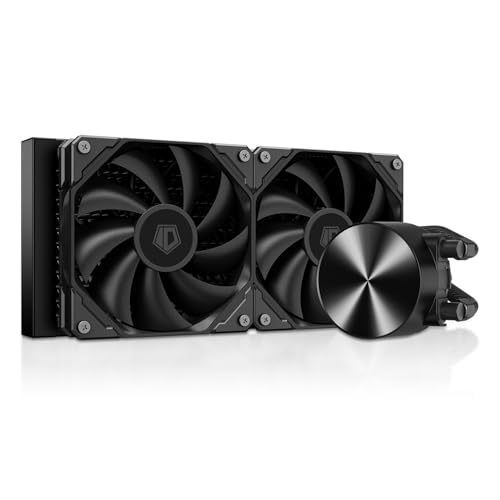
A 240mm cooler with an 82.5 CFM airflow rating that rivals many 360mm units.
This is the cooler to grab if you want maximum air movement from a compact 240mm radiator. The fans push 82.5 CFM at a max speed of 2900 RPM — the Dracaena pushes 45.6 CFM by comparison, and even beats some 360mm coolers. The pump runs at 2900 RPM with a rated TDP of 300W, meaning it can handle a hot Ryzen or Intel CPU without breaking a sweat. Owners mention a 9800X3D idles at 40°C and stays under 55°C during gaming.
The all-black design and CD-pattern pump cover look clean in any build, and the daisy-chain fan connectors simplify cable management. However, the noise level hits 35.2 dB — that is noticeably louder than the whisper-quiet MSI A13 360 (14.4 dB). Some owners note the pump and fans are audible through headphones under load. This is the trade-off: you get extreme cooling power in a 240mm package, but the fans do talk back.
The honest read: Cooling performance is the top praised aspect — 40 owners highlight it. Noise is the most mixed aspect (28 mentions). If you game with a headset, you will not notice; if you want a silent PC, consider a quieter option.
Go for it if: raw cooling performance in a 240mm size is your priority — this unit punches above its radiator class.
Think twice if: you need a silent cooler; the 35.2 dB noise level is among the highest here.
5. Cooler Master 240 Core II
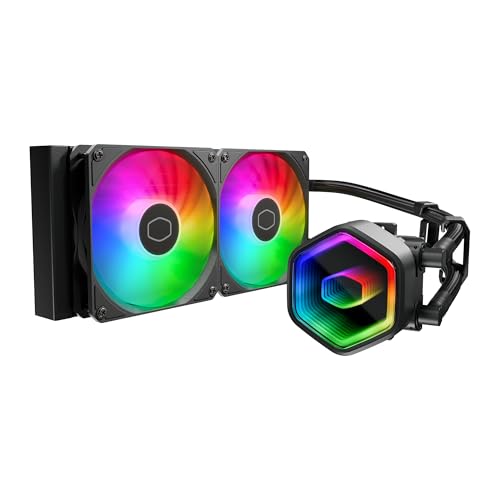
A stunning infinity mirror pump head that doubles as a serious 240mm performer.
Cooler Master is a name you trust, and the Core II delivers with a dual-chamber pump design that directs water flow to the CPU hotspot more precisely than single-chamber pumps. The included CryoFuze thermal paste has a thermal conductivity of 14W/mK and operates from -50°C to 250°C, giving you a solid thermal transfer at install. Customers note steady CPU temps of 44°C at idle and low noise even under heavy loads.
The two 120mm fans spin at a max of 1750 RPM and push 70.5 CFM of air at just 30 dB — a nice balance of performance and quiet. The infinity mirror on the pump head produces a deep, customizable ARGB effect that syncs with your motherboard. The main complaint is that the included thermal paste is quite thick, requiring you to spread it manually rather than relying on pump pressure. A few owners also note the water tubes are shorter than expected, so check your case layout.
Why It Shines
- Infinity mirror ARGB pump head is a visual standout in any build
- Fans push 70.5 CFM at only 30 dB — strong airflow with modest noise
- CryoFuze paste offers excellent thermal conductivity (14W/mK)
Downsides
- Included thermal paste is thick and needs manual spreading — not drop-in ready
- Tubes are on the shorter side, so case compatibility requires planning
Best for: builders who want a premium-looking 240mm cooler with reliable brand backing and a great acoustic profile.
Not for: anyone who needs extra-long tubes for a full-tower case — measure your route first.
6. ID-COOLING FX360 PRO 360mm

A 360mm powerhouse rated for 350W TDP — more than enough for a heavily overclocked chip.
Think of this as the 360mm brother of the FX240 PRO. Same 82.5 CFM fans, same pump speed, but a larger 360mm radiator that sheds heat faster. The TDP rating of 350W means this cooler can handle essentially any consumer CPU, including overclocked Ryzen 9 and Intel Core i9 chips. Reviewers point out a 5900X idles at 29°C with a 17°C ambient, and a 9800X3D sits around 32°C idle and 60°C under load. The fans are quiet at 1200 RPM and still move plenty of air, according to owner feedback.
The all-black design is understated — no RGB, just a clean CD-pattern pump cover. The fans come pre-assembled on the radiator, saving you setup time. The noise level hits 35.2 dB at full speed, which is the same as the FX240 PRO — the louder side of the lineup. But because the 360mm radiator can use slower fan speeds for the same cooling, you will likely run at quieter settings day-to-day. The build quality gets solid praise (16 owners highlight it), and the price-to-performance ratio is the second most praised aspect (40 mentions).
The verdict from owners: cooling performance is praised by 48 owners, and price-performance ratio is praised by 40. Noise is the only mixed aspect, with 35 mentions — but most owners note it is fine at lower RPMs.
Ideal for: those who want a high-TDP 360mm cooler with great build quality and don’t need RGB — the silent, clean aesthetic appeals to many.
Consider something else if: you must have RGB lighting or absolute silence under all conditions.
7. Cooler Master 360L Core

A proven 360mm performer with Cooler Master’s patented Gen S dual-chamber pump.
This cooler has been a crowd favorite for a while, with owners reporting noticeable temperature drops and lasting up to four years. The Gen S dual-chamber pump uses an improved copper base to target heat spots more precisely while increasing water flow and pressure. The frosted blade fans (71.93 CFM, 27.2 dB) diffuse ARGB light beautifully, creating a vibrant effect that syncs with your motherboard.
The CryoFuze paste (14W/mK conductivity) is pre-included, and three 120mm fans come pre-assembled for a straightforward installation that owners praise as an easy 8-screw job. The noise level of 27.2 dB is a bit louder than the MSI A13 360 but still well within the “quiet PC” range. A minor fit issue: the radiator is a bit longer than a standard 360mm due to attached reservoirs, so some owners had to modify their case slightly. The tubes could also be longer for certain setups.
What Owners Celebrate
- Gen S pump delivers precise cooling with increased water flow
- Fans push 71.93 CFM at a quiet 27.2 dB — ideal for balanced builds
- ARGB lighting is vibrant and fully customizable via motherboard sync
Reality Check
- Radiator is a bit longer than 360mm due to reservoirs — check case clearance
- Tubes are not very long, so case routing requires planning
Choose this if: you want a proven, reliable 360mm cooler with great ARGB, easy installation, and solid customer backing.
Look elsewhere if: your case has very tight radiator clearance or you need extra-long tubing for a large tower.
8. MSI MAG Coreliquid A13 240

The 240mm little brother of our top pick — same quiet pump, smaller footprint.
If the 360mm MSI A13 does not fit your case, the 240mm version brings the same split-flow radiator and integrated three-phase pump design in a more compact package. The pump runs at 3800 RPM and uses ceramic bearings for quiet operation — owners consistently call it “inaudible” or note there is “no audible sound” from fan or pump. The 390mm evaporation-proof tubing with triple-layered netted plastic is identical to the 360mm version, so build quality is equally assured.
This cooler handles a 7800X3D under 65°C with total silence, according to owners. Compatibility with LGA 1851 from the start is a nice perk for Intel builders. The main mixed note is that AMD installation requires a bit more prep time than Intel, and the included thermal paste (while usable) may not match the quality of aftermarket options like KPx paste that some owners prefer.
Owner consensus: Build quality and cooling performance are equally praised (18 mentions each). Noise level receives 9 positive mentions. Compatibility is the only mixed aspect (6 mentions), mostly around install differences between Intel and AMD.
Reach for this if: you want the silent, reliable pump from the MSI A13 lineup but need a 240mm size — a proven quality choice for quiet mid-range builds.
Think twice if: you need the highest possible airflow from your 240mm; the 60.78 CFM is adequate but not class-leading.
Understanding the Specs
Noise Level (dB)
Noise is measured in decibels, or dB. A difference of 3 dB is already twice as loud to human ears. The quietest coolers here hit around 14–15 dB — barely audible. Most budget coolers sit in the 25–30 dB range, which you will hear if the room is quiet but not during gaming. Coolers above 30 dB become noticeable without a headset. Check this number if you sleep in the same room as your PC or record audio nearby.
Pump Speed (RPM)
The pump moves heated coolant from the CPU block to the radiator for cooling. Higher RPM (revolutions per minute) means faster water flow and better heat transfer, but also more noise if the pump is low-quality. A pump around 2000–3000 RPM is standard for budget coolers. The MSI A13 360 reaches 5200 RPM — very high for its price class — which explains its excellent cooling. Look for ceramic bearings in the pump, which last longer and run quieter than metal-on-metal bearings.
Airflow (CFM)
CFM (cubic feet per minute) measures the volume of air a fan moves. Higher CFM means more air moves across the radiator, which improves cooling. But high CFM often comes with higher noise. A 240mm cooler with 80+ CFM can outperform some 360mm coolers with lower CFM fans. The trick is to balance CFM and noise: a fan rated at 82.5 CFM at 35 dB might move more air than a quiet 45 CFM fan, but you hear the difference.
FAQ
Will a 360mm AIO fit in my mid-tower case?
What is the difference between 240mm and 360mm AIO coolers?
Can I use a budget AIO cooler on a high-end CPU like the Ryzen 9 7950X?
How do I know if a 240mm cooler will fit my case?
Is a budget AIO cooler quieter than a high-end air cooler?
What does TDP mean for an AIO cooler?
Can I control the RGB on a budget AIO cooler without motherboard software?
How long does a budget AIO cooler typically last?
Is it safe to install an AIO cooler myself?
Final Thoughts: The Verdict
For the majority of shoppers, the budget aio cooler winner is the MSI MAG Coreliquid A13 360 because it delivers a class-leading 14.4 dB noise level with a powerful 3800 RPM pump — you get 360mm cooling performance that is nearly silent. If you want the absolute best value 360mm, grab the Thermalright Frozen Notte 360 V2 which moves 72.37 CFM of air and is praised by over 900 owners for its price-to-performance ratio. And for a compact 240mm build that stays quiet and looks premium, the Cooler Master 240 Core II is the one to reach for — its infinity mirror pump head stands out while the dual-chamber pump keeps the CPU steady at 44°C. Whichever you pick, you are getting liquid cooling that used to cost twice as much.
How We Picked
We do not accept paid placement. Every pick is matched to a real buyer and a real use-case; we do not hands-on test units.
Sources & Methodology
Specifications: manufacturer listings and product documentation. Review insights: verified customer reviews, as of July 2026. Pricing: not shown on this page (it changes often); check the current price via the retailer link.
As an Amazon Associate, Gadgets Feed earns from qualifying purchases. This does not affect which products we feature.