
Our readers keep the lights on and my morning glass full of iced black tea. As an Amazon Associate, I earn from qualifying purchases.
Specs are compiled from manufacturer listings and verified buyer reviews and can change over time — please confirm the key details on the product page before buying.
Every kit here is a no-contract, no-drill DIY system you can install yourself. Every system here is a do-it-yourself kit you can stick up in an afternoon, and none charge a monthly subscription to keep the lights on. Your choice depends on if you need cellular backup, voice control, or the loudest siren.
I’m Min — the founder and writer behind Gadgets Feed. This guide is built by comparing the manufacturers’ published specifications and the patterns across verified customer reviews, so you get each pick’s real strengths and trade-offs instead of marketing spin.
The right budget alarm system protects your doors and windows, blasts a 120dB siren, and sends alerts straight to your phone without any monthly fee.
Our Picks at a Glance

How To Choose The Best Budget Alarm System
A budget kit hinges on three specs: connectivity, siren volume, and sensor coverage.
Wi-Fi vs. Cellular Connectivity
Most kits here use 2.4GHz Wi-Fi to talk to an app on your phone. But Wi-Fi-only kits go silent when your internet drops or the cable is cut. If you want protection that works during an outage, you need a system with a SIM card slot that can send alerts over the cellular network instead. Just know that cellular kits need you to buy a SIM and pay the carrier for data.
Loudness and Installation Effort
Siren loudness, in decibels, is what deters intruders and alerts neighbors. A 120dB siren is the benchmark here. For installation, look for kits with self-adhesive pads so you can stick sensors on doors and windows without drilling. A true DIY kit installs in about 15 minutes with adhesive pads, no drilling.
Quick Comparison
| Model | Best For | Siren Loudness | Connectivity | Included Sensors | Amazon |
|---|---|---|---|---|---|
| WiFi Alarm Home Security System★ Best Overall | Garages & sheds | 120dB | 2.4GHz Wi-Fi + App | 2 window, 3 motion | Amazon |
| Home Security System WirelessVoice Control Pick | Voice control fans | 120dB | 2.4GHz Wi-Fi + App | 4 door/window | Amazon |
| PGST WiFi Wireless Home AlarmCellular Backup Pick | Cellular backup + LCD | 120dB | GSM/4G + Wi-Fi | 4 door, 2 motion | Amazon |
| PGST Home Security Systems | 99+ sensor expansion | 120dB | GSM/4G + Wi-Fi | 4 door, 2 motion | Amazon |
| eufy Security 5-Piece Kit | Brand ecosystem loyalty | — | HomeBase (Wi-Fi) | 2 entry, 1 motion | Amazon |
| 15-Piece WiFi Home Security | Whole-home starter kit | 120dB | 2.4GHz Wi-Fi + App | 10 door, 1 motion | Amazon |
| AGSHOME GSM Alarm System | No Wi-Fi needed | — | GSM SIM Card | 99 wireless zones | Amazon |
| WiFi Alarm System for Home | Power outage backup | 120dB | 2.4GHz Wi-Fi + App | 10 door, 1 motion | Amazon |
In‑Depth Reviews
1. WiFi Alarm Home Security System
Our pick — 4.5★ from 80+ verified ratings; the strongest balance of quality and price.
A garage-tough siren kit that screams 120dB without demanding a single tool.
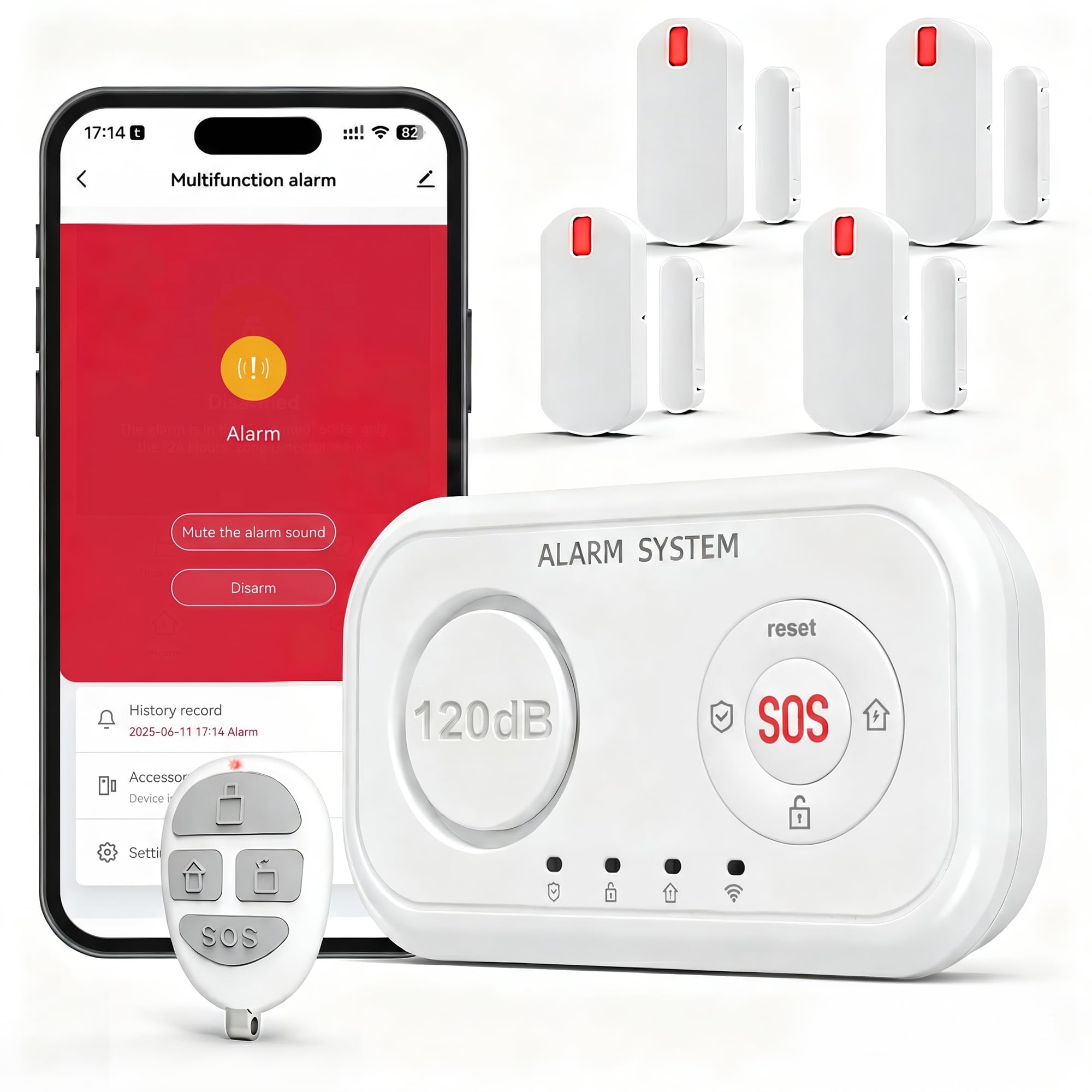
The headline here is the 120dB siren, which owners describe as “really loud” and enough to wake you up. That 120dB output suits garages, sheds, and porch package theft deterrence. You plug the siren hub into an outlet and stick the sensors on with adhesive pads or screws, so there’s no damage to your walls.
Security is what wins people over, and the included package gives you 2 window sensors, 3 motion sensors, and 2 remotes. The hub talks to the Tuya app over 2.4GHz Wi-Fi, so you get instant phone alerts when a door opens and can check real-time open/closed status for each sensor. You can program arming and disarming delays, alarm duration, and timers right from the app.
What makes this a true DIY system is the expansion: the alarm horn supports up to 30 wireless detectors and 20 remote controls. It’s also compatible with KERUI-brand hubs if you want to build a larger system later. The one caveat is that the loudness gets mixed reactions — most call it extremely loud, so it’s a matter of placement more than power.
What Owners Rave About
- Security features are the most-discussed strength — 11 owners single it out
- Setup is genuinely easy, with 6 owners praising the simple install
- Siren volume is enough to scare off intruders and wake you up
Watch For
- Siren loudness gets mixed reactions depending on placement
- Designed for basic deterrence, not complex whole-home setups
Reach for this if: you need a loud, expandable alarm for a garage, shed, or apartment that you can install in minutes.
Look elsewhere if: you want a system that keeps working when your home Wi-Fi goes down.
2. Home Security System Wireless
Smart-home voice control with a 120dB siren and zero subscription.
What sets this kit apart is hands-free control. It’s compatible with both Alexa and Google Home, so you can arm, disarm, and switch between Away and Home modes just by speaking. The remote control also includes a one-touch SOS button designed for seniors and children at home in an emergency.
Security performance is the most-praised aspect here, and the kit delivers a complete package: 1 alarm hub with a built-in rechargeable backup battery, 4 door and window sensors, and 1 remote control. It runs on a stable 433MHz wireless signal to reduce false alarms, and installation takes about 15 minutes with no wiring. Buyers report that the alarm is incredibly loud and the app works great.
You can expand this system up to 100 accessories, adding motion detectors, smoke detectors, water leak sensors, or outdoor sirens. It connects over 2.4GHz Wi-Fi via the Smart Life app, and the 2-year replacement warranty adds confidence. The trade-off is that an occasional unit arrives with a quirk, but most owners are very happy.
Smart-home ready: voice commands through Alexa or Google Home beat every other pick here for hands-free arming.
Genuine value: the loud 120dB siren and no monthly fee make it a strong apartment choice.
Best suited to: renters and apartments where voice control and a loud siren matter more than cellular backup.
Keep in mind: it relies on your home Wi-Fi, so a dead connection means no remote alerts.
3. PGST WiFi Wireless Home Alarm System
A 4-in-1 control unit with GSM backup and a screen you can actually read.
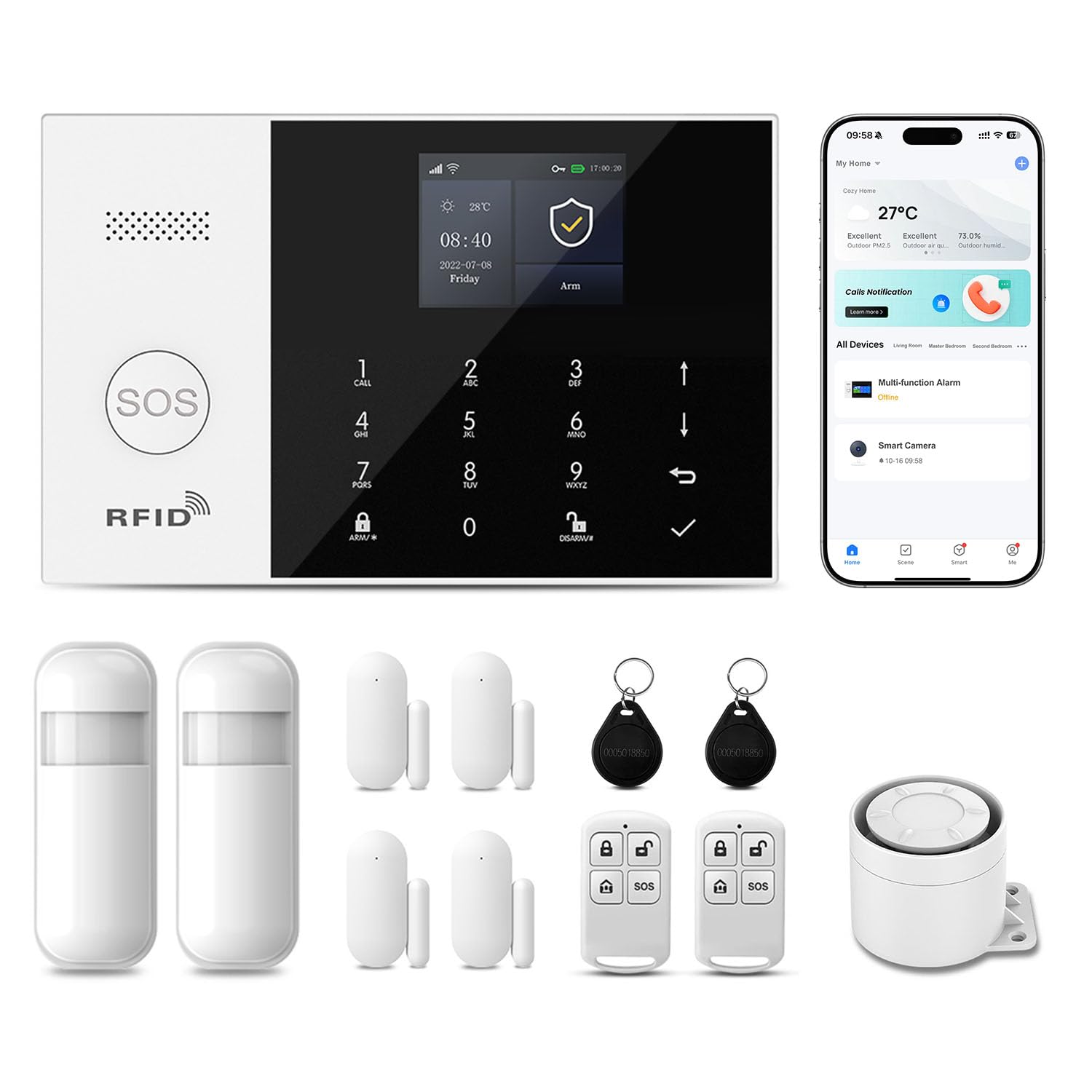
This is the pick for anyone who wants cellular protection without relying on home Wi-Fi. It supports dual GSM/4G plus Wi-Fi connection, so you can check real-time status from anywhere through the Smart Life app. Owners mention you can drop in a SIM card and skip any emergency service subscription entirely.
The standout feature is the 2.4-inch LCD screen with real-time alarm display and a keyboard, making it easy for both elderly users and children to operate. You get four ways to control it — keyboard, mobile app, remote control, and even an RFID card. The 3-in-1 control unit combines the base station, keypad, and siren, reducing the required space by 70%.
Multiple alarm methods go beyond just a loud 120dB siren — it supports remote notification via SMS, phone calls, and app alerts. There’s also a silent alarm mode that turns off the sound but still notifies you. The kit includes 4 door and window sensors, 2 motion sensors, a remote, and an RFID card. The instructions are a weak point, but owners say it works well once configured.
Always connected: the GSM/4G backup means alerts still reach you even if the Wi-Fi goes dark.
One honest flaw: the manual is not great, so plan to spend a few minutes figuring out the initial setup.
Choose this if: you want phone-call and SMS alerts plus an on-screen keypad for a small home.
Not ideal for: anyone who hates fiddling with instruction manuals during setup.
4. PGST Home Security Systems for House
A whole-house alarm host that scales to 99+ sensors and never needs Wi-Fi.
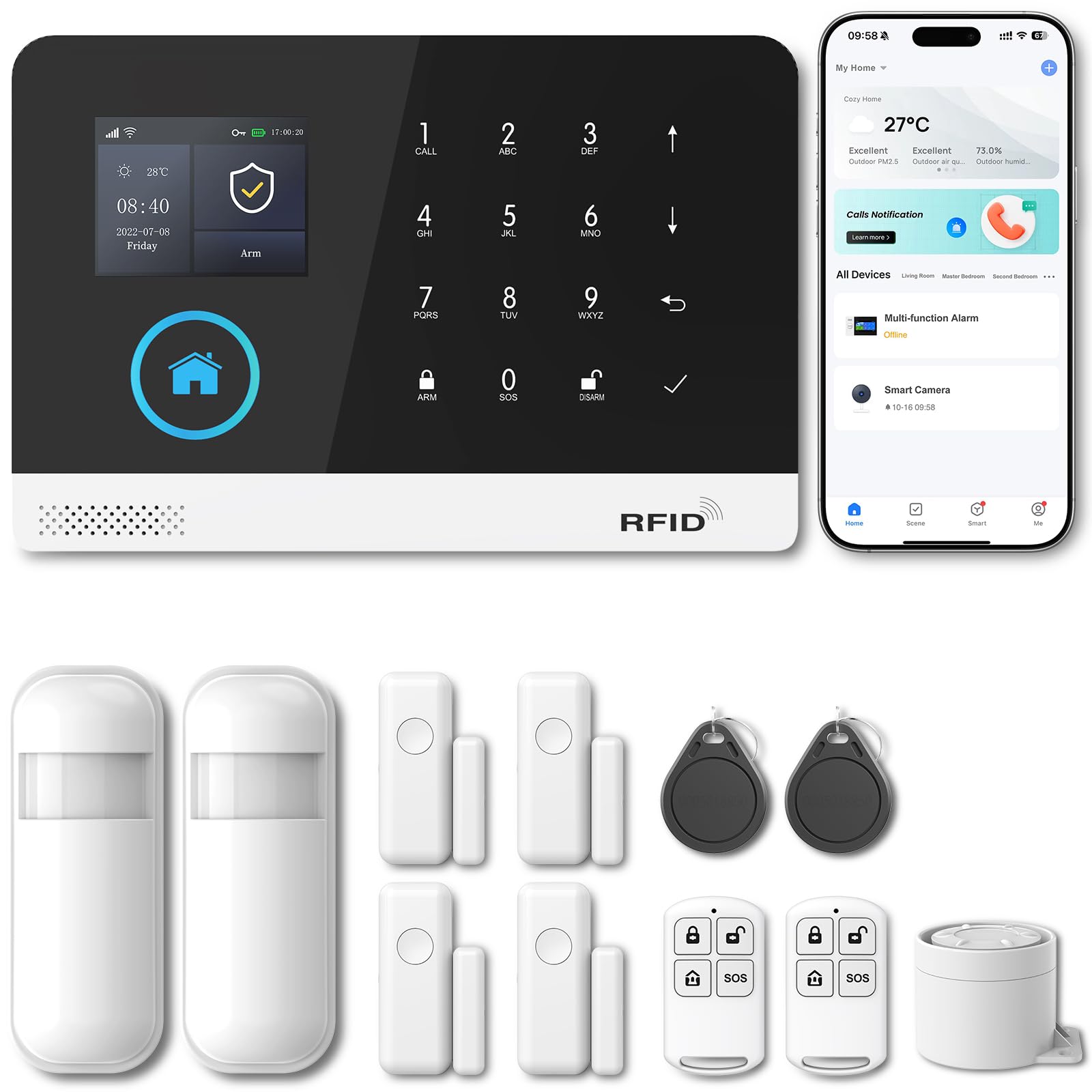
This is the system for someone who plans to grow their security over time. The host supports connecting up to 99+ sensors, and the kit arrives with 2 motion sensors, 4 door/window sensors, 2 RFID cards, 2 remote controls, and 1 siren. Customers note it’s easy to program with good range.
The security features go deeper than most budget kits. There’s a physical anti-tamper function — any forced removal triggers an instant alarm — and a password-lock screen so the alarm can only be stopped by entering the correct password. It also supports dual GSM/4G plus Wi-Fi connectivity via the Smart Life app.
One smart detail is that the system retains all functions even without Wi-Fi, sending alerts to your phone through a SIM card. That makes it a solid choice for cabins or properties with unreliable internet. The honest trade-off: a few owners found the sensor system complicated and noted the base won’t hold a charge for 24 hours, so keep it plugged in.
The Strong Points
- Scales to 99+ sensors for whole-home coverage
- Works without Wi-Fi using a SIM card
- Anti-tamper and password-lock features add real protection
The Caveats
- Sensor system can feel complicated to configure
- Backup battery doesn’t hold a full 24-hour charge
Grab this if: you want a system that works even when Wi-Fi is unavailable and can grow to cover a large property.
Think twice if: you want the simplest possible plug-and-play experience.
5. Eufy Security 5-Piece Home Alarm Kit

A brand-ecosystem starter kit that links straight to your existing eufy gear.
This is the pick for people already living in the eufy ecosystem. The 5-piece kit includes a HomeBase, keypad, motion sensor, and 2 entry sensors, and it links with other HomeBase-connected devices. Owners who’ve been with eufy for years say they love it and plan to buy more products — the appeal is building one unified security setup.
Setup takes minutes: the entry sensors attach to doors and windows, while the motion sensor and keypad secure to walls via included mounts. You arm and disarm by keying in a password or directly from the eufy Security app. There are no monthly fees, and you get instant alerts the moment motion or a breach is detected.
The honest caveat is that the built-in siren volume has drawn criticism — one owner notes the alarm is so low you can literally talk over it, and it relies on the HomeBase staying connected to your Wi-Fi. This is really a system for someone who values app integration over sheer loudness.
Ecosystem synergy: if you already own eufy cameras or doorbells, this alarm slots right into the same app.
Volume check: the siren isn’t the selling point here — consider an add-on siren if loudness is your priority.
Best for: eufy loyalists who want one app to control cameras and alarms together.
Pass on it if: you need a window-rattling siren from the base unit itself.
6. 15-Piece WiFi Home Security System

The biggest bang-for-buck kit, with 10 door sensors to cover every entry.
This kit is the crowd favorite for whole-home coverage on a budget, and its quality is the most-praised aspect — far more owners single out build quality than anything else. The box includes 1 Wi-Fi alarm base station, 1 keypad, 1 motion sensor, 10 door sensors, and 2 remote controls, which is enough to secure every door and window in a typical house.
Setup is a true DIY job: install the door and window sensors with the included adhesive strips, place the siren centrally, and pair everything through the companion app. Reviewers point out the whole process takes under an hour, with fast sensor response and a 120dB alarm that gets the job done. The system works with Alexa and connects to Tuya smart-home apps.
You can expand it up to 20 sensors and 5 remote controls or keypads on the Wi-Fi alarm station. There are no monthly fees. The one catch is connectivity: it only works on 2.4GHz Wi-Fi and does not support 5GHz networks, so owners with mesh systems sometimes need an extender.
Why It Wins
- 10 door sensors cover far more entries than most kits
- Quality is the top praise, with over 125 owners calling it out
- Easy install and expandable to 20 sensors
The Limitation
- Only works on 2.4GHz Wi-Fi — 5GHz networks need a workaround
Reach for it if: you want maximum sensor coverage per dollar for a whole house or rental.
Look elsewhere if: your router is 5GHz-only and you don’t want to deal with an extender.
7. AGSHOME Security Alarm System

A GSM auto-dial alarm that works anywhere, even with zero Wi-Fi.
If your property has no internet, this is the system to beat. It runs entirely on a built-in GSM module — just drop in a SIM card and it will call or send alert messages to phone numbers you preset. The GSM frequency covers 850/900/1800/1900MHz, so it can work in most countries worldwide. Shoppers say installing it in about 20 minutes with sensors that are pre-programmed.
The alarm supports up to 99 wireless defense zones and 7 wired zones, plus 5 groups of scheduled arm and disarm functions. You can set 6 groups of preset alarm phone numbers, and if an alarm occurs, the host dials them automatically with a 10-second help voice recording. There’s also a manual recording function to leave custom messages.
No tools are needed — it’s plug-and-play with self-adhesive sensors. The honest trade-off is that the instructions are widely considered vague, and a few owners struggled to get SMS alerts working. But for a tool-free GSM alarm with no contracts, the auto-dial feature is genuinely useful for remote properties.
No Wi-Fi needed: the GSM auto-dial keeps protection working in cabins, barns, or anywhere without internet.
Setup patience required: the manual is a known weak point, so expect to experiment a bit.
Perfect for: off-grid properties and anyone who wants phone-call alerts without an app.
Not for: buyers who want app-based control and modern smart-home integration.
8. WiFi Alarm System for Home Security
A 120dB siren kit with an 8-hour backup battery for outage protection.
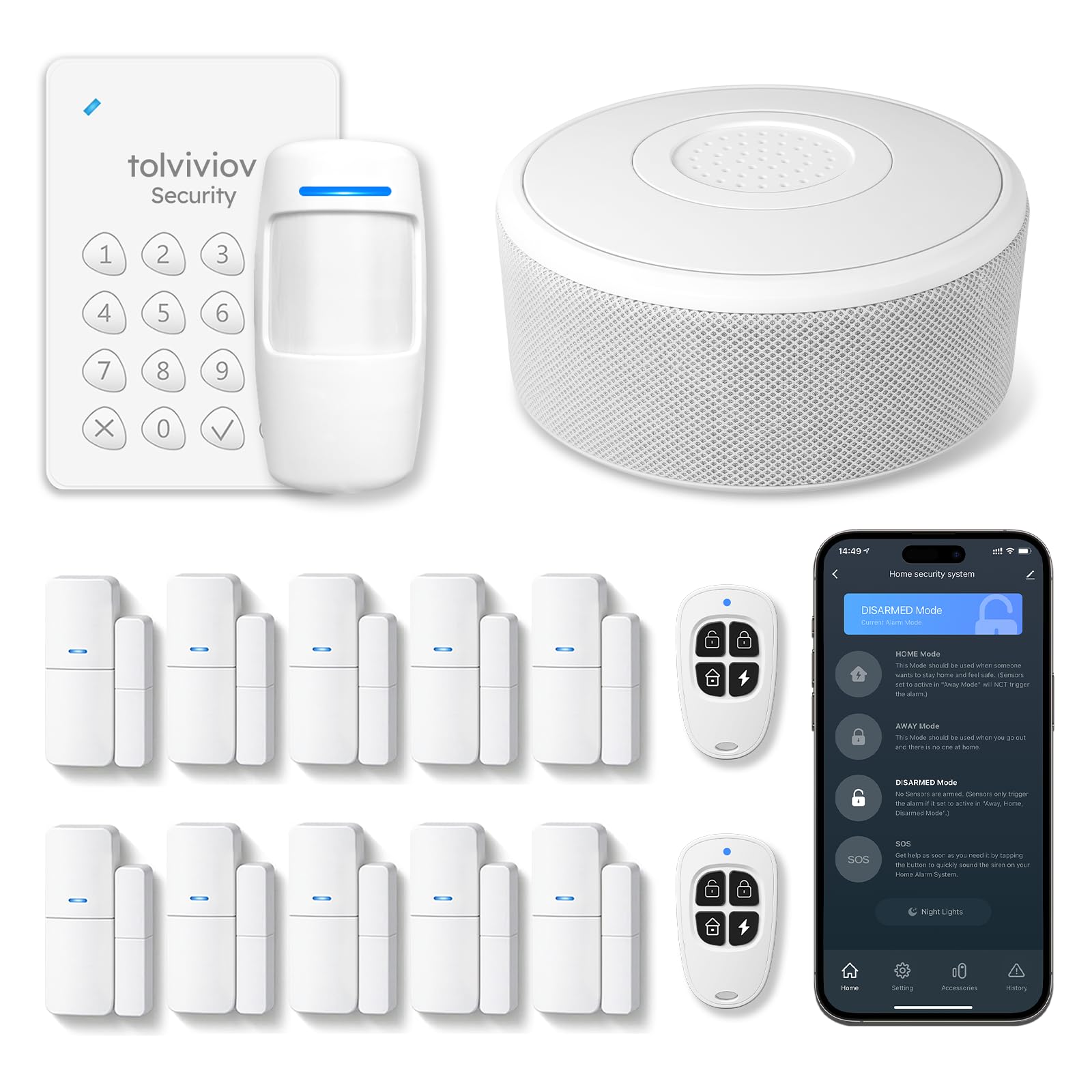
The defining feature here is the built-in rechargeable backup battery that keeps the alarm running for up to 8 hours during a power outage. That’s rare at this level and gives you real protection when the lights go out. Owners say the system was easy to set up with no complicated wiring, and the alarm is extremely loud.
The kit includes 1 Wi-Fi alarm base station, 1 keypad, 1 motion sensor, 10 door sensors, and 2 remote controls — the same broad coverage as the 15-piece kit, with the added battery backup. You install sensors with adhesive pads or screws, place the siren within Wi-Fi range, and pair everything through the companion app.
It sends instant notifications to your phone whenever a sensor is triggered, with no subscription or hidden monthly fees. It supports expansion up to 20 sensors and 5 remote controls or keypads. Like the sibling kit, it only works on 2.4GHz Wi-Fi and does not support 5GHz networks — worth checking before you buy.
Outage-proof: the 8-hour backup battery is the standout reason to pick this over similar kits.
Same Wi-Fi caveat: 2.4GHz only, so a 5GHz-only router will need a workaround.
Choose this if: you want whole-home sensor coverage plus protection that survives power cuts.
skip it if: your router setup can’t easily broadcast a 2.4GHz network.
Understanding the Specs
Why 120dB Matters
A siren’s loudness is measured in decibels, and 120dB is the benchmark that most of these kits hit. That’s roughly the volume of a chainsaw or a rock concert, and it’s enough to scare off intruders and alert everyone in the house. If loudness is your priority, look for that exact 120dB figure.
2.4GHz vs. 5GHz Wi-Fi
Most budget alarm hubs only connect to 2.4GHz Wi-Fi networks, not 5GHz. The 2.4GHz band travels farther through walls, which is why these devices prefer it. If your router only broadcasts 5GHz, you’ll need to enable 2.4GHz or use an extender to bridge the gap.
GSM and Cellular Backup
A GSM or 4G slot lets the alarm send alerts over the cellular network using a SIM card, so it works even if your internet is down or you have no Wi-Fi at all. You pay the carrier for data instead of a security company. This is essential for cabins, garages, or anywhere with unreliable internet.
Sensor Expansion Limits
Every kit has a cap on how many sensors you can add. Cheaper kits might top out at 20, while premium models support 99 or more. If you have a large home or plan to add motion detectors, smoke sensors, or water leak detectors later, check the expansion limit before buying.
FAQ
Will a budget alarm system work without an internet connection?
Do these systems require a monthly subscription?
How loud is a 120dB siren, really?
Can I add more sensors to my alarm kit later?
Will these alarms work with Alexa or Google Home?
How long does installation actually take?
What happens to the alarm during a power outage?
Is a Wi-Fi alarm or a GSM alarm better for my home?
Will door and window sensors stick to metal or textured surfaces?
Final Thoughts: The Verdict
For most buyers, the best budget alarm system is the WiFi Alarm Home Security System because its 120dB siren, easy DIY setup, and expandable 30-sensor capacity hit the balance of protection and simplicity. If you want voice control through Alexa or Google Home, grab the Home Security System Wireless. And for off-grid properties or homes with unreliable Wi-Fi, the AGSHOME GSM Alarm System is the one to reach for — it keeps working even with zero internet.
How We Picked
We do not accept paid placement. Every pick is matched to a real buyer and a real use-case; we do not hands-on test units.
Sources & Methodology
Specifications: manufacturer listings and product documentation. Review insights: verified customer reviews, as of August 2026. Pricing: not shown on this page (it changes often); check the current price via the retailer link.
As an Amazon Associate, Gadgets Feed earns from qualifying purchases. This does not affect which products we feature.