
Our readers keep the lights on and my morning glass full of iced black tea. As an Amazon Associate, I earn from qualifying purchases.
Specs are compiled from manufacturer listings and verified buyer reviews and can change over time — please confirm the key details on the product page before buying.
Building a PC on a budget usually means making peace with a case that looks dull, runs loud, or feels like it might dent if you sneeze near it. The budget case market has evolved, so you no longer must choose between flashy glass and real airflow. This guide finds budget cases that deliver real airflow, solid build quality, and a look you will not mind showing off—without a premium price.
I’m Min — the founder and writer behind Gadgets Feed. This guide is built by comparing the manufacturers’ published specifications and the patterns across verified customer reviews, so you get each pick’s real strengths and trade-offs instead of marketing spin.
Whether you are a first-time builder or upgrading an aging rig, finding the right budget computer case means balancing cooling, size, and looks against the money you want to spend.
Our Picks at a Glance


How To Choose The Best Budget Computer Case
Before you fall for a flashy front panel, remember a case must protect parts and move air past them. It protects your parts, and it moves air past them. On a tight budget, you want both without paying extra for RGB lighting you might not even use.
Size and Motherboard Support Come First
The first question is simple: what motherboard are you building with? A standard ATX board needs a mid-tower case, while a smaller build might use a Micro-ATX or Mini-ITX board. Most cases on a budget support all three, but the internal layout changes how much room you have for a big GPU and a tall CPU cooler. Check the maximum GPU length and CPU cooler height before you buy, so you do not end up with a case that cannot fit the parts you already own.
Airflow Beats Raw Fan Count
A case with a solid glass front panel might look sleek, but it chokes the intake fans behind it. Mesh front panels let air flow freely, which keeps your CPU and GPU cooler under load. A few well-placed fans in a mesh case often outperform a case stuffed with fans behind a sealed panel. Look for a mesh front and check whether the case includes any fans at all — budget cases sometimes ship with none.
Quick Comparison
| Model | Best For | Max GPU Length | Pre-Installed Fans | Front Panel I/O | Amazon |
|---|---|---|---|---|---|
| MONTECH XR★ Best Overall | Best Overall | High-end 40 series | 3 ARGB | 1x USB 3.0 | Amazon |
| Zalman T8Best Value | Kids / First Builds | 295mm | 1 rear 120mm | 1x USB 3.0 | Amazon |
| Zalman T6Compact Workhorse | Workstations | — | 1 rear 120mm | 1x USB 3.0, 2x USB 2.0 | Amazon |
| Thermaltake H21 | NAS / Server Builds | Long cards supported | None | 1x USB 3.0, 1x USB 2.0 | Amazon |
| MOROVOL 621 | First-Time Builders | 300mm | 4 RGB | 1x USB 3.0, 2x USB 2.0 | Amazon |
| DARKROCK EC2 | Airflow on a Budget | 340mm | None | 1x USB 3.0, Type-C ready | Amazon |
| Okinos Aqua 3 | Compact Showpiece | 320mm | 3 ARGB | 2x USB 3.0, Type-C 3.2 | Amazon |
| MUSETEX Y6 | Massive GPU Clearance | 410mm | 4 non-LED | 1x Type-C, 1x USB 3.0 | Amazon |
| CORSAIR 3500X | Premium Glass Look | — | None | 1x Type-C, 2x USB 3.0 | Amazon |
In‑Depth Reviews
1. MONTECH XR Panoramic High Airflow ATX PC Case
Our pick — over 4.5★ from 750+ verified ratings; the strongest balance of quality and price.
The rare budget case that feels premium, cools like a champ, and comes with the fans already spinning.
If you only look at one case on this list, make it this one. The MONTECH XR is the crowd-pleaser here for a reason — it ships with three 120mm ARGB fans already mounted, two of them reverse-blade on the side for intake and one regular-blade at the rear for exhaust. That alone saves you the cost and hassle of buying fans separately, and at a max speed of 1500 RPM they move serious air while staying quiet. The tempered glass build feels rigid and solid, not flimsy, and buyers consistently call out how well it shows off the components inside.
Builders report the interior is genuinely spacious, with easy cable management and tool-less drive bays that make a first build painless. It comfortably fits a 360mm radiator up top and supports high-end GPUs like the 40 series, so it is not a case you will outgrow quickly. The rear fan is surprisingly capable by itself — buyers report you can run it solo for a barebones build, then add the side fans when your hardware demands more cooling.
The honest trade-offs: the tempered glass is a fingerprint magnet, and the chassis is thin enough that buyers suggest lifting it with two hands. A couple of owners also found the pre-installed fans a bit loud on the desk. If you are running a power-hungry chip like an i9, plan to add more cooling on top of the included fans. None of that changes the verdict — this is the best balance of price, looks, and airflow on this list.
What Wins People Over
- Includes 3 bright ARGB fans with reverse-blade side intake
- Spacious interior fits 360mm radiator and 40-series GPUs
- Tempered glass build feels premium, not flimsy
- Tool-less drive bays and excellent cable management
What To Know
- Glass is a fingerprint magnet — keep a cloth handy
- Thin chassis; lift with both hands when moving
- Stock fans can run audible on a desk
Reach for this if: you want a case that looks and feels far more expensive than it is, with fans included and room to grow.
Look elsewhere if: you need a whisper-quiet rig from the start — the stock fans may bug you on a desk.
2. Zalman T8 ATX Mid-Tower Desktop Computer Gaming PC Case
Featherlight steel with a top-mounted PSU bay that keeps things cool and simple.
Sometimes you just need a case that works without fuss, and the Zalman T8 is exactly that. At just 7 pounds, it is dramatically lighter than the beefier MONTECH XR at 14.5 pounds, which makes it a joy to haul around or build in on a desk. Despite the light weight, the steel frame feels sturdy, and buyers specifically note it holds a 650W PSU without complaint. The RGB LED strip on the front panel adds a bit of flair, and the preinstalled 120mm rear fan gets airflow moving immediately.
This case is a known favorite for kids’ builds and simple desktops. It supports mATX and ITX boards, has a 5.25″ optical drive slot with a removable front cover, and fits a 240mm front radiator if you want better cooling later. The top PSU slot is an unusual layout, but it creates a dedicated cooling approach that works well for light loads. Buyers describe the fit as generous — maybe a little too large for a micro-ATX board, leaving the front controls sitting near the edge.
The quirks are worth knowing: the front LEDs use a Molex connector, which is an older power standard you will need to plug directly into your PSU. And while the rubber-mounted fans are fine, the overall build leans toward “basic” — this is not a showpiece. It is a smart, cheap, dependable shell for a machine that needs to run, not win beauty contests.
Solid and simple: light enough to carry with one hand, sturdy enough to trust, and priced like a spare part rather than a luxury item.
The honest caveat: the Molex front LEDs and basic layout make this a functional pick, not an aesthetic one.
Pick it for: a kid’s first PC, a spare office machine, or any build where reliability matters more than RGB.
Think twice if: you want a sleek glass showcase — this one keeps it plain and practical.
3. Zalman T6 ATX Mid Tower Computer PC Case
An old-school workhorse with a 5.25″ bay and a price that makes it a throwaway upgrade.
The Zalman T6 is the definition of a practical buy. It is noticeably more compact than the MONTECH XR — 14.84″D x 7.87″W x 16.92″H versus 17.1″D x 9″W x 17.7″H — which makes it a great fit for a tight desk corner. The powder-coated steel chassis is corrosion-resistant, and the hairline mesh front and side panels promote decent airflow. Buyers consistently call it a great value for the money.
This is a case for workstations, office PCs, and educational builds — not hardcore gaming. One buyer built a full ATX system with an R5 5600X3D and a DVD burner, reporting acceptable temps under load. The 5.25″ optical drive bay is a rarity these days, which makes this a lifesaver if you still need a disc drive. It supports ATX, mATX, and mini-ITX boards, and the mesh design lets air circulate even with just the single rear 120mm fan.
The big caveat is cooling: buyers are clear that this is not the case for a hot gaming rig — “poor cooling” is a recurring note. The metal is thin, the top-mounted PSU can make the case top-heavy, and you will only find 6 of 9 standoffs pre-installed. There is no USB-C either. For a budget workstation or a school computer lab, it is perfect. For a high-end gaming build, spend more on a case with better airflow.
Where It Shines
- Compact footprint saves desk space
- Rare 5.25″ bay for optical drives
- 4 internal bays for storage flexibility
- Powder-coated, corrosion-resistant steel
Where It Falls Short
- Cooling is weak — skip for hot gaming rigs
- Thin metal and top-heavy with PSU mounted up top
- Only 6 of 9 standoffs pre-installed
Best suited to: workstation builds, school labs, or any machine that runs cool and needs a disc drive.
Not the pick if: you plan to push a high-end GPU — the airflow just is not there.
4. Thermaltake Versa H21 SPCC ATX Mid Tower Computer Chassis

A no-nonsense chassis with internal bays to spare, built for NAS and server duty.
If you are building a network-attached storage box or a home server, stop scrolling — this is your case. The Thermaltake Versa H21 leans into function over flash, and it nails the essentials. It has six internal bays (three 3.5″ and three 2.5″) plus three 5.25″ external bays, which is more storage capacity than anything else on this list. The perforated metal mesh front and top panels pull air straight through, and the raised foot-stands boost airflow underneath. Buyers call the value for money exceptional.
This is a genuinely easy case to work in. The front bezel is tool-free, the drive bays are tool-less, and the PSU filter slides out for quick cleaning. It fits standard ATX boards and long graphics cards, and the open interior has no PSU basement to block your view. A buyer running a Noctua NH-D15 with a 5900X kept temps under 40°C under load, confirming strong ventilation. Another called it “inexpensive, but not cheaply made.”
The reality check: there is no tempered glass and no RGB here. The steel is thin, the cable management space is shallow, and there are no front fan mounts — you will want to add your own intake fans. The top-mounted power button sits where a curious pet or kid could reach it. But if your priority is stuffing a machine full of drives and keeping it cool, this case does the job for remarkably little money.
Purpose-built for storage: six internal bays and three optical bays make it the top pick for NAS and server builds.
The catch: no included fans and thin steel — you are paying for function, not finish.
Grab it for: a cheap NAS, a home server, or any build where drive count beats looks.
skip it if: you want a glass side panel or RGB lighting — this one is all business.
5. MOROVOL PC Case with 4 Pre-Installed RGB Fans

Four RGB fans in the box makes this the easiest way to get a glowing first build.
First-time builders, this one is aimed squarely at you. The MOROVOL 621 arrives with four 120mm RGB fans already installed — three in the front and one in the back — so you can skip the extra cost and confusion of buying and mounting fans yourself. The diamond-shaped mesh front panel feeds those fans plenty of air, and the tempered glass side panel shows off the whole setup. Buyers describe it as easy to assemble, with one noting it felt a bit flimsy before assembly but sturdy once everything was screwed together.
The compatibility math is friendly to mid-range builds. It supports ATX, Micro-ATX, and Mini-ITX boards, fits a GPU up to 300mm, a PSU up to 160mm, and a CPU cooler up to 155mm tall. That covers a lot of popular hardware, including a Ryzen 5 5500 with an RTX 3050. The fixed RGB lighting is not addressable, so you cannot change the colors per-fan, but you do not have to worry about syncing software either. It just glows.
The biggest recurring complaint is cable management — buyers call it “horrible” in spots, and the stock fan cables use Molex connectors rather than the newer PWM standard. There was also a report of broken top USB ports on one unit, though the manufacturer stepped in with a fair solution. For a starter build where the fans are already there and the price is low, the trade-offs are easy to live with.
Why Beginners Like It
- 4 RGB fans included — no extra fan budget needed
- Diamond mesh front feeds strong airflow
- Tempered glass shows off the build
- Fits common mid-range parts
What To Expect
- Cable management is the weak point
- Stock fans use Molex, not PWM
- Fixed RGB — no per-fan color control
Choose this for: a first gaming build where you want the RGB glow without paying for fans separately.
Pass if: you already own good fans and want clean cable routing instead of a light show.
6. DARKROCK EC2 ATX Mid Tower Gaming Computer PC Case

A mesh-fronted case that swallows 340mm GPUs and keeps them cool, with a magnetic glass door.
If airflow is your obsession, the DARKROCK EC2 is built to satisfy it. The full mesh front panel feeds air straight to your components, and the case supports up to eight 120mm fans or a 360mm radiator up front. Owners mention it cools an RTX 4060 Ti 16GB without thermal throttling., and the magnetic tempered glass door swings open for easy access — no screws to lose. At a modest footprint of 15.1″D x 8.6″W x 17.6″H, it fits 340mm GPUs and 200mm power supplies, which covers a lot of modern hardware.
The magnetic dust filters on the top and bottom are a thoughtful touch, keeping the interior cleaner for longer with minimal effort. Buyers consistently note the cable management is easy, with a roomy PSU shroud that hides the mess. The Type-C-ready front panel means you can add a USB-C port, and the removable rear fan grill makes swapping the exhaust fan simple. Builders fitting an RTX 2070 or 4070 Ti Super report a clean, straightforward assembly.
The honest downsides: the metal is thin and can flex, some buyers mention HDD vibration, and it is not a quiet case from the start — you may want vibration isolators. There were also notes that the top 140mm fan position can be blocked by the CPU power connector. It ships with no fans included, so factor that into your budget. For a builder who wants to pick their own fans and max out airflow, this is a strong, affordable foundation.
Cooling-first design: eight-fan capacity and a mesh front make this a top airflow pick at a budget price.
The trade-off: you supply the fans, and the thin metal can flex under pressure.
Go with this if: you already own fans and care more about thermals than about looks.
Reconsider if: you want a whisper-quiet case straight from the box — this one benefits from aftermarket fans.
7. Okinos Aqua 3 Micro ATX Case

A fishtank-style micro ATX case with a 270° glass view and a built-in RGB controller.
Want the showpiece look without the showpiece price? The Okinos Aqua 3 delivers a 270° panoramic view through fully glass-covered front and side panels, so your components are on display from almost every angle. It is a compact Micro-ATX case at 13.78″D x 8.27″W x 15.43″H, yet it still fits graphics cards up to 320mm and CPU coolers up to 164mm tall, comfortably accommodating a 4070. Three 120mm ARGB fans come pre-installed — two on top and one at the rear — and a built-in 4-port ARGB controller syncs the lighting without extra purchases.
The front I/O is genuinely modern. You get two USB 3.0 ports, audio jacks, and a Type-C 3.2 Gen 2 port running at 10Gbps for fast data transfer. The diamond-cut glass panels are quick-release, so you can pop the front open without a screwdriver. There is even a vertical airflow design with a fine 1.2mm steel mesh that does a better job blocking dust than the chunky 3.0mm mesh on many rivals. Buyers describe it as a “budget gem” that rivals much more expensive cases.
The catch is size: this is a small form factor case, and beginners warn it is not the easiest build. The motherboard fits extremely tight, some screws are hard to reach, and the stock fans are not controllable without replacing them. The front power button also needs a firm press. If you are comfortable with a snug build, the compact size and glass looks are worth it. If this is your first PC ever, a roomier ATX case will be kinder to you.
What Stands Out
- 270° glass panels make it a desktop centerpiece
- 3 ARGB fans and a 4-port controller included
- Type-C 3.2 Gen 2 at 10Gbps on the front
- Compact footprint with room for a 4070
What To Watch
- Tight build — not ideal for first-timers
- Stock fans are not controllable
- Power button needs a firm press
Perfect for: a compact desk setup where the glass view and Type-C speed are worth a snug build.
Not for: beginners who want an easy first assembly — give yourself room to work instead.
8. MUSETEX Y6 PC Case
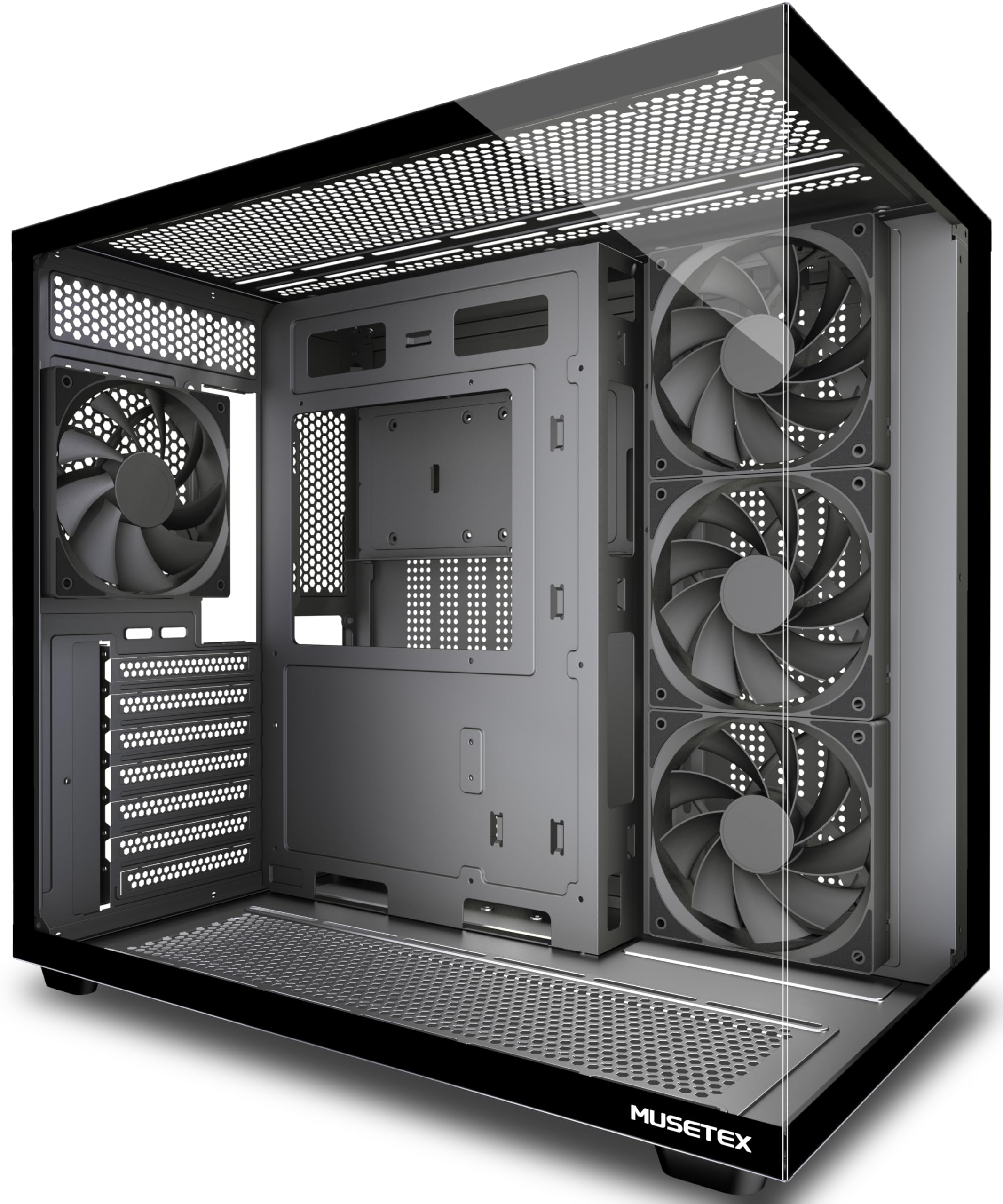
The 410mm GPU clearance sets the ceiling for this list — fit any monster card you own.
If you have already bought a massive graphics card, the MUSETEX Y6 is the case that will actually close around it. It supports GPUs up to 410mm (16.14 inches), which tops every other case here and covers even the chunkiest high-end cards. The 270° fully transparent dual tempered glass panels give you a fish-tank view of the whole setup, and the matte black finish keeps it looking serious rather than toy-like. It is a dual-chamber design that separates the PSU and drives into their own compartment for cleaner airflow.
It ships with four 120mm non-LED fans already mounted — three reverse-blade on the side and one forward on the back — so cooling is covered from the start. The top mounts up to a 360mm liquid cooler, the PSU bay swallows units up to 230mm, and CPU coolers up to 160mm tall fit without issue. Buyers running a 7950X with an RTX 5070 report excellent airflow and stable temperatures., and the screwless side panels make access easy. The front I/O includes a Type-C port, which is a welcome modern touch.
This is a case for builders who want maximum hardware compatibility. The downsides are minor but real: a veteran builder noted a missing standoff hole for some mATX boards, the metal edges can be sharp, and there is no HDD LED indicator. It is also the heaviest pick here at 13.1 pounds, so it stays put. If you are running a big GPU and a tall cooler, this is the rare budget case that just fits it all.
Maximum compatibility: a 410mm GPU limit and 230mm PSU support mean your hardware will fit, full stop.
The fine print: sharp edges and a missing mATX standoff hole in some cases — check your board layout.
Take this one if: you own or plan to own a giant GPU that smaller cases simply cannot hold.
Look away if: you want a light case to carry around — at 13.1 pounds, this one stays on the desk.
9. CORSAIR 3500X Mid-Tower ATX PC Case

The famous Corsair name with wraparound glass and room for ten fans — if you bring your own.
Corsair brings its build quality and reputation to the budget tier with the 3500X. The standout feature is compatibility with reverse-connection motherboards like ASUS BTF and MSI Project Zero, where the cables plug into the back of the board and stay completely hidden. Even without one of those boards, the wraparound glass panels give you a clean, uninterrupted view of your hardware. It supports motherboard form-factors from Mini-ITX all the way up to EATX, so almost any build fits.
Cooling capacity is genuinely impressive — this case can hold up to ten 120mm fans across the side, roof, and PSU mounting points. That means you can mount 360mm radiators in the roof and on the side for serious liquid cooling. Buyers praise the wide cable channels and thoughtful routing, and the removable front and side glass panels make building and upgrading easy. It is a heavy, solid case that feels premium to the touch and looks sharp on a desk.
You get a shell, not a cooling solution: no fans are included, so you must buy them separately. Storage is tight too — only two SSD slots behind the motherboard and no 3.5″ drive bay, even though the spec sheet suggests otherwise. One reviewer noted the blank PSU cover looks unattractive, and there is no printed manual. If you are starting from zero, this costs more than the MONTECH XR. But if you already own good fans, the Corsair name and clean glass look are tough to top.
Why It Impresses
- Holds up to 10x 120mm fans and dual 360mm radiators
- Reverse-connection motherboard compatible
- Wraparound glass with easy-removal panels
- Rigid, premium Corsair build quality
The Reality Check
- Ships with no fans — add them to your budget
- Limited to 2 SSD slots, no 3.5″ drive bay
- Heavy and not portable
Worth it for: a clean glass-fronted build with top-tier cooling potential and a trusted brand badge.
Skip if: you want fans in the box or need to mount mechanical drives — budget accordingly.
Understanding the Specs
Fan Size and Airflow
Most cases on this list use 120mm fans, which is the standard size for budget cooling. A 120mm fan moves a good amount of air at a reasonable noise level, and it fits nearly every mounting point. If a case ships with no fans — like the DARKROCK EC2 or CORSAIR 3500X — you will need to add your own, so factor that cost into the total. A mesh front panel lets those fans pull air freely, while a solid glass front chokes them.
GPU Length and CPU Cooler Height
These two numbers decide whether your parts physically fit. GPU length is measured in millimeters from the back of the case to the front, and modern cards can run 300mm or longer. CPU cooler height matters if you use a tall air cooler instead of a liquid cooler. Check both against your existing hardware before buying, because a case that looks great but cannot close over your GPU is a painful return.
FAQ
Will a budget case fit my large graphics card?
Can I mount a liquid cooler in a budget case?
What is the difference between ARGB and fixed RGB fans?
How many fans do I actually need for a budget gaming PC?
Is a tempered glass side panel a good idea on a budget case?
Do budget cases come with power supplies included?
What does a top-mounted PSU mean for my build?
Will a Micro-ATX motherboard fit in a mid-tower ATX case?
Final Thoughts: The Verdict
For most people, the budget computer case winner is the MONTECH XR because it bundles three ARGB fans, tempered glass, and a spacious interior at a price that undercuts the competition. If you want a compact glass showpiece with modern Type-C speed, grab the Okinos Aqua 3. And for the biggest GPUs on the market, the MUSETEX Y6 with its 410mm clearance is the one to reach for.
How We Picked
We do not accept paid placement. Every pick is matched to a real buyer and a real use-case; we do not hands-on test units.
Sources & Methodology
Specifications: manufacturer listings and product documentation. Review insights: verified customer reviews, as of August 2026. Pricing: not shown on this page (it changes often); check the current price via the retailer link.
As an Amazon Associate, Gadgets Feed earns from qualifying purchases. This does not affect which products we feature.