
Our readers keep the lights on and my morning glass full of iced black tea. As an Amazon Associate, I earn from qualifying purchases.
Specs are compiled from manufacturer listings and verified buyer reviews and can change over time — please confirm the key details on the product page before buying.
Upgrading from tinny monitor speakers to real desktop audio is the most satisfying desk upgrade, and you don’t need to spend hundreds to feel it.
I’m Min — the founder and writer behind Gadgets Feed. This guide is built by comparing the manufacturers’ published specifications and the patterns across verified customer reviews, so you get each pick’s real strengths and trade-offs instead of marketing spin.
This guide breaks down the budget computer speakers worth your desk space, separating the true keepers from the flashy disappointments by analyzing real specs and owner experiences.
Our Picks at a Glance

How To Choose The Best Budget Computer Speakers
Buying speakers on a budget is about picking your priorities: do you want a small footprint with a surprising amount of bass, a classic stereo soundstage for music, or a dedicated subwoofer for gaming and movies? Knowing what matters most helps you avoid a disappointing purchase.
Decoding 2.0 vs 2.1 Channels
A 2.0 system has just left and right speakers. A 2.1 system adds a separate subwoofer for low-frequency bass. If you watch movies or play games, the 2.1 layout delivers the rumble that makes explosions feel real. For music and a clean look, a quality 2.0 setup often gives you a more accurate and balanced soundstage without taking up floor space under the desk.
Reading Wattage and Power Claims
Manufacturers often quote “Peak” power, which is a high point a speaker can hit for a split second. The number that matters is RMS, which is the continuous power the speaker can handle, so you can actually judge loudness and headroom. A speaker with 42W RMS can fill a room without distorting, while a lower RMS number might struggle at higher volumes.
Picking Your Connection Type
Before you buy, look at the back of your computer or monitor. If you have a free USB-A port and a 3.5mm headphone jack, most budget speakers will work fine. If you want the easiest setup, USB-powered speakers with an AUX cable are typically plug-and-play. Bluetooth adds convenience for pairing your phone, but it does not improve sound quality over a wired connection.
Quick Comparison
| Model | Best For | Output Power | Configuration | Connectivity | Amazon |
|---|---|---|---|---|---|
| Edifier R1280T★ Best Overall | Music and movies | 42W RMS | 2.0 | AUX, RCA | Amazon |
| Redragon GS520Style Pick | Budget desk setup | — | 2.0 | USB, 3.5mm | Amazon |
| Creative Pebble Plus | Compact desks | Up to 8W RMS | 2.1 | USB, 3.5mm | Amazon |
| Sanyun SW208 | Bluetooth flexibility | 30W x 2 | 2.0 | USB, Bluetooth 5.0, AUX | Amazon |
| Logitech Z313 | Simple 2.1 value | 25W RMS | 2.1 | 3.5mm | Amazon |
| IBALL·BOX H1 | Tech-savvy buyers | 60W | 2.0 | USB-C, Optical, AUX, Bluetooth | Amazon |
| Bluedee 2.1 | rich gaming | 80W Peak | 2.1 | USB, USB-C, AUX, Bluetooth 5.4 | Amazon |
In‑Depth Reviews
1. Edifier R1280T Powered Bookshelf Speakers
Our pick — over 4.5★ from 19,000+ verified ratings; the strongest balance of quality and price.
The bookshelf classic that proves budget audio can sound premium and last for years.
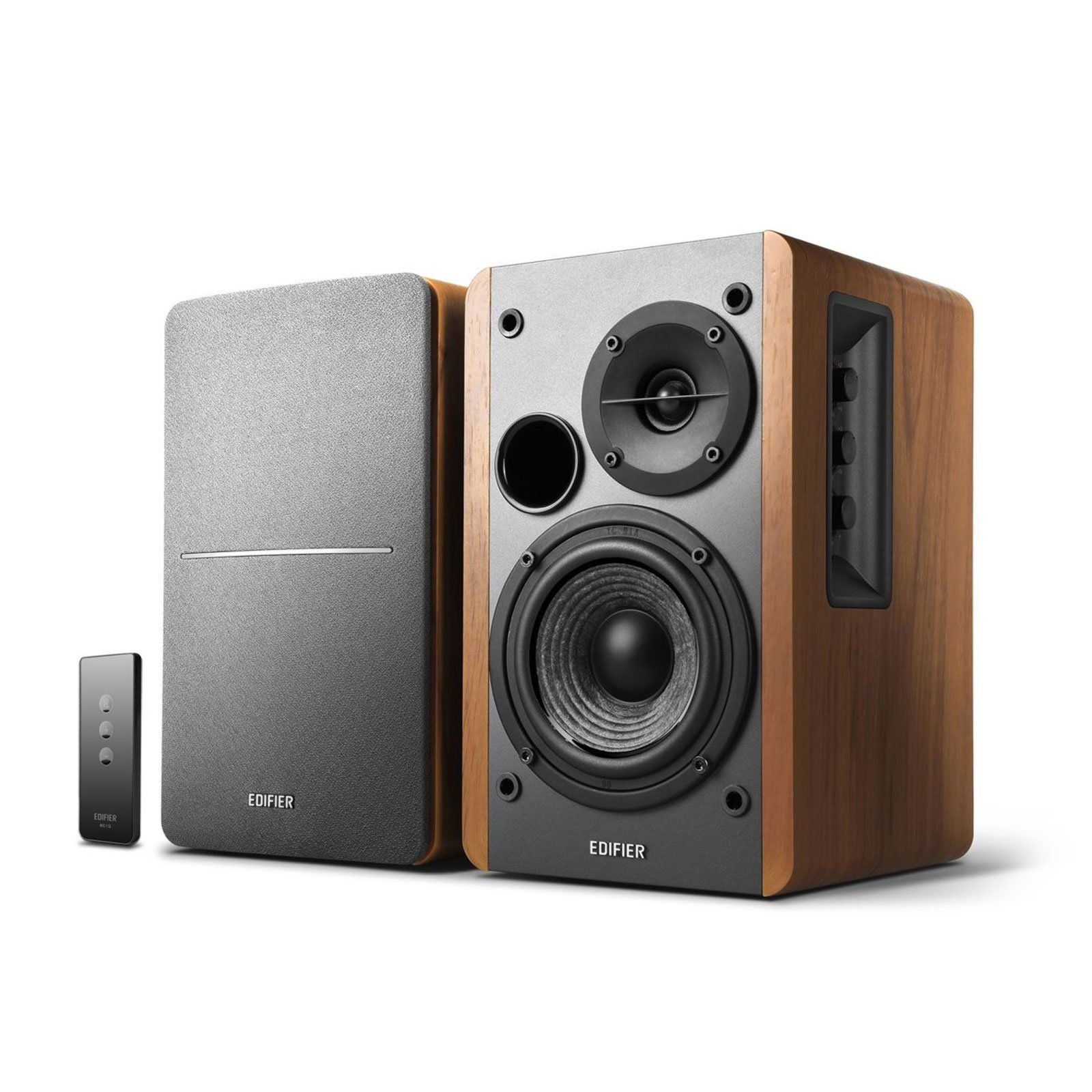
You get a wide, natural soundstage that buyers report rivals pricier monitors, all from a real wood-effect MDF cabinet (a dense wood board that reduces vibration) that fits right in next to a vinyl collection. It is not the loudest or flashiest pick, but its 42W RMS (root mean square, a measure of continuous power) delivers clean, natural audio that fills small to medium rooms with ease.
What wins people over is the sound quality, the thing owners talk about most. The silk dome tweeter and 4-inch woofer produce a natural, warm tone, and the creative setup means the dual AUX inputs invite you to connect your PC and a gaming console at the same time without switching cables. Owners mention one loud theme: “Durable after 1+ year daily use,” and many note it has lasted over a year with zero issues.
The trade-off is that it needs a bit of a tweak on the side-panel bass and treble controls to get the most out of it, especially for bass-heavy tracks. It is also a true near-field speaker, so it is happiest on a desk or a shelf, not trying to shake a large living room. For everyday music, movies, and gaming, it is the most balanced and reliable pick on this list.
Why It Earns the Crown
- 42W RMS of clean, room-filling power
- Dual AUX inputs for PC and console
- Included remote control for convenience
- Wood-effect MDF build feels solid and looks classic
Know Before You Buy
- Bass is present but not subwoofer-level
- Requires a little EQ tuning on the side panel for the best sound
- The included 6ft cable may be short for some desk layouts
Reach for this if: you want true stereo sound with build quality that outlasts the fads. Its wood cabinet is more substantial than the 42W RMS spec suggests, which is why it holds the crowd-favorite spot — 4.6 stars across 19,000+ owners.
Give it a miss if: you need deep, floor-shaking bass without adding a separate subwoofer later.
2. Redragon GS520 Wired RGB Computer Speakers
The RGB-lit budget bar that brings a gaming aesthetic to any desk.
The Redragon GS520 is the budget pick that leans into looks without forgetting the basics. It is USB-powered, so no wall brick is needed, and the 3.5mm audio and mic cables make it a simple plug-and-play setup for a PC or laptop. It pairs dual stereo speakers with a brushed-metal aesthetic that feels more upscale than the price suggests.
The standout feature is the touch-controlled RGB lighting bar (a color-changing LED strip) on top of the right speaker. Tap it to cycle through 6 lighting modes, or turn it off completely. Owners say this lighting is the main reason they buy it, but the sound is adequate rather than audiophile-grade — crisp for voices and games, though it won’t shake the room.
The honest catch is durability. Customers note “Worked well ~2 years until one set failed (won’t power on).” An occasional unit also needs a replug after a power outage. For a first gaming setup or a secondary desk, this is a stylish, low-cost entry point. Most reviewers find the value undeniable, even if one set can fail.
Owner Consensus: shoppers overwhelmingly say it is good value for the price, and even a 4-star review calls it “worth the money.” The RGB is the hook; the sound is just fine.
One Warning: buy this as a fun, inexpensive set, not as a long-term investment — or you may be disappointed when it fails down the line.
Ideal for: gamers and teens who want a splash of color on a budget. It’s about the vibe.
skip it if: you want a set that will last more than two years or need high-fidelity audio for music production.
3. Creative Pebble Plus 2.1 Speakers

The tiny 2.1 system that hides big bass in a down-firing subwoofer.
The Creative Pebble Plus is the champion of the compact desk. It is a 2.1 system, so it comes with a standalone 4-inch down-firing ported subwoofer, and the satellites improve their 2-inch mid-range drivers at a 45° angle, aiming the sound straight at you for a clear soundstage. It is powered entirely by USB, which means no wall socket clutter.
Owners value the High Gain Mode most — flip a switch and output jumps to 8W RMS, which needs a 5V 2A USB adapter (not included) but noticeably boosts bass. Despite its small size, it gets surprisingly loud, and the front volume controls are easy to reach.
Reviewers point out that it lacks real low-end for music and has a 4-second power-on delay, and the cables are short. A 4-star review sums it up well: “Solid value 2.1 system, if you are willing to tune it. Look elsewhere if not.” For desk gaming, movies, and YouTube, it is a potent, space-saving performer.
What Shines
- Compact design with a serious down-firing sub
- 44° improve drivers aimed at your ears
- High Gain Mode for a bass boost
Fair Trade-offs
- Short cables can limit desk placement
- Treble can be recessed without an EQ
Who it’s for: the gamer with a small desk who wants that subwoofer punch without the bulky cabinet footprint.
Who should pass: music purists looking for studio-level clarity and strong low-end for bass-heavy genres.
4. Sanyun SW208 3″ Bluetooth Bookshelf Speakers

The versatile 2.0 pair that adds Bluetooth and a built-in DAC for easy streaming.
The Sanyun SW208 is for the listener who wants to ditch a clunky wire from their phone and still get a proper bookshelf sound. It is a 2.0 system with 30W x 2 of power driving carbon fiber speaker units. It connects through a 3.5mm AUX cable, a USB port with a built-in 24bit DAC, or Bluetooth 5.0 with a 10-meter range.
The value for money is what owners praise most. It brings a rich, warm midrange and decent bass for its size, and the small bookshelf design means you can place it almost anywhere. For a small office or a desktop with classical or acoustic music, it is a strong performer. The build feels solid and the black design looks clean.
The main limitation is placement and power. Reviewers advise sitting 4 feet apart at 45° angles for the best sound, and they note the max volume is a bit weak. It lacks deep bass for techno, and it is not a room-filling system. As one review puts it: “Perfect Speakers for Anyone Who Just Wants Better Sound.” It is genuinely that — a clear step up from monitor speakers.
Solid Choice: if you split your time between your computer and your phone’s playlists, the Bluetooth 5.0 and 24bit DAC make this an easy recommendation.
Limit: it lacks a subwoofer output, and the off-axis sound drops sharply, so position it carefully.
Pick this when: you value Bluetooth convenience and a well-built cabinet over maximum bass output.
Look elsewhere if: you want a speaker that can get loud enough for a whole room or handle heavy techno tracks without distortion.
5. Logitech Z313 2.1 Multimedia Speaker System

The traditional 2.1 setup trusted for its ease, subwoofer punch, and everyday versatility.
The Logitech Z313 is a name that has been on desks for years, and for good reason. It is a simple 2.1 system with 25W RMS of output power and a compact subwoofer, meaning you get that dedicated low-end rumble for movies and games without a huge footprint. The setup is as easy as it gets: one 3.5mm cable to your PC and a control pod on your desk for volume.
Sound quality is the most-praised aspect, and buyers frequently call it a great budget upgrade from built-in monitor audio. It is versatile enough for music, movies, and gaming, and it doesn’t take up much space. The control pod is convenient, but it mutes the speakers when you plug headphones into it, which can cause wear on the headphone jack over time.
Reviewers point out that the subwoofer is a bit weaker and muddier than older, more expensive sets, and it lacks a dedicated subwoofer control. For the money, it delivers a clean, reliable experience. As the review pages sum it up: “Great budget computer audio upgrade!” If you just want a set that works instantly and adds some bass to your desk, this is a safe, proven pick.
Best Qualities
- Dedicated compact subwoofer for real bass
- Simple control pod for volume and power
- 25W RMS output delivers solid everyday volume
Be Aware
- Headphone jack on the pod wears cables
- Sound is clear, not audiophile-grade
Best for: the casual listener who wants a quick, reliable 2.1 setup with a subwoofer for movies and game nights, at a price that doesn’t hurt.
Not for: audio purists chasing a flat, detailed response for critical listening.
6. H1 Computer Speakers for Desktop PC with Bluetooth
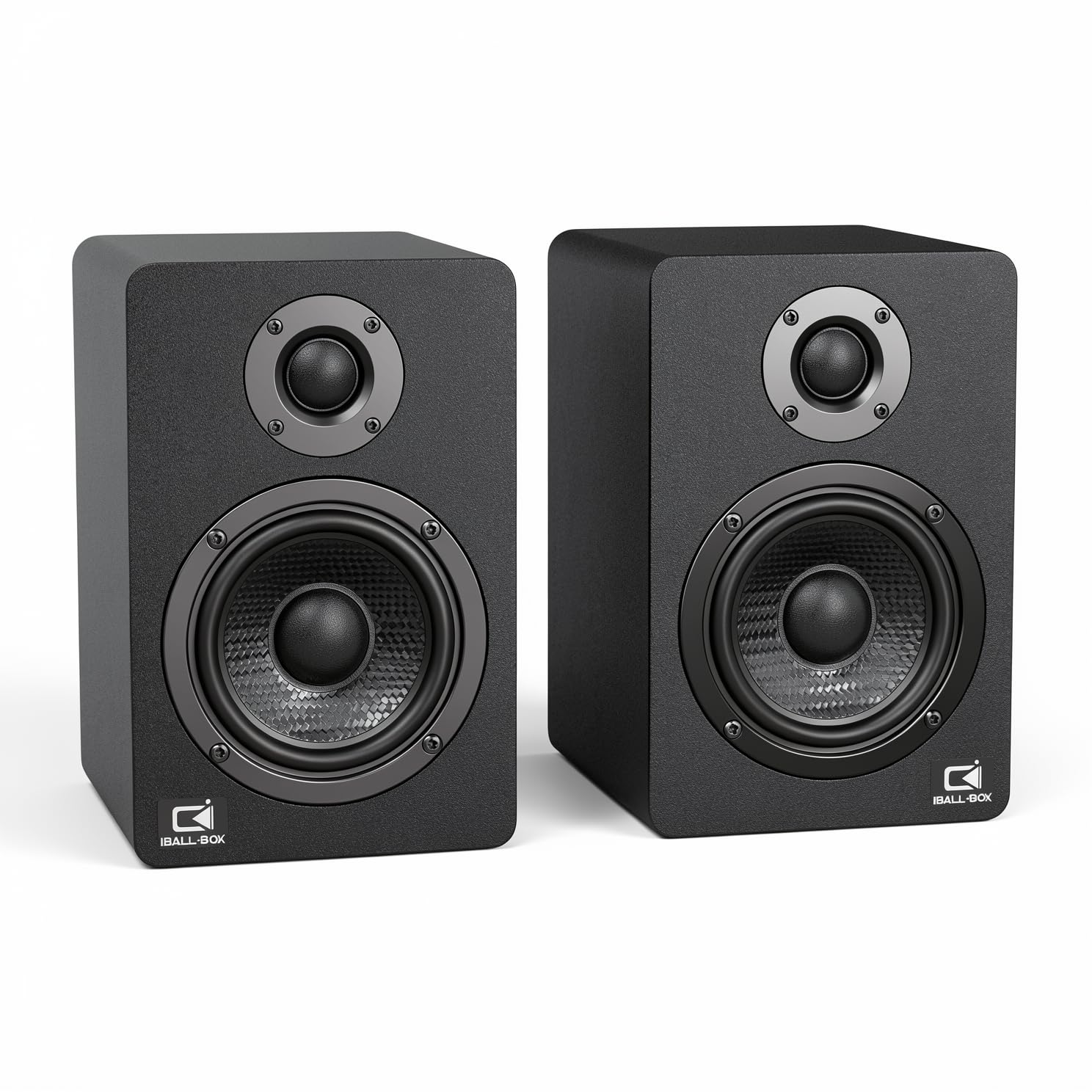
The connectivity king with USB-C, optical, and Bluetooth wrapped in a modern 2.0 design.
What makes the H1 the tech-savvy pick is its connection options. Beyond the standard 3.5mm AUX and Bluetooth, it adds a USB-C port with a 24-bit DAC and an optical input, giving you a direct, lossless digital link from your PC or console. This is a feature set usually found on much more expensive speakers.
It is also seriously powerful for a 2.0 system, delivering 60W of output through dual 3-inch carbon-fiber woofers and dual 1-inch silk-dome tweeters. The frequency response covers 40Hz-20KHz, which means you get clean highs and tighter bass that rivals a good 2.1 setup. Owners call the sound “clean” and “excellent,” especially over the optical connection.
The main gripe is cosmetic — the front logos — and the cable length is mixed for some. If you play Tidal or other high-quality streams, the engaging near-field sound makes it a bargain. It is the complete package for the person who wants modern inputs, solid power, and a cleaner look than the older wood-styled classics.
Best Feature: the optical input and USB-C DAC deliver a level of digital clarity that most budget speakers simply don’t offer.
Minor Quibble: the branding on the front is not for everyone, but the performance is easy to love.
Reach for this if: you’re a tech enthusiast with a modern monitor and want every connection option covered — including a lossless digital one.
Look past it if: you need a subwoofer for deep cinematic rumble, as this is a pure 2.0 setup.
7. Bluedee Computer Speakers with Subwoofer 2.1 80W Peak

The plug-and-play 2.1 system with an all-in-one knob and modern RGB glow.
If you want a dedicated subwoofer and the latest Bluetooth, the Bluedee 2.1 system hits all the notes. It packs an independent subwoofer for deep, punchy bass along with satellite speakers that stay clear, driven by 80W of peak power. It is the most modern 2.1 option here, with Bluetooth 5.4 for a stable wireless connection and both USB-A and USB-C wired inputs.
The audio is tuned with DSP to reduce distortion, and owners say the sound is crisp and deep even at high volume, with a surprisingly punchy mini-sub. The desk-friendly RGB lighting adds a modern touch without being overpowering, and the all-in-one control knob handles volume, play/pause, lighting effects, and input switching. The value for money is a frequent point of praise.
The main drawback is unclear instructions. Shoppers say you must hold the control knob to switch inputs, and some nearly returned it before figuring that out. The egg-shaped satellites (the small speakers) also tend to roll off high surfaces. Once you master the knob, this is a feature-rich budget 2.1 system (two satellites plus a subwoofer) that shines for movies and gaming.
Biggest Wins
- Real 2.1 setup with an independent subwoofer
- Bluetooth 5.4 plus USB-A, USB-C, and AUX connections
- RGB lighting with multiple modes for desk flair
Watch Out For
- No manual means a confusing input-switching knob
- Round satellites can roll off a high shelf
Ideal for the rich gamer: you get subwoofer rumble and modern RGB lighting without any setup hassle.
Consider carefully if: you’d prefer a speaker that guides you through setup, since this one leaves you to figure out the controls yourself.
Understanding the Specs
RMS Power vs Peak Power
RMS stands for Root Mean Square, and it measures the continuous, real-world power a speaker can produce without distorting. Peak power is a theoretical maximum a speaker can only hit in short bursts. When a 2.1 system claims 80W Peak, remember that continuous RMS is usually about half of that number. For a fuller sound, look for a higher RMS rating.
Channels (2.0 vs 2.1)
The channel count tells you how many separate speaker outputs there are. A 2.0 system uses just a left and right speaker, which is great for stereo music and a clean desk. A 2.1 system adds a third, dedicated subwoofer for low-frequency bass. This is why a 2.1 system excels at movies and games — it physically reproduces the deepest sounds.
Connectivity and DACs
Inside a speaker, a DAC (Digital-to-Analog Converter) turns the 1s and 0s from your computer into sound you can hear. Inexpensive speakers have basic DACs. Higher-end budget speakers, like a model with a 24-bit DAC, handle this conversion with greater detail, which means less signal loss and cleaner audio when you connect via USB or optical.
FAQ
What is the difference between a 2.0 and a 2.1 computer speaker setup?
How much RMS power do I need for a desktop PC?
Can I connect these speakers to my monitor?
What does RMS mean in speakers?
Are Bluetooth computer speakers worth it?
Why is there a hissing noise coming from my computer speakers?
How long should budget computer speakers last?
Do I need a subwoofer for computer speakers?
Final Thoughts: The Verdict
For most people, the budget computer speakers winner is the Edifier R1280T because it combines sound quality, build, and longevity from a brand owners trust to last. If you need modern connections, the H1 speakers offer USB-C and optical inputs that beat the rest of the budget field. For rich gaming with dedicated bass on a budget, the Bluedee 2.1 system is the one to choose.
How We Picked
We do not accept paid placement. Every pick is matched to a real buyer and a real use-case; we do not hands-on test units.
Sources & Methodology
Specifications: manufacturer listings and product documentation. Review insights: verified customer reviews, as of August 2026. Pricing: not shown on this page (it changes often); check the current price via the retailer link.
As an Amazon Associate, Gadgets Feed earns from qualifying purchases. This does not affect which products we feature.