
The term “budget computer” usually conjures images of sluggish boot times, cramped storage, and the dreaded spinning wheel of death. But the current refurbished and entry-level PC market has quietly evolved, offering genuine performance where a few years ago only compromises existed. The challenge is no longer finding a cheap computer — it’s identifying which spec trade-offs actually hurt your daily workflow and which ones are irrelevant to a smart buyer.
I’m Rikta — the co-founder and writer behind Gadgets Feed. I spend my time combing through benchmark data, comparing generation-over-generation CPU gains, and evaluating real-world multitasking scenarios to separate the genuinely capable budget machines from the ones that merely look good on paper. (And Homer 🐱 supervised from atop the warmest tower fan during the entire analysis).
The key to a smart purchase lies in balancing CPU generation, RAM capacity, and storage speed — three pillars that determine whether your budget computer feels fresh on day one or obsolete within a year.
How To Choose The Best Budget Computer
When your wallet dictates a tighter budget, every dollar must land on a component that genuinely affects your daily experience. Understanding which specs to prioritize and which to deprioritize separates a great deal from a frustrating one.
CPU Generation vs Core Count
Many entry-level listings boast an Intel Core i7, but an 8th Gen i7 (like the i7-8700) is architecturally generations behind a modern 14th Gen i3 (i3-14100). For everyday productivity—web browsing, office suites, video calls—single-threaded performance and power efficiency matter most. A newer budget processor often outperforms an older flagship in these tasks while sipping less power.
RAM Capacity and Generation
16GB of DDR4 RAM is the current baseline for smooth multitasking with a dozen browser tabs, Office apps, and background services. 8GB can feel tight, while 32GB is generous for the budget segment. The advent of DDR5 in even the cheapest new business-class towers, however, offers faster data transfer rates and future-proofing that matters if you plan to keep the machine for 4-5 years.
Storage Type: NVMe vs SATA SSD
The single biggest upgrade in modern budget PCs is the shift from SATA SSDs to NVMe drives. An NVMe SSD (especially PCIe 3.0 or 4.0) delivers boot times under 15 seconds and near-instant application launches. Always check if the drive is an M.2 NVMe format versus a 2.5-inch SATA SSD — the difference in daily responsiveness is night and day, far more impactful than a CPU clock speed bump.
Quick Comparison
On smaller screens, swipe sideways to see the full table.
| Model | Category | Best For | Key Spec | Amazon |
|---|---|---|---|---|
| CyberPowerPC Gamer Master | Premium Gaming | High-fidelity gaming and creative work | RTX 5060 Ti 8GB, 16GB DDR5 | Amazon |
| YAWYORE Ryzen 5 5600GT | Mid-Range Gaming | 1080P gaming and light video editing | 1TB NVMe, 16GB DDR4 | Amazon |
| Lenovo IdeaCentre 24″ AIO | All-in-One | Space-saving work from home setup | 24″ FHD, 8GB RAM, 256GB SSD | Amazon |
| Lenovo 24″ AIO Pro | All-in-One | Business productivity with 16GB RAM | 16GB DDR4, 512GB NVMe | Amazon |
| Dell Pro Tower i3-14100 | Business Essential | Small business fleet deployment | 14th Gen i3, 8GB DDR5 | Amazon |
| STGAubron i5/RX 550 | Entry-Level Gaming | Casual gaming for Fortnite/Roblox | RX 550 4GB, 16GB RAM | Amazon |
| abytespark i7/RX 590 | Budget Gaming | 1080P 60+ FPS gaming on a budget | RX 590 8GB, 16GB RAM | Amazon |
| suevery i7 16GB | RGB Value | Stylish home office with RGB aesthetics | 16GB RAM, 256GB NVMe | Amazon |
| Dell OptiPlex 7060 i7 | Refurbished Power | Heavy multitasking on a refurbished platform | 32GB DDR4, 512GB NVMe | Amazon |
| HP EliteDesk 800 G2 i7 | Refurbished Max RAM | Storage-heavy workflows | 32GB DDR4, 1TB SSD | Amazon |
| HP Windows 11 ProDesk | Complete Bundle | All-in-one starter with monitor and peripherals | 16GB DDR4, 500GB SSD | Amazon |
In‑Depth Reviews
11. CyberPowerPC Gamer Master Gaming PC

The CyberPowerPC Gamer Master represents a massive leap for the budget segment, pairing AMD’s latest Ryzen 7 8700F processor with NVIDIA’s GeForce RTX 5060 Ti 8GB. This combination delivers genuine 1440P gaming at high-ultra settings, with Call of Duty and similar titles pushing past 60 FPS without breaking a sweat. The 16GB of DDR5 RAM and 1TB PCIe 4.0 NVMe SSD ensure snappy system-wide responsiveness and ample storage for a growing game library.
Connectivity is modern across the board — Wi-Fi 6, Bluetooth 5.3, dual USB-C 3.2 ports, and a 7.1-channel audio setup that eliminates the need for an add-on sound card. The tempered glass side panel and customizable RGB lighting add visual flair, while the proprietary cooling solution keeps noise levels surprisingly low even under extended load. The inclusion of a keyboard and mouse means you are truly ready to play out of the box.
Customer feedback consistently praises the ease of setup, the quiet operation of its RGB fans, and the sheer gaming performance relative to similarly priced competitors. While a few users reported initial USB power quirks that required a BIOS tweak, the overwhelming consensus is that this rig offers unbeatable value for anyone seeking an upper-mid-range gaming experience without building their own system.
Why it’s great
- RTX 5060 Ti 8GB delivers excellent 1440P gaming performance
- Modern DDR5 RAM and PCIe 4.0 storage for future-proof speed
- Wi-Fi 6 and Bluetooth 5.3 for seamless wireless connectivity
Good to know
- Some units may require a BIOS tweak for USB power stability
- Customer support response can be slow for advanced issues
- Fan wire fragility reported in isolated cases
10. YAWYORE Gaming PC Desktop AMD Ryzen 5 5600GT

The YAWYORE Ryzen 5 5600GT build is a masterclass in budget-conscious PC assembly that punches above its weight class. Its AMD Ryzen 5 5600GT processor features integrated Radeon Vega graphics capable of handling 1080P esports titles, while the 16GB of DDR4 3200MHz RAM and a full 1TB M.2 NVMe SSD provide the kind of storage and multitasking headroom usually reserved for more expensive mid-range towers.
Cooling is handled by five 12cm ARGB fans paired with a 550W 80 PLUS Bronze PSU, keeping temperatures in check without excessive noise. The included Wi-Fi antenna and Bluetooth dongle mean you are not tethered to a wired network, and the MSI A520M-A PRO motherboard offers a solid foundation for future GPU upgrades — many buyers report adding a used RX 580 or GTX 1070 Ti without any platform limitations.
Owner experiences highlight the quiet operation, easy setup, and the effectiveness of the remote-controlled fan boost for heavy gaming sessions. The integrated graphics are competent for lighter titles, but the real value lies in its upgradeability: this is a platform that grows with you. The absence of a dedicated GPU out of the box is its only hard limitation for serious gaming, but the price-to-performance equation remains exceptionally strong.
Why it’s great
- Solid CPU platform with excellent upgrade potential for GPU later
- 1TB NVMe SSD offers massive storage at this price point
- Five ARGB fans with remote control for effective, quiet cooling
Good to know
- No dedicated graphics card included — relies on integrated Vega graphics
- GPU power cable can be tightly zip-tied, requiring careful extraction
- Requires minor assembly or component replacement for best gaming experience
9. Lenovo 24″ FHD All-in-One Desktop Computer

This Lenovo 24-inch all-in-one takes the clutter-free AIO format and equips it with genuinely usable specs for a business or home office environment. The 23.8-inch FHD IPS anti-glare display covers 99% of the sRGB color space, making it suitable for basic photo editing and spreadsheet work alike. The Intel N100 quad-core processor is not a powerhouse, but paired with 16GB of DDR4 RAM and a 512GB PCIe NVMe SSD, it handles daily productivity tasks, web conferencing, and media consumption with zero perceptible lag.
Connectivity is well-considered: Wi-Fi 6, Bluetooth 5.2, HDMI-out, USB-C and USB-A ports, and an Ethernet jack provide all the flexibility a professional user needs. The inclusion of a wired keyboard and mouse keeps the setup truly plug-and-play. The AIO form factor dramatically reduces desk clutter, making it ideal for compact workstations, student desks, or home-office corners where a tower plus monitor feels excessive.
Buyers consistently praise the easy assembly and streamlined aesthetic, noting that it replaced a full tower and monitor setup with a single clean screen. The wired peripherals are standard rather than premium, and the stand lacks height adjustment, which may be a consideration for ergonomics-focused users. Overall, it delivers a lot of computing capability packed into a tidy, visually unassuming package that suits conservative professional environments perfectly.
Why it’s great
- 16GB RAM with 512GB NVMe SSD offers smooth daily performance
- 24-inch IPS display with wide color gamut for productivity
- Wi-Fi 6 and Bluetooth 5.2 for reliable wireless connectivity
Good to know
- Processor is an entry-level N100, not for heavy rendering
- Stand lacks height adjustment
- Keyboard and mouse are wired only
8. Lenovo IdeaCentre 24″ Full HD All-in-One Desktop

The Lenovo IdeaCentre AIO 24 brings a polished multimedia experience to the budget all-in-one segment. Its expansive display, available in up to QHD on some configurations, is complemented by Harman audio-enhanced speakers that outperform typical built-in PC audio, making it a strong candidate for a family room or home office where media consumption matters. The low blue light technology and 5MP AI webcam with IR capability make video calls sharp and comfortable over long sessions.
Under the hood, the Intel N100 quad-core processor is paired with 8GB of RAM and a 256GB SSD — a configuration that handles web browsing, Office for the web, streaming, and video conferencing smoothly. The all-in-one design eliminates cable sprawl, and the built-in webcam privacy e-shutter adds a welcome layer of security. The included USB keyboard and mouse mean immediate usability without additional purchases.
Customer feedback is particularly positive from users with accessibility needs — one legally blind user reported the 24-inch screen was brilliantly visible. The AIO’s tilt-only stand, lack of height adjustment, and the entry-level processor are its main limitations for power users. As a dedicated remote work or light home computing hub, however, it offers a genuinely polished experience that belies its budget-friendly positioning.
Why it’s great
- Excellent Harman audio and 5MP AI webcam for video calls
- Large 24-inch display with low blue light technology
- Zero-cable design saves desk space
Good to know
- N100 processor and 8GB RAM limit heavy multitasking
- Stand offers tilt only, no height or swivel adjustment
- 256GB SSD fills quickly with media files
7. Dell Pro Tower Desktop Computer, 14th Gen Intel i3-14100
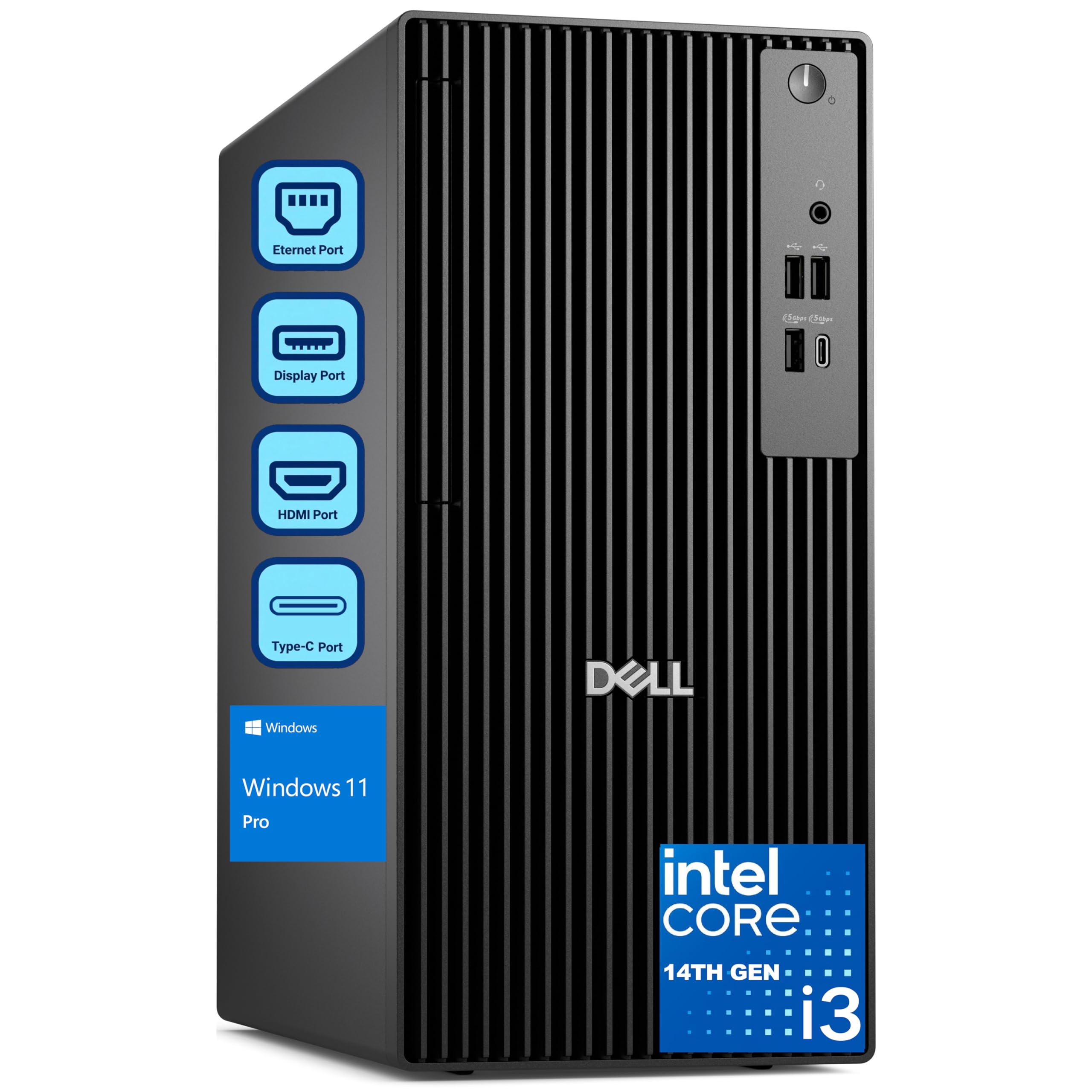
The Dell Pro Tower represents the modern evolution of the OptiPlex family, built for small businesses that need reliability above all else. Its Intel 14th Gen i3-14100 processor, while only a quad-core, features the latest Raptor Cove architecture that handily outperforms an 8th- or 9th-gen i7 in single-threaded office workloads. The inclusion of 8GB of DDR5 RAM is a notable step forward, offering higher bandwidth and efficiency compared to the DDR4 found in almost all budget competitors.
The 256GB PCIe SSD ensures fast boot times and responsive application loading, while Windows 11 Pro ships with professional features like BitLocker encryption and domain join capability out of the box. The expandable tower design allows for future upgrades — memory, storage, and expansion cards can be added as business needs grow. Port selection is business-oriented with multiple DisplayPort and USB ports for dual-monitor setups.
Small business owners and IT buyers report these machines work flawlessly for fleet deployments and daily operations. The 8GB RAM is the primary bottleneck for heavier multitasking — a memory-hungry user may find themselves needing an upgrade sooner than with a 16GB competitor. For a clean, supported, and warrantied business machine with modern architecture, however, this Dell delivers a compelling package that avoids the risks inherent in older refurbished hardware.
Why it’s great
- Latest 14th Gen Intel i3 architecture with DDR5 memory
- Windows 11 Pro with BitLocker and domain join built-in
- Expandable tower design for future upgrades
Good to know
- 8GB RAM is tight for heavy multitaskers
- 256GB SSD may require external storage for large files
- Integrated graphics limit gaming and GPU-intensive work
5. STGAubron Prebuilt Gaming PC Desktop, Radeon RX 550 4G

The STGAubron gaming desktop is a true entry-level gaming machine designed for younger players and casual gamers who want to play Fortnite, Roblox, Minecraft, and similar titles at solid frame rates. Its AMD Radeon RX 550 4GB graphics card is not for modern AAA gaming at high settings, but it handles esports and older titles beautifully. The Intel Core i5 processor, 16GB of DDR4 RAM, and 512GB SSD give it enough general performance for schoolwork and streaming, too.
Connectivity is a genuine highlight for its price tier — Wi-Fi 6 and Bluetooth 5.0 keep the system wireless-ready, and the included RGB gaming keyboard and mouse add a fun aesthetic that younger users appreciate. The two included RGB fans provide sufficient airflow for the modest hardware inside, and the compact black tower does not dominate a desk. The seller backs it with a one-year parts and labor warranty plus lifetime tech support.
Reviews paint a mixed but generally positive picture — many buyers report great experiences with easy setup and good performance for kids’ games. However, a notable subset reports component failures within months: failed LEDs, failed sound, and even a failed graphics card. The seller’s responsiveness in replacing faulty units has earned some praise, but the underlying hardware quality from the generic components (PSU, cooling, SSD) remains a gamble. It works brilliantly when it works, but longevity is not guaranteed.
Why it’s great
- Wi-Fi 6 and Bluetooth 5.0 for modern wireless networking
- RGB keyboard and mouse included for a complete gaming setup
- Lightweight for Fortnite, Roblox, and esports titles
Good to know
- Generic PSU and cooling components raise reliability concerns
- Not suitable for modern AAA gaming at high settings
- Some units require customer service intervention within months
6. abytespark Prebuilt Gaming PC, i7-4770 / RX 590 8GB

This abytespark build takes a different approach to the budget gaming PC: instead of a balanced platform, it focuses its budget on the GPU. The AMD Radeon RX 590 with 8GB of GDDR5 VRAM is the star of the show, enabling smooth 1080P gaming at 60+ FPS in titles like Fortnite, Apex Legends, and even some modern releases at medium settings. The Intel Core i7-4770, now over a decade old, is the clear bottleneck, but its four cores and eight threads still hold up well for gaming when paired with a decent GPU.
The 16GB of RAM and 512GB SSD provide enough headroom for light video editing and streaming alongside gaming. Four RGB fans and a white sea-view chassis give this build a visually striking appearance that appeals to gamers wanting a showpiece tower. Connectivity includes multiple USB 3.0 and 2.0 ports, HDMI, DisplayPort, and DVI for flexible monitor setups.
Customer reactions are polarized — many buyers are thrilled with the gaming performance relative to the cost, with VR capability reported for BONEWORKS. However, multiple reviews point out that the hardware is misrepresented: the CPU and motherboard are from a 2013 platform lacking TPM 2.0 and Secure Boot, with Windows 11 installed via unsupported workarounds. The absence of Bluetooth and an NVMe slot are notable omissions. It is a pragmatic GPU-first purchase for gaming, but its underlying platform is obsolete.
Why it’s great
- RX 590 8GB delivers strong 1080P gaming performance
- White sea-view case with four RGB fans is visually appealing
- 16GB RAM and SSD provide smooth multitasking
Good to know
- CPU and motherboard are from 2013, lacking modern platform features
- No Bluetooth — requires separate adapter
- Windows 11 installed via unsupported bypass, no TPM 2.0
4. suevery 16GB RAM Core i7 Tower Desktop

The suevery tower desktop is a visual standout in the budget segment, featuring a tempered glass side panel and five RGB fans that create a customizable lighting show. Beneath the flashy exterior lies a capable combination: an Intel Core i7 3.6GHz processor, 16GB of RAM, and a 256GB NVMe SSD that provide snappy performance for office work, browsing, and light creative tasks. The micro-ATX motherboard keeps the footprint relatively compact while still accepting a discrete GPU.
Connectivity is straightforward with built-in WiFi and HDMI output for high-definition displays. The prebuilt design means it works straight out of the box — no assembly required. The cooling design, driven by those five RGB fans, maintains good airflow, keeping temperatures in check even during moderate gaming or extended productivity sessions. The RGB fan lighting is controlled by a case button rather than software, which simplifies control but limits customization.
Early buyer reports are generally positive, with many praising the build quality, noise levels, and value. However, a significant reliability concern emerges after a few months of use: the hard drive (which appears to be a budget NVMe) is prone to failure, with at least one user reporting a crash within three months. The lack of an included GPU also means gaming is limited to integrated graphics unless you add your own. It is a solid office machine with RGB flair, but the storage component may require an eventual replacement.
Why it’s great
- Five RGB fans with tempered glass panel create a stunning look
- 16GB RAM provides excellent multitasking headroom
- NVMe SSD ensures fast boot and load times
Good to know
- No dedicated GPU — limited to integrated graphics
- Budget SSD reliability has been questioned by long-term users
- Cramped cable management in micro-ATX case
3. DELL Optiplex 7060 SFF Desktop, i7-8700, 32GB RAM

The Dell OptiPlex 7060 SFF is a refurbished business machine that offers a genuinely overwhelming amount of performance for the money. Its Intel 8th Gen i7-8700 six-core processor, 32GB of DDR4 RAM, and 512GB M.2 NVMe SSD represent a configuration that would have cost many times more just a few years ago. For productivity tasks — spreadsheets, databases, coding, video conferencing, heavy browser work — this machine barely breaks a sweat.
The small-form-factor chassis is deceptively expandable, featuring five USB 3.0 ports, two USB 2.0 ports, and dual DisplayPort outputs that support dual 4K monitors. Built-in Wi-Fi and Bluetooth eliminate the need for dongles, and Windows 11 Pro comes pre-installed. The included wireless keyboard and mouse make this a turnkey setup for a professional workstation. The compact size means it fits on a crowded desk without dominating the available space.
Buyer experiences are largely excellent, with many praising the near-new condition and outstanding performance for the price. The integrated Intel UHD Graphics 630 limits this machine to productivity and media tasks — gaming is not its purpose. A small subset of users received units with issues (dead on arrival, or swapped SATA SSDs instead of NVMe), and the included peripherals are notably cheap. The refurbished nature means quality can vary between units, but the overwhelming consensus is that it is the best performance-per-dollar deal in productivity computing.
Why it’s great
- 32GB DDR4 RAM handles extreme multitasking with ease
- i7-8700 six-core processor remains fast for productivity
- 512GB NVMe SSD for snappy system responsiveness
Good to know
- Integrated graphics limit gaming capability
- Refurbished condition means occasional unit variance
- Included keyboard and mouse are low quality
2. HP EliteDesk 800 G2 Business Desktop, i7-6700, 32GB RAM, 1TB SSD

The HP EliteDesk 800 G2 is a refurbished business desktop that prioritizes massive storage and RAM over CPU generation. Its 32GB of DDR4 RAM and 1TB SATA SSD provide ample space for extensive file archives and smooth multitasking across dozens of browser tabs, Office applications, and background processes. The Intel Core i7-6700 at 3.4GHz, while a 6th Gen processor, still maintains solid single-threaded performance for everyday office tasks.
This machine supports dual 4K displays via its integrated graphics, making it ideal for trading desktops, data analysis, or content creation workflows that benefit from expanded screen real estate. The included USB WiFi adapter adds wireless connectivity that the base model lacks, and the Optical Disk Drive is a rare inclusion that some users still require for legacy media. The dual-monitor capability is a standout feature in this price bracket.
Customer feedback is a mixed bag reflective of its older platform. Many users report fast performance and excellent value — one reviewer called it a great computer with a little upgrading. However, the age of the platform is evident: it lacks native TPM 2.0 for full Windows 11 compliance (currently using a software workaround), and the processor is now three generations behind current entry-level CPUs. Some units suffer from port failure or installation issues. It is a gamble on platform age, but when it works, the RAM and storage are unmatched at the price.
Why it’s great
- 32GB RAM and 1TB SSD provide unmatched storage and memory
- Supports dual 4K displays for professional workflows
- Optical drive included for legacy media
Good to know
- 6th Gen Intel platform lacks full Windows 11 compliance
- No native M.2 NVMe support — SSD is SATA-based
- Age of hardware leads to occasional port or component failure
1. HP Windows 11 Desktop Computer, Intel i5, 16GB RAM, 24″ LCD Bundle

This HP Windows 11 Desktop bundle positions itself as the ultimate “everything included” starter kit for families, students, or anyone setting up a home office for the first time. The package includes a refurbished HP ProDesk SFF computer with an Intel Core i5 8th Gen processor, 16GB DDR4 RAM, and a 500GB SSD, alongside a 24-inch LCD monitor, an RGB keyboard and mouse combo, new speakers, and a 2K webcam. It is a genuinely complete turnkey setup that requires zero additional purchases.
The PC itself handles schoolwork, streaming, and everyday productivity tasks with ease. The 16GB of RAM ensures smooth multitasking across typical workloads, and the 500GB SSD provides fast boot times and responsive application launches. Wi-Fi 6 and Bluetooth support keep the system connected without messy cables. The RGB peripherals add a dash of personality that young users and families tend to enjoy, and the included webcam is a practical addition for remote learning and video calls.
Reviews lean positive, with many buyers reporting that the system works great out of the box and is fast for the price. However, the refurbished nature is a real factor — one buyer received a unit that simply did not function, and another noted that the claimed “WiFi ready” required a separate adapter not included. The monitor model can vary, and the overall quality of the peripherals is entry-level. For a buyer who needs a complete computing station at a low upfront cost, this bundle is a compelling one-stop solution, though the refurbished gamble persists.
Why it’s great
- Genuinely complete setup with monitor, keyboard, mouse, speakers, and webcam
- 16GB RAM and 500GB SSD offer solid daily performance
- RGB peripherals and speakers add aesthetic and audible value
Good to know
- Refurbished unit quality varies — some arrive non-functional
- Monitor brand/model may vary from listing image
- WiFi may require a separate adapter depending on unit
FAQ
Is it safe to buy a refurbished computer as a first desktop?
How much RAM do I really need for a budget computer in 2024?
Final Thoughts: The Verdict
For most users seeking the budget computer that balances performance, value, and reliability, the CyberPowerPC Gamer Master wins because it delivers modern DDR5 memory, a current-gen Ryzen processor, and a dedicated RTX 5060 Ti GPU that genuinely games at high settings. If you need massive multitasking power without a GPU, the Dell OptiPlex 7060 offers an absurd amount of 32GB RAM and an NVMe drive for productivity. And for the most space-efficient home office setup, the Lenovo 24″ AIO provides a clean, capable, all-in-one package that hides the computer completely.