
The biggest mistake new budget ereader buyers make is confusing cheap with small. A compact screen doesn’t mean a compromised reading experience, but dozens of sub- devices force you to trade resolution for portability, battery for buttons, and storage for a lower price tag. The real challenge is finding a device that delivers a paper-like display and a distraction-free interface without feeling like a prototype.
I’m Min — the co-founder and writer behind Gadgets Feed. I have spent hundreds of hours analyzing the technical specifications, customer feedback, and real-world trade-offs of every sub- ereader currently competing for your shelf space, to separate the genuinely functional readers from the overpriced toys.
Whether you are a commuter wanting something pocketable or a casual reader upgrading from a phone screen, this guide dissects the seven most compelling options to help you find the ideal best budget ereader for your exact reading habits.
How To Choose The Best Budget Ereader
Finding the right budget ereader means understanding where manufacturers cut corners and where you cannot afford a compromise. The three specs that define the category are display quality, battery longevity, and file-format compatibility.
Screen Resolution and Front Light
A 167 PPI screen will show jagged edges on text, especially at smaller font sizes. Look for 212 PPI or better, and insist on an adjustable front light if you read in bed or in dim conditions — without a front light, a budget ereader is useless after sunset.
Battery Life vs. Real World Usage
Manufacturers often quote battery life at zero backlight and zero Wi-Fi. A realistic budget ereader should survive two weeks of daily one-hour reading sessions with moderate front-light use. If a device claims weeks but has a tiny battery, it likely lacks a front light entirely.
Physical Buttons vs. Touch Only
For one-handed reading on a commute or while eating, physical page-turn buttons are vastly better than swiping a touchscreen. Many budget ereaders sacrifice buttons to keep costs down, but the best value picks retain them.
Quick Comparison
On smaller screens, swipe sideways to see the full table.
| Model | Category | Best For | Key Spec | Amazon |
|---|---|---|---|---|
| Amazon Kindle (16GB) | Mid-Range | Max Portability | 6″ 300 PPI, 6-week battery | Amazon |
| XTEINK X3 | Premium | Ultra-Pocketable Carry | 3.7″ E-Ink, 58g, 16GB+MicroSD | Amazon |
| Nook Glowlight 4e | Mid-Range | Budget Touchscreen | 6″ LED, 8GB, front light | Amazon |
| OBOOK5 | Mid-Range | Feature-Rich Pocket Read | 4.26″ 219 PPI, 32GB, front light | Amazon |
| Nook Glowlight 4 (Renewed) | Premium | Crisp 300 PPI Screen | 6″ 300 PPI, 32GB, warm light | Amazon |
| Amazon Kindle Kids | Mid-Range | Worry-Free for Kids | 6″ 300 PPI, 2-year warranty | Amazon |
| Kindle Paperwhite (Renewed) | Premium | Best Display & Battery | 7″ 300 PPI, 12-week battery, waterproof | Amazon |
In‑Depth Reviews
1. Amazon Kindle 16GB (newest model)

The entry-level Kindle is the reference point for the entire budget ereader category. Its 6-inch, 300 PPI glare-free display delivers text sharpness that mid-range tablets simply cannot match, and the 25% brighter front light at max setting finally makes it usable in full darkness without a separate lamp. At 16GB, you can store around 8,000 books, and the USB-C charging combined with up to six weeks of battery life means you charge it roughly once a month.
The real advantage here is ecosystem: Amazon’s Kindle Store, Whispersync, and integration with apps like Libby (via Send to Kindle) make the download and sync experience frictionless. The device itself weighs almost nothing and is the lightest Kindle ever produced, so it disappears into a work bag or purse without adding noticeable weight. Page turns are noticeably faster than the previous generation, and the higher contrast ratio makes reading in direct sunlight far more comfortable.
However, there is no warm light adjustment — only a cool white front light — and no physical page-turn buttons. If you read strictly in bed next to a partner, the lack of warm amber tones might bother your eyes after an hour, and one-handed page turning requires a finger swipe rather than a button press. The 6-inch screen is also slightly smaller than the Paperwhite’s 6.8-inch panel, which matters if you read dense non-fiction with small formatting.
Why it’s great
- Best-in-class 300 PPI resolution at this price point
- Extremely lightweight and pocketable design
- Seamless Amazon ecosystem with massive book selection
Good to know
- No warm light adjustment for nighttime reading
- No physical page-turn buttons
- Not waterproof
2. XTEINK X3 eBook Reader (Developer Edition)
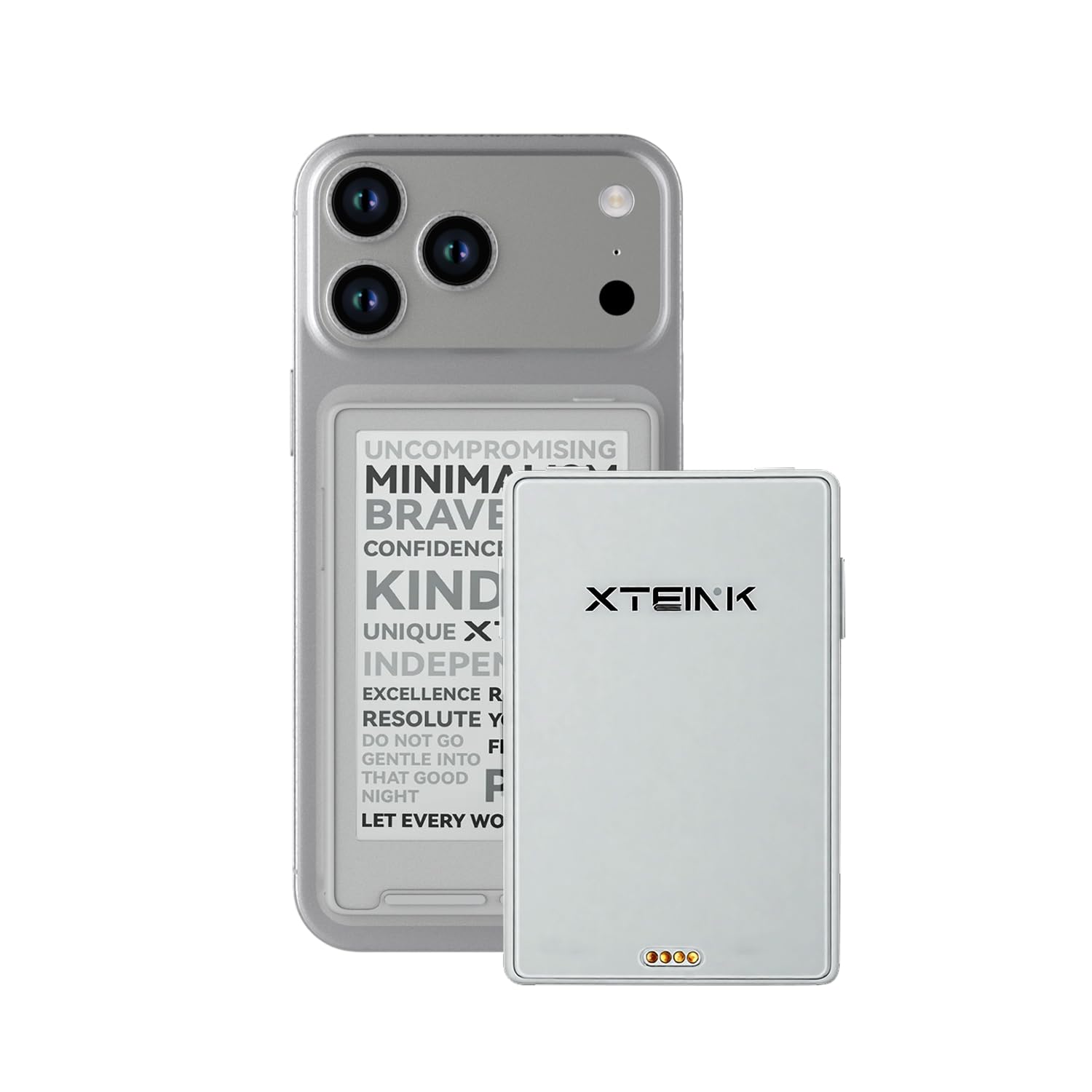
The XTEINK X3 is the most portable reading device you can buy today, weighing only 58 grams (about two ounces) with a 3.7-inch E-Ink screen. It is so small and light that it can be attached magnetically to the back of your smartphone or slipped into a coin pocket. The trade-off is a non-touch, no-backlight design supplemented by a gyroscope for page turning — tilt the device left or right to flip pages — plus physical buttons.
Storage is generous at 16GB internal plus microSD expansion up to 256GB, and the magnetic pogo-pin charging keeps the port clean. Battery life is rated at 10 hours, which is short for a budget ereader, but the screen is so small that it draws less power per hour than a 6-inch panel. The device supports ePub natively, and Wi-Fi transfer via a companion app works reliably once configured.
There is a significant learning curve. The UI is not intuitive — customers report needing trial and error to understand the button mapping — and customer review 5 notes extremely slow performance on image-heavy ePubs, with page turns taking over three minutes. This is not a Kindle replacement for mainstream readers; it is a niche gadget for minimalists, developers, and people who want to read during micro-moments on the go.
Why it’s great
- Smallest and lightest ereader on the market (58g)
- Expandable storage via MicroSD up to 256GB
- Magnetic attachment to phone for truly portable carry
Good to know
- No front light, no touchscreen
- Significant performance lag on image-heavy files
- UI learning curve, not beginner-friendly
3. Nook Barnes & Noble Nook Glowlight 4e (Renewed)

The Nook Glowlight 4e offers a 6-inch touchscreen with an adjustable front light at a price that undercuts the entry-level Kindle. It is a comfortable, soft-touch device that combines physical page-turn buttons with finger-swiping navigation, giving you two ways to turn pages. The 8GB of internal storage holds roughly 4,000 books, and cloud storage lets you archive purchases off-device.
Barnes & Noble’s file-format support includes EPUB and PDF, which is a genuine advantage over the Kindle’s proprietary format lock-in. You can side-load EPUBs from your computer via USB, which makes it easier to use with library services that do not support Amazon’s ecosystem. The front light is effective for evening reading, and the battery is rated around 10 hours of active use.
The renewed unit saves money, but customer review 4 flags that the refurbishing company sometimes ships it poorly packed inside the retail box, risking scratches during transit. Additionally, the Glowlight 4e lacks the high-resolution 300 PPI screen of the pricier Glowlight 4, so text will appear slightly less crisp at smaller font sizes. It is a strong entry-level pick if you want buttons and a front light without paying Kindle prices.
Why it’s great
- Physical page-turn buttons plus touchscreen
- Supports EPUB and PDF natively
- Adjustable front light for night reading
Good to know
- Screen resolution is below 300 PPI
- Renewed unit packaging may be careless
- No Bluetooth for audiobooks
4. OBOOK5 eBook Reader
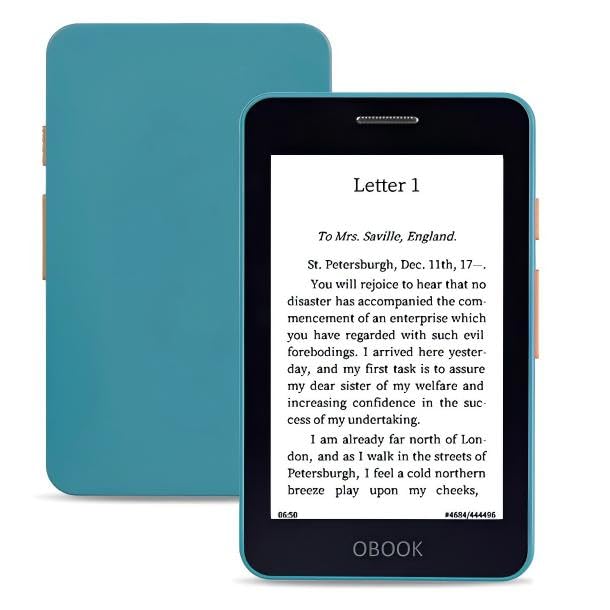
The OBOOK5 squeezes an impressive feature set into a 4.26-inch pocket-sized body. It offers an adjustable front light — rare at this size — combined with physical page-turn buttons and a touchscreen. The 219 PPI resolution is adequate for most prose, though text looks slightly pixelated compared to a 300 PPI panel. The 32GB of internal storage is double what most budget ereaders offer, and USB-C charging makes it convenient for daily carry.
An audiobook speaker and Bluetooth connectivity set the OBOOK5 apart from nearly every other budget ereader at this price. You can switch between reading and listening without needing a separate smartphone or speaker. The software is simple and ad-free, with drag-and-drop file transfer via USB that supports EPUB, MOBI, TXT, and DOC formats. Battery life is solid at roughly two weeks with moderate front-light use.
The big trade-off is screen quality. Customer review 2 reports poor graphics rendering and jagged text on some fonts, while review 4 calls the interface slow and cheap-feeling compared to the Kindle. The OBOOK5 is best suited for readers who value compact size, an audiobook option, and massive storage over pixel-perfect text rendering.
Why it’s great
- Front light plus page-turn buttons in a tiny body
- 32GB storage and microSD expansion
- Built-in speaker and Bluetooth for audiobooks
Good to know
- Screen resolution is only 219 PPI
- Some users report sluggish interface
- No dictionary or advanced typography support
5. Nook Glowlight 4 (Renewed)

The Nook Glowlight 4 delivers a 6-inch, 300 PPI display with a warm amber front light — the same resolution as the Kindle Paperwhite but at a lower cost via the renewed program. The amber light is adjustable from cool white to warm orange, which makes late-night reading far easier on the eyes than the entry-level Kindle’s single cool-white backlight. The screen also features a scratch- and fingerprint-resistant lens that feels premium under the finger.
Physical page-turn buttons on the side bezel work reliably, and the 32GB of storage is more than enough for a massive library. The Glowlight 4 supports EPUB natively, and side-loading books via USB is straightforward — no proprietary conversion required. Battery life is rated for weeks on a single charge, and the soft-touch finish makes it comfortable to hold for long sessions without fatigue.
The biggest concern is reliability over time: customer review 5 reports the device stopped turning on after about a year, with the screen freezing and the power button failing to respond. That is a known risk with renewed electronics. Additionally, the Nook ecosystem does not support instant Libby library book borrowing the way Kindle does — you must manually download and transfer ePubs from your computer.
Why it’s great
- 300 PPI resolution with warm amber front light
- Physical page-turn buttons plus scratch-resistant lens
- 32GB storage with native EPUB support
Good to know
- No instant Libby borrowing; manual EPUB sideloading required
- Renewed units may have durability issues after one year
- No Bluetooth for audiobooks
6. Amazon Kindle Kids 16GB (newest model)

The Kindle Kids edition is essentially the same 6-inch 300 PPI device as the standard Kindle, but it bundles a protective case, a 2-year worry-free guarantee (if it breaks, Amazon replaces it for free), and a six-month Amazon Kids+ subscription. The hardware is identical: the same glare-free display, the same 25% brighter front light, and the same six-week battery life. What changes is the software, which locks the device to a child-friendly interface with no browser, no social media, and no app store.
The parental dashboard gives you control over reading time, age filters, and book recommendations. The included case is durable and has saved many screens from drops — customer reviews consistently praise how the case encourages children to protect the device.
The main downside is that the Kids+ subscription auto-renews at per month after six months unless you cancel. The touchscreen is also slower to respond than a modern smartphone, which some kids may find frustrating. And while the 2-year guarantee covers accidental breakage, it does not cover loss or theft. For parents wanting a dedicated reading device that survives careless handling, this is the safest budget ereader bet.
Why it’s great
- Includes case and 2-year no-questions replacement warranty
- Distraction-free software with parental controls
- Same high-resolution 300 PPI screen as standard Kindle
Good to know
- Kids+ subscription auto-renews after 6 months
- Touchscreen response is slower than a tablet
- No warm light or waterproofing
7. Amazon Kindle Paperwhite 16GB (Like-New)

The Paperwhite is the most refined reading experience available at a budget-adjacent price, especially in its certified refurbished form. The 7-inch, 300 PPI display is 25% faster in page turns than the previous generation, with a higher contrast ratio that makes text feel printed on high-quality paper. The warm light adjusts from cool white to amber, and the device is IPX8 waterproof — you can take it into the bath, the pool, or read in the rain without worry.
Battery life is extraordinary at up to 12 weeks on a single charge, which means most users will charge this device two to three times a year. The storage is 16GB, enough for roughly 8,000 books, and USB-C charging is fast and universal. The Like-New certification means Amazon has tested and refurbished the unit to look and work like a new device, with the same limited warranty — several customer reviews confirm it arrived in pristine condition with no cosmetic flaws.
The biggest drawback is physical size: at 7 inches, the Paperwhite is noticeably larger than the 6-inch Kindle, and it does not fit as easily into a jacket pocket. There are also no physical page-turn buttons — you must swipe or tap the touchscreen, which can cause accidental page turns when holding the device one-handed. If you value a larger, sharper, waterproof screen and don’t mind the extra bulk, this is the best premium option with a budget-friendly refurb price.
Why it’s great
- Best-in-class 7-inch 300 PPI glare-free display with warm light
- IPX8 waterproof rating for worry-free reading anywhere
- 12-week battery life is class-leading
Good to know
- No physical page-turn buttons
- Larger form factor not as pocketable as 6-inch models
- Renewed units may have minor cosmetic wear
FAQ
Can I use a budget ereader with my local library app like Libby or OverDrive?
Is a 6-inch screen too small for reading PDFs and technical documents?
Final Thoughts: The Verdict
For most users, the best budget ereader winner is the Amazon Kindle (16GB) because it combines a 300 PPI display, six-week battery life, and access to the largest ebook ecosystem at a price that beats nearly every competitor on value-per-spec. If you want an ultra-pocketable reader that attaches to your phone, grab the XTEINK X3. And for a waterproof screen with the longest battery life at a refurbished price, nothing beats the Kindle Paperwhite.