
Our readers keep the lights on and my morning glass full of iced black tea. As an Amazon Associate, I earn from qualifying purchases.
Specs are compiled from manufacturer listings and verified buyer reviews and can change over time — please confirm the key details on the product page before buying.
Finding a budget gaming mechanical keyboard usually means wading through a swamp of flimsy membrane boards pretending to be mechanical. The real winners here aren’t just cheap—they nail the tactile feel, the satisfying click or thock, and the durability that keeps you from buying another one next year. This list cuts through that noise to the nine boards actually worth your desk space.
I’m Min — the founder and writer behind Gadgets Feed. This guide is built by comparing the manufacturers’ published specifications and the patterns across verified customer reviews, so you get each pick’s real strengths and trade-offs instead of marketing spin.
From hot-swappable switches to hall-effect magnetic triggers, these picks cover the full spectrum of what you can get without overspending. Here is the definitive breakdown of the budget gaming mechanical keyboard market and exactly which one fits your needs.
Our Picks at a Glance



How To Choose The Best Budget Gaming Mechanical Keyboard
What separates a great budget keyboard from a regrettable one isn’t just the sticker price—it’s the switches, the build materials, and the layout. Ignore those and you’ll be back shopping within a year.
Switch Type is the Real Decision
Clicky blue switches give you that loud, tactile bump and audible click per keystroke—great for typing feedback, annoying in a shared room. Linear red switches are smooth and quiet, pushing straight down with no bump, which makes rapid double-taps in games feel easy. Hall-effect magnetic switches use magnets instead of physical contact, which means no wear and tear and adjustable actuation points so you can set exactly how deep a press registers.
Layout Size Changes Your Desk
A TKL (tenkeyless) board drops the number pad to free up mouse space, while a 60% board removes even the function row and arrow keys for a tiny footprint. That works great for gaming but means using FN-key combos for everyday shortcuts. If you rely on a numpad for work, a 96% layout keeps it while trimming the gaps.
Quick Comparison
| Model | Best For | Key Count | Switch Type | RGB Modes | Amazon |
|---|---|---|---|---|---|
| Redragon K552P★ Best Overall | Loud tactile typing + gaming | 87 | Clicky Blue | 18 | Amazon |
| TMKB 60%Best Starter | First-time compact buyers | 61 | Linear Red | 15 | Amazon |
| Aula WIN60 HETop Performer | Competitive FPS players | 61 | Hall Effect Magnetic | 16.8M colors | Amazon |
| Womier WK61 | DIY customization fans | 61 | Linear Red | RGB | Amazon |
| HUO JI Z-99 | Creamy sound lovers | 99 | Pre-lubed Linear | 15 + 8 solid | Amazon |
| AULA WIN68 HE | Ultra-fast response | 68 | Hall Effect Magnetic | 16.8M colors | Amazon |
| Ajazz AK820 | Creamy thock + volume knob | 81 | Pre-lubed Linear | 20 | Amazon |
| Logitech K835 | Reliable brand + office use | TKL | Linear Red | Single | Amazon |
| RK R98 Pro | Numpad + creamy feel | 98 | Pre-lubed Linear | 20+ | Amazon |
In-Depth Reviews
1. Redragon K552P Mechanical Gaming Keyboard TKL
Our pick — over 4.5★ from 12,000+ verified ratings; the strongest balance of quality and price.
The 87-key crowd-pleaser that proves durability and clicky joy don’t require deep pockets
This is the board the internet keeps coming back to, and it’s easy to see why after a single typing session. Its clicky blue switches deliver that unmistakable tactile bump and audible click per keystroke, so you feel every press land with satisfying certainty. It’s loud enough to be a dealbreaker in a quiet office, but for gaming at home it is pure feedback.
The TKL (tenkeyless) design—87 keys without the number pad—frees up significant mouse space, and the aluminum frame gives it a heavy, solid feel at 900g that resists sliding. The double-shot keycaps resist fading, though one long-term owner swapped them for PBT keycaps and lubed linear Akko switches to personalize the board. Since the switches are hot-swappable, you can do that same modding without any soldering (just make sure you use 3-pin switches).
The RGB setup is a highlight, with 18 distinct backlight modes and per-key color control you can toggle with FN shortcuts. N-key rollover means every press registers even during frantic multi-key combos, and software on redragon.com open up macro programming. It’s the crowd favorite—4.7 stars with well over 10,000 owners—and it legitimately delivers at this price point. Buyers report it as reliable after three years of heavy use.
What Wins People Over
- Loud, satisfying clicky blue switches with tactile feedback
- Heavy aluminum frame keeps it planted on the desk
- Hot-swappable switches for easy modding
- 18 RGB modes with per-key control
The Real Trade-Offs
- Clicky noise is genuinely loud for shared spaces
- ABS keycaps feel less premium than PBT
- Non-detachable cable limits portability
Grab it for: a reliable, moddable workhorse that feels heavier and sturdier than its budget tier suggests.
Look elsewhere if: you share a room or need near-silent operation—this board clicks proudly.
2. TMKB 60% Mechanical Gaming Keyboard
A tiny 61-key gateway that turns beginners into mechanical convertss
This is a brilliant entry point for a young gamer or anyone testing the mechanical waters. Its 60% layout (61 keys) strips away the function row and numpad entirely, so it takes up almost no desk space yet still handles fast-paced play without issue. The linear red switches actuate at just 45g, meaning a light, smooth press registers instantly—ideal for rapid key taps in games.
The build quality is what buyers single out most, with 47 owners specifically praising how solid it feels for the price. Sound quality is the second biggest win, described as quiet enough for office work while remaining satisfying for gaming. It comes with 15 lighting modes, so a teen can cycle through effects all day, and the detachable USB-C cable makes it easy to stash in a backpack for on-the-go play.
The double-shot keycaps resist fading, and anti-ghosting supports full 61-key rollover for competitive moments. Setup is plug-and-play across Windows, Linux, and macOS with no software required. Owners mention it beats membrane boards dramatically—the feel is simply in a different league.
Our Read: The most forgiving, least intimidating mechanical board on this list. The trade-off is the 60% layout—no arrow keys or function row means learning FN combos. Weight (6 mentions) and color options (6 mentions) split opinions, so it’s not for everyone, but for its purpose it nails it.
Buy it for: a first mechanical keyboard or a kid’s setup—it’s light, quiet-ish, and forgiving.
Think twice if: you need arrow keys or a function row for spreadsheets or CAD work.
3. Aula WIN60 HE 60% Mechanical Gaming Keyboard
Magnetic switches and a 0.02mm rapid trigger that make budget FPS play feel pro
Here’s the board that makes its price tier feel like a mistake, because it borrows tech from far pricier competition. Its hall-effect magnetic switches register input without any physical contact, so there’s nothing to wear down over time. The 8000Hz polling rate is eight times faster than typical boards, and the 0.02mm Rapid Trigger step makes quick-stop shots in Valorant or CS2 register instantly.
Buyers call it the best value they’ve found, with all 134 quality mentions glowing and 67 more praising the price-to-performance ratio. The sound is described as thocky and satisfying without being obnoxious—deeper than a clicky switch, smoother than a cheap linear. That puts it ahead of even custom setups some owners had built, with one noting it “surpassed my custom Wooting in sound and feel.”
The web-based driver is a huge convenience: remap keys, build macros, and tweak the 16.8 million RGB colors without downloading software. The 60% design (11″L) leaves plenty of mouse room, and the south-facing LEDs shine through PBT keycaps evenly. The catch is that same web software is unpolished and some users find the stock keycaps cheap—swapping them is the single best upgrade.
Why It’s a Sleeper Pro Pick
- 8000Hz polling rate for ultra-fast response
- Hall-effect switches never wear out mechanically
- 0.02mm rapid trigger step for competitive FPS
- Web-based driver—no software install needed
Where It Stumbles
- Web software is functional but rough around the edges
- Stock keycaps feel cheap—plan a swap
- Windows only; no Mac support
Choose this if: you’re a competitive FPS player who wants magnetic-switch speed without the premium price tag.
Skip it for: Mac users or anyone who hates fiddling with browser-based settings.
4. Womier 60% Percent Keyboard Gaming

The matte translucent board that turns RGB into a wall of glow
This one is for the person who treats their keyboard like a piece of desk art. The frosted, translucent frame diffuses the RGB so light spills out in every direction, creating a glowing effect that plain black boards just can’t match. That appearance is the second-most praised thing about it (40 mentions), right behind overall quality (95 mentions).
Under that pretty exterior is a genuinely capable board. The quiet red linear switches are rated for 50 million keypresses, built to outlast years of heavy gaming. The multi-layer sound-dampening fillings kill the hollow ping you get from cheaper boards, giving each press a more stable, solid feel. Smooth and easy to press, the linear travel makes fast gaming easy with easy Ctrl access for crouch-spam.
It ships with 3 extra sublimation keycaps plus a spare spacebar so you can mix colors, and the hot-swappable design invites deeper DIY. It’s compatible with PC, PS4, Xbox Series X|S, and Xbox One, so one board covers console and PC setups. The catch? It’s Windows-only—there’s no Mac driver—and reliability gets mixed reviews (30 mentions), so treat the note about fragility as fair warning.
Bottom Line: The most customizable, best-looking budget board here. A year of daily use still looks brand new according to a long-term owner. It’s a joy to type on, with a satisfying, not-too-loud click that makes rapid bursts feel great.
Get it for: a gaming setup where looks matter and you want to tinker with keycaps.
Pass if: you’re on macOS or rely on a rock-solid workhorse that never needs fussing.
5. HUO JI E-Yooso Creamy Mechanical Keyboard

A 96% layout with gasket-mounted, pre-lubed switches that deliver “like typing on butter”
If you’ve ever wondered what people mean by a “creamy” keyboard, this is the board that defines it. The pre-lubed linear switches glide with almost zero friction, and the gasket structure wrapped in five layers of sound-absorbing foam kills the hollow echo. The maker claims the foam cuts noise by 40% and eliminates 80% of hollow sound, and buyers confirm the creamy, quiet result. Buyers describe the sound as “like typing on butter.”
You keep the numpad and every function key, but the frame shrinks to 39×13.5x4cm—so you get a full keyboard’s usefulness in a smaller footprint. The 99-key 96% layout (a compact design that retains the number pad) means you don’t lose productivity. The double-shot injection PBT keycaps (molded plastic that won’t wear off) stay readable even after heavy use, and the anti-ghosting N-key rollover (a feature that registers every key press simultaneously) handles any combo you throw at it.
This is the rare budget board that wows people into selling pricier gear—one buyer literally sold their Gravastar to keep this one. The RGB is “pretty but not obnoxious,” with 15 backlight effects and 8 solid color options, and setup takes about 10 seconds. All 240 quality mentions and 183 sound-quality mentions point to one thing: this is a seriously satisfying board.
Our Take: The best pure typing experience at this price, with a sound signature that’s genuinely creamy and soft. It’s wired only, which some wish weren’t the case, but the zero-latency connection is worth it.
Reach for this if: you type a lot and want that soft, quiet, satisfying “thock” without spending on a premium board.
Consider another if: you need a wireless setup or prefer a loud, clicky switch.
6. AULA WIN68 HE Mechanical Gaming Keyboard 60%

A 68-key hall-effect board with 0.3ms latency that makes inputs feel instantaneous
Where the WIN60 HE stops at pure speed, this WIN68 variant adds finesse. It keeps the hall-effect magnetic switches but expands to 68 keys, retaining arrow keys and basic function keys that a true 60% board drops. The company claims an 8x faster response than traditional boards, with 0.3ms latency that makes inputs feel instantaneous.
The real differentiator is adjustable actuation from 0.02mm to 3.44mm, personalized to the smallest unit of 0.1mm per key. That means you can make WASD trigger at a feather-light touch for gaming while keeping your spacebar or Enter deeper for everyday typing. The web-based driver handles RT, SOCD, DKS, MT, and TGL functions, macro editing, and full RGB customization without any downloads.
With 16.8 million RGB colors, 14 preset lighting effects, and south-facing LEDs, it looks great on any desk. At 686g it’s substantial, and buyers praise it for feeling “super durable”—one owner says their son prefers it over a keyboard. Quality earns 108 positive mentions, with value for money right behind at 51. The weak spot is mixed reliability reviews (47 mentions), including occasional reports of A and D keys failing within a month, so it’s worth a careful unboxing test.
Verdict: A speed-focused hall-effect board that’s honestly impressive for the budget tier. The software driver can be tricky to locate, but once running, per-key sensitivity is a standout.
Perfect for: competitive gamers and coders who want per-key actuation control and instant response.
Be cautious if: reliability is your top concern—quality control is the one mixed spot here.
7. Ajazz AK820 TKL 75% Hot Swappable Mechanical Keyboard
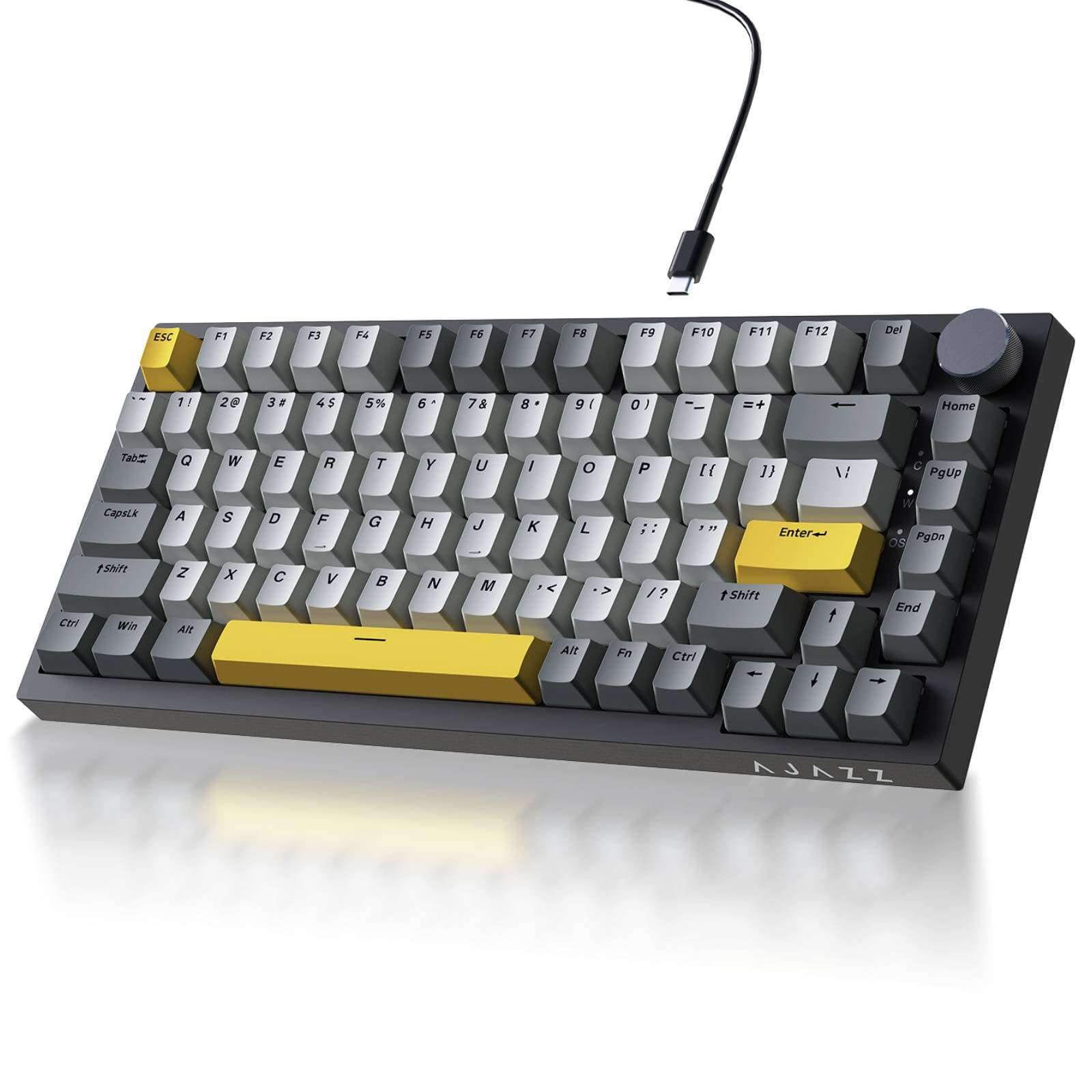
The 75% keyboard with a real metal volume knob and genuinely creamy gasket thock
One owner swapped out a Razer Ornata for this board purely because of how it feels to type on. The 82-key 75% layout keeps the function row and arrow keys while freeing up 30% more desk space for your mouse. The non-slip metal volume knob lets you mute or adjust volume instantly—no more hunting for FN key combos. Sound is the standout: 101 customers note a deep, satisfying “thock” with each keystroke.
The gasket mount structure with Poron sandwich cotton and high-density foam eliminates hollow noise entirely. The pre-lubed sea salt moonlight linear switches (or similar) are smooth, crisp, and quiet right from the start. Buyers describe the sound as “like brown switches but creamier”—familiar, satisfying, and office-friendly.
South-facing LEDs pair with premium double-shot PBT keycaps for 20 default lighting modes, plus full customization and music-rhythm effects via the driver. The flex-cut PCB with single-key slots boost typing stability, and the hot-swap PCB accepts both 3-pin and 5-pin switches for easy DIY. At just 400g, it’s notably light—easy to move around, though some may prefer more heft. Stock keycaps are solid, but upgrading to custom cherry PBT deadens the sound further while improving typing feel.
What Stands Out
- Real metal volume knob for instant audio control
- Gasket mount delivers deep, creamy thock
- 20 RGB modes with south-facing LEDs
- Hot-swap accepts 3-pin and 5-pin switches
Things to Know
- Manual lacks clear RGB switching instructions
- Very light at 400g—may slide on glossy desks
- Windows compatibility only listed
Snag this for: the best blend of creamy sound, useful layout, and a physical volume knob under most budgets.
Look away if: you need a heavier board or mac support from the start.
8. Logitech K835 TKL Wired Mechanical Keyboard
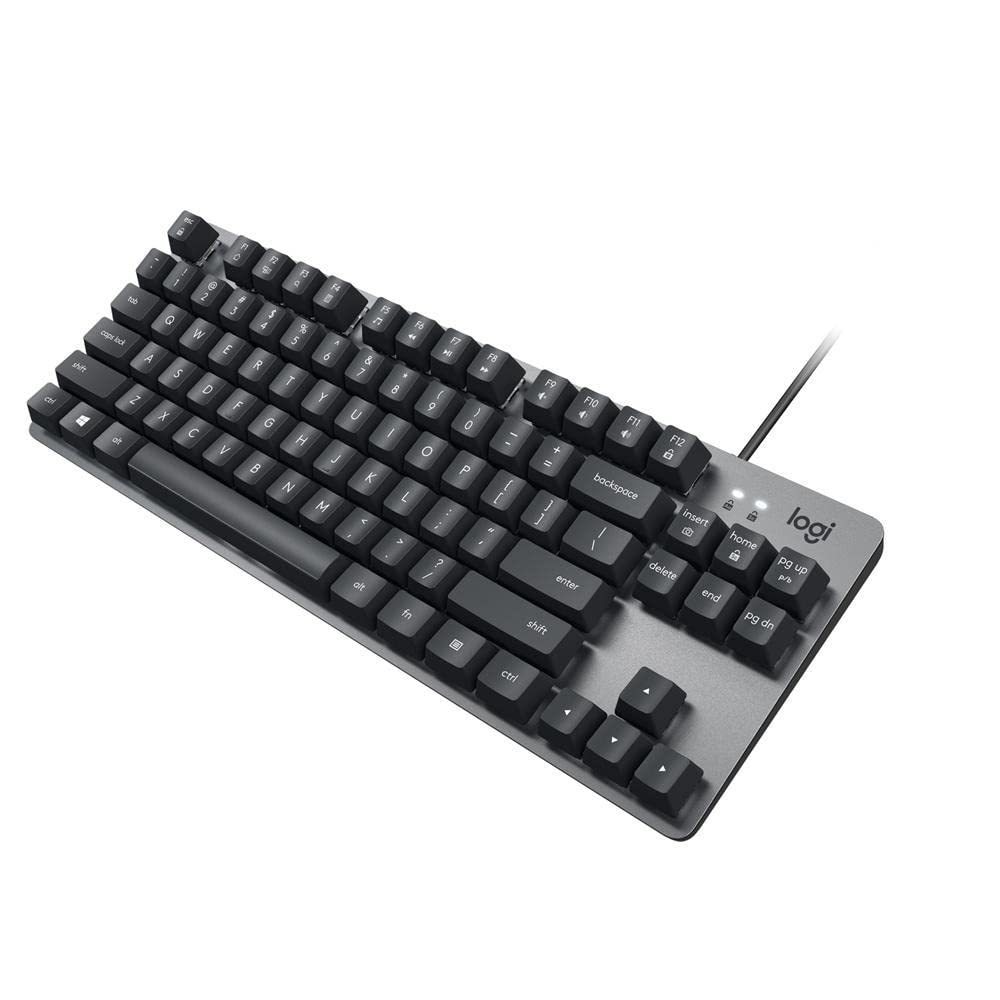
A no-nonsense TKL from a household name, built around linear red switches rated for 50 million clicks
Sometimes you want the safety net of a familiar brand, and this Logitech delivers exactly that without the gaming-tax markup. The aluminum frame gives it a premium weight at 874g that prevents sliding during frantic sessions, while the linear red switches offer a light-touch, smooth keystroke that in-between the loud clicky and mushy membrane worlds. The manufacturer rates these switches for 50 million clicks, making durability the core selling point.
The TKL layout keeps full-size keys but in a narrow config that buyers love for the extra mouse room. It includes 12 dual-function keys for quick media and shortcut access, plus a 5-foot USB cable that works with Windows 10 and above, Windows 8, and Windows 7. Curved keycaps and adjustable tilt brackets create a genuinely comfortable typing angle for long work sessions.
This is more of an office-first board that games well, not a flashy RGB gaming rig. There’s no backlighting here, so if you play in the dark, look elsewhere. Buyers praise the mechanical feel over “membrane squish” and note the rubberized keys stay comfortable. Two years of ownership still finds it working perfectly, per one long-term report—proof of Logitech’s build quality.
Our Take: The reliability pick. If you want a keyboard that just works for years without gimmicks, this is it. US/ANSI layout only, but the build quality makes it worth a switch.
Choose it for: a trustworthy daily driver that transitions from office typing to casual gaming without missing a beat.
Demand more if: you need RGB backlighting or hot-swappable switches for modding.
9. RK ROYAL KLUDGE R98 Pro Wired Mechanical Keyboard

The 98-key creamy beast that keeps your numpad and adds a detachable aluminum volume knob
For anyone who refuses to give up their numpad but still wants a mechanical upgrade, this is the endgame. The 98-key layout keeps the numpad, arrow keys, and most functions while tightening the footprint—perfect for gamers who also crunch spreadsheets. Five layers of sound-absorbing foam deliver the same thocky, creamy sound signature that’s become the budget community’s obsession. Buyers call the typing experience “buttery smooth” with a solid, mechanical feel.
The pre-lubed cream linear switches are the star, offering a unique look and exceptional smoothness right from the start. The MDA-profile PBT keycaps are the enthusiast pick, sculpted to fit fingers better with a stronger sense of wrapping while typing. Both the hot-swap PCB accept 3-pin and 5-pin switches, and it even ships with four spare cream switches plus a keycap puller for immediate customization.
The detachable aluminum CNC knob is a premium touch, and four indicator lights show Num Lock, Caps Lock, Win Lock, and Mac Mode at a glance. With 20+ RGB modes, full key remapping, and macro support via the RK online driver, it’s genuinely feature-complete. The build feels “not budget” at all—solid, heavy, with zero latency. The recurring gripe is the knob placement (too close to PgDn) and a slightly cramped arrow key cluster for some hands.
Verdict: This is the full-layout board that feels premium without the bulk. In one owner’s direct comparison, it beat a Logitech G512 for sound and comfort—quieter during phone calls and smoother to type on. The 96% layout (a compact design with a numpad) plus the volume knob hits the exact balance of function and space.
Buy it for: the full-keyboard experience—numpad, volume knob, arrow keys—with a creamy, quiet sound that’s office-safe.
Look elsewhere if: you want a compact 60% board or prefer loud, clicky switches.
Understanding the Specs
Polling Rate & Latency
Polling rate is how often your keyboard reports its status to your PC, measured in Hz. A standard board runs at 1000Hz (once a millisecond), while these budget hall-effect boards hit 8000Hz—meaning inputs register up to eight times faster. Latency is the total delay between your press and the on-screen action; the AULA WIN68 HE claims just 0.3ms. For competitive shooters, that difference can matter; for casual play, you likely won’t notice.
Switch Types Explained
Clicky blue switches give audible click and a tactile bump per keystroke—satisfying but loud. Linear red switches press straight down with no bump for smooth, quiet speed. Hall-effect magnetic switches use magnets to detect position with no physical contact, so nothing wears down and you can set the exact actuation point. Some, like the Aula WIN60 HE, offer rapid trigger with a 0.02mm step for instant re-press.
FAQ
Is a hot-swappable keyboard worth it on a budget?
What is the difference between clicky and linear switches for gaming?
Are hall-effect magnetic switches actually better than standard mechanical?
What keyboard layout is best, 60%, 75%, or TKL?
Why do some keyboards have a volume knob and do I need one?
What does N-key rollover or anti-ghosting actually mean?
Can I use these keyboards with a Mac or console?
Do I need PBT keycaps or will ABS be fine?
How important is adjustable actuation for casual gamers?
Final Thoughts: The Verdict
Across the board, the budget gaming mechanical keyboard winner is the Redragon K552P because it combines a heavy aluminum frame, satisfying clicky switches, and hot-swappable modding—at a crowd-favorite 4.7 stars with thousands of owners behind it. If you want hall-effect speed for competitive FPS, grab the Aula WIN60 HE. And for a full numpad with creamy, quiet typing, the RK R98 Pro is the one to reach for.
How We Picked
We do not accept paid placement. Every pick is matched to a real buyer and a real use-case; we do not hands-on test units.
Sources & Methodology
Specifications: manufacturer listings and product documentation. Review insights: verified customer reviews, as of September 2026. Pricing: not shown on this page (it changes often); check the current price via the retailer link.
As an Amazon Associate, Gadgets Feed earns from qualifying purchases. This does not affect which products we feature.