
The single biggest mistake builders make on a tight gaming build is pouring too much of the budget into the GPU or CPU, only to realize the motherboard lacks the VRM headroom for a stable boost clock or the PCIe generation to feed a modern graphics card. A budget gaming mobo has to balance socket compatibility, power delivery, and memory speed support without cutting the features that actually matter for frame rates.
I’m Min — the co-founder and writer behind Gadgets Feed. My buying guides are the result of hundreds of hours comparing PCB layouts, VRM phase counts, BIOS update policies, and real-world customer stress tests across every major price tier in the PC component market.
Whether you are building a first rig for competitive shooters or upgrading a prebuilt with a used Ryzen, the best budget gaming mobo is the foundation that determines whether your system posts on the first boot and keeps delivering consistent frame pacing for years.
How To Choose The Best Budget Gaming Mobo
The term “budget” should not mean “obsolete at install.” A well-chosen gaming motherboard at the entry level of the market still needs to deliver stable power to the CPU, support memory speeds the processor can actually use, and offer enough PCIe lanes for a discrete GPU and a fast NVMe drive without forcing workarounds. Understanding a few key specs helps you avoid the trap of saving a few dollars today only to replace the board within a year.
Socket Generation and CPU Compatibility
The socket defines your upgrade ceiling. AM4 boards like the MSI A520M-A Pro offer the widest pool of cheap used CPUs, including Ryzen 5000 series chips that still trade blows with modern processors in gaming. AM5 boards such as the GIGABYTE B650 Eagle AX cost more upfront, but they unlock DDR5 memory and a path to future Ryzen 9000 series upgrades without replacing the motherboard. For Intel builders, LGA 1700 boards cover 12th through 14th Gen Core processors, which gives the B760M-AYW WiFi a solid lifespan even though the socket will change for the next generation.
VRM Quality and Power Delivery
Voltage regulator modules (VRMs) convert the PSU power into clean voltage the CPU can use. A board with a 6-phase design and a proper heatsink, like the ASRock B550M-HDV, can handle a mid-range Ryzen 5 or Core i5 without thermal throttling. Boards with only 4 phases and no VRM heatsink will cause the CPU to downclock under sustained gaming loads. Look for Dr.MOS or 50A chokes in the spec sheet, and always check whether the chassis has adequate airflow over the VRM area.
Memory Support: DDR4 vs DDR5 and Overclocking Headroom
DDR4 is still the more affordable option for budget builds, and a board like the MSI A520M-A Pro that can push DDR4-4600 OC gives you headroom to tighten timings for better 1% lows in games. DDR5, found on the ASRock B760M Pro RS and MSI B760 Gaming Plus WiFi, offers higher bandwidth that benefits CPU-bound titles at 1080p, but the price premium on the modules often offsets the savings on a budget board. Check the QVL list for the board to confirm your kit runs at its rated speed without stability issues.
Quick Comparison
On smaller screens, swipe sideways to see the full table.
| Model | Category | Best For | Key Spec | Amazon |
|---|---|---|---|---|
| MSI B760 Gaming Plus WiFi | Premium | Feature-rich Intel DDR5 build | DDR5-6800+ OC, Wi-Fi 6E | Amazon |
| GIGABYTE B650 Eagle AX | Premium | Future-proof AM5 platform | 12+2+2 Phase VRM, PCIe 5.0 M.2 | Amazon |
| ASRock B760M Pro RS | Premium | DDR5 with PCIe 5.0 GPU slot | DDR5-7200 OC, PCIe 5.0 x16 | Amazon |
| ASUS B760M-AYW WiFi D4 II | Mid-Range | DDR4 Intel 14th Gen build | Intel B760, DDR4-8000 OC, Wi-Fi 6 | Amazon |
| ASUS Prime B550M-A WiFi II | Mid-Range | AM4 with integrated Wi-Fi 6 | B550 chipset, Wi-Fi 6, 4 RAM slots | Amazon |
| ASRock B550M-HDV | Entry-Level | Budget AM4 with PCIe 4.0 | B550 chipset, PCIe 4.0, DDR4-4733 OC | Amazon |
| MSI A520M-A PRO | Entry-Level | Ultra-low-cost AM4 foundation | AMD A520, PCIe 3.0, 2 DIMM slots | Amazon |
In‑Depth Reviews
1. MSI B760 Gaming Plus WiFi

The MSI B760 Gaming Plus WiFi is the full-ATZ board that proves budget does not mean feature-starved. It supports LGA 1700 socket CPUs from 12th to 14th Gen Intel and pushes DDR5 memory up to 6800 MHz in overclocked mode, which directly translates to higher minimum frame rates in CPU-bound scenarios like 1080p competitive shooters. The extended heatsink with 7W/mK MOSFET pads keeps the VRM area cool even when an i5-14600K is pinned at full load for hours.
Networking is future-proofed with Wi-Fi 6E and Bluetooth 5.3, plus a 2.5Gbps Ethernet port that eliminates LAN bottlenecks during large game downloads. The four DDR5 DIMM slots support up to 128 GB of RAM, and the board includes two M.2 slots with Lightning Gen 4 x4 connectivity for NVMe SSDs. Real-world user reports confirm it handles an RTX 4070 FE and an Elgato capture card without any lane-sharing drama.
BIOS navigation is clean and intuitive for MSI veterans, though beginners may find the connector layout a bit tight at the bottom edge. The board does not support CPU overclocking on B760, so enthusiasts who want to push a K-series chip will need a Z790. Still, for a DDR5 Intel build that prioritizes reliability and connectivity, this is the strongest option in the list.
Why it’s great
- DDR5-6800+ OC support delivers tangible FPS gains over DDR4 in CPU-bound titles
- Wi-Fi 6E + 2.5Gb Ethernet covers both wireless and wired scenarios without a dongle
- Extended VRM heatsink prevents thermal throttling during extended gaming sessions
Good to know
- No CPU overclocking support — locked to B760 chipset limitations
- Bottom connectors are cramped and hard to reach in tight cases
2. GIGABYTE B650 Eagle AX

The GIGABYTE B650 Eagle AX is the entry point into the AM5 ecosystem that does not compromise on power delivery. Its 12+2+2 phase digital VRM provides clean voltage to Ryzen 7000/8000/9000 series processors, making it more than capable of handling a Ryzen 5 7600X or even a Ryzen 7 7800X3D without VRM sag. The board features a PCIe 5.0 M.2 slot with a thermal guard, ensuring that the fastest NVMe drives do not throttle under sustained writes.
Memory support spans both AMD EXPO and Intel XMP profiles, so you can use the same DDR5 kit you might have purchased for an Intel build. The triple M.2 configuration — one PCIe 5.0 and two PCIe 4.0 — offers excellent storage expansion for a board in this price tier. Users consistently report that the Q-Flash Plus feature saves a bricked BIOS easily by using a FAT32 USB drive with a renamed file.
While the manual can be sparse and the board runs slightly hot under heavy load without good case airflow, the sheer value of an AM5 board with Wi-Fi 6E, USB 3.2 Gen2x2 Type-C, and a robust VRM layout makes it the best choice for anyone building a new Ryzen system on a budget. The 1755-gram weight reflects the substantial heatsink mass that keeps thermals in check.
Why it’s great
- 12+2+2 phase digital VRM handles Ryzen 7 and Ryzen 9 chips without stability issues
- PCIe 5.0 M.2 slot with thermal guard for next-gen storage performance
- Q-Flash Plus allows BIOS recovery without a CPU installed
Good to know
- VRM area runs warm and requires decent case airflow
- Manual lacks detailed setup guidance for first-time builders
3. ASRock B760M Pro RS

The ASRock B760M Pro RS brings PCIe 5.0 x16 to the budget segment without the premium attachment of a Z790 chipset. The full PCIe 5.0 lane to the primary GPU slot means current and next-generation graphics cards like the RTX 5070 or future AMD RDNA 4 cards can run at full bandwidth without bottleneck. It supports DDR5-7200 in overclocked mode across four DIMM slots, handling up to 192 GB of RAM for builders who also do content creation.
Power delivery uses a 7+1+1 phase Dr.MOS design that pairs well with a Core i5-14600K or even an i7-12700K, as confirmed by multiple reviewers who ran stress tests without crashes. The board includes one M.2 Key E slot for an optional Wi-Fi module, though you will need to supply your own card and antenna. The included RGB cutout on the PCB adds a subtle aesthetic touch that surprises many first-time owners.
Some caveats exist: the Realtek audio chip produces an audible crackle at system startup on Windows 11, and the rear I/O is limited to two USB 3.0 ports plus one USB-C, so a hub may be necessary for setups with many peripherals. However, for a microATX board that fits in compact cases while delivering PCIe 5.0 and high-speed DDR5, the Pro RS is a remarkable value.
Why it’s great
- PCIe 5.0 x16 slot provides full bandwidth for current and future GPUs
- DDR5-7200 OC support with four DIMM slots and 192 GB capacity ceiling
- 7+1+1 phase Dr.MOS delivers stable power to i5 and i7 class CPUs
Good to know
- Realtek audio driver produces a startup crackle on Windows 11
- Rear I/O lacks enough USB 3.0 ports for multi-peripheral setups
4. ASUS B760M-AYW WiFi D4 II
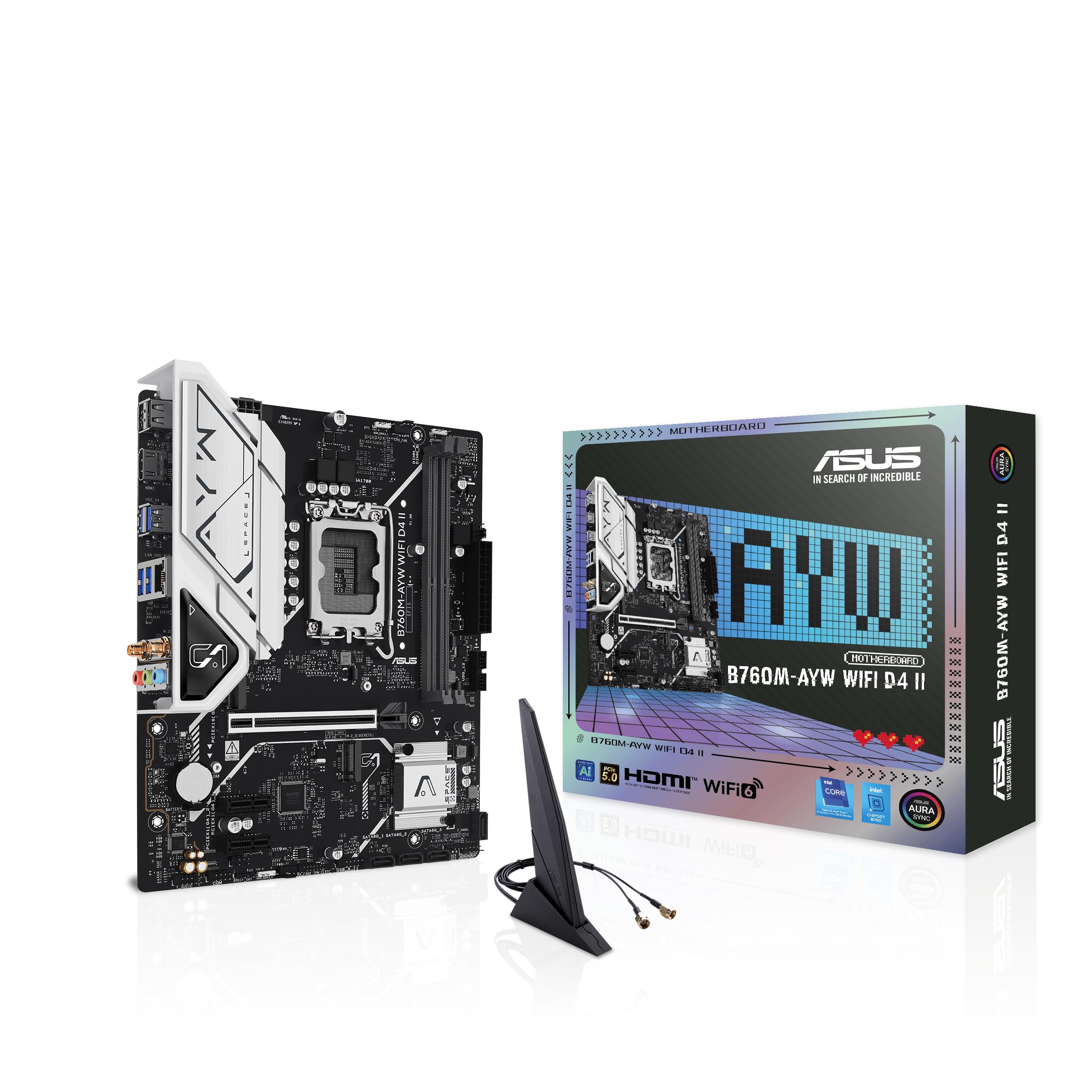
The ASUS B760M-AYW WiFi D4 II is built for the builder who already owns or wants to reuse a cheap DDR4 kit without sacrificing modern platform features. It supports LGA 1700 CPUs from 12th to 14th Gen Intel and can overclock memory up to 8000 MHz in DDR4 territory — a spec that sounds outrageous for budget DDR4 but allows very tight timing tuning for latency-sensitive games. The microATX form factor fits neatly into compact cases while still packing a PCIe 5.0 x16 slot and two M.2 slots.
Wi-Fi 6 and Realtek 2.5Gb Ethernet are included out of the box, which eliminates the need for a separate network card. The bundled antenna actually improves signal strength over standard motherboard antennas, as multiple verified buyers noted. The Fan Xpert 2+ utility gives granular control over the hybrid fan headers, keeping the system quiet during light loads and ramping up only when the CPU temp crosses the threshold.
The board lacks a USB-C front-panel header, so modern cases with USB-C ports will need an adapter or a PCIe card. A few users reported that the graphics card’s rear I/O shield can slightly obstruct access to the PCIe latch on the primary slot. Still, for a reliable, low-hassle DDR4 Intel build, this board offers unbeatable compatibility with older RAM sticks and newer CPUs alike.
Why it’s great
- DDR4-8000 OC capability allows extremely tight memory timings for competitive gaming
- Wi-Fi 6 and 2.5Gb Ethernet included, with an antenna that boosts signal quality
- microATX size fits most compact cases without sacrificing PCIe 5.0 slot
Good to know
- No USB-C front-panel header for modern case connectivity
- Primary PCIe latch can be hard to reach with a thick GPU installed
5. ASUS Prime B550M-A WiFi II

The ASUS Prime B550M-A WiFi II bridges the gap between the ultra-cheap A520 boards and the premium X570 options by offering PCIe 4.0 support with an integrated Wi-Fi 6 module and four DDR4 DIMM slots that support up to 128 GB of RAM at speeds up to 4866 MHz OC. This board is an excellent match for a Ryzen 5 5600X or a Ryzen 7 5700X, providing enough PCIe lanes for a modern GPU and a fast NVMe drive without lane sharing between the primary M.2 slot and the secondary SATA ports.
ASUS includes 5X Protection III in the form of LANGuard, DRAM overcurrent protection, and overvoltage protection, which matters for budget builds that may use a lower-quality power supply. The VRM heatsink and PCH heatsink keep temperatures reasonable even in cases with limited airflow. The BIOS interface is user-friendly and includes an easy XMP toggle for memory overclocking, which is a small but meaningful quality-of-life improvement for first-time builders.
Some users reported that the software bundle includes a driver updater that tries to launch under every profile and requires admin credentials — it is best to uninstall that utility after the initial driver installation. The board also lacks a USB-C header and has only one USB 3.0 bus, which can limit front-panel connectivity. Overall, the Prime B550M-A WiFi II is the most complete microATX AM4 board for someone who wants integrated Wi-Fi and doesn’t plan to upgrade to AM5 soon.
Why it’s great
- Four DIMM slots support up to 128 GB DDR4 with 4866 MHz OC overclock capability
- Integrated Wi-Fi 6 eliminates the need for a separate wireless adapter
- 5X Protection III provides surge protection for budget PSUs
Good to know
- ASUS driver updater tool is intrusive and should be removed after initial setup
- Only one USB 3.0 internal header — limits front-panel USB 3.0 ports
6. ASRock B550M-HDV

The ASRock B550M-HDV is the most affordable way to get PCIe 4.0 support on the AM4 platform. While the A520 chipset is locked to PCIe 3.0, the B550 chipset on this board provides PCIe 4.0 x16 to the primary GPU slot and PCIe 4.0 x4 to the Hyper M.2 slot, which means a modern graphics card like the RTX 3060 or RX 7600 can operate at full bandwidth. The board supports DDR4-4733+ in overclocked mode and includes legacy display outputs (HDMI 4K 60Hz, DVI-D, and D-Sub) for office use or home theater PCs.
The 6 Power Phase design with premium 50A chokes provides stable power delivery for Ryzen 3000 through 5000 series processors, and users have verified its reliability with a Ryzen 5 5600X and an RTX 3060 playing Overwatch 2, Marvel Rivals, and Cyberpunk 2077. The microATX form factor makes it a great fit for compact cases, and the full spike protection on USB, audio, and LAN ports adds peace of mind for budget builds that may use older power supplies.
The main trade-off is the two DIMM slot limitation — you are capped at 64 GB of RAM, and upgrading later requires replacing the existing sticks rather than adding new ones. Additionally, the board does not include Wi-Fi, so a USB adapter or PCIe card is required for wireless connectivity. For builders who prioritize PCIe 4.0 for their GPU and NVMe drive over memory expandability, this is the most cost-effective option.
Why it’s great
- PCIe 4.0 x16 and M.2 support at the lowest B550 price point
- 6 phase power with 50A chokes handles Ryzen 5 and Ryzen 7 class CPUs reliably
- Legacy display outputs make it versatile for HTPC or office builds
Good to know
- Only two DIMM slots — RAM upgrades require removing existing sticks
- No integrated Wi-Fi — requires a USB or PCIe wireless adapter
7. MSI A520M-A PRO
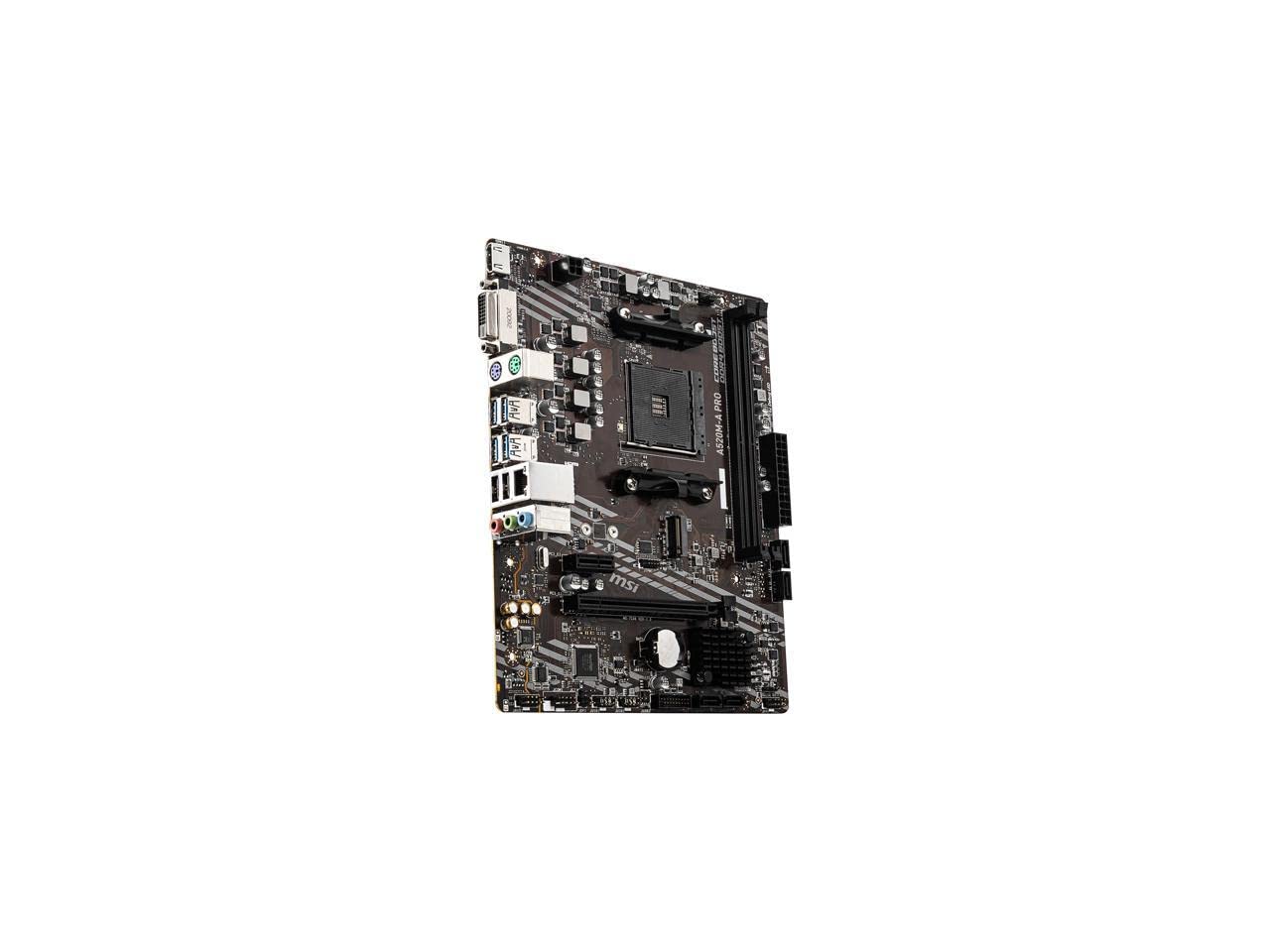
The MSI A520M-A PRO is the floor-level entry point for building a functional gaming rig on the AM4 platform. It supports Ryzen 5000 series processors out of the box, and its DDR4-4600 OC capability gives it enough memory bandwidth to keep a Ryzen 5 5600 fed in CPU-bound titles. The board uses a PCIe 3.0 interface for both the GPU slot and the Turbo M.2 slot, which is a limitation, but the real-world performance gap between PCIe 3.0 and 4.0 is negligible at this price tier with most current GPUs.
MSI’s Audio Boost delivers studio-grade sound quality through the Realtek codec, and the Dragon Center software provides a user-friendly interface for system monitoring and fan control. Verified buyers have successfully paired this board with a Ryzen 5 5500, an RTX 2060 Super, and 32 GB of DDR4-3200 memory for a smooth 1080p gaming experience in Overwatch 2 and Call of Duty. The board is exceptionally lightweight at 0.4 kg, which makes it easy to work with in compact cases.
The limitations are clear: only two DIMM slots, no Wi-Fi, no PCIe 4.0, and a single fan header that requires a splitter for case fans. The A520 chipset also lacks CPU overclocking support. However, for the absolute lowest cost of entry into the AM4 ecosystem, the MSI A520M-A PRO is a rock-solid foundation that just works straight out of the box.
Why it’s great
- Rock-bottom price for a fully functional AM4 platform with Ryzen 5000 support
- DDR4-4600 OC headroom provides tangible FPS gains for 1080p gaming
- Lightweight microATX design fits easily into compact and budget cases
Good to know
- Only one fan header — a splitter is required for multi-fan setups
- No PCIe 4.0 support, which limits bandwidth with high-end GPUs and NVMe drives
FAQ
Can I use a Ryzen 7 5800X3D on a budget A520 motherboard?
Does a budget gaming motherboard support 1440p or 4K gaming?
Will a budget B760 board work with a Core i7-14700K?
Do I need to update the BIOS on a budget gaming motherboard before installing a Ryzen 5000 CPU?
Final Thoughts: The Verdict
For most users, the best budget gaming mobo winner is the MSI B760 Gaming Plus WiFi because it combines DDR5 support, Wi-Fi 6E, and a robust VRM heatsink at a price that does not force compromises on connectivity or memory speed. If you want an AM5 platform with future upgrade potential, grab the GIGABYTE B650 Eagle AX for its 12+2+2 phase VRM and PCIe 5.0 M.2 slot. And for the absolute lowest cost of entry into a fully functional AM4 gaming build, nothing beats the MSI A520M-A PRO.