
Our readers keep the lights on and my morning glass full of iced black tea. As an Amazon Associate, I earn from qualifying purchases.
Specs are compiled from manufacturer listings and verified buyer reviews and can change over time — please confirm the key details on the product page before buying.
Getting into PC-powered VR without spending a fortune feels like a contradiction — but it’s not. The secret is knowing exactly which graphics cards deliver the minimum specs for a smooth headset experience without the premium price tag. This guide focuses solely on affordable options that still meet VR-ready requirements, so you can jump into virtual worlds without emptying your wallet.
I’m Min — the founder and writer behind Gadgets Feed. This guide is built by comparing the manufacturers’ published specifications and the patterns across verified customer reviews, so you get each pick’s real strengths and trade-offs instead of marketing spin.
Here, you’ll find the best cards that let you explore virtual reality without stretching your budget. We have sorted through the specs to help you find the right budget gpu for vr that balances cost with compatibility.
Our Picks at a Glance

How To Choose The Best Budget GPU For VR
Picking a budget VR card means looking past the marketing and focusing on the minimum requirements for your headset. Here are the specs that separate a smooth virtual experience from a stuttery mess.
VRAM: The 8GB Threshold
VR renders two images at once — one for each eye — which eats up video memory fast. A card with 6GB of VRAM can run older VR titles, but you will likely hit a wall with modern games. Most budget VR-savvy builds aim for 8GB of VRAM to handle the higher texture loads of current virtual reality software.
Display Outputs: Not All Ports Are Equal
Your VR headset connects through a DisplayPort or HDMI port. For the best compatibility, look for a card that has at least one DisplayPort 1.4 or HDMI 2.0 port. Many budget cards have these, but double-checking the spec list before you buy saves you from needing an adapter later.
Performance Per Dollar
The best budget VR cards hit a balance where they meet the minimum requirements without paying for high-end ray tracing or 4K gaming features you might not use. Cards like the RTX 5060 or RX 7600 offer strong 1080p and 1440p performance that translate well into VR headroom.
Quick Comparison
| Model | Best For | VRAM | Boost Clock | Memory Interface | Amazon |
|---|---|---|---|---|---|
| ZOTAC GTX 1660 Super★ Best Overall | Entry VR | 6GB GDDR6 | 1785 MHz | 192-bit | Amazon |
| ASRock RX 7600 ChallengerAlso Great | Best Overall VR | 8GB GDDR6 | 2695 MHz | 128-bit | Amazon |
| PNY RTX 5060 OCDLSS 4 Pick | DLSS 4 on a Budget | 8GB GDDR7 | 2535 MHz | 128-bit | Amazon |
| GIGABYTE RTX 5060 WINDFORCE | Quiet Cooling | 8GB GDDR7 | 2512 MHz | 128-bit | Amazon |
| GIGABYTE RTX 5060 Gaming OC | 3-Fan VR Cooling | 8GB GDDR7 | — | 128-bit | Amazon |
| ASUS Dual RTX 5060 OC | Compact SFF-Ready | 8GB GDDR7 | 2565 MHz | — | Amazon |
| XFX Speedster SWFT210 RX 7600 | PC/Video Production | 8GB GDDR6 | 2655 MHz | — | Amazon |
| MSI GTX 1660 Super Ventus XS | 2-Fan 1080p | 6GB GDDR6 | 1815 MHz | 192-bit | Amazon |
| ASUS RTX 2060 EVO | Ray Tracing Starter | 6GB GDDR6 | 1785 MHz | — | Amazon |
In‑Depth Reviews
1. ZOTAC Gaming GeForce GTX 1660 Super 6GB
The smallest VR-compatible card you can buy — fits where almost nothing else will.
Size is the defining story here. At just 6.83 inches long, the ZOTAC GTX 1660 Super is a super-compact card that fits into “99% of systems,” as ZOTAC claims — including older pre-built desktops with tight internal layouts. If you are trying to turn a small office PC into a VR machine, this card is likely the only one that will physically fit inside. It features 6GB of GDDR6 memory on a 192-bit bus, and the boost clock reaches 1785 MHz.
Despite its small size, it packs the outputs you need for VR: 3x DisplayPort 1.4 and 1x HDMI 2.0b. The card is based on the NVIDIA Turing architecture and is marked as 4K/HDR/VR ready. One young buyer upgrading from an old MSI GTX 960 noted the jump “was amazing the product worked great and continues to work great in my pc.” The card also supports resolutions up to 7680×4320, so it handles high-resolution desktops without issues.
The limitation is the same as its MSI sibling — 6GB of VRAM is the floor for VR, not the ceiling. Modern VR titles that lean heavily on texture detail will force you to lower settings. But for the price and the form factor, it is tough to top if you are in a space crunch.
Space-Saving Hero
- At 6.83 inches, it is easily the smallest VR-ready card on this list
- 192-bit memory bus provides good bandwidth for its class
- Proven reliability with thousands of positive reviews (4.7/5 from 1907 ratings)
VRAM Limited
- 6GB of VRAM will struggle with newer, high-fidelity VR experiences
- No ray tracing or DLSS support — you are reliant on raw rasterization performance
Perfect for: a very specific use case — upgrading a slim pre-built desktop to run VR. If case size is your biggest constraint, this ZOTAC card is the answer.
Not for: anyone building a fresh new VR rig where you have room for a larger, more powerful card. The RX 7600 or any RTX 5060 is a significant step up in VR performance.
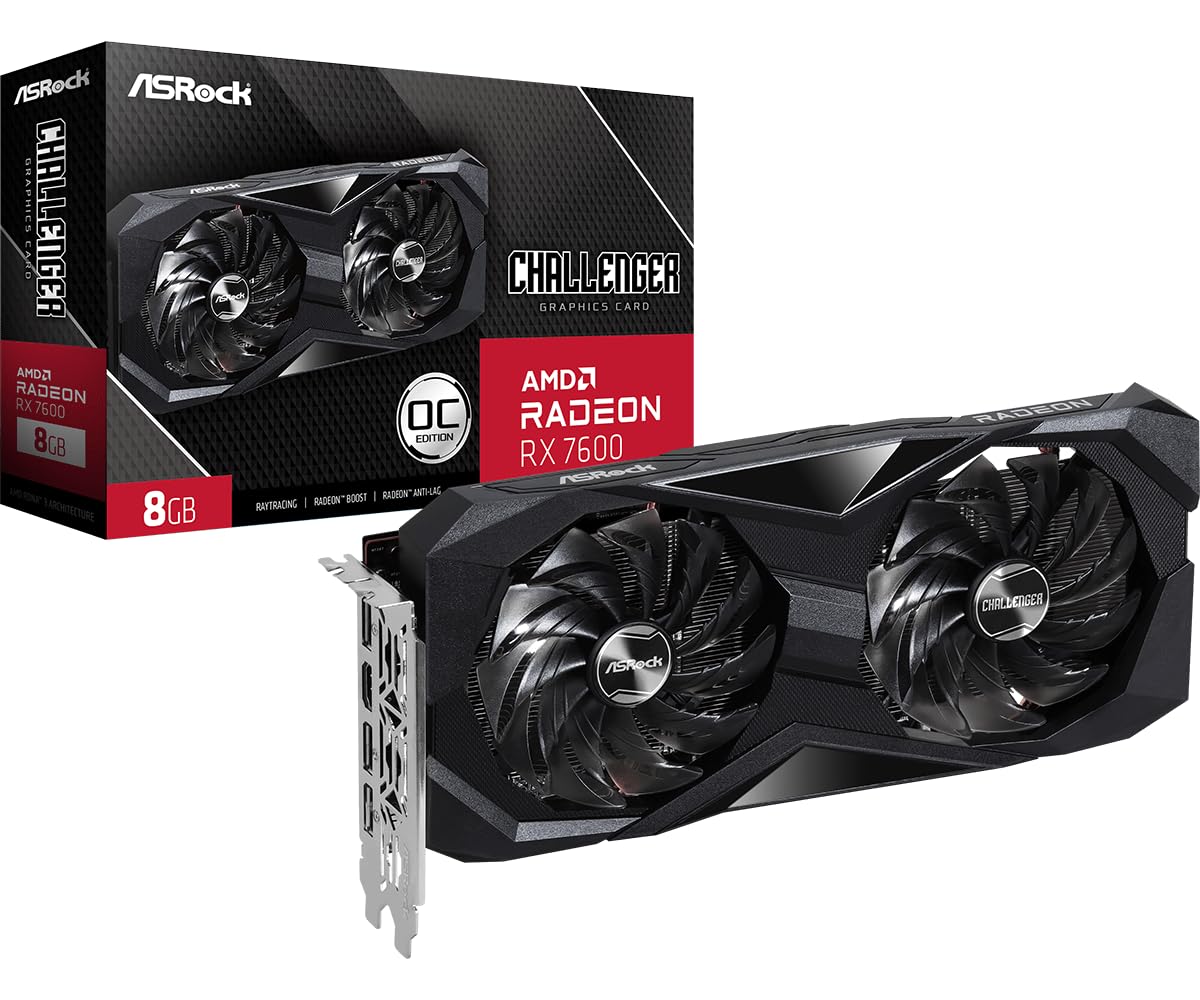
2. ASRock Radeon RX 7600 Challenger 8GB OC
The 8GB VRAM champ for VR that won’t ask you to compromise on texture quality.
For virtual reality, the most common bottleneck on a tight budget is running out of video memory. With 8GB of GDDR6 memory on a 128-bit bus, this card holds a noticeable edge over older 6GB cards — 33% more VRAM than the ZOTAC GTX 1660 Super’s 6GB — which means you can load higher-resolution textures without the stutter that kills immersion in VR.
The card is built on AMD’s RDNA 3 architecture, featuring 32 compute units and 2048 stream processors. The boost clock reaches up to 2695 MHz, which is a 51% increase over the 1785 MHz boost of the ZOTAC GTX 1660 Super, translating to much smoother frame pacing in demanding VR titles. Reviewers report that it “resolved VRAM bottleneck for Star Wars Survivor & NBA 2K26; enabled 1440p gaming,” proof of its capability beyond standard monitors.
One practical consideration: the card is a 2-slot design measuring 269.2 x 131.8 x 40.3 mm, requiring a single 8-pin power connector. ASRock recommends a 550W power supply. The dual-fan cooling includes a 0dB Silent mode, meaning the fans stop spinning under low load, so your VR rig stays quiet when you are just browsing the desktop.
VR-Ready balance: If you want a modern card that comfortably handles current VR titles without the bloat of high-end ray tracing, this is the balanced pick. The 8GB VRAM pool is the single biggest advantage over cheaper 6GB cards in VR.
Watch Your Case Space: At 269mm long, it is not the smallest card — buyers should measure their case clearance first. The 128-bit memory bus is also narrower than some older cards, but the fast 18 Gbps memory speed compensates in most real-world VR scenarios.
Reach for this if: you are building a new budget VR rig and want the best VRAM-to-dollar ratio. It is the pick that future-proofs you against texture-heavy VR titles better than 6GB cards.
Look elsewhere if: you need to reuse an older power supply under 550W or your case cannot fit a 269mm card.
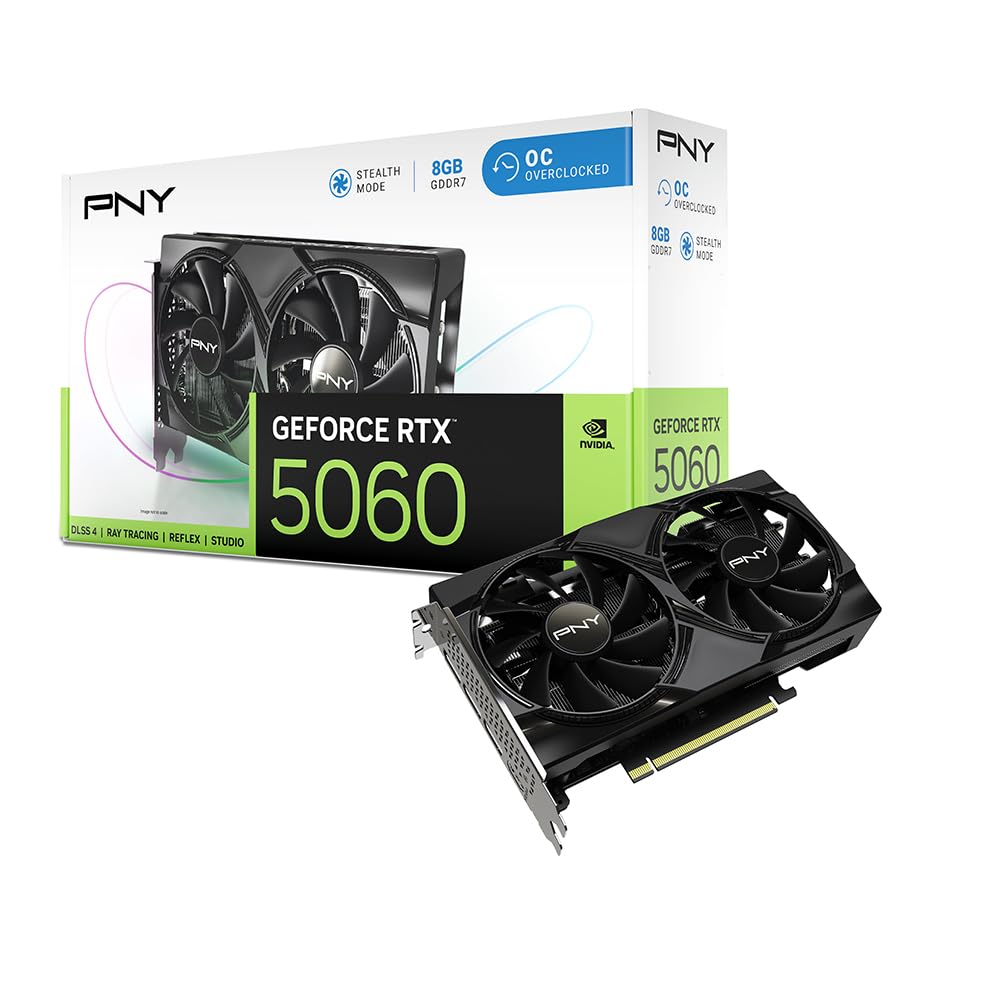
3. PNY NVIDIA GeForce RTX 5060 OC Dual Fan
The entry ticket to AI-boosted VR without the flagship price tag.
If you want the latest NVIDIA architecture with DLSS 4 (a suite of AI-powered neural rendering technologies that boost frame rates and improve image quality), this is the most affordable route. Built on the NVIDIA Blackwell architecture, the PNY RTX 5060 OC features fifth-gen Tensor Cores and fourth-gen Ray Tracing Cores, plus an 8GB GDDR7 memory buffer running on a 128-bit interface.
In VR, DLSS 4 can be a standout. It uses AI to render at a lower resolution and then upscale the image intelligently, which frees up the GPU to push higher frame rates — critical for avoiding motion sickness in VR. The card’s boost clock hits 2535 MHz, and buyers report it delivers “100+ fps on almost every game on high settings.” One buyer enthusiastically confirmed it’s “god tier on all accounts buy it if you want a cheap card thats reliable.”
The dual-fan design is SFF-Ready, meaning it fits into small form factor cases that are popular for compact VR stations. It supports DisplayPort 2.1 and HDMI 2.1, ensuring compatibility with modern VR headsets that require high-bandwidth connections. Power consumption is efficient, and installation is straightforward — one reviewer noted “compatible with my AMD 5 9600X, the performance was there and the installation is too easy.”
AI Power on a Budget
- DLSS 4 brings AI upscaling to VR, smoothing out demanding titles
- GDDR7 memory is faster than the GDDR6 found on many similarly-priced cards
- SFF-Ready design fits in compact cases without sacrificing cooling
The 8GB Ceiling
- 8GB of VRAM may still feel tight for future VR titles that recommend 12GB
- DLSS 4 is not supported in every old VR game, so mileage varies by title
Go for it if: you want the newest NVIDIA features (DLSS 4, GDDR7) on a budget — the AI boost genuinely helps VR frame rates. This card punches above its price in VR specifically because of that upscaling tech.
skip it if: you prefer to avoid any upscaling artifacts in VR and want purely native rendering performance.
4. GIGABYTE GeForce RTX 5060 WINDFORCE OC 8G

Keeps your VR sessions cool and quiet so the only noise you hear is the game.
The GIGABYTE WINDFORCE cooling system is the standout feature here. It uses dual fans with a unique blade design to move air more efficiently than standard fans, which is a real benefit for VR users who play for extended periods. Nobody wants a GPU fan ramping up mid-game and breaking the atmosphere of a VR world. The card is powered by the NVIDIA Blackwell architecture and DLSS 4, just like the PNY model above, and includes 8GB of GDDR7 memory on a 128-bit interface.
In terms of raw specs, the boost clock sits at 2512 MHz. Reviewers praise the cooling, noting that “excellent gaming and creative performance; dual-fan design runs cool and quiet.” One buyer mentioned getting “over 250 FPS in many games; handles Cyberpunk and DOOM well” paired with a Ryzen 5700 and a 750W power supply. The card measures 7.83 inches in length, making it a relatively compact fit for mid-tower cases.
For VR specifically, the combination of GDDR7 memory and the Blackwell architecture ensures that modern headset resolutions are handled with authority. The card has a PCIe 5.0 interface, though it will work fine in older motherboards with PCIe 4.0 slots. GIGABYTE also includes a dual BIOS feature on some models, adding a safety net if a firmware update goes wrong.
Quiet Operator: If noise bothers you during VR sessions — and it bothers most people — this GIGABYTE model is among the quietest in its class. The WINDFORCE system really does keep temps in check without a loud whoosh.
Slightly Lower Clock: At 2512 MHz boost, it is a hair slower than the PNY 5060’s 2535 MHz. In practice, you will not feel the difference in VR, but the spec sheet does favor the PNY by a tiny margin.
Choose this for: quiet VR gaming where fan noise ruins immersion. The cooling system is genuinely more effective than basic dual-fan designs.
Pick the PNY instead if: you want the highest boost clock among the 5060 cards and are less sensitive to fan noise.
5. GIGABYTE GeForce RTX 5060 Gaming OC 8G
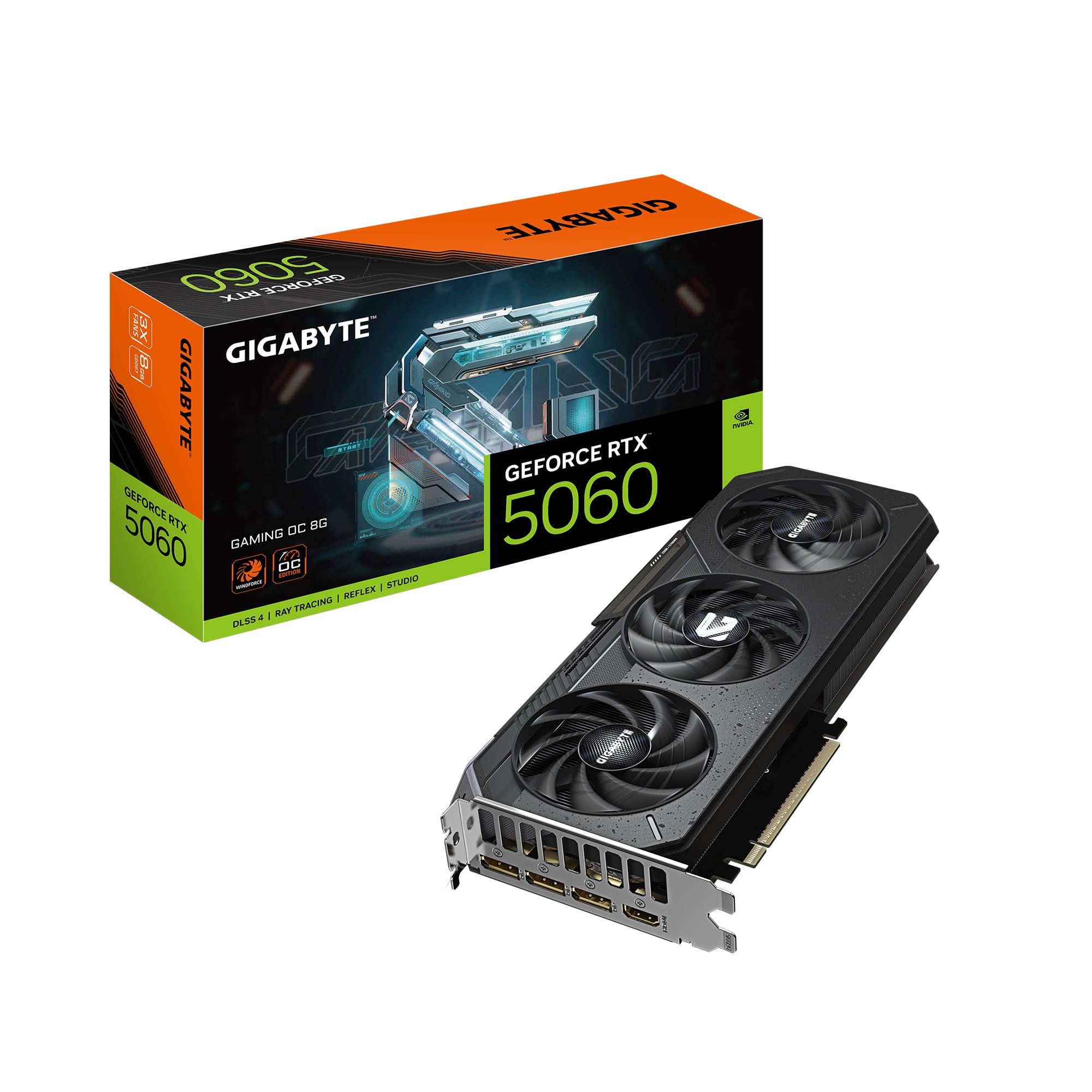
Packs three fans on a 5060 to keep VR temps frosty during marathon sessions.
This is the step-up version of the previous GIGABYTE card, featuring a triple-fan WINDFORCE cooling system instead of the dual-fan setup. The extra fan and larger heatsink mean it can maintain higher boost clocks for longer without thermal throttling — a genuine advantage during long VR sessions where the GPU is under sustained load. It also uses the same NVIDIA Blackwell architecture and DLSS 4, but adds a Gaming OC label that suggests a better binning of the chip for improved overclocking headroom.
Reviewers have been impressed, with one noting it is “30% faster than RTX 2070” and “good for casual 1080p gamers.” Another buyer stated it works perfectly and “plays the games I wanted it to!” The card measures 11.06 inches in length, which is significantly longer than the 7.83-inch WINDFORCE OC model. This is important to check against your case before buying.
The 8GB of GDDR7 memory is the same as the other RTX 5060 cards, but the superior cooling on this Gaming OC model can sustain higher performance in thermally challenged scenarios. The PCIe 5.0 interface, DisplayPort, and HDMI 2.1 outputs ensure it will work with any modern VR headset without adapter headaches.
Cooler Under Pressure
- Three fans keep the GPU cooler than dual-fan models, crucial for VR marathons
- Potentially better silicon quality for overclocking (Gaming OC binning)
- DLSS 4 support for AI-boosted VR performance
Bigger Footprint
- At 11.06 inches, it is one of the longest 5060 cards — will not fit in small cases
- The extra cost over the WINDFORCE OC model may not justify the thermal difference for most VR setups
Best for: VR users with roomy cases who prioritize thermal headroom and want the assurance of extra cooling for long, intense sessions.
Turn to the: GIGABYTE WINDFORCE OC (the dual-fan model) if your case cannot accommodate over 11 inches or you want to save a bit.
6. ASUS Dual NVIDIA GeForce RTX 5060 8GB GDDR7 OC Edition

A factory-overclocked 5060 that fits neatly into small VR rigs without sacrificing speed.
The ASUS Dual RTX 5060 OC Edition stands out for its factory overclock: it reaches 2565 MHz in OC mode (2535 MHz in default mode) — the highest boost clock among the 5060 cards on this list. This small extra speed can translate to a few more frames in VR, where every hertz matters for maintaining that 90 fps target. It is SFF-Ready (small form factor), measuring just 9 inches long, so it slides into compact cases that are common in space-constrained VR setups.
The cooling system uses ASUS’s Axial-tech fan design, which features a smaller fan hub that allows for longer blades and a barrier ring that increases downward air pressure. This design moves more air over the heatsink while keeping noise levels low. The card boasts 623 AI TOPS (trillion operations per second) of AI performance, which powers DLSS 4 in supported VR titles. Reviewers have noted it is “strong 1080p/1440p perf, ~2080 Ti/3070 raster” and highlighted that “GDDR7/PCIe 5.0 boost bandwidth vs 4060.”
One buyer on an 8-year-old computer reported “everything works fine. Compatibility on his 8 year old computer is excellent.” The card also features a 2.5-slot design, which is slightly thicker than a standard 2-slot card, so double-check the slot spacing in your case. It comes with a 3-year warranty from ASUS.
Pocket Rocket: For a small case, this ASUS card delivers the highest boost clock of any 5060 here. If you are building a compact VR station, this is likely your best bet.
Thick Profile: At 2.5 slots, it may block adjacent PCIe slots or brush against a large CPU cooler. Measure your motherboard’s slot spacing before buying.
Ideal for: SFF VR builds where space is tight but performance cannot be compromised. The factory OC gives you a small but real speed advantage in VR.
Avoid if: your motherboard has closely spaced PCIe slots — the 2.5-slot design could cause clearance issues.
7. XFX Speedster SWFT210 Radeon RX 7600 8GB

A straightforward RDNA 3 card with 8GB of VRAM that gets you into VR without overpaying.
The XFX Speedster SWFT210 is another RX 7600 option, similar to the ASRock Challenger but with its own cooling solution and a boost clock of up to 2655 MHz. It comes with 8GB of GDDR6 memory on a 128-bit bus, which is the same VRAM capacity that makes it suitable for VR. For a card in its tier, the 8GB buffer is a big help — as noted in the comparison facts, it holds 33% more VRAM than the 6GB found on older GTX 1660 Super cards.
Reviewers have mixed but generally positive experiences. One owner reported “Good price, fast, but initially crashed with high temps (80s).” After adding case fans and updating drivers, they reported “max temp upper 70s, 60% fan speed, no crashes, runs great.” This highlights a common theme: the RX 7600 series is sensitive to case airflow. Another reviewer on Linux said the swap from an Nvidia card was “easy, all 3 displays worked” and called it “silent, compact, good cooling.”
The card is slightly larger than the ASRock RX 7600 at 9.49 inches long and weighs 900 grams. It uses a dual-fan SWFT cooling solution and requires a standard PCIe power connector. The outputs include 3x DisplayPort and 1x HDMI, which covers the connectivity needs of most VR headsets.
Open Box Potential
- 8GB VRAM is the baseline for modern VR — this card meets it
- 2655 MHz boost clock is competitive for the price
- Linux compatibility is excellent if you are on that platform
Airflow Dependent
- Reviewers report initial high temps and crashes that required better case airflow to resolve
- Random driver crashes in some games (e.g., Overwatch 2) reported by one buyer
A solid entry: If you want an 8GB card for VR and you have decent case airflow, this XFX model is a good alternative to the ASRock RX 7600. It is especially friendly for Linux users.
Stick with the ASRock if: you prefer a brand with a slightly better cooling reputation from the start for the same RX 7600 chipset.
8. MSI Gaming GeForce GTX 1660 Super Ventus XS OC

A reliable 1080p workhorse that can still power older VR headsets on a shoestring.
The MSI GTX 1660 Super Ventus XS OC is an older-gen card built on the NVIDIA Turing architecture, but it remains a popular budget choice for a reason. It packs 6GB of GDDR6 memory on a 192-bit memory interface — which is actually 50% wider than the 128-bit bus found on the newer RX 7600 cards. In some VR titles that benefit more from memory bandwidth than raw VRAM size, this wider bus can keep performance competitive.
The boost clock is rated at 1815 MHz, and the card is dual-fan with outputs that include 3x DisplayPort 1.4 and 1x HDMI 2.0b, making it fully compatible with VR headsets like the Valve Index or HTC Vive. Reviewers consistently praise its value: one buyer called it an “Excellent 1080p/60fps card for; replaced failing GTX 970 Mini, fits semi-cramped case, no more crashes, max for i7-4790 without bottleneck.” Another noted it “runs GTA V and World of Warships well; good for 1080p HD movies; excellent budget choice; exceeded expectations.”
The key trade-off is the VRAM. At 6GB, it will struggle with modern VR titles that demand higher-resolution textures. Older VR games and experiences, however, will run smoothly. The card is also compact at 8 inches long, making it an easy fit for most cases.
The Value VR Card: If your VR diet consists of older titles like Beat Saber, Superhot VR, or Half-Life: Alyx at medium settings, this card handles them capably. The 192-bit bus helps it punch above its weight class in bandwidth-sensitive games.
VRAM Wall: The 6GB limit means you cannot push texture quality high in modern VR games. You will have to dial things back, and some newer releases may stutter. It is best viewed as a budget entry point, not a future-proof VR card.
Buy this if: you found a great deal on a used or discounted GTX 1660 Super and just need a card to run the existing VR library at medium settings. It is a proven workhorse for 1080p VR.
Spare yourself: the VRAM frustration if you plan to play the latest VR releases — 6GB will be a persistent bottleneck. The RX 7600 or a used RTX 2060 is a smarter investment.
9. ASUS GeForce RTX 2060 Overclocked 6G EVO Edition

The affordable gateway to ray tracing and VR, now at a budget-friendly price point.
The ASUS RTX 2060 EVO Edition is the oldest card on this list, but it occupies a unique niche: it supports real-time ray tracing and DLSS, technologies that have become standard requirements for some newer VR experiences. It comes with 6GB of GDDR6 memory, a boost clock of 1785 MHz, and 1920 CUDA cores. The EVO edition features an improved dual-fan cooling system with IP5X dust-resistant wing-blade fans that stop spinning at 0 dB when the temperature drops below 55°C.
For VR, the RTX 2060 is certified by NVIDIA as VR Ready, and the inclusion of ray tracing means some VR titles that implement it will look noticeably better than on a GTX 1660 Super. One reviewer upgrading from a GTX 470 found it “supports 3 monitors at high resolution for network modeling” and runs “COD Black Ops 3 at 70+ FPS high settings.” Another noted it handles “Witcher 3, Cyberpunk 2077, GTA V at 70-75 FPS ultra settings (no ray tracing).”
The card measures 9.53 inches long and is a 2-slot design. It supports up to four monitors with DisplayPort 1.4, HDMI 2.0, and DVI ports. The included GPU Tweak II software lets you monitor performance and stream in real-time. However, the 6GB VRAM is the same limitation as the GTX 1660 Super — it is sufficient for entry-level VR but will cap texture quality in newer titles.
Ray Tracing on a Dime: If you want to experience ray tracing in VR without buying a modern card, the RTX 2060 is the most affordable route. Keep expectations in check — ray tracing will tank frame rates at high resolutions.
Older Tech: The 6GB VRAM and lack of DLSS 4 or modern architectural features mean this card is reaching its end of useful life for cutting-edge VR. It makes sense only if you find it at a steep discount.
Reach for this if: you are on a very tight budget and want ray tracing support for the few VR titles that use it. The ASUS build quality and cooling are excellent for a card of this era.
Save your money for: a newer RTX 5060 if you can stretch the budget — the architectural leap and GDDR7 memory make a huge difference in VR performance.
Understanding the Specs
VRAM & Memory Bus: The VR Bottleneck
VRAM is the dedicated memory your GPU uses to store textures and frame data. VR rendering demands roughly twice the texture work of normal gaming because it has to prepare separate images for your left and right eyes. 8GB of VRAM is considered the safe minimum for modern VR titles. The memory bus width (128-bit vs 192-bit) affects how fast the GPU can communicate with that memory — a wider bus can help in bandwidth-sensitive games, but VRAM capacity often matters more in practice.
Boost Clock & Architecture
The boost clock is the speed your GPU runs at under load. A higher boost clock generally means smoother frame rates. The architecture (like AMD RDNA 3 or NVIDIA Blackwell) determines what features the card supports — like hardware ray tracing, DLSS, or FSR (AMD’s own upscaling tech). For VR, newer architectures also often include dedicated VR optimizations and better power efficiency, which keeps your system cooler inside a case.
FAQ
Can a budget GPU really run modern VR headsets like the Valve Index?
How much VRAM do I really need for VR gaming?
Is DLSS important for VR performance?
What is the difference between GDDR6 and GDDR7 memory for VR?
Will a PCIe 5.0 GPU work in an older motherboard with a PCIe 4.0 slot?
How important is case airflow for a budget VR GPU?
Can I use a Nvidia card with an AMD CPU, or vice versa?
What is the best budget GPU for VR right now?
Final Thoughts: The Verdict
Across the board, the budget gpu for vr winner is the ASRock Radeon RX 7600 Challenger because it delivers 8GB of VRAM and modern RDNA 3 features without the premium price that usually accompanies VR readiness. If you want DLSS 4 and GDDR7 memory to future-proof your build, grab the PNY RTX 5060 OC. And for the tightest case fits where only a super-compact card will do, the standout is the ZOTAC GTX 1660 Super.
How We Picked
We do not accept paid placement. Every pick is matched to a real buyer and a real use-case; we do not hands-on test units.
Sources & Methodology
Specifications: manufacturer listings and product documentation. Review insights: verified customer reviews, as of July 2026. Pricing: not shown on this page (it changes often); check the current price via the retailer link.
As an Amazon Associate, Gadgets Feed earns from qualifying purchases. This does not affect which products we feature.