
Finding a graphics card that doesn’t drain your wallet but still delivers smooth 1080p gaming is the central challenge of building a budget PC. The market is flooded with last-generation models, low-power workstation cards, and confusing rebrands, making it easy to overspend on a card that can’t actually handle modern titles or buy something too weak to meet your frame rate targets.
I’m Min — the co-founder and writer behind Gadgets Feed. I’ve spent dozens of hours analyzing VRAM capacities, memory bus widths, core clock speeds, and real-world gaming benchmarks to separate the genuine value plays from the traps in this specific price tier.
A smart purchase requires balancing GPU compute power, video memory, and interface bandwidth. This guide breaks down the top contenders for the best budget gpu to help you match the right card to your resolution and game library.
How To Choose The Best Budget GPU
Not all budget GPUs are created equal. The primary trap buyers fall into is fixating on a single spec — usually VRAM — while ignoring the memory bus width, PCIe interface, and power requirements that determine whether the card actually performs in their specific system. Here are the three factors that matter most.
VRAM Capacity vs. Memory Bus Width
A card with 8GB of VRAM sounds great on paper, but if it is paired with a narrow 96-bit or 128-bit memory bus, the actual bandwidth available to the GPU core is severely limited. The combination determines texture load-in, frame pacing, and playability at higher resolutions. A 6GB card with a 192-bit bus — like the GTX 1660 Super — often outperforms an 8GB card with a slower, narrower interface in modern games.
PCIe Interface Generation and Lane Count
Entry-level cards from both AMD and NVIDIA increasingly use PCIe 4.0 x4 or x8 interfaces. When installed in an older system limited to PCIe 3.0, these cards lose a measurable chunk of performance — sometimes 10-15% — because the interface becomes a bottleneck. If your motherboard only supports PCIe 3.0, a card with a full x16 interface (like the older RX 580) can actually deliver better results than a newer but bandwidth-constrained model.
Power Connectors and Physical Size
Many budget builds use refurbished office desktops with proprietary power supplies and cramped cases. A card that requires an 8-pin PCIe power connector may be unusable without a PSU upgrade. Always check whether the card is power-limited to 75W from the PCIe slot — the XFX RX 6400 is a fantastic example of a card that works with zero external power — or if it needs dedicated cables. Also measure the physical length and whether the card occupies one slot or two.
Quick Comparison
On smaller screens, swipe sideways to see the full table.
| Model | Category | Best For | Key Spec | Amazon |
|---|---|---|---|---|
| GIGABYTE RTX 3050 6GB | Premium | 1080p Ray Tracing Entry | 6GB GDDR6 / 96-bit | Amazon |
| MSI RTX 3050 LP 6G OC | Premium | SFF & HTPC Gaming | 6GB GDDR6 / Low Profile | Amazon |
| MSI RTX 3050 Ventus 2X 6G | Premium | Mainstream 1080p Upgrade | 6GB GDDR6 / 1492 MHz Boost | Amazon |
| XFX RX 6400 SWFT105 | Value | Office PC Gaming | 4GB GDDR6 / No Power Cable | Amazon |
| ZER-LON GTX 1660 Super 6GB | Mid-Range | 1080p High Frame Rates | 6GB GDDR6 / 192-bit Bus | Amazon |
| MOUGOL RX 580 8GB | Value | Entry-Level 1080p Gaming | 8GB GDDR5 / 256-bit Bus | Amazon |
| Maxsun RX 580 8GB White | Value | White Theme Budget Builds | 8GB GDDR5 / 256-bit Bus | Amazon |
| ASRock Intel Arc A380 6GB | Mid-Range | Media Transcoding & AV1 | 6GB GDDR6 / AV1 Encode | Amazon |
| Sparkle Intel Arc A310 4GB | Budget | NAS/Jellyfin Transcoding | 4GB GDDR6 / 50W TBP | Amazon |
In‑Depth Reviews
1. GIGABYTE GeForce RTX 3050 WINDFORCE OC V2 6G

The GIGABYTE RTX 3050 WINDFORCE OC V2 6G represents the premium edge of the budget GPU market, offering a genuine taste of ray tracing and DLSS at 1080p. Its 1477 MHz base clock and 6GB of GDDR6 memory on a 96-bit bus deliver a smooth experience in titles like Fortnite, Valorant, and Minecraft with ray tracing enabled — something no RX 580 can match. The Windforce dual-fan cooler keeps temperatures under 70°C under sustained load while remaining whisper-quiet during desktop use thanks to the 0dB fan stop feature.
Installation is straightforward for a mid-tower build. The card requires a single 8-pin PCIe power connector and a 500W PSU recommendation, which is standard for this tier. Outputs include two DisplayPort 1.4a and two HDMI 2.1 ports, supporting up to four monitors at 7680×4320. The 96-bit memory bus is the primary bottleneck — bandwidth is around 192 GB/s, which is lower than the 192-bit GTX 1660 Super, but the RT and Tensor cores compensate with upscaling and lighting effects.
Reviewers consistently praise this card as a well-rounded entry into the RTX ecosystem without breaking the bank. The build quality is solid with a metal backplate, and the factory overclock out of the box saves you the hassle of manual tuning. For a buyer who wants modern features like hardware-accelerated ray tracing and DLSS on a strict budget, this is the most forward-looking option available.
Why it’s great
- Ray tracing and DLSS at 1080p budget
- Excellent dual-fan cooling with 0dB idle
- Four monitor outputs with high resolution support
Good to know
- 96-bit memory bus limits raw bandwidth
- Requires dedicated 8-pin power cable
2. MSI Gaming RTX 3050 LP 6G OC

The MSI RTX 3050 LP 6G OC is the definitive low-profile budget GPU for small form factor enthusiasts. Measuring just 6.9 inches long and occupying a single slot, this card slides into Dell Optiplex SFF cases, HP Pavilion desktops, and custom HTPC enclosures without clearance or power issues. The boost clock reaches 1492 MHz, and with 6GB GDDR6 on a 96-bit bus, it delivers 60+ FPS at medium settings in most modern games at 1080p.
What sets this card apart is its ability to draw all required power from the PCIe slot — no 6-pin or 8-pin power connector needed. This makes it a drop-in upgrade for proprietary office PCs with weak power supplies. The Twin Frozr cooling solution is remarkably quiet for such a compact design, and the bundled low-profile bracket makes installation straightforward. Outputs include one DisplayPort 1.4a and two HDMI 2.1a ports, which is generous for a card of this size.
Buyers upgrading from integrated graphics or a GT 1030 will see a dramatic performance leap. The included DLSS support means you can push higher visual settings with acceptable frame rates, and the card runs cool enough that fan noise is barely perceptible even under load. The only real compromise versus a full-height card is the smaller heatsink surface area, which can cause temperatures to reach around 78°C under sustained gaming, but this is well within safe limits.
Why it’s great
- Zero external power required — true plug and play
- Fits SFF and proprietary office cases easily
- DLSS 3 functional for better frame rates
Good to know
- Runs warmer than full-height alternatives
- 96-bit bus limits raw bandwidth potential
3. MSI GeForce RTX 3050 Ventus 2X 6G OC
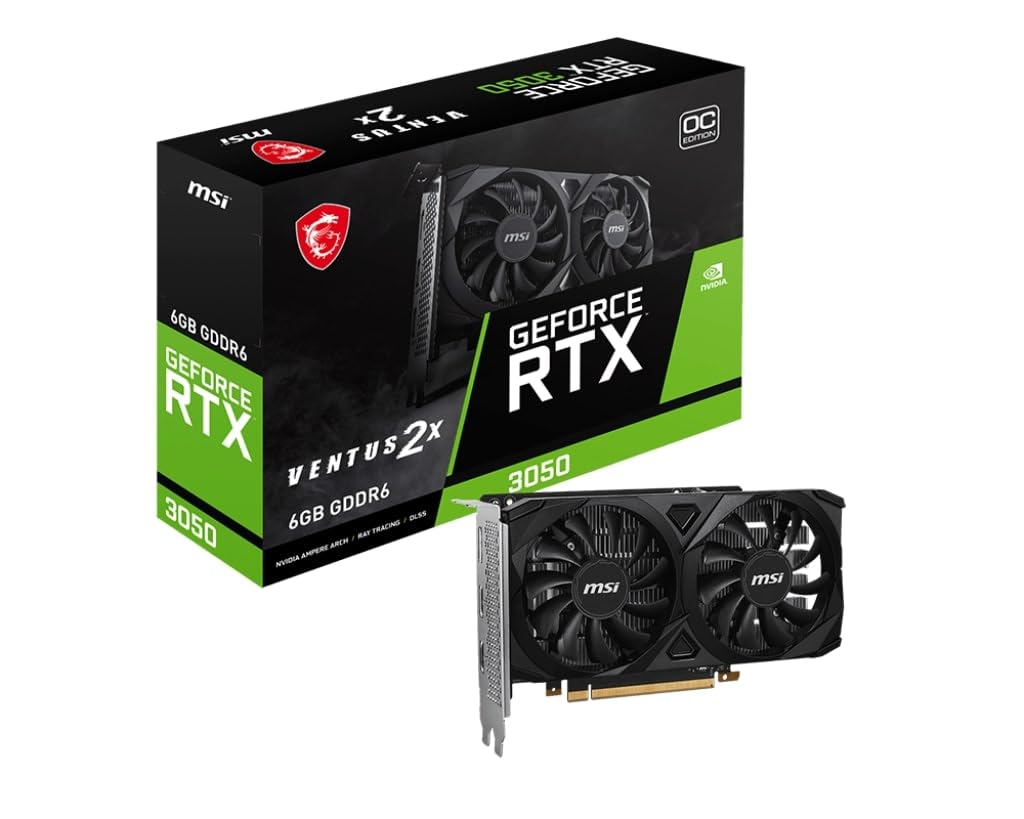
The MSI RTX 3050 Ventus 2X 6G OC takes the same Ampere architecture and packages it in a full-height, dual-fan design that prioritizes lower temperatures and quieter operation. The 1492 MHz boost clock and 6GB GDDR6 memory deliver consistent 1080p performance in titles like Red Dead Redemption 2 and Cyberpunk 2077 at low-to-medium settings with DLSS enabled. The Ventus line uses an industrial, no-nonsense aesthetic with a matte black shroud that fits any build theme.
One of the strongest selling points is the low power requirement. The Ventus draws well under 100W peak, which means it can run on a standard 300W-500W PSU without strain. It requires a single 8-pin PCIe power connector. The 381-gram weight means there is zero risk of GPU sag, even in older motherboards. Outputs include DisplayPort 1.4a and HDMI 2.1, supporting up to 4K displays at 60Hz.
Buyers consistently report this as an easy drop-in upgrade for older HP and Dell towers, breathing new life into systems that previously relied on integrated graphics or ancient GTX 600-series cards. The driver support is mature, with GeForce Experience handling automatic updates and game optimization. For a mainstream desktop user who wants a reliable, cool-running RTX 3050 without the low-profile constraints, this is the most straightforward choice.
Why it’s great
- Very low power draw under typical gaming load
- Lightweight design eliminates sag concerns
- Mature NVIDIA driver ecosystem and software
Good to know
- 96-bit bus limits texture bandwidth in some titles
- Not suitable for 1440p high refresh gaming
4. XFX Speedster SWFT105 Radeon RX 6400 4GB

The XFX Speedster SWFT105 RX 6400 is the ultimate example of a zero-complication budget GPU. With a boost clock up to 2321 MHz and 4GB of 16 Gbps GDDR6 memory on a 64-bit bus, this card is designed specifically for users upgrading a prebuilt office PC. It draws all power from the PCIe slot, meaning no power supply upgrade is needed — just plug it in, install the driver, and your office machine can play esports titles at 1080p with decent settings.
The single-fan design is compact at 6.3 inches and includes a low-profile bracket in the box. The bracket swap, however, requires removing 10 screws including the fan shroud, which reviewers consistently describe as tedious. Once installed, the card runs cool and quiet. It uses an RDNA 2 architecture, which brings hardware-accelerated ray tracing, though the 4GB VRAM cap means you will be limited to low settings with RT disabled.
This card shines in PCIe 4.0 systems. When paired with an older PCIe 3.0 motherboard, the x4 interface cuts performance by roughly 15-20% in bandwidth-sensitive titles. For a buyer who just wants to turn a Dell Optiplex into a Fortnite machine for a child, the RX 6400 is an incredibly cost-effective solution. Just avoid it for texture-heavy games or anything requiring more than 4GB of VRAM at 1080p medium.
Why it’s great
- Absolute zero external power requirement
- Includes low-profile bracket for SFF cases
- RDNA 2 architecture with modern features
Good to know
- Bracket swap is a 10-screw procedure
- PCIe 4.0 x4 interface penalizes PCIe 3.0 builds
5. ZER-LON GeForce GTX 1660 Super 6GB

The ZER-LON GTX 1660 Super 6GB is the raw performance king of the budget tier, thanks to its 192-bit memory bus and 6GB GDDR6 memory clocked at 14000 MHz. This combination delivers 336 GB/s of memory bandwidth — nearly double that of the 96-bit RTX 3050 cards. The result is significantly better frame pacing and higher average FPS in titles that saturate VRAM bandwidth, such as Call of Duty Warzone, Forza Horizon 5, and Red Dead Redemption 2.
The dual-fan cooling system uses heat pipes in direct contact with the GPU core to keep temperatures under 70°C, and the fans are designed to stop completely under light loads for silent operation. Outputs include one DVI, one DisplayPort, and one HDMI, supporting up to three monitors and 8K resolution. The card requires a single 8-pin PCIe power connector and is built on the 12 nm Turing architecture without RT or Tensor cores, so ray tracing is off the table.
Reviewers highlight this as a fantastic upgrade from a GTX 1060 or RX 580, with noticeable gains in both 1% low and average frame rates. The primary complaint is the lack of modern software features like DLSS and hardware encoding quality that the RTX 3050 offers. For a pure 1080p gaming build with no interest in ray tracing or upscaling, this card offers the highest raw performance per dollar of any option on this list.
Why it’s great
- 192-bit bus provides outstanding memory bandwidth
- Beats RTX 3050 in raw 1080p performance
- 0dB fan stop for silent desktop use
Good to know
- No ray tracing or DLSS support
- No accessories included in the box
6. MOUGOL AMD Radeon RX 580 8GB
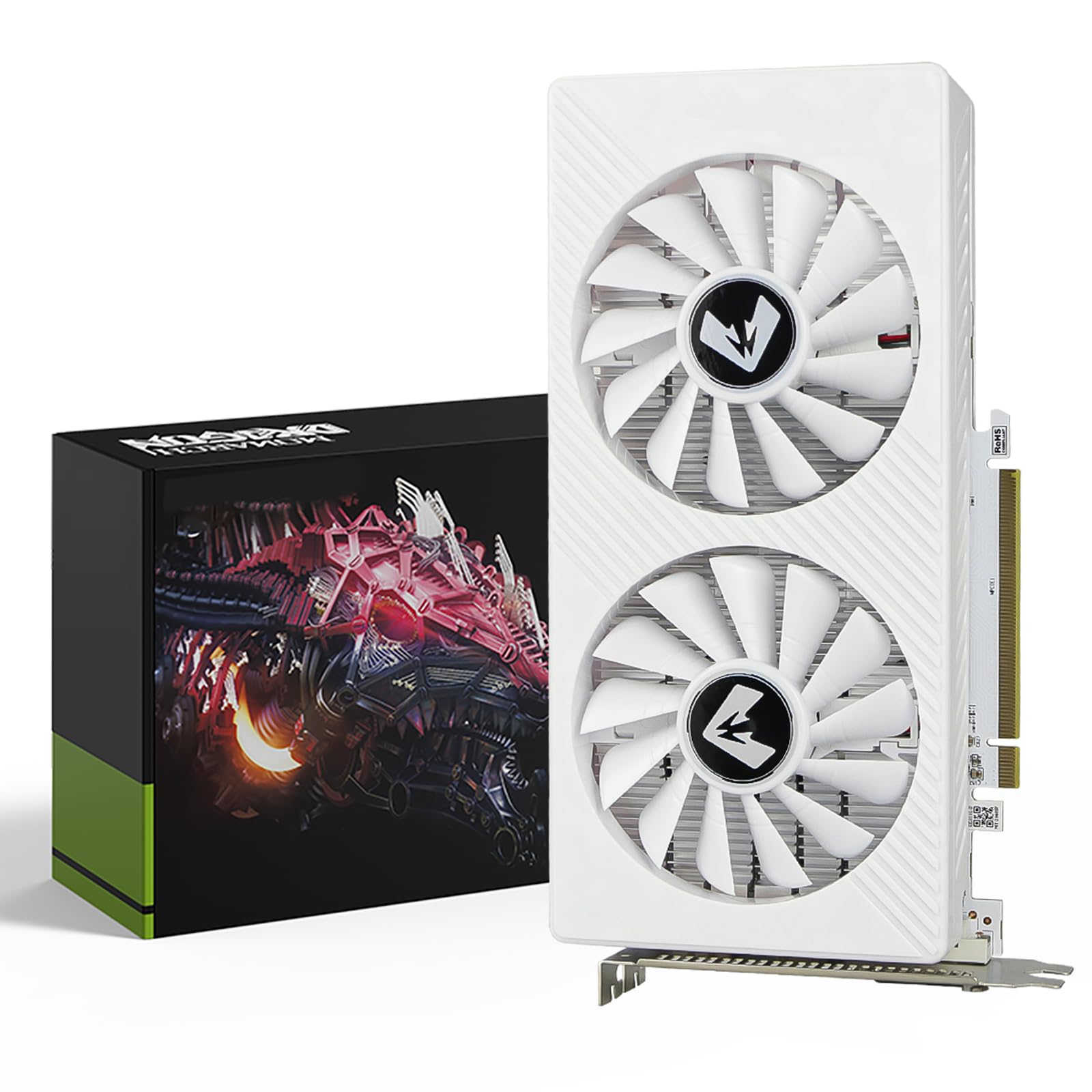
The MOUGOL RX 580 8GB is a modern revival of the legendary Polaris architecture, offering 8GB of GDDR5 memory on a massive 256-bit bus for a very accessible price. The 2048 Stream Processors and 1206 MHz core clock provide solid 1080p gaming in titles like Fortnite, Apex Legends, and Valorant, with the ability to handle texture-heavy games that would choke a 4GB card. The 256-bit bus delivers 256 GB/s of bandwidth, which is competitive even by today’s standards.
The dual-fan cooling solution keeps thermals under control, with intelligent fan curves that remain quiet during light workloads. Outputs include HDMI, DisplayPort, and DVI, supporting triple-monitor setups at up to 4K resolution. The card measures 9.45 inches, so it fits most ATX and Micro-ATX cases. It requires a single 6-pin PCIe power connector, which is less demanding than the 8-pin connectors on modern cards. AMD Adrenaline software provides game optimization, driver updates, and recording features.
Buyers consistently report satisfaction with the price-to-performance ratio, noting that the card runs cool and handles modern games at 1080p high settings without issue. The only downsides are the older GCN architecture, which lacks hardware-accelerated ray tracing and AV1 decode, and the higher power draw compared to newer options. For a pure value-focused build where VRAM headroom matters, the MOUGOL RX 580 remains a compelling choice.
Why it’s great
- 8GB VRAM with 256-bit bus for texture-heavy games
- Excellent price-to-performance ratio at 1080p
- Only requires a 6-pin power connector
Good to know
- Older GCN architecture lacks modern features
- Higher power draw than newer cards
7. Maxsun AMD Radeon RX 580 8GB 2048SP

The Maxsun RX 580 8GB 2048SP is visually identical in performance to the MOUGOL RX 580 but adds a distinct white PCB and shroud design that makes it the natural choice for white-themed gaming builds. It features the same 8GB GDDR5 at 256-bit, 2048 Stream Processors, and identical connectivity options including HDMI, DP, and DVI. The 14 nm Polaris 20 XL core runs at a similar 1206 MHz clock, delivering the same reliable 1080p experience.
The dual-fan cooler keeps the card under 65°C under gaming load, according to buyers, and the build quality is adequate for the price tier. It requires a 6-pin power connector and fits standard ATX cases easily at 7.48 inches long. The card supports DirectX 12 and Vulkan, ensuring compatibility with modern game engines. The included bracket is standard height, but it can accommodate a low-profile bracket with aftermarket modification.
One notable buyer concern involves the external power port — some units arrived with a 6-pin configuration instead of the advertised 8-pin. This is a potential inconsistency in manufacturing, and buyers should verify the connector upon arrival. For a budget builder who prioritizes aesthetics and wants a GPU that matches a white motherboard and case without sacrificing the reliable Polaris architecture, this is the only option that fits that specific niche.
Why it’s great
- Unique white design for themed PC builds
- 8GB VRAM with wide 256-bit memory bus
- Good thermals under gaming load
Good to know
- Some units have power connector inconsistencies
- Plastic shroud feels less premium
8. ASRock Intel Arc A380 Challenger ITX 6GB OC

The ASRock Intel Arc A380 Challenger ITX 6GB OC is a specialized budget GPU that serves a dual purpose as both an entry-level gaming card and an exceptional media encoding tool. Its 2250 MHz GPU clock and 6GB of GDDR6 on a 96-bit bus provide enough power for esports titles at 1080p medium settings, but the true value lies in the AV1 hardware encoder — a feature usually found on cards costing three times as much. This makes it an unbeatable choice for a Plex or Jellyfin server that needs efficient 4K transcoding.
The single-fan ITX design measures just 7.48 inches and occupies two slots, fitting into compact cases with ease. The 0dB Silent mode stops the fan completely at low temperatures. It requires a single 8-pin power connector and recommends a 500W PSU. Outputs include three DisplayPort 2.0 ports and one HDMI 2.0b, supporting up to four displays at 8K resolution. Intel XeSS upscaling provides a performance boost in supported games, though the ecosystem is still maturing.
Buyers rave about the A380’s transcoding performance, with many calling it a “Plex encoding monster.” The 3D gaming performance is weaker than the GTX 1660 Super — Cyberpunk 2077 is playable only at low settings with XeSS enabled. A critical requirement is Resizable BAR (ReBAR) support in the motherboard BIOS; without it, performance drops by as much as 40%. This card is perfect for a user who prioritizes media streaming and occasionally plays lighter games.
Why it’s great
- Industry-first AV1 hardware encode at this price
- Excellent for Plex/Jellyfin media transcoding
- Compact ITX design fits small cases
Good to know
- Requires Resizable BAR support for good gaming
- HDMI 2.0b output limited to 4K 60Hz without DSC
9. Sparkle Intel Arc A310 ECO 4GB

The Sparkle Intel Arc A310 ECO sits at the absolute entry-level of the budget GPU segment, with a 50W TBP that makes it the most power-efficient card on this list. The 4GB GDDR6 memory on a 64-bit bus limits gaming to low-settings at 1080p for modern titles, but the card’s true calling is as a dedicated transcoding accelerator for a NAS, home server, or mini PC. The Intel Xe HPG architecture provides hardware AV1 encode and decode, making this a fantastic companion for a Jellyfin or Plex server handling multiple 4K transcodes simultaneously.
The single-slot, low-profile design is the smallest on this list at 6.14 inches long and just 202 grams. A low-profile bracket is included in the box. Outputs include one HDMI 2.0b and two mini-DisplayPorts. The fan is audible under load — a consistent complaint from buyers — but users report that turning on V-Sync or capping frame rates dramatically reduces noise. The card requires ReBAR support, and buyers should note that Linux musl-based distributions may have issues with the Xe driver.
For a buyer building a dedicated media server or wanting to offload encoding from a CPU, the A310 is the cheapest way to get AV1 support in a tiny footprint. For a gaming-focused build, the 4GB VRAM and 64-bit bus are simply too limiting for anything beyond light esports. This is a highly specialized tool that excels in its narrow use case but should not be the primary GPU for a gaming rig.
Why it’s great
- Lowest power draw at only 50W TBP
- Ultra-compact single-slot low-profile design
- Excellent AV1 encode for media servers
Good to know
- Fan noise is noticeable under load
- 4GB VRAM and 64-bit bus limit gaming
FAQ
Does the RX 580 8GB still hold up for modern gaming in 2024?
How much VRAM do I really need for 1080p gaming on a budget?
Can I use an Intel Arc A380 as my primary gaming GPU?
Why does the RX 6400 lose performance in older PCIe 3.0 systems?
Final Thoughts: The Verdict
For most users, the best budget gpu winner is the GIGABYTE RTX 3050 WINDFORCE OC V2 6G because it delivers ray tracing and DLSS at a price that was unthinkable two years ago, with excellent cooling and modern feature support. If you want the highest raw 1080p performance without ray tracing, grab the ZER-LON GTX 1660 Super 6GB for its 192-bit bus and outstanding bandwidth. And for a specialized media server or NAS build that needs AV1 encoding, nothing beats the ASRock Arc A380 Challenger ITX 6GB.