
Design work lives and dies by color precision. A single monitor that misrepresents a hue can throw off an entire branding project, turning hours of careful work into a costly redo. For creatives operating on a lean budget, the challenge is finding a display that delivers factory-calibrated accuracy and a wide color gamut without demanding a second mortgage.
I’m Min — the co-founder and writer behind Gadgets Feed. I’ve spent countless hours sifting through datasheets, pixel response metrics, and real-world user feedback to isolate which monitors in this bracket actually perform for color-critical tasks, and which just market the buzzwords.
Whether you are retouching photos, designing layouts, or editing video, the right panel makes the difference between guesswork and confidence. I’ve curated this guide to the best budget graphic design monitor choices that balance cost with legitimate color performance.
How To Choose The Best Budget Graphic Design Monitor
Choosing a monitor for design work on a budget means ignoring flashy gaming specs and focusing on what actually impacts your workflow: color accuracy, resolution, panel technology, and connectivity. Here are the three non-negotiable factors.
Color Accuracy and Gamut Coverage
The single most important spec for a graphic design monitor is color accuracy, measured by Delta E (ΔE). A value under 2 is considered excellent; under 1 is professional grade. You also need wide gamut coverage — 100% sRGB is the baseline for web design, while 90% or higher DCI-P3 is crucial for print and video work. A factory calibration report ensures the monitor matches its claimed specs right out of the box.
Resolution and Panel Size
A 27-inch 4K (3840 x 2160) display is the sweet spot for budget design monitors. It offers enough pixel density (163 PPI) to render crisp text and fine details without needing to scale UI elements excessively. IPS panels are essential because they provide consistent color and brightness across wide viewing angles, unlike VA or TN panels which shift colors when viewed off-center.
Connectivity and Ergonomics
A single USB-C cable that delivers video, data, and power (at least 65W) is a massive convenience for laptop-based designers. Look for a monitor with a fully adjustable stand — height, tilt, swivel, and pivot (90-degree rotation). This allows you to position the screen for comfortable all-day work and switch to portrait mode for coding or long document layouts. A built-in KVM switch is a bonus for those working across two computers.
Quick Comparison
On smaller screens, swipe sideways to see the full table.
| Model | Category | Best For | Key Spec | Amazon |
|---|---|---|---|---|
| ASUS ProArt PA279CV | Premium | Professional Color Work | ΔE < 2, 100% sRGB/Rec.709 | Amazon |
| ViewSonic VP2756-4K | Premium | Pantone-Matched Editing | Pantone Validated, 60W USB-C | Amazon |
| BenQ PD2706U | Premium | Mac Ecosystem & KVM Workflows | 90W USB-C, KVM Switch, 95% P3 | Amazon |
| Dell S2722DC | Mid-Range | QHD Productivity & Programming | 75Hz, USB-C, Built-in Speakers | Amazon |
| Dell 27 Plus 4K (S2725QS) | Mid-Range | Smooth 4K & Gaming Blend | 120Hz, 1500:1 Contrast | Amazon |
| LG 27UP850K-W | Mid-Range | USB-C Hub with 90W PD | 95% DCI-P3, 90W USB-C | Amazon |
| LG 27US550-W | Mid-Range | Borderless Multi-Monitor Setup | 3-Side Borderless, DCI-P3 90% | Amazon |
| ASUS ProArt PA278CV | Mid-Range | Entry-Level Pro & Gaming Hybrid | ΔE < 2, 75Hz, DP Daisy-Chain | Amazon |
| INNOCN 27C1U-D | Budget | Affordable 4K with USB-C | USB-C 65W, HDR400, 1.07B Colors | Amazon |
In‑Depth Reviews
1. ASUS ProArt Display PA279CV

The ASUS ProArt PA279CV is the gold standard for budget-conscious professionals who refuse to compromise on color fidelity. It covers 100% sRGB and 100% Rec. 709 out of the box, and every unit ships with a Calman Verification report showing a Delta E of less than 2. This means the greens, reds, and blues you see on screen will match your final print or video export with minimal drift.
Connectivity is equally impressive for the price bracket. The USB-C port delivers 65W of power delivery, letting you drive a laptop and transfer data through a single cable. The monitor also includes a four-port USB 3.1 hub, DisplayPort, and HDMI, with a fully ergonomic stand that offers height, swivel, pivot, and tilt adjustments.
Some users report a slight green tint straight out of the box that requires a minor tint adjustment in the OSD to resolve. Additionally, the 60Hz refresh rate is standard for design work, but gamers or those wanting extra fluidity may need to look elsewhere. For pure color-critical tasks, however, this monitor punches far above its cost.
Why it’s great
- Calman Verified ΔE < 2 for trusted out-of-box color accuracy
- USB-C with 65W PD and built-in USB hub reduces desk clutter
- Full ergonomic stand (height, pivot, swivel, tilt) included
Good to know
- May require manual color calibration to correct a slight green cast
- 60Hz refresh rate limits gaming and scrolling smoothness
2. ViewSonic VP2756-4K

The ViewSonic VP2756-4K is a serious contender for designers who need Pantone-validated color matching in a 4K package. Its 27-inch IPS panel covers 100% sRGB, EBU, and SMPTE-C standards, and the Delta E of less than 2 ensures you can trust the display for consistent proofing across your entire workflow. The 350-nit brightness is adequate for most studio environments.
The advanced ergonomic stand is one of the best in this class, offering smooth height, swivel, pivot, and tilt adjustments that lock into place firmly. The 60W USB-C port handles video, data, and charging in one cable, and the built-in USB hub automatically switches between connected devices, which is a boon for hybrid workstation setups.
One limitation is that the monitor does not support 90-degree pivot rotation when connected to a Mac, a detail that is not clearly stated in the product description. The on-screen display (OSD) menu is also a bit clunky to navigate, though ViewSonic’s software control partially alleviates this. If your workflow demands accurate color reproduction above all else, this is a fantastic investment.
Why it’s great
- Pantone Validated for accurate spot color matching
- Includes 60W USB-C with automatic device switching
- Superb ergonomic stand with smooth adjustments
Good to know
- Pivot rotation does not function properly with macOS
- OSD menu buttons are unintuitive and difficult to use
3. BenQ PD2706U

The BenQ PD2706U is purpose-built for the Mac ecosystem, with a 90W USB-C port that charges a MacBook Pro at full speed while transmitting 4K video and data. It covers 95% DCI-P3 and 99% sRGB/Rec.709, with a Delta E of less than 3 and Pantone, Pantone SkinTone, and Calman Validations. The AQCOLOR technology ensures consistent color reproduction across the entire screen.
A standout feature is the built-in KVM switch, which lets you control two computers with a single keyboard and mouse. This is a massive productivity boost for designers who switch between a Mac and a PC. The monitor also includes a HotKey Puck for quick access to display modes and the BenQ ICCsync software that synchronizes color profiles instantly.
On the downside, the maximum brightness is rated at 250 nits, which is lower than competitors like the ASUS ProArt or ViewSonic models. This makes it less suitable for brightly lit rooms. A small number of users also reported defective units, although the seller provided prompt refunds. For a Mac-centric workflow, this is a compelling choice.
Why it’s great
- 90W USB-C provides fast charging for MacBooks
- KVM switch streamlines dual-computer workflows
- Pantone SkinTone Validated for portrait retouching
Good to know
- Max brightness of 250 nits is dim for bright rooms
- Some quality control issues reported with defective units
4. Dell S2722DC

The Dell S2722DC is a QHD (2560×1440) monitor that trades 4K resolution for an ultra-smooth 75Hz refresh rate and a more accessible price point. Its IPS panel delivers sharp text and vibrant colors, making it a strong choice for programmers, analysts, and designers who work primarily with layouts and code rather than pixel-level detail. The USB-C port supports video and power delivery.
The build quality is classic Dell — clean design, a fully adjustable stand with height and angle adjustment, and built-in speakers that are adequate for system audio. The 75Hz refresh rate makes scrolling through long documents feel noticeably smoother than a standard 60Hz panel, reducing eye strain during marathon work sessions.
However, this monitor lacks HDR support, which is a drawback for video editing or HDR content creation. It also uses an older connectivity standard, so you may need an adapter for newer laptops. For a budget-friendly secondary display or a primary screen focused on productivity, the S2722DC delivers excellent value.
Why it’s great
- 75Hz refresh rate for smoother scrolling and reduced eye strain
- USB-C connectivity with video and power delivery
- Excellent build quality with 3-year warranty
Good to know
- QHD resolution, not 4K — less pixel density for fine detail work
- No HDR support limits its use for video editing
5. Dell 27 Plus 4K (S2725QS)

The Dell 27 Plus 4K S2725QS is a standout entry in the budget design monitor category because it brings a 120Hz refresh rate to a 4K IPS panel without inflating the cost. The 1500:1 contrast ratio delivers deeper blacks than the typical 1000:1 IPS panel, which is a real advantage when working with dark-mode interfaces or shadow detail in photos.
Its 99% sRGB coverage and HDR readiness handle day-to-day design work well, while the 120Hz smoothness makes general desktop navigation and casual gaming far more pleasant. The ComfortView Plus feature reduces blue light emissions to under 35% without a yellow tint, preserving color accuracy for long editing sessions. The ash white finish and ultra-thin bezels also make it a stylish addition to any desk.
For pure competitive gaming, the 120Hz IPS panel shows noticeable ghosting in fast-moving scenes, so hardcore FPS players should look elsewhere. A few users also reported a persistent yellow tint on their units, which may indicate some panel lottery variance. For a design monitor that doubles as a high-refresh-rate daily driver, this is a fantastic hybrid option.
Why it’s great
- 120Hz refresh rate at 4K for smooth browsing and light gaming
- 1500:1 contrast ratio provides deeper blacks than standard IPS
- ComfortView Plus blue light filter maintains color accuracy
Good to know
- Noticeable ghosting in fast-paced gaming
- Some units may have inconsistent color tint from factory
6. LG 27UP850K-W

The LG 27UP850K-W is a refined 4K monitor that excels in color space coverage, delivering up to 95% DCI-P3 for vibrant, lifelike imagery that is critical for video editing and print design. Its 27-inch IPS panel supports DisplayHDR 400, with 400 nits of peak brightness that provides convincing highlights in HDR content.
The highlight is the 90W USB-C port, which is the highest power delivery in this roundup and will comfortably charge a 16-inch MacBook Pro at full speed. The ergonomic stand offers height, tilt, and pivot adjustments. Built-in stereo speakers with Waves MaxxAudio provide surprisingly robust sound for a monitor. The LG Switch app also lets you split the screen into multiple zones for efficient multitasking.
The 60Hz refresh rate is standard for design use, but gamers looking for a dual-purpose display will notice the absence of a higher refresh rate. Some users noted minor quirks when waking from sleep with a MacBook, requiring a cable reseat. For pure color work with a Mac, this LG is one of the most complete packages at its price point.
Why it’s great
- 95% DCI-P3 coverage for vivid, professional-grade color
- 90W USB-C provides fast charging for large laptops
- Excellent built-in speakers with Waves MaxxAudio
Good to know
- 60Hz refresh rate limits gaming smoothness
- Minor wake-from-sleep quirk with some MacBooks
7. LG 27US550-W
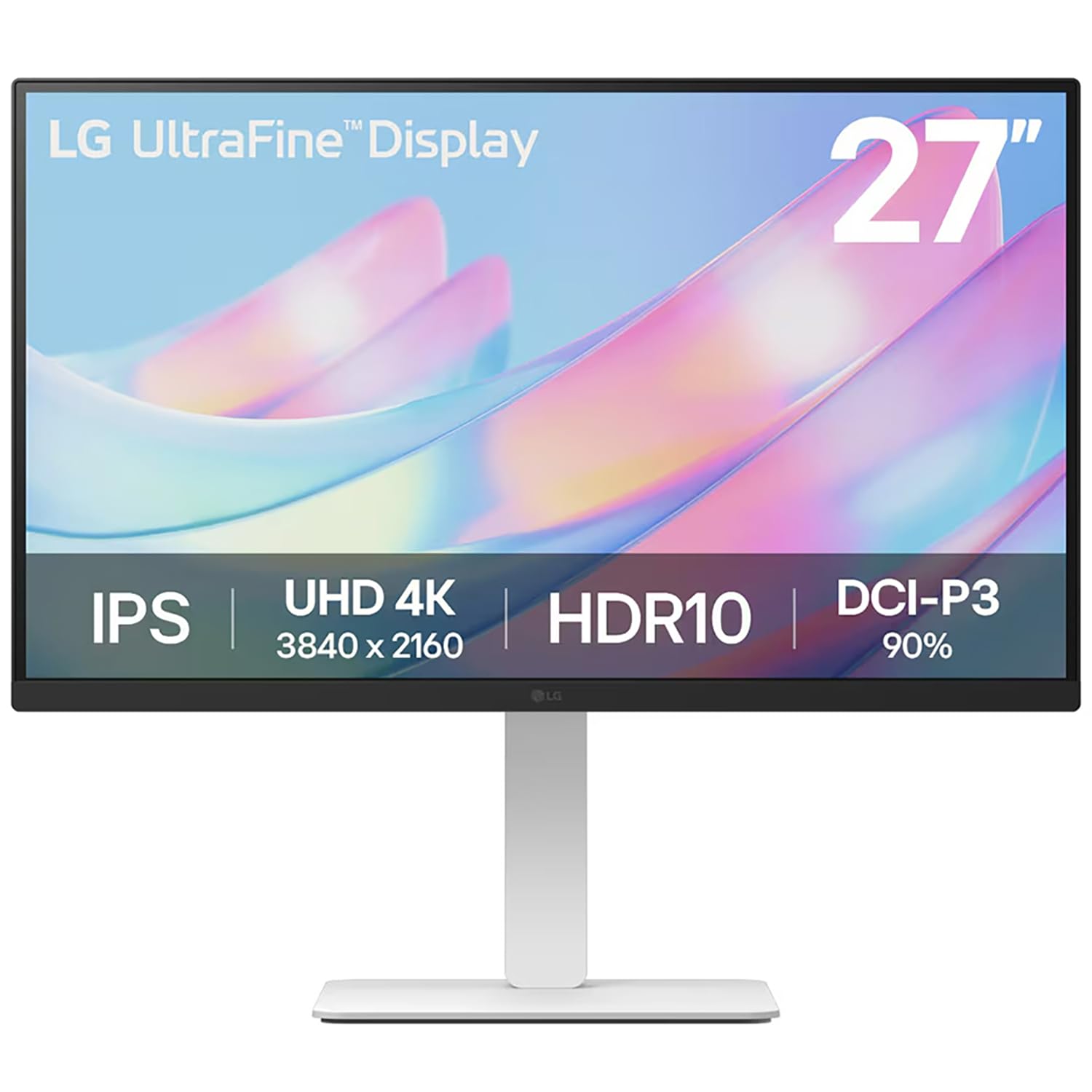
The LG 27US550-W is designed for users who need a clean, borderless multi-monitor setup without breaking the bank. Its 3-side virtually borderless design means you can place two or more of these side by side with minimal bezel gap, creating an expansive workspace for complex design projects. The 27-inch 4K IPS panel covers 90% DCI-P3 and supports HDR10 for decent color vibrancy.
With 300 nits of brightness, it is not the brightest monitor in this list, but it is adequate for most indoor office environments. The LG Switch app simplifies toggling between multiple inputs, which is useful for hybrid workstations connecting a laptop and a desktop. The stand offers height, tilt, and pivot adjustments, allowing you to position the screen comfortably.
The color gamut is slightly narrower than the LG 27UP850K-W at 90% DCI-P3 versus 95%, which matters for high-end video work. It also lacks a USB-C port with power delivery, relying on standard HDMI and USB connections. For a secondary monitor or a budget primary that prioritizes an immersive multi-screen layout, this is a solid choice.
Why it’s great
- Ultra-slim 3-side borderless design for seamless multi-monitor setups
- 90% DCI-P3 coverage delivers vibrant colors for the price
- LG Switch app simplifies input management
Good to know
- No USB-C with power delivery (standard HDMI/USB only)
- 300-nit brightness is adequate but not exceptional
8. ASUS ProArt Display PA278CV

The ASUS ProArt PA278CV is the entry-level gateway into professional-grade color accuracy, offering Calman Verified Delta E < 2 performance with 100% sRGB and 100% Rec. 709 coverage. While it uses a WQHD (2560×1440) panel rather than 4K, the pixel density on a 27-inch screen is still sharp enough for most design tasks, and the 75Hz refresh rate provides a noticeably smoother scrolling experience than a standard 60Hz monitor.
Connectivity is a strong point with DisplayPort daisy-chaining, allowing you to connect up to four displays in series for a massive workspace. The USB-C port delivers 65W of power, and the ergonomic stand with 90-degree pivot makes it easy to switch to portrait mode for coding or long documents. The Adaptive-Sync compatibility (FreeSync) also reduces screen tearing during video playback.
The lack of 4K resolution may be a dealbreaker for designers who need to see fine details at 100% zoom. The 65W power delivery is also borderline for charging a 16-inch MacBook Pro under heavy load, where it may discharge slowly. For a budget-friendly monitor that prioritizes color reliability and productivity features, the PA278CV is a smart choice.
Why it’s great
- Calman Verified ΔE < 2 for trusted color accuracy
- DisplayPort daisy-chaining for seamless multi-monitor setups
- 75Hz refresh rate with FreeSync for tear-free viewing
Good to know
- WQHD (1440p) resolution, not 4K — less pixel density for fine detail
- 65W USB-C may struggle to charge larger laptops under load
9. INNOCN 27C1U-D

The INNOCN 27C1U-D is the ultimate budget option for designers who absolutely need 4K resolution without spending a premium. Its 27-inch IPS panel delivers a true 3840×2160 resolution with 1.07 billion colors (8-bit+FRC), covering a wide enough gamut for general design work. The Delta E is rated at less than 2, ensuring colors are reasonably accurate straight out of the box.
The monitor includes a USB-C port with 65W power delivery, making it compatible with modern laptops for a single-cable setup. It also supports HDR400, which provides a noticeable improvement in dynamic range when viewing HDR content. The ergonomic stand includes height, swivel, pivot, and tilt adjustments — a rare feature at this price point. VESA mount compatibility further expands its placement options.
The included speakers are notoriously weak and tinny, so you will want external speakers or headphones. The on-screen display menu buttons are also unintuitive and frustrating to use. Some users reported a slight slow wake-up time when connected to a MacBook, requiring a cable reseat. For the price, however, you are getting a 4K monitor with color accuracy that punches well above its class.
Why it’s great
- Genuine 4K UHD resolution at a very accessible price point
- USB-C with 65W power delivery for single-cable convenience
- Full ergonomic stand with height, pivot, and swivel
Good to know
- Built-in speakers are very poor quality
- OSD buttons are unintuitive and hard to navigate
FAQ
What is the minimum Delta E I should accept for graphic design?
Is a 4K monitor necessary for graphic design on a budget?
Can I use a gaming monitor for graphic design?
Final Thoughts: The Verdict
For most users, the best budget graphic design monitor winner is the ASUS ProArt PA279CV because it delivers verified Delta E < 2 accuracy, 100% sRGB/Rec. 709 coverage, and a full ergonomic stand at a price that undercuts most pro-grade displays. If you need 90W USB-C charging for your MacBook, grab the BenQ PD2706U. And for a hybrid design-and-casual-gaming monitor, nothing beats the Dell 27 Plus 4K (S2725QS) with its 120Hz refresh rate and superior contrast.