
A true multi-channel HDMI modulator is the bridge between modern HDMI sources and legacy coaxial TV distribution systems. Without one, you are stuck either running individual long HDMI cables to every screen or abandoning older televisions that lack HDMI inputs entirely — not a great choice for churches, sports bars, or campus AV setups that need to feed a single source to dozens of rooms.
I’m Min — the co-founder and writer behind Gadgets Feed. I’ve spent countless hours cross-referencing modulation standards, EDID compatibility tables, and real-world review patterns to separate the units that actually deliver clean RF signals from the ones that introduce glitches and audio jumble.
Whether you need to distribute HDMI over coax for a multi-room commercial installation or a house of worship, finding the right budget multi channel hdmi modulator requires understanding modulation type, channel count, and RF output power rather than just sticker price.
How To Choose The Best Budget Multi Channel HDMI Modulator
An HDMI modulator converts an HDMI video source into an RF television channel that can be distributed over standard coaxial cable to any TV with a tuner. Unlike a simple splitter, a modulator encodes the signal as a specific channel number — your TVs just scan and find it. Choosing the right one means evaluating modulation standards, channel count, RF output strength, and build reliability for 24/7 commercial use.
ATSC versus QAM Modulation
The modulation standard dictates which TVs can receive your signal. ATSC is the North American over-the-air digital TV standard compatible with any modern TV with a built-in tuner and an antenna input. QAM (J.83B) is the cable industry standard used by most cable-ready TVs without a set-top box. Some modulators support both, giving you maximum flexibility if your building has a mix of antenna-input and direct-cable-input televisions.
RF Output Power and Signal Distribution
Output power, measured in dBuV, determines how far and cleanly the RF signal travels through your coax infrastructure. A weak modulator around 70 dBuV may require an external distribution amplifier if you are feeding more than a handful of TVs or running cable longer than 100 feet. Models with adjustable output between 70 and 100 dBuV let you dial in the right level for your specific building layout without adding extra hardware.
Channel Count and Source Flexibility
Multi-channel capability means the modulator can encode multiple HDMI sources onto different RF channels simultaneously. A single-channel unit handles one source, while a 4-channel or 8-channel matrix-style system lets you send different programming to different zones. For houses of worship or sports bars, a multi-channel modulator allows one system to carry the main feed, a secondary camera angle, and a presentation feed on separate channels that users can flip between.
Quick Comparison
On smaller screens, swipe sideways to see the full table.
| Model | Category | Best For | Key Spec | Amazon |
|---|---|---|---|---|
| SatLink ST-7000 | Modulator | True RF Modulation over Coax | ATSC/QAM, 70-100 dBuV | Amazon |
| OREI 4×4 HDMI Matrix | Matrix Switch | Mixed 4K/1080p Multi-Zone | 4K@60Hz, 18Gbps, Downscale | Amazon |
| CENMATE HE104 | Extender Splitter | Long-Distance HDMI over Cat6 | 1080p@60Hz, 165ft, POC | Amazon |
| VPFET HDMI Extender Splitter | Extender Splitter | EDID Presets for Compatibility | 1080p@60Hz, POC, Auto EQ | Amazon |
| AAO Steetek 1×4 | Extender Splitter | Metal Build / EDID Copy | 1080p@60Hz, 165ft, POC | Amazon |
| OREI HDS-402MV | Matrix Switcher | Quad-View / PIP Multi-Source | 4K@30Hz, 4 In 2 Out | Amazon |
| MT-VIKI HD88L | Matrix Switch | Large 8×8 Commercial Routing | 4K@30Hz, Web GUI, RS232 | Amazon |
In‑Depth Reviews
1. SatLink ST-7000 HDMI to RF Digital Modulator

The SatLink ST-7000 is the only true digital modulator in this lineup that converts an HDMI source into an actual ATSC or QAM (J.83B) RF channel for distribution over standard coaxial cable. This means any TV with a built-in tuner — from vintage CRT sets with a digital converter to the latest flat panels — can tune into your feed simply by scanning channels. No additional set-top boxes or HDMI dongles are needed at each display.
The adjustable RF output power from 70 to 100 dBuV is a significant professional feature. If your coax runs are long or you are splitting the signal to dozens of rooms, you can crank the output to overcome line loss without buying a separate distribution amplifier. Users report that setting it to around 75 dBuV delivers a clean, stable picture across a building, though a signal amplifier may be required for grainy results at lower power in larger installations.
Setup is handled via a web-based interface, making channel assignment and modulation configuration straightforward without needing a separate programmer. The 1080P output quality is consistently praised for being better than expected from a hardware encoder in this class. However, the unit lacks an overscan option, which can slightly crop the edges of the image, and isolated reports mention audio sync issues that may require firmware attention.
Why it’s great
- True ATSC/QAM modulation for direct tuner compatibility
- Adjustable RF output power up to 100 dBuV for long coax runs
- Web-based setup eliminates need for programming hardware
Good to know
- No overscan adjustment means image edges may be cropped
- Some units have experienced early failure requiring replacement
- RF IN port may attenuate incoming cable signal on lower channels
2. OREI 4×4 HDMI Matrix Switch UHD-404

The OREI 4×4 HDMI Matrix Switch gives you four HDMI inputs and four HDMI outputs with the ability to route any source to any display independently. Unlike a modulator that converts to RF, this is a pure HDMI matrix, ideal when all your displays are within standard HDMI cable distance and you need native 4K resolution without compression. It supports 4K@60Hz with 4:4:4 chroma subsampling and HDR, delivering a pristine signal at up to 18Gbps.
The downscaling functionality is a standout feature for mixed-resolution environments. If you have a mix of 4K and 1080p displays, the matrix can automatically downscale 4K content to 1080p for the older screens while feeding full 4K to the newer ones. This eliminates the need for separate signal paths or additional converters. Each display can show the same source or completely different content, offering maximum routing flexibility.
The metal chassis provides good heat dissipation for continuous operation, which matters in commercial AV racks. HDMI CEC compatibility works well with Apple TV remotes, and audio extraction over Optical to 5.1 systems is clean. The only recurring criticism is the fragility of the power connector wire — a slight movement can disconnect power, so the unit should be placed in a stationary position within the rack.
Why it’s great
- Downscales 4K to 1080p automatically for mixed display setups
- Full 4K@60Hz 4:4:4 with HDR at 18Gbps bandwidth
- Reliable CEC compatibility with mainstream remotes
Good to know
- Power connector wire is fragile and prone to disconnection
- Not a modulator — requires direct HDMI connection to displays
- Incompatible with display types like Rokid AR glasses
3. CENMATE 1×4 HDMI Extender Splitter HE104
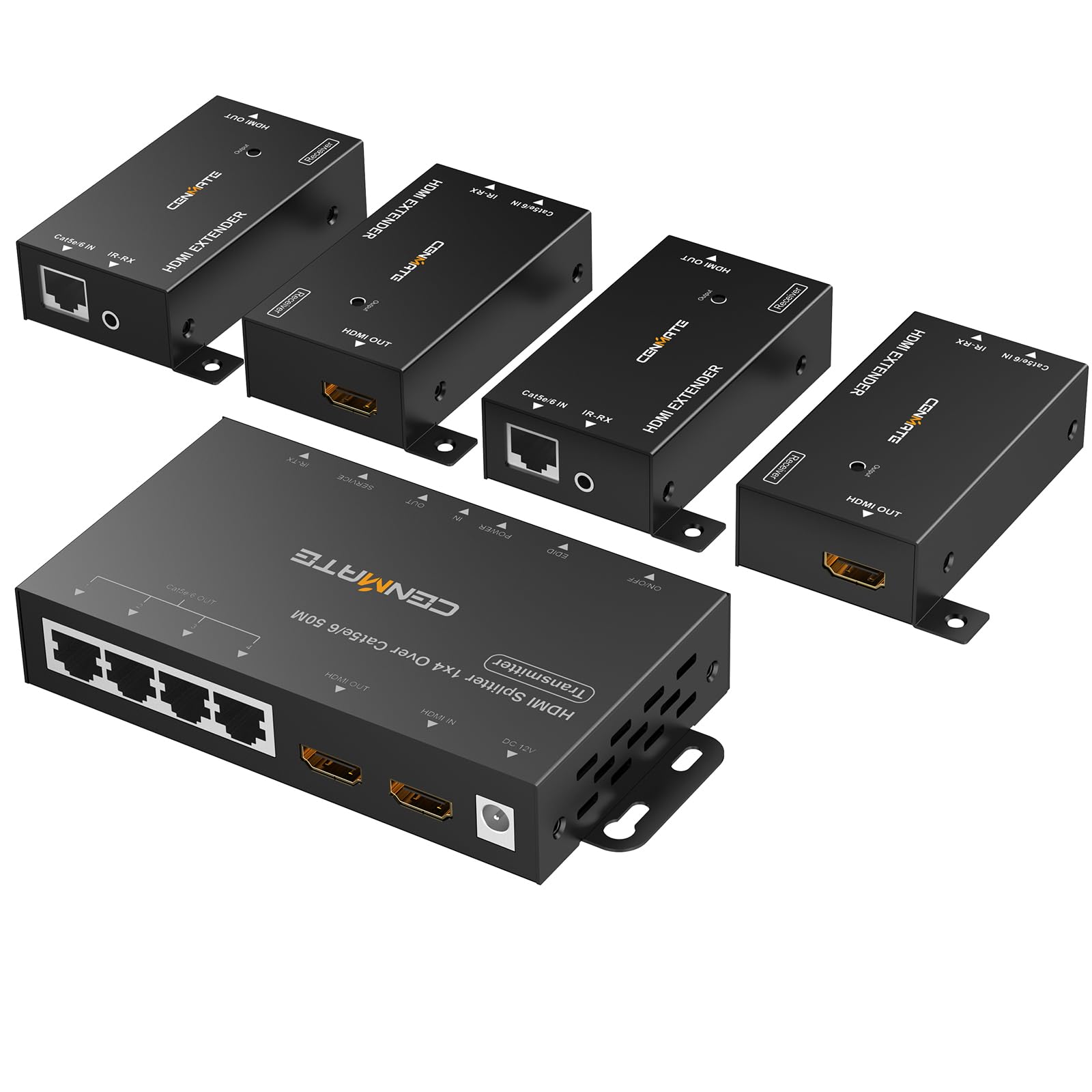
The CENMATE HE104 is a 1×4 HDMI extender splitter that transmits one HDMI source to four remote displays over Cat5e, Cat6, or Cat7 cable at distances up to 165 feet. It uses Power over Cable (POC) technology, meaning only the transmitter needs a power supply — the four receiver units draw power from the Cat cable itself, massively simplifying installation in ceiling spaces or remote rooms where power outlets are scarce.
The unit supports 1080p@60Hz with zero video latency, making it suitable for live video feeds where timing matters. The EDID function automatically recognizes and matches display parameters to ensure the source delivers the correct resolution. This prevents the common problem of a display refusing to show an image because the source is sending an unsupported format. Four IR receiver cables and one IR transmitter cable are included for remote control pass-through from each display location.
Wall-mountable design allows installation in AV racks or behind displays, though mounting bolts are not included. The main concern from users is sensitivity to physical movement — the signal can cut out if the unit or cables are bumped, so secure mounting is essential. Quality control has been inconsistent, with some units arriving with a defective port while others work flawlessly. The 1-year warranty and responsive seller support have resolved most issues.
Why it’s great
- POC technology powers all receivers from a single adapter
- 165-foot transmission distance over standard Cat6 cable
- EDID auto-detection ensures display compatibility
Good to know
- Signal cuts out if the unit or cables are bumped
- Quality control issues reported with defective ports
- Requires high-quality Cat cable for reliable performance
4. VPFET HDMI Extender Splitter 1×4

The VPFET 1×4 HDMI Extender Splitter splits one HDMI source into four identical signals and transmits them up to 165 feet over Cat5e, Cat6, or Cat7 cable. POC technology means only the transmitter requires a 12V power supply, with the receivers powered through the Ethernet cable — a significant advantage for installations where running separate power to each receiver is impractical.
The EDID preset system allows you to select from multiple compatibility profiles to match different display types. This is particularly useful in environments like churches or classrooms where the four displays may be different brands or models with varying EDID handshake requirements. Without proper EDID management, some displays may show a black screen or incorrect resolution. The built-in Auto EQ chip eliminates the need for manual equalization adjustments based on cable length, automatically compensating for signal degradation over longer runs.
Uncompressed 1080p@60Hz transmission preserves video quality without artifacts, and support for PCM, DTS, and DSD audio formats keeps audio intact. Some users have reported intermittent audio popping sounds from the receiver requiring restarts every 20 minutes, though this appears to be an isolated issue rather than a widespread defect. The local HDMI loop-out ports may not work with certain TVs without an additional EDID manager, so verify compatibility if you need local loop-out.
Why it’s great
- EDID presets improve compatibility with mixed-brand displays
- Auto EQ chip adjusts for cable length automatically
- POC powers receivers over Ethernet from single adapter
Good to know
- Some units experience periodic audio popping requiring restart
- Local HDMI loop-out may need separate EDID manager
- Suggested cable lengths vary by category rating
5. AAO Steetek 1×4 HDMI Extender Splitter

The AAO Steetek 1×4 HDMI Extender Splitter delivers the same fundamental capability as the other extenders — one HDMI source to four displays over Cat5e/Cat6/Cat7 up to 165 feet — but adds a metal shell with ventilation ports that aid thermal management in 24/7 rack installations. The EDID copy function is particularly useful for environments where you need to clone the EDID data from one display to force the source to output a specific resolution compatible with all displays.
POC function means only the transmitter needs a 12V 1A power adapter, keeping the receiver locations clean of power bricks. The 1080p@60Hz uncompressed transmission maintains clarity even over the maximum 165-foot distance, provided you use high-quality Cat6 cable. Users have reported successful operation on 140-foot Cat5e runs with stable performance over several weeks of continuous use.
Setup is true plug-and-play with no drivers or software required. The metal housing and heat dissipation design protect against thermal damage during extended operation. The seller has been proactive in providing tips on proper RJ45 termination, which can affect signal reliability. While some budget extenders feel flimsy, this unit’s metal build gives it a more substantial feel suited for permanent commercial installation.
Why it’s great
- Metal shell with heat dissipation ports for prolonged use
- EDID copy function forces resolution compatibility
- Single POC power adapter supplies transmitter and four receivers
Good to know
- Does not support IP-based transmission
- Requires high-quality termination on Cat cable ends
- Limited to 1080p with no 4K pass-through
6. OREI Quad Multi HDMI Viewer HDS-402MV
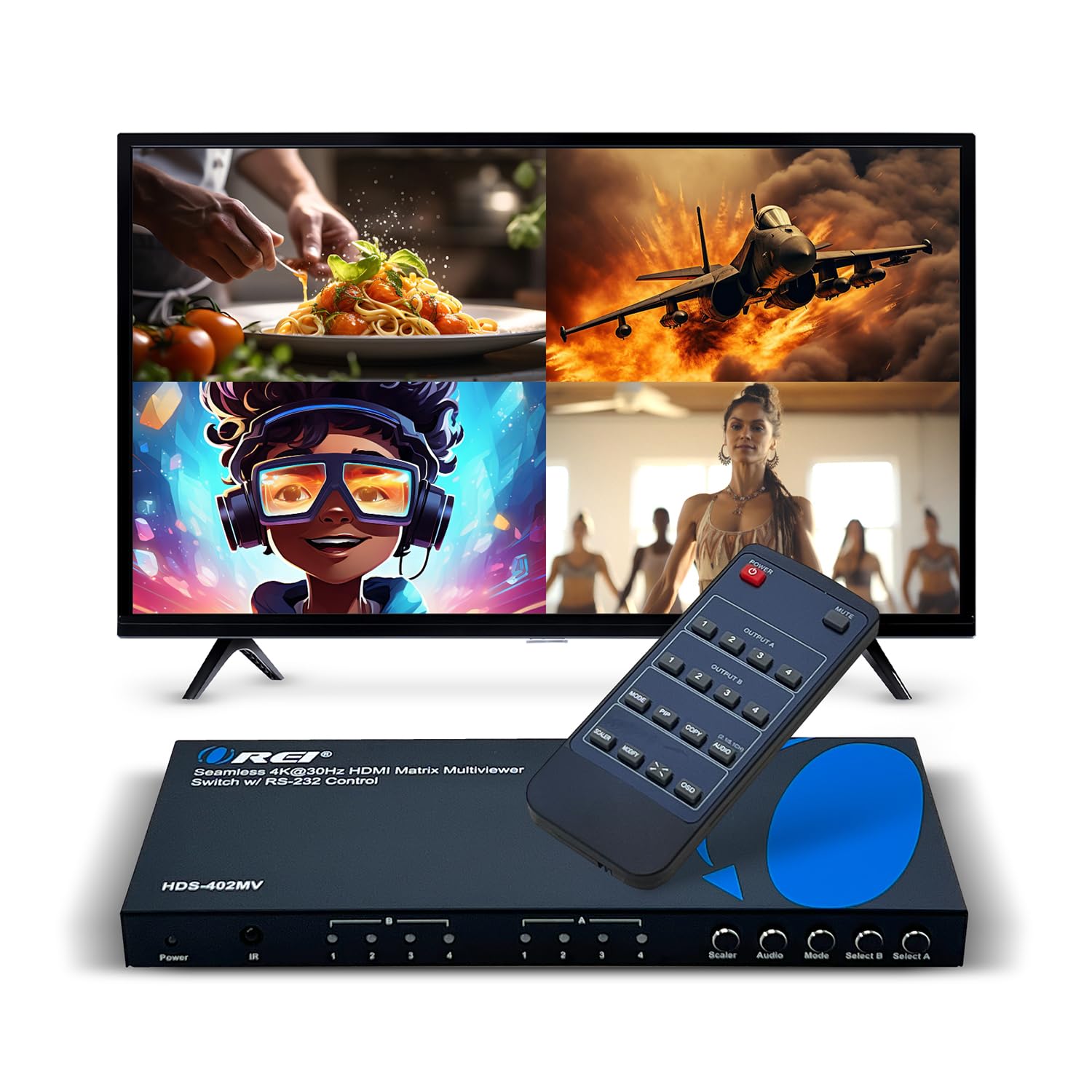
The OREI HDS-402MV is a 4-input, 2-output HDMI matrix switcher with a built-in quad multi-viewer that can display up to four sources simultaneously on one screen in a 4-way split or picture-in-picture layout. This is an entirely different beast from the extenders above — instead of sending one source to multiple displays, it lets you combine multiple sources onto one display with seamless switching between five display modes.
The quad-view mode is invaluable for security camera monitoring, production control rooms, or church IMAG setups where you need to see multiple camera feeds on a single monitor. The Picture-in-Picture function allows you to position a secondary source in any corner of the display while the main source fills the screen. Control is available via IR remote, front panel buttons, or RS-232 for integration into larger control systems.
Video support goes up to 4K@30Hz, but note that 4K@60Hz sources are forced down to 1080p. Audio extraction is handled through Optical or L/R ports, supporting LPCM and AC3/DTS formats. The metal casing with mounting brackets allows clean installation in AV racks. Some users report the occasional glitch requiring a power cycle, but the build quality and multi-view features make it a unique tool for source aggregation.
Why it’s great
- Quad-view and PIP modes combine multiple sources on one screen
- RS-232 control for integration with automation systems
- Optical audio output for external sound system connectivity
Good to know
- 4K@60Hz sources are downscaled to 1080p
- Occasional glitches require power cycling
- Not a modulator — outputs HDMI only, not RF
7. MT-VIKI 4K HDMI Matrix Switch 8X8 HD88L

The MT-VIKI HD88L is a full 8×8 HDMI matrix switch that routes any of 8 HDMI inputs to any of 8 outputs independently. This is a professional-grade unit designed for large commercial installations — conference rooms, sports bars, churches with multiple zones — where you need independent source selection at each display. Each output can show a different source simultaneously, or you can mirror the same source across all eight.
Control options are comprehensive: front panel buttons, IR remote, RS-232, LAN port with Web GUI, and even third-party control system integration. The Web GUI is particularly praised for its ease of use, allowing source-to-display routing to be configured from any browser on the network. The unit fits in a standard 1U 19-inch rack space with included rack ears, making for a clean professional installation.
Video support is 4K@30Hz, which is suitable for most commercial content but not ideal for high-refresh gaming or 60fps video. The 3.5mm audio extraction works exclusively through OUT8, which is a limitation if you need audio from multiple zones simultaneously. While the vast majority of users report reliable operation and easy setup, there is at least one report of a unit whose matrix switching failed after the first use, so verifying functionality early in the return window is wise. The 2-year warranty provides an extra safety net over most competitors.
Why it’s great
- 8×8 independent routing for large multi-zone installations
- Web GUI, RS-232, LAN, and IR control options
- Fits 1U 19-inch rack with included ears
Good to know
- Audio extraction only available through OUT8
- Limited to 4K@30Hz with HDMI 1.4 bandwidth
- Some units may experience switching failure after initial use
FAQ
What is the difference between an HDMI modulator and an HDMI extender splitter?
Can I use an HDMI matrix switch in place of a modulator?
Why does my modulator need adjustable RF output power?
Final Thoughts: The Verdict
For most users, the budget multi channel hdmi modulator winner is the SatLink ST-7000 because it is the only unit that actually modulates HDMI into a true ATSC/QAM RF channel with adjustable output power for professional coax distribution. If you need a 4×4 HDMI matrix with mixed 4K/1080p downscaling for a multi-zone AV system, grab the OREI 4×4 HDMI Matrix. And for long-distance HDMI extension over Cat6 cable with single-power POC convenience, nothing beats the CENMATE HE104.