
Our readers keep the lights on and my morning glass full of iced black tea. As an Amazon Associate, I earn from qualifying purchases.
Specs are compiled from manufacturer listings and verified buyer reviews and can change over time — please confirm the key details on the product page before buying.
You want that perfect, inky-black OLED picture without paying flagship prices. You want fast response, rich colors, and a screen that feels like an upgrade — not a compromise. The real challenge is figuring out which budget-tier panel delivers the goods and which one quietly cuts corners.
I’m Min — the founder and writer behind Gadgets Feed. This guide is built by comparing the manufacturers’ published specifications and the patterns across verified customer reviews, so you get each pick’s real strengths and trade-offs instead of marketing spin.
We break down the best budget oled gaming monitor options with real specs and honest owner experiences to help you choose with confidence.
Our Picks at a Glance


How To Choose The Best Budget OLED Gaming Monitor
OLED gaming monitors used to be a luxury item. Now you can get a genuine OLED panel — with perfect blacks and instant response — for a price that won’t make you wince. The trick is knowing which specs actually matter for your gaming style and which marketing numbers you can safely ignore.
Refresh Rate: How Smooth Does It Need To Be?
Your refresh rate, measured in Hertz, tells you how many times the screen redraws per second. A 165Hz screen shows 165 frames per second, which feels noticeably smoother than a standard 60Hz display. For fast competitive shooters, the jump to 240Hz or 360Hz gives you a real edge — you see enemies a fraction of a second sooner. For slower story games, you will barely notice the difference.
Panel Type: QD-OLED vs WOLED
Not all OLED is the same. QD-OLED (Quantum Dot OLED) adds a quantum dot layer that converts blue light into red and green, boosting color volume and peak brightness. WOLED (White OLED) uses white subpixels with color filters, which can handle bright scenes well but sometimes shows less vivid color. For a budget pick, either can be great — just know what you are getting.
Resolution: 1440p vs 4K
Your graphics card decides how much detail you can push. A 2560 x 1440 (QHD) panel (a resolution with 2560 pixels across and 1440 down) looks sharp but is far easier for your GPU to handle than 4K, so you get higher frame rates. A 3440 x 1440 ultrawide (a wider screen with extra side vision) adds peripheral awareness for rich play, while 3840 x 2160 (4K) (a resolution with 3840 pixels across and 2160 down) needs a powerful GPU to hit high frame rates. Match the resolution to your rig, not the other way around.
Quick Comparison
| Model | Best For | Resolution | Refresh Rate | Response Time | Amazon |
|---|---|---|---|---|---|
| Alienware AW3423DWF★ Best Overall | rich Ultrawide Play | 3440 x 1440 | 165Hz | 0.1ms | Amazon |
| MSI MPG 271QRXEsports Pick | Competitive Esports | 2560 x 1440 | 360Hz | 0.03ms | Amazon |
| AOC Agon Pro AG346UCDBest Value | Cinematic Ultrawide on a Budget | 3440 x 1440 | 175Hz | 0.03ms | Amazon |
| Samsung Odyssey OLED G6 | High-Speed 1440p Gaming | 2560 x 1440 | 360Hz | 0.03ms | Amazon |
| ASUS ROG Strix XG27ACDNG | Balanced 1440p Gaming | 2560 x 1440 | 360Hz | 0.03ms | Amazon |
| MSI MPG 321URX | 4K Gaming & Productivity | 3840 x 2160 | 240Hz | 0.03ms | Amazon |
| LG 39GX90SA-W | Curved Ultrawide & Streaming | 3440 x 1440 | 240Hz | 0.03ms | Amazon |
| Samsung Odyssey G8 G81SF | Sharp 4K Detail | 3840 x 2160 | 240Hz | 0.03ms | Amazon |
| Alienware AW3423DW | NVIDIA G-Sync Enthusiasts | 3440 x 1440 | 175Hz | 0.1ms | Amazon |
| ASUS ROG PG32UCDP | 4K Detail & Dual-Mode Speed | 3840 x 2160 | 240Hz | 0.03ms | Amazon |
| LG 32GX870A-B | Bright 4K Gaming | 3840 x 2160 | 240Hz | 0.03ms | Amazon |
In-Depth Reviews
1. Alienware AW3423DWF Curved QD-OLED Gaming Monitor
Our pick — over 4★ from 600+ verified ratings; the strongest balance of quality and price.
The ultrawide that wraps you in color and keeps your wallet intact.
This 34-inch curved QD-OLED panel is the best all-around pick because it nails the full OLED fantasy — true blacks, vivid color, and zero backlight bleed — while staying firmly in budget territory. The Quantum Dot layer boosts peak brightness and color gamut compared to standard WOLED screens, and with a 3440 x 1440 resolution on a 21:9 aspect ratio, games feel genuinely cinematic. You get a 165Hz refresh rate and 0.1ms response time, so motion stays fluid and ghosting stays out of sight.
Owners are almost unanimous on the picture: colors are rich, blacks are deep, and games simply look better than on any LCD they have used. The 1800R curvature plus tilt, swivel, and height adjustment means you can dial in a comfortable viewing position. A built-in Creator Mode lets you switch between DCI-P3 and sRGB color spaces, which is a real bonus if you also do photo or video work.
The catch is reliability — some buyers report the monitor stopped working after a couple of months, so treat the included 3-year premium warranty (covering OLED burn-in) as essential, not optional. Also be aware that a forced pixel-refresh cycle runs periodically and can interrupt your workflow. The crowd favorite holds a 4.4-star average across roughly 640 ratings.
What Owners Rave About
- Picture quality with deep blacks and zero pixelation
- rich 34-inch ultrawide format for gaming
- 3-year premium warranty covering burn-in
What To Know Before Buying
- Reliability reports are mixed — a few units failed early
- Periodic pixel refresh can interrupt work sessions
- Text sharpness is slightly soft, so not ideal for heavy office use
Your best bet if: you want a wide, rich OLED for games and movies without paying a premium.
Think twice if: you need a purely productivity-focused display and cannot tolerate scheduled pixel-maintenance pauses.
2. MSI MPG 271QRX QD-OLED Gaming Monitor
A 360Hz esports monster that refuses to blur the action.
If you live in competitive shooters, this 27-inch QHD panel is your speed demon. Its 360Hz refresh rate is more than double the Alienware’s 165Hz — a massive advantage where every millisecond of motion clarity counts — and the 0.03ms response time is effectively instant. The QD-OLED panel delivers vibrant color and truly deep blacks, so the picture quality is just as impressive as the speed.
MSI’s OLED Care 2.0 actively reduces the risk of burn-in (permanent image ghosting), and the VESA DisplayHDR True Black 400 certification means dark scenes keep their detail without washing out. There is also a KVM switch built in, letting you control multiple devices with one keyboard and mouse set — a convenience you rarely see at this level. The stand offers height adjustment so you can match your seating position.
Owners consistently praise the color quality and responsiveness, though a common note is that the OLED protection can trigger an auto-shutdown and the sleep-wake cycle sometimes fails — a known quirk, not a dealbreaker for most. It also gives you HDMI 2.1 with full 48 Gbps bandwidth, so it is ready for modern consoles too.
Speed king: The 360Hz refresh rate plus 0.03ms response means near-zero input lag, and the glossy screen makes colors pop.
Made for: competitive players and anyone who wants the smoothest motion possible at 1440p.
Look elsewhere if: you cannot tolerate occasional OLED-protection shutdowns disrupting your session.
3. AOC Agon Pro 34″ Curved QD-OLED Gaming Monitor
The cheapest way to get a glossy QD-OLED ultrawide on your desk.
At 400 nits, this AOC is about 60% brighter than the 250-nit MSI 271QRX, keeping the image vivid in well-lit rooms. The 3440 x 1440 resolution on a 21:9 aspect ratio is the same ultrawide format as the Alienware, but AOC gets you there with a more aggressive price tag.
The 175Hz refresh rate and 0.03ms response time keep fast motion clean, and NVIDIA G-SYNC compatibility means no screen tearing in high-action scenes. HDR400 True Black certification delivers deeper blacks and brighter whites for a more cinematic look. The ergonomic stand tilts, swivels, and adjusts up to 150mm, plus it is VESA mount compatible if you want to free up desk space.
Owners say the picture is stunning — one described the glossy QD-OLED coating and HDR1000 MAX mode as making it feel like a whole new rig after coming from an LCD. A 4-year warranty is a real peace-of-mind bonus. The main gripes are minor: the included screen protector is awkward to remove and can leave residue, and the V-shaped stand is not everyone’s taste. A few owners also note the screen can briefly go black for about 2 seconds on occasion.
Why It’s A Steal
- Bright 400-nit QD-OLED panel
- Same ultrawide format as pricier rivals
- 4-year warranty included
Small Quirks
- Screen protector is difficult to remove
- Occasional 2-second black screen reported
Reach for this if: you want the ultrawide experience and extra brightness without spending more for a bigger brand name.
skip it if: you dislike the V-stand design or want to avoid any chance of brief screen dropouts.
4. Samsung 27″ Odyssey OLED G6 (G60SD)

A 360Hz QD-OLED with anti-glare that keeps you focused on the fight.
This 27-inch QHD monitor pairs a searing 360Hz refresh rate with QD-OLED color depth, giving you both esports-level speed and gorgeous image quality. The 0.03ms response time makes inputs feel instant, and AMD FreeSync Premium Pro eliminates screen tearing.
Samsung’s Glare Free technology is a standout — it cuts reflections from external light so the perfect blacks stay visible even in a bright room. The screen also dims itself after 10 minutes of inactivity as an extra safety measure.
Owners love the image quality and the sleek design, with several calling it the best gaming monitor they have owned. The catch? Build quality draws mixed feedback — some find it solid, others report construction issues, and the power button is a known weak point. The 3-year warranty is a comfort, but it is worth protecting the panel carefully.
Speed and style: 360Hz competitive speed combined with a screen that fights glare and keeps blacks pure.
Best for: gamers in bright rooms who want high refresh rates and anti-glare comfort.
Be aware: mixed reports on build quality and a fragile power button mean gentle handling is wise.
5. ASUS ROG Strix 26.5″ 1440P QD-OLED (XG27ACDNG)
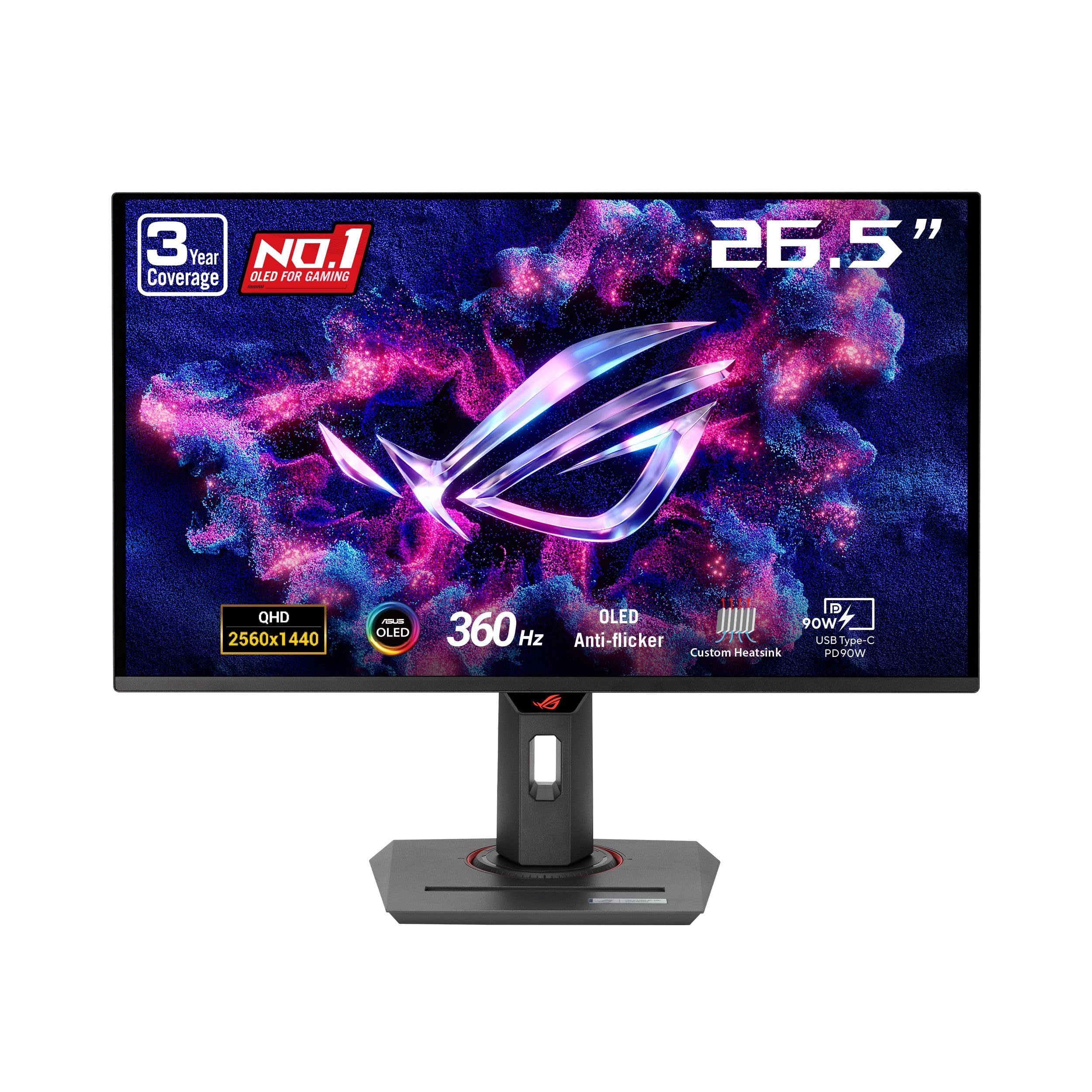
Color-accurate 360Hz OLED with a custom heatsink that plays it cool.
This 26.5-inch QHD panel hits a rare balance: 360Hz speed for competitive play plus 99% DCI-P3 color gamut for accurate, vibrant imagery. The true 10-bit color depth and Delta E less than 2 means what you see is what you get — great if you dabble in creative work between gaming sessions.
ASUS packs in ROG-exclusive anti-flicker technology to reduce flicker during refresh-rate fluctuations, which is a comfort during long sessions. The custom heatsink provides passive cooling to lower burn-in risk, and OLED Care+ adds another layer of protection. You get G-SYNC compatibility and FreeSync Premium Pro, so it works smoothly with both NVIDIA and AMD graphics cards.
Owners consistently describe the display as silky smooth with no ghosting, and the built-in FPS counter is a nice touch. The 3-year warranty covers burn-in and accidental damage (ARR), which is generous. The honest downsides: height adjustment is limited, the pixel-cleaning popup can be annoying, and a few older games are incompatible with the panel. One owner even ditched 4K monitors to come back to this 1440p panel for its QD-OLED quality.
What Makes It Shine
- Silky-smooth 360Hz with zero ghosting
- 99% DCI-P3 for accurate, vivid color
- 3-year warranty with burn-in coverage
Watch Outs
- Limited height adjustment range
- Pixel-cleaning popups interrupt occasionally
Your pick if: you want a 360Hz OLED with excellent color accuracy for both gaming and creative work.
Consider others if: you need a wide height range on your stand or play many older titles.
6. MSI MPG 321URX QD-OLED 4K Gaming Monitor

32 inches of 4K QD-OLED that makes both games and spreadsheets look incredible.
At 31.5 inches with a 3840 x 2160 resolution, this MSI gives you the sharpest text and most detailed image in this budget lineup. The 240Hz refresh rate is plenty for fast play, and the 0.03ms response time keeps motion perfectly clean. You get 1.07 billion colors (10-bit) with 99% DCI-P3 coverage, so HDR content genuinely pops with pure blacks and bright whites.
The KVM switch lets you control a laptop and desktop with one keyboard and mouse — a genuine productivity win if you work across two machines. HDMI 2.1, DisplayPort 1.4a, and USB-C connections cover modern consoles and docks. The 4-way adjustable stand has height, tilt, swivel, and pivot, so you can find the perfect angle.
Owners call the HDR breathtaking and note it is a night-and-day upgrade from a 27-inch 1440p IPS panel. Text stays crisp, which is rare for OLED and great for productivity. The hefty stand base takes desk space, and a Mac dual-monitor setup requires disabling DSC (Display Stream Compression) and locking to DisplayPort at 120Hz. It is a chunky monitor, but that stability is a fair trade for the image quality.
Productivity plus play: 4K sharpness, crisp text, and HDR performance that makes games look insane — all without the usual OLED text fringing.
Grab it if: you want 4K detail for both gaming and work and have a GPU that can drive it.
Think twice if: you run a dual-monitor Mac setup — you will need to adjust DSC settings to get it stable.
7. LG 39GX90SA-W Ultragear WQHD OLED

A steep 800R curve that puts you inside the action — with streaming built in.
This 39-inch ultrawide with a dramatic 800R curve (a curve radius of 800 millimeters, so the screen bends tightly around you) wraps your peripheral vision and pulls you deep into games. The 3440 x 1440 resolution on a 21:9 aspect ratio (a screen 21 units wide for every 9 tall) is rich, and the 240Hz refresh rate (the screen updates 240 times per second) with 0.03ms response (a near-instant pixel reaction time) keeps everything fast and fluid. It also hits up to 1300-nit peak brightness (a measure of luminance, where 1300 nits is very bright) — far brighter than most OLED rivals — so HDR highlights genuinely glow.
The standout feature is webOS: you get built-in access to Netflix, Prime Video, Disney+, and over 300 free LG channels, plus cloud gaming via NVIDIA GeForce NOW and Amazon Luna directly from the home screen. You can game without a PC or console. With 98.5% DCI-P3 coverage and a 1.5M:1 contrast ratio, both games and streams look stunning.
Owners love the rich curve and smooth motion, and several note it reduced eye strain compared to wider 32:9 alternatives (a screen 32 units wide for every 9 tall, which is even wider). The 21:9 format is called a balance — wide enough for immersion, practical enough for multi-tasking with three browser tabs. The possible catch involves LG software on Windows, which some owners mention installing adware-like components via updates.
What Excites Owners
- rich 800R curvature that pulls you in
- webOS with built-in streaming and cloud gaming
- Bright 1300-nit peak for vivid HDR
What Gives Pause
- LG software behavior on Windows raised privacy concerns
- Curve may not suit everyone’s taste
Reach for this if: you want an rich curved display and enjoy having streaming apps built straight into the monitor.
Look elsewhere if: you are privacy-conscious about manufacturer software on your Windows machine.
8. Samsung 27-inch Odyssey QD-OLED G8 (G81SF)

The 27-inch 4K OLED with pixel density so sharp it looks like a print.
This compact 27-inch screen packs a 3840 x 2160 4K resolution with an incredible 166 PPI (pixels per inch), delivering stunning detail — worlds feel more defined, and text looks razor-sharp. The 240Hz refresh rate and 0.03ms response keep gameplay smooth, and Samsung’s Glare Free technology cuts reflections by 54% versus standard anti-reflection film, keeping blacks pure in bright rooms.
The Dynamic Cooling System uses a pulsating heat pipe to diffuse heat five times faster than graphite sheets, cutting burn-in risk. Logo and taskbar detection automatically dims static images to further protect the panel. The ergonomic stand offers height and tilt adjustment so you can set the perfect angle.
Owners say it is well-rounded for both PS5 Pro and PC, with vivid colors and sharp text that stand out. The anti-glare matte coating is praised, though some prefer the punch of a glossy screen. There are some concerns: a few report the power button splitting and warranty denials over “physical damage,” and color accuracy draws mixed feedback. The bundled cable can also limit performance, so check your connections.
Detail champion: 4K on a 27-inch frame means crisp text and dense detail that makes games look razor-sharp.
Made for: players who want 4K sharpness on a smaller desk footprint without losing high refresh speed.
Be cautious if: you worry about long-term durability — a few owners reported button failures during normal use.
9. Alienware AW3423DW Curved QD-OLED

The G-Sync Ultimate ultrawide that certified smoothness over everything.
For NVIDIA users, this 34-inch curved QD-OLED (a type of OLED that uses quantum dots for richer color) is the smoothest-riding option here thanks to NVIDIA G-SYNC ULTIMATE certification — the highest tier of G-Sync, ensuring tear-free, stutter-free motion. The 3440 x 1440 resolution on a 21:9 aspect ratio with 1800R curvature (a curve radius of 1800 millimeters, so a gentler bend) delivers an rich, cinematic field of view, and the 175Hz refresh rate (the screen updates 175 times per second) feels fluid. The 0.1ms response time (a pixel reaction time of 0.1 milliseconds) is essentially instant.
The Quantum Dot layer boosts color accuracy, with a 1.07 billion color depth that makes games pop. Creator Mode lets you switch between DCI-P3 and sRGB spaces for color-critical work. The height-adjustable stand includes tilt and swivel, so comfort is easy to dial in. It is also for light-sensitive users who find traditional monitors harsh.
Owners are blown away by the colors and motion smoothness, calling it incredible for both gaming and work. The recurring complaint is the frequent pixel refresh (around every 4 hours), which takes up to 10 minutes and interrupts workflow — one owner said they would pay significant extra to avoid it. The HDMI port is version 2.0, capping that connection at 100Hz, so use DisplayPort for full speed. Poor blacks in bright rooms are another noted limitation.
Why NVIDIA Fans Love It
- G-SYNC ULTIMATE certified for the smoothest play
- Vivid QD-OLED color with 1.07 billion shades
- 3-year warranty on the panel
Honest Limitations
- Frequent pixel-refresh interruptions
- HDMI caps at 100Hz — use DisplayPort instead
Your pick if: you run an NVIDIA GPU and want the smoothest, tear-free OLED experience possible.
pass on it if: you do a lot of static work — the recurring pixel refresh will drive you up the wall.
10. ASUS ROG PG32UCDP 32″ 4K 240Hz OLED

A dual-mode 4K OLED that swaps to 480Hz FHD for competitive shooters.
This 32-inch WOLED panel is the shape-shifter of the lineup. It runs 4K at 240Hz for gorgeous story-driven games, then switches to Full HD at 480Hz with one hit of the hotkey for fast-paced competitive play. That flexibility means you get cinematic detail and esports speed in a single screen.
ASUS includes a custom heatsink for passive cooling and OLED Care functions to reduce burn-in risk. The RGB-backlit design, USB-C port with 90W power delivery, and G-SYNC compatibility round it out. The 99% DCI-P3 and true 10-bit color depth deliver vibrant, accurate color for both games and creative work.
Owners describe it as visually transformative — text stays clear at 100% scaling, unlike many 4K monitors, and the matte anti-glare coating works well in bright rooms. The included 3-year warranty with burn-in coverage is solid. However, there are reports of severe OLED flicker with multi-monitor setups, and the aggressive brightness dimming on static images can be distracting. Some also note the dual-mode FHD 480Hz function does not always work, depending on your GPU.
The Big Wins
- Dual-mode: 4K 240Hz or FHD 480Hz
- Crisp text even at 100% scaling
- USB-C with 90W power delivery
Real Trade-offs
- Flicker reported in multi-monitor setups
- Dual-mode speed depends on your GPU
Best if: you want one monitor that does both 4K cinematic detail and blazing 480Hz esports speed.
Look elsewhere if: you run a multi-monitor rig and are sensitive to flicker.
11. LG 32GX870A-B Ultragear 4K UHD OLED

LG’s brightest OLED yet with dual-mode 4K and FHD 480Hz in one panel.
This 32-inch 4K monitor uses LG’s Micro Lens Array+ technology to reach a typical 275 nits and a peak of up to 1300 nits — calling it the brightest OLED gaming display LG has made. That brightness makes HDR content pop and keeps the screen usable in well-lit rooms. It offers dual-mode: 4K at 240Hz for rich story games, or Full HD at 480Hz for competitive FPS, MOBA, and racing titles via a hotkey.
The 0.03ms response time eliminates perceptible input lag, and both NVIDIA G-SYNC and AMD FreeSync Premium Pro support any GPU. Built-in speakers with 4-pole headphone jack and DTS Headphone:X 3D audio give you solid sound without extra gear. The virtually borderless design and adjustable stand (height, tilt, swivel, pivot) help you dial in comfort.
Owners praise the image quality, perfectly deep blacks, and excellent speakers — some say the sound is better than their headset. The matte coating can look slightly grainy on static bright pages, and there is some global dimming with large bright areas. Settings take a while to dial in, but once configured, it is a gorgeous display. The 2-year limited warranty covers key components including the OLED panel.
What Stands Out
- Bright 1300-nit peak for vivid HDR
- Dual-mode 4K 240Hz / FHD 480Hz
- Excellent built-in speakers
What To Note
- Matte coating slightly grainy on static pages
- Requires significant time to adjust settings
Grab it if: you want the brightest, most versatile 4K OLED with dual-mode speed and great built-in sound.
Think twice if: you dislike grainy matte finishes or want a plug-and-play monitor with zero setup time.
Understanding the Specs
Refresh Rate (Hz)
This tells you how many times your screen redraws per second. A 165Hz screen shows 165 frames per second, which looks dramatically smoother than the 60Hz on older monitors. Higher rates like 240Hz or 360Hz matter most in fast competitive shooters where split-second reactions decide the round.
Response Time (ms)
Measured in milliseconds, this is how fast a pixel changes color. Slower response creates blur or “ghosting” on fast-moving objects. OLED panels are naturally fast — the 0.03ms to 0.1ms figures you see here are far quicker than typical LCDs, which often sit around 4ms to 5ms.
FAQ
Is the Alienware AW3423DWF’s 165Hz refresh rate fast enough for competitive gaming?
What is the difference between QD-OLED and WOLED panels?
Will a 4K OLED gaming monitor like the MSI 321URX work with my current graphics card?
How does OLED burn-in protection work on these monitors?
Is the 800R curve on the LG 39GX90SA-W too aggressive for daily use?
Can I use console gaming on these OLED monitors?
Why does my OLED monitor keep running a pixel refresh cycle?
Is a 1440p OLED monitor a better budget choice than a 4K model?
How important is HDR certification for OLED gaming?
What is the real difference between G-Sync and FreeSync for OLED monitors?
Final Thoughts: The Verdict
For most buyers, the budget oled gaming monitor winner is the Alienware AW3423DWF because it delivers the rich 34-inch ultrawide QD-OLED experience with sturdy color and a 3-year burn-in warranty at a price that undercuts rivals. If you want esports-level speed, grab the MSI MPG 271QRX for its 360Hz refresh rate (the screen updates 360 times per second, so motion is ultra-smooth). And for the ultrawide look on a tighter budget, the AOC Agon Pro is the one to reach for, bringing bright 400-nit QD-OLED quality with a 4-year warranty.
How We Picked
We do not accept paid placement. Every pick is matched to a real buyer and a real use-case; we do not hands-on test units.
Sources & Methodology
Specifications: manufacturer listings and product documentation. Review insights: verified customer reviews, as of August 2026. Pricing: not shown on this page (it changes often); check the current price via the retailer link.
As an Amazon Associate, Gadgets Feed earns from qualifying purchases. This does not affect which products we feature.