
Our readers keep the lights on and my morning glass full of iced black tea. As an Amazon Associate, I earn from qualifying purchases.
Specs are compiled from manufacturer listings and verified buyer reviews and can change over time — please confirm the key details on the product page before buying.
Choosing a budget PC case used to mean accepting a cramped, hot, or flimsy box. That trade-off is gone — the current wave of affordable mid-towers packs in tempered glass, multiple pre-installed fans, and room for modern graphics cards. This guide sorts through the options so you can spend your money on the parts inside the case, not the case itself.
I’m Min — the founder and writer behind Gadgets Feed. This guide is built by comparing the manufacturers’ published specifications and the patterns across verified customer reviews, so you get each pick’s real strengths and trade-offs instead of marketing spin.
You’ll see which models offer the best cooling, build quality, and features for the price, all in one place. This is the practical breakdown of the best budget pc case options worth your attention today.
Our Picks at a Glance


How To Choose The Best Budget PC Case
Before you pick a case, you need to know the dimensions of your biggest parts. Your graphics card’s length, your CPU cooler’s height, and your power supply’s size all dictate whether a component will physically fit inside the chassis.
Prioritize pre-installed fans
Pre-installed fans are the biggest cost-saver in a budget case. A case with three or four pre-installed fans saves you from buying them separately. It also means you get working airflow from day one, which is critical for keeping your parts cool.
Match your motherboard size
Most budget cases are mid-towers that fit standard ATX motherboards. They also accommodate smaller Micro-ATX and Mini-ITX boards. Make sure the case supports your motherboard’s form factor, but remember that a bigger case won’t hurt a smaller board.
Check the power supply position
Bottom-mounted PSUs lower the center of gravity for better stability. Some older-style budget cases use a top-mounted slot instead. Top-mounted units can make the whole case feel top-heavy, especially if the metal frame is thin.
Look for cable management room
A behind-the-motherboard channel or PSU shroud keeps cables tidy and improves airflow. While this is more of a convenience than a requirement, a little extra space behind the board saves you from struggling with stubborn cables later.
Quick Comparison
| Model | Best For | Max GPU Length | Pre-installed Fans | Case Type | Amazon |
|---|---|---|---|---|---|
| MONTECH XR★ Best Overall | High-airflow builds with a view | 40-Series GPUs | 3x ARGB PWM | Mid Tower | Amazon |
| Lian Li LANCOOL 216Airflow King | Enthusiasts who want great cooling | 392mm | 2x 160mm + 1x 140mm | Mid Tower | Amazon |
| MUSETEX Y6Showcase Pick | Panoramic glass showcase | 410mm | 4x Non-LED | Mid Tower | Amazon |
| CORSAIR 3500X | Clean builds with reverse-connect boards | Large (not specified) | None | Mid Tower | Amazon |
| DARKROCK EC2 | Type-C connectivity on a budget | 340mm | 1x 120mm rear | Mid Tower | Amazon |
| MOROVOL 621 | First-time builders wanting RGB | 300mm | 4x RGB 120mm | Mid Tower | Amazon |
| Zalman T6 | Light, low-profile workstation builds | — | 1x 120mm rear | Mid Tower | Amazon |
| Thermaltake Versa H21 | NAS or server builds with many drives | — | 1x 120mm rear | Mid Tower | Amazon |
| Zalman T8 | Kids’ builds and barebones systems | 295mm | 1x 120mm rear | Mid Tower | Amazon |
In‑Depth Reviews
1. MONTECH XR Panoramic High Airflow ATX PC Case
Our pick — over 4.5★ from 750+ verified ratings; the strongest balance of quality and price.
The budget case that cools, looks, and builds like it costs twice the price.
The MONTECH XR delivers premium looks and feel at a budget price. It ships with three pre-installed ARGB fans spinning up to 1500 RPM — two reverse-blade units on the side and one regular unit at the rear — for airflow that works the moment you power on. Owners consistently call out its spacious interior and first-class cable management, noting you can fit full-size components without them feeling crammed.
It’s built to handle serious hardware, accommodating a 360mm radiator on top and supporting high-end GPUs in the 40 series. The design leans into a panoramic look with tempered glass, and it earned a spot as a crowd favorite — 4.8 stars across nearly 760 owner ratings. While the glass is a known fingerprint magnet, the clarity and the bright, vibrant lighting from the fans more than make up for a quick wipe-down.
Its 4.8-star average across nearly 760 owner ratings confirms it as the top pick. It beats the Zalman T8 on sheer fan count and airflow, offering three ARGB fans to the T8’s single pre-installed unit. The main drawback is that it’s a heavier case at 14.5 pounds, but you’re getting the build quality and features to justify the extra steel.
What Wins People Over
- Three pre-installed ARGB PWM fans for excellent value
- Spacious interior with excellent cable management options
- Solid build quality with a sleek tempered glass design
What to Know Before You Buy
- Glass panel is a fingerprint magnet
- Fans can be audible at higher speeds for noise-sensitive users
- Chassis framing is thin in places; handle with care
Reach for this if: you want a case that delivers premium looks, strong airflow, and great value from the start without buying extra fans.
A fair warning: buyers who are very sensitive to fan noise might want quieter replacements later.
2. Lian Li LANCOOL 216 Case
Giant pre-installed fans make this the best-cooling case in the budget conversation.
The Lian Li LANCOOL 216 is all about airflow, and its two 160mm ARGB front fans move serious air. There’s also a 140mm rear fan included, so the case is fully cooled right from the start. It’s a build that attracts enthusiast buyers specifically for its superb thermal performance, with one owner noting how the giant front fans pull in a lot of air.
That cooling focus doesn’t come at the expense of space. It supports graphics cards up to 392mm in length, fitting even the largest NVIDIA 4000 series cards. The modular motherboard I/O lets you shift the board’s position for air-cooled or water-cooled setups, and it has room for 2 x 3.5″ HDDs and 6 x 2.5″ SSDs. It’s the priciest pick here, but you’re paying for a 10.5 kg steel frame that feels heavy-duty and rock solid.
The Lian Li costs more than the MONTECH XR, but its 160mm front fans and modular I/O justify the premium. One small gripe: the flat black power button blends into the front panel, making it tricky to find in the dark. It’s a minor quibble on a case that is otherwise described as one of the best for cable management and airflow.
What owners love: The thing everyone raves about is the cooling — the giant front fans are practically silent while moving enormous amounts of air through the mesh front, top, and PSU shroud.
The honest trade-off: It’s the highest-priced pick on this list, so it’s best if airflow and build quality are your non-negotiables.
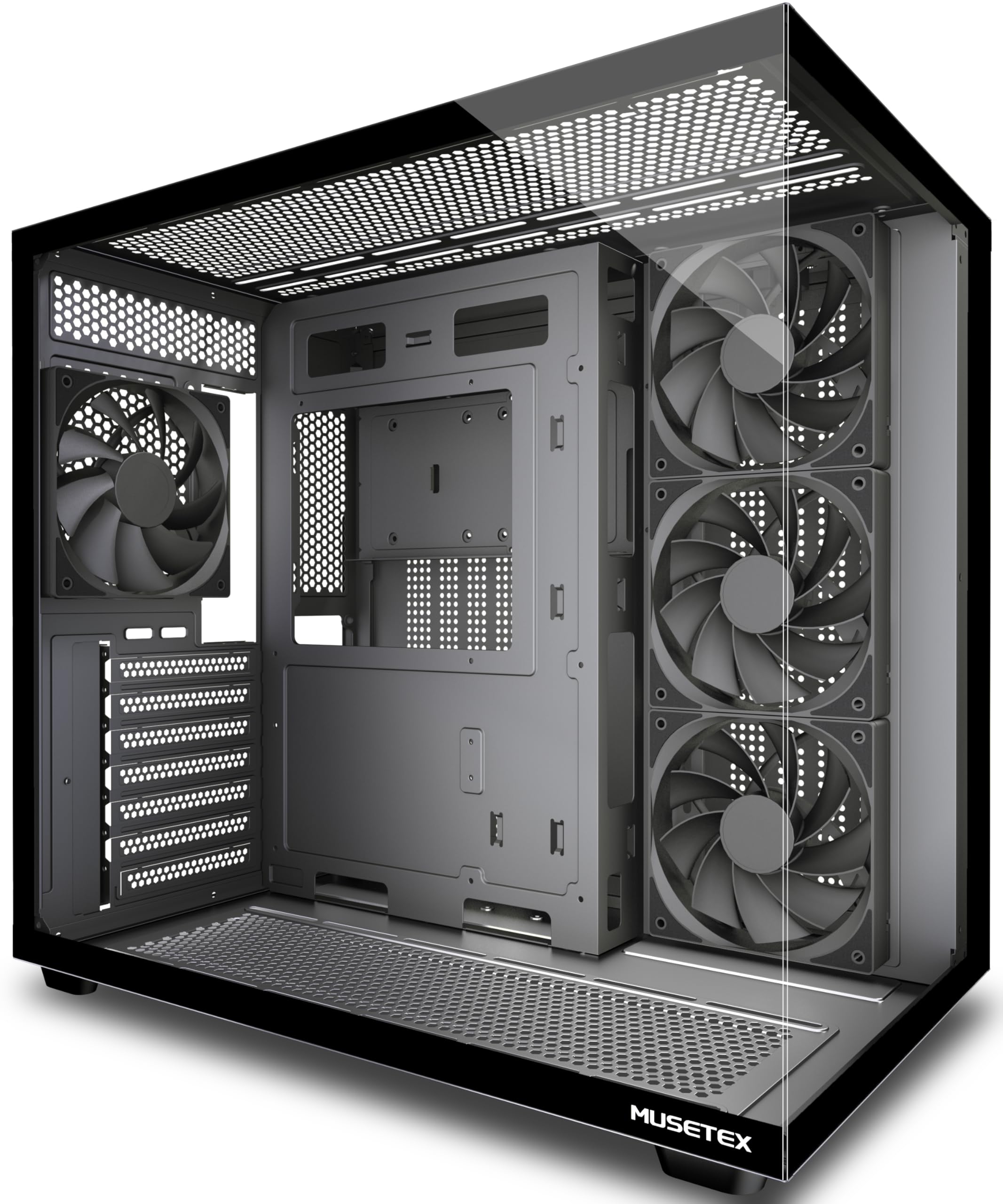
3. MUSETEX Y6 PC Case
A 270-degree glass panorama that turns your build into a desktop centerpiece.
The MUSETEX Y6 is the case for anyone who wants their high-end hardware on display. Its 270° fully transparent dual tempered glass panels offer a wider field of view than most cases, showing off your GPU, cooler, and beloved collectibles from nearly every angle. It features a mysterious black matte texture that owners describe as sleek and high-end.
It’s not just a pretty face — this case supports GPUs up to 410mm, CPU coolers up to 160mm, and top-mounted 360mm liquid coolers. It also includes a Type-C port, which is a rarity at this price point. The dual-chamber design keeps the power supply separate for better thermals, and it comes pre-installed with four 120mm Non-LED fans (three reverse fans on the side and one forward fan on the back) for solid out-of-the-box cooling.
The Y6 is one of the smaller ATX cases available, which makes it efficient on a desk but means ATX boards can limit cable management space. One experienced builder noted that while the airflow, fans, and looks scored 10s, the assembly precision lagged a little — a few standoffs were finicky. For most, the gorgeous glass and the Type-C port make it a worthwhile pick.
Why It Stands Out
- 270° tempered glass for an unobstructed view of components
- Type-C port on the front I/O panel
- Supports GPU up to 410mm and 360mm liquid coolers
Walk-in With Eyes Open
- The built-in cable management system isn’t the best on the market
- Sharp edges inside can cut if you’re not careful during assembly
- Missing standoff hole for mATX boards in some units
Buy it for the view: this is for showcase builds where aesthetics and a modern Type-C port matter as much as raw cooling.
Think twice if: you want the absolute easiest assembly experience of the group.
4. CORSAIR 3500X Mid-Tower ATX PC Case

A wraparound glass look with the cooling capacity to back it up.
The CORSAIR 3500X delivers a clean, modern build with its panoramic wraparound glass aesthetic. It’s designed for those who want the “fish tank” look without the extra width of a larger case. The front and side glass panels are easily removable, which makes building and accessing your system after it’s done a straightforward process.
You can hide cables completely with reverse connection motherboards (boards like ASUS BTF and MSI Project Zero that route power through the back), and it fits any board from Mini-ITX up to EATX. It holds up to 10x 120mm fans across side, roof, and PSU mounts, so you keep strong airflow even with a clean look. Buyers report the build feels sturdy and the glass panel is crisp.
The 3500X falls short on drive space, though — there are only two SSD slots behind the motherboard, making it a poor fit for storage-heavy builds. It also doesn’t include any fans, so you’ll need to factor that into your budget. A note for big GPU owners: a large card can obstruct the PCI slots if you mount fans in the bottom.
The headline: It’s a gorgeous case with excellent room for cable management and a rigid, toolless frame that makes rebuilding a PC a two-hour job.
The catch: With no fans included and limited 3.5″ drive support, it’s best for modern builds prioritizing aesthetics over mass storage.
5. DARKROCK EC2 ATX Mid Tower Gaming Computer PC Case

A sturdy, feature-rich mid-tower that feels far more expensive than it is.
The DARKROCK EC2 is a mesh-front case designed for high airflow and efficient cooling. It’s equipped with magnetic dust filters on the top and bottom to keep the interior clean. While it ships with just a single rear 120mm fan, it supports up to 8 x 120mm fans and a 360mm radiator on the front, giving you plenty of room to expand your cooling later.
This case is Type-C ready, offering the latest connectivity options for all your devices. It fits GPUs up to 340mm in length and PSUs up to 200mm, so it handles most modern hardware without issue. The tempered glass side panel is hinged, which owners love for the easy access it provides to the internals.
The EC2 is lighter and simpler than the MONTECH XR, yet owners praise its sturdy build and value. The recurring comment is that cable management is manageable but time-consuming. It’s a straightforward budget case that reliably gets the job done.
What owners appreciate: The build quality and value get the most praise, with the hinged glass door and magnetic filters being favorite features.
Keep in mind: Cable management is passable rather than excellent, and you’ll likely want to add a couple more fans for a high-end gaming rig.
6. MOROVOL PC Case with 4 RGB Fans

Four RGB fans and a glass side panel make this the flashiest case for the money.
First-time builders get instant airflow and color with the MOROVOL 621, which ships with four pre-installed 120mm RGB fans (fans with red, green, and blue lighting you can customize). You get strong cooling and a bright interior right from the start, without buying extra fans. The diamond-shaped mesh front panel (a pattern of small holes) boosts airflow while adding a stylish look.
It supports ATX, Micro-ATX, and Mini-ITX motherboards, with room for GPUs up to 300mm and CPU coolers up to 155mm. There’s space for 2 x 2.5″ SSDs and 2 x 3.5″ HDDs. The tempered glass side panel is removable and boasts high light transmittance to show off your components and the fixed RGB lighting.
The lighting on these fans is fixed, not addressable, so you can’t change the color patterns. Owners also note that the cable management system is “horrible” and the metal can feel flimsy before it’s fully assembled. Once built, the case feels sturdy enough, but it’s best suited for a starter build where the included RGB fans add the most value.
Why It’s A Catch
- Four pre-installed RGB fans save you a significant amount of money
- Attractive matte finish and glass side panel
- Great airflow through the mesh front
What To Expect
- The USB ports on top can be faulty or stop working after the build
- Cable management requires patience due to limited routing space
- The RGB lighting is fixed, not customizable
Best for: a first-time builder who wants a low-cost case that comes with a full set of working RGB fans and a glass panel.
skip it if: you need sophisticated cable management or plan to install a huge, 300mm-plus GPU.
7. Zalman T6 ATX Mid Tower Computer PC Case

A featherweight, no-frills case perfect for workstations and low-profile builds.
The Zalman T6 is the go-to for a simple, no-nonsense build. It’s a lightweight case that owners frequently recommend for home workstations, office PCs, or student building classes. The hairline pattern front and side mesh design, along with the pre-installed 120mm rear fan, provides sufficient air circulation for basic systems. It ships with a total of 4 fan mounts for a little extra cooling if you need it.
It’s a compact mid-tower that fits a wide range of motherboards — ATX, mATX, and mini-ITX — and includes two 2.5″ bays and two 3.5/2.5″ bays, plus an external bay for a 5.25″ drive. The powder-coated steel chassis is corrosion-resistant. It’s best matched with an internal 120mm fan and a top PSU mount, which keeps the footprint small and doesn’t block airflow in the front.
The most-discussed trade-off is the build quality. The metal is thin, and the case relies on top-mounted PSUs, making it a bit top-heavy. It’s also largely held back by a lack of top and bottom vents, which limits cooling potential for gaming. The T6 is an honest, budget-friendly pick for those who want to keep the cost down and aren’t pushing high-end components.
What owners say: It’s a “cheap, lightweight ATX case ideal for a workstation, not gaming,” with many noting that only 6 of the 9 standoffs come pre-installed.
The fit note: Thin material and limited ventilation are its biggest limitations — it won’t handle a hot gaming rig well.
8. Thermaltake Versa H21 SPCC ATX Mid Tower

The storage workhorse with six bays and tool-free access for server or NAS builds.
The Thermaltake Versa H21 is a functional specialist. While many modern cases are slimming down drive support, this one leans the other way, offering an impressive 6 internal bays (three 3.5″ and three 2.5″) plus three 5.25″ optical bays. That makes it an ideal foundation for a home server, NAS, or a build with lots of storage. The perforated metal mesh front and top panels allow for efficient heat dissipation.
It’s a tool-free case, meaning you can pop panels and drive bays off by hand. The front-top panel includes one SuperSpeed USB 3.0 port, a USB 2.0 port, and HD audio jacks for easy access. It’s designed to support motherboards up to standard ATX, and it can even fit a large CPU cooler like the Noctua NH-D15 while keeping load temps under 40°C in a quiet configuration.
Owners rate it highly within its price point, calling it “low-end but not junky.” The main downsides are the thin steel construction, the lack of front fan mounts, and a non-removable front dust filter. It’s a case that prioritizes function over form — it gets the job done without any visual drama, making it a niche but valuable pick.
The Strong Suit
- Six internal drive bays for massive storage capacity
- Tool-free installation makes building and swapping parts easy
- Great direct front-to-back airflow with a slide-out PSU filter
The Trade-offs
- Thin stamped metal can feel flimsy
- No front fan mounts included, so airflow depends on your own fans
- Power button on top is vulnerable to accidental presses
Reach for this if: you’re building a storage-focused system like a NAS or server and need maximum drive bays on a budget.
Look elsewhere if: you want a flashy side window or a premium-feeling chassis for a gaming showcase.
9. Zalman T8 ATX Mid-Tower Desktop Computer Gaming PC Case

A lightweight, inexpensive starting point with a touch of RGB flair.
The Zalman T8 is the most stripped-down, entry-level option on this list, ideal for a simple first build. It comes with a pre-installed 120mm rear fan and a dedicated RGB LED strip on the front panel for a little visual flair. It’s a supremely lightweight case at just 7 pounds, making it easy to move around, and it’s light enough to be a good platform for a kid’s first gaming PC.
It offers plenty of essential features: USB 3.0 support, a top PSU slot for efficient cooling, and a 5.25″ optical drive slot with a removable front cover. It fits most standard ATX motherboards and supports a CPU cooler up to 160mm tall and VGA cards up to 295mm long. The T8 also accommodates a 240mm front radiator for liquid cooling.
The biggest stylistic difference is the fit — some owners note that the case feels a bit large for Micro-ATX boards. The build quality is acceptable for the price, with light steel that’s sturdy enough for a basic setup. Keep in mind the front LEDs use a Molex connector, which is a slightly dated power connection that not all modern power supplies include.
The takeaway: Owners say it’s “great for a kids build” — it’s a functional, no-fuss case that gets a basic machine running without costing much.
The considerations: Cable management is mixed, and it’s not built for high-performance gaming with a top-heavy PSU design.
Understanding PC Case Specs
Max GPU Length
This tells you the longest graphics card that will physically fit inside the case. A measurement like 340mm or 392mm is the total room measured from the front to the rear of the chassis. Always check your GPU’s own length before buying a case, especially with the larger modern cards on the market.
Pre-Installed Fans
Fans are the heart of a case’s airflow. A case that ships with multiple fans—whether standard 120mm or larger 140mm and 160mm units—saves you from buying them separately. The size and speed (measured in RPM, or rotations per minute) of these fans dictate how much air they move and how much noise they make.
FAQ
Will my large graphics card fit in a budget mid-tower case?
What is the difference between a top PSU mount and a bottom PSU mount?
How many fans should my budget PC case have?
Is tempered glass safe and durable on a budget case?
Do budget PC cases come with a power supply?
What is a Type-C port on a PC case used for?
Is a mesh front panel better for airflow than a glass front?
How many hard drives can I install in a budget case?
What is the importance of the CPU cooler height limit?
Do I need to buy fans separately for my new case?
Final Thoughts: The Verdict
For most people, the budget pc case winner is the MONTECH XR because it brings three ARGB fans, panoramic glass, and superb build quality to a mid-range price with a stellar owner reputation. If you want the absolute best airflow and have a little more to spend, grab the Lian Li LANCOOL 216. And for a build that needs massive storage or maximum visual flair, the Thermaltake Versa H21 and MUSETEX Y6 are the ones to reach for.
How We Picked
We do not accept paid placement. Every pick is matched to a real buyer and a real use-case; we do not hands-on test units.
Sources & Methodology
Specifications: manufacturer listings and product documentation. Review insights: verified customer reviews, as of August 2026. Pricing: not shown on this page (it changes often); check the current price via the retailer link.
As an Amazon Associate, Gadgets Feed earns from qualifying purchases. This does not affect which products we feature.