
Our readers keep the lights on and my morning glass full of iced black tea. As an Amazon Associate, I earn from qualifying purchases.
Specs are compiled from manufacturer listings and verified buyer reviews and can change over time — please confirm the key details on the product page before buying.
Keeping a gaming rig cool usually feels like a choice between a noisy wind tunnel and a budget that cries for help. You don’t have to choose between them. The best budget PC fans on the market right now deliver serious airflow, low noise, and often flashy ARGB lighting, all for less than you would expect to spend on a single premium fan.
I’m Min — the founder and writer behind Gadgets Feed. This guide is built by comparing the manufacturers’ published specifications and the patterns across verified customer reviews, so you get each pick’s real strengths and trade-offs instead of marketing spin.
Whether you are refreshing a prebuilt or building from scratch, finding the right budget pc fans means balancing airflow, noise, and lighting to match your case and your ears.
Our Picks at a Glance


How To Choose The Best Budget PC Fans
Before buying, weigh your case size, cooling target, and noise tolerance. A full-tower fan may be overkill for a small form factor build, and a high-speed fan can be annoying at close range.
Match the Fan Size to Your Case
The most common sizes are 120mm and 140mm. Larger 140mm fans can move more air at lower speeds, which usually means less noise, but you must check your case’s mounting points to see which size it accepts. Most modern cases support both, but it is a crucial check before you commit to a multi-pack.
Understand Airflow vs. Static Pressure
Airflow, measured in CFM (cubic feet per minute), tells you how much air a fan can move in open space. Static pressure, measured in mmH₂O, tells you how well a fan pushes air through resistance, like a dense radiator or a dust filter. For case intake and exhaust, high airflow is key. For radiators, you want higher static pressure to push air through the fins.
Don’t Overlook Noise Level
Noise is measured in dB(A), and a difference of even 5 dB is noticeable. A fan rated at 25 dB(A) is whisper-quiet, while one at 30 dB(A) is audible in a quiet room. Look for fans with a wide RPM range and PWM control, so they can spin slow and silent when your PC is idle and ramp up only when needed.
Quick Comparison
| Model | Best For | Max | Max Speed | Airflow | Noise | Amazon |
|---|---|---|---|---|---|---|
| Noctua NF-P12 redux-1700 PWM★ Best Overall | Silent air cooling | — | 1700 rpm | 120.2 m3/h | 25.1 db | Amazon |
| AsiaHorse Amici ARGBHigh Airflow Pick | High airflow & style | — | 2000 rpm | 89.77 cfm | 30 db | Amazon |
| Thermalright TL-C12C-S 5 PackBest Value | Whole-case value | — | 1550 rpm | 66.17 cfm | 25.6 db | Amazon |
| DS RGB Fans 6 Pack | Budget builds | — | 1200 rpm | 40 cfm | 23 db | Amazon |
| ARCTIC P12 Pro A-RGB 3 Pack | Radiators & high pressure | — | 3000 rpm | 77 cfm | — | Amazon |
| ARCTIC P14 Pro PST 5 Pack | Large case airflow | — | 2500 rpm | — | — | Amazon |
| Thermalright TL-M12Q X3 | ARGB & cable management | — | 2000 rpm | 68.9 cfm | 28.2 db | Amazon |
| be quiet! Pure Wings 3 | Near-silent operation | — | 1600 rpm | 49.9 cfm | 25.5 db | Amazon |
In-Depth Reviews
1. Noctua NF-P12 redux-1700 PWM
Our pick — over 4.5★ from 19,500+ verified ratings; the strongest balance of quality and price.
The quiet champion that proves performance and silence can share one frame.
If your priority is a PC you can barely hear, this is the fan to build around. It uses a pressure-optimised blade design that pushes strong airflow for its class, making it versatile enough for a CPU cooler, a radiator, or just a quiet case exhaust. Its maximum speed of 1700 RPM and 4-pin PWM support let your motherboard automatically spin it down to near-silence when things are cool.
You get a quiet system even under heavy loads, thanks to a maximum noise level of just 25.1 dB(A) (a decibel scale where lower is quieter). Buyers report it handles heavy loads without complaint, saying “They are quiet, yet still powerful.” The frame is made of fibre-glass reinforced PBT (a sturdy plastic), so it stays rigid for years, and the brand rates it for over 150,000 hours of operation (about 17 years of continuous use).
This is the redux edition, meaning you get Noctua’s engineering without the premium price tag. The main thing you give up is the iconic brown and beige color scheme, but you are paying for performance, not paint. It consistently lowers idle temperatures by a few degrees and is a common fix for GPU overheating.
Why It Wins Fans Over
- Exceptional build quality that feels premium in hand
- Moves a serious amount of air for its mere 25.1 dB(A) noise rating
- Versatile enough for CPU coolers, radiators, or case ventilation
What To Know First
- No RGB lighting, so it won’t match a flashy build
- Comes as a single fan, so filling a case costs more upfront
Reach for this if: you want a silent, high-quality fan for a radiator or CPU cooler and care more about acoustics than lighting.
Not for you when: you need to light up a case with ARGB on a strict budget, as this one is purely a performance piece.
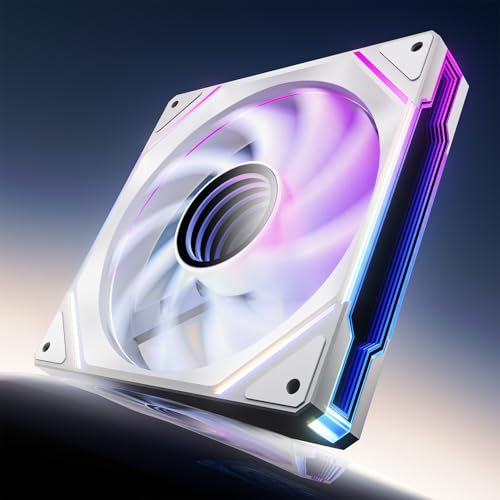
2. AsiaHorse Amici 140mm ARGB PC Case Fan
A 140mm powerhouse that pairs huge airflow with a mesmerizing infinity mirror.
For large cases that need serious air movement, this 140mm fan is a top contender. It boasts a maximum airflow of 89.77 CFM and 3.24mmH₂O wind pressure, which is a substantial step up from standard 120mm fans. This makes it exceptional at expelling heat from a roomy chassis, even during long gaming sessions. It pushes 36% more air than the Thermalright 5-pack’s 66.17 CFM.
The visual experience is a huge part of the appeal. Its infinity mirror effect with 24 LED beads and support for 16.8 million colors makes it look far pricier than it is. It is compatible with Asus Aura Sync, Gigabyte RGB Fusion, and MSI Mystic Light Sync, so it will match your existing setup. The fans can be daisy-chained, up to 3 per chain, which streamlines cable management.
Performance and silence are balanced well here. It uses a hydraulic bearing design for smooth, quiet operation, with a noise range of 6~30dB(A). Owners mention the bearing is smooth and the rubber pads on the frame help reduce vibration. The only consistent drawback mentioned is that cable routing requires some planning, and a couple of owners noted the mirror can sit off-center, causing a slight wobble on some units.
What Impresses Owners
- Huge airflow in a 140mm frame, ideal for big cases
- Infinity mirror RGB looks excellent in person
- Compatible with major motherboard lighting software
Where It’s Tricky
- A 140mm fan requires a case with the right mounting points
- Occasional off-center mirror on some units causes a wobble
Go with this if: you have a full tower needing maximum airflow and want a centerpiece ARGB fan that doesn’t cost a fortune.
Pass on it when: your case only supports 120mm fans, or you need fans for a radiator where static pressure matters more.
3. Thermalright TL-C12C-S 5 Pack
Five solid ARGB fans that beat the cost of a single premium one.
This is the pack that lets you fill every fan slot in your case while staying affordable. You get five 120mm fans with ARGB lighting, each spinning up to 1550 RPM and pushing 66.17 CFM. It is the highest-value way to get whole-system cooling, with owners reporting CPU temperature drops of 8°C after installing them.
Installation is a breeze thanks to the daisy-chain PWM and ARGB connections, meaning you don’t need a separate hub. The included S-FDB bearings keep noise low, rated at ≤25.6 dBA. They are quiet enough for daily use, though they can get slightly audible under heavy load. Some customers note a minor trade-off: they can be a touch noisier at max speed compared to premium options.
You can fill an entire case while staying affordable—reviewers point out buying 20-30 of these for their systems without issue. They also fit on radiators and CPU coolers, so you get flexibility beyond just case airflow. A few customers mentioned a rare DOA (dead on arrival) unit, but most say the value and performance make that risk worth taking.
The Appeal
- Five fans for less than the price of one premium fan
- Daisy-chain design avoids the need for a separate hub
- Good airflow and quiet S-FDB bearing operation
The Catch
- Can get slightly noisy when cranked to maximum speed
- Rare defective units slip through quality control
Best for: anyone building a new PC on a budget who wants consistent, capable cooling in every corner of the case.
Think twice if: you are noise-sensitive at high fan speeds, as these aren’t the quietest at their ceiling.
4. DS RGB Fans, 120mm 6 Pack

An old-school rainbow glow for builds where raw airflow isn’t the focus.
This is the entry-level pick for getting a full set of lighting into a case for the absolute lowest cost. It includes six 120mm fans that top out at 1200 RPM and move 40 CFM each. That airflow is modest compared to high-performance fans, but it is more than enough for low-to-mid-range PCs with standard components.
The lighting here is “Static RGB,” a specific caveat. It cycles through rainbow colors automatically, but you cannot change the colors or turn them off. The fans use a Molex connector, which is a bit dated but works with most standard power supplies. They run at a low 23 db noise level, making them some of the quietest on this list, but they have slightly lower airflow as a trade-off.
Reviewers find them attractive and great value for money, with rubber grommets that dampen vibration. However, the noise and reliability get mixed feedback. Some find them very quiet, others a little noisy, and there are occasional reports of a unit stopping working. If you want a basic, soft glow in your build and don’t need addressable RGB, this is a great fit.
Why It’s Chosen
- Impossibly cheap for six fans with lighting included
- Very quiet with a low 23 db noise rating
- Rubber grommets on the frame reduce vibration
Keep In Mind
- Static RGB cannot be customized or disabled
- Lower 40 CFM airflow suits only modest builds
Choose it if: you want a complete lighting solution for a simple, quiet build and don’t care about software control or max airflow.
Not the one if: you need strong airflow for a hot gaming rig or want RGB that syncs with your motherboard.
5. ARCTIC P12 Pro A-RGB 3 Pack

The pressure-focused set that keeps dense radiators cool at ludicrous speeds.
This is the pick for liquid cooling. The ARCTIC P12 Pro is built for high static pressure, which means it can push air through the tight fins of a radiator or a mesh panel efficiently. It spins up to a staggering 3000 RPM and moves 77 CFM, giving you the raw power to handle the most demanding cooling configurations.
You get excellent control over that power. The PWM speed is adjustable down to less than 5% PWM, at which point the fan stops completely for a truly silent idle. The fluid dynamic bearing keeps things smooth and reliable over a long service life. The new blade design balances performance and noise, delivering a solid package for those who want the flexibility of extreme cooling.
The major caveat is the noise at high speed. Shoppers say that while they are quiet under 60-70% speed and even at 100% for some, they can get noticeably loud above that threshold due to the sheer RPM. This is expected from a high-performance fan, but it means you’ll need to set a custom fan curve in your BIOS or software like FanControl to keep things pleasant. It manages to be quieter than other 3000rpm fans, but it’s not silent at the top end.
Who It’s For
- Exceptional static pressure for dense radiators
- Wide 0-3000 RPM range for precise control
- Solid build quality with vibrant A-RGB lighting
Who It Isn’t
- Gets loud at higher speeds above 70%
- Needs a custom fan curve for best results
Buy it for: any build with a thick radiator or restrictive airflow paths where you need maximum pressure to push air through.
Look elsewhere if: you want a set-and-forget silent fan; these demand a little configuration to tame the top-end noise.
6. ARCTIC P14 Pro PST 5 Pack
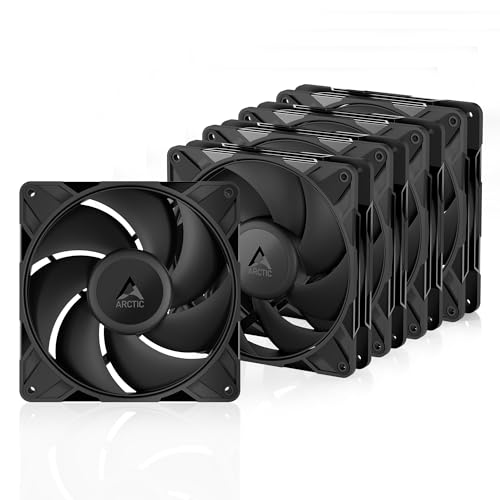
Five large 140mm fans that move a fantastic amount of air for a full tower.
If you want to fill a full-tower case with high-performance 140mm fans, this 5-pack is the efficient way to do it. The P14 Pro spins up to 2500 RPM and moves an impressive amount of air, with some owners reporting over 100 CFM per fan at maximum speed. This is enough airflow to keep an entire system cool, even under a heavy load.
The wide 400-2500 RPM range and PWM control (Y-cable splitter included) let you balance this power against noise. Like its 120mm sibling, it stops completely below 5% PWM for silent operation at idle. Buyers report load temperatures dropping by around 10°C versus stock fans. The build quality is solid, and the daisy-chain wiring is straightforward.
The feedback on noise is mixed, with many finding them quiet at mid-speeds, but they do get pretty noisy past 50% speed. The most consistent complaint, however, is the mounting hardware. The included screws are not great quality and can strip easily, and the holes are tight. Owners often recommend using spare case screws instead. Despite this, the value and performance make it a strong choice.
Strengths
- Huge airflow output for a large chassis
- Excellent value with five fans in the box
- Solid daisy-chain wiring for easy setup
Weaknesses
- Included mounting screws are easy to strip
- Can get noisy at speeds above 50%
Reach for this if: you need to cover a large case with high-airflow fans on a budget and don’t mind using your own screws.
Avoid it when: you require whisper-quiet operation at all times, as these get loud when pushed.
7. Thermalright TL-M12Q X3 120mm ARGB Case Fans

A cleaner build with dual-side infinity mirrors and daisy-chain wiring.
This 3-pack stands out for its stunning looks and clean cable management. Each 120mm fan features dual-side infinity mirror ARGB lighting, which gives a fuller, more premium look in glass-panel cases. It is an aesthetic upgrade that makes the builder’s job easier, with the infinity mirror being the defining visual feature.
Under the hood, it performs strongly. It runs up to 2000 RPM, providing 68.9 CFM of airflow and 2.21mmH2O of static pressure. That is enough for case intake and exhaust and even some radiator use. The 4-pin PWM control and 3-pin 5V ARGB connections allow for syncing with your motherboard software, while the daisy-chain connection keeps the wiring tidy and simple.
Owners praise the value for money and the quality of the fans. The lighting is bright and the build is solid, often making it a “gem” find for an RGB-focused build. The main thing to understand is the daisy-chain requires a side-by-side row of three, and the fans are not individually controllable. For beginners, the cable instructions can be a little confusing at first, though the end result is well worth the effort.
Standout Points
- Dual-side infinity mirror for a fuller RGB look
- Clean daisy-chain wiring simplifies cable management
- Great airflow at 68.9 CFM and quiet operation
Watch Outs
- Daisy-chain setup means no individual fan control
- Instructions can be confusing for those new to builds
Get these if: you want a high-impact ARGB look with simple, clean cabling and solid airflow for a gaming rig.
Skip them if: you need to control each fan’s RGB independently, as the daisy-chain limits this flexibility.
8. be quiet! Pure Wings 3 120mm PWM Triple Pack
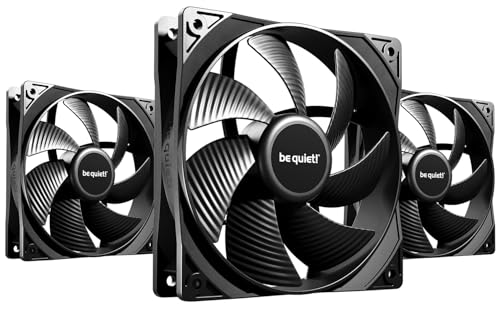
German-engineered silence with a timeless, no-nonsense design.
True to its name, this is the fan for the silence purist. The Pure Wings 3 is designed with a newly tune fan frame and blade angles to reduce air leaks and minimize noise-generating turbulence. It runs at a maximum of 1600 RPM and produces just 25.5 dB of noise, which owners describe as impossible to hear unless you are really concentrating.
Performance doesn’t take a back seat. It moves a respectable 49.9 CFM of air, and Owners mention CPU temperature drops of around 5°C. The 7 airflow-tune blades ensure reliable cooling even in demanding configurations. It’s a no-nonsense, elegant addition to any gaming PC, focusing purely on function and acoustics.
It’s built to last, too. Its rifle bearing design delivers an 80,000-hour lifespan for set-and-forget reliability. Each pack comes with three fans, perfect for the main case slots. Note that it doesn’t come with vibration pads, and while the blade design is good, some owners feel other premium options push a bit more air, though they typically cost more.
Why it’s a Top Pick
- Exceptional low-noise operation at just 25.5 dB
- Long 80,000-hour lifespan with rifle bearing tech
- Solid build quality and easy to clean
The Trade-off
- No vibration pads included in the box
- Airflow is solid but not class-leading
Ideal for: anyone who values a near-silent PC above all else and wants a reliable, long-lasting fan for their case.
Not for: budget buyers who need maximum airflow or want RGB, as this pack focuses purely on quiet performance and function.
Understanding the Specs
Airflow and Static Pressure
The two numbers that define a fan’s cooling ability are airflow (CFM) and static pressure (mmH₂O). Airflow tells you how much air the fan moves in free space, which is crucial for case intake and exhaust. Static pressure tells you how well it pushes through resistance, like a radiator or dust filter. High-CFM fans are great for case airflow, while high-pressure fans are essential for liquid cooling radiators.
Noise and dB(A)
Fan noise is measured in dB(A), a scale that reflects how the human ear perceives sound. A difference of 3 dB is noticeable, and 10 dB is perceived as roughly twice as loud. For a quiet PC, look for fans rated under 25 dB(A). Remember, a fan’s noise is tied to its speed, so a fan with a wide PWM range can be silent at idle and only get loud under heavy load.
FAQ
What is the difference between static pressure and airflow in PC fans?
Are 120mm or 140mm fans better for my PC case?
Is a 4-pin PWM fan worth it over a 3-pin fan?
How many case fans do I need for a gaming PC?
Can I use a CPU fan as a case fan and vice versa?
Will ARGB fans work with any motherboard?
How long do PC case fans typically last?
Why does my fan sound loud even when it’s new?
Is there any reason to buy expensive fans like this budget list?
What is a “daisy-chain” connection on PC fans?
Final Thoughts: The Verdict
For the majority of shoppers, the budget pc fans winner is the Noctua NF-P12 redux-1700 PWM because it delivers top-tier quiet operation with proven long-term reliability. If you want to fill a whole case with capable cooling on a shoestring, grab the Thermalright TL-C12C-S 5 Pack. And for a build that prioritizes looks and high airflow, the AsiaHorse Amici ARGB is the one to reach for.
How We Picked
We do not accept paid placement. Every pick is matched to a real buyer and a real use-case; we do not hands-on test units.
Sources & Methodology
Specifications: manufacturer listings and product documentation. Review insights: verified customer reviews, as of August 2026. Pricing: not shown on this page (it changes often); check the current price via the retailer link.
As an Amazon Associate, Gadgets Feed earns from qualifying purchases. This does not affect which products we feature.