
The wall between a frustrating typing session and a fluid, productive workflow often comes down to a single peripheral sitting under your fingertips. A budget PC keyboard carries the burden of tens of thousands of keystrokes per day, yet the market floods this price tier with designs that cut every conceivable corner, from mushy membranes to keycaps that fade within months. Picking the wrong one means living with missed inputs, finger fatigue, and a desk that feels incomplete.
I’m Min — the co-founder and writer behind Gadgets Feed. I have spent countless hours cross-referencing technical specifications, analyzing switch types, polling rates, keycap materials, and real user endurance reports to separate the genuine performers from the flashy distractions in this crowded space.
Whether you crave the tactile snap of mechanical switches, the silent reliability of a membrane deck, or the competitive edge of hall-effect magnetic actuation, this guide dissects the top contenders to help you find the best budget pc keyboard for your specific typing style and daily demands.
How To Choose The Best Budget PC Keyboard
Every budget PC keyboard forces a trade-off. Understanding which spec trade-offs to accept — and which are deal-breakers — is the difference between a smart purchase and a regretful one. The three pillars to evaluate are switch type, rollover and polling performance, and layout form factor.
Switch Type: The Foundation of Feel
Membrane keyboards use a rubber dome under each key, producing a softer, quieter press with a mushy bottom-out feel. They are cheaper to manufacture and often spill-resistant, but they lack the consistent tactile feedback and durability of mechanical switches. Mechanical keyboards use individual spring-loaded switches under each key, offering crisp tactile or linear actuation, longer lifespan (50 million to 100 million keystrokes), and hot-swappable flexibility for customization. Hall-effect magnetic switches — found on some budget-friendly models — use magnets to detect actuation with zero physical contact, enabling adjustable actuation points and rapid trigger modes that mechanical switches cannot match.
Rollover and Polling Rate: Responsiveness Under Pressure
N-key rollover (NKRO) ensures every simultaneous keypress registers correctly, a critical spec for complex gaming inputs and fast typists. Membrane keyboards typically offer only 6-key or 12-key rollover, while mechanical and hall-effect boards in this tier almost always support full NKRO. Polling rate, measured in Hz, dictates how often the keyboard reports its state to your PC. A 1000 Hz polling rate (1 ms response time) is standard for competitive gaming, while cheaper boards drop to 125 Hz or 250 Hz, introducing noticeable lag.
Layout: Balancing Space and Function
Full-size (104-key) layouts include a dedicated number pad, ideal for data entry and productivity. Tenkeyless (TKL, 87-key) removes the number pad to free up mouse space for gamers. Compact 60% and 75% layouts eliminate the function row and navigation cluster, prioritizing portability but requiring layer keys for F-commands and arrows. Your desk size and primary usage scenario should dictate this choice — not the aesthetic trend.
Quick Comparison
On smaller screens, swipe sideways to see the full table.
| Model | Category | Best For | Key Spec | Amazon |
|---|---|---|---|---|
| SteelSeries Apex Pro TKL Gen 3 | Premium | Competitive esports gaming | OmniPoint 3.0 Hall-Effect switches, 0.1-4.0mm adjustable actuation | Amazon |
| HUO JI E-Yooso Z-99 | Premium | Typists seeking creamy, quiet acoustics | 5-layer sound dampening foam, gasket mount | Amazon |
| Aula WIN60 HE | Mid-Range | Competitive FPS on a tight budget | 8000 Hz polling rate, magnetic switches with Rapid Trigger | Amazon |
| Redragon K552P | Mid-Range | Budget mechanical with hot-swap capabilities | Hot-swappable 3-pin Blue switches, metal frame | Amazon |
| Corsair K55 CORE | Mid-Range | Quiet full-size office and casual gaming | 12-key rollover membrane, 300ml spill resistance | Amazon |
| KOPJIPPOM Large Print (7-Color) | Budget | Visually impaired users and low-light environments | 4x larger key fonts, 7-color backlight with 3 brightness levels | Amazon |
| KOPJIPPOM USB Wired (Rainbow) | Budget | Seniors and learners needing visual clarity | Large print keys with spaced layout, rainbow backlight | Amazon |
In‑Depth Reviews
1. SteelSeries Apex Pro TKL Gen 3

The SteelSeries Apex Pro TKL Gen 3 redefines what is possible in a keyboard at its price tier by ditching traditional mechanical contacts entirely. Its OmniPoint 3.0 HyperMagnetic switches use hall-effect sensors to detect actuation with zero physical wear, offering 20x faster actuation than standard mechanical switches and an adjustable actuation range from 0.1 mm to 4.0 mm. This granular control lets you set hair-trigger sensitivity for rapid-fire taps in shooters, then dial it back to a deeper press for typing to avoid accidental inputs — all without swapping hardware.
The Rapid Trigger and Rapid Tap features register key releases and subsequent presses faster than the physical reset of a mechanical switch, effectively allowing you to spam strafe or AD-peek at inhuman speeds. The included Protection Mode dynamically reduces sensitivity on adjacent keys when a primary key is pressed, cutting down on accidental misclicks during intense moments. The OLED Smart Display on the top right handles on-the-fly setting adjustments without leaving your game, and the PBT keycaps resist the greasy shine that plagues cheaper ABS caps.
Its tenkeyless form factor frees up significant mouse space, and the USB-C connection ensures low-latency data transfer. The SteelSeries GG software provides game-ready presets for major esports titles, making setup trivial for competitive players. The only real compromise is the plastic enclosure, but it feels dense and non-slip in hand, and the included magnetic wrist rest adds comfort for long sessions. For anyone who competes seriously, this is the performance ceiling for a budget-accessible keyboard.
Why it’s great
- Adjustable actuation range (0.1-4.0mm) adapts to any game or typing style
- Rapid Trigger and Rapid Tap eliminate mechanical reset delay
- PBT keycaps and OLED display add premium durability and convenience
Good to know
- Plastic chassis may not satisfy users wanting full aluminum construction
- SteelSeries GG software required for full customization
2. HUO JI E-Yooso Z-99 Creamy Mechanical

The HUO JI E-Yooso Z-99 prioritizes a sensory experience that most budget boards ignore: sound quality. Its gasket-mounted structure isolates the plate from the case, while five layers of sound-absorbing foam and a silicone dampener pad reduce hollow resonance by roughly 80% and overall noise by about 40%. The result is a deep, creamy bottom-out sound — not the sharp plastic clack of a traditional metal-plate board — making it suitable for shared workspaces or late-night typing sessions where noise carries.
The pre-lubed linear switches ship from the factory with a smooth, scratch-free feel that typically requires aftermarket modification on cheaper mechanicals. The hot-swappable PCB supports both 3-pin and 5-pin switches, giving you freedom to experiment with different force curves later. The 96% layout (99 keys) retains the F-row, arrow cluster, and number pad within a frame that is only 15.5 inches wide, shaving several inches off a full-size board while maintaining full functionality.
Double-shot injection PBT keycaps ensure the legends never fade, a common failure point on budget boards that use pad-printed or laser-etched caps. The 15 RGB backlight effects and eight solid color modes are controlled via key combos without software, though the per-key brightness is moderate compared to gaming-focused boards. The detachable USB-C cable adds convenience for transport. If your priority is a pleasant, quiet typing feel with room to customize later, the Z-99 delivers acoustics that punch above its price class.
Why it’s great
- Gasket mount and 5-layer foam create an exceptionally creamy, quiet sound
- Hot-swappable PCB supports 3-pin and 5-pin switches for easy modding
- 96% layout saves space while keeping full numpad and arrow keys
Good to know
- Backlight brightness is moderate, not eye-searing
- No dedicated software for macro programming
3. Aula WIN60 HE

The Aula WIN60 HE brings hall-effect magnetic switch technology — the same foundation used in flagship esports keyboards — to a price point that undercuts most traditional mechanical contenders. Its Graywood V3 magnetic switches rely on magnets rather than metal leaf contacts, eliminating physical wear and enabling an adjustable actuation distance down to 0.02 mm per step with Rapid Trigger mode. The 8000 Hz polling rate (0.125 ms response time) exceeds the 1000 Hz standard by a factor of eight, giving FPS players an edge in games like Valorant and CS2 where every millisecond of input delay matters.
The 60% layout removes the arrow cluster, function row, and navigation keys entirely, which is a deliberate trade-off for desk space and portability. The compact 11-inch width frees up vast mouse sweep area, critical for low-sensitivity aiming. The web-based driver handles key remapping, macro creation, and RGB customization without downloading any software — though some users report the interface feels unpolished compared to local applications. The standard white version is widely preferred over the max red variant, which has reported hardware inconsistency with uneven spacebars.
Build quality is surprisingly robust for the price: the plastic frame feels dense, the PBT keycaps resist shine, and the RGB underglow illuminates the caps from a lower position for a clean diffused look. The USB-C cable is detachable, and the keyboard is not compatible with PlayStation consoles. For competitive gamers who prioritize raw speed and programmability over layout completeness, the WIN60 HE is an absurd value proposition that rivals boards costing four times as much.
Why it’s great
- 8000 Hz polling rate and hall-effect switches deliver near-zero input lag
- Rapid Trigger with 0.02mm step distance enables unmatched speed
- Web-based driver eliminates bulky software downloads
Good to know
- 60% layout lacks arrow keys and function row, requiring layer learning
- Web-based software is functional but not as refined as dedicated apps
4. Redragon K552P

The Redragon K552P has earned its reputation as the entry-level mechanical keyboard that refuses to break. Its tenkeyless 87-key layout with a metal top plate and a spill-resistant design offers a build quality that feels significantly more premium than its price suggests. The included hot-swappable Blue switches deliver a crisp tactile bump with a loud audible click — polarizing for open offices but deeply satisfying for typists who want confirmation with every stroke. The PCB supports 3-pin mechanical switches, making this an excellent modding platform for beginners to experiment with different switch feel without soldering.
The 18 RGB backlight modes are controlled via FN key combos and offer direction, speed, and brightness adjustments, though the per-key lighting resets to default on reboot — a minor inconvenience. The N-key rollover ensures every keypress registers correctly regardless of how many simultaneous inputs you send, and the 1000 Hz polling rate keeps input lag imperceptible. The included keycap puller and switch puller mean you can start customizing straight out of the box, and the double-shot PBT keycaps resist fading better than the ABS caps found on most keyboards at this level.
The Blue switches are loud — the click sound comes from the switch mechanism itself, not just keycap bottom-out — and the non-detachable USB cable limits portability. Some users report speaker interference when connected via KVM switches on Mac systems. However, the K552P has a proven track record of reliability over years of daily use, and its hot-swappable nature means you can gradually upgrade switches and keycaps to create a truly personal build. It remains the gold standard for dipping your toes into mechanical keyboards without financial risk.
Why it’s great
- Hot-swappable 3-pin PCB makes switch customization easy for beginners
- Metal top plate and spill-resistant build offer exceptional durability
- Full NKRO and 1000 Hz polling cover gaming needs adequately
Good to know
- Blue switches are loud and may disturb nearby coworkers or family
- Non-detachable cable limits desk cable management options
5. Corsair K55 CORE

The Corsair K55 CORE sits in a unique position as a premium membrane keyboard in a market increasingly dominated by cheap mechanicals. Its quiet, responsive membrane switches offer a softer press than any clicky mechanical, making it an ideal choice for shared offices, dorm rooms, or late-night work sessions where noise discipline matters. The full-size layout includes a dedicated number pad and four media keys (volume up/down, mute, play/pause), plus a Windows lock key and brightness control — all without requiring software for basic operation.
The 300 ml spill resistance rating means a tipped coffee cup or water glass won’t instantly destroy the board, a practical advantage over exposed mechanical switch housings. The ten-zone RGB backlighting is customizable through Corsair’s iCUE software, though the zones are arranged vertically (left, center, right) rather than per-key — a compromise inherent to membrane construction. The 12-key rollover and 1000 Hz polling rate are adequate for casual gaming, though competitive players will notice the absence of full NKRO during complex key combos.
The included detachable wrist rest adds comfort for long typing sessions, and the textured plastic chassis feels solid despite being lighter than a metal-frame mechanical. The membrane switches are rated for a lower total keystroke lifespan than mechanical alternatives, and the fixed keycaps cannot be swapped without destructive modification. For users who prioritize quiet operation, spill protection, and a straightforward full-size layout over switch customization and tactile feedback, the K55 CORE is the membrane keyboard that gets the fundamentals right.
Why it’s great
- Quiet membrane switches are ideal for noise-sensitive environments
- 300ml spill resistance provides practical everyday protection
- Dedicated media keys and included wrist rest add daily convenience
Good to know
- 12-key rollover limits simultaneous input registration during heavy gaming
- Membrane switches have a shorter lifespan than mechanical alternatives
6. KOPJIPPOM Large Print Keyboard (7-Color Backlight)

The KOPJIPPOM Large Print Keyboard addresses a specific accessibility gap that most budget keyboards ignore entirely: key legibility for users with visual impairments. Its keycaps are printed with letters approximately four times larger than standard keyboard fonts, making individual characters readable from a normal typing distance without squinting. The 7-color LED backlight with three adjustable brightness levels ensures those large letters remain visible even in dimly lit rooms, with options ranging from cool blue and green to warmer white and yellow tones to suit personal preference.
The full-size 104-key membrane layout includes a dedicated number pad, and the spill-resistant design adds a layer of protection against accidental liquid damage. The plug-and-play USB-A connection requires no driver installation on Windows 2000 through 11, with basic compatibility for Mac OS (though multimedia keys may not map correctly). The foldable stands at the back raise the keyboard to a 5-degree angle to reduce wrist strain during extended sessions. Reviewers consistently note the quiet, responsive keypresses and the stable, heavy build that prevents sliding on the desk.
One limitation is that the keyboard does not retain its color or brightness setting after being unplugged — it defaults to the last active mode when reconnected. The FN-layer for volume and multimedia control lacks a dedicated lock, and the keys flash momentarily when the connected PC enters sleep mode. These are minor annoyances against the core value proposition: a large-print, backlit, spill-resistant keyboard that makes everyday typing accessible for seniors, visually impaired users, and low-light environments without breaking the bank.
Why it’s great
- 4x larger key fonts dramatically improve readability for low-vision users
- 7-color backlight with 3 brightness levels works in any lighting condition
- Spill-resistant design and quiet membrane switches suit shared spaces
Good to know
- Backlight settings reset when unplugged from power
- FN-layer for media controls lacks a lock, requiring two-handed use
7. KOPJIPPOM USB Wired Keyboard (Rainbow Backlight)
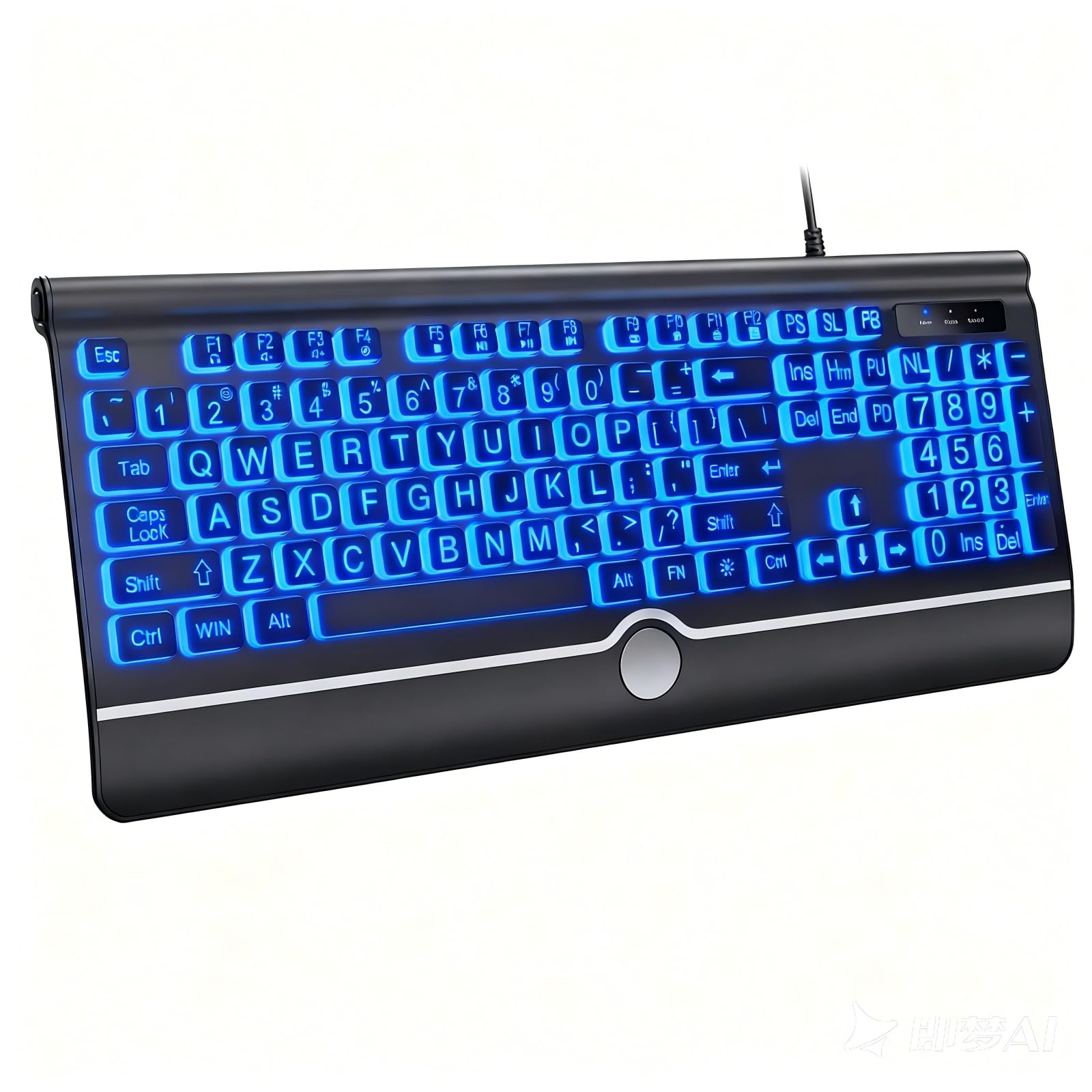
The KOPJIPPOM USB Wired Keyboard refines the large-print formula with a slightly spaced key layout that actively reduces typing errors — the gaps between keys give your fingers more room to land accurately without striking adjacent caps. This design detail makes it particularly effective for seniors and young learners who are still developing muscle memory, as the physical separation compensates for imprecise finger placement. The rainbow backlight cycles through multiple colors automatically with both permanent and breathing modes, plus adjustable brightness levels to suit ambient room lighting.
The full-size 104-key membrane construction includes a built-in wrist rest that provides palm support without adding a separate attachment, and the foldable feet at the rear offer two typing angles. The spill-resistant frame protects against minor liquid accidents, and the estimated key lifespan of 5 million keystrokes is reasonable for a board at this price tier. Compatibility spans Windows 2000 through 11, with basic Mac OS support (multimedia keys may not map perfectly). The 4-foot USB cable provides adequate reach for most desktop setups without requiring a USB extender.
Some users note that the integrated wrist rest is narrower than dedicated separate rests, and the volume control requires a two-handed FN-button combination rather than a dedicated knob or slider. The keys are soft and quiet, which works well in shared environments but may feel too mushy for typists accustomed to mechanical feedback. For an entry-level or accessibility-focused user who needs large, well-spaced letters and a colorful backlight at a minimal investment, this KOPJIPPOM model delivers reliable function without unnecessary complexity.
Why it’s great
- Slightly spaced key layout reduces typing errors for beginners and seniors
- Rainbow backlight with breathing mode adds visual appeal without software
- Built-in wrist rest and spill resistance cover daily-use comfort needs
Good to know
- Wrist rest is narrower than standalone ergonomic pads
- Volume control requires a two-handed FN combination
FAQ
Is a membrane keyboard good enough for gaming?
What does hot-swappable mean on a mechanical keyboard?
Is a 60% keyboard too small for office work?
What is the advantage of hall-effect switches over mechanical switches?
Final Thoughts: The Verdict
For most users, the best budget pc keyboard winner is the SteelSeries Apex Pro TKL Gen 3 because its hall-effect adjustability covers typing, casual gaming, and competitive esports equally well. If you want creamy acoustics and a hot-swappable mechanical build for quiet typing sessions, grab the HUO JI E-Yooso Z-99. And for competitive FPS play on a tight budget, nothing beats the Aula WIN60 HE with its 8000 Hz polling and magnetic Rapid Trigger.