
Building a PC on a budget isn’t about buying the cheapest junk you can find. It’s about knowing exactly which components deliver 90% of the performance for half the cost, and which ones you can’t afford to cheap out on. The right case, PSU, CPU, and storage choices will make or break your build’s longevity and gaming experience.
I’m Min — the co-founder and writer behind Gadgets Feed. I’ve spent hundreds of hours analyzing price-to-performance graphs, reading through thousands of verified buyer reports, and cross-referencing technical specifications to find the smartest components for builders who want maximum performance without wasteful spending.
This guide focuses strictly on components that punch above their weight class, helping you assemble a capable rig without breaking the bank. After extensive research, I’ve curated this definitive list of the best budget pc parts available right now.
How To Choose The Best Budget PC Parts
When you’re building a budget PC, every dollar has to earn its place. The trap most new builders fall into is overspending on flashy cases and RGB fans while underspending on the power supply and storage. A smart budget build prioritizes the components that directly impact gaming performance and system stability — the CPU, GPU, and PSU — while cutting costs on the case and peripherals that don’t affect framerates.
Prioritize the CPU and PSU
The processor is the brain of your build, and on a budget, the AMD AM4 platform offers incredible value. A 6-core, 12-thread chip like the Ryzen 5 5500 delivers smooth 1080p gaming for under . Pairing it with a reliable 80+ Bronze 650W power supply ensures your system stays stable under load without risking damage from cheap PSUs that can fail catastrophically. Never cut corners on the PSU — a failing unit can take your entire build with it.
Choose a Case With Real Airflow
A mesh front panel with proper ventilation is non-negotiable for keeping temperatures in check. Many budget cases look good but suffocate components behind solid glass or plastic panels. Look for cases with perforated fronts, multiple fan mounting points, and at least one pre-installed fan. A case that supports a 240mm or 360mm radiator gives you room to upgrade cooling later without replacing the entire chassis.
Quick Comparison
On smaller screens, swipe sideways to see the full table.
| Model | Category | Best For | Key Spec | Amazon |
|---|---|---|---|---|
| AMD Ryzen 5 5500 | CPU | 1080p Gaming | 6 Cores / 12 Threads | Amazon |
| MSI MAG A650BN | PSU | Reliable Stability | 650W / 80+ Bronze | Amazon |
| Cooler Master Q300L | Case | Compact mATX Builds | 360mm GPU Clearance | Amazon |
| DARKROCK EC2 | Case | ATX Mid-Tower | 340mm GPU Clearance | Amazon |
| GAMDIAS Mid Tower | Case | RGB Gaming Builds | 4 Pre-Installed ARGB Fans | Amazon |
| wo-we P6 Lite Mini PC | System | Compact Desktop | Ryzen 5 3500U / Vega 8 | Amazon |
| Seagate BarraCuda 8TB | Storage | Mass Media Storage | 8TB / 5400 RPM | Amazon |
In‑Depth Reviews
1. AMD Ryzen 5 5500 6-Core Processor

The Ryzen 5 5500 is the cornerstone of any budget gaming build. With 6 cores and 12 threads clocking up to 4.2 GHz, this unlocked processor delivers over 100 FPS in popular titles when paired with a discrete GPU. It supports DDR4-3200 memory and sits on the mature AM4 platform, meaning you can drop it into affordable B550 or A520 motherboards for maximum value.
The bundled Wraith Stealth cooler is adequate for stock operation, keeping temperatures under 70°C during gaming sessions according to verified reports. Its 19MB of total cache helps reduce latency in CPU-bound scenarios, and the unlocked multiplier gives you headroom to squeeze extra performance with a budget aftermarket cooler down the line. At this price point, no other processor offers this core count and gaming throughput.
Just remember that this chip lacks integrated graphics — you’ll need a dedicated GPU to get video output. For builders upgrading from older Ryzen generations, the AM4 compatibility means you can reuse existing DDR4 memory and motherboards, making this a cost-effective drop-in upgrade for systems already running Ryzen 3000 or earlier.
Why it’s great
- Unmatched price-to-performance for 1080p gaming
- Unlocked multiplier enables overclocking
- AM4 platform compatibility saves on motherboard costs
Good to know
- Requires a discrete graphics card — no integrated GPU
- Stock cooler lacks copper core, consider aftermarket for noise reduction
2. MSI MAG A650BN 650W Power Supply

The MSI MAG A650BN is the kind of power supply you want powering your budget build — reliable, efficient, and built to last. This non-modular 650W unit carries an 80+ Bronze certification, meaning it runs at up to 85% efficiency under typical loads, wasting less heat and keeping your electricity bill in check. The DC-DC circuit design ensures stable voltage delivery to your CPU and GPU, even during intense gaming sessions.
Buyers report whisper-quiet operation from the 120mm low-noise fan, and the five-year warranty speaks to MSI’s confidence in the build quality. Industrial-level protections — including OVP, OCP, OPP, OTP, and SCP — guard against power surges and overheating. For a mid-range build with components drawing under 500W, this 650W unit gives you plenty of headroom without going overboard.
The non-modular cable design is the only real concession to its budget positioning. You’ll need to manage the extra cables inside your case, which is easier in mid-tower cases with generous cable routing space. A bit of planning with zip ties turns this into a non-issue, and the savings versus a modular unit are well worth the effort.
Why it’s great
- Rock-solid voltage regulation with DC-DC design
- Very quiet operation even under load
- Five-year warranty provides peace of mind
Good to know
- Non-modular cables require careful management
- 24-pin connector may loosen over time in some units
3. Cooler Master MasterBox Q300L
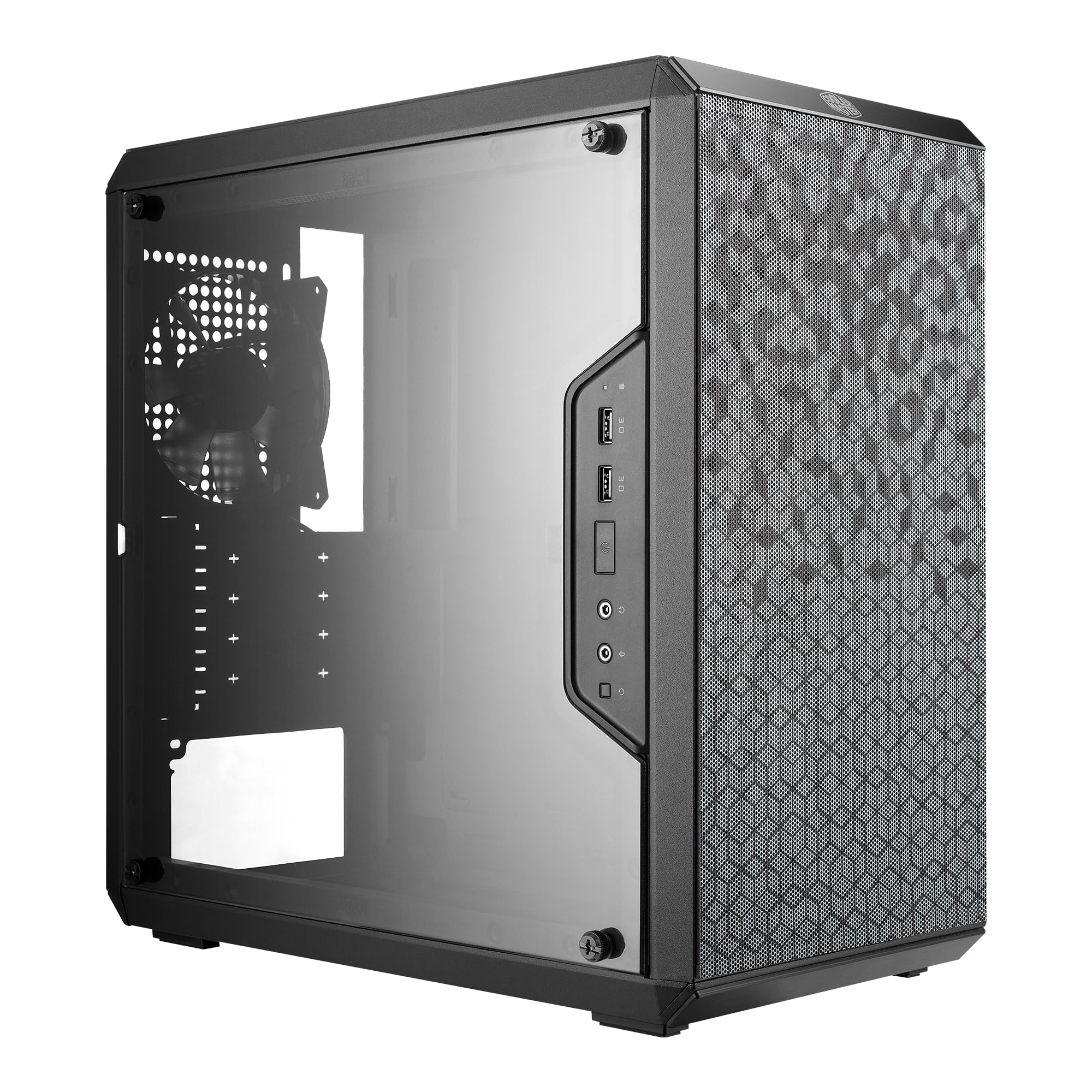
The Cooler Master MasterBox Q300L proves you don’t need a full tower to get excellent airflow and component support. This compact Micro-ATX case accommodates CPU coolers up to 159mm tall and graphics cards up to 360mm long — enough for virtually any modern GPU, including the chunky 9070 XT. The perforated design on all sides creates an open thermal environment that reviewers confirm dropped temperatures from the high 80s to mid-70s Celsius with additional fans installed.
The modular I/O panel is a standout feature at this price point, letting you reposition the front-panel ports to the top, bottom, or either side depending on your desk layout. Magnetic dust filters on the front and bottom keep the interior clean while adding a distinctive visual pattern. One 120mm fan comes pre-installed, but the case supports up to five fans total or a 240mm radiator, giving you plenty of cooling expansion options.
Build quality is impressive for the cost, but there are trade-offs. The side panel uses acrylic rather than tempered glass, which is more prone to scratching during cleaning. Cable management behind the motherboard tray is tight, and a modular power supply makes life significantly easier in this compact space. For builders who value a small footprint without sacrificing GPU compatibility, the Q300L is hard to beat.
Why it’s great
- Excellent airflow with all-perforated design
- Movable I/O panel for flexible desk placement
- Fits massive GPUs up to 360mm in a compact chassis
Good to know
- Acrylic side panel scratches easier than glass
- Tight cable routing space behind the tray
4. DARKROCK EC2 ATX Mid Tower

The DARKROCK EC2 bridges the gap between budget and premium with features usually reserved for pricier enclosures. The tempered glass side panel uses a convenient hinged door design — no screws to lose, just pull and swing open for easy component access. The mesh front panel feeds cool air directly into the chassis, and the magnetic dust filters on the top and bottom prevent dust buildup without needing tools to clean.
Connectivity includes a front-panel USB-C port, a rarity in the budget segment, alongside USB 3.0 and audio jacks. Internally, the EC2 supports up to eight 120mm fans or a 360mm radiator up front, giving you serious cooling headroom for future upgrades. ATX, Micro-ATX, and Mini-ITX motherboards all fit, and the 340mm GPU clearance handles RTX 4070 Ti Super-class cards without issues.
Builders consistently praise the build quality, calling it “solid” and “mature” with easy cable management. The included fan is a single 120mm rear exhaust, which is enough for basic builds but you’ll want to add front intakes for gaming rigs. Some buyers note that the front mesh panel is a bit stiff to remove for cleaning, and top fan mounting can feel awkward, but these are minor quirks in an otherwise excellent budget case.
Why it’s great
- Hinged tempered glass door for tool-free access
- USB-C front port at a budget price point
- Supports 360mm radiator for serious cooling
Good to know
- Only one pre-installed fan included
- Front mesh panel can be difficult to remove
5. GAMDIAS ATX Mid Tower with 4 ARGB Fans

The GAMDIAS mid-tower case is built for buyers who want lighting effects without spending extra on fans and controllers. It ships with four 120mm ARGB fans pre-installed — three in the front for intake and one in the rear for exhaust — complete with a built-in LED controller and a dedicated button to cycle through lighting modes. The panoramic tempered glass side panel gives you a full view of your build’s interior, making it ideal for showcasing RGB components.
Supporting ATX, Micro-ATX, and Mini-ITX motherboards, this case handles CPU coolers up to 160mm and GPUs up to 260mm. The perforated front panel feeds the intake fans effectively, and the case can accommodate up to six fans total or a 360mm radiator in the front. Front I/O includes one USB 3.0 and two USB 2.0 ports along with HD audio jacks and the LED control button.
The main caveats revolve around build quality details. The pre-installed fans use non-standard daisy-chain connections, making replacement trickier than standard setups. Cable management space is tight, especially for an ATX motherboard, and some units have reported misaligned USB 3.0 cutouts that require an extender cable. For the price, you’re getting a lot of lighting and glass, but the structural refinements of pricier cases are absent.
Why it’s great
- Four ARGB fans included with built-in controller
- Panoramic tempered glass for full component display
- Supports 360mm radiator for liquid cooling
Good to know
- Non-standard fan connectors complicate replacements
- Tight cable management for ATX builds
6. wo-we P6 Lite Mini PC Ryzen 5 3500U
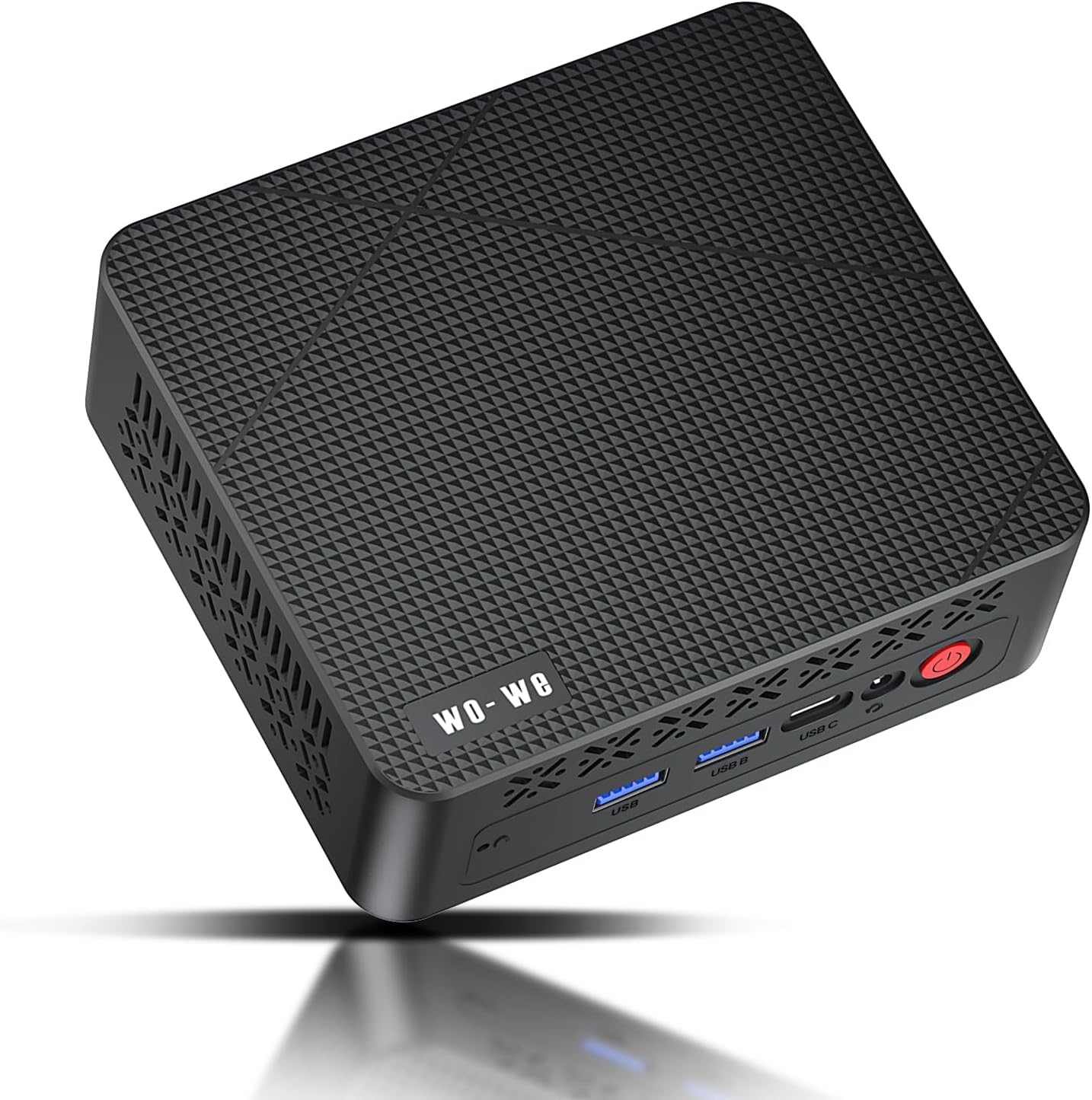
The wo-we P6 Lite Mini PC redefines the budget PC concept by packing a full desktop experience into a palm-sized chassis. Powered by the AMD Ryzen 5 3500U with its 4 cores, 8 threads, and integrated Vega 8 graphics, this mini PC handles everyday productivity, media streaming, and even light gaming without needing a separate GPU. The dual-copper heat pipe cooling system keeps it whisper-quiet even under sustained loads.
Connectivity is impressive for the form factor. Two HDMI 2.0 ports and one USB-C port with DisplayPort functionality support triple 4K display output at 60Hz, making this an excellent choice for multitasking workflows like stock trading, photo editing, or home theater setups. The included VESA mount lets you attach it behind a monitor, effectively turning any display into a full desktop computer with zero desk footprint.
The 8GB DDR4 RAM and 256GB M.2 NVMe SSD provide snappy boot times and smooth multitasking for office applications. Both are upgradeable — RAM up to 32GB and storage up to 2TB via the M.2 slot plus an included SATA cable for a 2.5-inch drive. Just note that on the 8GB configuration, about 3.25GB is pre-allocated to the Vega 8 graphics, leaving 4.75GB for the operating system, so upgrading to 16GB is recommended for Windows users.
Why it’s great
- Triple 4K display output in a palm-sized chassis
- Upgradeable RAM and storage for future-proofing
- Very quiet operation with dual copper heat pipes
Good to know
- 8GB RAM config leaves only ~4.75GB usable for OS
- Integrated Vega 8 graphics limited to light gaming
7. Seagate BarraCuda 8TB Internal HDD

The Seagate BarraCuda 8TB delivers the kind of bulk storage that transforms a PC into a media server, game library, or backup workstation. With 8 terabytes of capacity, 256MB of cache, and SATA 6Gb/s interface, this 3.5-inch drive offers sustained transfer rates up to 190MB/s. That’s fast enough for loading game levels, accessing large media files, and running applications that don’t require NVMe-level random read speeds.
Backed by 20 years of BarraCuda engineering, this drive is built for reliability. It runs very quietly — an important consideration for builds where silence matters — and the 5400 RPM spindle speed keeps power consumption and heat generation lower than 7200 RPM alternatives. Reviewers report read speeds close to the advertised 190MB/s and write speeds ranging from 20MB/s to 250MB/s depending on file sizes, with the 256MB cache helping smaller writes significantly.
One important detail: this ships in frustration-free packaging, meaning it comes in just an anti-static bag with no cables, screws, or retail box. You’ll need to supply your own SATA cable and mounting screws, which your case or motherboard likely included. For users consolidating multiple older drives or expanding a game library that’s outgrown a single SSD, the BarraCuda offers the best cost per gigabyte without sacrificing reliability.
Why it’s great
- Excellent cost per gigabyte for mass storage
- Quiet operation even during sustained transfers
- 256MB cache improves small file write performance
Good to know
- Ships in anti-static bag only — no cables or screws
- 5400 RPM slower than 7200 RPM for peak transfers
FAQ
Can I use a budget power supply with a high-end GPU?
Is a micro-ATX case harder to build in than a mid-tower?
Does a mini PC with integrated graphics replace a desktop for gaming?
Final Thoughts: The Verdict
For most users, the best budget pc parts winner is the AMD Ryzen 5 5500 because it delivers 6-core, 12-thread gaming performance at a price that leaves room in your budget for a decent GPU. If you want reliable power delivery and peace of mind, grab the MSI MAG A650BN. And for a compact living room PC or media server, nothing beats the wo-we P6 Lite Mini PC.