
Our readers keep the lights on and my morning glass full of iced black tea. As an Amazon Associate, I earn from qualifying purchases.
Specs are compiled from manufacturer listings and verified buyer reviews and can change over time — please confirm the key details on the product page before buying.
Here is the short answer: if you want one scanner that handles everyday paperwork without fighting you, the Epson DS-70 is the pick to beat — it feeds a single page in as fast as 5.5 seconds and the crowd backs it up with 4.4 stars across 300+ owners. The rest of this list splits into two clear camps: sheet-fed portables that pull one page at a time, and flatbeds that you lay pages on. Knowing which camp fits your desk is the whole decision.
I’m Min — the founder and writer behind Gadgets Feed. This guide is built by comparing the manufacturers’ published specifications and the patterns across verified customer reviews, so you get each pick’s real strengths and trade-offs instead of marketing spin.
Below you will find the paper-handling quirks, the software snags, and the exact ports each unit needs, so you can pick the right one the first time. This breakdown of the best budget scanner covers what actually matters when you are scanning bills, receipts, and contracts at home. That sentence is the whole promise of this page, and everything after it backs that claim up with real specifications and real owner experiences.
Our Picks at a Glance


How To Choose The Best Budget Scanner
The single biggest fork in the road is paper path. A sheet-fed scanner pulls one page through a slot, like an ATM eating a card — fast, but it only sees one side unless the model does duplex (both sides at once). A flatbed scanner is a glass window you lay the page on, one side at a time, slower but forgiving of staples, creased pages, and photos.
Sheet-fed or flatbed — pick your paper path first
If your pile is mostly flat, printed paper you want in a PDF folder, go sheet-fed. If your pile is childhood photos, stapled forms, or books, go flatbed. A sheet-fed unit physically cannot scan a stapled booklet, and that is a limitation of the mechanism, not a defect.
Simplex versus duplex — how many sides per pass
Simplex means one side per pass. Duplex means the machine flips the page internally and grabs both sides in a single feed, which matters when you digitize a double-sided contract and do not want to re-insert each sheet. The Brother DS-740D is the duplex-capable pick on this list.
Resolution and speed — the two numbers on the box
Resolution in dpi (dots per inch) sets the detail ceiling — higher dpi means crisper text and sharper photo grain, but bigger files. Speed in ppm (pages per minute) tells you how fast the feeder moves paper. For receipts and contracts, a moderate dpi setting and a modest ppm is plenty; for photo archiving, resolution matters far more than speed.
Software and drivers — where budget scanners stumble
The most common owner frustration in this category is not the hardware, it is the driver install. Several units on this list ship without a CD and expect you to download drivers from the maker’s website first, so check that the maker still lists your operating system before you commit.
Quick Comparison
| Model | Best For | Scan Type | Resolution (dpi) | Connection | Amazon |
|---|---|---|---|---|---|
| Epson DS-70★ Best Overall | Everyday documents on the go | Single-sheet, simplex | 1200 | USB | Amazon |
| Canon CanoScan LiDE 300Best Flatbed | Flatbed scanning on a desk | Flatbed | — | USB | Amazon |
| Plustek S410 PlusMost Compact | Travel-bag portability | Sheet-fed, simplex | 600 | USB | Amazon |
| Brother DS-740D | Double-sided documents | Sheet-fed, duplex | 300 | USB | Amazon |
| Epson Perfection V39 | Photo archiving | Flatbed | 4800 | USB | Amazon |
| IRIScan Express 4 | Contracts and business cards | Sheet-fed, simplex | 300 | USB | Amazon |
| Brother DS-640 | Daily desk-side scanning | Sheet-fed, simplex | 300 | USB | Amazon |
| IRIScan Executive 4 Pro | Duplex scanning on Windows | Sheet-fed, duplex | 600 | USB | Amazon |
| HP HPPS100 | Home and office paperwork | Sheet-fed, simplex | 1200 | USB | Amazon |
In-Depth Reviews
1. Epson DS-70 Portable Document Scanner
Our pick — over 4★ from 350+ verified ratings; the strongest balance of quality and price.
A 9.44-ounce sheet feeder that turns a stack of receipts into searchable PDFs in 5.5 seconds per page.
Start with the number that decides most buyers: a single page feeds through in as fast as 5.5 seconds. That is the tempo you feel when you are clearing a week of mail. The DS-70 handles documents up to 8.5″ x 72″ — long enough for a full-length legal page or a rolled receipt — plus business cards, ID cards, and receipts. It weighs 9.44 ounces, light enough to live in a backpack pocket.
It runs off a single USB cable, so there is no wall outlet to hunt for, and it scans straight into searchable PDFs because OCR (software that turns a picture of words into text you can copy) is included. Where owners split is reliability. That is the highest-mention topic on this machine and the verdict is mixed, with some units developing faint lines after a while and the odd dud arriving. Epson backs it with a 3-year limited warranty that includes Next-Business-Day Replacement, which softens that risk considerably.
What wins people over is how little thought it demands. The recurring owner theme is quick setup, clear scans, and a footprint small enough to hide behind a monitor. One practical catch: it is simplex — one side per pass — so a double-sided contract means re-feeding the sheet. Scan quality is also a mixed bag per owners, so heavy photo work belongs on a flatbed instead.
The Fast-Lane Advantages
- Single pages feed through in as fast as 5.5 seconds each
- Handles documents up to 8.5″ x 72″, plus cards and receipts
- Runs on one USB cable with no AC adapter needed
- 9.44 ounces — fits a backpack with room to spare
- 3-year limited warranty with Next-Business-Day Replacement
Where It Pushes Back
- Simplex only — you re-feed for the second side
- Reliability is the most-discussed topic and owners’ verdict is mixed; some units develop faint lines
- Scan quality readings vary, so photo archiving is not its job
Buy it when: you want one fast, no-fuss feeder for mail, contracts, and receipts, and you would rather not think about it.
Leave it on the shelf when: your work is double-sided pages or old photographs — a flatbed fits that better.
2. Canon CanoScan LiDE 300 Scanner
A 1.7-inch-tall flatbed that scans stapled forms, creased pages, and photos for the price of a sheet feeder.
This one takes the opposite path from the DS-70 and shows how much room that frees up. The LiDE 300 measures 14.5″D x 9.9″W x 1.7″H — a footprint nine times the depth of the Plustek S410 Plus. What you buy with that desk space is a glass window that accepts anything flat: a stapled form, a creased page, an old sepia family photo. One USB cable powers it, no wall outlet, and it also manages 300 dpi color scans of photos and artwork well enough that artists mention it by name.
Auto Scan Mode detects what you have laid down and picks the settings for you, which is why ease of use is the trait the model is known for. Value runs a close second — the phrase “perfect scanner for daily use” shows up on the review pages. It works natively with Mac Mojave and Windows 11 machines through Microsoft’s own software, and it will do 200 scans quickly without drama.
The honest trade-off here is compatibility and install pain. This is where the model’s complaints cluster, and some buyers never get it working from the start. If you enjoy clean detections and automatic color handling, the LiDE 300 is a quiet win for desks that cannot fit a full-size flatbed. A rare gripe about “scanner busy” errors after extended use exists, and you should factor that as a what-if rather than a pattern.
The Desk-Space Math: 14.5 inches deep and 1.7 inches tall is laptop-sized when stowed — a genuine win for anyone with a corner of a desk and nothing more.
The Install Reality: Owners consistently report that setup is straightforward when drivers behave, and that a Linux profile works from the start. Non-technical buyers who hit a snag tend to be the ones who bounce.
Reach for it: for mixed flat items on a small desk — receipts, contracts, photos — where you can sacrifice speed for a lie-flat glass surface.
Look elsewhere if: you want a single cable drive and zero fuss, because a handful of buyers hit a stubborn install wall.
3. Plustek Mobile Scanner S410 Plus
At 11.7 inches wide and under a pound, this feeder slips into a travel bag and never asks for a button press.
Here is the size pitch in hard numbers. The Plustek S410 Plus measures 1.6″D x 11.7″W x 1.9″H and weighs 0.41 kg. Stack that against the Canon LiDE 300’s 14.5-inch depth above and the difference is stark — the Plus is roughly a tenth as deep, so it treats storage as an afterthought.
Button-free scanning is the calling card. You feed a page, the machine processes it automatically, and it drops the result into the folder you pre-selected — no pushing buttons, no clicking dialog boxes. It handles Letter and Legal sizes, sizes down to business cards and plastic IDs, invoices, and receipts. OCR is built in and outputs searchable PDF, Excel, or Word files. Two words in the specs say it all: Sheet-Fed. That means flat pages only — the machine eats receipts but not stapled booklets.
Functionality wins the most praise, with easy use close behind. It runs on BUS power through a single cable, so there is no AC adapter to pack. The recurring small gripe is a “memory cache full” error, which owners say clears by clicking OK and resumes scanning in a few seconds. A rarer complaint is a unit that arrived missing its power supply and needed returning, worth knowing if you buy used or refurbished.
What Travelers Notice: The button-free flow is a genuine productivity improvement — no second screen to open mid-task, and the file is already in your folder when you look up.
The Storage Reality: USB only, no wireless. That is a small thing in a travel bag and a bigger one if you want to scan from the other side of the room.
The buy signal: you scan in different locations, you hate fiddling with menus, and your pages are flat.
The pass signal: you need wireless or you routinely handle books and stapled forms — this feeder will not accept them.
4. Brother DS-740D Duplex Compact Mobile Document Scanner

A duplex feeder that captures both sides of a page in one pass at 16 ppm.
The feature to lead with is duplex — the machine feeds a page once and captures both sides. It does 16 ppm (pages per minute) for single and double-sided work, and color moves at the same speed as black and white. The Desk Saving Design lets the output tray fold back to free up 11 inches of desk space, so this is a feeder that disappears when you are not using it.
Portability is the second strength, and owners confirm it. The Brother iPrint&Scan app sends scans to multiple destinations — PC, network, cloud services, email, and OCR — across Windows, Mac, and Linux. In practice, one owner reports building multiple 5-7 page PDFs without a hiccup, and another notes the machine handles light-to-medium duty scanning with ease.
The catch is set-up snags rather than the hardware. Some units are factory-refurbished and have arrived without the necessary cable or with a Windows 11 compatibility question. The safe play is to buy the new-in-box listing and confirm your operating system ahead of time — the Brother software has a well-known quirk where it works on Intel machines and sometimes balks on AMD Ryzen desktops.
Why Duplex Changes The Job
- Both sides of a page in one pass at 16 ppm
- Color scans as fast as black and white
- 1.4 pounds and under a foot long — truly portable
- Powers off the included micro USB 3.0 cable
- Desk Saving Design reclaims 11 inches of desk depth
The Fine Print
- Set-up receives mixed reviews — some units ship refurbished and missing cables
- Windows 11 compatibility has been flagged as a question mark on some units
- The free software suite has a known favorite-child issue between Intel and AMD machines
Pick this one if: you handle double-sided contracts, applications, or photo backs and want a single-pass machine that folds flat on your desk.
Skip if: your desktop runs on AMD silicon or you want the tightest possible install experience.
5. Epson Perfection V39 Color Photo & Document Scanner
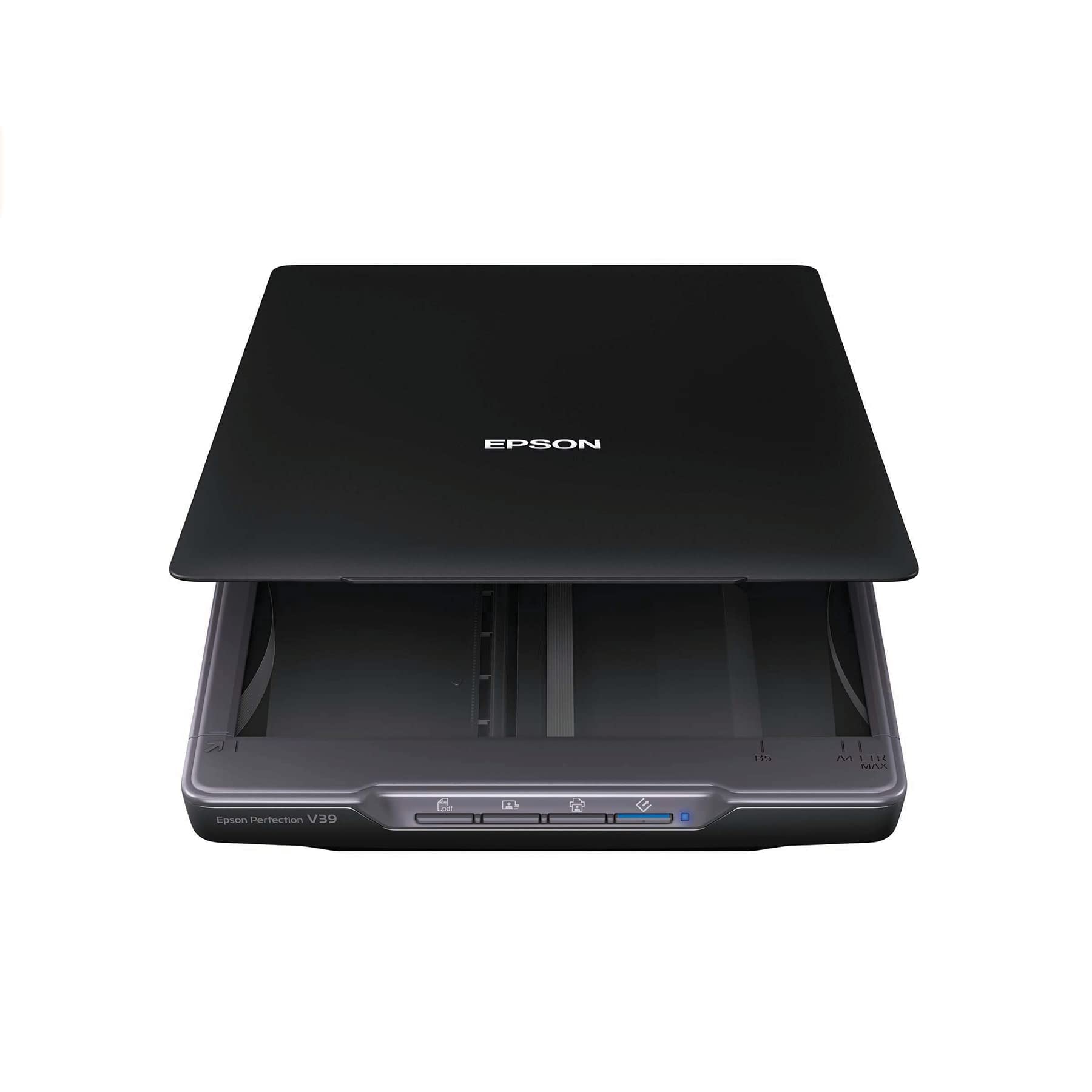
A 4800 dpi flatbed built for digitizing a shoebox of family photos, about a minute per print.
The number here is 4800 dpi optical resolution — four times the 1200 dpi of the DS-70 at the top of this list. That gap is exactly why photo archiving lives on this scanner and not on a sheet feeder. The Perfection V39 is a flatbed with a high-rise, removable lid that accepts books and photo albums, a built-in kickstand for vertical storage, and 3.4 pounds of light plastic build that USB power runs without an AC adapter.
What wins people over is the volume of photos it can quietly chew through. Multiple photos placed about three-quarters of an inch apart are auto-detected and saved as separate files, and it will name them in a running sequence. Buyers report running 1,000+ photos from old albums through it, roughly a minute per photo cycle, with better quality at equal dpi than a multifunction printer managed. Easy Photo Fix restores faded color with one click, and auto-splitting works hard at keeping files organized.
The honest trade-off is that this is a slow, low-duty-cycle machine by design. It is not built for bulk document runs — the maker’s own sheet-fed units are. Software is the other soft spot: a real slice of owners find the interface confusing, and the bundled OCR is inconsistent enough that buyers often switch tools. USB cable quirks (a wiggle to restore a connection) also get flagged occasionally.
The Family Album Case: 4800 dpi resolution plus auto-splitting and one-click color restoration is a combination built precisely for turning a shoebox into a folder.
The Patience Trade: Around a minute per photo is fine for a weekend project and painful for a stack of invoices — do not ask this flatbed to be a document scanner.
Buy it for: digitizing old prints, slides of color, and documents that need a lie-flat scan without unfolding or unstapling.
Do not buy it for: bulk paperwork — the flatbed cycle is slow and the bundled OCR is nobody’s favorite tool.
6. IRIScan Express 4 Black Compact Portable USB Simplex Document Scanner

An 8 ppm simplex feeder bundled with Readiris OCR for scanning invoices and receipts straight into Word, PDF, or Excel.
The pitch is straightforward: 8 ppm (pages per minute) with color scans running at the same speed as black and white. It feeds one side at a time, which IRIScan calls simplex — so keep that in mind if your documents are stapled or two-sided. It handles contracts, invoices, business cards, photos, and receipts, and it runs off an included micro USB 2.0 cable, so no AC adapter is needed.
The differentiating factor is the software bundle. Readiris OCR is included with lifetime use, and you can scan directly into Word, PDF, or Excel. Business cards route straight into Outlook, and there is a free PDF editor for annotating and signing documents. That combination — card-reader plus OCR plus PDF editor — is what makes this one an obvious fit for freelancers and small offices where “scanning to a file” is actually “scanning to a workflow.”
The honestly sized downside: this scanner is Windows-only, and setup has a genuinely mixed reputation. A minority of owners mention a hard time finding the driver download and finding that scans default to JPEG rather than PDF. The bundled support path and the software menus assume a bit of patience, so if you want to plug in and go with zero friction, plan for a short setup session.
The Workflow Angle: Twelve business-card scans a week into Outlook, invoices into Excel, contracts into Word — the software carries the load here, not the hardware.
The Setup Reality: Two hours hunting a driver is not what you want on a weekday. Set aside time on a Saturday, or budget for the shortcut of calling support.
Reach for this when: you live in Excel, Word, and PDF files and want a feeder plus OCR plus a PDF editor in one package.
Steer clear if: you run macOS, or you want a scanner that works the moment the cable clicks in.
7. Brother DS-640 Compact Mobile Document Scanner

A 16 ppm simplex feeder that two owners liked enough to buy a second unit as a backup.
Its 1.99″D x 11.9″W x 1.45″H body is one of the thinnest here — only the HP HPPS100’s 1.4-inch height undercuts it. Paper handling covers the full spread: business cards, embossed cards, ID cards, laminated cards, plain paper, plastic cards, and receipts. It runs on an included micro USB 3.0 cable, and taking that cable anywhere means you can scan with no outlet nearby.
What owners rave about is the software. The iPrint&Scan app is ad-free and functional, and one reviewer explicitly called the machine “refreshingly solid and straight-forward.” Another reported scanning about 20 documents on day one without a problem. It works across Windows, Mac, and Linux, and can push output to PC, network, cloud, email, and OCR targets. There is a caveat worth flagging on the Mac side: hooking a Silicon MacBook Pro up requires a USB-C to USB-A adapter, and it will not register through a USB-A hub.
The honest trade-off is single-sided scanning. Functionality receives mixed feedback because a persistent gripe is that the machine accepts only one sheet at a time, so you have to click “add pages” for each — that is a workflow annoyance, not a defect. Bulk jobs belong on a different machine. Daily, light-to-medium duty, though, is where this feeder earns its keep.
What Daily Owners Value
- Handles 16 ppm at color and black-and-white speed alike
- 1.45-inch profile and about 1.5 pounds — travels anywhere
- Works with Windows, Mac, and Linux and pushes to cloud or email
- Software is ad-free and straightforward
The Workflow Trade-Off
- Single-sided scanning only — a page at a time
- Bulk jobs need a click of “add pages” per sheet
- Silicon MacBooks require a USB-C to USB-A adapter, not a hub
The pick for you if: you scan a handful of documents most days and want a familiar, low-fuss machine that quietly keeps working.
Walk past it if: you need double-sided pages in a single pass — the DS-740D handles that better.
8. IRIScan Executive 4 Pro Portable Duplex Scanner

A duplex-capable feeder carrying lifetime OCR — assuming you can get past its famously picky setup.
The headline numbers are 8 ppm and 16 IPM in duplex (images per minute, counting each side of a double-sided page). That is half the 16 ppm of the Brother DS-740D, and the color speed matches the black-and-white speed. Resolution is 600 dpi via CCD (a sensor type that reads reflected light off the page), the sheet capacity holds one page, and the whole unit sips 2.5 watts. It feeds through a micro USB 2.0 cable and runs off USB power with no AC adapter required.
What justifies its place on this list is the software. Readiris OCR ships with lifetime coverage and outputs to Word, PDF, and Excel. Business cards scan straight into Outlook, photos and receipts are handled too, and the PDF editor handles signing, annotating, and creating. If your scanning is a paper-in, file-out task, the bundle is genuinely complete. It is Windows-only, and the maker leans on the Readiris suite as the primary interface.
The real friction here is set-up, and owners are unusually direct about it. It has been flagged as “extremely difficult to pair,” and one long-time user reports that after an operating system upgrade the machine started failing with a “can not find scanner” error. Support practice has also been described as repetitive troubleshooting rather than a fix. Non-experts have had a frustrating time getting the initial configuration to work.
The Software Bundle Case: Lifetime OCR with direct Word, Excel, and PDF export targets is uncommon in the entry tier — the accompanying PDF editor adds real value for a small office.
The Support Question: A three-star average is a fit signal, not a verdict. If you are comfortable with multi-step installs and Windows, the duplex capability plus lifetime software is real value.
Consider it for: Windows-based duplex document work where the lifetime OCR bundle is worth as much as the scanner.
Think twice for: a first-time scanner buyer or anyone on macOS — this one expects a technical hand to get started.
9. HP Small USB Document & Photo Scanner (HPPS100)

At 3 ounces it is the lightest feeder here, and its 1200 dpi rating is the highest among the sheet-fed picks.
On paper the HPPS100 is the most aggressive sheet-fed feeder on this list. It runs at 15 ppm — treated by the maker as roughly 4 seconds per page — with 1200 dpi resolution, which beats the 300 dpi rating of the similarly priced Brother DS-640 above. It accepts paper from 2″ x 2.9″ up to 8.5″ x 14″ and outputs to PDF, JPG, and other formats. It weighs 3 ounces, making it the lightest unit here. USB 2.0 powered with the cable included, it is aimed at commuters, small businesses, legal practices, and tax preparers.
What owners are happy with is how easy it is to press into service, and the number of aspects they agree on — ease of use, compact size, scanning speed, and straightforward set-up — all read positive. HP WorkScan is a free download for Windows and macOS that handles auto-scan and size detection, cropping, background cleanup, and saving. The general read is that people who use it for homework-style jobs are pleased; several call it great value at the entry level.
The catch is two-fold. First, image quality is genuinely mixed — one owner reports that above 300 dpi the machine crashes their computer, and another says the resolution feels locked at 300 dpi in practice. Second, the software is heavy: another owner says it eats about 90% of the CPU and crashes laptops. If you use the free WorkScan software and stay at 300 dpi, you may be fine; if you want to push beyond that, expect friction from the driver side.
What the Spec Sheet Promises
- 15 ppm scanning speed (about 4 seconds per page, per the maker)
- 1200 dpi rated resolution — highest among the sheet-fed picks here
- Accepts paper sizes from 2″ x 2.9″ up to 8.5″ x 14″
- 3 ounces — the lightest scanner on this list
Where Practice Differs From Paper
- Image quality receives mixed feedback, with reports of software problems above 300 dpi
- HP WorkScan has been described as CPU-heavy, up to 90% load
- Simplex only — a single side at a time
The best fit when: you want an ultralight, high-number sheet feeder for home tasks and can live inside the free HP WorkScan app at moderate resolution.
A step too far when: your machine is already strained — the software overhead is the biggest owner complaint on this model.
Understanding the Specs
Resolution (dpi)
Dots per inch — how many individual dots the scanner’s sensor captures across one inch of paper. Higher dpi means sharper detail: 300 dpi handles plain text and contracts fine, 600 dpi is comfortable with receipts and small print, and 4800 dpi is photo-grade and primarily useful for archiving prints. The cost of a high dpi setting is a slower scan and a bigger file, so match the number to the job rather than always scanning at maximum.
Speed (ppm) and Duplex (IPM)
Pages per minute tells you how fast a feeder moves paper. Simplex means one side per pass; duplex means both sides in a single feed, often quoted as IPM (images per minute) because a single sheet produces two images. A 16 ppm simplex feeder and an 8 ppm/16 IPM duplex feeder are matched on throughput once you factor the second side. For high-volume paperwork, duplex saves the most time because you never re-feed.
FAQ
Will a budget scanner work with Windows 11 or a newer Mac?
What is the difference between simplex and duplex scanning?
Can I scan receipts and business cards with these scanners?
Do these scanners need their own power outlet?
Which budget scanner is best for scanning old photos?
How long does a budget scanner last before it breaks?
Can I scan long receipts and legal-length documents?
Does scan quality matter more than scan speed for documents?
Do I need OCR software, and is it included on budget scanners?
Can I use these scanners with a laptop USB-C port only?
Final Thoughts: The Verdict
For most people, the best budget scanner winner is the Epson DS-70 because it feeds a page in as fast as 5.5 seconds, handles sizes up to 8.5″ x 72″, and backs it all with a 3-year limited warranty that includes Next-Business-Day Replacement. If you want to digitize old photos with real detail, grab the Epson Perfection V39 — its 4800 dpi resolves the fine grain in a print that a feeder would blur. And for double-sided paperwork, the duplex capability of the Brother DS-740D is the one to reach for. The DS-70’s 4.4 stars across 300+ owners is the highest rating on this list, so start there.
How We Picked
We do not accept paid placement. Every pick is matched to a real buyer and a real use-case; we do not hands-on test units.
Sources & Methodology
Specifications: manufacturer listings and product documentation. Review insights: verified customer reviews, as of September 2026. Pricing: not shown on this page (it changes often); check the current price via the retailer link.
As an Amazon Associate, Gadgets Feed earns from qualifying purchases. This does not affect which products we feature.