
Our readers keep the lights on and my morning glass full of iced black tea. As an Amazon Associate, I earn from qualifying purchases.
Specs are compiled from manufacturer listings and verified buyer reviews and can change over time — please confirm the key details on the product page before buying.
Upgrade from tinny monitor audio with budget speakers that deliver clear, punchy sound. A clear upgrade does not need to cost a fortune, and you can get punchy game audio, crisp dialogue, and music that does not sound like it’s coming through a phone speaker while staying affordable. In this roundup, the budget speakers for computer that wins for most people is the Creative Pebble, thanks to its large 12.6 cm drivers and proven 4.6-star track record from over 68,000 owners.
I’m Min — the founder and writer behind Gadgets Feed. This guide is built by comparing the manufacturers’ published specifications and the patterns across verified customer reviews, so you get each pick’s real strengths and trade-offs instead of marketing spin.
You’ll find a tiny option for a cramped desk and a set with real bass below. Each review names the exact buyer it suits, so you can pick with confidence.
Our Picks at a Glance


How To Choose The Best Budget Speakers For Computer
All budget computer speakers plug in the same way, but they sound very different once you hit play. Before you pick, think about your desk size, what you listen to, and how much bass you actually want.
Driver Size Sets the Ceiling
A speaker’s driver (the cone that pushes air to make sound) is measured in centimeters or millimeters, and it dictates how much air the speaker can move. A larger driver generally means fuller sound, while smaller drivers stay clear but lean. If you want music with body, you will want the biggest driver your budget allows.
Bass Is About Design, Not Just Power
Small speakers cannot produce deep bass on their own. Brands use rear-facing passive radiators — a diaphragm that moves air with the main driver — to fake that depth. A bigger passive radiator usually delivers richer low-end on a small footprint, which means the bass you hear on a YouTube video or a Spotify playlist sounds less hollow.
Power and Placement Matter
Wattage tells you how loud a speaker can get, but on a desk, placement matters just as much. Aim drivers at your ears for the clearest sound. If you want room-filling volume without a subwoofer, look for more watts and a larger enclosure.
Quick Comparison
| Model | Best For | Driver Size | Power | Style | Amazon |
|---|---|---|---|---|---|
| Creative Pebble★ Best Overall | Overall desk clarity | 12.6 cm | USB powered | 2.0 stereo | Amazon |
| FUNLOGY SpeakerCompact Pick | Compact tilt design | 48 mm | 14W | 2.0 stereo | Amazon |
| XKX USB Soundbar | One-piece bar setups | 5.3 cm | USB powered | Soundbar | Amazon |
| OFFSIR 2-in-1 | RGB gaming looks | 5 inches | Dual 5W | 2.0 detachable | Amazon |
| Amazon Basics 2.0 | Simple no-frills audio | — | USB powered | 2.0 stereo | Amazon |
| ROSON A-293 | Headphone jack access | — | 3W x 2 | 2.0 stereo | Amazon |
| Logitech Z313 | Real bass with subwoofer | — | 25W RMS | 2.1 channel | Amazon |
In‑Depth Reviews
1. Creative Pebble
Our pick — over 4.5★ from 68,000+ verified ratings; the strongest balance of quality and price.
The Creative Pebble packs a 12.6 cm driver into a compact shell for full, clear audio.
You get the fullest sound per square inch here because of one spec: a 12.6 cm driver tucked into a tiny round shell. That is more than double the 5.3 cm driver inside the XKX soundbar, and it shows in the fullness of your music. These deliver clean highs and respectable bass for the footprint, making them the best all-rounder for everyday listening.
Setup is genuinely one-cable simple. The USB cable powers them, and the 3.5mm AUX-in handles the audio, so there is no wall adapter to hunt for. The 45° tilted drivers fire sound upward toward your ears, which means you do not have to sit perfectly aligned to hear detail. Volume control sits on the front face for quick adjustments mid-task.
The thing everyone raves about is the sound quality — owners call them surprisingly powerful for the size. The recurring trade-off is the volume ceiling; they get loud but are not room-fillers, and the permanently attached wire between the two units limits placement. Buyers report that an occasional unit can develop static or stop working after a few months, but the crowd favorite status — 4.6 stars across 68,000+ owners — says most people are thrilled.
Why Owners Love Them
- Clear, airy highs and surprising bass range for the size
- Single USB cable means a clean, uncluttered desk setup
- Front volume control is easy to reach
- Small footprint fits nearly any workspace
The Honest Trade-offs
- Not loud enough for filling a large room
- Speakers are joined by a fixed wire, limiting placement
- Occasional static or buzzing reported over time
Reach for these if: you want the best balance of clarity, size, and value for a normal desk setup. If you need room-shaking volume or plan to drive a big living space, you will be happier with the Logitech Z313 and its subwoofer.
2. FUNLOGY Speaker
The FUNLOGY’s 30° tilt angles its 48 mm drivers toward your ears for crisp near-field sound.
You get a single clean unit that outperforms your monitor’s built-in speakers, according to buyers. Inside are dual 48mm full-range drivers with passive radiators (diaphragms that move air to boost bass), pushing 14W of total output. The volume knob is a standout feature, letting you dial in precise levels for background music without touching your computer.
Its defining trick is the 30° upward tilt, which angles the drivers directly toward your ears. That design choice makes detail crisp whether the unit sits under a monitor or beside a laptop. It runs entirely on USB power with a 3.5mm aux connection, and Windows simply recognizes it as a headphone device, so there are zero drivers to install.
What wins people over is the build quality — owners consistently call it well-made. The honest limits are the bass, which is focused rather than deep, and the lack of dedicated bass control unless you dig into your device settings. As owners mention: “I tried some similar ones with the same specs and setup, these were much better.” Volume gets mixed notes, so it is best for near-field listening, not filling a big room.
The tight build: the matte finish and sturdy feel punch above the price tier, and the compact form slides neatly under monitors.
The real catch: no separate bass adjustment means the low end is tied to the main volume knob. If you crave deep bass, this unit will leave you wanting more than the Logitech Z313 delivers.
Grab it if: you want a single clean unit with precise volume control and a small footprint. If you need heavy bass or plan to fill a large space with sound, the Z313’s dedicated subwoofer is the better route.
3. XKX USB Soundbar
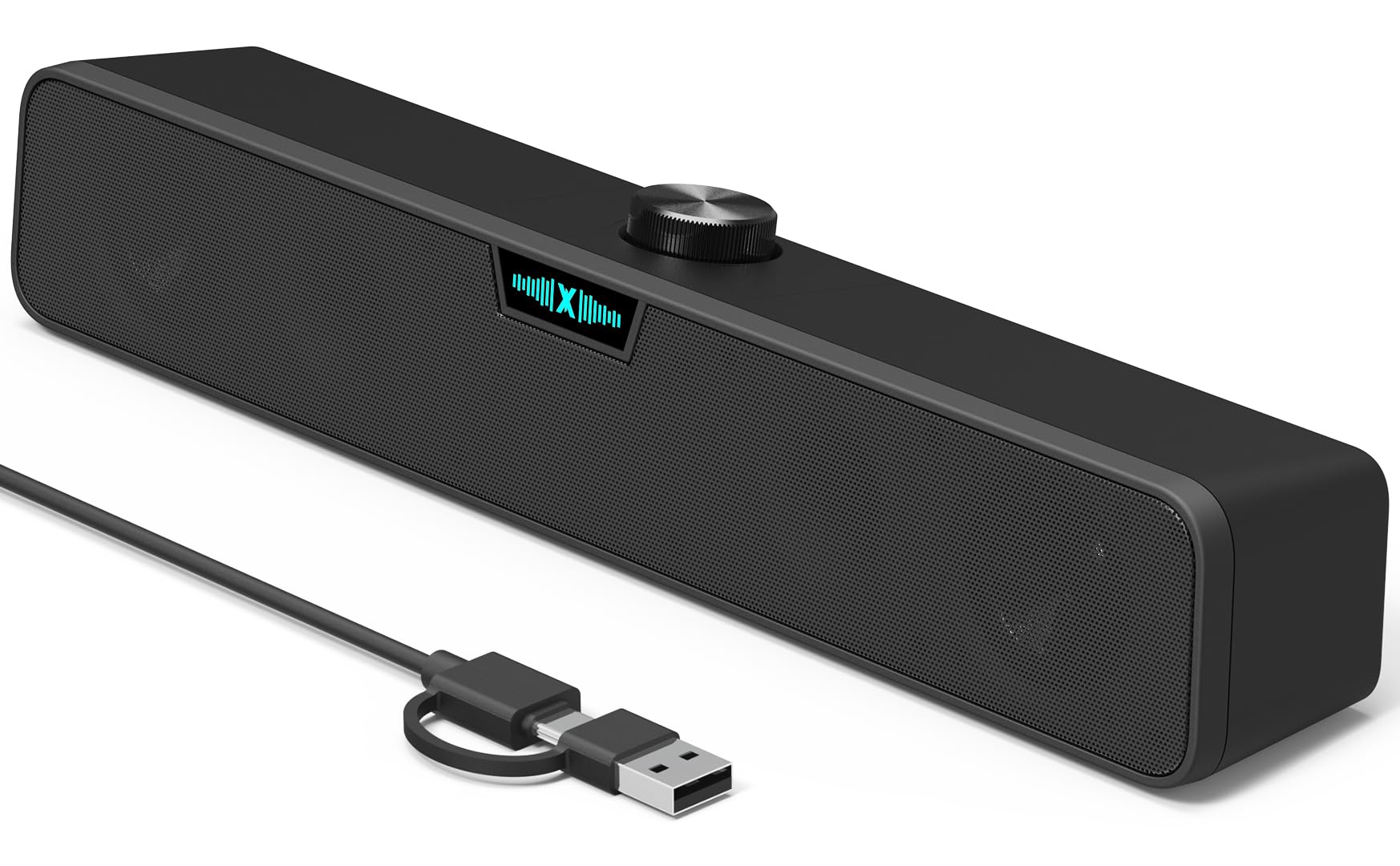
The XKX soundbar’s dual 5.3 cm drivers deliver high volume without distortion in a single bar.
You skip the mess of two separate speakers with this single 15-inch bar housing dual 2-inch full-range drivers, with dual bass-boosting ports built into the chassis. The result is sound that gets genuinely loud — owners consistently mention the volume ceiling is high without distortion.
What makes this one modern is the native USB-C plug. It connects straight to the latest MacBooks, iPads, and Mac minis without an adapter, and the included USB-to-USB-C adapter keeps it compatible with older USB-A desktops. Control comes from a premium rotary encoder knob (a dial you turn) that syncs directly with your computer’s system volume, so each click matches your OS level.
The visual flair is the RGB logo on the front that pulses to the music, cycles through 256 colors, or switches off with one press. Owners call the RGB a bit gimmicky but fun. The catch is a short audio delay after silence — roughly half a second before the first words — and a few note it disconnects if unused for a while. Value is the consistent praise: loud, clear, and simple for the price. The driver gap versus the Creative Pebble is real, though — 5.3 cm here against 12.6 cm there, so it leans bright rather than full.
One-cable desk clean: the soundbar format and USB-C plug eliminate wire clutter entirely, which is a win if you want a minimalist setup.
Know before you buy: the brief silence-triggered delay can clip the start of audio, and connectivity quirks are reported. If you are sensitive to lag, you may prefer the instant response of the Creative Pebble.
Go for this if: you want a modern, USB-C-native bar that gets loud and saves desk space. The half-second audio delay on first playback is the trade-off you accept for that clean, one-piece look.
4. OFFSIR 2-in-1 RGB Speakers
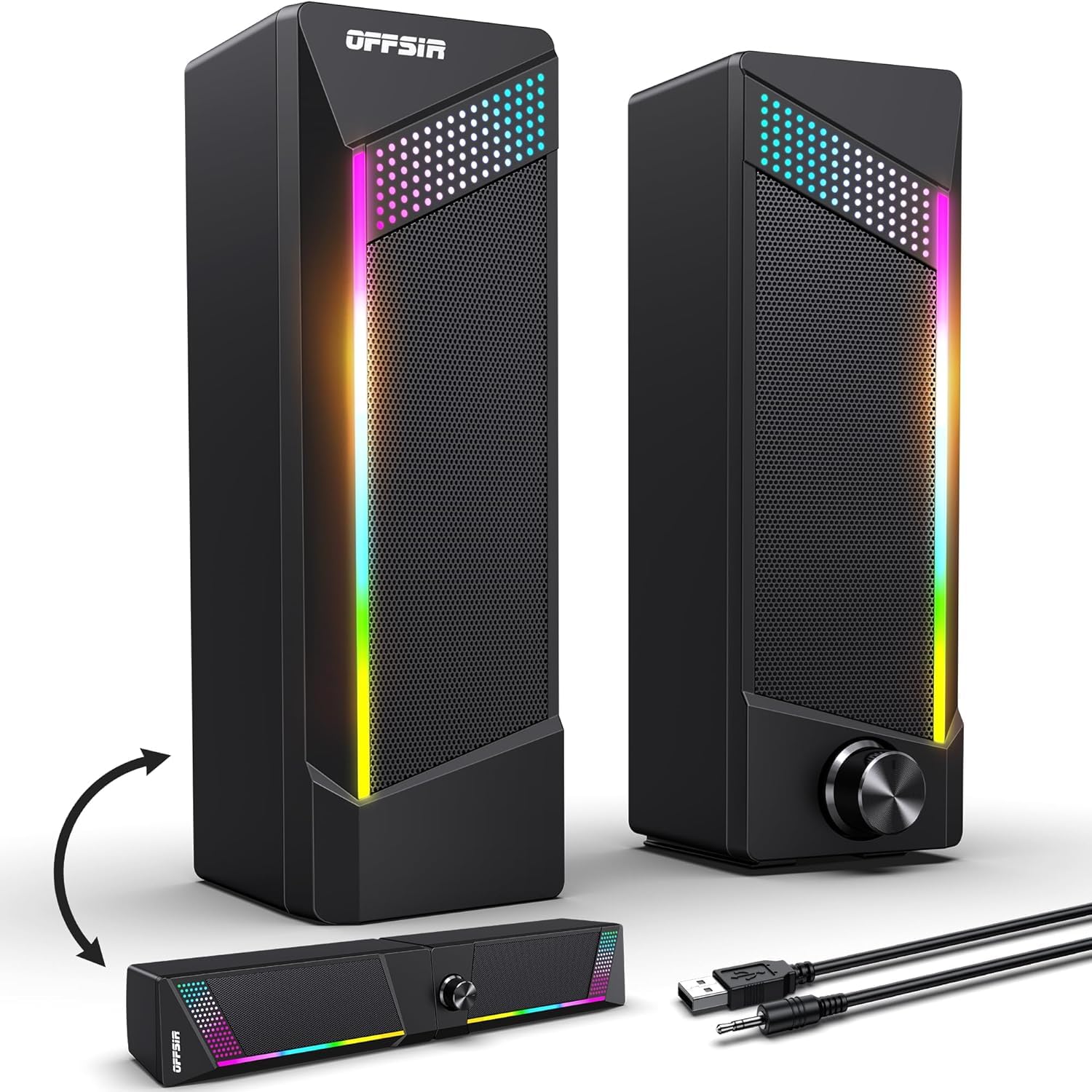
The OFFSIR’s detachable speakers offer stereo separation or a joined soundbar with touch RGB.
You get two setup layouts in one box with the OFFSIR. It ships as two removable speakers that you can place wide for stereo separation or snap together into a single soundbar. Each side runs a 5W driver for a combined 2.0-channel stereo core, and customers note clean, clear audio that surprises for the size. It is a clever solution for tight desks where you want flexibility.
Gamers will love the touch-sensitive lighting — tap the top to cycle through four light modes, from a steady glow to breathing effects. Setup is true plug-and-play with a USB cable and 3.5mm aux, needing no drivers on Windows, Mac, Chrome OS, or Linux. A single knob handles power and volume, so you never reach for your keyboard to adjust audio.
The cables are a big draw: the USB and 3.5mm lines run 58.3 inches long, and the link between the two speakers is 52 inches, giving you real freedom to place them across a wide desk. Sound quality is the top praise in the reviews, along with the build feel. The limits are a preset-only RGB palette — no custom colors — and a budget build that is not meant for high-volume listening. The 5-inch driver spec is generous, though owners note it is best enjoyed at low to medium volumes.
Flexible Setup Wins
- Detachable speakers or joined soundbar — your choice per day
- Long 58.3-inch cables allow wide placement
- Touch lighting adds a genuine gaming vibe
- Single knob for power and volume control
What Limits It
- RGB is preset colors only, no full customization
- Budget build best at low-to-mid volume
- Speakers cannot be separated far from each other
Best suited for: gamers and streamers who want RGB flair with a flexible two-in-one layout. If you need preset-free RGB control or high-volume room audio, the XKX soundbar gets louder, and the Logitech Z313 adds real bass.
5. Amazon Basics 2.0 Speakers

The Amazon Basics pair delivers reliable, clear audio with in-line volume control at a low price.
You get reliable sound with zero fuss at the lowest risk. The Amazon Basics pair are USB-powered with an in-line volume control on the cable, so everything you need is within reach. They sit small enough to slide under a monitor, and the metal finish with a scratch-free padded base keeps them looking tidy on any desk.
What buyers value most is the sound quality relative to the price — owners frequently say they sound much better than expected for basic speakers. The bottom radiator adds what the brand calls a “springy” bass character, giving music a little more life than flat laptop audio. They are not high-fidelity equipment, but for videos, calls, and casual music, they get the job done clearly.
The honest trade-offs start with the blue LED lights, which some owners find too bright and annoying since they cannot be disabled. Durability is the bigger recurring theme — a number of units are reported to stop working after several months or arrive with staticky or popping noises. Still, the sheer scale of happy owners — 4.4 stars across 81,000+ ratings — makes this the safest entry point if you want proven basics at a minimal investment.
Simple Strengths
- Clear audio that exceeds expectations at the price
- Compact size fits easily under any monitor
- In-line volume control is always at hand
- Proven track record with a huge owner base
Honest Weaknesses
- Blue LEDs stay on and can be too bright
- Limited bass and a modest volume ceiling
- Durability reported as hit-or-miss in some units
Pick this if: you want the lowest-risk, simplest way to add desk audio. If bright always-on LEDs or long-term durability would annoy you, the Creative Pebble is worth the extra cost for its stronger 4.6-star reliability record.
6. ROSON Computer Speakers
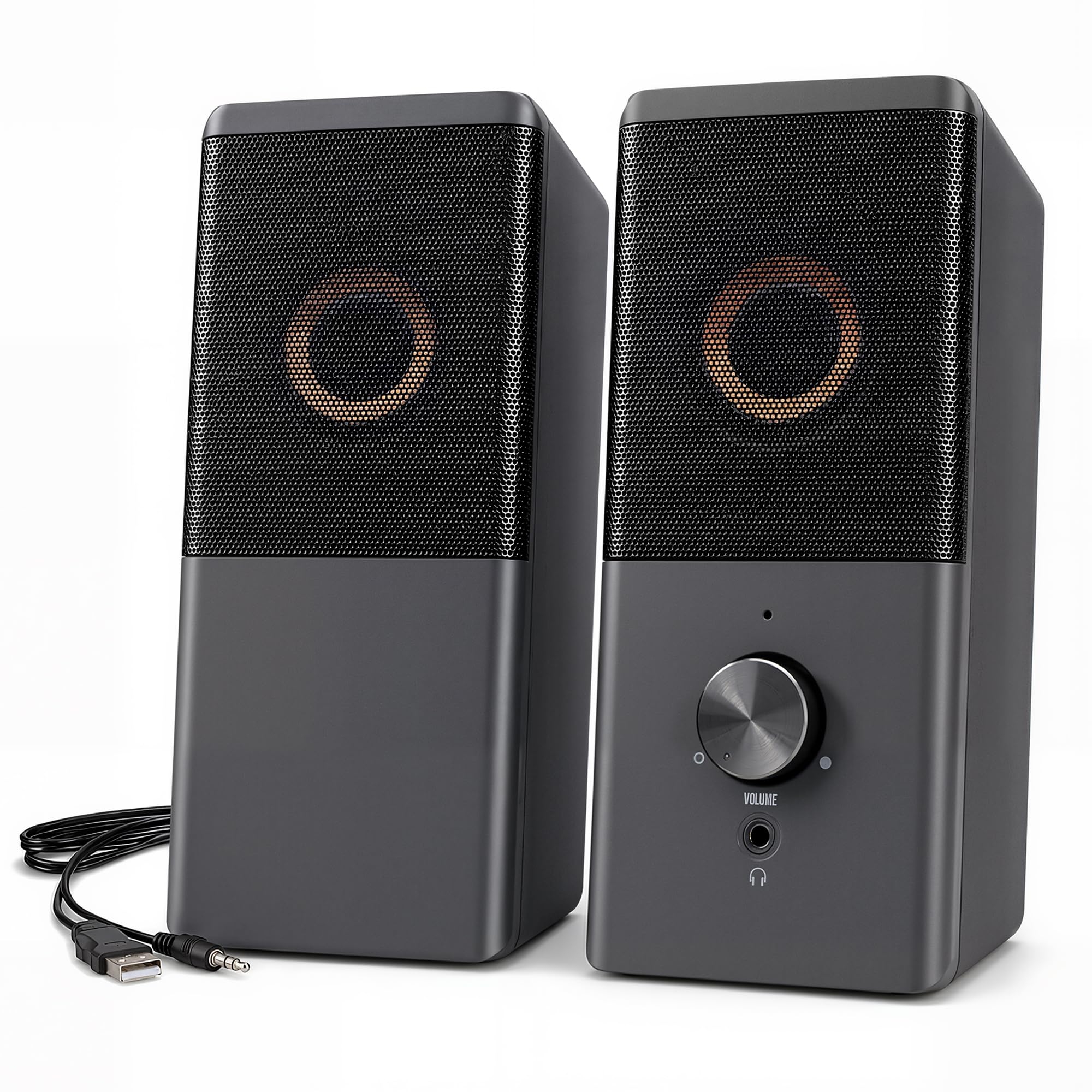
The ROSON’s front headphone jack and volume knob put audio control within easy reach.
You get one feature most budget speakers skip: a headphone jack on the front of the right speaker. That means you can plug in headphones without reaching behind your PC tower or fumbling with the back of a laptop. Volume control sits right there on the front face too, so the whole audio station lives in one place.
Power comes from a low-voltage digital amp rated at 3W x 2, which keeps the sound clear and rounded for a small body measuring 6.96 x 3.34 x 3.14 inches. The USB cable handles power, and the aux cable carries audio, working with any device that has a standard 3.5mm jack — including game consoles like the Nintendo Switch. If your device lacks a USB port, the cable can plug into any 5V charger instead.
What owners praise is the sound relative to the price, calling it good value and noting the clean output without static. The cable lengths are generous: 31.49 inches between the left and right speakers and 39.37 inches for the USB and aux lines. The recurring complaints are volume — several note it is just not loud enough at peak — and light bass response. A few report connectivity issues, but the praise for value and ease of setup dominates the conversation. Those cable lengths give you more placement freedom than the Creative Pebble’s fixed wire, though the Pebble sounds fuller.
The convenience angle: front-mounted headphone jack and volume knob make this the most accessible desk setup here.
The realistic limit: at 3W x 2, this is near-field audio — fine for a desk, not for a party.
Choose this if: you switch between speakers and headphones often and want one easy control point. If you need loud volume or deep bass, you will outgrow these quickly.
7. Logitech Z313

The Logitech Z313’s 2.1-channel system with a dedicated subwoofer delivers room-filling bass.
You feel your music instead of just hearing it with this genuine 2.1-channel system (two satellite speakers plus a subwoofer). It delivers 25W RMS of power tuned for balanced acoustics, and it is the only pick in this roundup with a dedicated sub. That changes how bass-heavy music and movie soundtracks feel — a depth you cannot get from the USB-only pairs like the Creative Pebble.
Owners consistently praise the sound quality, with particular attention to the mid and high frequencies. The system connects to any device with a 3.5mm headphone jack, and a wired control pod handles volume with a remote-style knob on your desk. Owners love that control pod — it was a top reason for choosing this set over previous speakers without volume control.
The enjoyment comes from the added presence the subwoofer brings. It is described as a value-priced basic set with plenty of power and decent sound, which is honest framing — this is not audiophile gear, but it fills a room in a way the USB-only pairs cannot. The satellite dimensions are compact at 5.76″H x 3.52″W x 3.19″D, while the subwoofer sits at 8.99″H x 5.91″W x 8.66″D, so you need floor or under-desk space for the extra box. AC power means a wall outlet is required, but the payoff is bass you can actually feel.
The Subwoofer Advantage
- Real 2.1-channel bass that USB pairs cannot match
- 25W RMS fills a room with balanced sound
- Wired control pod makes volume easy to reach
- Compact satellites keep the desk footprint small
Setup Considerations
- Needs AC power from a wall outlet
- Subwoofer adds a box you must find space for
- Not audiophile grade — tuned for value, not refinement
Best for: anyone who wants true bass and room-filling sound without leaving the budget tier. If your desk has no room for a subwoofer or wall outlet nearby, the Creative Pebble offers a simpler USB-only setup.
Understanding the Specs
Driver Size and Bass Ports
Driver size, shown in centimeters or millimeters, is the main spec that predicts how full your audio sounds. Bigger drivers move more air, which means richer mids and more present bass, so your favorite songs have body. Smaller drivers stay bright and clear but lean, which works for podcasts but not for bass-heavy tracks. Look for passive radiators or bass-boosting ports on compact speakers — those are the tricks brands use to fake deeper low-end without a big enclosure.
Wattage and Power Source
Wattage tells you the loudness ceiling. USB-powered speakers are the easiest to set up — one cable and you are done — but they hit a volume wall. Systems with AC power adapters and higher RMS ratings, like the Logitech Z313 at 25W RMS, can fill a room. On a desk, match the power to your room size: USB pairs for close listening, powered systems for bigger spaces.
FAQ
Will USB-powered computer speakers work without a power adapter?
What does the 3.5mm aux input do if the speakers are USB powered?
Can budget speakers work with a MacBook or iPad that only has USB-C?
How much bass can I expect from small computer speakers?
Is a soundbar or a pair of separate speakers better for a desk?
Will these speakers work with a gaming console like the Nintendo Switch?
Why do some budget speakers produce static or buzzing noise?
What is the difference between 2.0 and 2.1 channel speakers?
How long do budget computer speakers typically last?
Do I need to install drivers for USB computer speakers?
Final Thoughts: The Verdict
The budget speakers for computer winner for most buyers is the Creative Pebble, because its 12.6 cm drivers deliver the most balanced sound and its 4.6-star rating across 68,000+ owners signals proven reliability. For a modern single-bar setup with USB-C, grab the XKX Soundbar. And for real bass that fills a room, the Logitech Z313 with its 2.1-channel subwoofer is the one to reach for.
How We Picked
We do not accept paid placement. Every pick is matched to a real buyer and a real use-case; we do not hands-on test units.
Sources & Methodology
Specifications: manufacturer listings and product documentation. Review insights: verified customer reviews, as of September 2026. Pricing: not shown on this page (it changes often); check the current price via the retailer link.
As an Amazon Associate, Gadgets Feed earns from qualifying purchases. This does not affect which products we feature.