
Our readers keep the lights on and my morning glass full of iced black tea. As an Amazon Associate, I earn from qualifying purchases.
Specs are compiled from manufacturer listings and verified buyer reviews and can change over time — please confirm the key details on the product page before buying.
The single biggest lie in budget PC speakers is that you have to choose between “cheap” and “listenable.” That trade-off no longer exists. Clear sound and decent bass are now affordable. The key is identifying which models cut the right corners and which deliver lasting performance.
Look for RMS power (Root Mean Square, the steady wattage a speaker can handle without distorting), choose your connection type (USB, Bluetooth, or 3.5mm) based on your desk layout, and check the driver size for bass depth. The Creative Pebble V3 gives you the best overall mix of clarity and features, the OHAYO 60W speakers fill a room, and the Nylavee pair adds a light show—each for a different buyer. That is what this guide covers below.
Our Picks at a Glance


How To Choose The Best Budget Speakers For PC
A few dollars’ difference often separates a speaker that sounds clear from one that introduces a constant hum or distorts at medium volume. Focus on these three factors to simplify your choice.
Wattage: RMS is the Real Number
Look for RMS (Root Mean Square—the steady power a speaker can handle continuously without distortion). A speaker advertising a high “peak power” number might only deliver a fraction of that in real use. The Creative Pebble V3, for example, pushes 8W RMS and peaks at 16W, which is a much more honest representation of its volume capability than a random inflated peak rating on a no-name product.
Connectivity: USB Power vs. Bluetooth vs. 3.5mm
Your connection type dictates how much noise enters the system and how flexible the speakers are. A pure USB-powered speaker (like the Nylavee) is simple but sometimes needs a stronger charger to avoid a hum. A speaker with Bluetooth 5.3, like the KASOHQEE, gives you wireless freedom, but if that connection switches modes randomly, it can be a headache. A 3.5mm aux cable is the most universal, but the cable length is often too short on budget models.
Driver Size and Audio Processing
A larger driver (the part of the speaker that produces sound) usually gives better bass, but the design of the enclosure matters more. A speaker with a rear bass port, like the OHAYO, can amplify low-end depth without needing a separate subwoofer. Features like Creative’s Clear Dialog processing are rare at this price point and make a huge difference for watching movies and YouTube—they separate speech from background noise so you can hear every word without constantly adjusting the volume.
Quick Comparison
| Model | Best For | Connectivity | RMS Power | Special Features | Amazon |
|---|---|---|---|---|---|
| Nylavee Computer Speakers★ Best Overall | Gaming with flash | USB + 3.5mm | Not specified | 6 touch lighting modes, 2 bass ports | Amazon |
| Creative Pebble V3Also Great | Best overall value | USB-C, Bluetooth 5.0, 3.5mm | 8W RMS (16W peak) | Clear Dialog processing, 45° drivers | Amazon |
| ROSON Computer Speaker | Basic desk audio | USB + 3.5mm | 3W x 2 | Headphone jack, long cables | Amazon |
| Redragon GS560 | Single-speaker soundbar | USB + 3.5mm | Not specified | Audio-light sync, 4 backlit modes | Amazon |
| KASOHQEE Bluetooth 5.3 Speaker | Wireless desk use | USB, Bluetooth 5.3, AUX, USB-C | 5W x 2 | Compact soundbar, 3 input modes | Amazon |
| Bluedee Computer Speakers | Compact office setup | USB / USB-C | 10W peak (5W x 2) | RGB lights with on/off, headphone jack | Amazon |
| OHAYO 60W Speakers | Music & gaming depth | Bluetooth 5.3, RCA, AUX, USB | 30W x 2 | MDF wood enclosure, separate treble/bass knobs | Amazon |
In-Depth Reviews
1. Nylavee Computer Speakers
Our pick — over 4★ from 5,500+ verified ratings; the strongest balance of quality and price.
Hi-Fi stereo sound with a switchable light show.
The touch-sensitive RGB lighting has six modes—symphony, flowing, breathing, and three solid colors—so you can match your setup’s vibe. The speakers measure 3.23 x 4.21 x 7 inches each and pack two full-range dual-magnet drivers plus a pair of bass-boost ports. Thousands of buyers report crisp, distortion-free sound with a punchy low-end that works for action games and dialog-heavy video. But the 3.5mm cable is short, so your PC needs to be close. Buyers also note it “needs a 2A USB plug to avoid hum”—a standard laptop USB port may not cut it. The lack of a dedicated LED off button frustrates some; you must tap through all six modes to reach the off state. Compared to the Creative Pebble V3, the Nylavee has more visual flair but lacks clear dialog processing and Bluetooth.
Best for gamers on a tight budget: The bass ports and 6-mode lighting deliver an experience that feels more premium than the price suggests. Just make sure you plug it into a 2A USB adapter, not your motherboard’s port.
One honest note: The sound profile leans mid-range focused and lacks deep low-end extension, so it is good for gameplay and calls but not critical music listening.
Buy it for: a desk that needs personality—the RGB is genuinely good-looking, and the sound quality is solid for the price. It is a perfect gaming monitor companion.
Pass on it if: your desk is far from your PC and the short 3.5mm cable becomes a stretching problem, or if you want deep bass for music.
2. Creative Pebble V3
The crowd-tested champion proves big sound doesn’t require a big budget.
Clear Dialog processing isolates speech from background noise so you hear every word in movies and YouTube without raising the volume. That 8W RMS of continuous power (with a peak of up to 16W) comes from larger custom-tuned 2.25-inch full-range drivers, and a built-in gain switch that needs a 10W USB-C or USB-A port to fire the full output. The 45-degree improve drivers angle the sound straight at your ears, creating a clear stereo balance on your desk without any clutter.
The single USB-C cable handles both power and audio, keeping your desk tidy. For older PCs without USB-C, a converter to USB-A is included in the box. When you step away, Bluetooth 5.0 lets you stream directly from your phone. Reviewers praise the natural voice reproduction and the surprising depth from such a compact speaker. The most-discussed trade-off is bass—it is not missing, but anyone expecting floor-shaking low end will need a 2.1 system (a separate subwoofer). A few note the inter-speaker cable is short, which can be a problem if your monitor is wide.
Why it wins the desk
- Clear Dialog processing makes voices intelligible without raising volume
- USB-C single-cable connection for audio and power keeps the desk clean
- 45° improve drivers aim sound directly at you for a precise stereo image
- Bluetooth 5.0 adds wireless flexibility when you step away from the PC
The honest trade-offs
- Bass is adequate for its size, not room-shaking
- Short cable between the left and right speakers limits placement with wide monitors
- Requires a 10W USB port to reach its full peak power
Grab this for: anyone who wants the most reliable, best-reviewed sound quality at this price point—a single purchase that works perfectly for gaming, YouTube, and background music.
Think twice if: your primary need is deep, bass-heavy music listening without a subwoofer.
3. OHAYO 60W Computer Speakers

Bookshelf-style power that fills a room without dominating your desk.
Each speaker pushes a genuine 30W x 2 of distortion-free sound—that is more than three times the continuous power of the Creative Pebble V3. A 0.75-inch carbon fiber silk dome tweeter (the part that produces high frequencies) and a 3-inch carbon fiber full-range driver work together, while the rear bass port amplifies low-end depth. The MDF wooden enclosure (Medium Density Fiberboard, a wood composite that reduces unwanted box resonance) delivers a cleaner, more precise sound than the plastic shells found on almost everything else at this level.
Bluetooth 5.3 gives you low-latency wireless streaming up to about 20 feet, plus RCA, AUX, and USB inputs for a turntable, TV, game console, or audio mixer. Front-panel volume, treble, and bass knobs are rare at this price. Owners describe the sound as clean and clear across the frequency range, with a strength in the lower-mid to upper-mid frequencies that makes voices and instruments sound natural. The energy efficiency is another bonus—it draws less than 1W even at sustained full volume. The catch: it is physically larger and requires a separate AC power cable, so it is not travel-friendly.
Room-filling authority: The MDF cabinet and 30W per channel put this in a different tier than any USB-powered bar or mini speaker here. It is the best choice if you want to actually listen to music, not just hear it.
The catch: If your desk has less than about 12 inches of depth for each speaker, you will struggle to place these.
Reach for this if: music listening and gaming immersion matter more than desk-minimalism, and you want a speaker system that sounds like a proper stereo, not a laptop accessory.
skip it if: you need something you can move between rooms easily or your desk is very tight on space.
4. Redragon GS560 RGB Desktop Soundbar

A single-speaker soundbar that slides under your monitor and lights up with your music.
At about 16 inches wide, this soundbar fits neatly beneath most standard monitors. Instead of two separate satellites, you get one enclosure with upgraded drivers that Redragon claims deliver clear, crystal sound with rich bass. The audio-light sync makes the RGB bar pulse with your music in real time, and there are four backlit modes including dynamic and static options. The volume knob doubles as the on/off switch and is smooth and precise. Setup is USB for power and 3.5mm for audio. Owners praise the easy compatibility with PC, TV, laptop, and smartphone. But the sound quality earns mixed reviews—it is decent and clear for casual use, but lacks deep bass and audiophile detail. Unlike the OHAYO, which has true stereo separation, the Redragon is a single speaker, so you lose left and right channels. A small number of owners mention a unit failure (a screeching noise on a specific color setting), though the company’s customer service is noted as responsive in replacing faulty units.
What makes it stand out
- 16-inch compact size slides neatly under almost any monitor
- Audio-reactive RGB light show that syncs to music creates a fun atmosphere
- Minimalist, clean design with a reassuringly smooth volume knob
- USB-powered and plug-and-play with a huge range of devices
Where it falls short
- Sound quality is “fine for the price” but lacks bass and crisp detail
- Occasional unit defect reported, though customer service handles replacements
- As a single speaker, you lose true stereo separation
Ideal for: someone who wants a one-cable, one-speaker setup that looks clean, sounds good enough for games and calls, and provides desk-friendly RGB fun.
Not for: anyone whose primary use is serious music listening who needs rich, room-filling stereo.
5. Bluedee Computer Speakers

Compact satellites with a lifetime warranty and surprisingly clear vocals.
At just 3.74 inches long, 3.15 inches wide, and 6.11 inches tall, these are among the most compact speakers here. A 10W peak power (5W per driver) fills a space up to 12 square meters with clear, balanced sound that owners describe as “crisp vocals” and “surprisingly loud for the size.” The front volume knob adjusts from 0 to 100%, and non-slip pads on the bottom reduce vibration. Setup is truly instant: plug into your PC via USB or USB-C (the cable is included for both), and you are done—no drivers, no Bluetooth pairing, no 3.5mm cable needed. The touch-sensitive RGB can be switched on or off with a single tap, a welcome design for those who want the light without distraction. A 3.5mm headphone jack on the front lets you listen privately. The standout is the LIFETIME quality assurance—rare for a budget-priced pair. Unlike the Nylavee, which needs a 2A adapter, these run cleanly on standard USB power. Owners note the volume is slightly quiet compared to larger speakers, and the light bass is what you expect from this driver size.
Tailor-made for tight desks: If your workspace is small—a dorm room, a cubicle, a laptop stand—these are the most space-efficient speakers here without sacrificing intelligibility. The lifetime warranty is a rare peace-of-mind bonus.
Best suited for: the minimal desk setup where every inch counts, and where you primarily need clear vocals for calls, lectures, and background music at moderate volumes.
pass on it if: you demand loud, room-filling volume or deep bass—these are desktop companions, not party speakers.
6. KASOHQEE Bluetooth 5.3 Soundbar
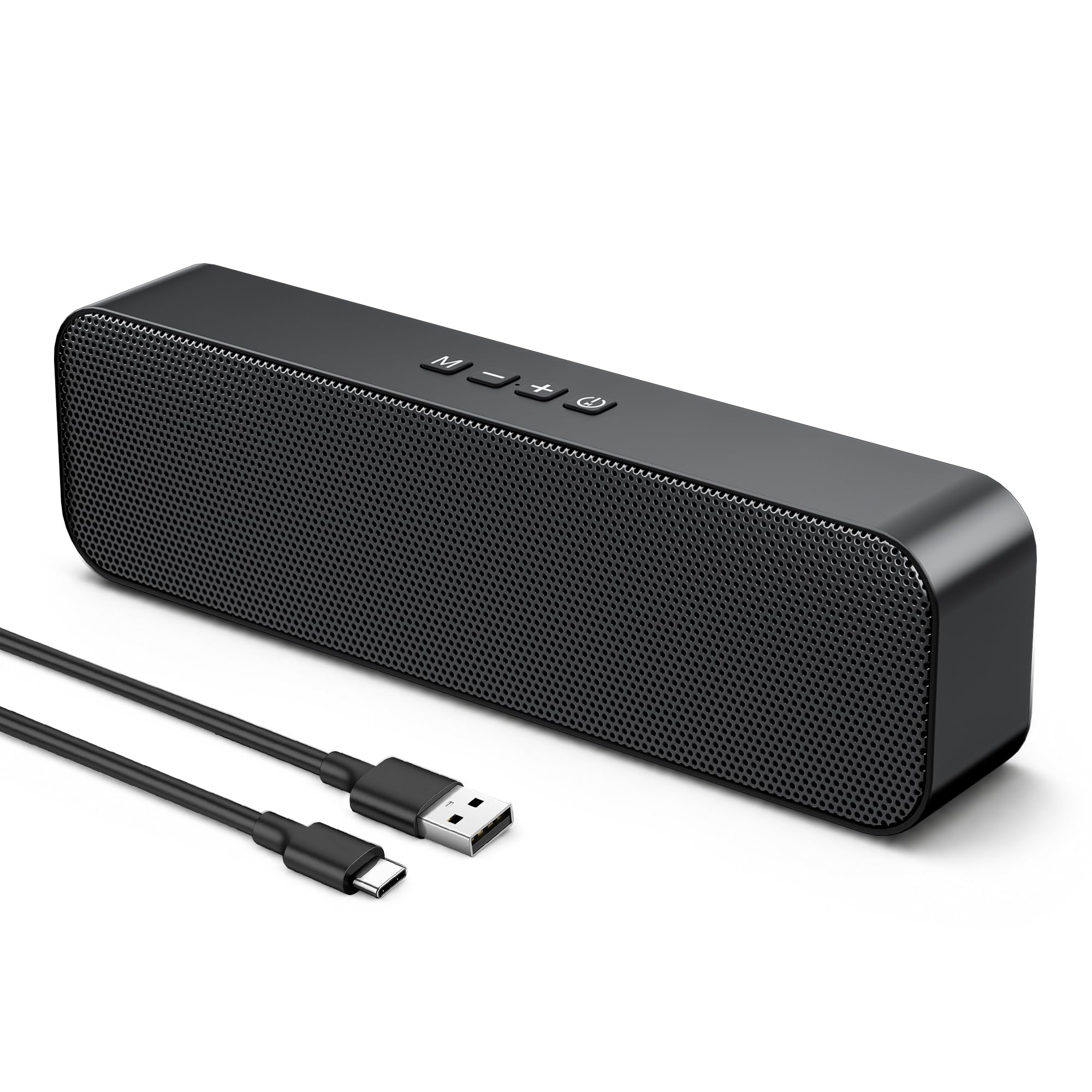
A soundbar that does Bluetooth, USB, and AUX without hogging your monitor’s base.
At 8.74 x 2.56 x 1.46 inches, this slim soundbar packs two 5W magnetic drivers in a dual-channel configuration. Three input modes give you flexibility: Bluetooth 5.3 for wireless streaming, a 3.5mm AUX for universal compatibility, and a USB/Type-C wired connection that handles both power and audio. Owners describe the sound as excellent for computer use like videos and gaming, with clear stereo separation and crisp high frequencies in the 5-20kHz range. You can connect to a PS5 via USB, stream music from your phone via Bluetooth, and still have the AUX port open for a second device. But there are rough edges. The most-discussed problem is a software bug where the soundbar randomly switches from wired PC mode to Bluetooth mode even if never paired, cutting off audio. A few owners also report the low volume is too loud for open-office use, and the included USB extension cable can cause crackling if pushed past 15-20 feet. Compared to the Creative Pebble V3, the KASOHQEE offers more input options but has a reliability quirk.
The wireless workhorse: The Bluetooth 5.3 and three-input flexibility make this the most versatile connectivity option here. It is a smart pick if you switch between a desktop for work and a phone or tablet for music throughout the day.
The reliability note: The random mode-switching bug is real—a few owners have had to return the unit. It is a great design with a potential software flaw.
Reach for this if: you want one speaker bar that can be wired to your PC and wirelessly take music from your phone without re-plugging anything, and you are willing to accept a small risk of a mode-switching quirk.
it’s not for you if: you need 100% simple to use reliability from a single cable—a traditional wired 2.0 set is safer.
7. ROSON Computer Speaker
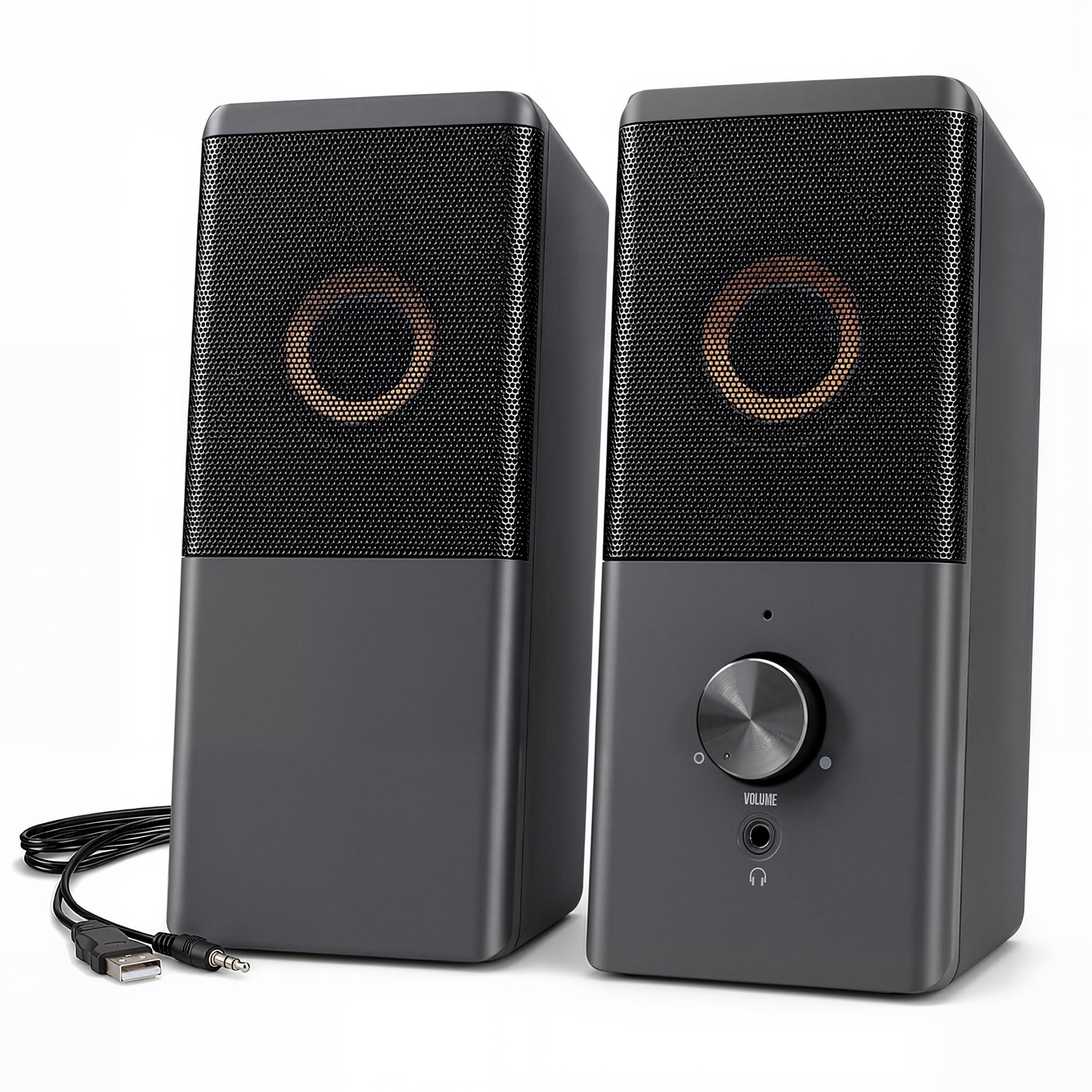
The lowest-cost entry that still qualifies as a real speaker, not a toy.
This true entry-level pair is designed for anyone who just needs audio output from their PC without spending more than necessary. The two speakers are USB-powered and claim a maximum power of 3W x 2, ensuring clear, bright, and rounded sound for basic tasks. The right speaker hosts the volume control knob and a headphone jack on the front for private listening. The left-to-right speaker cable is 31.49 inches long, and the USB and AUX cables each measure 39.37 inches—longer than many other budget pairs, giving you flexibility for monitor placement. Owners confirm the speakers play “loud and clear” for their size and price, and they work with any device with a standard 3.5mm jack. The compromises are clear: the most frequent criticism is that the speakers “don’t handle low volume bass well”—the speaker assembly itself resonates with bass frequencies, lowering clarity. The 3W x 2 power is much lower than the Creative Pebble V3’s 8W RMS, so you get less volume and headroom. Some units also experience one-side-only audio or compatibility issues with certain tablets.
For the bare-bones build: This is the right pick if your budget is extremely tight and you just need a speaker that audibly improves over your monitor’s built-in speaker. It is the definition of “good enough.”
Buy it for: a secondary computer, a kid’s first setup, or a temporary solution where any sound is an improvement over silence.
look elsewhere if: you listen to bass-heavy music or need consistent audio quality at low volumes—the resonance issue is real.
Understanding the Specs
RMS vs. Peak Power
RMS stands for Root Mean Square—it measures the continuous power a speaker can handle without distortion. Think of it as the cruising speed your car can hold all day. Peak power is the short burst the speaker can take for a fraction of a second before it overheats or distorts. A speaker that advertises only peak power without an RMS number is likely underpowered. The Creative Pebble V3 is a good example: it honestly states 8W RMS and 16W peak, so you know exactly what you are getting.
Active vs. Passive Speakers
An active speaker (like every product in this list) has its amplifier built into the speaker cabinet—you simply plug it into power and your audio source, and it works. A passive speaker has no built-in amplifier and requires a separate stereo receiver or amplifier to drive it, which adds cost and complexity. For a simple PC setup, always buy active speakers unless you already own an amplifier.
Driver Size and Enclosure Material
The driver is the circular component that physically moves air to create sound. A larger driver generally means better bass, but the material of the enclosure matters just as much. A stiff, dense material like the MDF wood used in the OHAYO speakers reduces the cabinet from vibrating along with the sound, which keeps the audio clean. Plastic enclosures (used in most budget USB speakers) are cheaper but tend to resonate and color the sound.
Clear Dialog Processing
This is a specific audio processing feature that isolates and enhances spoken dialogue frequencies without boosting the background sound effects or music. If you watch a lot of YouTube, movies, or take video calls at your desk, this feature alone can make a speaker worth buying over another that costs the same. The Creative Pebble V3 is the only product in this budget range that includes it.
FAQ
Can I use these speakers with a PS5 or Xbox?
Why do my USB-powered speakers have a buzzing or humming sound?
Is a soundbar better than two separate satellite speakers for a PC?
How long do budget PC speakers usually last?
Do I need a DAC or sound card for these speakers?
What is the difference between Bluetooth 5.0 and 5.3 for speakers?
Can I use a USB-C to USB-A adapter with these speakers?
Why is the bass weak on small desktop speakers?
Final Thoughts: The Verdict
For the majority of shoppers, the Creative Pebble V3 is the winner because it combines Clear Dialog processing, 8W RMS power, and reliable connectivity at a price that is tough to top. If your priority is room-filling music and gaming depth, the OHAYO 60W speakers are the better pick with their MDF enclosure and 30W x 2 of clean power. And if you want the absolute best value with a light show, the Nylavee Computer Speakers deliver solid audio with 6 RGB lighting modes for very little money.
How We Picked
We do not accept paid placement. Every pick is matched to a real buyer and a real use-case; we do not hands-on test units.
Sources & Methodology
Specifications: manufacturer listings and product documentation. Review insights: verified customer reviews, as of July 2026. Pricing: not shown on this page (it changes often); check the current price via the retailer link.
As an Amazon Associate, Gadgets Feed earns from qualifying purchases. This does not affect which products we feature.