
The single biggest hurdle when building a gaming PC on a shoestring budget is finding a graphics card that doesn’t force you into sub-30 FPS slideshows on modern titles. You need a card that can handle 1080p with medium-to-high settings without requiring you to take out a second mortgage. The market is flooded with underpowered options that promise much but deliver stuttering frame rates and outdated VRAM pools.
I’m Min — the co-founder and writer behind Gadgets Feed. I’ve spent countless hours analyzing GPU benchmarks, VRAM bandwidth tables, and real-world gaming performance metrics to separate the true value picks from the overpriced paperweights in the budget segment.
After sifting through terabytes of benchmark data and user reports across 1080p and 1440p gaming scenarios, I’ve narrowed down the field to the cards that actually deliver playable frame rates without emptying your wallet. This guide covers the best budget video card for gaming options currently worth your attention.
How To Choose The Best Budget Video Card For Gaming
Finding a budget video card for gaming that doesn’t feel like a compromise requires looking past the brand name and focusing on three core pillars: VRAM capacity, memory bus width, and power delivery. A card with insufficient VRAM will stutter on high-resolution textures even if the core clock is high. A narrow 96-bit memory bus will choke bandwidth regardless of how fast the memory chips are. And a card requiring external power may rule out upgrading an old office PC entirely.
VRAM Capacity and Memory Bus Width
Modern AAA titles at 1080p can comfortably use 6GB of VRAM at high textures, with some texture-heavy games pushing past 8GB. A budget video card for gaming with 4GB is strictly for esports titles and older games. Memory interface width matters just as much: a 128-bit bus on an 8GB card like the RX 7600 provides significantly more bandwidth than a 96-bit bus on a 6GB RTX 3050, directly translating to smoother frame pacing in open-world environments.
Power Requirements and Form Factor
Many budget builders are upgrading pre-built office desktops from Dell, HP, or Lenovo. These systems often have proprietary power supplies with limited wattage and no PCIe power cables. Look for cards that draw power solely from the PCIe slot (under 75W). Low-profile or single-slot designs are mandatory for small form factor (SFF) cases. A budget video card for gaming that fits without a PSU upgrade saves both money and hassle.
Quick Comparison
On smaller screens, swipe sideways to see the full table.
| Model | Category | Best For | Key Spec | Amazon |
|---|---|---|---|---|
| ASRock RX 7600 Challenger | Mid-Range | 1080p High Settings | 8GB GDDR6 / 128-bit Bus | Amazon |
| PNY RTX 5060 OC Dual | Premium | 1080p Ultra + DLSS 4 | 8GB GDDR7 / 128-bit | Amazon |
| ASUS Dual RTX 5060 OC | Premium | 1440p Entry Level | 8GB GDDR7 / PCIe 5.0 | Amazon |
| GIGABYTE RTX 5070 Windforce | Premium | 1440p Max Settings | 12GB GDDR7 / 192-bit | Amazon |
| GIGABYTE RTX 3050 Windforce 6G | Mid-Range | Entry Level Ray Tracing | 6GB GDDR6 / 96-bit Bus | Amazon |
| MSI RTX 3050 LP 6G | Mid-Range | SFF / HTPC Builds | 6GB GDDR6 / Low Profile | Amazon |
| AISURIX RX 5500 XT 8G | Budget | 1080p Medium Settings | 8GB GDDR6 / 128-bit Bus | Amazon |
| MAXSUN RTX 3050 6GB | Budget | SFF Optiplex Upgrades | 6GB GDDR6 / Low Profile | Amazon |
| XFX RX 6400 SWFT 105 | Budget | Esports / Office Upgrade | 4GB GDDR6 / No Power Cable | Amazon |
In‑Depth Reviews
1. ASRock Radeon RX 7600 Challenger 8GB OC

The ASRock Radeon RX 7600 Challenger slots into the budget video card for gaming market as the highest-performing card under the premium threshold. Its 8GB of GDDR6 on a full 128-bit memory bus gives it a significant bandwidth advantage over the 96-bit RTX 3050 options. Factory overclocked to a 2695 MHz boost clock, this RDNA 3 card delivers consistent 60+ FPS at high settings in demanding titles like Star Wars Jedi Survivor and Cyberpunk 2077 without relying on upscaling tricks. The 0dB Silent fan mode stops the dual-fan cooler entirely during desktop use, making it a genuinely quiet daily companion, while the metal backplate adds rigidity that budget cards often skip.
Under load, the Challenger draws around 130W through a single 8-pin connector, which keeps compatibility wide for most standard 550W PSUs. The PCIe 4.0 x8 interface is a mild performance limiter on PCIe 3.0 motherboards, but in practice, the frame rate penalty at 1080p is under 5%, making it a safe bet for older system upgrades. The card supports DirectX 12 Ultimate, hardware ray tracing, and AMD FSR, giving you access to modern rendering features without the NVIDIA price premium. Linux gamers will appreciate the seamless plug-and-play experience on kernel 6.8+ with Mesa drivers.
Real-world user reports confirm this card resolves VRAM bottlenecks that plague 4GB and 6GB cards on modern texture packs. Owners pairing it with 600W+ PSUs noted dramatic performance jumps from previous-gen entry-level cards. The physical dimensions require a standard dual-slot space, so verify your case clearance before ordering, but the performance-per-dollar ratio here is the strongest in this entire roundup. If you want raw rasterization power without overspending, this is the pick.
Why it’s great
- 8GB VRAM on 128-bit bus avoids texture stuttering
- 0dB Silent fan mode for near-silent desktop operation
- Excellent 1080p high-settings performance without upscaling
Good to know
- PCIe 4.0 x8 interface limits performance on older PCIe 3.0 boards
- Requires a single 8-pin PSU power connector
2. PNY NVIDIA GeForce RTX 5060 OC Dual Fan
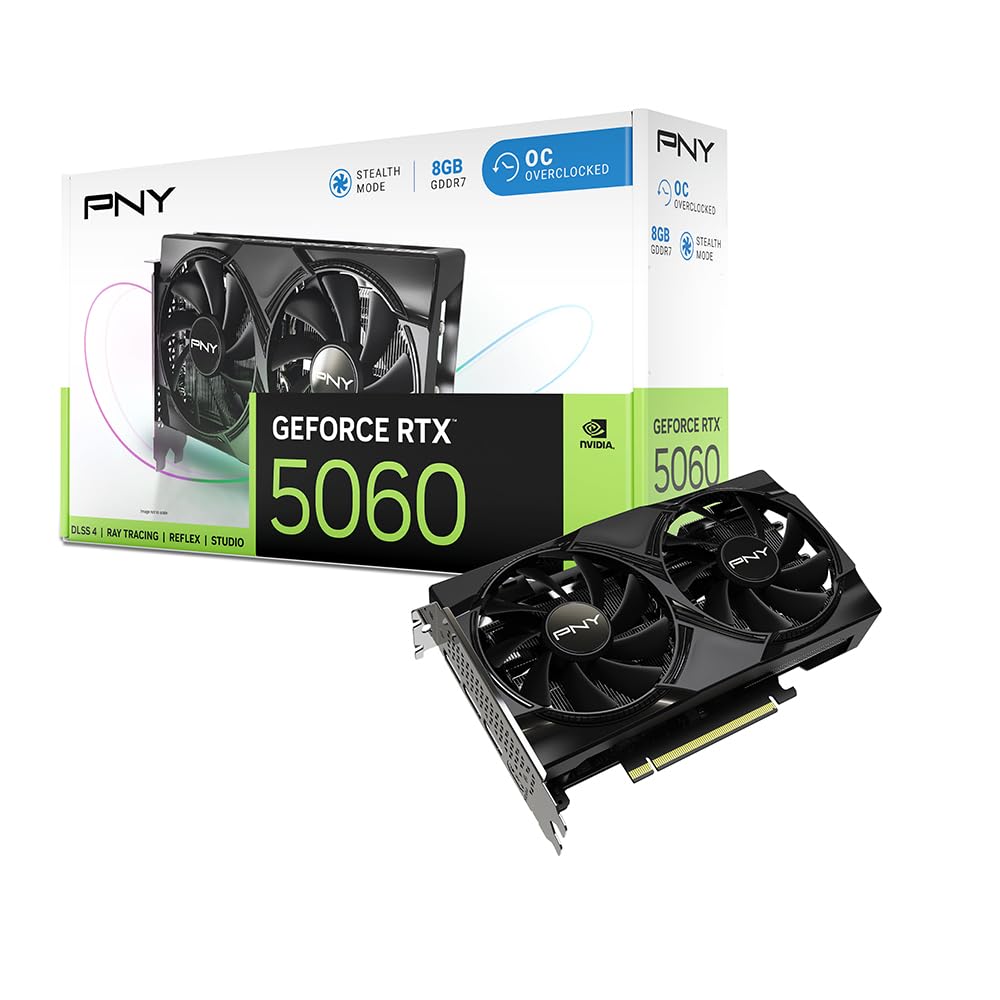
The PNY RTX 5060 OC Dual Fan represents the entry point into NVIDIA’s Blackwell architecture and DLSS 4 for budget-conscious gamers. The jump to GDDR7 memory on a 128-bit bus delivers substantial memory bandwidth improvements over the GDDR6 used in previous generations, directly addressing the RTX 4060’s primary bottleneck. With Fifth-Gen Tensor Cores and Fourth-Gen Ray Tracing Cores, this card can handle ray-traced titles at 1080p with DLSS 4’s Multi Frame Generation smoothing out the performance to well over 100 FPS in supported games. The 2535 MHz boost clock ensures competitive rasterization performance that rivals last-gen x70-class cards.
This dual-fan design is SFF-ready, meaning it fits comfortably in smaller mid-tower cases without sacrificing cooling efficiency. The card draws power through a standard PCIe connector and maintains a moderate thermal profile during extended gaming sessions. PNY includes the NVIDIA App for driver management and AI-assisted optimization, which simplifies tuning for users who aren’t comfortable with manual overclocking utilities. The HDMI 2.1b and DisplayPort 2.1 outputs support up to 8K resolution, future-proofing your display connectivity even if your budget monitor isn’t there yet.
User reviews consistently highlight the 100+ FPS performance on high settings across modern titles like Fortnite, Call of Duty, and Cyberpunk 2077. The card runs quietly under load and was praised for its easy installation in both fresh builds and 8-year-old systems with compatible PSUs. The 8GB VRAM is the only limitation for 1440p ultra textures in the most demanding 2025 titles, but for pure 1080p dominance with DLSS 4, this is the most forward-looking option in the mid-range segment.
Why it’s great
- GDDR7 memory eliminates previous-gen bandwidth bottlenecks
- DLSS 4 Multi Frame Generation boosts FPS significantly
- SFF-ready compact design fits most cases
Good to know
- 8GB VRAM may limit ultra texture settings at 1440p
- Relies on DLSS for heavy ray-traced workloads
3. ASUS Dual NVIDIA GeForce RTX 5060 8GB GDDR7 OC Edition

The ASUS Dual RTX 5060 OC Edition distinguishes itself with a factory overclock of 2565 MHz and PCIe 5.0 support, making it the most future-ready budget video card for gaming on this list. The Axial-tech fan design with a smaller hub and longer blades improves downward air pressure, resulting in effective cooling at lower noise levels compared to generic dual-fan designs. The 2.5-slot form factor is slightly thicker than the PNY variant, but it still qualifies as SFF-ready, allowing installation in compact cases. The 623 AI TOPS rating from the Blackwell architecture underscores the card’s capability for AI-accelerated workloads beyond just gaming.
This card’s strength lies in its efficiency — the 150W TDP means it often consumes under 100W during typical gaming sessions, making it an excellent choice for systems with modest power supplies. The 0dB Technology stops the fans completely below a certain temperature threshold, offering a silent desktop experience that budget cards rarely deliver. ASUS backs this unit with a 3-year warranty, which provides peace of mind that lesser-known brands cannot match. The dual HDMI 2.1b and dual DisplayPort 2.1b outputs support high refresh rate monitors and VR headsets without compromise.
Community testing has shown this card achieving 140 FPS in Fortnite at high settings and delivering rasterization performance comparable to the RTX 2080 Ti in non-ray-traced titles. Users upgrading from iGPU solutions or ancient x60-class cards report transformative gains in playability. The lack of RGB lighting is a welcome restraint for builders who want a clean, subdued aesthetic. If you want the premium build quality, cooling, and warranty support that ASUS is known for, this is the definitive Blackwell budget option.
Why it’s great
- 3-year warranty offers excellent long-term peace of mind
- PCIe 5.0 ready for next-gen motherboard compatibility
- Highly efficient power draw runs cool and quiet
Good to know
- 2.5-slot size may be tight for ultra-SFF cases
- No RGB lighting for those wanting flashy builds
4. GIGABYTE GeForce RTX 5070 WINDFORCE OC SFF 12G

Strictly speaking, the GIGABYTE RTX 5070 WINDFORCE OC SFF 12G stretches the definition of “budget,” but for buyers who want maximum longevity and 1440p performance, it offers the highest value over time. The 12GB of GDDR7 on a full 192-bit memory bus is a massive step up from the 8GB 128-bit configuration common in the budget tier, providing headroom for high-resolution texture packs and future game releases. Powered by the NVIDIA Blackwell architecture with DLSS 4, this card can push 1440p at max settings with ray tracing enabled while maintaining smooth frame rates well past 100 FPS. The WINDFORCE triple-fan cooling system with alternate spinning fans reduces turbulence, keeping noise lower than typical triple-fan designs.
At just 11.1 inches long and with an SFF-ready designation, this card fits in a wider range of cases than you’d expect from an x70-class GPU. The PCIe 5.0 interface future-proofs your investment for motherboard upgrades down the line. Power consumption settles around 250W, which demands a quality 650W PSU but is efficient for the performance class. The lack of RGB lighting gives it a professional, understated look that pairs well without any aesthetic theme. All standard GIGABYTE software utilities are supported for fine-tuning fan curves and monitoring temperatures.
User testimonials confirm this card handles 1440p at 180 Hz with maximum settings across the latest titles, representing a significant thermal and noise improvement over previous-gen x80-class upgrades. Owners report idle temperatures around 42°C and consistent sub-75°C performance under full load, even in less ventilated cases. The card is reliable on arrival with no DOA issues reported in the sample reviews. If your budget can stretch to this tier, the 12GB frame buffer makes it the most “future-proof” option in the entire guide.
Why it’s great
- 12GB GDDR7 with 192-bit bus handles 1440p ultra textures easily
- Triple-fan design runs quieter than comparable cards
- SFF-ready form factor for its performance class
Good to know
- Requires a quality 650W PSU for stable operation
- Exceeds strict budget pricing for some buyers
5. GIGABYTE GeForce RTX 3050 WINDFORCE OC V2 6G

The GIGABYTE RTX 3050 WINDFORCE OC V2 6G serves as the most accessible route into NVIDIA’s RTX ecosystem without breaking your savings. The 6GB GDDR6 memory on a 96-bit bus is a tight fit for modern AAA titles, but the card’s ability to enable ray tracing—even at reduced settings in Minecraft and other lighter RT titles—sets it apart from AMD alternatives at similar pricing. The Ampere architecture brings 2nd Gen RT Cores and 3rd Gen Tensor Cores, giving you access to DLSS upscaling that can salvage playability in more demanding scenarios. The dual WINDFORCE fans with alternate spinning keep the card cool and relatively quiet under sustained loads.
The key advantage of this card is its power flexibility: it does not require an external PCIe power connector, drawing all its power from the motherboard slot. This makes it an ideal drop-in upgrade for pre-built office PCs from Dell, HP, or Lenovo where the PSU lacks dedicated GPU cables. The card supports a maximum resolution of 7680×4320 through its DisplayPort output, bettering many budget competitors in display flexibility. GIGABYTE’s build quality and warranty support provide a safety net that off-brand alternatives don’t offer.
User reports confirm this card works well as a media center GPU for 1080p gaming, with one reviewer using it exclusively for Minecraft with ray tracing enabled. Another noted a significant performance improvement when upgrading from 2GB integrated graphics to the 6GB VRAM pool. The 1477 MHz base clock is conservative, so expect to rely on DLSS in newer titles to maintain smooth frame rates. This card is best suited for those who prioritize NVIDIA feature access over raw rasterization power.
Why it’s great
- No external power cable needed, perfect for office PC upgrades
- Runs ray tracing and DLSS at entry-level pricing
- Low power consumption runs cool in small cases
Good to know
- 96-bit memory bus limits bandwidth in texture-heavy games
- 6GB VRAM is near the minimum for modern AAA titles
6. MSI Gaming RTX 3050 LP 6G OC

The MSI RTX 3050 LP 6G OC is the definitive budget video card for gaming in small form factor builds, thanks to its 6.9-inch length and included low-profile bracket. This card swaps the standard dual-slot bracket for a narrow profile right out of the box, enabling installation in slim Optiplex and EliteDesk office machines without modification. The Twin Frozr cooling solution with Zero Frozr technology keeps fans stopped at idle, ensuring near-silent operation for productivity work. The 1492 MHz boost clock is slightly higher than the GIGABYTE variant, offering a marginal performance edge in GPU-bound scenarios.
The memory configuration matches the GIGABYTE counterpart: 6GB GDDR6 on a 96-bit bus with 14 Gbps memory speed. Outputs include one DisplayPort 1.4a and two HDMI 2.1a ports, supporting up to 3840×2160 resolution. The card requires no additional power connectors, drawing its full power budget from the PCIe slot, which is critical for proprietary office PC PSUs. MSI’s Dragon Center software provides straightforward monitoring and fan curve adjustment, useful for managing the card’s behavior in thermally constrained spaces.
Real-world reports confirm this card fits into a Dell Inspiron 3471 SFF with zero modifications, delivering 60+ FPS at medium-high settings in demanding titles with DLSS Quality mode enabled. The card reaches around 78°C under full load, which is acceptable for a low-profile cooler. One user noted a brief fan clatter noise on approximately 1 in 25 cold starts, but it resolves within seconds. For builders whose priority is fitting a capable GPU into a tiny case, this is the unmatched specialist.
Why it’s great
- Low-profile bracket included, fits SFF cases perfectly
- Zero Frozr fan stops at idle for silent operation
- No additional power connectors required
Good to know
- 96-bit memory bus is a bottleneck for modern games
- Cooling is adequate but runs warmer than full-height cards
7. AISURIX RX 5500 XT 8GB GDDR6

The AISURIX RX 5500 XT 8GB is the lowest-priced entry on this list that offers 8GB of VRAM on a full 128-bit memory bus, making it a remarkable value for budget builders who prioritize texture quality over brand recognition. Based on AMD’s RDNA architecture, this card delivers smooth 60 FPS at medium-to-high settings in 1080p for titles like Resident Evil 4 Remake without ray tracing enabled. The semi-automatic intelligent fan system stops the fans when GPU temperatures are low, providing a genuinely silent desktop experience. The composite heat pipes make direct contact with the GPU core, improving thermal transfer for sustained load stability.
The card uses a PCI Express 4.0 x8 interface and draws power from a single 8-pin connector with a 130W TDP. Outputs include three DisplayPort 1.4a ports and one HDMI 2.0b, allowing for multi-monitor setups up to 4K resolution. Support for AMD ReBAR (Resizable BAR) ensures slight performance uplifts in compatible titles. The plastic backplate is a cost-saving measure but doesn’t negatively impact performance. This card is best suited for builders who need 8GB VRAM at the lowest possible entry price and are comfortable with a lesser-known brand.
User reports confirm strong 1080p performance at the price, with one reviewer noting 60+ FPS in BeamNG.Drive on Ultra settings after resolving minor physical damage during shipping. Another reported a unit with bent PCIe bracket causing boot issues, which required manual straightening. Quality control can vary, so purchasing through a platform with solid return policies is advised. If your budget absolutely cannot stretch to the premium or mid-range options, the AISURIX gives you 8GB of VRAM for an unbeatable price, but understand the trade-offs in reliability assurance.
Why it’s great
- 8GB VRAM on 128-bit bus for well below pricing
- Fan-stop mode for silent desktop use
- Three DisplayPort outputs for multi-monitor setups
Good to know
- Quality control and packaging may be inconsistent
- Plastic backplate offers less protection than metal
8. MAXSUN GeForce RTX 3050 6GB

The MAXSUN GeForce RTX 3050 6GB occupies a unique niche as a low-profile card built around the same Ampere architecture as the big-brand RTX 3050s but at a lower price point. The 6GB GDDR6 memory running at 14000 MHz on a 96-bit bus provides sufficient bandwidth for 1080p gaming at medium settings. The slim design measures just 6.65 inches by 2.71 inches, making it one of the smallest RTX 3050 cards available, perfect for tight SFF cases. The GPU core runs at 1042 MHz base with a 1470 MHz boost, delivering solid performance for its class.
The card supports PCI Express 4.0 x8 and includes HDMI 2.1 and DisplayPort 1.4a outputs for up to 8K resolution support. The low power draw, maxing around 77W, means no external power connectors are needed, making it a viable upgrade for slim desktops with minimal power supply headroom. The low-profile bracket is included and pre-installed, saving tedious hardware swaps. MAXSUN provides a 1-year warranty, which is shorter than the major brands but aligns with its budget positioning.
User feedback confirms excellent performance in Dell Optiplex SFF systems, with one reviewer achieving 80+ FPS in Fortnite and Warzone at 1080p with minimal adjustments. The card runs louder under sustained gaming load due to the compact single-fan cooler, but MSI Afterburner can help optimize fan curves. The card is plug-and-play after driver installation with no frame drops reported in optimized titles. For the absolute cheapest route into NVIDIA RTX features in a tiny office PC, the MAXSUN delivers.
Why it’s great
- Extremely compact for tight SFF and Optiplex cases
- No external power connection needed
- DLSS support for enhanced performance in supported games
Good to know
- Single-fan cooler runs louder under sustained gaming load
- 1-year warranty is shorter than brand-name alternatives
9. XFX Speedster SWFT105 Radeon RX 6400 4GB

The XFX Speedster SWFT105 Radeon RX 6400 is the quietest and most power-efficient entry in the budget video card for gaming category, drawing all its power from the PCIe slot and requiring zero external cables. Based on AMD’s RDNA 2 architecture, the 4GB GDDR6 memory runs at 16 Gbps, offering decent bandwidth for esports titles and older AAA games at 1080p. The boost clock reaches up to 2321 MHz, a figure that looks impressive on paper but must be understood in the context of the card’s limited 4GB frame buffer. The low-profile design with included bracket makes it a natural fit for Optiplex and Pavilion upgrades where power supply headroom is minimal.
The card supports hardware ray tracing, but with only 4GB of VRAM, ray tracing is functionally limited to very light implementations or lower resolutions. The single-slot cooler is sufficient for the 53W TDP, keeping noise levels low during operation. XFX includes a driver CD and the low-profile bracket, though user reviews note the bracket swap requires removing 10 screws including the shroud, making it tedious compared to competitors with pre-installed brackets. The card works best when paired with a decent CPU in a PCIe 4.0 system, as the x4 interface takes a significant performance hit on PCIe 3.0 systems.
Real-world user results show this card handling Mortal Kombat 11 and Tekken 7 smoothly, and it can transform an old office PC into a 1080p gaming machine for esports and indie titles. One reviewer successfully installed it in an HP M01-F3214 without any PSU upgrade required. The 4GB VRAM is the hard ceiling, so modern open-world games like Hogwarts Legacy or Cyberpunk 2077 will struggle. This card is strictly for the tightest budgets where any dedicated GPU is an improvement over integrated graphics.
Why it’s great
- No external power needed, works with any standard PCIe slot
- Extremely low power draw keeps thermals and noise minimal
- Includes low-profile bracket for SFF office PC upgrades
Good to know
- 4GB VRAM is insufficient for modern AAA titles at medium settings
- PCIe 4.0 x4 interface severely underperforms on PCIe 3.0 systems
- Bracket swap is tedious with many screws to remove
FAQ
Is 6GB of VRAM enough for 1080p gaming in 2025?
Can a budget video card for gaming use ray tracing?
Final Thoughts: The Verdict
For most users, the budget video card for gaming winner is the ASRock RX 7600 Challenger because it delivers 8GB of VRAM on a full 128-bit bus with RDNA 3 efficiency at a price that undercuts all premium options. If you want DLSS 4 and the Blackwell feature set, grab the PNY RTX 5060 OC Dual Fan. And for upgrading a slim office PC into a gaming machine, nothing beats the MSI RTX 3050 LP 6G OC.