
You want a gaming PC that just works—no fussing with wiring a motherboard or troubleshooting a compatibility issue late at night. A pre-built machine skips all that and gets you straight to playing. The real question is which box of parts actually delivers the speed and reliability you paid for, and which one cuts corners you’ll regret later.
I’m Min — the co-founder and writer behind Gadgets Feed. This guide is built by comparing the manufacturers’ published specifications and the patterns across verified customer reviews, so you get each pick’s real strengths and trade-offs instead of marketing spin.
Whether you are aiming for smooth 1440p gaming or need a rig that can handle AAA titles at max settings for years, finding the right built gaming pc comes down to matching the processor, graphics card, and cooling to what you actually play.
How To Choose The Best Built Gaming PC
Picking a pre-built gaming PC is simpler when you focus on four parts that decide your whole experience: the graphics card, the processor, the memory and storage, and the cooling. Every other feature, from RGB lighting to case fans, is secondary to those core specs.
The Graphics Card Is the Heart of Your Build
The GPU (Graphics Processing Unit) does the heavy lifting for gaming visuals. An RTX 5060 handles 1080p and lighter 1440p games well, while an RTX 5070 or 5070 Ti delivers smooth 1440p and entry-level 4K performance. If you plan to play new demanding titles on a high-refresh-rate monitor, aim for at least an RTX 5070 with 12 GB of video memory.
Match the Processor to the Graphics Card
The CPU (Central Processing Unit) runs the game’s logic and feeds data to the GPU. An AMD Ryzen 7 8700F or an Intel Core i7 is a solid match for mid-range builds. For higher-end machines with an RTX 5070 Ti or better, a Ryzen 7 9800X3D or an Intel Core i9 prevents the CPU from becoming a bottleneck (a situation where the processor is too slow for the graphics card).
Don’t Skimp on RAM and Storage
Modern games need 16 GB of RAM as a floor, but 32 GB is becoming the sweet spot for multitasking while gaming. For storage, a 1 TB NVMe SSD (a fast solid-state drive that plugs directly into the motherboard) is the minimum, and 2 TB gives you room for more titles without uninstalling games frequently.
Quick Comparison
On smaller screens, swipe sideways to see the full table.
| Model | Category | Best For | Key Spec | Amazon |
|---|---|---|---|---|
| Skytech Gaming O11 Vision | Premium | Ultra 1440p Gaming | RTX 5070 Ti 16GB | Amazon |
| STORMCRAFT Skyhawk PRO | Premium | High-FPS AAA Titles | Ryzen 7 9800X3D CPU | Amazon |
| Alienware Aurora ACT1250 | High-End | 4K Gaming & Creation | RTX 5080 16GB | Amazon |
| Corsair Vengeance i7500 | High-End | Raw Power Workstation | RTX 5080 + i9-14900KF | Amazon |
| iBUYPOWER Element | Premium | Streaming & AI Workloads | Ryzen 9 7900X 5.6 GHz | Amazon |
| Lenovo Legion Tower 5i | Premium | Quiet 1440p Performance | RTX 5070 Ti + Ultra 7 | Amazon |
| KOTIN G60B | Mid-Range | Showcase 4K Gaming | 11.3″ Smart Display | Amazon |
| msi Codex Z2 | Mid-Range | Max Settings AAA Gaming | RTX 5070 + 32GB DDR5 | Amazon |
| Thermaltake View i570-170 | High-End | Intel Ecosystem Gaming | i9-14900KF + RTX 5070 | Amazon |
| CyberPowerPC Gamer Master | Mid-Range | Future-Proofed Mid Range | RTX 5060 Ti 8GB | Amazon |
| STGAubron Gaming PC | Budget | Entry-Level 60+ FPS | i7 + RTX 3050 6GB | Amazon |
| YAWYORE Gaming PC | Budget | DIY GPU Upgrade Base | 1GB Integrated Graphics | Amazon |
In‑Depth Reviews
1. Skytech Gaming O11 Vision Gaming PC

The AMD Ryzen 7 9850X3D with extra 3D V-Cache paired with an RTX 5070 Ti 16GB graphics card makes the Skytech Gaming O11 Vision the top pick for gamers who want 60-plus FPS at 1440p in demanding titles like Cyberpunk 2077 and Baldur’s Gate 3 without any setup hassle.
The 32GB of DDR5 RAM at 5600MHz and a 2TB Gen4 NVMe SSD eliminate storage and memory bottlenecks, while buyers report it runs “Elden Ring Nightreign, Baldur’s Gate 3, Cyberpunk 2077 … at Ultra settings” with the 360mm AIO liquid cooler keeping the system quiet under load. A free keyboard and mouse are included for immediate play.
A 360mm AIO liquid cooler keeps the CPU ice-cold during long sessions, making the Skytech O11 Vision the premium choice for anyone who wants a no-compromise gaming machine ready out of the box.
Why it’s great
- Top-tier RTX 5070 Ti 16GB GPU for ultra settings at 1440p
- Extra-large 2TB Gen4 SSD leaves room for many games
- Assembled in the USA with a 1-year warranty on parts and labor
Good to know
- Premium pricing reflects high-end components
- Comes with Wi-Fi 5, not the latest Wi-Fi 6 or 7 standard
2. STORMCRAFT Skyhawk PRO Gaming PC

The STORMCRAFT Skyhawk PRO edges ahead of the Skytech on raw CPU performance thanks to the AMD Ryzen 7 9800X3D, which boosts up to 5.2 GHz and packs a massive 96 MB of cache (a large pool of super-fast memory on the processor that reduces lag in games like Star Citizen and Black Myth: Wukong). It pairs this with the same RTX 5070 Ti 16GB GPU, so you get a machine that excels in both simulation-heavy titles and traditional shooters.
Reviewers report the system runs “Star Citizen on Ultra at 1080p: 48 FPS in cities, 200+ FPS in space” and that the fans stay quiet even under load. The 360mm AIO liquid cooler and 850W Gold-certified power supply (a high-efficiency PSU that wastes less energy as heat) give you plenty of headroom for future upgrades. It also includes a 1-year parts and 3-year labor warranty, which is generous for a premium build.
The 96 MB of L3 cache on the Ryzen 7 9800X3D is more than double what most gaming CPUs carry, making this the best pick for fans of open-world and simulation games that benefit from extra on-chip memory. Choose the STORMCRAFT Skyhawk PRO if your gaming library leans toward CPU-heavy titles like Star Citizen or Black Myth: Wukong over the top pick.
Where it shines
- Ryzen 7 9800X3D CPU with 96MB cache is a beast for simulation games
- Generous 1-year parts and 3-year labor warranty
- 850W Gold PSU gives solid upgrade flexibility
Worth noting
- Reported buzzing from the top headphone jack on some units
- One of six case fans may scrape against ducting at high RPM
3. Alienware Aurora Gaming Desktop ACT1250

The Alienware Aurora ACT1250 is built for the person who wants 4K gaming at high frame rates without compromise. The NVIDIA GeForce RTX 5080 (a top-of-the-line GPU with Blackwell architecture and 16GB of GDDR7 memory) handles modern games at maxed-out 4K settings, and the Intel Core Ultra 9 285 processor ensures nothing bottlenecks the experience.
A 240mm liquid cooler (a compact but effective liquid-cooling system) keeps the CPU temperatures low during marathon sessions, and the 1000W Platinum-rated power supply provides clean, stable power. One reviewer noted the RTX 5080 “runs flawlessly, ice-cold, silent” and even achieved a world record 3D Mark score with overclocking. Alienware includes 1-year onsite service, meaning a technician will come to your home if something breaks.
The RTX 5080 16GB GPU is a massive step up from the RTX 5070 Ti found in many competitors, offering roughly 20-30% more rasterization performance at 4K. The Alienware Aurora is the go-to pick if you own a 4K high-refresh-rate monitor and want every frame to count.
What stands out
- RTX 5080 with 16GB GDDR7 is a genuine 4K gaming powerhouse
- 1000W Platinum PSU provides stable power for overclocking
- 1-year onsite Dell service for convenience
The trade-offs
- Some units have reported motherboard failures within weeks
- Proprietary parts may limit aftermarket upgrade flexibility
4. Corsair Vengeance i7500 Gaming PC

If raw CPU clock speed matters most to you, the Corsair Vengeance i7500 leads the pack with the Intel Core i9-14900KF that boosts up to 5.8 GHz—the highest single-core boost of any processor in this list. Combined with the RTX 5080 16GB GPU, this machine crushes both gaming and heavy multitasking like video editing or 3D rendering.
The Corsair NAUTILUS RS ARGB liquid cooler (a custom liquid loop that uses a large 240mm radiator) keeps heat in check, and the 32GB of Vengeance RGB DDR5 memory is optimized for Intel platforms. With a 2TB M.2 NVMe SSD, you have double the storage of the base 1TB models from Alienware and Thermaltake. One reviewer says the computer “struggles with having patience… finally I found a computer that can keep up with me.”
The catch is in build quality consistency—multiple reviewers reported issues with non-working fans, poorly installed windows, and a lopsided case. At this premium level, you expect flawless quality control, and the Corsair Vengeance i7500 has a higher-than-ideal rate of defects. Still, when it works, the performance is unmatched.
The upsides
- Intel Core i9-14900KF runs at 5.8 GHz boost clock
- 2TB M.2 NVMe SSD gives double the standard storage
- Corsair liquid cooling and DRAM are top-tier components
Keep in mind
- Build quality concerns (fans, case windows) reported frequently
- Limited rear USB ports may be a minor annoyance
5. iBUYPOWER Element Gaming PC

The iBUYPOWER Element delivers a genuine 12-core AMD Ryzen 9 7900X processor that boosts to 5.6 GHz, paired with an RTX 5070 12GB GPU for capable 1440p gaming and AI workloads.
Its 32GB of DDR5 RAM is double the 16GB found on many mid-range competitors, letting you keep a dozen browser tabs, a Discord call, and your game running without slowdown. The package includes a free gaming keyboard and mouse, a white tempered glass case with 16-color RGB lighting, and no bloatware.
The 12GB of video memory on the RTX 5070 is a meaningful advantage over the 8GB RTX 5060 Ti found in some similarly priced builds, enabling higher-resolution texture packs. The iBUYPOWER Element is perfect for streamers who game and broadcast from the same machine on a budget.
Why we’d pick it
- 12-core Ryzen 9 7900X CPU boosts up to 5.6 GHz
- 32GB DDR5 RAM handles heavy multitasking easily
- RTX 5070 12GB video memory suits high-resolution gaming
A few caveats
- GPU shipping foam sometimes missing, risking damage in transit
- Motherboard only has 2 RAM slots, limiting future upgrades
6. Lenovo Legion Tower 5i
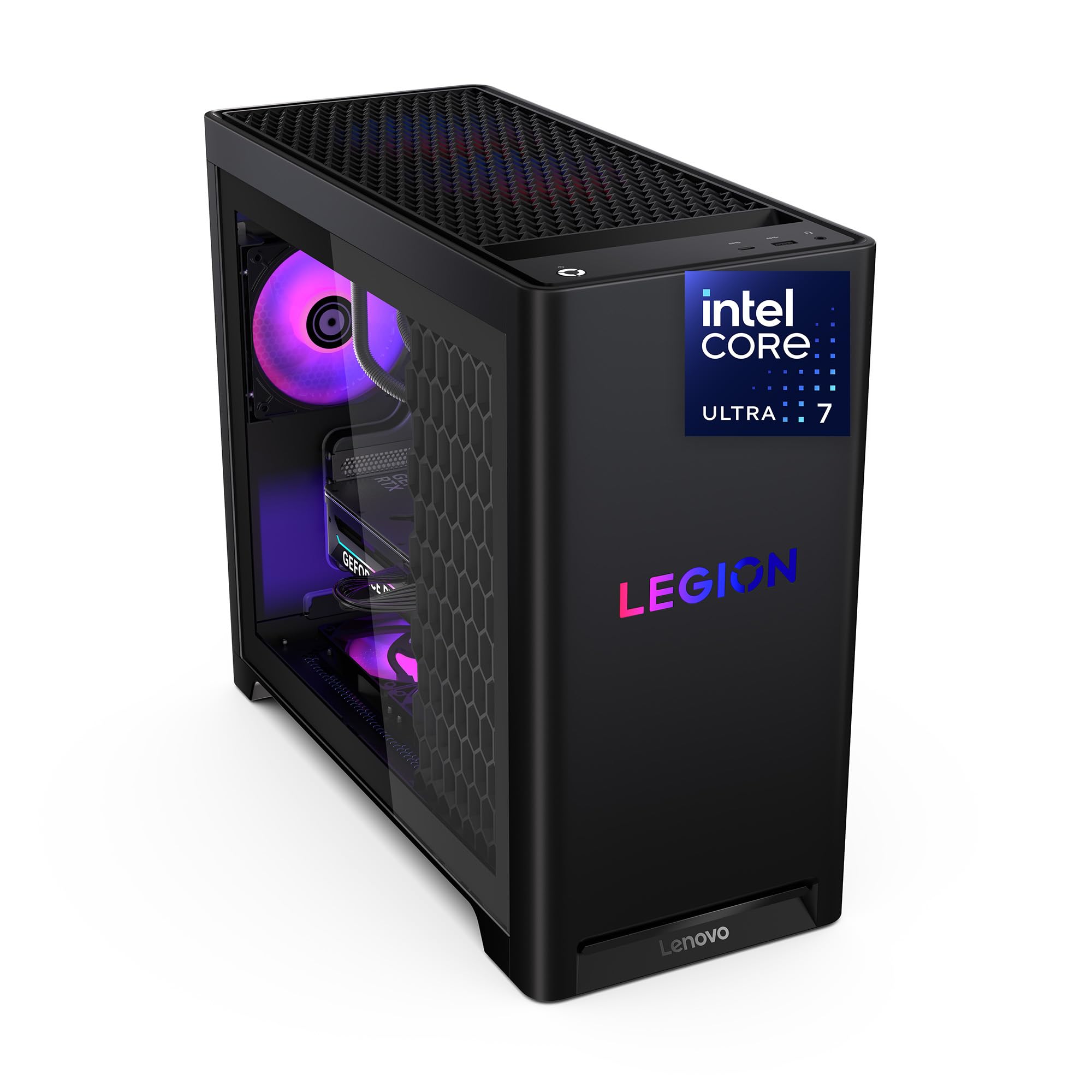
The Lenovo Legion Tower 5i is the value king among premium builds, perfect for the gamer who wants top-tier GPU performance without paying the premium charged by brands like Alienware or Corsair. It packs an RTX 5070 Ti 16GB GPU and an Intel Core Ultra 7 265F processor into a case with tool-less side panels. It consistently appears on deal lists—one reviewer bought it for a price that undercuts many lower-spec competitors. It delivers strong 1440p and entry-level 4K performance without demanding the same investment as the Alienware or Corsair options.
Reviewers confirm the system runs “Forza 5 maxed: ~180 FPS average, ~300 with DLSS/frame gen” and “MH Wilds maxed: ~97 FPS”. The RTX 5070 Ti paired with the Ultra 7 processor stays quiet and cool, according to reports, with GPU temps in the mid-60s Celsius under load. The tower has an extra M.2 slot for storage expansion and supports up to 128GB of DDR5 RAM.
The 2.5G Ethernet port is a welcome upgrade over standard 1G ports, making this an excellent choice for online multiplayer who need fast wired connections. The Legion Tower 5i is the sweet spot for value-conscious gamers who refuse to compromise on GPU power. Just be aware that its budget-friendly build means you may not get the same premium chassis, RGB lighting, or customer support experience as pricier competitors.
Strong points
- RTX 5070 Ti 16GB at a competitive price point
- Tool-less side panel makes upgrades effortless
- 2.5G Ethernet for superior wired networking
Before you buy
- Intel Ultra 7 265F CPU is fine for gaming but not the fastest option
- Third M.2 slot is partially hidden behind the GPU
7. KOTIN G60B Prebuilt Gaming PC

The KOTIN G60B delivers a feature no other build in this list offers: an 11.3-inch smart display on the side of the case that shows real-time system info like CPU temperature, weather, and time. This gives it a distinct flair for anyone who wants their rig to look as impressive as it performs. Under the hood, it packs an AMD Ryzen 7 9700X (boosting up to 5.5 GHz) and an RTX 5070 12GB GPU.
For cooling, KOTIN uses a 360mm liquid cooler with a digital temperature display, which is unusual at this price tier. The system also includes 32GB of DDR5 RAM at 6000MHz (faster than the 5200MHz in the iBUYPOWER Element) and an 850W 80 Plus Gold power supply. One reviewer called it “underrated” and noted the “beautiful appearance with functional side status screen.”
The 11.3-inch smart display is the standout callout here—it is basically a small secondary monitor integrated into the case, which no other product in this roundup offers. The KOTIN G60B is the best choice for anyone who wants a conversation-piece gaming PC with great mid-range specs and a unique visual identity.
What we like
- Unique 11.3-inch smart display shows system stats in real time
- 360mm liquid cooler with digital temperature readout
- Fast 6000MHz DDR5 RAM for snappy performance
The downsides
- Some owners mention the side display doesn’t function properly
- A few units have hardware defects requiring returns
8. msi Codex Z2 Gaming Desktop

The msi Codex Z2 is the volume pick for mid-range buyers: it delivers an RTX 5070 GPU and 32GB of DDR5 RAM (twice the RAM of the STGAubron budget option) at a price that undercuts many similarly equipped competitors. With a 2TB M.2 NVMe SSD, it offers double the storage of the YAWYORE’s 1TB drive, so you can install twice as many games immediately.
Reviewers report the system handles “Frostpunk 2 buttery smooth” and “drives 3x 27-inch 4K monitors easily.” The four-system cooling fans (three front, one rear) keep air moving through the case, and the AMD Ryzen 7 8700F processor boosts up to 5.0 GHz for responsive gameplay. One buyer called it a “great gaming computer” after upgrading the Bluetooth module to a TP-Link BE9300 PCIe card.
The RTX 5070 is a significant step up from the RTX 5060 Ti found in the CyberPowerPC Gamer Master, delivering higher frame rates in demanding titles. The msi Codex Z2 is the mid-range pick with the best balance of price, storage, and future-proofing for gamers who want to play max settings at 1440p.
Why it’s great
- RTX 5070 GPU and 32GB DDR5 RAM for smooth 1440p gaming
- Large 2TB SSD stores many AAA games
- Compact case with good airflow and easy setup
Good to know
- Built-in Bluetooth module is reportedly poor quality
- Fans get noticeably loud under heavy gaming load
9. Thermaltake LCGS View i570-170

The Thermaltake LCGS View i570-170 trades the top pick’s Ryzen 7 9700X for an Intel Core i9-14900KF—a flagship 14th-gen processor that boosts to 5.8 GHz—and pairs it with an RTX 5070 12GB and 32GB of DDR5 6000MT/s RAM, making it a potent machine for both gaming and creative workloads for a price that sits between the mid-range and premium tiers.
The 240mm closed-loop liquid cooler helps manage the i9’s significant heat output, and the PSU power cover with filtered ventilation keeps the inside clean. One reviewer called it an “all around beast of a machine” and reported that “Cyberpunk, Rust, BG3, Helldivers … all work flawlessly” with a “very quiet” fan profile. The glass-panel case shows off the RGB memory and cooling.
The Intel Core i9-14900KF is the fastest gaming CPU in the Intel lineup, slightly outpacing the Ryzen 7 9700X in raw single-core speed, especially at 1080p resolution where CPU speed matters most. The Thermaltake LCGS View i570-170 is the best choice if you are committed to the Intel ecosystem or need peak single-core performance for emulation or certain simulation games.
Where it shines
- Intel Core i9-14900KF is the fastest Intel gaming CPU available
- 240mm liquid cooling keeps the high-power CPU in check
- Very quiet operation even under load, per customer reports
Worth noting
- Only 1TB storage may feel tight for a premium build
- Some customers note slight fan noise, though minimal
10. CyberPowerPC Gamer Master Gaming PC

If you are shopping for a prebuilt that squeezes every drop of performance from your budget without cutting corners on the platform, the CyberPowerPC Gamer Master earns its place as the smartest mid-range choice by delivering an AMD Ryzen 7 8700F with an RTX 5060 Ti 8GB in a DDR5 build that outperforms similarly priced rivals that pair weaker CPUs with older DDR4 memory. Reviewers confirm it “runs COD at 60+ FPS on ultra,” and one buyer mentioned it “outperforms similarly priced rivals (4060/DDR4)” for the price.
You cannot crank texture details to the absolute max in every modern game at 1440p. However, for 1080p gaming, the RTX 5060 Ti is plenty powerful, and the Ryzen 7 8700F ensures fluid performance in CPU-heavy titles like Valorant and Overwatch 2.
The 1TB PCIe 4.0 SSD and built-in Wi-Fi 6 and Bluetooth 5.3 mean you are set for modern connectivity. The CyberPowerPC Gamer Master is the best value entry into DDR5 gaming with a dedicated GPU for anyone who wants reliable 1080p and solid 1440p performance.
What stands out
- Ryzen 7 8700F plus RTX 5060 Ti delivers strong 1080p and 1440p performance
- DDR5 RAM and PCIe 4.0 SSD for modern system speed
- Wi-Fi 6 and Bluetooth 5.3 built in
The trade-offs
- 8GB VRAM is a limit for max texture quality at 1440p
- Air cooler, not liquid—acceptable but not ideal for heavy loads
11. STGAubron Gaming PC Desktop

The single number that matters most in this category is the price-to-performance ratio, and the STGAubron Gaming PC scores by being your lowest-cost entry into a dedicated gaming machine, pairing an Intel Core i7 (4th-gen, so a decade-old architecture) with an NVIDIA GeForce RTX 3050 6GB graphics card, 16GB of RAM, a 512GB SSD, six RGB fans, an RGB keyboard and mouse, and Windows 11 Home pre-installed—all for a price that makes building your own PC difficult to beat.
You pay for that low entry cost in the hardware’s age and reliability: multiple reviewers point out the “built-in WiFi adapter failed to connect; needed external USB adapter” and that “the pc has failed already storage drive and power supply.” The CPU is a 4th-gen i7-4790 (3.60GHz) that cannot keep up with modern games that need more than four cores, and the RTX 3050 6GB is entry-level for 1080p gaming.
If your budget is tight and you need a Windows PC that can handle Fortnite, Valorant, and Roblox at 60-plus FPS, the STGAubron gets the job done today—just be ready for a few quirks like a flaky WiFi adapter, and know that this machine is not built for future games, making its price-to-value read as a short-term fix rather than a long-term investment.
The upsides
- Lowest price point for a dedicated GPU gaming PC
- Includes RGB keyboard, mouse, and six RGB fans
- Runs popular games like Fortnite and Valorant at 60+ FPS
Keep in mind
- WiFi adapter is unreliable, often needs external USB adapter
- Components are several generations old (i7-4790 CPU)
12. YAWYORE Gaming PC Desktop Computer

The YAWYORE Gaming PC takes a different approach: it comes without a dedicated graphics card, relying instead on the integrated AMD Radeon Vega graphics built into the AMD Ryzen 5 5600GT processor. This makes it a capable machine for desktop productivity and very light gaming out of the box—one reviewer notes it “runs Fortnite at ~30 FPS” on integrated graphics.
You give up immediate high-performance gaming, but the YAWYORE gives you a strong foundation: 16GB of DDR4 3200MHz RAM, a 1TB M.2 NVMe SSD, a 550W 80 Plus Bronze power supply, and five ARGB case fans. Multiple reviewers report that adding a cheap used GPU like an RX 580 boosts Fortnite to ~80 FPS. The motherboard is an MSI A520M-A PRO, a name-brand board with upgrade potential.
If you want a solid, quiet system you can game on immediately without a GPU—and you are willing to add a graphics card later—the YAWYORE is the budget base to build around. It is perfect for the first-time builder who wants a pre-assembled PC with a clear upgrade path rather than a locked-down budget machine.
Why we’d pick it
- Name-brand MSI motherboard with upgrade flexibility
- Quiet operation and easy setup right out of the box
- Upgrade path to a dedicated GPU is simple and affordable
A few caveats
- No dedicated GPU included—integrated graphics only
- GPU power cable is tucked and zip-tied near PSU, hard to access
Understanding the Specs
Graphics Card (GPU)
The GPU, or Graphics Processing Unit, is the chip that renders all the visuals in your games. An RTX 5060 is fine for 1080p, an RTX 5070 handles 1440p well, and an RTX 5070 Ti or RTX 5080 is what you want for 4K gaming. The video RAM (VRAM) matters too—8GB is the minimum for modern games, 12GB is safer for high-resolution textures, and 16GB gives you breathing room for future titles.
Processor (CPU)
The CPU handles game logic, physics, and feeds instructions to the GPU. For most gaming, an AMD Ryzen 7 or Intel Core i7 with at least 6 or 8 cores is enough. The Ryzen 7 9800X3D has extra 3D V-Cache that improves performance in simulation and strategy games. The Intel Core i9-14900KF boosts higher for single-core-heavy tasks like emulation or older games.
RAM and Storage
RAM, or Random Access Memory, is the short-term memory your PC uses to run applications. 16GB is the minimum for gaming, 32GB lets you multitask heavily (e.g., streaming, Discord, browser). Storage speed matters—an NVMe SSD (a solid-state drive plugged directly into the motherboard via M.2 slot) loads games in seconds, while a traditional hard drive takes minutes. Aim for at least 1TB of NVMe storage.
Cooling
Cooling keeps the CPU and GPU from overheating and throttling (slowing down to protect themselves). Air cooling uses fans and a metal heatsink—it is simple and reliable. Liquid cooling (AIO or all-in-one) uses a pump and radiator to move heat away more efficiently, which is helpful for high-end CPUs like the i9-14900KF or Ryzen 9 7900X. A 240mm or 360mm radiator size indicates cooling capacity.
FAQ
Is 16GB of RAM enough for gaming in a built PC?
Should I choose an AMD or Intel CPU for my gaming PC?
How much storage do I really need in a gaming PC?
Final Thoughts: The Verdict
If you want one dependable pick, the built gaming pc winner is the Skytech Gaming O11 Vision because it balances a top-tier RTX 5070 Ti GPU, a 2TB SSD, and a powerful Ryzen 7 9850X3D CPU in a quiet, well-built package that handles any modern game at max settings. If you want the unique 11.3-inch smart display and excellent value, grab the KOTIN G60B. And for pure 4K gaming power with onsite service support, the Alienware Aurora ACT1250 delivers the strongest GPU in the lineup.