
Our readers keep the lights on and my morning glass full of iced black tea. As an Amazon Associate, I earn from qualifying purchases.
Specs are compiled from manufacturer listings and verified buyer reviews and can change over time — please confirm the key details on the product page before buying.
Finding a laptop that handles spreadsheets by day and max-settings gaming by night usually means paying a fortune or carrying a brick. The machines that genuinely pull off both are rare — they need a powerful dedicated graphics chip (not just integrated graphics), a fast processor that won’t stutter on data-crunching, and a screen sharp enough for design work but smooth enough for competitive shooters. This guide cuts past the marketing to show you the three models that actually deliver on both fronts without faking it.
I’m Min — the founder and writer behind Gadgets Feed. This guide is built by comparing the manufacturers’ published specifications and the patterns across verified customer reviews, so you get each pick’s real strengths and trade-offs instead of marketing spin.
Every machine here pairs a modern dedicated NVIDIA GeForce RTX GPU with a high-end processor, letting you jump from a video render straight into a game without rebooting. This is the shortlist for the very best business laptops with gaming performance you can buy right now.
Quick Picks
- LG gram Pro 17-inch (Intel Core Ultra 9 — Best Overall
- GIGABYTE AERO X16 (Ryzen AI 9 — Top Performer
- Lenovo IdeaPad Pro 5 (Ryzen AI 7 350 — Best Value
How To Choose The Best Business Laptops With Gaming Performance
A laptop that pulls double duty — running demanding business software and modern games at decent settings — needs three things to line up right: a dedicated GPU that isn’t just integrated graphics, a high-refresh screen that won’t ghost during fast motion, and a processor that keeps up with both workloads without thermal throttling. Here are the specs that actually separate the real dual-use machines from the pretenders.
The Graphics Card Is Everything
Integrated graphics (the kind built into the CPU) simply cannot handle modern games at playable frame rates. For a business laptop to also game, it must have a dedicated GPU from NVIDIA’s RTX series or an equivalent from AMD. The RTX 5050 and RTX 5070 in these picks are entry-to-mid-tier gaming GPUs that can run demanding titles at 1080p-1440p without stuttering, while also accelerating video editing and 3D rendering tasks for work.
Screen: Refresh Rate vs Resolution
A high-resolution screen (like 2880 x 1800 OLED) gives you pixel-perfect detail for photo editing and spreadsheets, but a high refresh rate (120Hz or 165Hz) is what makes games feel smooth and responsive. The best dual-use laptops offer both — a fast refresh for gaming and high resolution for productivity. OLED panels offer richer colors and true blacks, which helps creative work and movie watching, while IPS-type screens like WQXGA tend to be brighter for use in well-lit offices.
Upgradeability and RAM
Check whether the RAM is soldered to the motherboard or uses a standard SODIMM slot. Soldered RAM means you are stuck with whatever the laptop came with — if you buy 16GB now and need 32GB in two years, you have to buy a whole new laptop. For a long-term business investment, a model with at least one accessible RAM slot gives you room to grow without replacing the entire machine.
Quick Comparison
| Model | Best For | GPU | Screen Specs | Battery Life | Amazon |
|---|---|---|---|---|---|
| LG gram Pro 17 | Ultra-portable power for mobile pros | NVIDIA RTX 5050 | 17″ 144Hz VRR | 25 Hours | from $1,649.99Amazon |
| GIGABYTE AERO X16 | High-refresh gaming at a reasonable price | NVIDIA RTX 5070 | 16″ 165Hz 2560×1600 | 14 Hours | $1,699.00$2,059.99Amazon |
| Lenovo IdeaPad Pro 5 | OLED quality with budget-friendly entry | NVIDIA RTX 5050 | 16″ 120Hz 2880 x 1800 OLED | — | $1,069.99Amazon |
In‑Depth Reviews
1. LG gram Pro 17-inch (Intel Core Ultra 9, RTX 5050, 32GB RAM, 2TB SSD)

A 3.3-pound business machine that runs games without needing a cooling pad.
The LG gram Pro weighs just 3.3 lbs — less than many 13-inch ultrabooks — yet packs a 17-inch display, an Intel Core Ultra 9 processor reaching 5.4 GHz, and an NVIDIA RTX 5050 GPU. You get a massive 32GB of RAM and 2TB of storage, so you can keep large project files and a game library without juggling external drives. The 90Wh battery delivers up to 25 hours of video playback, compared to the GIGABYTE AERO X16’s 14-hour rating, meaning you can travel all day without hunting for an outlet.
The screen uses a variable refresh rate that adapts from 31Hz to 144Hz, smoothing out fast movements in games while saving battery during office work. Buyers report the LG feels premium and sturdy, with one reviewer calling it “near perfect” for business, video editing, and web work. The trade-off is the high entry cost and the lack of an Ethernet port, but for the thinnest 17-inch machine with real gaming power, it is a hard act to beat.
The Intel Evo Edition certification means it wakes instantly and handles AI-accelerated tasks through LG’s hybrid gram AI system, blending on-device searches with cloud-based generative AI for document creation. If you want one laptop for everything and portability is non-negotiable, this is the one.
Why it wins for most people: The LG gram Pro gives you a full 17-inch screen, desktop-level RAM and storage, and legitimate gaming ability in a frame lighter than many 14-inch business laptops. The 25-hour battery means you almost never think about charging during the workday.
The honest catch: It is expensive — among the priciest picks here — and soldered RAM means the 32GB cannot be upgraded later. Buy the configuration you will need for the next few years from day one.
Reach for this if: You travel frequently and need a single machine that handles heavy multitasking, video editing, and mid-range gaming without weighing down your bag.
Look elsewhere if: The premium price and non-upgradeable RAM are dealbreakers for your budget or long-term upgrade plans.
2. GIGABYTE AERO X16 (Ryzen AI 9, RTX 5070, 32GB RAM, 1TB SSD)

The RTX 5070 at this price makes real gaming without compromises possible.
This GIGABYTE AERO X16 steps up the graphics to an NVIDIA GeForce RTX 5070 — a full tier above the RTX 5050 found in the other two picks — and pairs it with an AMD Ryzen AI 9 HX 370 processor. The 165Hz WQXGA screen (2560 x 1600 resolution) refreshes faster than any other display here, making competitive shooters like Fortnite feel dramatically smoother. One reviewer noted getting around 45fps on max settings with raytracing on Fortnite, and was “seriously impressed”; on normal settings that same buyer averaged 230fps.
At 16.75mm thin and 4.18 lbs, the AERO X16 is surprisingly portable given the powerful GPU inside. The 14-hour battery life is decent but falls well short of the LG’s 25-hour mark — expect to charge mid-day if you push it hard. The Copilot+ PC integration and GiMATE AI assistant add intelligent search and task management, which is useful for business workflows.
Acer’s keyboard and trackpad feel responsive, and owners mention the build quality is premium — solid aluminum chassis with very quiet fans even during long gaming sessions. However, the 1TB SSD is half the storage of the LG gram Pro, though the 32GB of DDR5 RAM matches it. This is the pick if you prioritize raw gaming frame rates over sheer portability and battery endurance.
What it does best
- NVIDIA RTX 5070 GPU outperforms the RTX 5050 in both other picks for demanding games
- 165Hz screen offers the smoothest motion for competitive gaming
- Thin and light (0.65 inches, 4.18 lbs) for its GPU class
Where it yields
- Only 14-hour battery life — you will need to plug in by late afternoon
- 1TB SSD means less local storage for game libraries and large project files
- Runs hot under sustained load; a cooling pad helps according to buyers
Best for: Gamers who need a business-appropriate chassis but want the extra GPU performance to run modern titles at high refresh rates without compromise.
skip it if: All-day battery is a must for your work travel, or you need more than 1TB of onboard storage without carrying an external drive.
3. Lenovo IdeaPad Pro 5 (Ryzen AI 7 350, RTX 5050, 16GB RAM, 1TB SSD)
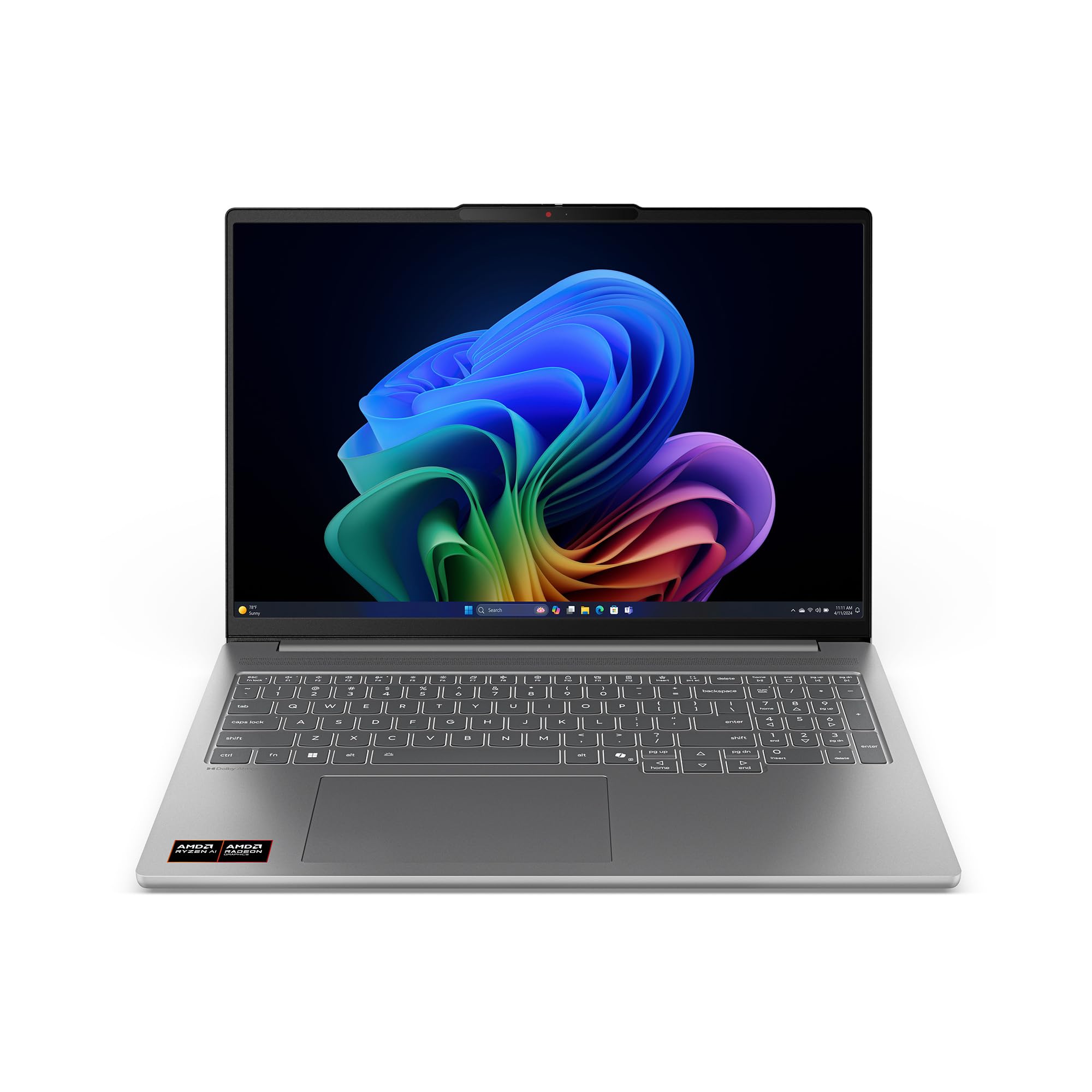
OLED brilliance at a price that leaves room in the budget for extras.
The Lenovo IdeaPad Pro 5 delivers a stunning 16-inch OLED display at 2880 x 1800 resolution with a 120Hz refresh rate — the best color accuracy and contrast of any screen here, ideal for creative professionals working with photos, video, or design layouts. The AMD Ryzen AI 7 350 processor reaches 5 GHz, and the RTX 5050 GPU handles graphics work and mid-range gaming respectably. It is the most affordable entry point into a true dual-use business laptop with a dedicated GPU.
Customers note the screen quality rivals a MacBook Air 15-inch, and Linux compatibility is excellent. However, there is a clear pattern in reviews: “runs games but crashes with heavy titles or high graphics,” as one reviewer put it, and another noted frequent crashes even after troubleshooting, suggesting potential hardware variability. The RAM is also soldered at 16GB in a single channel (no slot), which means you cannot upgrade it later. There is a storage expansion slot, so you can add more SSD space, but memory is fixed.
The build carries MIL-STD-810H certification for durability and includes a full selection of ports — 2x USB-C (USB4), 2x USB-A, HDMI 2.1 supporting 8K@60Hz, and an SD card reader — making it the most versatile for connecting external monitors and peripherals without a dongle. For someone who wants the best screen possible and stays within mid-range gaming, this delivers the best bang for the buck.
Standout strengths
- 2880 x 1800 OLED screen with 120Hz is the best display for color-accurate creative work
- Most affordable dedicated-GPU business laptop in this lineup
- Full port selection plus MIL-STD-810H durability
Notable drawbacks
- 16GB soldered RAM cannot be upgraded — buy what you need now
- Multiple reviewers point out crashes under heavy gaming loads and random shut-offs
- Battery life is modest; no official spec provided beyond 5-6 hours under Linux
Who it fits: Creative professionals on a tighter budget who need an exceptional OLED display for design and don’t plan to push games to their absolute max settings.
Who should pass: Anyone wanting to play demanding AAA titles at high graphics, or anyone who expects to keep the laptop for 4+ years and might need more RAM later.
Understanding the Specs
Dedicated GPU vs Integrated Graphics
The single most important spec for a business laptop that can also game is a dedicated graphics processor — an actual separate chip with its own video memory (VRAM) rather than borrowing from main system RAM. NVIDIA’s RTX 5050 and RTX 5070 are the mainstream and upper-midrange options here; the RTX 5070 in the GIGABYTE AERO X16 will handle heavier titles at higher settings, while the RTX 5050 in the other two picks is still capable but may need reduced settings for the most demanding games.
Refresh Rate (Hz)
Measured in hertz (Hz), this is how many times per second the screen updates. A standard office laptop runs at 60Hz, which looks fine for spreadsheets but feels sluggish in fast games. The Lenovo and LG both offer 120Hz and 144Hz variable refresh rates, meaning they adapt the rate to match the content — smooth in games, power-saving during static work. The GIGABYTE’s 165Hz screen is the fastest here and gives a genuine competitive edge in shooter games.
FAQ
Can a business laptop with an RTX 5050 run modern games at high settings?
Is 16GB of soldered RAM enough for business and gaming?
Why does the GIGABYTE AERO X16 have a much lower battery life than the LG gram Pro?
What is a variable refresh rate (VRR) and why does it matter?
Can I upgrade the RAM or storage on these laptops?
What does Copilot+ PC mean for gaming performance?
Is an OLED screen better than a WQXGA screen for gaming?
Do I need a cooling pad for these laptops during gaming?
Final Thoughts: The Verdict
For the majority of shoppers, the business laptops with gaming performance winner is the LG gram Pro 17 because it crams a 17-inch screen and an RTX 5050 into a 3.3-pound body with 25 hours of battery — no other machine here matches that portability and endurance. If you want the smoothest gaming frames and the most GPU power, grab the GIGABYTE AERO X16. And for the best screen quality at the best price, the standout is the Lenovo IdeaPad Pro 5.
How We Picked
We do not accept paid placement. Every pick is matched to a real buyer and a real use-case; we do not hands-on test units.
Sources & Methodology
Specifications: manufacturer listings and product documentation. Review insights: verified customer reviews, as of July 2026. Pricing: not shown on this page (it changes often); check the current price via the retailer link.
As an Amazon Associate, Gadgets Feed earns from qualifying purchases. This does not affect which products we feature.
Related Guides
Product prices and availability are accurate as of the date/time indicated and are subject to change. Any price and availability information displayed on Amazon at the time of purchase will apply to the purchase of this product. As an Amazon Associate I earn from qualifying purchases.
CERTAIN CONTENT THAT APPEARS ON THIS SITE COMES FROM AMAZON. THIS CONTENT IS PROVIDED "AS IS" AND IS SUBJECT TO CHANGE OR REMOVAL AT ANY TIME.
Amazon and the Amazon logo are trademarks of Amazon.com, Inc. or its affiliates.