
An office network that stutters during a video call or drops a VPN tunnel mid-transaction isn’t just a technical glitch; it’s a revenue leak. Consumer-grade routers prioritize streaming smoothness, not connection stability, leaving your business exposed to bandwidth contention and security blind spots. The moment you add a second WAN line for failover or push more than twenty concurrent devices through a single gateway, the cracks in a residential router’s session table become painfully obvious.
I’m Min — the co-founder and writer behind Gadgets Feed. I’ve spent hundreds of hours cross-referencing chipset architectures, VPN throughput ceilings, session limits, and firmware update policies to separate true office-grade hardware from consumer hardware with a darker paint job.
This guide focuses exclusively on wired and wireless gateways designed to handle multi-WAN load balancing, site-to-site IPsec tunnels, and hundreds of simultaneous connections. Whether you manage a ten-person consultancy or a warehouse with fifty IoT sensors, the right business wifi router keeps your data moving without costly downtime.
How To Choose The Best Business WiFi Router
Selecting an office gateway requires a different checklist than buying for the living room. Business environments depend on features like multi-WAN failover, VPN server capacity, and centralized management that consumer routers treat as afterthoughts. Start by mapping your non-negotiables around security, scale, and wired throughput before looking at Wi-Fi generation.
VPN Throughput and Tunnel Count
If your staff connects remotely or you link multiple office sites, the router’s VPN processing power dictates real-world speeds. Hardware-accelerated WireGuard or IPsec tunnels can push hundreds of megabits per second, while software-based encryption on a weak CPU stalls at 50 Mbps. Check both the maximum number of simultaneous tunnels and the throughput per tunnel for your preferred protocol.
Session Limits and Client Capacity
A consumer router may cap out at 10,000 or 20,000 concurrent sessions; a business-grade gateway should handle 100,000 or more. With each device (phone, laptop, printer, camera, IoT sensor) opening dozens of sessions, hitting the ceiling causes dropped connections and packet loss. Always verify the “concurrent sessions” figure in the data sheet.
Multi-WAN and Failover Logic
Uninterrupted internet access requires at least two WAN uplinks. Look for routers that perform true load balancing (splitting traffic across both lines) as well as active-passive failover. A sub-second failover threshold keeps VPN tunnels alive and video calls uninterrupted when the primary ISP flickers.
Quick Comparison
On smaller screens, swipe sideways to see the full table.
| Model | Category | Best For | Key Spec | Amazon |
|---|---|---|---|---|
| Ubiquiti UDM-SE | Premium Gateway | All-in-one SDN + PoE | 10G SFP+ WAN / 8-port PoE switch | Amazon |
| ASUS RT-BE88U | High-End Wi-Fi 7 | Fast wired + wireless combo | 10G SFP+ / 4x 2.5G LAN | Amazon |
| ASUS ROG GS-BE12000 | Tri-Band Performance | High-density wireless + VLAN | 12 Gbps tri-band / 8x 2.5G LAN | Amazon |
| Netgear RS500 | Tri-Band Wi-Fi 7 | App-based cloud management | 12 Gbps / covers 3,000 sq. ft. | Amazon |
| TP-Link ER7412-M2 | Multi-WAN Workhorse | 11-port load balancing | Up to 11 WAN ports / IPS/IDS | Amazon |
| ASUS RT-BE82U | Mid-Range Wi-Fi 7 | Affordable Wi-Fi 7 + VPN | 6.5 Gbps / 5x 2.5G ports | Amazon |
| Ubiquiti UCG-Ultra | Compact Gateway | UniFi controller + routing | 1 Gbps IDS/IPS / 300+ clients | Amazon |
| TP-Link ER707-M2 | Value Multi-Gig VPN | Low-cost dual 2.5G VPN router | Dual 2.5G WAN / 100 VPN tunnels | Amazon |
| GL.iNet MT2500A | Mini VPN Gateway | WireGuard server / no Wi-Fi | WireGuard 355 Mbps / 2.5G WAN | Amazon |
In‑Depth Reviews
1. Ubiquiti UniFi Dream Machine Special Edition

The UDM-SE collapses a router, firewall, 8-port PoE switch, and UniFi Network controller into a single rack-mountable chassis. For small to medium businesses, that consolidation alone saves the cost of three separate appliances. The 10G SFP+ WAN port future-proofs fiber uplinks, and the built-in IDS/IPS engine sustains line-rate inspection without bottlenecking traffic.
Network engineers routinely praise its reliability in production — one reviewer replaced a Fortigate and saw immediate performance gains when paired with UniFi access points. The UniFi OS interface provides enterprise-level visibility (VLANs, traffic graphs, client fingerprints) without recurring licensing fees. PoE+ output powers cameras and access points directly.
The trade-off is software depth: advanced routing protocols and granular MAC filtering aren’t as flexible as Cisco or MikroTik alternatives. The port LEDs are also aggressively bright in a dark server closet. But for an all-in-one gateway that just works, the UDM-SE is the benchmark.
Why it’s great
- 10G SFP+ and multi-gig WAN with IDS/IPS at line speed
- Integrated PoE switch reduces hardware clutter in the rack
- UniFi controller built-in, no separate cloud key needed
- Excellent VPN performance with WireGuard and IPsec
Good to know
- LEDs are very bright; may require covering in a dark room
- Advanced routing features are less flexible than enterprise competitors
- No built-in Wi-Fi – requires separate UniFi access point
2. ASUS RT-BE88U Dual-Band WiFi 7 Router

The RT-BE88U is ASUS’s wired-port powerhouse: a 10G SFP+ port plus a 10G RJ45 WAN/LAN, four 2.5G ports, and four 1G ports for a combined 34 Gbps switching capacity. That’s enough bandwidth to daisy-chain a NAS, a workstation, and a secondary switch without any port contention. The quad-core 2.6 GHz CPU handles VPN encryption and AiProtection Pro without breaking a sweat.
Real-world coverage spans 3,100 square feet according to owners, with no extender needed for most midsize offices. The Guest Network Pro feature creates up to five SSIDs with separate VPN policies, ideal for separating staff traffic from guest access. AiMesh compatibility lets you add ASUS nodes for larger floorplans.
Wi-Fi 7 is dual-band only (no 6 GHz band), which limits peak wireless speed compared to tri-band competitors. Some users reported a firmware update bug that caused a red light and loss of internet, though the same manual flash resolved it. For offices that value wired throughput above all, this is the top pick.
Why it’s great
- Two 10G ports (one SFP+, one RJ45) for high-speed backbone
- Quad-core 2.6 GHz CPU with hardware VPN acceleration
- AiProtection Pro provides commercial-grade security without subscription
- AiMesh extendable for larger multi-floor offices
Good to know
- Wi-Fi is dual-band only, missing the 6 GHz band
- Initial firmware version had a midnight-check bug causing outages
- Larger footprint than typical office routers
3. ASUS ROG Strix GS-BE12000 Tri-Band WiFi 7 Router

Tri-band Wi-Fi 7 with a 6 GHz channel, 320 MHz width, and Multi-Link Operation makes the GS-BE12000 the fastest wireless router in this lineup. It pushes 12 Gbps aggregate throughput and bundles seven 2.5G LAN ports, giving you enough wired capacity for a small office full of high-bandwidth workstations plus a NAS.
Owners consistently report stable performance after a few firmware cycles, with no disconnects over months of heavy use. The Smart Home Master feature creates up to three separate SSIDs for IoT devices, each with its own VPN policy — a practical way to isolate smart sensors from business data. Triple-Level Game Acceleration, while gaming-focused, also works for prioritizing latency-sensitive applications like VoIP.
Coverage is listed at 3,000 square feet, but some users found it falls short of that in mixed construction environments. The internal antennas can’t be repositioned for tricky layouts. It lacks a 10G port, so the wired backbone tops out at 2.5G per link. For businesses that need tri-band density on the 6 GHz band, this is the strongest option.
Why it’s great
- Tri-band Wi-Fi 7 with 6 GHz band and 320 MHz channels
- Seven 2.5G LAN ports offer abundant wired capacity
- Smart Home Master for separate IoT SSIDs with VPN policies
- AiProtection Pro security suite included
Good to know
- No 10G port, wired backbone limited to 2.5G
- Internal antennas are not adjustable
- Coverage under 3,000 sq. ft. in some real-world setups
4. NETGEAR Nighthawk RS500 Tri-Band WiFi 7 Router

The RS500 strips away complexity with a streamlined app setup that guides you through configuration in about 15 minutes. It’s a tri-band Wi-Fi 7 router rated for 12 Gbps aggregate speed and 3,000 square feet of coverage, handling up to 120 devices. For a business owner who wants solid multi-gig internet without wrestling VLANs, this is the path of least resistance.
Real-world tests show speed jumps from 300 Mbps to over 700 Mbps after replacing older hardware, with coverage spanning from the third floor to the basement. The 2.5G internet port matches multi-gig fiber plans, and all key ports are 2.5G capable. Users running 50+ devices report smooth 4K streaming and gaming simultaneously.
It is a router only — you need a separate modem (cable or fiber). Some buyers received units that appeared refurbished when ordered as new, so verify packaging upon arrival. The Nighthawk app provides remote monitoring but lacks the deep SDN controls of Ubiquiti or TP-Link Omada. For a simple, fast upgrade to WiFi 7, it delivers.
Why it’s great
- Fast 15-minute app-based setup, no IT background required
- Tri-band Wi-Fi 7 with 12 Gbps aggregate throughput
- Handles 120+ devices with consistent performance
- 2.5G internet port for multi-gig fiber plans
Good to know
- No built-in modem; requires separate cable/fiber modem
- App management is simpler but less granular than SDN platforms
- Some customers received used units listed as new
5. TP-Link Omada ER7412-M2 Multi-Gigabit VPN Router

With two 2.5G WAN/LAN ports plus ten gigabit ports (eight RJ45 and two SFP), the ER7412-M2 can load-balance across up to eleven internet connections. That’s an extreme multi-WAN configuration suited for warehouses, retail chains, or businesses needing absolute ISP diversity. The quad-core CPU runs DPI and IPS/IDS at meaningful speeds, though enabling full inspection does cut throughput significantly.
The Omada SDN platform provides centralized management for TP-Link switches and access points, making it a strong controller for a unified network stack. VPN support spans IPsec, WireGuard, OpenVPN, L2TP, and PPTP, with site-to-site tunnels that scale well for branch offices. Rackmount kit included in the box.
Performance complaints center on the IPS/IDS feature: enabling it drops 1 Gbps links to around 350 Mbps, which defeats the purpose of multi-gig ports for security-conscious buyers. The web interface is dense and not beginner-friendly. For IT staff who need a wired VPN router with extreme port flexibility, the ER7412-M2 fits the bill.
Why it’s great
- Load balancing across up to 11 WAN connections
- Omada SDN integration for centralized network management
- Supports IPsec, WireGuard, OpenVPN, L2TP, and PPTP
- Rackmount kit included
Good to know
- IPS/IDS drops throughput from 1 Gbps to ~350 Mbps
- Complex interface, steep learning curve for non-IT users
- CPU can feel underpowered when DPI is fully enabled
6. ASUS RT-BE82U WiFi 7 Router
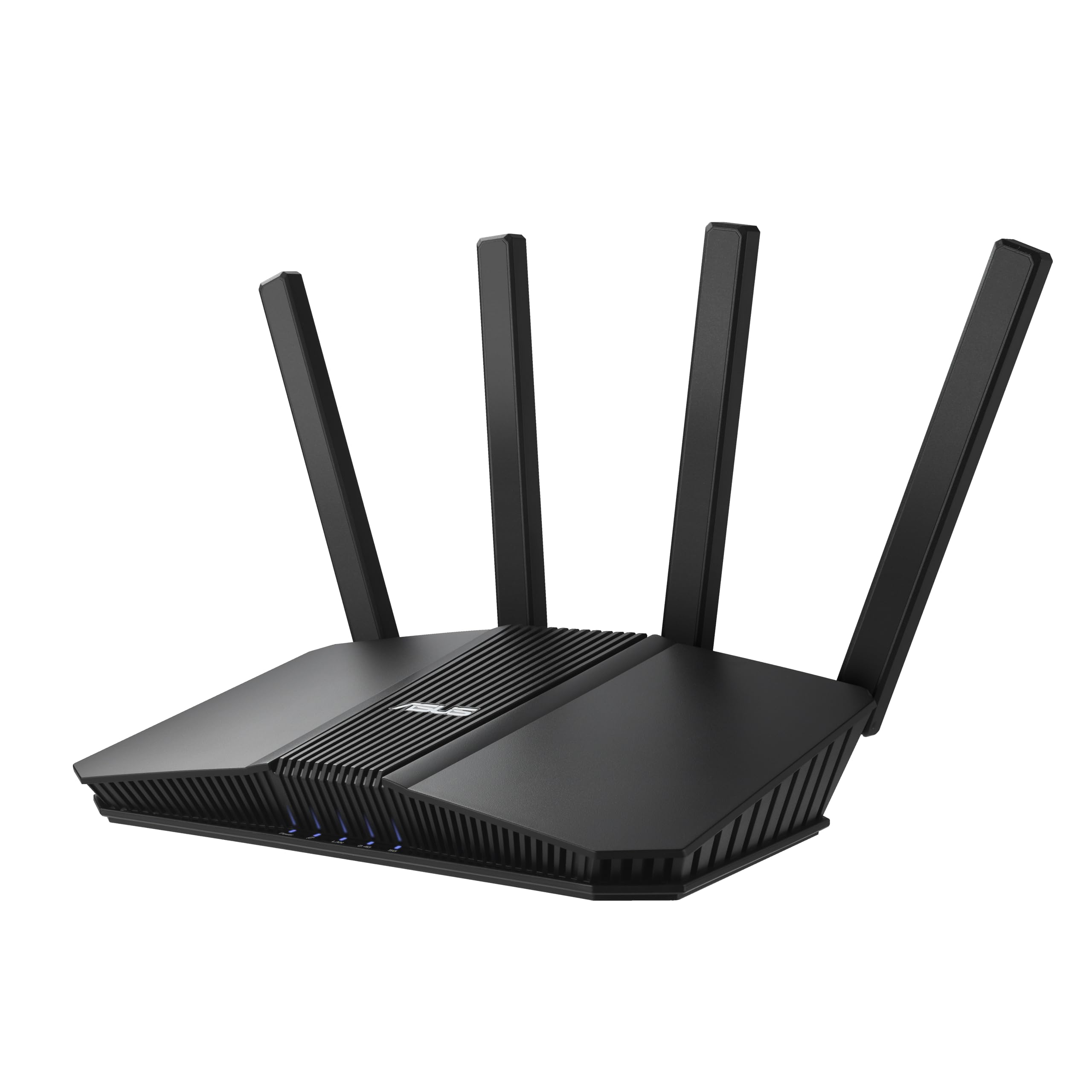
The RT-BE82U brings WiFi 7 and five 2.5G ports to the table at a mid-range price point that undercuts most competitors. It’s a dual-band router (2.4 GHz and 5 GHz) with 4096-QAM modulation pushing up to 6.5 Gbps aggregate. For offices that have just upgraded to multi-gig fiber but aren’t ready to invest in tri-band hardware, this is a pragmatic sweet spot.
Setup takes minutes, and the AiMesh feature allows you to add older ASUS routers as mesh nodes to extend coverage without replacing existing hardware. AiProtection Pro runs in the background with Trend Micro signatures, catching threats without slowing the connection. VPN integration works smoothly — one reviewer connected their VPN service in just a few minutes.
Coverage is solid for a 1,600-square-foot space plus yard, but concrete walls will still need a mesh node. The 5 GHz band is excellent, but the lack of a 6 GHz band means peak wireless speeds fall well short of tri-band rivals. For a budget-conscious office that wants WiFi 7, AiMesh flexibility, and strong security, this is the pick.
Why it’s great
- Five 2.5G ports for multi-gig wired connectivity
- AiMesh extendable with existing ASUS routers
- AiProtection Pro security included with no subscription
- Simple VPN client integration
Good to know
- Dual-band only, no 6 GHz band for peak Wi-Fi 7 speed
- Coverage may require mesh node in concrete construction
- Some users reported price bait-and-switch issues
7. Ubiquiti Cloud Gateway Ultra (UCG-Ultra)

The UCG-Ultra is Ubiquiti’s smallest wired gateway, but it packs a full UniFi Network controller and can manage 30+ UniFi devices and 300+ clients. The 1 Gbps routing with IDS/IPS enabled matches most gigabit fiber plans, and multi-WAN load balancing provides failover for critical uptime. A 0.96-inch LCM screen on the front displays real-time traffic stats.
IT professionals praise it as a replacement for expensive firewalls, noting that the UniFi interface offers enterprise insight without the Cisco headache. The compact plastic chassis is USB-C powered, making it easy to tuck into a telecom closet.
The wired-only design means you must bring your own PoE switch and access points. Initial setup can be mildly tricky for users coming from EdgeRouter interfaces. The front LCD is more decorative than functional. For small businesses already invested in the UniFi ecosystem, the UCG-Ultra is an affordable, reliable brain.
Why it’s great
- Built-in UniFi controller manages 30+ devices and 300+ clients
- 1 Gbps IDS/IPS throughput keeps security on without speed loss
- Multi-WAN load balancing for ISP redundancy
- Low power, small footprint, USB-C powered
Good to know
- Wired only; requires separate switch and access points
- Front LCD is more cosmetic than functional
- Setup slightly tricky for non-UniFi veterans
8. TP-Link ER707-M2 Omada Multi-Gigabit VPN Router

The ER707-M2 delivers dual 2.5G WAN ports, a gigabit SFP cage, and support for up to 100 IPsec tunnels at a price that undercuts nearly every other multi-gig VPN router in the market. It handles 500,000 concurrent sessions and 1,000+ clients, making it suitable for mid-size offices with dense device counts. The Omada SDN integration means centralized management across switches and APs.
Owners consistently highlight the easy setup for ISP redundancy — one reviewer had primary and backup ISPs configured in minutes, with failover under 15 seconds transparent to end users. The five-year warranty provides peace of mind for long-term deployments. Remote cloud access through the Omada app makes it simple to check network status from anywhere.
The only Ethernet port is 2.5G for the two WAN ports, while the four LAN ports and SFP slot are gigabit, capping local wired speeds. TP-Link’s terminology and color scheme can be confusing during initial setup. If you need a dual-WAN VPN router with SDN management at a compelling price, the ER707-M2 is the standout.
Why it’s great
- Dual 2.5G WAN plus gigabit SFP for flexible internet uplinks
- 500,000 concurrent sessions handles dense office environments
- Omada SDN management for unified network control
- 5-year warranty and free tech support
Good to know
- LAN ports are gigabit, not multi-gig
- TP-Link’s interface terminology can be confusing
- No built-in Wi-Fi
9. GL.iNet MT2500A (Brume 2) Mini VPN Security Gateway

This compact aluminum box has no Wi-Fi, no antennas, and no pretense — it is a dedicated WireGuard and OpenVPN gateway that does one thing very well. The MT2500A pushes WireGuard at 355 Mbps and OpenVPN at 150 Mbps, driven by a capable processor and 8 GB eMMC storage for offline configurations. The 2.5G WAN port ensures your modem’s full speed reaches the VPN tunnel.
Users praise its ultra-low power draw (1-2 watts) and passive cooling, making it ideal for a 24/7 VPN server in a home office or small branch. The web admin panel is clean, and WireGuard setup takes about 20 minutes with the built-in DDNS. Support for VPN cascading allows simultaneous server and client operation — access your office LAN and route traffic through a third-party VPN at the same time.
There is no wireless capability, so you must connect it behind a Wi-Fi access point or switch. Some users report lower OpenVPN throughput (around 30 Mbps) over long-distance connections compared to higher-end ASUS routers. The lack of mounting holes makes tidy installation slightly awkward. For a purpose-built VPN gateway at the lowest entry cost, the Brume 2 is unbeatable.
Why it’s great
- Dedicated WireGuard gateway with 355 Mbps throughput
- Ultra-low power consumption (1-2W) for 24/7 operation
- VPN cascading supports simultaneous server and client modes
- 2.5G WAN port ensures modem speed reaches the tunnel
Good to know
- No Wi-Fi capability; requires separate access point
- OpenVPN speeds over long distance lag behind premium routers
- No mounting holes or bracket for wall/desk installation
FAQ
Do I need a tri-band Wi-Fi 7 router for my office?
What is the difference between IPsec and WireGuard for site-to-site connections?
Can I use a consumer mesh system for my small business?
How many concurrent devices can a business WiFi router handle?
Final Thoughts: The Verdict
For most users, the business wifi router winner is the Ubiquiti UniFi Dream Machine Special Edition because it collapses routing, switching, and controller into one rack unit with zero licensing fees. If you want maximum wired throughput for a NAS and workstations, grab the ASUS RT-BE88U. And for a cost-effective dual-WAN VPN router with SDN management, nothing beats the TP-Link ER707-M2.