
If your office desk is constantly littered with half-empty color cartridges that dried out before you could finish a single document, a dedicated monochrome laser printer is the cure. These machines print crisp, smudge-resistant black text at speeds that make inkjets feel like they’re running through molasses, all while slashing your per-page costs to pennies.
I’m Min — the co-founder and writer behind Gadgets Feed. This guide is built on hundreds of hours spent digging through technical spec sheets, analyzing real-world print speeds, and comparing the fine print on connectivity and toner yield to separate the workhorses from the paperweights.
The right model eliminates the biggest frustrations of modern printing: constant connection drops, expensive cartridges that dry out, and slow output. That is exactly why researching the best b&w printer requires a deep look at the actual specs that matter.
How To Choose The Best B&W Printer
Buying a monochrome laser printer is a long-term investment. The key is matching the machine’s core specs to your actual workload, not just the initial purchase cost. Here are the three most important factors to consider.
Print Speed and Duplex Capability
Speed is measured in pages per minute (PPM). A 30 PPM printer is fine for a single user printing a few dozen pages a day, but a small team sharing the device will benefit from a 36–42 PPM model. Automatic duplex printing (printing on both sides of the paper) is a non-negotiable for saving paper and staying organized, especially when printing reports or contracts. Always check if the duplex is automatic or manual — you want automatic.
Connectivity That Matches Your Workflow
Wireless (Wi-Fi) models offer the most flexibility, letting you print from a laptop, smartphone, or tablet anywhere in the office. If your Wi-Fi is unreliable or you prioritize security, a wired model with USB or Ethernet is the better bet. Many business printers now support Apple AirPrint and Mopria Print Service for driverless mobile printing, which simplifies setup significantly.
Toner Yield and Cost Per Page
The upfront price is only half the story. A printer that uses a high-yield toner cartridge (often labeled “XL” or “high capacity”) will cost more per cartridge but drastically lowers your cost per page over time. Starter toner cartridges (included in the box) often yield only a few hundred pages, so factor in the price of a replacement cartridge from day one. Also, look for brands that allow the use of compatible or third-party toner to keep operating costs low.
Quick Comparison
On smaller screens, swipe sideways to see the full table.
| Model | Category | Best For | Key Spec | Amazon |
|---|---|---|---|---|
| Brother HL-L2480DW | 3-in-1 Laser | All-in-One Home Office | 36 PPM, 2.7″ Touchscreen | Amazon |
| HP LaserJet Pro 4001n | Office Workhorse | Small Teams & High Volume | 42 PPM, HP Wolf Security | Amazon |
| Brother MFC-L2690DW | Premium All-in-One | Reliable Multi-Function Work | 26 PPM, 250-Sheet Tray | Amazon |
| Canon imageCLASS MF275dw | 4-in-1 Laser | Compact All-in-One Office | 30 PPM, 35-Sheet ADF | Amazon |
| Xerox B230/DNI | Wireless Single-Function | Fast Mobile & Cloud Printing | 36 PPM, AirPrint Support | Amazon |
| Canon imageCLASS LBP122dw | Compact Single-Function | Budget-Conscious Home Office | 30 PPM, Wireless Duplex | Amazon |
| HP LaserJet M209d | Wired Duplex Printer | Simple, Reliable USB Printing | 30 PPM, Auto Duplex | Amazon |
| Lexmark MX431adw | Business MFP | Secure Office with Auto 2-Sided Scan | 42 PPM, Analog Fax | Amazon |
| Brother Dual Tray | High-Volume Single-Function | High-Volume Office Printing | 50 PPM, Dual 500-Sheet Trays | Amazon |
In‑Depth Reviews
1. Brother HL-L2480DW

The Brother HL-L2480DW is a powerhouse 3-in-1 monochrome laser that combines a printer, scanner, and copier into a compact footprint. At 36 PPM with automatic duplex printing, it keeps your workflow moving without wasting paper. The standout feature here is the 2.7-inch touchscreen, which makes navigating Cloud apps like Google Drive and Dropbox a breeze — a rare convenience at this level.
Connectivity is future-proofed with dual-band Wi-Fi (2.4GHz and 5GHz), Ethernet, and USB, so you can place it anywhere without worrying about network congestion. The 250-sheet paper tray handles high-volume days, and the manual feed slot allows for printing on envelopes or thicker card stock. The Brother Mobile Connect app lets you manage the printer and track toner levels remotely.
User feedback highlights the reliability of Brother’s wireless connection, with many noting it works flawlessly where other brands failed. The TN830 and TN830XL toner cartridges keep operating costs low, especially with the Refresh subscription that can save up to 50% on toner. For a home office or small team needing a do-everything workhorse, this is the one to beat.
Why it’s great
- Excelente 36 PPM print speed with duplex
- Intuitive 2.7″ touchscreen with cloud app access
- Dual-band Wi-Fi for reliable connectivity
Good to know
- Starter toner included yields fewer pages than standard
- No one-button fax or advanced document feeder
2. HP LaserJet Pro 4001n
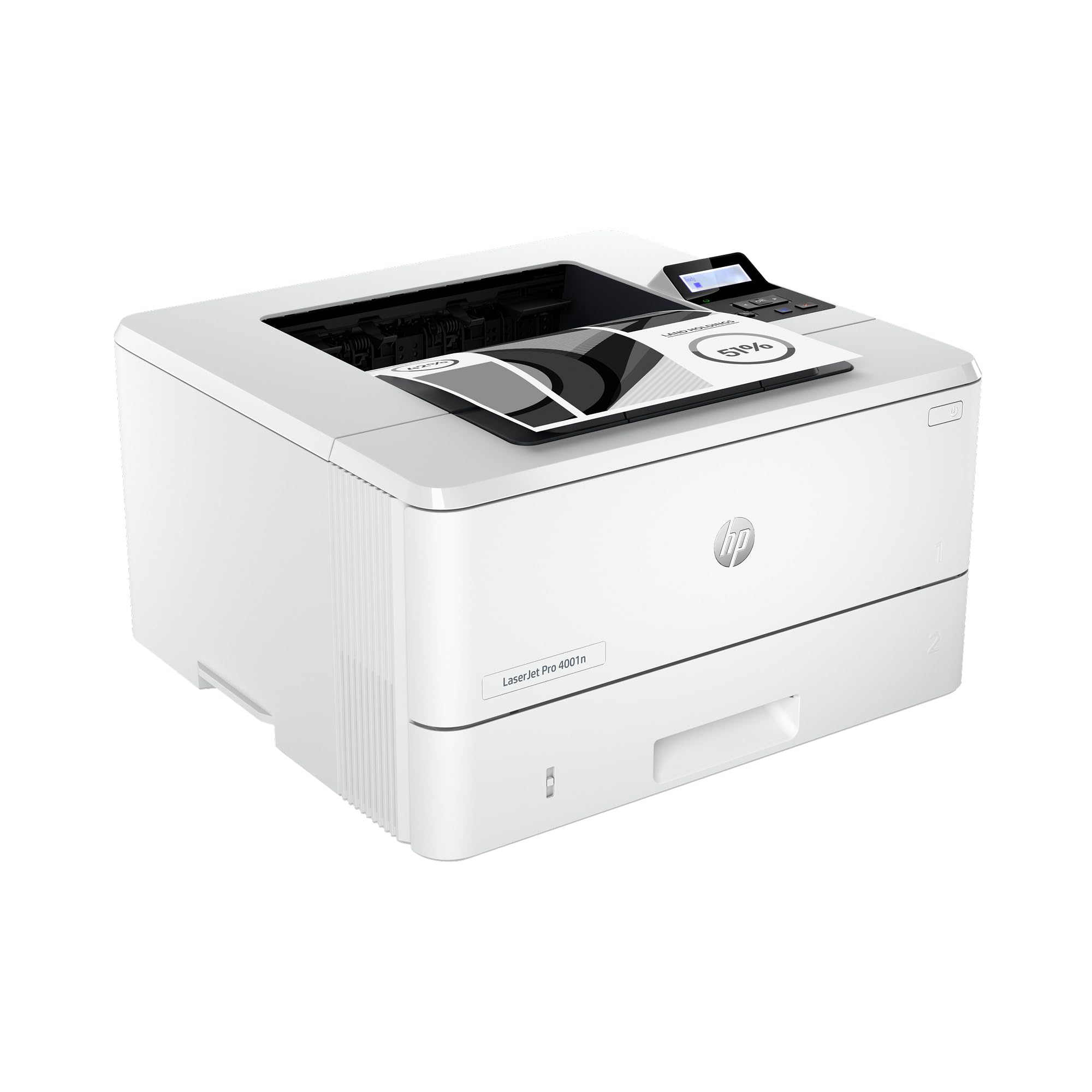
The HP LaserJet Pro 4001n is built for small teams that need blistering speed and enterprise-grade security. Its 42 PPM output is among the fastest in this class, and with HP Wolf Pro Security, your data is protected from cyber threats at every point of the print workflow. This is a wired-only model (USB and Ethernet), which is a deliberate choice for reliability in a busy office environment without Wi-Fi dropouts.
Print quality is exceptional for text-heavy documents, with sharp, consistent blacks page after page. The 4001n supports a wide range of operating systems and mobile printing via AirPrint, Android, and Chromebook. The built-in LCD makes setup and management straightforward, though you won’t find a touchscreen here. The high-yield 148X toner cartridge delivers up to 9,500 pages, keeping cost per page very low for a premium machine.
Reviews consistently praise its speed and reliability, with users noting it handles high-volume days without jams or errors. A few have reported firmware-related paper size errors, so it’s worth keeping the firmware updated. For a dedicated print-only machine that can serve up to ten users, this is a top-tier investment.
Why it’s great
- Blazing 42 PPM speed for high-volume teams
- HP Wolf Pro Security for data protection
- Low cost per page with high-yield toner
Good to know
- Wired-only (no Wi-Fi or Bluetooth)
- No duplex scanning or copy function
3. Brother MFC-L2690DW

The Brother MFC-L2690DW is a premium all-in-one monochrome laser that excels in reliability and build quality. It prints at 26 PPM with automatic duplexing, and its 250-sheet adjustable paper tray handles letter and legal sizes with ease. The manual feed slot adds versatility for printing on card stock, envelopes, and watercolor paper — a blessing for small business owners who need occasional specialty media support.
This model includes copy, scan, and fax functions, making it a true MFP for a busy desk. Connectivity is built-in wireless, plus a USB interface for direct connection. The LCD display is functional but not touchscreen, so navigating settings takes a moment. Brother’s reputation for sturdy construction is evident here — the steel frame feels durable enough to survive years of daily use.
User reviews highlight its excellent print quality and seamless integration with Mac OS and iOS for scanning. The TN-450 toner cartridges are widely available and affordable. Some users report a minor quirk where the printer occasionally defaults to fax mode on startup, but a quick restart resolves it. For a reliable, do-it-all machine that won’t break the bank, this is a solid choice.
Why it’s great
- Sturdy build with steel frame construction
- Handles card stock and specialty media via manual feed
- Reliable wireless with easy Mac/iOS integration
Good to know
- Print speed is slower at 26 PPM
- LCD is not a touchscreen for navigation
4. Canon imageCLASS MF275dw

The Canon imageCLASS MF275dw delivers a genuinely useful 4-in-1 experience (print, scan, copy, fax) at a price that undercuts many competitors. With 30 PPM print speed and a quick first print time of around 5.3 seconds, it handles daily office tasks without lag. The 35-sheet automatic document feeder simplifies scanning or copying multi-page documents, and the 6-line adjustable touchscreen makes navigation pleasant whether you’re sitting or standing.
Wireless setup is straightforward using the Canon PRINT Business app, and it supports AirPrint and Mopria for driverless mobile printing. The 150-sheet paper cassette is on the smaller side, but for a home office with moderate output, it’s adequate. The cartridge 071 starter cartridge yields around 700 pages, so factor in a standard or high-capacity replacement soon after purchase.
Reviews consistently praise its reliable wireless connectivity and automatic duplex printing. Scanning in B&W can appear slightly grainy compared to color scans, but for document archiving, it’s perfectly acceptable. The MF275dw is an excellent choice for anyone who needs a compact, feature-rich MFP without paying for premium features they won’t use.
Why it’s great
- Full 4-in-1 functionality for a low upfront investment
- Adjustable touchscreen for easy navigation
- 35-sheet ADF for multi-page copying/scanning
Good to know
- 150-sheet tray may need frequent refilling
- Starter toner yields only 700 pages
5. Xerox B230/DNI

The Xerox B230/DNI is a single-function monochrome laser that prioritizes speed and mobile connectivity. At 36 PPM with built-in Wi-Fi, AirPrint, and Mopria Print Service, it’s designed for users who print primarily from smartphones and tablets. The compact form factor fits easily on a small desk, and the automatic duplex printing helps reduce paper consumption.
Security is a core focus here, with comprehensive features that protect sensitive data on the network and the device itself. The LCD screen is functional, but entering Wi-Fi passwords is a scrolling chore — users recommend connecting via Ethernet during setup and enabling Wi-Fi later if needed. The starter toner cartridge is a standard-yield unit, which is a minor letdown, but replacement toner is reasonably priced.
Customer feedback is split: many praise the effortless wireless connection with Apple devices and the solid print quality, while a few report connectivity dropouts that require re-entering passwords. The lack of a scan or copy function means it’s strictly for printing, which keeps the interface simple. For a dedicated print-only machine with strong mobile support, the B230 is a smart pick.
Why it’s great
- Excellent mobile support with AirPrint and Mopria
- Fast 36 PPM output for busy home offices
- Compact, space-saving design
Good to know
- Wi-Fi password entry is tedious on the small LCD
- No scan, copy, or fax functionality
6. Canon imageCLASS LBP122dw

The Canon imageCLASS LBP122dw is a compact single-function printer that offers excellent value for a home office on a budget. It prints at 30 PPM with automatic duplexing, and its wireless connectivity (though limited to 2.4GHz) allows for easy placement anywhere. The Canon PRINT app adds convenience for mobile printing, and AirPrint support means iPhone and iPad users can print without a driver.
Its compact size is a notable advantage — it fits on a cramped desk next to a laptop without dominating the space. The LCD screen is small and hard to read in bright light, and initial Wi-Fi setup requires manually typing the password on that tiny screen, which some users find frustrating. Once connected, however, the connection is stable and reliable. The toner 071 high-capacity cartridge keeps running costs low.
User reviews highlight its crisp text output and the fact that it uses genuine Canon toner that avoids the dried-ink issues of inkjets. The paper tray stays open and collects dust, and the printer makes a moderate noise during operation. For a no-frills, fast, and affordable monochrome laser that just prints, the LBP122dw is hard to beat at this price.
Why it’s great
- Very affordable entry point for laser printing
- Automatic duplex and fast 30 PPM speed
- Reliable wireless after initial setup
Good to know
- LCD screen is small and hard to read
- Wi-Fi setup requires typing on a tiny screen
7. HP LaserJet M209d

The HP LaserJet M209d is a wired-only monochrome printer built for users who want absolute simplicity. With automatic duplex printing and a 30 PPM speed, it delivers fast, sharp prints without the hassle of Wi-Fi troubleshooting. The compact design — just 8 inches wide — fits neatly on a shelf or small desk, making it one of the most space-efficient models available.
Its plug-and-play setup via the included USB cable is a major advantage for non-technical users. There is no need to connect to a network, configure IP addresses, or deal with wireless dropouts. The smart-guided buttons on the front panel make navigation easy, though there is no touchscreen. A potential limitation is its incompatibility with macOS versions 12 and later, so Windows users will get the best experience.
Customer reviews consistently praise its reliability and fast warm-up time. The 150-sheet input tray is adequate for light to moderate use, and the toner cartridge included is a starter unit. Users also note that the prints come out slightly warm, which is a pleasant quirk. For a dedicated wired printer that just works, the M209d is a tremendous value.
Why it’s great
- Extremely simple plug-and-play USB setup
- Compact footprint saves desk space
- Fast auto duplex printing
Good to know
- Not compatible with macOS 12+
- No Wi-Fi or Ethernet connectivity
8. Lexmark MX431adw

The Lexmark MX431adw is a secure, feature-packed MFP designed for small businesses that need robust functionality. It prints at a fast 42 PPM and offers automatic two-sided scanning via a document feeder, plus copy, scan, and analog fax. The touchscreen interface makes navigation smooth, and built-in security features protect sensitive information at every stage of the print job.
Its sturdy steel frame is built to last in a busy office, and the automatic duplex printing and scanning save significant time and paper. Connectivity is handled via USB and Ethernet, ensuring a stable network connection. The high-yield toner cartridges cost more upfront but deliver a lower cost per page for high-volume users. This is a serious machine for serious workloads.
User experiences are mixed: while many praise its value and print quality, a concerning number report reliability issues, including repeated paper jams and unit failures. The lack of a printed manual is a notable omission, and customer support has been described as unhelpful. For a business with a dedicated IT team, the performance is there, but for solo users, the risk may be too high.
Why it’s great
- Fast 42 PPM with automatic two-sided scanning
- Sturdy steel frame for long-term durability
- Enterprise-level security features
Good to know
- Higher-than-average reliability complaints
- No printed manual included with the unit
9. Brother Dual Tray Laser Printer

The Brother Dual Tray Laser Printer is a high-volume workhorse built for busy offices that burn through reams of paper daily. It prints at an impressive 50 PPM, and its dual 500-sheet trays mean you can load two different paper sizes or types simultaneously without swapping paper. The 1.8-inch color touchscreen simplifies navigation, and automatic duplex printing comes standard.
This is a dedicated print-only machine, so there is no scanner, copier, or fax. Its scalable paper handling is its superpower — the dual trays significantly reduce the need for manual intervention during long print runs. Connectivity is wired Ethernet, making it a stable, fast node on your office network. The high-yield toner cartridges further reduce the cost per page for high-volume users.
Customer reviews are overwhelmingly positive, with users describing it as “super fast” and “a printer that actually works well.” The setup can be tricky for those unfamiliar with networked printers, but once configured, it runs reliably. The lack of wireless connectivity is the only major compromise. For a department or small office with heavy printing demands, this is the ultimate tool.
Why it’s great
- Blazing 50 PPM speed for high-volume tasks
- Dual 500-sheet trays for two paper sizes
- Color touchscreen for easy control
Good to know
- Wired-only (no Wi-Fi or mobile printing)
- Setup can be complex for novices
FAQ
Can I use third-party toner in a B&W laser printer?
How many pages should I expect from a starter toner cartridge?
Does a B&W laser printer require a special paper type?
Final Thoughts: The Verdict
For most users, the best b&w printer winner is the Brother HL-L2480DW because it packs a 36 PPM print speed, a user-friendly touchscreen, and reliable wireless connectivity into a versatile all-in-one package. If you want max speed and enterprise security, grab the HP LaserJet Pro 4001n. And for high-volume offices that need non-stop output and dual paper trays, nothing beats the Brother Dual Tray Laser Printer.