
An accounting calculator needs to do more than add numbers. It must deliver a reliable paper trail, clear visual feedback, and the right commercial-grade functions to handle cost-sell-margin calculations, tax entries, and multi-step checks without introducing errors. The wrong device slows down everyday workflows with paper jams, dim screens, or flimsy key action.
I’m Min — the co-founder and writer behind Gadgets Feed. I’ve spent countless hours dissecting the technical specs, build quality, and real-world performance of printing calculators to determine which units actually hold up under the demands of professional accounting and bookkeeping environments.
After analyzing print speeds, display types, key mechanisms, and business-specific features, here is my curated list of the absolute best calculator for accounting professionals who refuse to compromise on accuracy or efficiency.
How To Choose The Best Calculator For Accounting
Selecting the right unit means balancing three things: the speed and reliability of the print mechanism, the clarity of the display, and the specific business functions that match your daily workflow. A cheap unit that jams every ten prints costs more in frustration than a mid-range model built for endurance.
Print Speed and Mechanism
Print speed measured in lines per second (LPS) directly impacts how fast you can churn through ledger entries. Budget models hover around 2.0–2.5 LPS, while premium thermal units push 6.0–8.0 LPS. Thermal printing eliminates ink and ribbon replacements entirely, which cuts long-term consumable costs. However, thermal paper can be slightly more expensive per roll, so factor that into your decision.
Business-Specific Functions
Not all calculators labeled “accounting” include dedicated Cost, Sell, and Margin (CSM) keys. These one-touch functions let you compute profit margins or markups without memorizing formulas. Tax calculation keys and currency conversion are also common on more advanced desktop models. If your work involves frequent tax entries or multi-currency invoices, a unit with those built-in keys is a significant time-saver.
Display and Key Feel
Vacuum Fluorescent Display (VFD) screens offer higher contrast and wider viewing angles than standard LCDs, which reduces eye strain during long number-crunching sessions. Key feel is subjective but critical — look for full-sized, well-spaced keys with tactile resistance. Flimsy keys lead to mis-typed digits and wasted tape. A 12-digit display is the minimum for serious accounting work.
Quick Comparison
On smaller screens, swipe sideways to see the full table.
| Model | Category | Best For | Key Spec | Amazon |
|---|---|---|---|---|
| Sharp EL-1801V | Ink Ribbon | Premium durability & color-coded prints | 2.5 LPS, VFD display, metal/plastic build | Amazon |
| Sharp EL-1901 | Paperless | Digital tape review & error correction | 300-entry memory, 5-line LCD, quiet | Amazon |
| CATIGA SP-2401 (Thermal White) | Thermal | Fastest print speed & no ink costs | 8.0 LPS, VFD display, ink-free | Amazon |
| CATIGA SP-2401 (Thermal Black) | Thermal | Fastest print speed & no ink costs | 8.0 LPS, VFD display, ink-free | Amazon |
| Canon P23-DHV-3 | Ink Ribbon | Double-check function & reliable longevity | 2.0 LPS, LCD display, tax/currency keys | Amazon |
| Casio HR-200RC | Ink Ribbon | Dual-color prints & 150-step check | 2.4 LPS, large LCD, CSM keys | Amazon |
| Amazon Basics Printing Calculator | Thermal | Budget-friendly thermal printing | 6.0 LPS, LCD display, ink-free | Amazon |
In‑Depth Reviews
1. Sharp EL-1801V

The Sharp EL-1801V is the gold standard for accountants who demand a durable, desktop workhorse. It prints in black and red at 2.5 lines per second using standard ink ribbons, giving you a clear, color-coded audit trail where positive numbers print black and negatives appear in red. The 12-digit VFD display is exceptionally bright and readable from wide angles, reducing squinting during long sessions.
Build quality sets this unit apart. The combination of metal and plastic construction feels substantial, and the ergonomic key layout lets you type at speed without accidental double-taps. Dedicated Cost-Sell-Margin keys and a One-Touch Change function make profit calculations instantaneous. It is AC-powered only, so this is a dedicated desk unit, not something you move between locations.
Some users note that the newer production runs feel slightly lighter than older versions, but the core mechanics remain reliable. The EL-1801V uses standard Victor IR-40T ink rollers and common 2.25-inch paper rolls, making consumables easy to source. If you need a no-nonsense, long-lasting printing calculator for daily accounting use, this is the benchmark.
Why it’s great
- Superb VFD screen visibility in any office lighting
- Durable metal/plastic chassis designed for heavy daily use
- Color-coded prints reduce interpretation errors
Good to know
- AC-powered only — no battery option for portability
- Print speed is adequate but not class-leading at 2.5 LPS
2. Sharp EL-1901 Paperless Printing Calculator
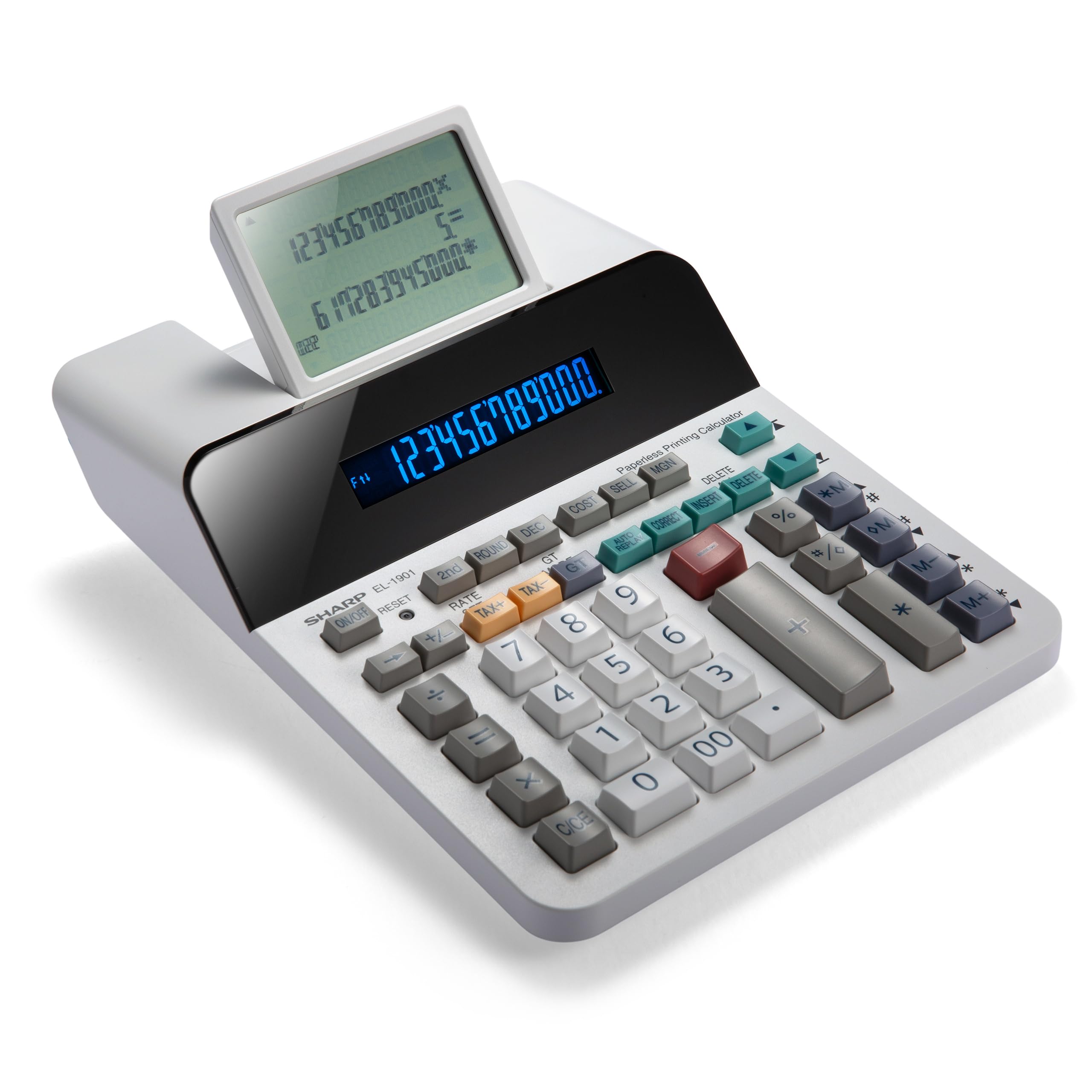
The Sharp EL-1901 redefines what an adding machine can do by completely ditching paper and ink. Instead of a thermal or ribbon printer, it uses a 5-line, 4-inch LCD screen that scrolls like a digital tape. You can review up to 300 entries, insert missing lines, and correct errors without redoing the entire calculation. This is a game-changer for accountants who hate wasting paper on wrong entries.
The unit operates whisper-quiet since there is no print head slamming or paper feeding. The full-sized keys feel responsive and well-spaced, and the adjustable tilt display helps eliminate glare from overhead office lights. It runs on AC power with a CR2032 backup battery, so your memory is safe during power blips. The learning curve is minimal — the scrolling interface is intuitive for anyone comfortable with a standard 10-key layout.
Some users report that clearing the entire tape requires an undocumented key combination (down + shift + delete twice). Once learned, however, this minor quirk becomes routine. The 300-entry limit means the oldest entries are overwritten, which is sufficient for most daily accounting sessions. For professionals transitioning to a paperless workflow, the EL-1901 is a thoughtful and practical innovation.
Why it’s great
- Eliminates paper and ink waste entirely
- Insert and correct lines without restarting calculations
- Nearly silent operation
Good to know
- Clear-all function is not user-friendly out of the box
- 300-entry history limit may not suit all-day high-volume sessions
3. CATIGA SP-2401 Thermal Printing Calculator (White)
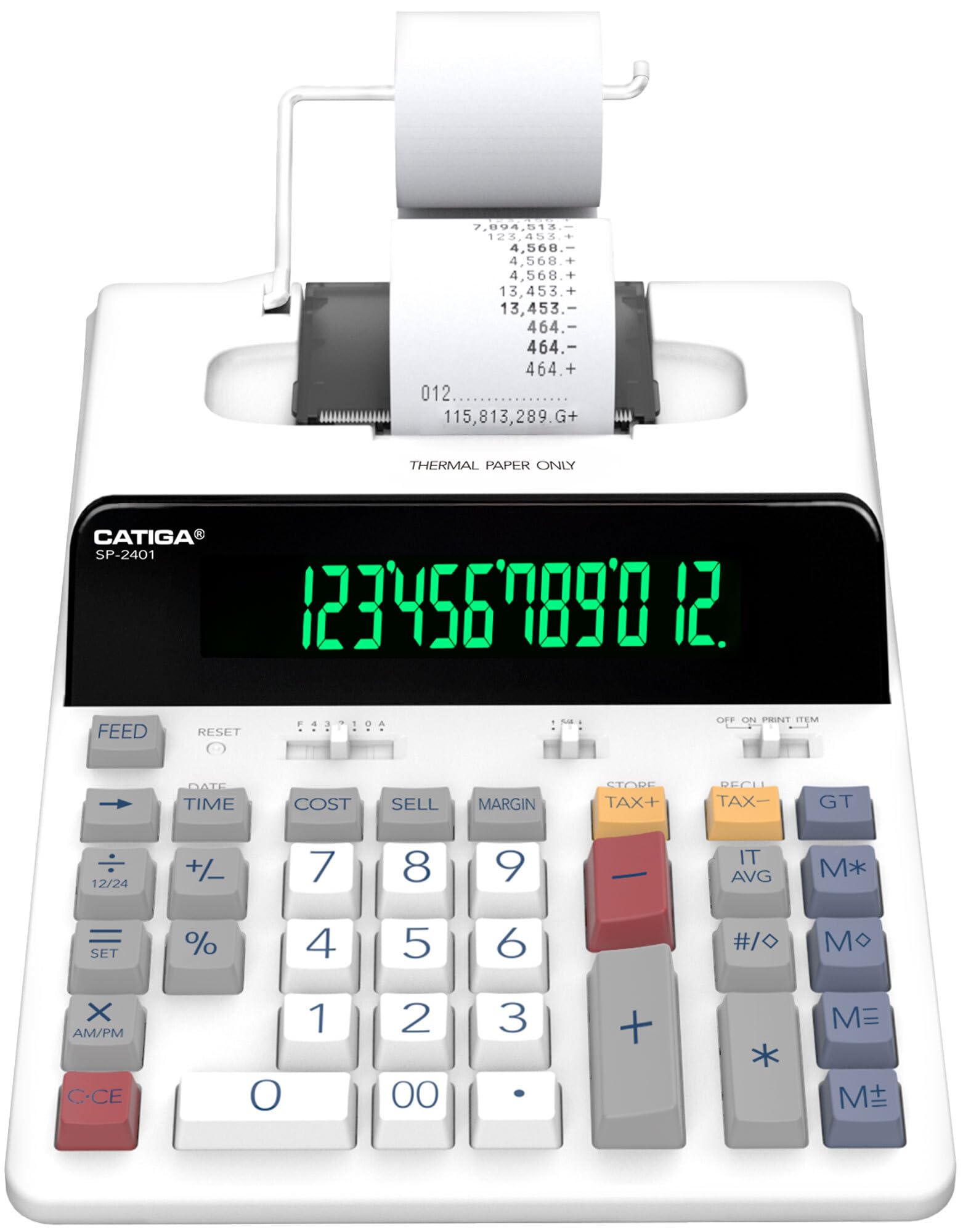
The CATIGA SP-2401 in Thermal White delivers the fastest print speed in this roundup at 8.0 lines per second — roughly three to five times faster than traditional ink models. This speed advantage is immediately noticeable when processing stacks of invoices. The ink-free thermal mechanism eliminates ribbon replacements entirely, saving both money and the hassle of messy cartridge changes.
The extra-large 12-digit VFD screen is strikingly bright and high-contrast, making it legible even under harsh fluorescent lights. The full-sized tactile keyboard provides a satisfying click with each keystroke, reducing the chance of missed entries. Built-in tax calculation and clock/calendar functions add convenience for everyday bookkeeping. The all-plastic chassis keeps weight down at approximately 1.5 pounds.
Some users have reported issues with paper tearing and occasional jams, and the plastic cover feels less robust than metal-reinforced rivals. If the paper path is not perfectly aligned, the tear-off blade can struggle. However, at this price point, the combination of 8.0 LPS speed, a VFD display, and zero ink costs is a compelling value proposition for any busy accounting desk.
Why it’s great
- Class-leading 8.0 LPS thermal print speed
- Bright VFD display reduces eye fatigue
- No ink or toner to replace
Good to know
- Paper path alignment can be finicky
- Plastic cover may wear with heavy use
4. CATIGA SP-2401 Thermal Printing Calculator (Black)

The CATIGA SP-2401 in Thermal Black is mechanically identical to its white counterpart, offering the same 8.0 LPS print speed and bright VFD display. The black colorway is purely an aesthetic choice that may match darker office equipment or personal preference. The core specification sheet is identical: ink-free thermal printing, large 12-digit fluorescent screen, tax and clock functions, and a classic 10-key layout.
Performance consistency between the two units is strong — neither thermal variant suffers from the speed degradation that occurs with ink ribbons as they dry out. The quiet operation (relative to impact printers) makes it suitable for shared workspaces. The tactile keys are large enough for heavy-fingered users, and the VFD display remains sharp even when viewed from a sharp angle beside a monitor.
Like the white version, the black model shares the same paper-path sensitivity. Users who struggle with paper alignment may experience jams more frequently than with sturdier builds. That said, the 8.0 LPS speed is the headline feature here, and for accountants processing large volumes of calculations rapidly, this unit delivers exceptional throughput at a mid-range price.
Why it’s great
- Same lightning-fast 8.0 LPS thermal engine as the white version
- VFD display provides excellent contrast across viewing angles
- Dark aesthetic suits modern office setups
Good to know
- Paper tearing mechanism is not foolproof
- Plastic housing lacks the heft of premium builds
5. Canon P23-DHV-3 Printing Calculator

Canon’s P23-DHV-3 has earned a loyal following among accountants who value consistency over raw speed. The 2.0 LPS print speed is modest, but the Double Check function sets it apart — after completing a calculation, pressing Double Check re-runs the entire sequence and compares totals, flagging errors automatically. This is a safety net that can prevent costly mistakes in tax and payroll work.
The 12-digit LCD display is clear and well-lit, and the dedicated tax calculation and currency conversion keys cover the most common business scenarios without needing to program custom rates. The paper loading slot has been moved higher on the printer head, which Canon says eliminates finger-jamming during paper changes. The chassis is lightweight plastic at about 1 pound, making it easy to reposition on a crowded desk.
The unit uses standard ink ribbons and 2.25-inch paper rolls, both widely available. If you prioritize accuracy verification features and are comfortable with a moderate print speed, the Canon P23-DHV-3 is a trustworthy companion for daily accounting tasks.
Why it’s great
- Double Check function reduces arithmetic errors
- Dedicated tax and currency keys save time
- Easy paper loading design
Good to know
- Print speed is modest at 2.0 LPS
- Lightweight plastic build feels less substantial
6. Casio HR-200RC

The Casio HR-200RC brings dual-color printing (black for positives, red for negatives) and a 150-step Check & Correct function to the accounting desk. This means you can review the last 150 calculation steps on the tape, reprint them, and edit entries after printing — a powerful feature for reconciling long columns of numbers without starting over. The print speed is 2.4 lines per second, which is adequate for most office paces.
The extra-large 12-digit LCD display is easy on the eyes, and the keys are well-spaced with a positive click that reduces input errors. Built-in Cost-Sell-Margin keys, tax calculation, and currency exchange functions cover the key business bases. The clock and calendar printing feature stamps the date and time on your tape, which helps with organized recordkeeping in accounting and retail environments.
Some users note the plastic casing feels slightly flimsy compared to older Casio models, and the included paper roll is tiny, so ordering extra rolls at purchase is recommended. The removable AC cord is a practical touch. For accountants who need to verify their work after the fact without saving physical paper trails, the 150-step memory is the standout feature here.
Why it’s great
- 150-step Check & Correct for easy error review
- Dual-color printing distinguishes positive and negative values
- Built-in clock and calendar print on tape
Good to know
- Plastic casing feels less sturdy than premium rivals
- Comes with a very small starter paper roll
7. Amazon Basics Printing Calculator
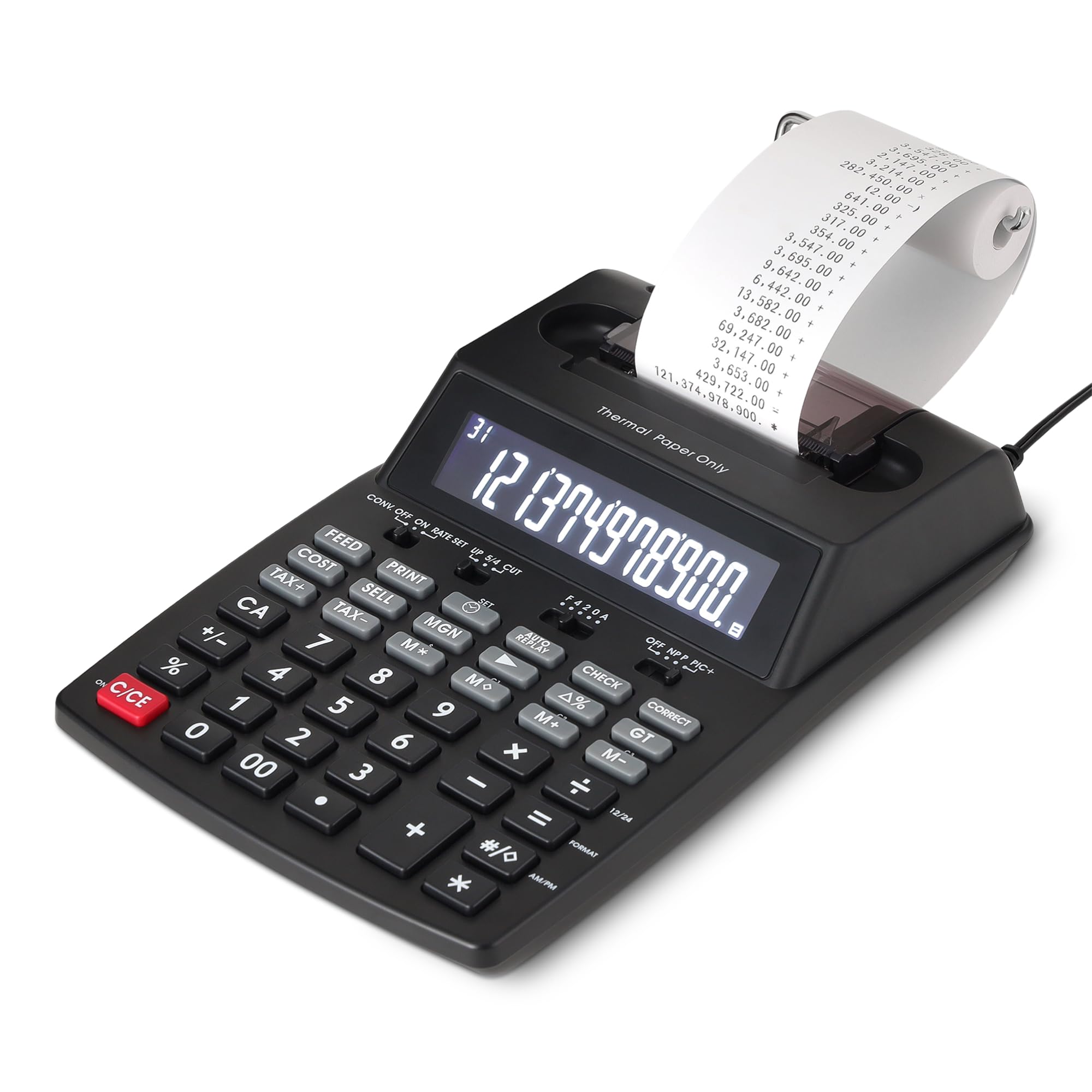
Amazon’s in-house brand delivers a thermal printing calculator that punches above its weight class. The 6.0 lines per second print speed is solidly mid-range, yet it costs significantly less than most competitors with similar thermal engines. The 12-digit LCD display is bright and functional, and the classic 10-key layout is comfortable for sustained data entry. Cost-Sell-Margin and tax calculation keys are included, covering the essential business functions.
The ink-free thermal technology eliminates recurring ribbon purchases, which keeps operating costs low over the life of the device. AC power means you never have to worry about battery changes during a busy workday. At under 1 pound, it is lightweight enough to move between desks without effort. The unit comes with a 1-year limited warranty from Amazon, providing basic peace of mind.
Some users have experienced paper jams, which appear to stem from a narrow paper path that does not tolerate misaligned rolls well. The included paper roll is also undersized, so purchasing standard 2.25-inch thermal rolls upfront is advisable. For budget-conscious accountants or small business owners who need a functional thermal printing calculator without the premium price tag, this Amazon Basics model offers compelling value.
Why it’s great
- Fast 6.0 LPS thermal print speed at a budget price
- No ink or ribbon replacements needed
- Includes Cost-Sell-Margin and tax keys
Good to know
- Paper path is prone to jams if not perfectly aligned
- Comes with a small starter paper roll
FAQ
What does the Cost-Sell-Margin key do for accounting?
Can I use standard paper rolls on a thermal printing calculator?
Is a VFD display worth the extra cost over an LCD?
What does the Double Check function do on the Canon P23-DHV-3?
Final Thoughts: The Verdict
For most users, the best calculator for accounting winner is the Sharp EL-1801V because it combines a durable metal chassis, a superb VFD display, and the most reliable color-coded printing mechanism in this class. If you want to go completely paperless and reclaim desk space, grab the Sharp EL-1901. And for lightning-fast throughput on a budget, nothing beats the print speed of the CATIGA SP-2401 Thermal.