
Our readers keep the lights on and my morning glass full of iced black tea. As an Amazon Associate, I earn from qualifying purchases.
Balancing a chemical equation, converting between moles and grams, or solving for pH can turn a straightforward homework session into a long headache. The right calculator does not just add numbers — it handles logarithms (logs), exponents (powers), and unit conversions in the ways chemistry actually works, so you can focus on understanding the reaction instead of wrestling with decimal places.
I’m Min — the co-founder and writer behind Gadgets Feed. This guide is built by comparing the manufacturers’ published specifications and the patterns across verified customer reviews, so you get each pick’s real strengths and trade-offs instead of marketing spin.
The six calculators here all support the scientific functions you need for college and high school chemistry. They differ in display size, function count, and build quality. Read on for our analysis of the best options for your calculator for chemistry.
How To Choose The Best Calculator For Chemistry
Picking a calculator for chemistry is different from picking one for basic math. You need a model that does not just crunch numbers but also displays equations in a way you can follow, offers enough functions for solubility and equilibrium, and lasts through exam seasons without dying. Here is what matters most.
Screen Size and Display Lines
Chemistry equations often involve stacked fractions, exponents, and scientific notation (very large or very small numbers). A four-line display like the one on the Casio fx-115ES Plus (4 lines) lets you see the entire expression and your previous work at once. A two-line display (like the OSALO at 2 lines) might force you to scroll more, which slows you down during a time-pressured lab practical.
Function Count vs. Chemistry Relevance
A high function count sounds impressive, but you need to check if those functions matter for chemistry. Look for log (logarithm), ln (natural log — the log with base e), exponent and power functions, factorial (multiplication of all positive integers up to a number, like 5! = 5×4×3×2×1), and statistical regression (a tool to find relationships in lab data). Some calculators with 400+ functions focus heavily on calculus and matrices rather than the scientific constants you use for gas laws (like PV = nRT) and stoichiometry (mass calculations in reactions).
Power Source Reliability
Most chemistry calculators use solar power with a battery backup. This combo (called “Solar Plus” or “dual power”) means a well-lit classroom keeps you running, and if the light dips, the battery takes over without losing your data. Models that rely only on solar can go dim under desk lamps, so a backup battery is a practical safety net.
Quick Comparison
On smaller screens, swipe sideways to see the full table.
| Model | Category | Best For | Key Spec | Amazon |
|---|---|---|---|---|
| Casio fx-115ES Plus 2nd Edition | Premium Non-Graphing | Clear textbook-style display | 4-line LCD, 6.05 oz | Amazon |
| Texas Instruments TI-36X Pro | Premium Pro | Engineering & exact math output | MathPrint display, 5.12 oz | Amazon |
| iPepul 991EX | Premium All-in-One | Built-in notepad for scratch work | 552 functions, Type-C rechargeable | Amazon |
| Scientific Calculators IPEROT 991ES | Mid-Range Value | Budget-friendly 4-line screen | 417 functions, 6.5″ screen | Amazon |
| Texas Instruments TI-30XS MultiView | Mid-Range Standard | Standardized exam use | 16-digit LCD, 4.8 oz | Amazon |
| OSALO OS 991ES Plus 2nd Edition | Entry-Level Budget | Basic chemistry calculations on a tight budget | 417 functions, 2.36″ screen | Amazon |
In‑Depth Reviews
1. Casio fx-115ES Plus 2nd Edition

280+ functions and a Natural Textbook Display make the Casio fx-115ES Plus 2nd Edition the top pick for any chemistry student who needs to see fractions, roots, and exponents exactly as they appear in a textbook.
It handles complex numbers for electrochemistry, summation for statistical analysis, and integration for thermochemistry on a 4-line display that is significantly easier to read than the 2-line display on the OSALO; buyers consistently call it the “best calculator at its price point.”
The honest trade-off is the screen brightness: some users note the display is not super bright in low light, though it remains perfectly readable in a well-lit classroom or lab. For most chemistry students up through Calculus I and II, this is the confident one-line verdict: the sharpest display-to-dollar value in this category.
Why it’s great
- Natural Textbook Display makes equation entry and review feel intuitive
- Integrates (finds area under curves) and differentiates (finds slopes) for physical chemistry topics
- Solar-plus-battery backup means no dead batteries during exams
Good to know
- Display brightness could be stronger in dim rooms
- Plastic case feels durable but not premium
2. Texas Instruments TI-36X Pro

The TI-36X Pro beats the Casio fx-115ES on one critical front for chemistry: it outputs exact answers (like √8 simplified to 2√2, or π symbol notation) as the default, rather than decimals you have to convert. Reviewers point out that churning out “exact answers that graphing calculators won’t do” makes it superior for number theory, modular arithmetic (dealing with remainders), and any chemistry that involves radicals or constants like π and e.
Its MathPrint display shows stacked fractions, exponents, and scientific notation the same way textbooks do, and it packs built-in equation solvers and polynomial solvers (tools that solve equations like ax² + bx + c = 0) that are useful for rate laws and equilibrium problems. At 5.12 ounces, it is lighter than the Casio’s 6.05 ounces, making it easier to carry around campus. It is also approved for the FE exam (Fundamentals of Engineering exam), so it will last through engineering chemistry classes.
Who should pick this over the top pick? If your chemistry coursework involves exact mathematical representations (for example, leaving an equilibrium constant as a simplified radical) and you want a calculator that defaults to fraction and symbolic answers, the TI-36X Pro is the smarter choice.
Where it shines
- Default exact output (fractions, radicals, π) saves time in analytical chemistry
- FE exam approved — professional longevity beyond school
- Built-in polynomial and equation solvers for kinetics and equilibrium
Worth noting
- Chrome buttons can be hard to read in bright light (some users add Sharpie markings)
- No insert toggle — editing long expressions requires rewriting
3. iPepul Scientific Calculator 991EX

Picture this: you are in the middle of a lab practical, you need to jot down a quick intermediate result, and you cannot find a scrap of paper. The iPepul 991EX builds a small notepad right into the calculator body — a locking writing surface that prevents accidental erasure — so you can scribble molar masses or titration volumes without juggling a separate notebook. Buyers report it is “lightweight and easy to carry,” and the screen is “very responsive to the included pen.”
It packs 552 functions (the highest count in this roundup), covering trigonometric (sine, cosine, tangent), exponential, logarithmic, and statistical domains, plus complex number and matrix operations. Instead of relying on disposable button-cell batteries, it uses Type-C charging and solar power, so you never need to hunt for an LR44 again. One reviewer notes it arrived needing a charge out of the box, so plan for that.
The standout spec here is the 2.7-inch LCD screen in a model that also runs on a rechargeable lithium-ion battery — no other pick combines a built-in notepad with this many functions at this tier. If you want a single device that replaces both your calculator and scratch paper, this is the one.
What stands out
- Built-in locking notepad eliminates the need for separate scratch paper
- 552 functions cover everything from stoichiometry to quantum chemistry
- Type-C charging + solar means no more hunting for button-cell batteries
The trade-offs
- Feels a bit light and cheap in hand for its price tier
- Screen hard to read in very dark rooms
4. Scientific Calculators IPEROT 991ES
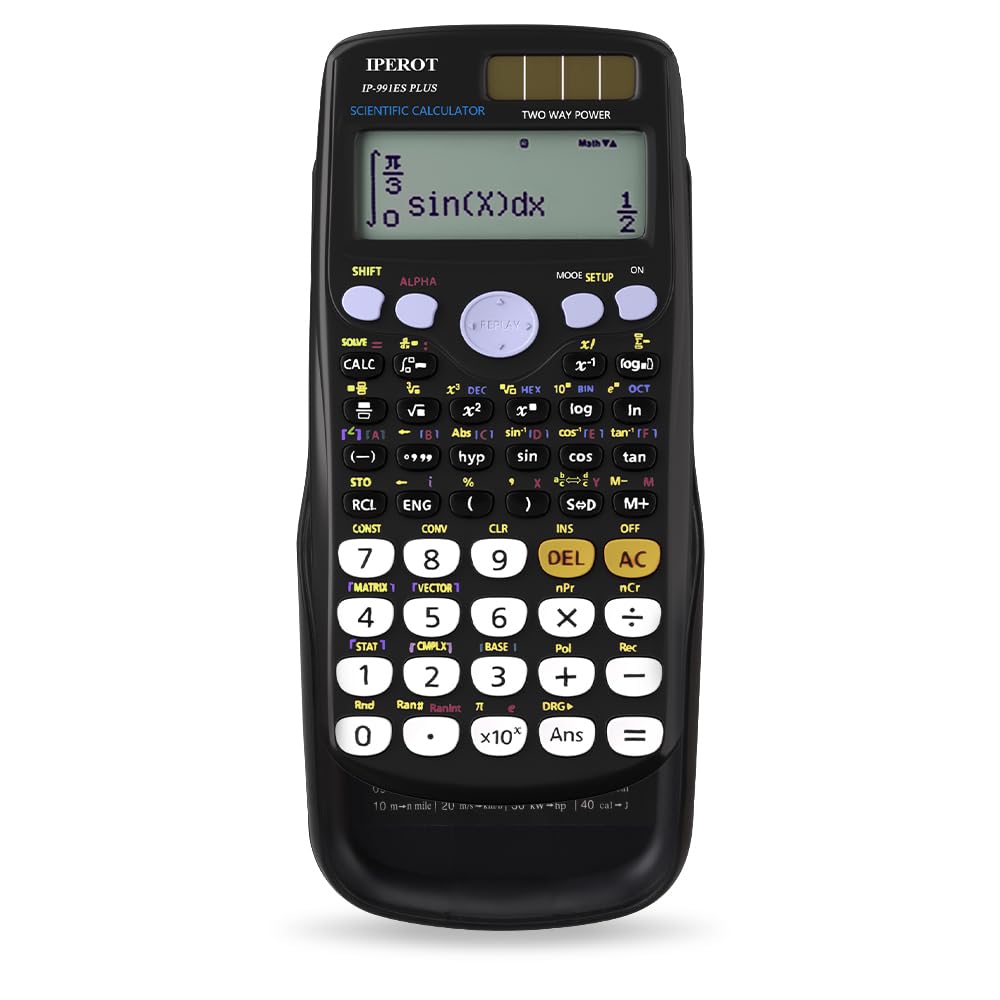
The single number that matters most in this category — screen size — goes to the IPEROT 991ES with its 6.5-inch display, which is a full 2.8 times larger than the OSALO’s 2.36-inch screen. That extra real estate means you can read a full chemical equation with exponents and subscripts without squinting, making it a huge practical advantage for anyone who does not want to lean over their desk.
The catch you accept is button feel: reviewers describe the buttons as “mushy” rather than clicky, saying they lack the tactile feedback of a Casio or Texas Instruments. However, the calculator is “great light weight calculator” according to one buyer, and the sliding cover protects the screen when you toss it in a bag. It runs on solar and battery power, so battery replacements are rare.
At this price, you get 417 functions (including derivative (calculating slope), integral (calculating area), and complex number calculations) and a 4-line display. If screen readability is your top priority and you can live with softer buttons, this is a price-to-performance winner.
The upsides
- 6.5-inch screen is the largest in this roundup — no squinting at equations
- Solar + battery dual power for reliable operation
- Sliding hard cover protects the display in bags
Keep in mind
- Buttons feel mushy, not crisp — less satisfying to press
- Build quality is functional rather than premium
5. Texas Instruments TI-30XS MultiView

At this entry-level price, you get the Texas Instruments brand reliability combined with a MultiView display that lets you enter more than one calculation on the same screen — useful for comparing reaction yields side-by-side. It uses Math Print mode to display stacked fractions and exponents just like textbooks, and it includes a toggle key to switch quickly between fraction and decimal views.
What you give up: it lacks the integration, differentiation, and matrix operations that the Casio fx-115ES and TI-36X Pro offer, so it will not handle your physical chemistry coursework. Reviewers call it an “excellent value scientific calculator for students,” but note that if you need matrices or numeric calculus, “superior alternatives exist at same price” like the Casio fx-115ES. It weighs just 4.8 ounces — the lightest in this lineup — making it the easiest to slip into a pencil case.
This is the exact budget buyer it is perfect for: a high school student taking chemistry or a college student in introductory chemistry (without calculus) who wants a reliable, exam-approved calculator from a trusted brand.
Why we’d pick it
- MultiView screen shows multiple calculations simultaneously
- Lightest at 4.8 oz — pocket-friendly for daily carry
- Trusted TI brand, widely approved for standardized exams
A few caveats
- No integration, differentiation, or matrix operations for advanced chemistry
- Limited to basic scientific functions — you may outgrow it
6. OSALO OS 991ES Plus 2nd Edition

This OSALO OS 991ES Plus 2nd Edition is perfect for the budget-conscious chemistry student who needs a full-featured scientific calculator but is willing to trade a large screen for maximum portability and the lowest cost in this guide.
Despite its compact 2.36-inch screen, it packs 417 functions including equation solving, trigonometry, integration, differentiation, matrix operations, and complex number calculations, all powered by a solar-and-battery dual system. Reviewers confirm it “does calculus functions well,” and a college professor specifically recommended it for a student, while shortcut keys and editable expressions reduce keystrokes by 50%.
This is the most affordable way to get 417 functions in a textbook-style display, but be aware that its small screen is a significant trade-off compared to larger-display models like the IPEROT or Casio.
Strong points
- Affordable entry point to a 417-function scientific calculator
- Solar + battery dual power for dependable use
- Shortcut keys and editable expressions reduce key presses
Before you buy
- 2.36-inch screen is small compared to the IPEROT’s 6.5 inches
- Build feels budget-level, not rugged
Understanding the Specs
Display Lines and Screen Size
Chemistry equations involve stacked fractions, exponents, and scientific notation. A 4-line display shows the entire expression plus previous entries, while a 2-line display requires scrolling. Screen size (measured diagonally in inches) determines how comfortably you read the numbers — a 6.5-inch display is much easier on the eyes than a 2.36-inch one during long lab sessions.
Function Count vs. Relevant Features
Having 400+ functions sounds impressive, but for chemistry you specifically need: log/ln (logarithm/natural log), exponent and power functions, factorial, and statistical regression. Some calculators emphasize calculus functions that you will not use in general chemistry, so check the feature list for equilibrium, pH, and gas law functions before buying based on raw function count.
FAQ
Do I need a graphing calculator for chemistry?
What is the difference between a 2-line and 4-line display for chemistry work?
Final Thoughts: The Verdict
For most chemistry students, the calculator for chemistry winner is the Casio fx-115ES Plus 2nd Edition because its 4-line Natural Textbook Display makes reading stacked fractions and exponents effortless, and the over 280 functions cover all general chemistry needs. If you need exact symbolic output (radicals and π by default) for analytical chemistry, grab the Texas Instruments TI-36X Pro. And for the best value with the largest screen, the IPEROT 991ES gives you the most readability per dollar.