
Our readers keep the lights on and my morning glass full of iced black tea. As an Amazon Associate, I earn from qualifying purchases.
Specs are compiled from manufacturer listings and verified buyer reviews and can change over time — please confirm the key details on the product page before buying.
Every college student hits this moment: a pop quiz, a complex equation, and a calculator that shows only the final number, leaving you to guess how you got there. The right college calculator does more than crunch digits—it shows your work, helps you learn, and keeps you approved for exams. This guide breaks down six calculators by how they actually perform in real classes, from basic algebra to college-level calculus.
I’m Min — the founder and writer behind Gadgets Feed. This guide is built by comparing the manufacturers’ published specifications and the patterns across verified customer reviews, so you get each pick’s real strengths and trade-offs instead of marketing spin.
Whether you are a freshman in pre-algebra or a STEM major tackling integrals, the best calculator for college depends on your course load, exam rules, and how much screen you need to see your work clearly.
Quick Picks
- Texas Instruments TI-84 Plus CE Python Color Graphing Calculator, Coral — Top Performer
- Casio fx-CG100 ClassWiz Color Graphing Calculator — Best Display
- Casio fx-115ES Plus 2nd Edition – Advanced Scientific Calculator — Best Value
- Nadex Scientific Calculator with Graph Functions, Pink — Best for AP
- Texas Instruments TI-30XS MultiView Scientific Calculator — Best Budget
- iPepul Purple Math Calculator with 417 Functions — Budget Champion
How To Choose The Best Calculator For College
Picking a calculator for college is less about brand loyalty and more about matching the device to your actual class schedule. A biology major and an engineering sophomore need different tools, even if they share a dorm. Focus on these three things: the types of math you will actually do, whether your exams allow graphing calculators, and how easy it is to read complex fractions and formulas on the screen.
Function Count vs. Class Level
Basic algebra and statistics classes rarely need more than 280 functions, while calculus and physics courses often demand 360 or more. Look for a calculator that covers the specific operations your syllabus lists — like integrals, matrices, or vector calculations — rather than the highest number you can find. A calculator with 417 functions is overkill for a statistics 101 class, but it becomes useful if you are taking engineering courses.
Screen Size and Display Type
A four-line display lets you see both the problem you typed and the answer at the same time, which helps catch entry errors. Natural Textbook Display formatting (found on many Casio models) shows fractions, square roots, and stacked equations exactly as they appear in your textbook — a feature that reduces confusion when you are checking your work. If you need graphing, a high-resolution color screen (like the 3.2-inch or 3.7-inch options) makes it easier to distinguish between multiple plotted functions.
Exam Approval and Power Source
Many college exams restrict graphing calculators that have computer algebra systems (CAS) or connectivity features. Check your department’s rules before buying. For durability, dual-power models (solar plus a backup battery) remove the worry of the calculator dying mid-exam. Some premium models use a rechargeable battery, which requires remembering to charge it before test day.
Quick Comparison
On smaller screens, swipe sideways to see the full table.
| Model | Best For | Functions | Screen Size | Dimensions (L x W) | Amazon |
|---|---|---|---|---|---|
| Texas Instruments TI-84 Plus CE Python | Advanced graphing and programming | Graphing | 3.2 Inches | 8″ x 4.4″ | $113.99Amazon |
| Casio fx-CG100 ClassWiz | 3D graphing and Python coding | Graphing | 3.7 Inches | 8.86″ x 3.62″ | $122.09$139.99Amazon |
| Casio fx-115ES Plus 2nd Edition | College calculus and physics | 280+ | 4-line LCD | 9″ x 5.5″ | $20.34$23.99Amazon |
| Nadex Scientific with Graph Functions | Formula visualization for AP classes | 360+ | 2.5 Inches | 11″ x 2″ | from $39.99Amazon |
| Texas Instruments TI-30XS MultiView | Budget-friendly school essentials | Scientific | 16-digit LCD | 7.22″ x 3.27″ | $16.99$20.00Amazon |
| iPepul Purple Math Calculator | Low-cost scientific with many functions | 417 | 2.8 Inches | 6.5″ x 3.27″ | $16.99Amazon |
In‑Depth Reviews
1. Texas Instruments TI-84 Plus CE Python Color Graphing Calculator, Coral
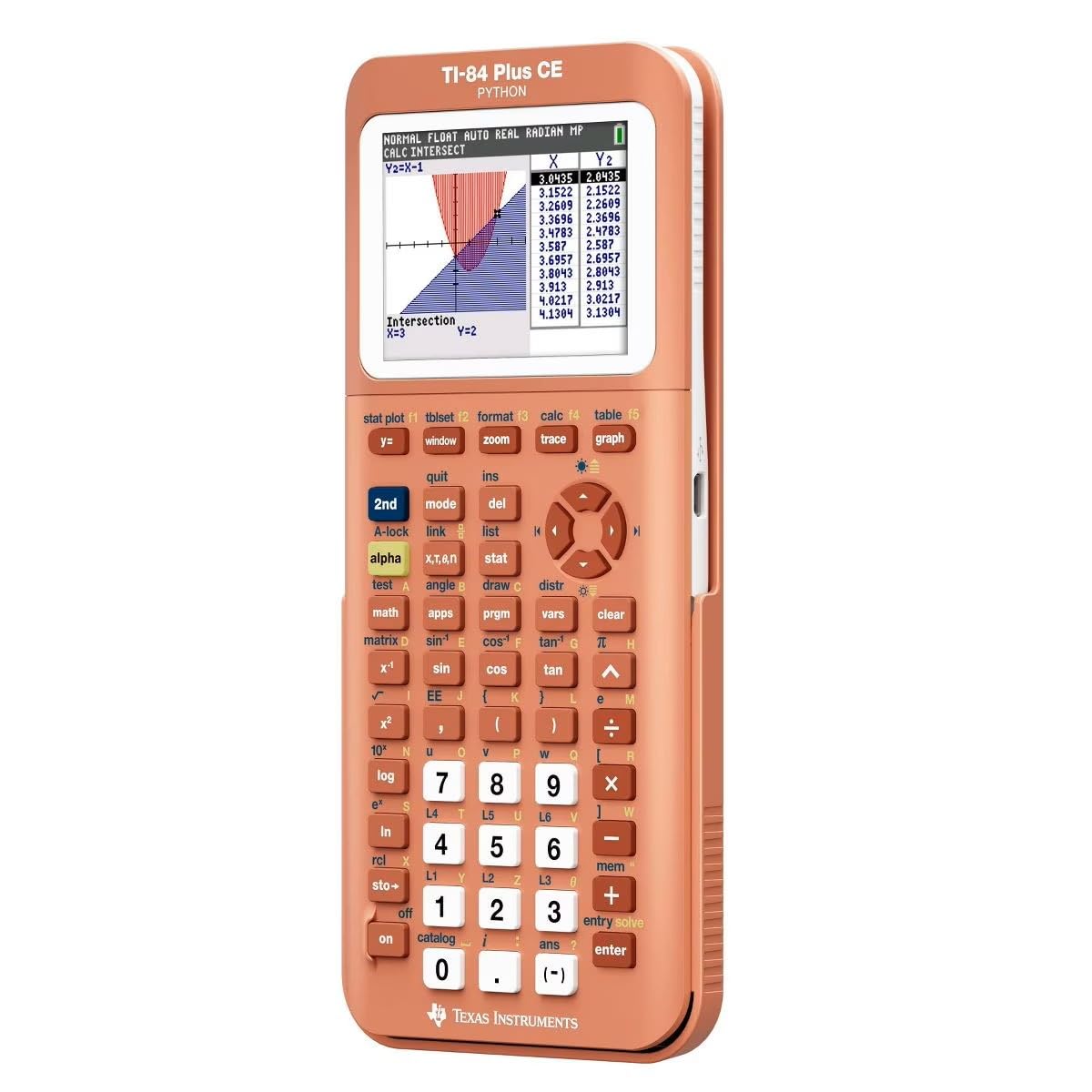
The gold-standard graphing calculator with a color screen and a rechargeable battery you can charge before tests.
The TI-84 Plus CE is the calculator most college STEM departments expect you to own. Its high-resolution, full-color backlit display (140 DPI resolution with 16-bit color) makes it easy to read multiple graphs at once, and the 3.2-inch screen gives you room to see your data without squinting. You get a rechargeable battery, which means no scrambling for LR44s during finals, though one reviewer noted that “it doesn’t come fully charged so make sure you charge it” right from the start.
Buyers report this coral model stands out in a backpack — one reviewer wrote, “Coral color stands out, making it easy to find unlike black ‘ninja’ calculators.” Another chemistry major was thrilled to find the color periodic table built in: “it has a color periodic table!!!!!!… this one has the periodic table on it with all the information for each element.”
What makes it the top pick
- Full-color backlit display makes graph analysis clearer
- Rechargeable battery removes the need for coin cells
- Built-in Python programming for coding coursework
The trade-offs
- Not all exams permit graphing calculators — check your syllabus
- Arrives with low charge, so plan for an initial 2-3 hour charge
Reach for this if: you are in a STEM major (engineering, chemistry, physics) and need a graphing calculator that handles everything from algebra to advanced statistics.
Look elsewhere if: your courses only require a basic scientific calculator — you would pay for features you never use.
2. Casio fx-CG100 ClassWiz Color Graphing Calculator

A large 3.7-inch color display with 3D graphing that shows spheres and planes exactly as they look in your textbook.
If your courses involve multivariable calculus or physics with 3D vectors, the Casio fx-CG100 gives you the biggest screen in this lineup at 3.7 inches with over 65,000 colors. It supports 3D graphing of up to three functions at once — including spheres, cylinders, and planes — so you can rotate and explore shapes that are hard to imagine on a black-and-white screen. The Natural Textbook Display shows fractions and equations exactly as they appear in your book, which helps you catch entry mistakes before they cost you points.
A reviewer noted their “8th Grader was so excited to receive a calculator” and that the “display is bright and amazing” — they even used sine and cosine to draw a perfect heart. The MicroPython integration lets you learn programming directly on the calculator, a feature that aligns with modern coding curriculum standards. It runs on 4 AAA batteries (included), and the built-in Exam Mode is accessible from the home screen, making it approved for AP, SAT, PSAT, and ACT exams.
Why it stands out
- 3.7-inch high-resolution color display — the largest screen here
- 3D graphing of spheres, cylinders, and planes for advanced math
- MicroPython built in for learning real programming skills
Where it falls short
- Runs on 4 AAA batteries instead of rechargeable
- Heavier and larger than basic scientific models for everyday carry
Choose this for: students in calculus III, linear algebra, or any STEM course where visualizing 3D functions makes a real difference in understanding.
skip it if: your classes only need a basic scientific calculator — you would rarely use the 3D graphing or Python features.
3. Casio fx-115ES Plus 2nd Edition – Advanced Scientific Calculator

The non-graphing calculator that outperforms the TI-30 on integrals while costing less than a full graphing model.
The Casio fx-115ES Plus handles over 280 functions including complex number calculations, linear regression, summation, integration, permutations and combinations, and matrix/vector operations. That is 29% more functions than the 280+ baseline, putting it ahead of many TI models in the same price tier. The Natural Textbook Display shows fractions, roots, and equations exactly as they appear in your textbook — a feature that one reviewer called “a must for Calculus I/II” because you see stacked fractions and integrals clearly, not in a linear string.
Buyers consistently praise its battery life: one buyer mentioned “excellent battery life (lasted a year)” on a single LR44 cell. Another reviewer compares it directly to TI options: “Outperforms TI-30; does derivatives and integrals.” The 16-digit 4-line LCD keeps your input and output visible at the same time, so you can spot errors before hitting equals.
What earns it the spot
- Natural Textbook Display for clear fraction and equation reading
- Over 280 functions including calculus and matrix operations
- Excellent battery life — a single LR44 lasts about a year
The catch
- No graphing capability — you cannot plot functions visually
- Display is not backlit, so it needs a well-lit room
Best for: college students taking calculus I/II, physics, or statistics who do not need a graphing calculator and want the most capable non-graphing model available.
Not for: anyone who needs to plot graphs or visualize data — this model shows numbers only.
4. Nadex Scientific Calculator with Graph Functions, Pink

A scientific calculator with graph display functions that is longer than most textbooks at 11 inches but slim at 2 inches wide.
The Nadex Scientific Calculator is built for formula visualization rather than full graphing — it can show linear equations, parabolas, and statistical plots on its 2.5-inch screen, but it does not replace a true graphing calculator like the TI-84. With over 360 functions including complex number calculations, fractions, linear regression, standard deviation, permutations, and variable solving, it is designed for AP courses like Pre-Algebra through Calculus. It has 69% more length than the compact iPepul (11″L x 2″W vs 6.5″L x 3.27″W), which gives you more physical space for key layout but makes it less pocket-friendly.
A buyer reported, “I bought it for my daughter’s college algebra course. She said it worked perfectly for what she needed.” Another reviewer noted “it comes with a booklet that tells you how to use all its different functions” and that it “seems durable enough for everyday use.” It includes a secondary replacement battery in the chamber for convenience, though the primary power source is solar.
Its strengths
- 360+ functions covering AP and college math courses
- Solar powered with a backup battery included
- Large screen with simultaneous equation and graphic display
Its limits
- Not a graphing calculator — “graph functions” are for formula visualizations only
- At 11 inches long, it does not fit in standard pencil cases
Reach for it if: you need a scientific calculator with visual graph display for AP math classes but your school does not permit full graphing models.
pass on it if: you need true graphing (plotting multiple functions, tracing curves) — this model only visualizes formulas, not full graphs.
5. Texas Instruments TI-30XS MultiView Scientific Calculator

The lightweight school companion at 0.3 pounds that many colleges still put on their approved calculator list.
The Texas Instruments TI-30XS MultiView fits into a small corner of your backpack without adding weight — it is just 0.3 pounds and measures 7.22 inches by 3.27 inches. It lets you enter more than one calculation on the same screen and compare results, which is helpful when you are checking your work against a formula sheet. The Math Print mode shows stacked fractions, exponents, and exact square roots the same way they appear in your textbook, and the toggle key flips between fraction and decimal forms instantly.
A reviewer called it “the GOAT of Budget Scientific Calculators” and said it is “sturdy, responsive buttons, large text.” Another buyer bought it for their daughter’s TCAP since “the TI84 isn’t on the approved list.” One reviewer compared it critically: “Good but limited; best only if required for exams (e.g., actuarial). Superior alternatives exist: Casio ES-115 Plus (more features, matrices, numeric calculus) or TI-36X Pro for similar price.”
Why it works
- Dual solar/battery power so it never dies mid-exam
- MultiView screen shows multiple calculations side by side
- Very lightweight and compact at 0.3 pounds
Its limits
- Lacks CAS, graphing, and equation solving
- Fewer advanced functions than the Casio fx-115ES at a similar price
Pick this for: students who need a reliable, exam-approved scientific calculator for basic math through accounting and introductory science classes.
Look elsewhere if: your courses require calculus, matrices, or vector operations — the Casio fx-115ES gives you more firepower for a similar cost.
6. iPepul Purple Math Calculator with 417 Functions

The purple entry-level scientific with 417 functions packed into a body that actually fits in a jeans pocket at 6.5 inches.
The iPepul Purple Math Calculator offers the highest function count in the budget tier at 417 functions — including trigonometric, exponential, logarithmic, calculus, statistics, algebra, complex number calculations, matrix calculations, and vector calculations — all in a compact 6.5-inch body. Its 2.8-inch four-line display is 12% larger than the Nadex’s 2.5-inch screen, making it easier to read your input and output at the same time. The dual power system (solar panel plus an included LR44 battery) means it can run for years without a replacement, as long as there is enough light.
A reviewer who bought it two years ago wrote, “After buying it for two years I am now leaving a review. Works perfectly, No problem at all. Highly recommend.” Another buyer noted it is “excellent for statistics; versatile functions (algebra, trig). Responsive buttons, clear display, ergonomic. Sturdy build survives drops.” One owner reported a minor issue: “The buttons stick just a little bit but it’s actually great and has all the functions I need for my exams.”
What makes it a great budget pick
- 417 functions — the highest count in the budget category
- 2.8-inch four-line display for reading full equations
- Solar and battery dual power for long-term reliability
Where it cuts corners
- Some users report sticky buttons over time
- No graphing capability despite the high function count
Grab this for: students on a tight budget who still want a full set of scientific functions — it covers trigonometry, calculus, and statistics without the graphing price tag.
it’s not for you if: you need fully responsive keys or a more premium build — the button stickiness could slow you down during exams.
Understanding the Specs
Function Count
The number of built-in operations a calculator can perform — from simple arithmetic to advanced functions like integration, matrix operations, and vector calculations. For college courses, 280+ functions generally cover calculus and physics, while 360+ or 417 functions include extras like complex number support and regression analysis. More functions help in advanced classes, but for basic algebra or statistics, a count above 280 is usually overkill.
Screen Size and Display Type
Screen size is measured diagonally (like 2.5 inches, 2.8 inches, or 3.2 inches). A larger screen lets you see more of your equation and the result at the same time, which reduces entry errors. “Four-line display” means you see up to four rows of text, while “Natural Textbook Display” shows fractions and integrals as they appear in print. High-resolution color displays (like the TI-84 Plus CE’s 140 DPI, 16-bit color) make it easier to read multiple graphed functions without overlapping confusion.
FAQ
What is the difference between a scientific and a graphing calculator for college?
Are graphing calculators allowed on college exams?
How many functions do I actually need for college math?
What does “Natural Textbook Display” mean?
Will a TI-84 or Casio fx-CG100 work for all four years of college?
Which calculators are the most durable and survive drops?
Do I need a calculator with Python for college?
How long do calculator batteries typically last?
Final Thoughts: The Verdict
If you want one dependable pick, the best calculator for college winner is the Casio fx-115ES Plus 2nd Edition because it packs calculus-level functions into an exam-approved, battery-efficient package that costs less than a graphing model. If you need full graphing and programming, grab the Texas Instruments TI-84 Plus CE Python with its color display and rechargeable battery. And for students on a tight budget who still want over 400 functions, the iPepul Purple Math Calculator delivers surprising depth in a compact, solar-powered body.
How We Picked
We do not accept paid placement, and we did not hands-on test every unit. Instead, we match each pick to a real buyer and use-case by comparing the manufacturers’ published specifications against the patterns in verified customer reviews — so you get each pick’s real strengths and trade-offs instead of marketing copy.
Sources & Methodology
Specifications: manufacturer listings and product documentation. Review insights: verified customer reviews, as of July 2026. Pricing: not shown on this page (it changes often); check the current price via the retailer link.
As an Amazon Associate, Gadgets Feed earns from qualifying purchases. This does not affect which products we feature.
Product prices and availability are accurate as of the date/time indicated and are subject to change. Any price and availability information displayed on Amazon at the time of purchase will apply to the purchase of this product. As an Amazon Associate I earn from qualifying purchases.
CERTAIN CONTENT THAT APPEARS ON THIS SITE COMES FROM AMAZON. THIS CONTENT IS PROVIDED "AS IS" AND IS SUBJECT TO CHANGE OR REMOVAL AT ANY TIME.
Amazon and the Amazon logo are trademarks of Amazon.com, Inc. or its affiliates.