
Our readers keep the lights on and my morning glass full of iced black tea. As an Amazon Associate, I earn from qualifying purchases.
Specs are compiled from manufacturer listings and verified buyer reviews and can change over time — please confirm the key details on the product page before buying.
The biggest mistake new streamers make is buying on megapixels alone, then discovering the autofocus hunts when they lean forward or the software fights them mid-broadcast. For a solo creator, fast focus, movement tracking, and low-light survival matter more than a higher resolution number. That is why this guide weighs real-world behavior as heavily as the spec sheet, separating reliable performers from those that just look good in the box.
I’m Min — the founder and writer behind Gadgets Feed. This guide is built by comparing the manufacturers’ published specifications and the patterns across verified customer reviews, so you get each pick’s real strengths and trade-offs instead of marketing spin.
You will find the best cam for streaming by matching its sensor, autofocus, and tracking to how you actually broadcast, whether that means a fixed desk setup or a camera that follows you across the room.
Our Picks at a Glance


How To Choose The Best Cam For Streaming
Streaming cameras divide into two camps: simple webcams that sit on your monitor and PTZ (pan-tilt-zoom) cameras that physically move to follow you. Your choice depends on whether you stay seated for the whole broadcast or move around a stage, studio, or room.
Autofocus is your real co-host
A camera that keeps you sharp while you lean in to read chat or stand up to gesture is worth more than one with a higher peak resolution. Phase-detection autofocus (PDAF) locks on faster than standard contrast-based systems, so you stay crisp even during quick movements.
Sensor size beats pixel count in dim rooms
A larger image sensor gathers more light, which means cleaner video when you stream under normal room lighting or with a single ring light. Cameras with 1/1.3″ or 1/1.8″ sensors tend to handle shadows and backlit windows far better than smaller sensors stuffed with more pixels.
Frame rate decides how smooth you look
60 frames per second (FPS) captures fast motion without that stuttery, soap-opera drag, which matters for gaming and active content. If your stream is mostly you talking at a desk, 30 FPS at 4K will look just as polished and free up your upload bandwidth.
Quick Comparison
| Model | Best For | Resolution | Frame Rate | Autofocus | Amazon |
|---|---|---|---|---|---|
| AVKANS NDI PTZ★ Best Overall | Multi-cam church & venues | 4K / 8 MP | 30 fps | Auto | Amazon |
| Razer Kiyo V2 XBest Value | Budget 60fps gaming | 1440p / 3.7 MP | 60 fps | Auto + Manual | Amazon |
| NexiGo N680E ProRing-Light Pick | Ring-light self-framing | 4K / 3840px | 1080p 60 fps | PDAF | Amazon |
| Logitech StreamCam | Full HD desk streams | 1080p / 2 MP | 60 fps | Auto | Amazon |
| EMEET PIXY | AI auto-tracking solo hosts | 4K / 8 MP | 1080p 60 fps | PDAF + AI | Amazon |
| Razer Kiyo V2 | Low-light 4K streams | 4K / 8.3 MP | 30 fps | Auto | Amazon |
| OBSBOT Tiny 3 Lite | Compact AI tracking | 4K / 48 MP | 1080p 120 fps | PDAF | Amazon |
| YOLOLIV YoloCam S3 | Pro-grade image quality | 4K / 3840px | 1080p 60 fps | PDAF | Amazon |
| Insta360 Link 2 Pro | PTZ tracking + slick software | 4K / 8 MP | 4K 30 fps | Auto + Manual | Amazon |
In-Depth Reviews
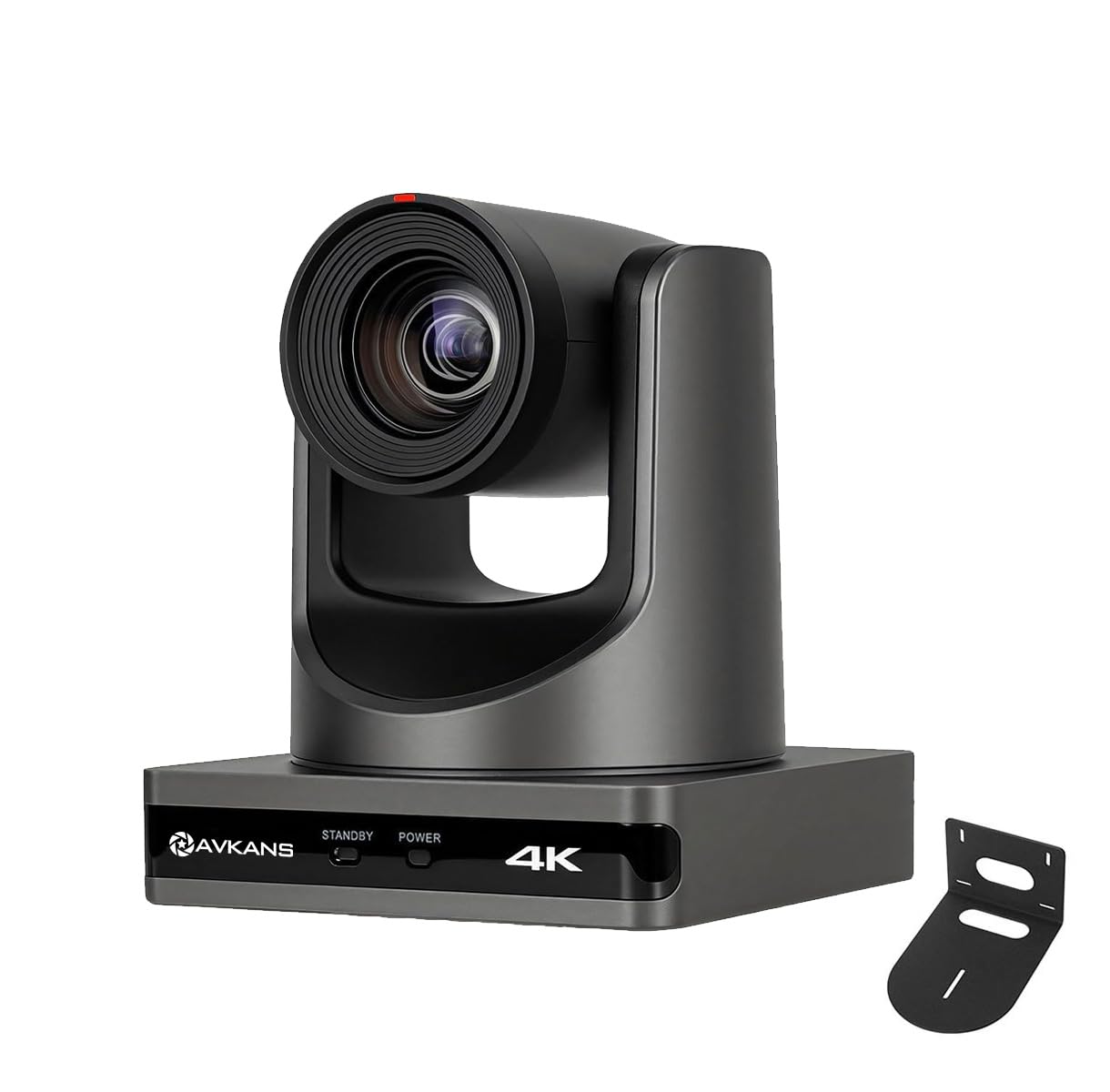
1. AVKANS NDI PTZ Camera 4K
Our pick — over 4.5★ from 450+ verified ratings; the strongest balance of quality and price.
The broadcast-grade choice that turns a single operator into a full production team.
When one person has to cover an entire stage, sanctuary, or conference hall, this camera lets you do it from the back row. The 20X optical zoom pulls in sharp detail without you moving an inch, and the 1/1.8 inch sensor keeps that image clean even when the house lights drop for a sermon or a keynote. Buyers report it replaces expensive camcorder rigs at roughly half the cost while adding network-native video.
What makes it special is the connectivity. It outputs HDMI, USB 3.0, and IP/NDI all at once, so you can feed a live switcher, a recording computer, and a streaming encoder simultaneously from one lens. The NDI license is included, which means a single network cable can carry power, video, and control when you use Power over Ethernet (PoE). That simplicity is why owners mention a church streaming setup goes from boxes of cables to one tidy run.
The motor is quiet enough for a live service, panning and tilting smoothly without the whir picking up on the audio feed. Setup takes some networking expertise, and the interface boots in Chinese until you toggle it, but the support team gets consistent praise for walking owners through it. As customers note: “Excellent value NDI PTZ for church streaming.” The 30x zoom praise in the review pages actually refers to the reach of comparable PTZ units, so treat the 20X here as your real working range.
Built for real venues
- 20X optical zoom captures distant subjects crisply
- Simultaneous HDMI, USB 3.0, and IP/NDI outputs
- PoE runs power and data over one cable
- Quiet motor suits live worship and events
Know before you buy
- Setup demands basic networking knowledge
- I/O ports feel less solid than the body
- Focus can drift slightly while zooming
Your pick if: you stream a church, school, or venue and want one operator to cover a wide space with a remote-controlled zoom lens and clean network output.
Think twice if: you only need a webcam for a desk; this is a production tool, not a monitor-top accessory.
2. Razer Kiyo V2 X Webcam
The understated little lens that delivers silky motion without the flagship price.
If your stream is you at a desk with your face in the corner of the frame, this is the smart money move. It pushes out 1440p at 60 frames per second, so fast hand movement and energetic reactions stay smooth and natural instead of blurring into a ghost. Reviewers point out the 1440p output is sharp and clear, with the video looking smooth even at 60 FPS — exactly what a new gaming streamer wants from a first facecam.
The wide-angle lens is the flexible part of the package. Zoom out to show off your full setup, then lean in close for a reaction shot, all without swapping lenses or repositioning the mount. A quick twist covers the lens with the integrated privacy shutter when you step away, and the pivoting mount tilts and swivels on a monitor or screws onto a tripod via its built-in thread.
Color and image quality split opinion in the reviews — some owners love the natural tones while others hit a fuzzy picture in darker rooms. Treat this as the value pick for well-lit desk setups rather than a low-light specialist. It also leans on Razer Synapse software for fine-tuning, so check that your machine runs the required Windows 10 64-bit or macOS 14 setup before you buy.
Best for starters: a clean, sharp 1440p picture at a friendly entry price, with a wide lens that adapts to desk and setup tours.
The trade-off: keep a lamp on; low-light performance is the weak spot this side of the Kiyo family.
3. NexiGo N680E Pro 4K Webcam
A self-contained studio light and sharp lens that flatters faces from the very first plug-in.
The standout here is the built-in tri-tone ring light, which gives you three color temperature modes and stepless brightness control by rotating the outer dial. That means you get a soft, glare-free glow that lifts your face out of shadow without buying a separate light stand. For a creator streaming from a bedroom or office, that is one less piece of gear to buy and one less thing to set up wrong.
Under that light sits a Sony 1/2.5″ 4K sensor that streams smoothly at 1080p 60 fps, and the phase-detection autofocus (PDAF) keeps you locked in as you shift position. Dual noise-reducing microphones filter out background hum so your voice stays clear for your audience. The whole unit runs on simple USB-A plug-and-play, with no drivers, apps, or Wi-Fi required — just connect and start your Zoom, Teams, or Twitch session.
The 80° field of view frames a solo host comfortably without the distortion you often see at wider angles. Buyers call the picture crisp and clear, and the light settings get their own praise. The main catch is compatibility: your capture software has to support the sensor, and one owner hit a snag with an NVIDIA driver, so check your setup first if you run an older GPU.
All-in-one simplicity
- Built-in ring light with 3 color temperatures
- PDAF autofocus holds focus as you move
- True plug-and-play, no drivers needed
- Dual noise-canceling mics for clean audio
Watch out for
- Output resolution depends on your capture software
- Potential driver conflicts on some PCs
Reach for it if: you want a flattering, well-lit facecam with minimal setup and no extra lighting gear.
Look elsewhere if: you already own a studio light and prefer a camera without one bolted on.
4. Logitech StreamCam (Renewed)

A proven Full HD workhorse that keeps you framed and looking natural through long sessions.
For talking-head streams, podcasts, and YouTube content, StreamCam gives you a clean 1080p picture at 60 frames per second—sharp video without the file-size burden of 4K. The high-bandwidth USB-C connection keeps that video stable and reliable, even when you are pushing a stream and a recording at the same time. Smart auto-framing keeps you centered as you move left or right, and intelligent exposure adjusts so you still look good when the room light changes.
This is a genuine all-rounder that buyers describe as the best webcam they have owned, with particular praise for its resolution and the surprisingly good integrated microphone. It works with the Logitech Capture software to automate focus and exposure, and it plays nicely with OBS, XSplit, and Streamlabs OBS for direct Twitch and YouTube streaming. The vertical mount rotates the image for portrait content without any distortion, which is handy for short-form video creators.
The catch with this unit is that it is a renewed (refurbished) model, so an occasional cable connection issue can surface, and the Logitech software has drawn mixed feedback from Mac users. It also needs an Intel Core i5 7th generation or higher processor, so check your machine’s specs before committing. For its price tier, the sharp 1080p output and smooth 60fps motion are hard to argue with.
The honest read: a dependable, well-rounded 1080p streamer with smart framing and a mic that out-performs most built-ins, at a budget-friendly price.
Know this: the software is finicky on some Macs, and being renewed means the unit has a prior life.
5. EMEET PIXY Dual-Camera PTZ

The dual-lens tracker that follows you across the room and keeps skin tones true.
PIXY is built for the creator who moves. A 4K main camera handles the image while a second AI camera watches your face to tune autofocus and exposure, so you stay sharp and well-lit whether you are demoing a product, teaching a class, or dancing for a fitness stream. The dual-camera system locks focus in 0.2s, far faster than the 1.1s typical of single-lens webcams.
The tracking is the headline feature. A 3-chip AI system lets the camera pan 310° and tilt 180° to keep you centered as you move around the room, and you can trigger it with an open palm held up for 2 seconds. The triple-mic array adds a Live Mode that filters steady noise like fans and AC, plus a Noise Canceling Mode that blocks sudden sounds like keyboard clicks and door slams — all without plugging in an external mic.
Buyers love the image clarity and find it well worth the money, and the tracking wins genuine praise when you move at a natural pace. The honest caveat is that the tracking works best with deliberate movement, and the software has a reputation for feeling laggy and occasionally losing you if you move too fast. It integrates with OBS, Twitch, and YouTube, and mounts via the included clip or a separately sold tripod.
Freedom to move
- Dual-camera AI keeps you framed and exposed
- 310° pan / 180° tilt tracks a moving host
- Triple-mic array with scene-based noise modes
- Gesture control with a simple open palm
Accept the limits
- Tracking prefers slow, deliberate movement
- Software can feel laggy and buggy
- No physical privacy shutter
Pick it for: solo streamers who pace, present, or demonstrate and need a lens that physically follows them.
skip it if: you cannot tolerate app quirks; the software is the weak link in an otherwise strong package.
6. Razer Kiyo V2 Webcam
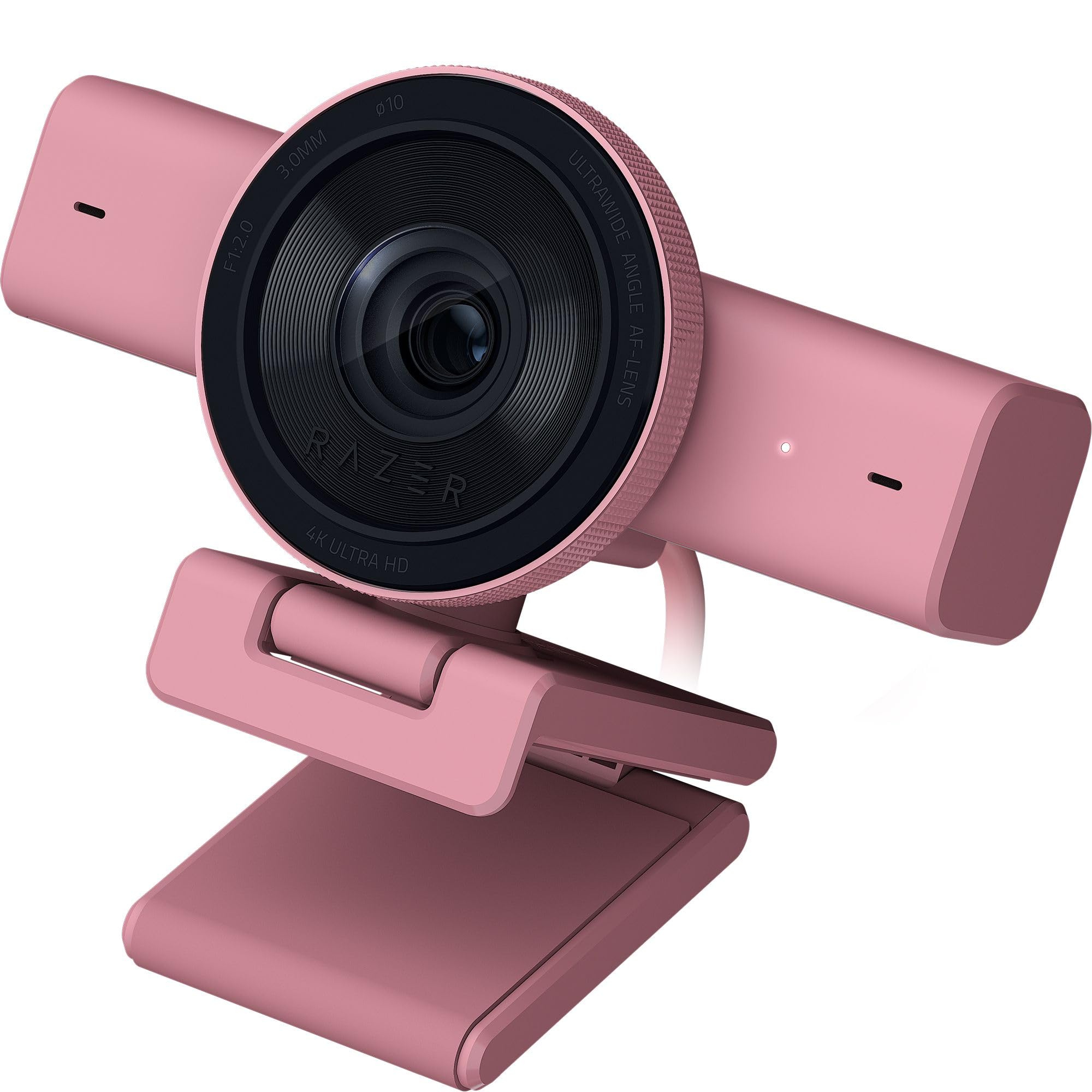
The dim-room specialist that pulls a crisp 4K image out of near-darkness.
If your streaming corner sits in shadow or gets backlit by a glowing battlestation, this is the webcam built for exactly that. The Sony STARVIS sensor excels in low light, with automatic exposure, white balance, and noise reduction that clean up the image without you touching a dial. Shoppers say exceptional low-light performance that outperforms expectations, even compared to mirrorless camera setups, and it can eliminate the need for a separate lighting rig entirely.
The 4K 30fps output brings real depth to your picture, and HDR support adds richer hues and better contrast for streams with colorful backdrops. The ultra-wide-angle lens zooms in for a personal close-up or pulls out to show your entire setup without warping at the edges. AI-powered auto-framing pans, tilts, and zooms to keep you centered, and the universal pivoting mount works on a monitor or a tripod via a built-in thread.
The honest warning here is the Razer software. Synapse gives you pro-level control like ISO and shutter speed, but buyers report it can be buggy and occasionally causes the webcam to freeze mid-stream, needing an unplug and replug to recover. The camera also needs a USB 3.2 Gen 2 connection to hit full 4K30, yet it ships with a USB 2.0 cable — so budget for a proper cable to get the resolution you paid for.
Built for shadow
- Sony STARVIS sensor excels in low light
- 4K 30fps with HDR for richer color
- AI auto-framing pans and tilts to follow you
- Metal body feels durable and premium
Handle with care
- Razer Synapse software can freeze the feed
- Ships with a USB 2.0 cable that limits 4K30
- Top-heavy design needs a steady mount
Choose it for: RGB-lit, backlit, or dim rooms where most webcams turn to noise — this one holds a clean image.
Think twice if: you want zero software fuss or lack a USB 3.2 Gen 2 port to open up true 4K.
7. OBSBOT Tiny 3 Lite

A tiny gimbal cam with big-ticket tracking, voice control, and buttery 120fps motion.
This is the camera that shrinks a whole PTZ rig down to fit in the palm of your hand. The Tiny 3 Lite is 48% smaller and 34% lighter than its predecessor, yet its 1/2” CMOS sensor shoots 4K at 30 FPS or 1080p at 120 FPS. That high frame rate makes fast movement look incredibly fluid, which is a real edge for active streamers and vloggers who want slow-motion-capable footage.
The AI Tracking 2.0 system locks onto a single person, a whole group, or any of over 200 object types, and it does it all with a precision gimbal. What makes it feel futuristic is the control — you can wake it, track, zoom, and switch presets with your voice or a wave of your hand, no buttons needed. The triple-mic array delivers spatial audio with five specialized modes, from noise reduction for busy rooms to full ambient capture for music and singing.
The image quality earns rave reviews for clarity, and the compact size is a favorite feature for creators with cramped desks. Owners mention the software has its moments — an update can destabilize autofocus or the app can hog PC resources, and it occasionally shuts down mid-call in Zoom. The manual even suggests turning off voice and gesture control if the gimbal acts erratically, which is worth knowing before you rely on hands-free operation for a live show.
Why it stands out: 1080p at 120 FPS for ultra-smooth motion, plus hands-free voice and gesture control in a body smaller than a phone.
The honest catch: software stability is the recurring sore spot, so budget time to tweak settings before a critical broadcast.
8. YOLOLIV YoloCam S3

The DSLR-killer with a 1/1.3″ sensor that delivers real depth-of-field bokeh.
This is the webcam that makes viewers ask if you upgraded to a mirrorless camera. The secret is the 1/1.3″ sensor — likely the largest ever put in a webcam — which delivers uncompressed 4K at 30fps and 1080p at 60fps with a natural background blur that looks professionally shot. Buyers describe a DSLR-like quality with natural bokeh, and one owner in a 4,000°F glassblowing studio runs it daily with a sharp, consistent image that beat out a Canon R50 V for everyday streaming.
The fast PDAF autofocus gives you zero-lag focus that keeps close-ups crisp, and AI-enhanced imaging claims 2.5x clearer faces in low light via smart exposure, white balance, and HDR auto-tuning. The 82° field of view frames you well without losing image quality at the edges. A foldable magnetic mount attaches anywhere, and the integrated 1/4″-20 thread works with most tripods — though one owner warned the magnetic base means you should not expect a classic clamp.
The all-aluminum body acts as a heat sink, enabling 24/7 streaming without overheating or lagging. The Picasso Resolve color grading engine offers pro-level control, though it is Windows-only for now. The main limitation is no SD card recording, so you will need a computer or a YoloBox to capture footage directly.
Serious image quality
- Massive 1/1.3″ sensor for true bokeh
- PDAF autofocus with zero-lag lock
- All-metal body prevents overheating
- Magnetic mount plus 1/4″-20 tripod thread
Worth noting
- No SD card recording built in
- Picasso Resolve color grading is Windows-only
- Magnetic mount is not a traditional clamp
Buy it for: the most film-like image you can get from a webcam, with background blur that makes your stream look expensive.
Pass if: you need standalone recording without a PC, or you are a Mac user who wants the full color-grading toolkit.
9. Insta360 Link 2 Pro

The polished all-rounder that tracks you smoothly and slides straight into a pro workflow.
This is the premium pick that feels finished. It pairs a large 1/1.3″ sensor with a gimbal that physically pans and tilts to follow you around the room, so you get clean, detailed 4K video with excellent low-light performance and a natural DSLR-like bokeh. Customers note it handles bright windows behind the desk exceptionally well — a scenario that wrecks most webcams — while keeping you perfectly centered and sharp. It is widely described as better than a Logitech Brio.
The audio matches the video. A redesigned dual-mic system uses beamforming directional pickup to isolate your voice and cut background noise in busy rooms — so no separate mic needed for most streams. If you run an Elgato Stream Deck, it integrates directly to switch modes, trigger presets, and control multiple cameras for a faster creator workflow. Simple hand gestures or your smartphone can start tracking, zoom, or activate Whiteboard Mode.
Specialized modes adapt the camera to whatever you are doing, including DeskView for overhead shots, Whiteboard, and 4K Portrait Mode for vertical content. The free Link Controller software handles fine-tuning, and compatibility spans Windows, macOS, Chrome OS, and Linux. Reviewers point out the AI tracking can feel a little eerie at first before it learns your movement patterns, and it does demand decent lighting to track well, but the setup is under five minutes and the results are studio-grade.
Polished performance
- Large 1/1.3″ sensor with true bokeh
- Smooth gimbal tracking keeps you centered
- Beamforming mics cut background noise
- Native Elgato Stream Deck integration
Premium quirks
- AI tracking needs time to learn your patterns
- Not compatible with ARM-based Windows or Windows Hello
- Requires decent lighting for reliable tracking
The pick for: streamers and remote pros who want a complete package — great video, smart audio, and a gimbal that tracks without babysitting.
Not for you if: you run an ARM-based Windows machine or want full resolution without considering your lighting setup.
Understanding the Specs
Sensor Size and Low-Light
The sensor is the light-catching chip inside the camera, measured in inches like 1/1.8″ or 1/1.3″. A bigger sensor means each pixel gathers more light, which gives you cleaner video in dim rooms and better handling of backlit windows. Cameras with larger sensors like the YoloCam S3 can produce that expensive background-blur look that small sensors simply cannot replicate.
PDAF Autofocus
Phase-detection autofocus (PDAF) is a focus system that locks onto your face faster and holds it more reliably than older contrast-based systems. For a streamer who leans in, gestures, or stands up mid-broadcast, this is the difference between staying sharp and constantly drifting in and out of focus. It is the single most important quality-of-life spec for a solo host.
Frame Rate and Resolution
Resolution (1080p, 1440p, 4K) sets the sharpness while frames per second (FPS) sets the smoothness. At 60 FPS, fast hand movement and energetic reactions stay fluid and natural; at 30 FPS they can look choppy. Many cameras offer a split — 4K at 30 FPS and 1080p at 60 FPS — so you choose between maximum detail and maximum smoothness depending on your content.
AI Tracking and PTZ
Pan-tilt-zoom (PTZ) means the camera physically rotates and tilts to follow you, and AI tracking decides what to lock onto. This is essential for anyone who moves around a room while presenting, teaching, or demonstrating. Look for how many degrees it can pan and tilt, and check whether tracking handles quick movements or prefers slower, deliberate motion.
FAQ
Is 4K worth it for streaming if my platform caps at 1080p?
Will these cameras work with OBS and Twitch?
What is the difference between a webcam and a PTZ camera?
Why does my webcam look grainy in low light?
Should I trust AI tracking to follow me during a live stream?
Do I need a separate microphone if the webcam has built-in mics?
What is NDI and do I need it?
How important is a privacy shutter?
Will a 1080p 60 FPS camera look better than a 4K 30 FPS one for gaming?
What computer specs do I need to run these streaming cameras?
Final Thoughts: The Verdict
For most buyers, the best all-around cam for streaming is the AVKANS NDI PTZ because its 20X optical zoom, silent motor, and multi-output design cover everything from a church service to a full production with one lens. If you want a budget-friendly desk webcam with silky 60fps motion, grab the Razer Kiyo V2 X. And for the most film-like image with true background blur, the YoloCam S3 is the one to reach for.
How We Picked
We do not accept paid placement. Every pick is matched to a real buyer and a real use-case; we do not hands-on test units.
Sources & Methodology
Specifications: manufacturer listings and product documentation. Review insights: verified customer reviews, as of August 2026. Pricing: not shown on this page (it changes often); check the current price via the retailer link.
As an Amazon Associate, Gadgets Feed earns from qualifying purchases. This does not affect which products we feature.