
That grainy, pixelated face on your Zoom calls isn’t your internet — it’s your laptop’s built-in camera. Most integrated sensors are barely 720p and choke the second your room light dips below studio-bright, leaving you looking like a shadow instead of a professional. A dedicated computer camera fixes that instantly, giving you crisp 1080p or even 4K video with fluid motion and true-to-life color that makes every meeting, stream, or presentation feel intentional.
I’m Min — the co-founder and writer behind Gadgets Feed. I’ve spent hours cross-referencing sensor sizes, autofocus speeds, and frame rate specs to find the webcams that actually deliver on their promises rather than relying on marketing fluff.
After sorting through dozens of models and analyzing real customer feedback, I’ve narrowed the field to the most reliable and feature-rich options available. Whether you need a sharp lens for video calls or a flexible setup for live streaming, this guide to the best camera for computer will help you find the right fit without second-guessing your purchase.
How To Choose The Best Camera For Computer
Buying a computer camera isn’t just about picking the cheapest option with the highest number. The difference between a usable webcam and an excellent one comes down to a few critical specs that directly affect how you look and sound in every meeting or stream. Here is what you need to consider.
Resolution and Frame Rate — The Look and Feel of Motion
1080p at 30 FPS is the baseline for acceptable video quality today — it’s sharp enough for professional calls and clear for streaming. However, if you move around a lot during presentations or want fluid game streams, 1080p at 60 FPS is noticeably smoother. 4K is overkill for most video calls (bandwidth limits usually drop it back to 1080p), but it gives you the ability to crop or zoom in without losing detail during recording.
Autofocus and Field of View — Staying Sharp and Framed
Fixed-focus cameras are cheap, but they force you to sit at a specific distance or you blur out. Phase Detection Autofocus (PDAF) locks onto your face instantly and tracks it, which is critical if you lean in to show something or stand up during a presentation. Field of view matters too — 65-78 degrees is ideal for solo shots that crop out messy backgrounds, while 90-95 degrees fits two or three people sharing the frame.
Microphone Quality and Lighting — Audio and Visual Polish
A great picture is wasted if your audio sounds tinny or picks up every keyboard click. Look for built-in microphones with noise cancellation, or be prepared to use an external mic. Low-light performance also varies hugely between models — a camera with a larger sensor (like a 1/2.55-inch) and good light correction will keep you visible even when your room is dimly lit by evening or cloudy weather.
Quick Comparison
On smaller screens, swipe sideways to see the full table.
| Model | Category | Best For | Key Spec | Amazon |
|---|---|---|---|---|
| EMEET C60E Dual-Camera | Mid-Range | Dual-camera streaming | 4K sensor with 11X hybrid zoom | Amazon |
| EMEET PIXY Dual-Camera | Premium | AI-powered PTZ tracking | 4K with 0.2s PDAF + AI focus | Amazon |
| Anker PowerConf C200 | Mid-Range | 2K clarity in low light | 1440p resolution with light correction | Amazon |
| Logitech C920x HD Pro | Mid-Range | Reliable 1080p meetings | 1080p at 30 FPS with autofocus | Amazon |
| AOC 4K Webcam | Mid-Range | Sharp 1080p at 60 FPS value | IMX363 sensor, PDAF autofocus | Amazon |
| Angetube 862Pro | Budget | Streaming with ring light | 1080p at 60 FPS + built-in light | Amazon |
| NexiGo N930AF | Budget | Autofocus on a budget | 1080p at 30 FPS with autofocus | Amazon |
In-Depth Reviews
1. EMEET C60E Dual-Camera 4K Webcam

What makes the C60E stand out is its dual-camera system sharing a single 1/2.8-inch 4K CMOS sensor — a wide-angle lens for full-scene shots and a telephoto lens for detailed close-ups of documents or products. Switching between them gives you professional framing options that no single-lens webcam can match, making it ideal for streamers, educators, and product demonstrators who need to shift perspectives mid-session.
The PDAF autofocus keeps you sharp through 1X to 11X hybrid zoom, and you control everything via the included remote or the EMEET STUDIO software. The RGB lighting adds a bit of personality and helps you know the camera’s active status at a glance. Dual omnidirectional mics capture clear sound up to ten feet away, and the plug-and-play USB connection works with OBS, Twitch, and all major conferencing platforms.
At 4K resolution, the zoom is locked, but you get full 11X control in 1080p mode. Some users noted that 4K streaming requires solid bandwidth, and the instruction manual is minimal. Still, for the price, the dual-camera versatility and sharp image quality make this the best all-around choice for anyone who wants a step up from a basic webcam without jumping to a DSLR mirrorless setup.
Why it’s great
- World’s first dual-camera webcam for seamless wide and close-up shots
- Smooth 11X hybrid zoom with PDAF keeps focus locked during movement
- Remote control and software suite for live adjustments without touching the camera
Good to know
- Zoom is limited in 4K mode — full range works only in 1080p
- Slight grain appears in very low-light environments
2. EMEET PIXY Dual-Camera AI-Powered PTZ 4K Webcam

The EMEET PIXY takes webcam intelligence to another level with its dual-camera AI system — a main 4K imaging camera with a 1/2.55-inch Sony sensor and an auxiliary AI camera that detects your face position to optimize autofocus and exposure in 0.2 seconds. That is significantly faster than typical autofocus which takes around 1.1 seconds, meaning you stay sharp even when you pivot to show a whiteboard or reach for a prop during a stream.
The PTZ feature gives you 310 degrees of pan and 180 degrees of tilt, and gesture control lets you activate tracking with an open palm held still for two seconds. A triple-mic array offers three sound modes — Live Mode filters steady fan noise, Noise Canceling Mode blocks sudden keyboard clicks and door slams, and Original Sound Mode captures full ambient detail for music. The included EMEET STUDIO app also offers Whiteboard Mode, privacy tilt, and AIGC-powered shot lists.
Some users reported that the AI tracking can lag in very dim lighting and that the installation instructions are not well-organized. The unit connects via USB-C and works on Windows 10+ and macOS 10.14+. For content creators, fitness streamers, and teachers who move around, the PIXY’s fast tracking and studio-grade audio make it worth the premium.
Why it’s great
- Blazing 0.2-second autofocus with AI-assisted face detection
- PTZ motor enables smooth 310° pan and 180° tilt
- Triple-mic array with three distinct noise-filtering sound profiles
Good to know
- AI tracking performance drops in low-light conditions
- Setup instructions and software links could be clearer
3. Anker PowerConf C200 2K Webcam

The Anker PowerConf C200 sits in a sweet spot between standard 1080p and overkill 4K by offering true 2K resolution (1440p) that gives you extra detail for cropping or zooming without bogging down your bandwidth. Its dual microphones use AI noise cancellation to suppress background hum from AC units or PC fans while keeping your voice crisp — a feature typically found in more expensive conference-grade cameras.
Low-light performance is a standout here: the camera automatically adjusts exposure in dim settings without washing out your face or introducing heavy grain. You can switch between 65°, 78°, and 95° fields of view through the companion software, which gives you flexibility to frame a solo shot or a wide group meeting. The integrated privacy cover slides over the lens physically, so there is no software-based security worry.
The autofocus is solid in normal lighting but can struggle in very dark rooms, occasionally hunting for focus when you shift position. The clip grips monitors securely, and the USB-C cable is included. For professionals who need sharp 2K video with intelligent audio filtering and don’t want to spend on a 4K unit, the C200 delivers exceptional value for its price.
Why it’s great
- 2K resolution offers more detail than 1080p without the bandwidth demand of 4K
- AI noise-canceling mics cut out background hum effectively
- Adjustable FOV (65-95°) via software for solo or group framing
Good to know
- Autofocus hunts in very dimly lit rooms
- Software login requirement can be slightly annoying
4. Logitech C920x HD Pro Webcam

The Logitech C920x is the benchmark that most other webcams are compared against, and for good reason — it delivers consistent, reliable 1080p video at 30 FPS with autofocus and automatic light correction that handles mixed office lighting well. It is compatible with just about every platform, including the Nintendo Switch 2’s GameChat mode, and works out of the box with Windows, macOS, Chrome OS, and major meeting apps like Zoom, Teams, and Google Meet.
Dual omnidirectional mics capture stereo audio, and the autofocus keeps you sharp within a reasonable distance range. The camera’s clip fits securely on any monitor or laptop, and the 5-foot USB cable gives enough slack for most desk setups. Its Full HD capture is sharp enough for professional video calls and casual streaming, and the included 3-month XSplit VCam license lets you blur or replace your background without a green screen.
The trade-offs are well-known: low-light performance is average and can get grainy in dim rooms, and there is no built-in privacy shutter — you’ll need to cover it yourself or buy a separate lens cap. The microphone is adequate for quiet rooms but picks up too much ambient sound in busy environments. Still, the C920x remains the most dependable workhorse for general use, especially if your room has decent lighting.
Why it’s great
- Industry-standard reliability with broad platform and software compatibility
- Autofocus and light correction deliver clean 1080p image in good lighting
- Stereo audio from dual mics is clear for quiet rooms
Good to know
- No built-in privacy shutter — requires separate lens cover
- Low-light performance is average and prone to grain
5. AOC 4K Webcam with IMX363 Sensor
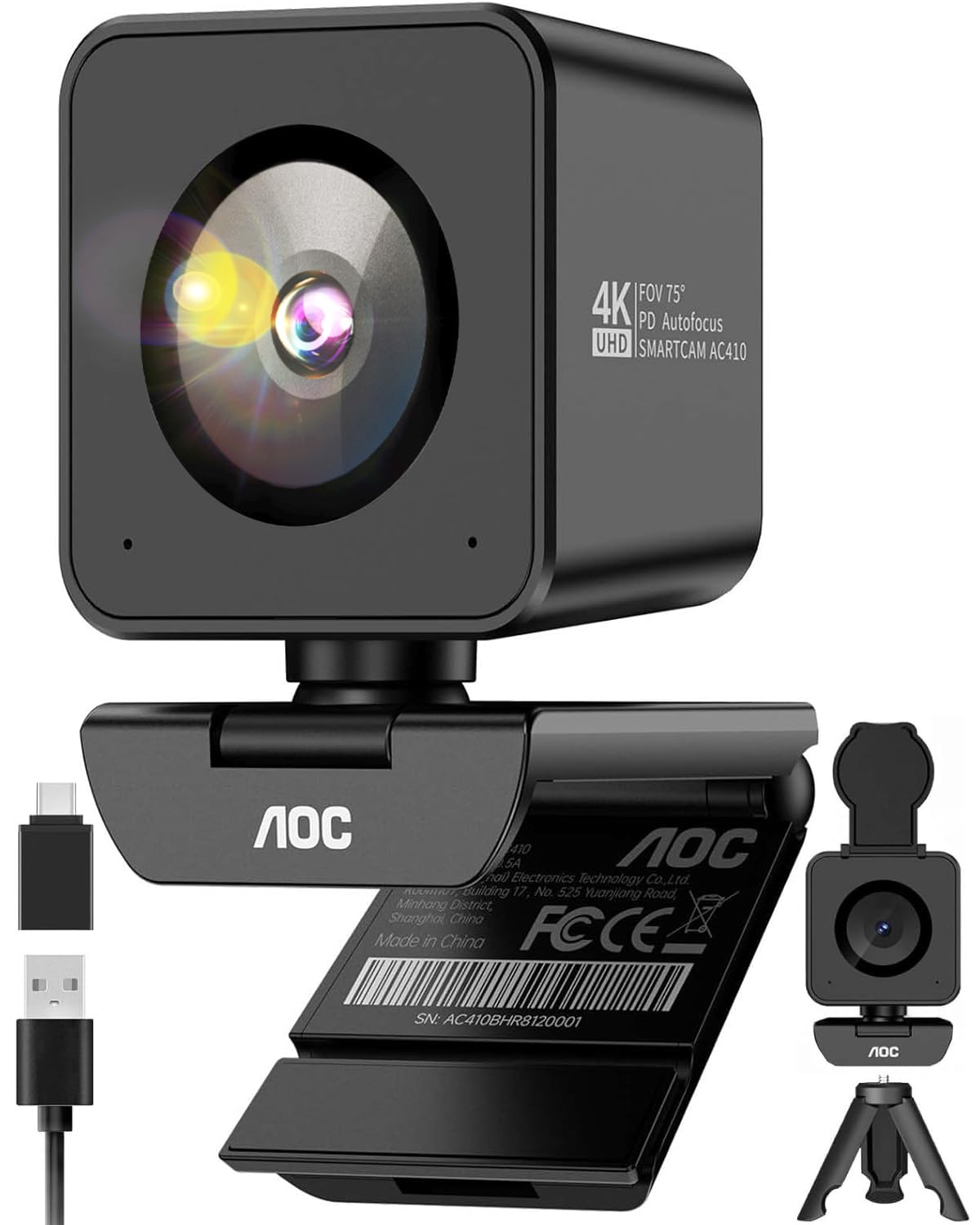
The AOC AC410 surprises by packing a flagship-grade IMX363 sensor into a budget-friendly body, giving you genuine 4K resolution for static shots and silky 1080p video at 60 FPS for movement-heavy streaming or presentations. That 60 FPS double the frame rate means your gestures, product demos, and even subtle facial expressions look fluid instead of choppy — a noticeable upgrade over the 30 FPS standard found in most computer cameras at this level.
Phase Detection Autofocus locks onto your face or an object instantly without the nauseating hunting you get with contrast-based systems. The 75-degree field of view is the golden standard for professional framing — wide enough to include your shoulders and a bit of desk, narrow enough to crop out a cluttered background without making you look like you’re in a fisheye lens. It comes with a privacy cover, a built-in noise-canceling mic, a desktop tripod, and a USB-A to USB-C adapter, so everything you need is in the box.
The 4K mode is limited to 30 FPS, and some users noted the actual FOV is slightly wider than advertised, which can be an issue if you are in a tight space. The microphone is decent for calls but not studio-grade. For the price, getting a PDAF-enabled 60 FPS camera with a premium sensor is hard to beat.
Why it’s great
- Flagship IMX363 sensor delivers sharp 4K and smooth 1080p at 60 FPS
- PDAF autofocus eliminates focus hunting
- Complete kit with tripod, privacy cover, and USB-C adapter included
Good to know
- 4K video is locked to 30 FPS — 60 FPS only in 1080p mode
- FOV is slightly wider than the stated 75 degrees
6. Angetube 862Pro Streaming Webcam with Ring Light

The Angetube 862Pro solves one of the biggest headaches for streamers and home-office workers — inconsistent lighting — by integrating a multi-function ring light directly into the camera bezel. Three color temperatures (warm, neutral, cool) with stepless brightness adjustment let you dial in exactly the look you want without needing a separate lamp or softbox, which saves desk space and setup time. A single rotating bezel controls brightness, and a touch button switches color modes.
It records 1080p video at 60 FPS for fluid motion, and the RF remote gives you 5X digital zoom control, mute, video disable, FOV adjustment, and white balance tweaks from across the room — ideal if you walk around while presenting or streaming. Dual omnidirectional mics with noise cancellation handle audio, and the privacy cover plus remote disable feature offers dual-layer security. The USB-A to USB-C adapter ensures compatibility with older and newer laptops alike.
The ring light can sometimes feel harsh if you set it too bright too close to your face, and the built-in mic is acceptable for basic calls but not for serious recording. The remote requires AAA batteries (included). For streamers on a budget who want polished lighting without extra gear, the 862Pro is a clever all-in-one solution.
Why it’s great
- Built-in ring light eliminates need for separate lighting gear
- RF remote gives full control of zoom, mute, and lighting from afar
- Runs 1080p at 60 FPS for fluid streaming video
Good to know
- Ring light can over-illuminate if placed too close
- Internal microphone is adequate for calls but not podcast-grade
7. NexiGo N930AF Autofocus Webcam

The NexiGo N930AF proves that autofocus and a privacy cover are not exclusive to premium webcams. For a very accessible price, this 1080p camera gives you a 2 MP CMOS sensor with autofocus that starts at just 2.8 inches — close enough for macro shots of documents — and you can manually disable the autofocus to lock a specific focal point, a rare flexibility at this tier. The 6.5-foot USB cord gives plenty of slack for routing behind a desk.
Setup is genuinely plug-and-play — no drivers required on Windows, Mac, Linux, or Chrome OS — and the optional NexiGo software lets you fine-tune exposure, white balance, and other settings while running Zoom, Skype, or OBS. The folding design makes it portable, and the mounting clip works on monitors, laptops, tripods, or even flat surfaces. The noise-canceling microphone reduces ambient hum and makes your voice audible even with a PC fan running nearby.
The 30 FPS frame rate is standard for the price, so fast hand movements can show slight motion blur. The microphone is acceptable but not rich — voices can sound a bit thin compared to more expensive units. If you need a reliable autofocus webcam for basic conferencing and online classes without spending much, the N930AF delivers exactly what the label says.
Why it’s great
- Autofocus works at distances as close as 2.8 inches, great for document close-ups
- Genuine plug-and-play on all major operating systems
- Privacy cover and noise-canceling mic included at this entry-level price
Good to know
- Limited to 30 FPS — not ideal for fast motion
- Microphone quality is clear but lacks depth for serious recording
FAQ
Do I really need 4K for video calls if platforms only support 1080p?
What is the difference between PDAF and contrast-detection autofocus in a computer camera?
Does a built-in privacy shutter matter or is software blocking enough?
Final Thoughts: The Verdict
For most users, the camera for computer winner is the EMEET C60E Dual-Camera 4K Webcam because its dual-lens system gives you wide-scene and close-up capability in one device, with smooth PDAF autofocus and remote control that fits streaming, teaching, and professional meetings. If you want AI-powered PTZ tracking that follows you around the room, grab the EMEET PIXY Dual-Camera. And for the best mix of image quality and affordability, nothing beats the Anker PowerConf C200 2K Webcam.