
Choosing a camera for elderly monitoring means balancing crystal-clear video, easy two-way communication, and features that simplify caregiving without overwhelming the senior. The right camera lets you check in remotely, respond to falls or calls for help, and gain peace of mind—all while respecting privacy and keeping setup simple for non-tech-savvy users.
I’m Min — the co-founder and writer behind Gadgets Feed. I’ve spent dozens of hours analyzing the technical specifications, real customer feedback, and use-case fit for over 40 different monitoring cameras to find the ones that truly serve seniors and their caregivers.
Whether you need Wi-Fi for remote viewing or a secure closed system for privacy, the right camera for elderly monitoring delivers reliable alerts, clear audio, and simple daily operation.
How To Choose The Best Camera For Elderly Monitoring
Selecting a monitoring camera for a senior relative involves more than just picking the highest resolution. You need to think about how the camera will be used, who will interact with it, and what kind of connection fits the home environment. Here are the key factors to weigh.
Wi‑Fi vs. No‑Wi‑Fi Systems
A Wi‑Fi camera lets you check the live feed from anywhere using a smartphone app, which is ideal if you live separately from the senior. However, it relies on a stable home network and may raise privacy concerns. A no‑Wi‑Fi system uses a dedicated closed circuit (often 2.4 GHz FHSS) with a handheld monitor, offering complete privacy and no internet dependency, but you must be within range—typically up to 1,000 feet.
One‑Touch Call Button
For elderly monitoring, a physical call button the senior can press for help is arguably more important than video clarity. Look for models with a dedicated SOS button—some are wearable as wristbands or pendants, others sit bedside. This feature ensures the senior can alert you even if they can’t reach a phone or speak loudly.
Pan/Tilt and Night Vision
Pan and tilt (PTZ) capability lets you remotely scan the entire room from a single camera, reducing blind spots. Night vision is essential for checking on the senior after dark—look for infrared (IR) LEDs that automatically switch on in low light. Starlight sensors offer even better low‑light performance without the harsh glow.
Quick Comparison
On smaller screens, swipe sideways to see the full table.
| Model | Category | Best For | Key Spec | Amazon |
|---|---|---|---|---|
| Reolink E1 Pro | Premium Wi‑Fi | 3K clarity & auto tracking | 2880×1616 resolution | Amazon |
| Tapo C260 | Premium Wi‑Fi | 4K zoom & facial recognition | 4K (8 MP) resolution | Amazon |
| Elderly Monitor ABM200 | No‑Wi‑Fi System | Complete stand‑alone privacy | 5‑in screen, 1000‑ft range | Amazon |
| Smart Caregiver Video Monitor | No‑Wi‑Fi System | Portable caregiver monitor | 2.8‑in screen, VOX mode | Amazon |
| INFIYA K7 2‑Pack | Mid‑Range Wi‑Fi | Two‑camera value with call button | 1296P, 360° PTZ | Amazon |
| Blink Mini Pan‑Tilt | Mid‑Range Wi‑Fi | Alexa integration & 360° view | 1080p HD, manual PTZ | Amazon |
| CallToU Caregiver Pager | Budget Pager System | Audio‑only fall alert system | 328‑ft range, app alerts | Amazon |
In‑Depth Reviews
1. Reolink E1 Pro (Black)

The Reolink E1 Pro delivers 3K QHD resolution (2880×1616) through an F1.6 aperture lens that captures sharp details even in dim light. Its pan‑and‑tilt mechanism covers 360° with AI‑powered auto tracking, so the camera follows movement automatically—useful for keeping an eye on a senior who moves around the room. Dual‑band Wi‑Fi (2.4/5 GHz) ensures a stable stream, and the Bluetooth‑assisted setup takes under ten minutes.
Beyond video quality, the E1 Pro includes person, pet, and baby‑cry detection, which reduces nuisance alerts while flagging real events. Two‑way audio lets you speak to the senior through the camera, and storage options include a microSD card (up to 512 GB), Reolink NVR, or FTP/NAS—no mandatory subscription. The magnetic mounting plate makes placement flexible, and the compact black housing blends into most interiors.
Customer reviewers consistently praise the “crystal clear” day and night footage and the reliable auto‑tracking feature. A few note that initial setup requires a temporary Ethernet cable connection, but once configured, the wireless performance is rock solid. For a feature‑rich, subscription‑free camera that excels at both monitoring and security, the E1 Pro is an outstanding choice for elderly care.
Why it’s great
- 3K resolution with excellent low‑light performance
- AI auto tracking follows the senior as they move
- No monthly fees for local storage or basic alerts
Good to know
- Initial setup needs a wired Ethernet connection
- Pan/tilt speed is not adjustable in fine increments
2. Tapo 4K Indoor Pan/Tilt C260

The Tapo C260 steps up the resolution game with true 4K Ultra HD (8 MP), delivering four times the detail of standard 1080p. This means you can digitally zoom up to 18x and still read labels or see facial expressions clearly—a huge advantage when you need to check if a senior is holding medication or appears distressed. The 360° horizontal and 116° vertical pan/tilt range leaves no corner hidden.
On‑device AI processes person, pet, baby‑cry, and facial recognition locally, so sensitive data never leaves the camera. Smart motion tracking automatically follows a subject across the full 360° range, and the starlight sensor provides vivid color night vision without a harsh IR glow. Storage is flexible: use a microSD card (up to 512 GB) with no subscription, or opt for Tapo Care cloud storage if you prefer off‑site backups.
Reviewers highlight the “sharp clear picture” and “excellent night vision” as standout features, along with the responsive Tapo app that manages multiple cameras easily. Some note that the microphone is very sensitive—you may need to adjust the level to avoid picking up ambient noise. For caregivers who want the highest possible image quality and advanced AI that respects privacy, the C260 is the premium pick.
Why it’s great
- 4K resolution with 18x zoom for extreme detail
- On‑device AI keeps facial data private
- Starlight sensor for excellent color night vision
Good to know
- Very sensitive microphone may pick up room noise
- MicroSD card slot is slightly recessed and fiddly
3. Elderly Monitor ABM200

The ABM200 is a complete stand‑alone system designed specifically for elderly care, operating over 2.4 GHz FHSS technology with a range of up to 1,000 feet. It includes a 5‑inch handheld monitor with a 3500 mAh battery, a PTZ camera with silent motor, and a dedicated one‑touch call button that sends SOS, Help, Toilet, Fall, or Water alerts directly to the monitor screen. There is no internet connection involved, so privacy is absolute.
Beyond basic monitoring, the ABM200 adds medication and feeding reminders, temperature monitoring, automatic infrared night vision, and white noise for better sleep. The VOX mode conserves battery by keeping the screen off until sound is detected, then wakes instantly. The ergonomic remote has raised tactile markers for visually impaired users, and the 4X digital zoom lets you see fine details on the 5‑inch display.
Customer feedback emphasizes the “large, clear screen” and “simple, senior‑friendly menu.” Some users experienced connection drops after a day or two, requiring a full power cycle to restore the link. A few also noted that the speaker quality could be better for hearing subtle movements. For caregivers who prioritize privacy and want a dedicated system with medication reminders, the ABM200 is a robust solution.
Why it’s great
- Complete privacy with no Wi‑Fi or internet needed
- Built‑in medication reminders and temperature alerts
- One‑touch call button with multiple alert types
Good to know
- Some units lose sync after a day or two
- Speaker quality is not the clearest for subtle sounds
4. Smart Caregiver Video Monitor
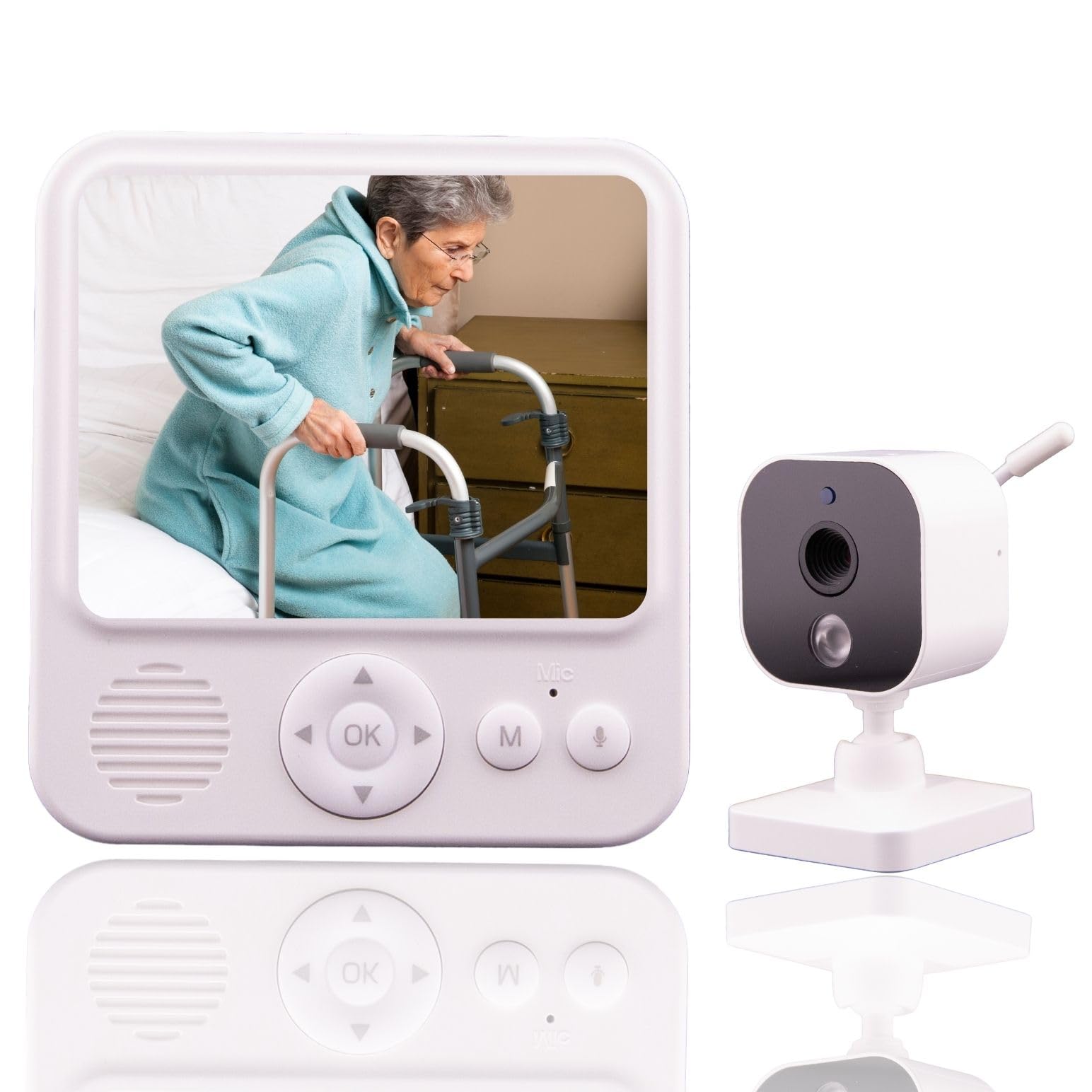
The Smart Caregiver Video Monitor offers a no‑Wi‑Fi monitoring experience at an entry‑level price. The camera connects directly to a 2.8‑inch handheld monitor with a belt clip, making it easy to carry from room to room. Setup is truly plug‑and‑play—the camera automatically pairs with the monitor as soon as both are powered on—so there is no app, no network configuration, and no password to forget.
Two‑way audio works through a push‑to‑talk button on the monitor and an always‑on microphone on the camera, letting you speak to the senior or listen for activity. VOX mode puts the monitor screen to sleep during quiet periods to save battery life and wakes it when sound is detected. Infrared night vision automatically engages in low light, helping you check on the senior without entering the room.
Reviewers describe it as “easy to use” and “great for peace of mind,” especially for monitoring overnight. The main drawback reported is that after months of continuous use, the camera and monitor occasionally lose synch and need to be power‑cycled. For a simple, affordable, and privacy‑focused system that works right out of the box, this monitor is an excellent value pick.
Why it’s great
- True plug‑and‑play with no internet required
- Portable monitor with belt clip for roaming caregivers
- VOX mode extends battery life significantly
Good to know
- Occasional loss of sync requires power cycle
- Small 2.8‑inch screen may be tough for some to read
5. INFIYA 2K Indoor Camera K7 2‑Pack

The INFIYA K7 2‑Pack brings a unique combination to the elderly monitoring space: two cameras with a physical one‑touch call button on each. Pressing the button instantly initiates a two‑way call through the INFIYA app, which is ideal for seniors who are not comfortable navigating a smartphone. Each camera captures 1296P (2304×1296) video with 355° pan and 90° tilt, plus infrared night vision for 24‑hour coverage.
Motion detection sends 10‑second video clips to your phone, and the intelligent tracking feature follows moving subjects automatically. The built‑in siren can be activated to deter unwanted visitors, though for elderly monitoring you will likely keep it off. Storage is handled locally via a microSD card (up to 128 GB) or through optional cloud subscription, and the cameras work with Alexa and Google Home for voice control.
Customer reviews highlight the “easy setup” and “great value” of getting two fully featured cameras in one box. The two‑way audio can produce feedback if the phone is too close to the camera, so maintaining a 3‑10 foot distance is recommended. For caregivers monitoring multiple rooms—such as a bedroom and a living area—the INFIYA 2‑Pack delivers excellent coverage without breaking the budget.
Why it’s great
- Two cameras in one box for multi‑room monitoring
- Physical one‑touch call button for seniors
- Good 1296P video with 360° pan/tilt coverage
Good to know
- Only supports 2.4 GHz Wi‑Fi, not 5 GHz
- Two‑way audio may cause feedback if too close
6. Blink Mini Pan‑Tilt Camera

The Blink Mini Pan‑Tilt Camera offers 1080p HD video with 360° pan and tilt control via the Blink app, letting you scan a room from corner to corner. It integrates seamlessly with Alexa, so you can view the feed on an Echo Show or control it with voice commands. The compact white design plugs directly into a wall outlet and connects to your 2.4 GHz Wi‑Fi network in minutes.
Motion alerts are delivered to your smartphone in real time, and you can use the two‑way audio to speak through the camera. Clips can be saved to the cloud with a free 30‑day trial of the Blink Subscription Plan, or stored locally using a Sync Module 2 and USB drive (both sold separately). The pan/tilt mount is manual—it does not auto‑track movement, so you control the view from the app.
Reviewers appreciate the “bang for the buck” and the ease of integration with existing Blink systems. Some criticize the lack of auto‑tracking and note that the system can feel slow with a few seconds of lag between motion and alert. For households already invested in Alexa or Blink products, the Mini Pan‑Tilt is a solid, affordable entry‑level camera for checking in on a senior.
Why it’s great
- Excellent Alexa integration for voice and Echo Show control
- Compact, plug‑and‑play design with easy setup
- Flexible cloud or local storage options
Good to know
- No auto tracking—pan/tilt is manual only
- Motion alerts can have a noticeable lag
7. CallToU Wi‑Fi Caregiver Pager
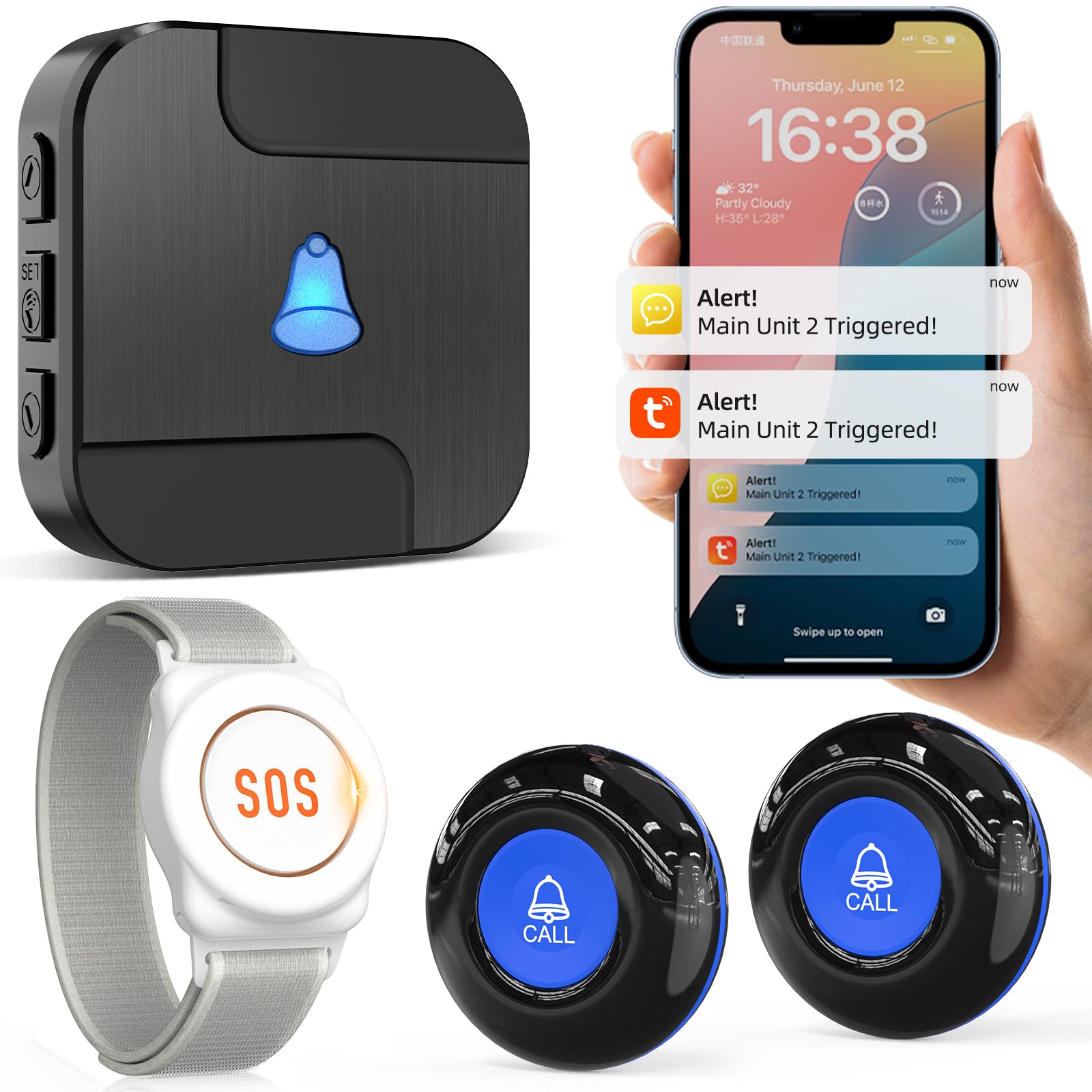
The CallToU Caregiver Pager is a different take on elderly monitoring: it is an audio‑only alert system, not a video camera. The wireless call buttons (up to 328 feet range using 433 MHz technology) trigger a loud alarm and flashing lights on the receiver, plus a push notification to your phone via the Tuya app. For an extra /month, you can also receive phone or text alerts.
Each call button can be assigned a custom name and ringtone in the app, so you know instantly which room or person needs help. The system includes a plug‑in receiver and a portable battery‑operated receiver that works during power outages. Buttons come with lanyards for wearing around the neck or wrist, making them accessible for seniors who may not be able to reach a wall switch.
Customer feedback is mixed: many users find it “indispensable” for overnight caregiving, praising the loud alarm and battery‑powered portability. Others report that the alarm sounds “jarring” and the speaker quality is poor, and a few say the alarm does not always trigger reliably at longer ranges. For a budget‑friendly, non‑intrusive way to know when a senior needs help—especially for the hearing‑impaired caregiver—the CallToU system works as a simple, effective alert network.
Why it’s great
- Loud alarm and flashing lights can be heard/seen across the house
- Portable receiver works during power outages
- Customizable ringtones and button names for easy identification
Good to know
- Audio only—no video feed to check on the senior
- Alarm sound quality is described as jarring and cheap
FAQ
Do I need a subscription to use a camera for elderly monitoring?
Is a Wi‑Fi camera safe for monitoring a senior at home?
What is the best way to alert a caregiver when a senior falls?
Final Thoughts: The Verdict
For most users, the camera for elderly monitoring winner is the Reolink E1 Pro because it combines 3K resolution, AI auto‑tracking, and subscription‑free local storage at a mid‑range price that outperforms everything near it. If you want 4K zoom detail and on‑device facial recognition, grab the Tapo C260. And for absolute privacy without Wi‑Fi, nothing beats the Elderly Monitor ABM200 with its dedicated screen, medication reminders, and one‑touch call button.