
Our readers keep the lights on and my morning glass full of iced black tea. As an Amazon Associate, I earn from qualifying purchases.
Specs are compiled from manufacturer listings and verified buyer reviews and can change over time — please confirm the key details on the product page before buying.
The hardest part of streaming isn’t your content — it’s making your face look as good as your ideas. A grainy webcam loses viewers instantly, while a sharp 4K picture keeps them engaged. This guide cuts through the noise to show you exactly which camera for streaming 4k actually delivers on quality without emptying your bank account.
I’m Min — the founder and writer behind Gadgets Feed. This guide is built by comparing the manufacturers’ published specifications and the patterns across verified customer reviews, so you get each pick’s real strengths and trade-offs instead of marketing spin.
You need a camera that streams true 4K video. The products covered in this guide are listed as native 4K options, which separates real streaming cameras from ordinary webcams. Your best camera for streaming 4k depends on if you need AI auto-tracking for solo streams or a multi-output camera for live production — and this guide matches each to your specific workflow.
Quick Picks
- OBSBOT Tiny 2 Lite 4K Webcam — Best Value
- Elgato Facecam 4K — Top Performer
- OBSBOT Tiny 3 Lite — Compact Power
- Insta360 Link 2 Pro — Large Sensor
- YOLOLIV YoloCam S3 — Best Overall
- NearStream VM20 — Multi-Cam Ready
- TONGVEO 4K NDI PTZ Camera — Pro PTZ
- Logitech Mevo Core — Wireless Freedom
How To Choose The Best 4K Streaming Camera
Matching a 4K streaming camera to your setting matters because a desk streamer and a church production team need very different features. Here are the three specs that matter most.
Sensor Size: The True Engine of Image Quality
A larger sensor captures more light, which means cleaner video in dim rooms and less grainy noise. Look for a 1/2-inch or larger sensor for decent low-light performance, while 1/1.3-inch and above approaches true cinematic quality. Brands like YOLOLIV and Insta360 use larger sensors to deliver that depth-of-field look without a DSLR.
Autofocus and Tracking: Keeping You in the Frame
If you move during your stream (presentations, cooking, fitness), you need autofocus and AI subject tracking. Phase Detection Autofocus (PDAF) locks on faster than contrast-based systems. Some cameras use physical gimbal or PTZ (pan, tilt, zoom) motors to follow you, while others rely on digital cropping — the physical motor option gives you full resolution all the time.
Connectivity and Output
A simple USB plug-and-play camera works for desktop streaming. For multi-camera setups or live events, you need HDMI or SDI outputs alongside USB. Professional options from NearStream and TONGVEO add Ethernet ports and NDI integration, letting you control everything over a network instead of running long USB cables.
Quick Comparison
On smaller screens, swipe sideways to see the full table.
| Model | Best For | Sensor | Frame Rate | Connectivity | Amazon |
|---|---|---|---|---|---|
| OBSBOT Tiny 2 Lite | Budget AI auto-tracking | 1/2″ | 4K@30fps / 1080p@60fps | USB-C | $159.00$179.00Amazon |
| Elgato Facecam 4K | DSLR-like control | Sony STARVIS 2 | 4K@60fps | USB-C | $199.99Amazon |
| OBSBOT Tiny 3 Lite | Ultra-compact with spatial audio | 1/2″ | 4K@30fps / 1080p@120fps | USB-C | $199.00Amazon |
| Insta360 Link 2 Pro | Large sensor + PTZ tracking | 1/1.3″ | 4K@30fps / 1080p@60fps | USB-C | $249.99Amazon |
| YOLOLIV YoloCam S3 | Premium sensor + studio software | 1/1.28″ | 4K@30fps / 1080p@60fps | USB 3.0 | $219.00Amazon |
| NearStream VM20 | Multi-camera live production | 8 MP | 4K@30fps / 1080p@60fps | USB, HDMI, RJ45 | $549.99Amazon |
| TONGVEO 4K NDI PTZ | Pro AV/ church installation | 4K | 4K@30fps | HDMI, SDI, USB 3.0, LAN | $459.00Amazon |
| Logitech Mevo Core | Wireless multicam streaming | Micro Four Thirds | 4K@30fps | Wi-Fi 6E, USB-C, HDMI | $973.99Amazon |
In‑Depth Reviews
1. OBSBOT Tiny 2 Lite 4K Webcam

Smart auto-tracking that keeps you centered without needing a second person to operate it.
The OBSBOT Tiny 2 Lite earns its spot because its AI-driven PTZ (pan, tilt, zoom) gimbal physically follows you as you move — a feature you won’t find on the YoloCam S3. It uses a 1/2-inch CMOS sensor and supports 60 FPS (frames per second), so your video stays crisp even in average room lighting. You get multiple tracking modes like upper-body and hand tracking that you can customize. skip it if you need a larger sensor for cinematic depth of field — the 1/2-inch size limits background blur.
Gesture control (peace sign to zoom, open palm to track) and a customizable preset position feature let you save different angles for sitting versus standing. The microphone is adequate for quick calls but owners mention it falls short for podcasting, so plan on a dedicated mic. At 8 MP effective still resolution, it lags behind the 48 MP of the Tiny 3 Lite, but for streaming specifically, the 4K video output matters more than stills.
What It Excels At
- Physical AI auto-tracking gimbal at a budget-friendly price
- 4K at 60 FPS with excellent low-light performance
- Plug-and-play setup for beginners, plus Stream Deck support for pros
Where It Falls Short
- Built-in mic is weak for serious audio work
- Zoom and many apps do not support the full 4K resolution
- Lacks voice control and whiteboard mode found on flagship OBSBOT models
Reach for this if: you want physical AI tracking on a budget for meetings or solo streaming, and you already own a separate microphone.
Look elsewhere if: you need professional audio from the camera itself or require wireless operation without a PC.
2. Elgato Facecam 4K

Studio-grade video in a webcam body, with full manual control like a real camera.
The Elgato Facecam 4K is one of the few webcams that outputs uncompressed 4K at 60 FPS (frames per second) at full resolution — sharper than the OBSBOT Tiny 2 Lite’s compressed output. It uses a Sony STARVIS 2 CMOS sensor and Elgato Prime Lens technology, plus HDR (High Dynamic Range) so highlights don’t blow out and shadows retain detail. The 49mm filter ring lets you screw on a polarizer or diffusion filter just like a DSLR. One reviewer noted, “It’s the first camera I have actually gotten comments about the quality of my video in chats.” pass on it if you need auto-tracking — the Facecam 4K has no PTZ gimbal.
The free Camera Hub software unlocks DSLR-like adjustments to exposure, white balance, and focus, and the camera stores your settings on its internal flash memory so they survive a reboot. A clear trade-off is the 20mm wide lens which requires a narrow space for a tight headshot, and the digital zoom beyond that crops into the sensor and loses the 4K advantage. It’s also picky about USB cables, so use the included high-speed USB-C 3.0 cable.
Strengths at a Glance
- True 4K60 uncompressed video with a premium Sony sensor
- Standard 49mm filter thread for polarizers and diffusion
- Settings saved on-camera via built-in flash memory
Consider Before Buying
- Wide 20mm lens makes a tight face shot difficult without cropping
- Digital zoom kills 4K resolution
- Mediocre software; most users prefer OBS for tuning
Best for: streamers and creators who want DSLR-grade control and lens filters in a simple USB-C package.
Not for: anyone who needs built-in auto-tracking or who plans to use a USB hub (can cause boot issues).
3. OBSBOT Tiny 3 Lite

Palm-sized but packs a 48-megapixel sensor and spatial audio for desktop streams.
The OBSBOT Tiny 3 Lite is smaller than the Tiny 2 Lite, yet it packs a triple-mic array for spatial audio and a 1/2-inch CMOS sensor that captures 48 MP stills, versus the Tiny 2 Lite’s 8 MP. You get 4K at 30 FPS or 1080p at 120 FPS for smooth slow-motion, with Phase Detection Autofocus (PDAF) that switches focus rapidly based on lighting. The Wide ISO Domain from 100 to 6400 means you get usable footage in dim rooms without extra key lights. it’s not for you if you need 4K at 60 FPS — the Tiny 3 Lite maxes at 30 FPS at 4K.
The AI Tracking 2.0 system can identify over 200 types of objects and supports voice control on top of gesture commands, so you can zoom, track, or switch presets hands-free. A common complaint from buyers is that “the camera keeps turning off in the middle of a google meet or zoom call,” which suggests the software stability is not yet perfect. The gimbal can also become erratic if voice or gesture control is left on, so disable those if you experience glitches.
Standout Features
- 48 MP effective stills for sharp photos and video
- Triple-mic array with five audio modes for spatial sound
- 1080p at 120 FPS for slow-motion streaming
Watch Out For
- Reported instability causing random disconnects during calls
- Buggy software that is not truly plug-and-play
- Voice/gesture control can interfere with gimbal operation
Pick this if: you need high-resolution stills from your webcam and want a compact design with spatial audio.
look elsewhere if: reliability is critical for live broadcasts — the connection drops may interrupt your stream.
4. Insta360 Link 2 Pro

A physically-tracking PTZ camera with a large sensor that rivals mirrorless image quality.
The Insta360 Link 2 Pro steps up to a 1/1.3-inch sensor — larger than the 1/2-inch sensors in most webcams — so it captures more light for cleaner low-light footage and a natural bokeh (blurred background) effect without a green screen. It delivers 4K at 30 FPS, and the PTZ gimbal physically pans and tilts to track you around the room, with gesture control and smartphone remote operation. Buyers praise its “astounding clarity” and “outstanding auto stabilization,” noting it works well even without extra lighting. steer clear if you need 4K at 60 FPS — the Link 2 Pro maxes at 30 FPS at 4K.
Insta360 also added a redesigned dual-mic system with beamforming directional pickup to isolate your voice from background chatter. The magnetic mount and included recognition markers make setup simple, and the Elgato Stream Deck integration is a big plus for creators running multi-camera productions. One limitation is that it is not compatible with ARM-based Windows systems, so check your hardware before buying.
What Makes It Special
- Large 1/1.3-inch sensor for genuine low-light performance and bokeh
- Physical PTZ tracking with gesture and smartphone control
- Elgato Stream Deck and Link Controller software compatibility
Potential Dealbreakers
- Incompatible with ARM-based Windows systems
- No Windows Hello Face Recognition support
- AI tracking requires good lighting for best results
Reach for this if: you want the best sensor-driven image quality in a PTZ webcam for professional streaming or conferencing.
Consider something else if: you use an ARM-based Windows device or rely heavily on Windows Hello for login.
5. YOLOLIV YoloCam S3

The largest sensor in a webcam, delivering cinematic depth of field right from the start.
The YOLOLIV YoloCam S3 houses a 1/1.28-inch CMOS sensor — according to YOLOLIV, “likely the largest ever in a webcam” — which is meaningfully larger than the 1/1.3-inch sensor in the Insta360 Link 2 Pro. It outputs uncompressed 4K at 30 FPS and 1080p at 60 FPS through USB 3.0, with Phase Detection Autofocus (PDAF) that snaps into focus instantly. Customers note that the “large sensor and narrow aperture give cinematic depth of field and great low-light performance,” and one buyer called it a “standout for streams, content, and video calls.” skip it if you need physical auto-tracking — the YoloCam S3 has no PTZ gimbal.
On the software side, the Picasso Resolve color grading engine gives you DSLR-level control over contrast, sharpness, saturation, and white balance, all tunable through the Yolocam Compose software. The all-aluminum body doubles as a heat sink so you can run it 24/7 without overheating. Note that the Pro Color Grading software is currently only available on Windows, though Mac support is coming soon.
Why It Wins
- Largest sensor (1/1.28″) among mainstream streaming webcams
- Phase Detection Autofocus with zero-lag response
- Premium all-aluminum heat sink prevents overheating during extended streams
Things to Know
- Picasso Resolve color grading is Windows-only for now
- Requires USB 3.0 for full quality
- No built-in AI tracking gimbal — relies on digital methods
The bottom line: if pure image quality from a sensor that beats every other webcam here is your priority, this is the pick.
One caveat: you sacrifice physical auto-tracking, so it’s best for static desk setups where you don’t wander the room.
6. NearStream VM20
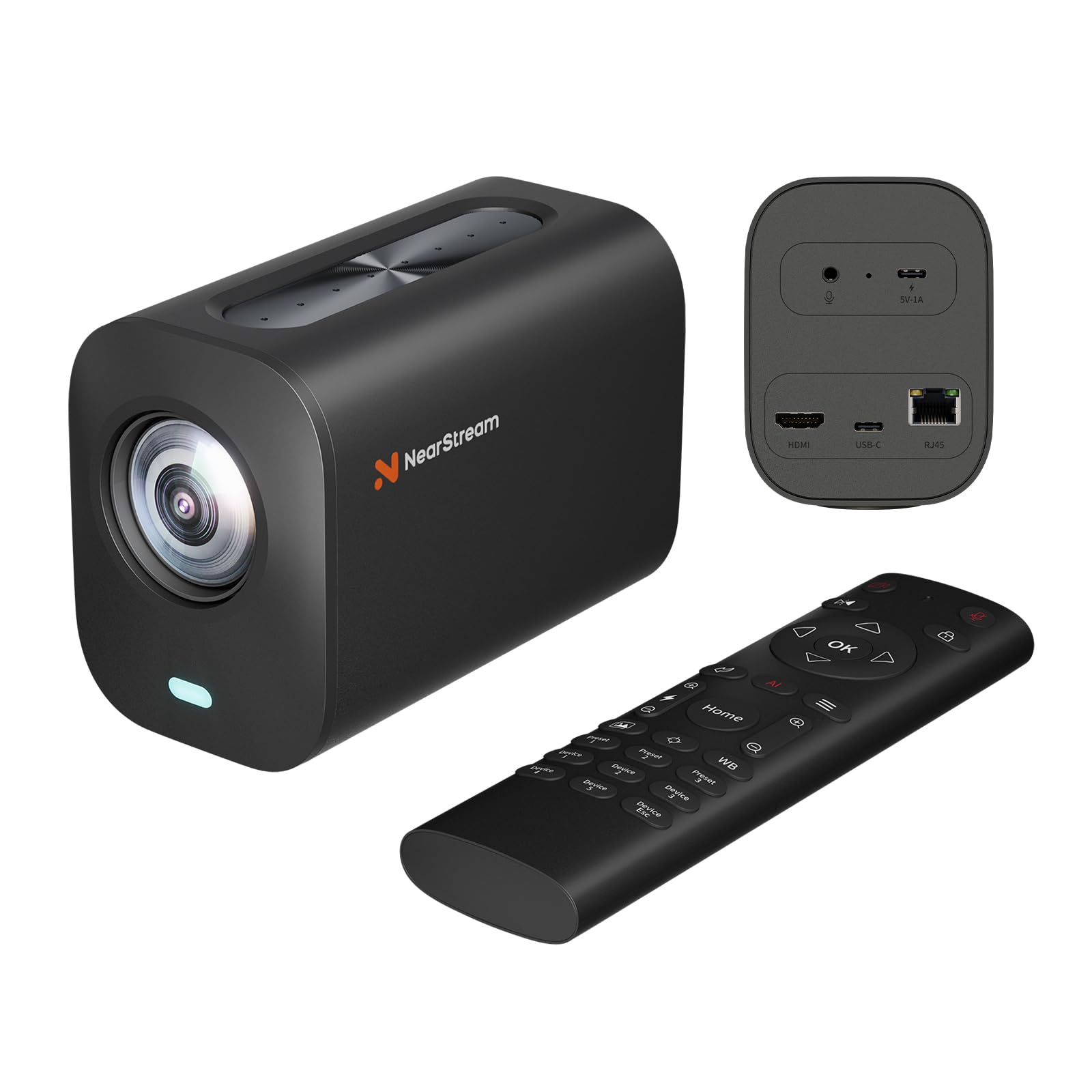
A hybrid production camera with 40x zoom and eight microphones for large rooms.
The AVerMedia VM20 is built for conference rooms, classrooms, and worship spaces where a single webcam can’t cover the whole stage. It delivers 4K at 30 FPS via USB and 1080p at 60 FPS through HDMI or Ethernet, with an 8x optical zoom plus 5x digital zoom for a total 40x hybrid zoom range — you can frame a speaker from across the room without walking up to the camera. The 8-MEMS microphone array captures 360-degree audio within a 16-foot radius and uses AI noise cancellation to isolate voices from background hum. pass on it if you stream from a desk — the VM20 is designed for large rooms, not close-up use.
It supports multi-camera setups where a single remote can control several VM20s individually, and the NearSync software enables RTSP streaming over IP without extra hardware. The catch, according to some buyers, is that settings like zoom and focus reset after the camera goes to sleep, and the macOS NearSync app has been reported as buggy with no preview and UI issues. This camera is optimized for OBS and software-based workflows, not for plug-and-play consumer use.
Key Strengths
- 40x hybrid zoom (8x optical + 5x digital) for large venues
- 8-MEMS mic array with 360-degree audio capture
- Flexible output: USB, HDMI, and RJ45 for IP streaming
Notable Drawbacks
- Settings reset after sleep, requiring reconfiguration
- Buggy NearSync software on macOS
- Bulky form factor not suited for desktop use
Ideal for: educators, worship teams, and event streamers who need a single camera with zoom and clear audio for a large room.
Pass on it if: you need a plug-and-play desk camera — this demands time to configure and troubleshoot.
7. TONGVEO 4K NDI PTZ Camera

Official NDI license and 20x optical zoom for professional broadcast integration.
The TONGVEO delivers 4K at 30 FPS through HDMI and USB, with a 20x optical zoom lens that brings distant speakers into tight close-ups without losing detail — unlike the NearStream VM20 which relies partly on digital zoom. It also includes an official NDI license, meaning plug-and-play compatibility with OBS, vMix, Streamlabs, and ProPresenter, and Power over Ethernet (PoE) so a single network cable handles both data and power. Buyers have called it “better than the more expensive Logitech camera” for sharpness and color.
The AI auto-tracking uses both facial and human body recognition, with two modes: Presenter Tracking and Auto-Framing. One note is that it tracks one person at a time and is not designed for high-speed motion. The remote control is functional but a bit clunky, and pan, tilt, and zoom cannot operate simultaneously — each movement takes turns. For multi-camera studios, you will want to add a separate joystick controller.
What It Does Well
- 20x optical zoom for high-detail shots across large spaces
- Official NDI license simplifies broadcast workflows
- PoE support via single network cable for power and data
Where It Lags
- PTZ operations cannot run simultaneously (pan, then tilt, then zoom)
- IR remote is clunky and slow
- Network streaming limited to 1080p, not 4K
Choose this for: churches, schools, and broadcast studios that need official NDI and long optical reach from a single camera.
Think twice if: you need simultaneous pan/tilt/zoom motion or prefer a more intuitive remote control.
8. Logitech Mevo Core

A wireless 4K camera with interchangeable Micro Four Thirds lenses and six hours of battery life.
The Mevo Core is a different beast — it is a proper video camera body with a Micro Four Thirds lens mount, meaning you can swap in wide-angle or telephoto lenses to match the shot. It streams wirelessly via Wi-Fi 6E up to 4K at 30 FPS directly to YouTube and Twitch, or you can use the built-in 6-hour battery (at 1080p30) for outdoor events without hunting for a power outlet. Reviewers point out using it for streaming baseball games from centerfield and praise its “good WiFi range, long battery, simple focus.”
The Mevo Multicam app lets you control multiple Mevo Core cameras from one device, cutting between angles for a professional production look. It also has a built-in three-mic array with noise cancellation and supports external audio via analog or digital inputs. The biggest catch is the price — this is a premium investment — and some users have reported difficulty with the support team when troubleshooting focus mechanism issues.
what separates it
- Interchangeable Micro Four Thirds lens system for creative flexibility
- Built-in 6-hour battery for wireless, remote streaming
- Wi-Fi 6E and multi-cam app control for cutting between angles
Considerations
- Premium price point is the highest in this lineup
- Technical support is email-only and can be slow to resolve issues
- Not ideal for a simple desk setup — it is designed for mobility
Go for this if: you need a wireless, battery-powered streaming camera with interchangeable lenses for outdoor or multi-angle production.
Pass if: you stream exclusively from a desk and don’t need the extra gear complexity or the higher budget.
Understanding the Specs
Sensor Size
The physical imaging chip inside the camera that converts light into video. A larger sensor (measured in inches) collects more light, giving you cleaner, less noisy video in dim conditions and a natural background blur (bokeh) that looks professional. Most webcams use 1/2-inch or 1/2.8-inch sensors, while premium cameras like the YOLOLIV YoloCam S3 use a 1/1.28-inch sensor. For streaming, a larger sensor matters more than raw megapixel count.
Frame Rate
Measured in FPS (frames per second), this tells you how many individual images the camera captures each second. 30 FPS is the standard for smooth 4K video, while 60 FPS gives you noticeably smoother motion that viewers perceive as more professional. Some cameras like the OBSBOT Tiny 3 Lite offer 1080p at 120 FPS, which allows for slow-motion effects. If you stream fast movement (gaming, fitness), aim for 60 FPS.
Autofocus System
This is how the camera keeps you sharp as you move. Phase Detection Autofocus (PDAF) uses dedicated pixels on the sensor to measure focus distance instantly, making it much faster and more reliable than contrast-detection, which hunts back and forth. Cameras like the YoloCam S3 and OBSBOT Tiny 3 Lite use PDAF for zero-lag focus, while others rely on standard contrast-based autofocus that can be slower and less accurate in low light.
Connectivity Options
USB-C is the standard plug-and-play connection for most streaming cameras. HDMI and SDI outputs are needed for professional setups where you want to send video to a switcher or capture card without compression. Ethernet and NDI support let you run video over your existing network, which is essential for multi-camera installations in churches or event venues. If you only stream from a desk, USB-C is fine — if you produce shows, look for HDMI and NDI.
FAQ
What sensor size do I need for good low-light streaming?
Can I use a 4K streaming camera with Zoom or Teams?
What is the difference between optical zoom and digital zoom?
Do I need a separate microphone with a 4K streaming camera?
How important is AI auto-tracking for streaming?
What computer specs do I need for a 4K streaming camera?
Can I use a streaming camera for both live streaming and video conferencing?
How does NDI help with professional streaming?
What is Phase Detection Autofocus and why does it matter?
Final Thoughts: The Verdict
For the majority of shoppers, the best camera for streaming 4k winner is the YOLOLIV YoloCam S3 because its 1/1.28-inch sensor delivers the highest image quality and deepest cinematic depth of field in a simple USB package. If you want physical auto-tracking that follows your movement, grab the Insta360 Link 2 Pro for its large sensor and reliable PTZ gimbal. And for a wireless, multi-camera production setup, the Logitech Mevo Core stands out with interchangeable lenses and a built-in battery — no USB cable needed.
How We Picked
We do not accept paid placement, and we did not hands-on test every unit. Instead, we match each pick to a real buyer and use-case by comparing the manufacturers’ published specifications against the patterns in verified customer reviews — so you get each pick’s real strengths and trade-offs instead of marketing copy.
Sources & Methodology
Specifications: manufacturer listings and product documentation. Review insights: verified customer reviews, as of July 2026. Pricing: not shown on this page (it changes often); check the current price via the retailer link.
As an Amazon Associate, Gadgets Feed earns from qualifying purchases. This does not affect which products we feature.
Product prices and availability are accurate as of the date/time indicated and are subject to change. Any price and availability information displayed on Amazon at the time of purchase will apply to the purchase of this product. As an Amazon Associate I earn from qualifying purchases.
CERTAIN CONTENT THAT APPEARS ON THIS SITE COMES FROM AMAZON. THIS CONTENT IS PROVIDED "AS IS" AND IS SUBJECT TO CHANGE OR REMOVAL AT ANY TIME.
Amazon and the Amazon logo are trademarks of Amazon.com, Inc. or its affiliates.