
A camera monitor is the one tool that separates a good frame from a missed one. Whether you’re pulling focus on a run-and-gun doc, exposing a log profile on a commercial set, or building a rig for a gimbal, the monitor’s brightness, color engine, and connection ports determine if you nail the shot or waste time guessing.
I’m Min — the co-founder and writer behind Gadgets Feed. I spend my time analyzing spec sheets, cross-referencing real user feedback, and comparing nit outputs, color gamut coverage, and latency figures across dozens of field monitors to find the ones that actually deliver in production environments.
This guide ranks the top options for outdoor visibility, professional color tools, and studio-grade color accuracy to help you find the perfect camera monitor for your specific workflow without wasting budget on overhyped features.
How To Choose The Best Camera Monitor
Choosing the right external monitor isn’t about finding the cheapest screen — it’s about matching brightness, resolution, color tools, and connectivity to your specific camera and shooting conditions. A vlogger working in shade has very different needs than a filmmaker pulling focus in direct sunlight.
Brightness (Nits) — The Make-or-Break Spec for Outdoor Shoots
Brightness is measured in nits (cd/m²). A standard laptop screen sits around 300 nits — nearly unusable outdoors on a sunny day. For field production, you need at least 1,500 nits to see your frame clearly. Premium monitors hit 2,200 to 3,000 nits, eliminating the need for a sun hood in bright conditions.
Color Tools — Waveform, Vectorscope, and 3D LUT Support
Professional monitoring tools separate a basic display from a true production monitor. Waveform and RGB parade let you read exposure levels numerically — no more guessing from a tiny luminance bar on your camera screen. Vectorscope shows color saturation and hue. 3D LUT support lets you preview a look or conversion (like Log to Rec.709) right on set, saving hours of grading time later.
Connectivity — HDMI vs. SDI and Loop-Out
HDMI is standard for mirrorless and DSLR cameras. SDI is the professional broadcast standard, offering locking connectors and longer cable runs. If you work with cinema cameras or need to feed a second monitor, loop-out ports (HDMI or SDI) pass the signal through without an extra splitter. For hybrid shooters, a monitor with both HDMI and SDI gives the most flexibility.
Quick Comparison
On smaller screens, swipe sideways to see the full table.
| Model | Category | Best For | Key Spec | Amazon |
|---|---|---|---|---|
| Osee G7 Pro | Premium | Camera control & focus tracking | 3,000 nits | Amazon |
| ASUS ProArt PA279CRV | Premium | Studio color grading & editing | 99% DCI-P3 / Adobe RGB | Amazon |
| LILLIPUT A11 | Premium | Large screen teleprompter & studio | 10.1-inch panel | Amazon |
| FEELWORLD LUT7S | Mid-Range | SDI + HDMI hybrid workflows | 2,200 nits | Amazon |
| VILTROX DC-X3 | Mid-Range | Compact rig with cage & SDI | 6-inch screen | Amazon |
| NEEWER F700 | Mid-Range | Value kit with two batteries | 2,000 nits | Amazon |
| VILTROX DC-A1 | Mid-Range | Highest brightness in class | 2,800 nits | Amazon |
| FEELWORLD LUT7 | Mid-Range | Entry-level pro field monitor | 2,200 nits | Amazon |
| ASUS BE24EQK | Budget | Desktop video conferencing | Built-in 2MP webcam | Amazon |
In‑Depth Reviews
1. Osee G7 Pro
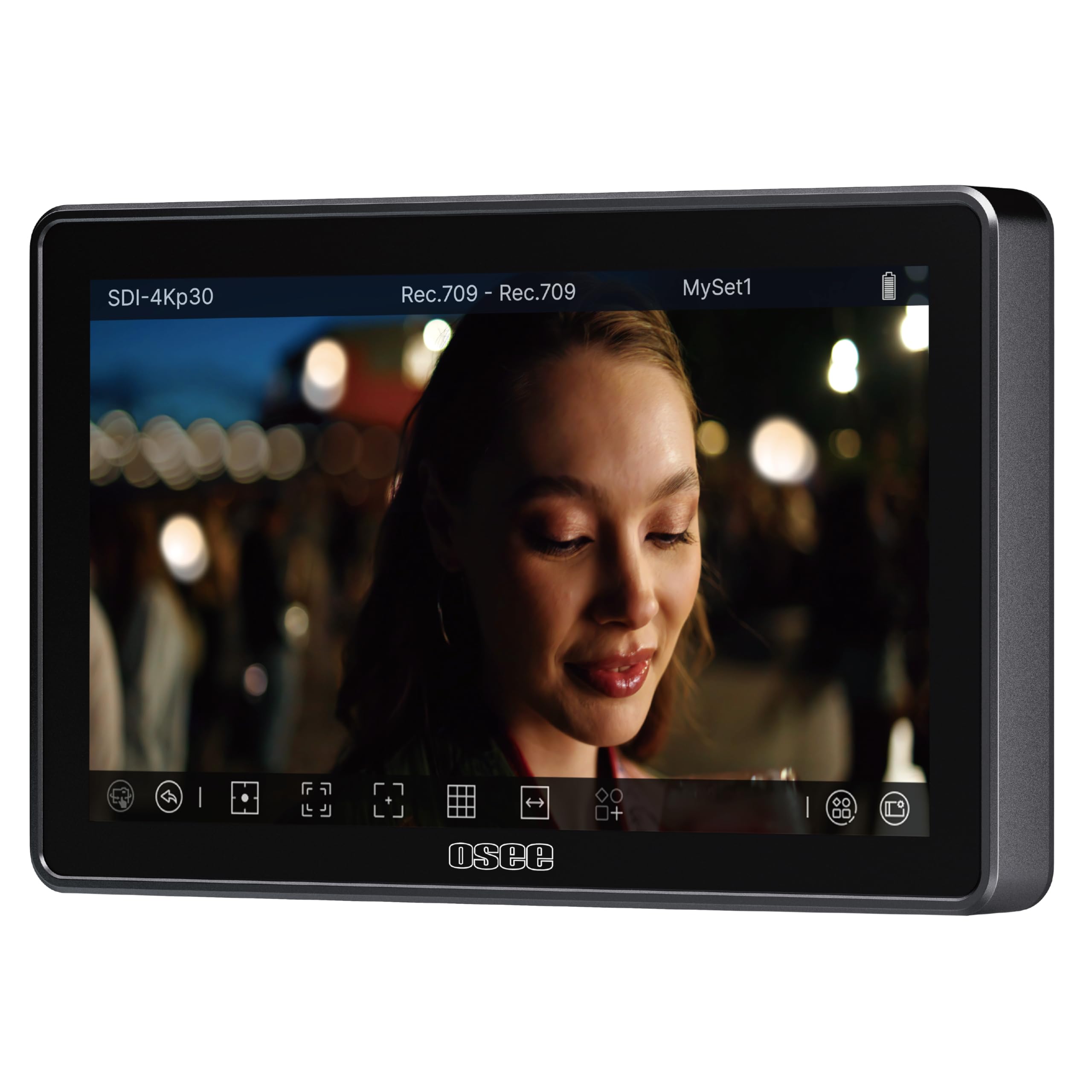
The Osee G7 Pro is the most feature-dense field monitor in this lineup. Its 3,000-nit panel uses reflection-reducing coating and a 1300:1 contrast ratio to remain fully readable under direct sun — no hood needed. The true standout is camera control via Type-C: you adjust ISO, aperture, shutter speed, and trigger record directly from the touchscreen on supported bodies like the Sony FX3, Canon R5 II, or Nikon Z9.
Touch-to-focus dynamic tracking lets you tap a subject and the monitor communicates focus commands to the camera, which is a massive workflow boost for run-and-gun or gimbal work. The monitor supports 10 custom 3D LUTs via SD card with 22-bit internal processing for 18 stops of dynamic range, and it packs 3G-SDI plus 4K HDMI loop in/out. The aluminum build feels premium, and the silent fan keeps temps in check during long takes.
A few quirks exist: the touch-only interface lacks physical buttons, and some users report a brief artifact on fast pans or a slow handshake with certain HDMI sources. Camera control is not universal — always check the supported list. Still, at this brightness and toolset level, the G7 Pro is a serious contender for pro productions.
Why it’s great
- 3000-nit brightness with anti-glare coating for full sun visibility
- Camera control and touch-to-focus tracking on supported bodies
- Aluminum frame with silent fan cooling
Good to know
- No physical buttons — full touch UI may be slow in gloves or rain
- Camera control compatibility is model-specific, not universal
2. ASUS ProArt Display PA279CRV

The ASUS ProArt PA279CRV is not a field monitor — it’s a 27-inch studio reference display built for color-critical work. The 4K UHD (3840 x 2160) IPS panel covers 99% DCI-P3 and 99% Adobe RGB, and it ships factory-calibrated to a Delta E of less than 2. Calman Verification confirms the accuracy, so what you see on this screen matches your final output on a grade.
Connectivity is impressive for a studio monitor: USB-C with 96-watt Power Delivery charges a laptop while passing video, plus DisplayPort in/out for daisy-chaining, and two HDMI ports. The ergonomic stand offers tilt, swivel, pivot, and height adjustment. The 3000:1 contrast ratio and anti-glare matte finish reduce reflections during long editing sessions.
This is not a monitor you take on location — it’s a desktop tool for post-production color grading, photo editing, and client reviews. The 60Hz refresh rate is fine for video review but not for gaming. Some users note minor light bleed on black frames, though uniformity averages a Delta E of 0.4. For a studio-bound camera monitor that prioritizes color science, the PA279CRV is a reference-grade choice.
Why it’s great
- Factory-calibrated Delta E < 2 with 99% DCI-P3 coverage
- USB-C with 96W PD for laptop charging and video
- Full ergonomic stand with VESA compatibility
Good to know
- 60Hz refresh — not suitable for high-frame-rate gaming
- Desk-bound only, not designed for field production
3. LILLIPUT A11

The LILLIPUT A11 stands out for its size — a 10.1-inch LCD that delivers 1920×1200 native resolution. That extra real estate makes it ideal as a director’s monitor, a teleprompter display, or for tripod-based monitoring where a 7-inch screen feels cramped. The full lamination tech reduces internal reflection, and the 175-degree wide viewing angle keeps the image consistent for a small crew.
The A11 accepts 4K 30Hz via HDMI 1.4b and 3G-SDI up to 1080p60, with loop-out on both. A universal VGA port adds legacy compatibility for older setups. The body uses glass-on-glass construction for a smoother feel, and mounting options include standard 1/4-inch screw holes, VESA 75mm, and gimbal brackets. An assignable image flip button is especially handy for teleprompter use.
Brightness is 320 nits — fine for controlled indoor lighting but not enough for outdoor field work without the included sun shade. The feature set is basic compared to dedicated field monitors: no waveform, no vectorscope, no 3D LUT upload. It’s a straightforward, large display for specific studio or teleprompter roles, not a full production monitoring tool.
Why it’s great
- 10.1-inch screen with full lamination and wide viewing angles
- HDMI and SDI loop-out plus VGA input
- Image flip button for teleprompter setups
Good to know
- 320 nits — not bright enough for outdoor use without a hood
- Missing advanced pro tools like waveform and vectorscope
4. FEELWORLD LUT7S

The FEELWORLD LUT7S delivers hybrid connectivity at a price point that makes SDI accessible for budget-conscious shooters. The 7-inch, 1920×1200 touchscreen hits 2,200 nits with an ambient light sensor that auto-adjusts brightness for outdoor and indoor conditions — a thoughtful touch for run-and-gun workflows where you move between sun and shade quickly.
Professional tools are all here: waveform, RGB parade, vectorscope, histogram, focus peaking, zebra, false color, and 3D LUT loading via USB. The SDI output supports custom LUT image output, so you can pipe a graded signal to a second display. The 8.4V DC output powers your camera, reducing battery swaps on the gimbal. A 360-degree tilt arm makes mounting flexible.
Package caveat: the LUT7S ships without a battery or power adapter — you need to buy a battery-included bundle separately or source your own NP-F. The glossy screen finish can catch reflections, though the high brightness compensates. Some users report the plastic build feels less rugged than premium alternatives, but for the feature set at this price, it’s a solid workhorse.
Why it’s great
- 2200-nit auto-adjusting brightness for sun/shade transitions
- HDMI and 3G-SDI with LUT output on SDI
- 8.4V DC output powers the camera
Good to know
- Battery and adapter sold separately — check bundle options
- Plastic chassis feels less durable than metal competitors
5. VILTROX DC-X3
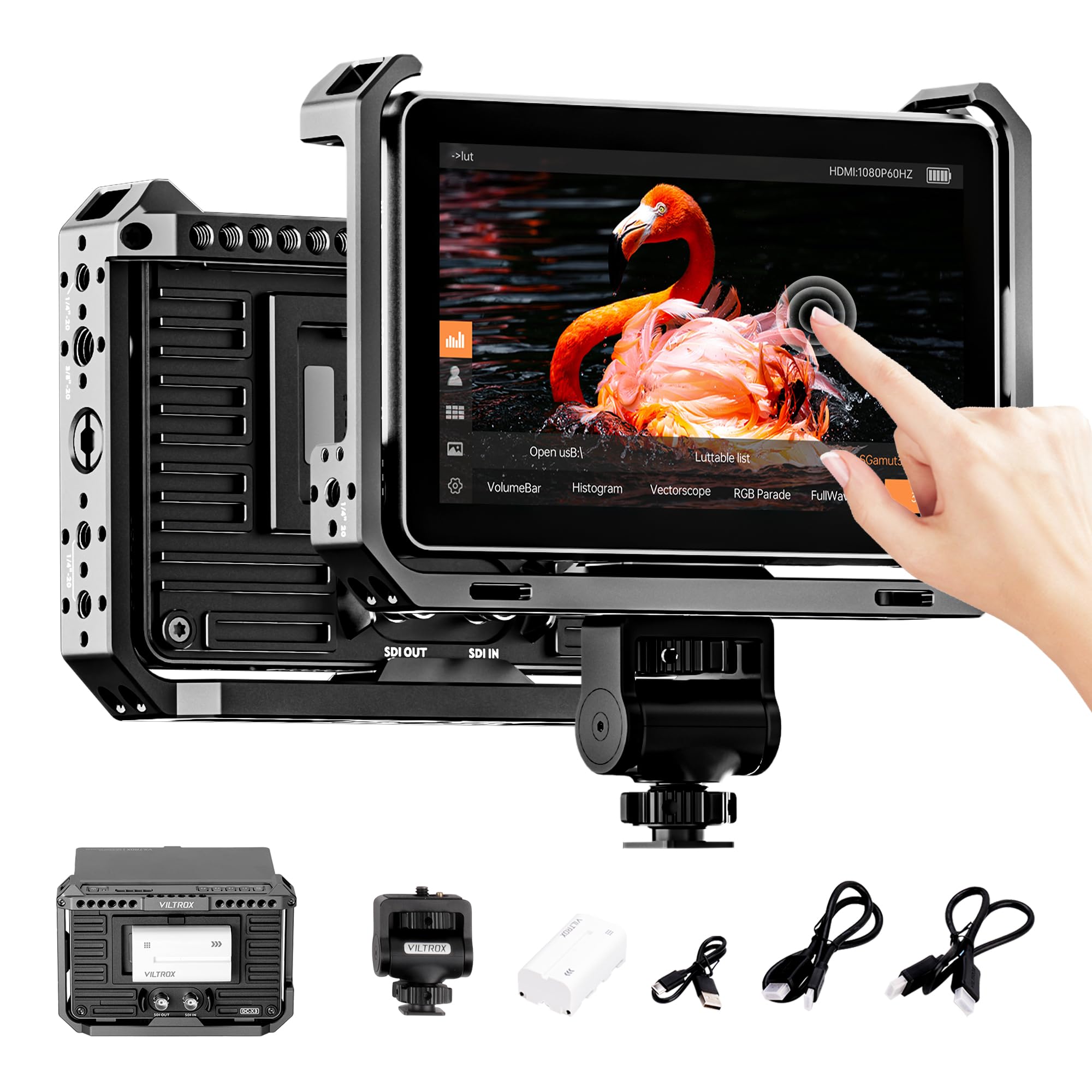
The VILTROX DC-X3 is a 6-inch monitor designed for compact rigs where every inch of space matters. At 2,000 nits, it stays visible outdoors, and the IPS touchscreen handles 1920×1080 at 60Hz for smooth live view. The 160-degree viewing angles keep the image clear even when the monitor is off-axis on a stabilizer.
What sets the DC-X3 apart is the included rig cage and sunshade hood straight out of the box. The cage protects the monitor on tight gimbal mounts, and the ultra-quiet cooling fan adjusts speed based on an internal temperature sensor. Connectivity covers both 4K HDMI (up to 4K 30Hz) and 3G-SDI (up to 1080p60) with loop in/out on both, plus a 3.5mm headphone jack for audio monitoring.
The monitor ships with one NP-F550 battery and a hard-shell carry case. Pro monitoring tools include waveform, RGB parade, vectorscope, false color, and image flip. The UI is responsive and customizable with four shortcut keys. The main trade-off is the 6-inch size — it’s smaller than the 7-inch standard, so if you prioritize screen real estate, a larger panel may suit you better.
Why it’s great
- Kit includes rig cage, sunshade hood, and hard case
- HDMI and SDI loop in/out for hybrid workflows
- Ultra-quiet auto fan prevents overheating on long takes
Good to know
- 6-inch screen is smaller than the standard 7-inch class
- SDI limited to 1080p60, not 4K
6. NEEWER F700

The NEEWER F700 is a 7-inch field monitor that prioritizes long runtime: it ships with two NP-F750 batteries (4,400mAh each) for a combined 4.8 hours of operation. The 2,000-nit IPS touchscreen includes auto backlight adjustment (1-100 scale), so it dims in dark environments and pushes full brightness for outdoor work. The 1000:1 contrast ratio and 160-degree viewing angle deliver consistent image quality.
For monitoring tools, the F700 offers waveform, vectorscope, histogram, false color, zebra, peaking, and HDR support. You can upload up to 60 custom 3D LUTs via SD card. The 4K HDMI loop in/out supports up to 3840×2160 at 30Hz, and a 3.5mm headphone jack enables audio monitoring. The built-in cooling fan keeps the panel from overheating during extended use.
The monitor is heavy with both batteries installed — 857 grams — which is noticeable on a gimbal. The included micro HDMI cable has been reported as fragile by some users; upgrading to a 90-degree cable is a smart first purchase. For a value-focused kit that keeps you running through a full shoot day, the F700 is a strong contender.
Why it’s great
- Two NP-F750 batteries included for nearly 5 hours runtime
- Auto backlight adjustment adapts to environment
- Supports up to 60 custom 3D LUTs via SD card
Good to know
- Heavy at 857g with both batteries mounted
- Included micro HDMI cable is prone to early failure
7. VILTROX DC-A1
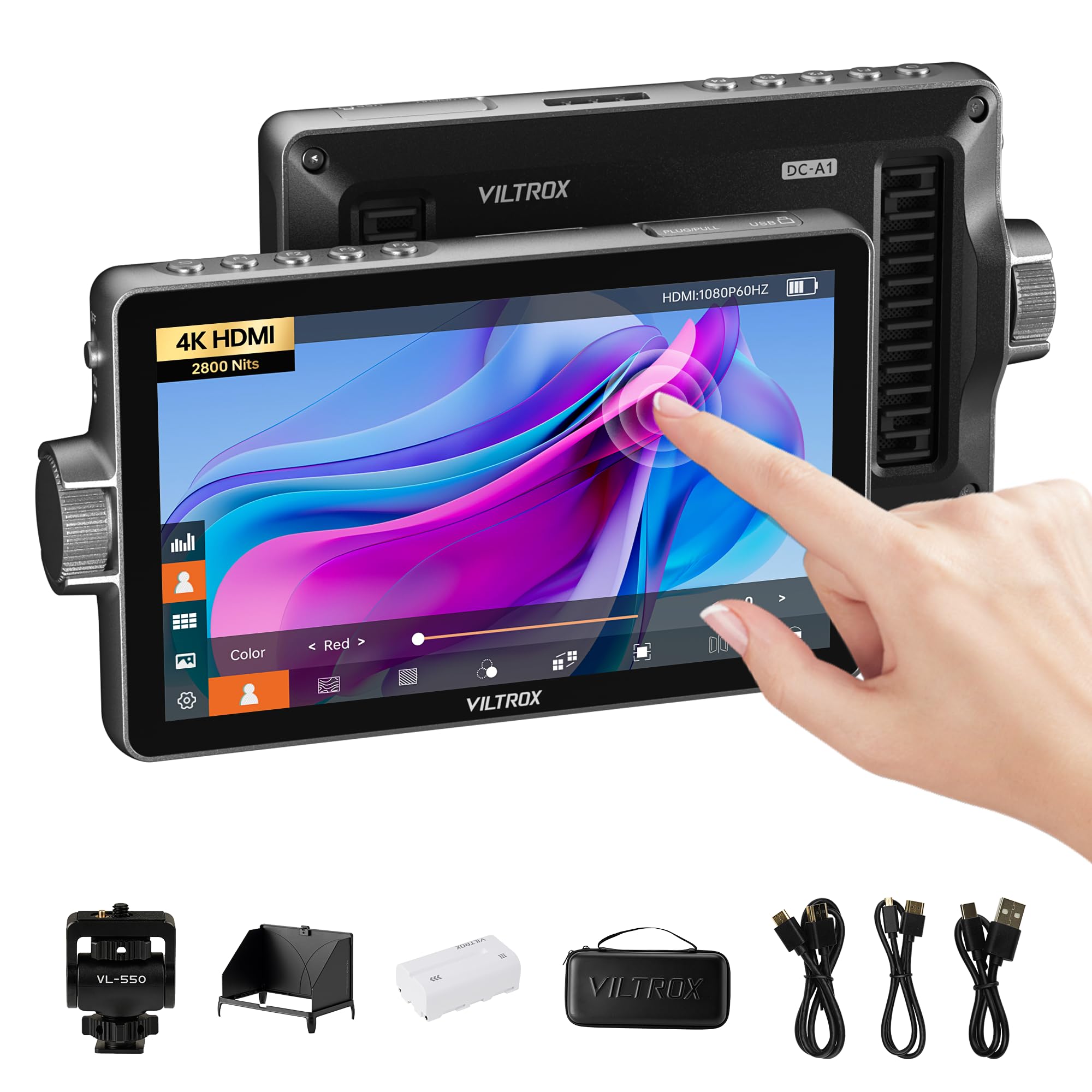
The VILTROX DC-A1 packs 2,800 nits into its 7-inch IPS touchscreen — the highest brightness in the mid-range category. That level of luminance makes the image punchy and readable even in harsh midday sun without a hood. The 1920×1080 resolution at 60Hz, combined with a 1000:1 contrast ratio and sRGB/Rec.709 color calibration, delivers a clean, accurate image for exposure and focus decisions.
Professional tools include waveform (Parade and RGB/YUV/Y), vectorscope, histogram, false color, focus peaking, image flip, and audio bar. You can import custom 3D LUTs via USB-A for Log monitoring. The HDMI 2.0 ports support loop in/out at 4K 60Hz. Power options are flexible: NP-F series battery (one NP-F550 included), DC 10-18V input, or Type-C at 9V/3A.
The DC-A1 comes with a quick-release sunshade hood and an intelligent cooling fan. The touch UI is intuitive, and four customizable shortcut keys (F1-F4) let you switch tools without diving into menus. Build quality is decent for the price, though some users note the plastic body lacks the premium feel of higher-end monitors. For on-the-go shooters who absolutely need sun visibility, this is a top contender.
Why it’s great
- 2800-nit brightness eliminates need for a sun hood outdoors
- 4K HDMI 2.0 loop in/out at 60Hz
- Flexible power via NP-F, DC, or Type-C
Good to know
- No SDI input — HDMI only
- Plastic chassis feels less rugged than metal frames
8. FEELWORLD LUT7

The FEELWORLD LUT7 is the monitor that opened the door to affordable pro-level field monitoring. The 7-inch 1920×1200 IPS touchscreen pushes 2,200 nits with an ambient light sensor for automatic brightness adjustment. That’s enough to shoot outdoors without a hood, and the 160-degree viewing angle keeps the image consistent when the monitor is rigged off-axis.
The LUT7 packs essential professional tools: waveform, vectorscope, RGB histogram, focus peaking, false color, zebra, and 3D LUT upload for Log preview. The 8.4V DC output can power your camera, which is a huge plus for gimbal rigs where every cable swap matters. The complete kit includes a battery (F750), a bag, a tilt arm, and HDMI cables — ready to shoot out of the box.
Build quality is where the entry price shows: the plastic construction feels light and can flex under pressure. Some users have reported the power button failing after a few months. The monitor is also slightly large for compact gimbal mounting. If you want a bright, functional monitor to learn on without a big investment, the LUT7 works — just handle it with care.
Why it’s great
- 2200-nit panel with auto brightness for outdoor use
- 8.4V DC output powers camera directly
- Complete kit includes battery, bag, and cables
Good to know
- Plastic build has reported durability issues over time
- Larger footprint makes gimbal mounting tight
9. ASUS BE24EQK

The ASUS BE24EQK is a 24-inch Full HD IPS desktop monitor with an integrated 2MP adjustable webcam, mic array, and stereo speakers — purpose-built for video conferencing and remote work. It is not a field monitor, but it fills a specific niche for creators who need a reliable display with a built-in camera for client calls or remote direction.
The frameless IPS panel delivers 300 nits of brightness and 178-degree viewing angles, with TÜV Rheinland-certified flicker-free and low blue light technology for all-day comfort. The webcam uses beamforming and echo cancellation to filter out keyboard clicks and ambient noise, making voice pickup clearer than typical laptop mics. Connectivity includes DisplayPort, HDMI, and a USB hub.
This monitor is best viewed as a desktop companion for a camera monitor workflow — not a production tool. The built-in speakers are tinny, and some users report screen flickering or webcam USB recognition issues after several months. If you need a simple, all-in-one video conferencing display with eye care, the BE24EQK works. If your priority is field monitoring or color-critical work, look elsewhere in this guide.
Why it’s great
- Built-in 2MP webcam with echo cancellation for clear calls
- TÜV-certified flicker-free and low blue light
- Frameless IPS panel with wide 178-degree viewing angles
Good to know
- Built-in speakers are weak and tinny
- Long-term reliability concerns with webcam and flickering
FAQ
How many nits do I need for an outdoor camera monitor?
Can I use a camera monitor for color grading?
What is the advantage of SDI over HDMI in a camera monitor?
Final Thoughts: The Verdict
For most users, the camera monitor winner is the Osee G7 Pro because it combines 3,000-nit brightness, camera control via Type-C, touch-to-focus tracking, and both HDMI and SDI connectivity in a durable aluminum body. If you want professional color tools for a studio editing setup, grab the ASUS ProArt PA279CRV. And for a budget-friendly value kit that keeps you powered through a full shoot day, nothing beats the NEEWER F700.